











How much does small business CRM software cost?
Small business CRM software commonly costs about £10-£30 per user per month on standard annual plans, making it an accessible operational upgrade for modest budgets. Entry-level tiers typically start between £10 and £15 per user monthly, delivering core contact management, visual pipeline boards, and mobile access for teams of two to ten representatives.
Mid-tier subscriptions priced from £20 to £30 per seat unlock automated email sequences, custom pipeline reports, and integrated document quoting. Month-to-month billing is widely offered across small business platforms, though choosing annual billing contracts typically reduces licensing overhead by 15–20% across the whole operating year.
Small companies should be mindful of contact tier limits and add-on pricing for advanced features like dedicated calling numbers or marketing automations, which can gradually increase monthly software expenditures as your prospect database grows.
Are free plans sufficient for small business sales needs?
Free CRM plans are sufficient only for solo entrepreneurs and micro-businesses with basic contact storage requirements, but they quickly become operational bottlenecks as sales activity accelerates. Zero-cost tiers provide essential contact cards and simple deal boards, yet they universally exclude multi-step workflow automation, advanced email tracking, and integrated phone dialers.
HubSpot provides a generous free tier supporting unlimited users and up to one million contacts, but it strictly limits users to one automated email per contact and restricts custom properties. Zoho CRM offers a free three-user tier with basic lead management but restricts automated workflow rules. In contrast, low-cost commercial plans from Capsule and Pipedrive starting at 14 $ to 18 $ per user monthly unlock automated activity reminders and email synchronization that prevent deals from stalling.
Small business owners should view free plans as temporary evaluation environments rather than permanent operating systems. Upgrading to an entry-level paid plan is typically justified as soon as a company employs more than two sales representatives or requires automated follow-up sequences to manage lead volume reliably.
Core pipeline and contact features that matter most for small teams include the following:
- Visual kanban pipeline management: Intuitive drag-and-drop opportunity boards that display active deals across customizable sales milestones. Visual pipeline columns give small business owners immediate clarity over total pipeline value, stage bottlenecks, and expected closing dates.
- Unified customer and communication timeline: Consolidated contact ledgers that chronologically display all emails, meeting notes, phone call logs, and proposals in a single scrolling feed. Having centralized history ensures any team member can step in and assist a customer with full context.
- Automated two-way email and calendar sync: Seamless integration with Gmail and Outlook that automatically logs client conversations without requiring cumbersome BCC forwarding. Calendar synchronization captures scheduled appointments and prevents overlapping commitments across small staff.
- Lightweight follow-up task automation: Pre-configured reminders and automated follow-up tasks triggered by deal stage changes or customer inactivity. Automated task cues ensure small teams maintain consistent customer communication without letting quotes slip through the cracks.
- Customizable contact fields and tagging: Flexible custom data properties that allow business owners to track industry-specific customer attributes, lead sources, and purchasing preferences. Dynamic tags enable targeted list segmentation for email broadcasts and promotional offers.
- Integrated quote generation and basic invoicing: Native document tools that assemble professional price quotes using saved product catalogs and customer contact details. Connecting quotes to Stripe or PayPal enables immediate payment collection upon client signature.
- Native mobile application access: Fully featured iOS and Android apps that allow owners and mobile technicians to look up customer addresses, review quotes, and log call notes on the go. Mobile access keeps small sales teams productive while traveling or working on job sites.
What email and calendar integrations do small business CRMs require?
Small business CRMs require robust, bidirectional synchronization with Google Workspace and Microsoft 365 to centralize client correspondence and appointment schedules without manual data entry. Automatic email logging ensures that every proposal, reply, and calendar invite is linked to the relevant contact record, giving the entire team full context before customer calls.
Copper CRM offers industry-leading Google Workspace integration, operating directly inside Gmail and Google Calendar as a native Chrome sidebar displaying deal values and task lists without switching browser tabs. Pipedrive and Freshsales support two-way sync for both Gmail and Outlook, tracking email opens and embedding direct calendar booking links into sales messages. Entry-level tools lacking native sync force users to rely on cumbersome BCC dropbox addresses that reps frequently forget.
Seamless calendar integration eliminates scheduling friction by allowing prospects to book discovery calls directly from available slots on a rep's calendar. Automating inbox logging saves small teams dozens of administrative hours each month and guarantees that client histories remain secure inside the company when staff depart.
What should you check before choosing a small business CRM?
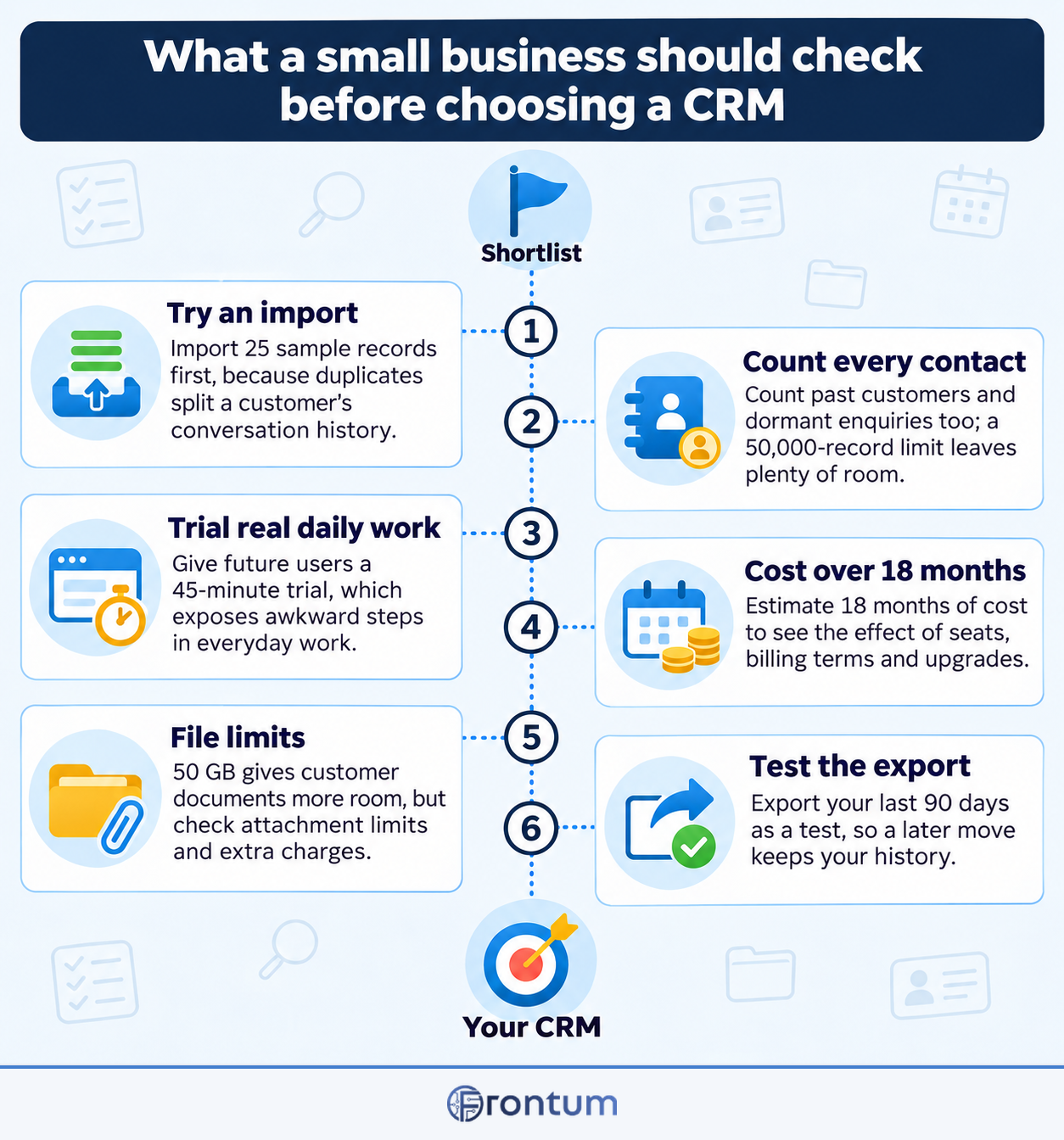
Before choosing a small business CRM, business owners should check the following considerations:
- Setup simplicity and learning curve: The chosen platform must allow non-technical team members to customize deal stages and import contact databases within hours rather than weeks. Solutions requiring dedicated certified consultants or lengthy implementation cycles often stall progress across smaller teams with limited operational resources. A clean, intuitive layout ensures staff members start logging interactions immediately without formal training sessions.
- Email and calendar synchronization: Two-way background synchronization with Google Workspace or Microsoft 365 ensures incoming and outgoing communications log automatically without manual copy-pasting. Representatives should be able to view past email exchanges, schedule upcoming meetings, and set task reminders directly from their primary inbox interface. Inconsistent email syncing creates blind spots that lead to overlapping or missed customer interactions.
- Transparent per-seat pricing: Subscription plans should offer straightforward monthly or annual pricing without hidden platform maintenance fees or compulsory multi-year contracts. Smaller firms need the flexibility to add or remove user seats as sales staffing demands shift throughout seasonal business cycles. Verifying whether essential automation features require higher subscription tiers prevents unexpected budget overruns.
- Contact database and storage limits: Tiered contact thresholds can trigger unexpected subscription upgrades when customer databases expand past initial allocations. Platforms offering generous record ceilings between 5,000 and 10,000 contacts provide comfortable room for organic marketing and pipeline expansion. Reviewing overage penalties in advance protects growing businesses from sudden billing spikes.
- Integrated quote and proposal tools: Native generation of professional PDF proposals and price quotes from active deal records accelerates transaction turnaround times. Built-in electronic signature capture eliminates the necessity of purchasing separate third-party signing subscriptions for small teams. This unified approach prevents pricing discrepancies between sales negotiations and final customer contracts.
- Mobile application functionality: Dedicated iOS and Android mobile apps with full offline viewing allow field representatives and mobile business owners to access account notes on the road. Field personnel need the capability to quickly review past meeting minutes, dictate voice notes, and update deal statuses immediately after on-site client visits. Slow or desktop-dependent mobile interfaces compromise response times when communicating with urgent leads.
- Customer support responsiveness: Accessible support channels including live chat, email ticketing, and detailed video documentation help resolve technical hurdles without stalling daily business. Smaller companies without internal IT administrators rely heavily on vendor support for troubleshooting integration conflicts and workflow hiccups. Evaluating community forums and verified support response times ensures reliable assistance when workflow snags arise.