











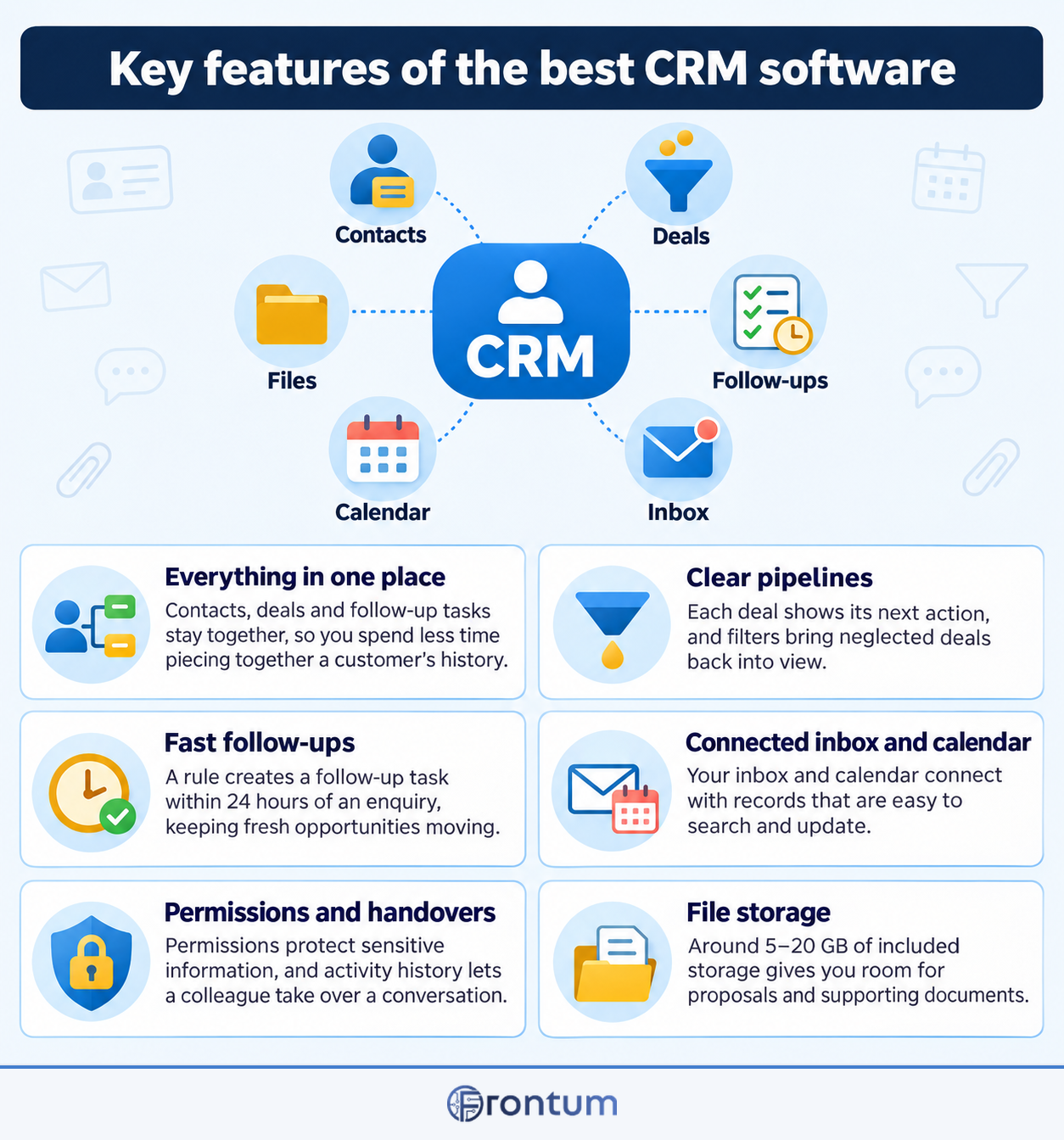
Core CRM pipelines organize prospective deals into sequential visual stages that reflect your organization's real sales cycle from initial contact to won revenue. Each deal card displays deal value, primary contact details, expected close date, and the next required action, allowing sales representatives to manage dozens of active opportunities simultaneously.
Contact management extends beyond a static digital address book by automatically aggregating chronological timelines of emails, meeting notes, phone call recordings, and document views for every associated individual. Robust database architectures connect individual contacts to parent company accounts, preserving visibility into multi-stakeholder organizational structures and complex corporate hierarchies.
Custom fields and custom objects allow businesses to track unique industry parameters, such as contract renewal dates, technical specifications, or subscription tier details. Automated stage gating can enforce required data entry before a deal moves forward, preventing pipeline stagnation and ensuring consistent data cleanliness across the entire sales floor.

Which lead tracking and deal stages matter most?
The most important lead tracking and deal stages are as follows:
- Lead qualification: Initial vetting of prospect budget, authority, need, and project timeline to filter viable commercial prospects from unqualified inquiries. Representatives verify company size, use cases, and budget readiness before advancing records into active pipeline tracking.
- Discovery and needs assessment: In-depth exploration of client business challenges, operational pain points, and current technical architecture. Sales representatives document organizational requirements and establish quantifiable business goals to prepare tailored demonstration scenarios.
- Tailored solution demonstration: Comprehensive product presentation customized to the prospect's validated workflow requirements and technical criteria. Account executives demonstrate specific platform capabilities, address functional objections, and confirm feature alignment with key departmental stakeholders.
- Stakeholder consensus and solution design: Alignment across executive sponsors, technical evaluators, legal advisors, and end-user team leads. Representatives coordinate security reviews, address architecture inquiries, and establish organizational buy-in across the complete buying committee.
- Proposal submission and quotation: Formal delivery of commercial pricing tiers, software licensing terms, implementation scopes, and service level commitments. Deal records link directly to CPQ proposals with transparent pricing breakdowns and validity expiration dates.
- Contract negotiation and legal review: Collaborative finalization of master service agreements, data processing addenda, payment milestones, and enterprise terms. Sales operations teams track legal markups, redlines, and executive signature approvals in real time.
- Closed won and onboarding transition: Successful contract execution triggering automated record handoffs to customer success and billing departments. Automated notifications alert implementation engineers, initiate onboarding project templates, and generate initial billing schedules.
Essential sales automation and email tracking tools include the following:
- Multi-step automated email sequences: Drip campaigns that send personalized follow-up emails according to pre-defined intervals and prospect interaction triggers. Sequences automatically halt whenever a recipient replies or books a meeting, allowing sales reps to manage high outreach volume without sending tone-deaf messages.
- Real-time email engagement tracking: Instant notifications indicating when prospects open emails, click embedded proposal links, or download file attachments. Representatives leverage real-time engagement alerts to time follow-up phone calls precisely when buyer interest is highest.
- Automated lead scoring and prioritization: Algorithmic calculation of prospect engagement across web page visits, email opens, and form submissions. Systems dynamically update lead quality scores to direct sales team attention toward high-intent prospects most likely to convert.
- Intelligent round-robin lead assignment: Automated distribution rules that route inbound leads to sales representatives based on territory, deal size, or language skills. Immediate lead routing ensures prospective buyers receive contact within minutes of submitting digital inquiries.
- Automated activity and task reminders: System-generated prompts that remind account executives to follow up on pending proposals, overdue contracts, or stalled negotiations. Automated task creation eliminates human oversight and ensures deals maintain steady pipeline momentum.
- Meeting scheduling and calendar links: Self-service booking links embedded in email signatures and outreach cadences that synchronize with representative calendars. Prospects select convenient meeting times directly, eliminating back-and-forth scheduling emails while automatically creating CRM deal records.
- Stalled deal and pipeline rotting alerts: Visual warning indicators and manager notifications triggered when opportunities linger in a pipeline stage beyond designated duration limits. Alerting leadership to inactive deals enables timely coaching interventions before valuable opportunities go cold.
How much do the best CRM software cost?
The best CRM software commonly cost about £15-£130 per user per month for standard commercial subscriptions, while comprehensive enterprise packages can reach £220-£340 per seat monthly. Free entry-level tiers provide basic contact tracking for up to 3–5 users, though growing teams quickly outgrow their restrictive limits on workflow automations, custom reporting, and marketing contacts.
Midrange plans priced between £20 and £60 per seat represent the operational sweet spot for expanding businesses, typically unlocking automated sales sequences, multiple pipeline views, predictive lead scoring, and native VoIP dialers. Annual billing commitments routinely offer 15–25% discounts compared to month-to-month invoicing, making annual contracts the standard procurement choice for stable teams.
High-end enterprise tiers demand substantial investments not only in monthly licensing fees but also in mandatory third-party implementation services, data migration consulting, and administrator certifications that can add £4,300-£25,800 to initial deployment budgets.
Hidden costs in CRM platforms primarily stem from escalating contact storage tiers, mandatory onboarding packages, and add-on fees for basic automation. While entry-level tiers appear inexpensive, platforms frequently penalize growing businesses as marketing databases expand or when custom reporting and workflow triggers are gated behind enterprise tiers.
HubSpot exemplifies contact tier escalation, where crossing 1,000 marketing contacts triggers monthly surcharges that quickly double a startup's software bill, alongside mandatory 3,000 $ onboarding fees on Professional plans. In contrast, Pipedrive charges strictly per user seat with zero contact storage penalties, making budgeting predictable. Salesforce requires expensive add-ons for telephony and Einstein artificial intelligence, often adding 50 $ to 75 $ per seat monthly on top of core licensing.
To avoid budget overruns, sales operations leaders must audit database size, purge inactive subscriber records annually, and calculate the three-year total cost of ownership. Choosing platforms with all-inclusive tier structures like Zoho CRM or pricing per seat without contact caps prevents sudden billing shocks as marketing lists grow.
Which integrations and API capabilities are essential for CRM software?
Essential CRM software integrations and API capabilities include the following:
- Native email and calendar synchronization: Bi-directional integration with Google Workspace and Microsoft 365 through native OAuth APIs captures incoming and outgoing client correspondence without manual BCC logging. Automated two-way calendar sync links client discovery meetings, schedules follow-ups, and prevents double-booking across sales representative schedules.
- Accounting and billing gateways: Direct connections to platforms like QuickBooks Online, Xero, and Stripe Billing allow sales teams to review customer payment histories and outstanding receivables directly on contact cards. Automated invoice triggers generate draft billing documents immediately upon a deal advancing to closed-won, eliminating duplicate financial data entry.
- Marketing automation and campaign connectors: Seamless data pipelines between the CRM and platforms like Mailchimp, ActiveCampaign, or Brevo keep lead databases synchronized and track campaign engagement. Marketing activity like link clicks and webinar registrations sync back to the CRM to adjust lead scores and trigger automated sales follow-up tasks.
- Cloud telephony, VoIP, and call recording: Computer telephony integration with providers like Aircall, RingCentral, or Twilio embeds click-to-dial functionality and automated call logging directly into the CRM interface. Inbound caller identification displays customer account histories before reps answer, while audio recordings and AI call summaries are attached directly to contact timelines.
- Document generation and digital e-signatures: Integration with tools such as PandaDoc, DocuSign, or native quote generators enables representatives to create customized proposals, service contracts, and NDAs using CRM merge tags. Tracking features alert sales reps when clients open documents, view pricing tables, or execute binding digital signatures.
- Customer service and help desk ticketing: Two-way synchronization with support platforms like Zendesk, Freshdesk, or Intercom displays open customer tickets and satisfaction ratings alongside sales records. Having support visibility prevents representatives from initiating tone-deaf upsell campaigns while an account is experiencing critical unresolved technical issues.
- REST APIs, webhooks, and iPaaS connectors: Robust REST or GraphQL endpoints with generous daily call allowances allow engineering teams to build custom data flows between the CRM and proprietary internal databases. Real-time webhooks notify external systems of pipeline stage updates, while native connectors for Zapier and Make facilitate rapid no-code multi-app automation.
What security certifications, data residency, and permissions do enterprises need?
Enterprise CRM security standards and permission controls include the following:
- Independent SOC 2 Type II and ISO 27001 certifications: Third-party auditor reports confirming that vendor infrastructure satisfies rigorous standards for data availability, confidentiality, and operational integrity. Annual compliance renewals verify continuous security monitoring and proactive vulnerability patching.
- Sovereign data residency and localization: Guaranteed data hosting within designated legal jurisdictions such as AWS Frankfurt or OVHcloud Paris to ensure full compliance with GDPR and regional privacy statutes. Localized hosting shields corporate records from foreign legal jurisdictions and extraterritorial data retrieval requests.
- Granular role-based access control and field-level permissions: Administrative security policies that restrict record viewing, editing, and exporting capabilities based on employee role, department, or geographic territory. Field-level masking conceals sensitive commercial terms, margins, or credit card numbers from unauthorized personnel.
- Single Sign-On and multi-factor authentication: Centralized identity federation supporting SAML 2.0 and OpenID Connect with identity providers such as Okta, Azure Active Directory, or Google Workspace. Mandatory multi-factor authentication prevents account takeover resulting from compromised representative credentials.
- Immutable audit logging and change history tracking: Comprehensive digital audit trails that record every user login, record creation, field modification, and bulk data export with timestamps and IP addresses. Security teams inspect audit logs to monitor data governance compliance and investigate unauthorized data access.
- Comprehensive encryption at rest and in transit: Cryptographic protection utilizing AES-256 for stored database tables and backups alongside TLS 1.3 encryption for all network data transfers. Enterprise key management options allow corporate security teams to maintain dedicated encryption keys.
- Automated Data Processing Agreements and deletion protocols: Legally enforceable contractual terms outlining data controller and processor obligations under Article 28 GDPR. Automated workflows execute customer data deletion requests and data portability exports within statutory deadlines.
How does mobile and offline CRM access impact sales productivity?
Mobile and offline CRM access directly impacts sales productivity by enabling field representatives to log client interactions, retrieve deal histories, and update pipeline stages immediately after on-site meetings. Prompt mobile data entry prevents crucial conversation details from being forgotten and ensures pipeline forecasts reflect real-time field activity.
Pipedrive and Freshsales provide intuitive native mobile applications featuring geolocation client mapping, one-tap call logging, and background audio transcription that converts spoken notes into structured CRM records. Zoho CRM includes an offline mobile mode that stores deal edits locally and synchronizes automatically once connectivity is restored. Conversely, Salesforce Field Service delivers deep offline scheduling but requires complex administrative configuration.
Deploying a mobile-first CRM reduces administrative drag by four to six hours per sales representative each week. When field teams can scan business cards directly into contact records and generate quotes from mobile tablets, deal velocity increases and sales leadership gains transparent visibility into regional performance.
Before choosing a CRM software platform, prospective buyers should evaluate the following factors:
- Sales process alignment: Pipeline visualization and custom deal stage configuration must mirror your team's real-world customer journey rather than forcing reps into generic workflows. Systems supporting multiple concurrent pipelines allow revenue teams to separate new outbound deals from renewals and partner channels. Without this flexibility, representatives often bypass the platform in favor of private spreadsheets.
- User adoption and interface simplicity: Daily interface ergonomics directly determine long-term data integrity and team adherence. Platforms requiring more than three clicks to record a client phone call or meeting note create persistent administrative drag across the sales floor. Clean navigation layouts and lightweight browser extensions minimize friction during high-volume outreach periods.
- Integration ecosystem depth: Native bi-directional connectors for your business email client, calendar suite, accounting software, and telephony systems prevent costly data silos. Third-party automation platforms like Zapier can bridge minor functional gaps, but high-volume operations require resilient direct webhooks and published REST APIs. Evaluating API rate limits in advance prevents unexpected data synchronization failures during critical quarterly reporting periods.
- Workflow automation capabilities: Rule-based triggers, automatic task delegation, and personalized multi-step email cadences eliminate repetitive manual follow-up chores. Configurable condition trees should handle deal reassignment, inactivity alerts, and automated customer status progression without custom code. Teams establishing automated sequences save an estimated four to six hours per representative each week.
- Reporting and forecasting analytics: Customizable executive dashboards, rep activity scorecards, and weighted revenue forecasting models provide necessary pipeline visibility. Revenue leaders need clear insight into historical stage conversion rates and typical deal velocity to establish achievable quarterly targets. Missing historical tracking capabilities severely impairs executive leadership when allocating expansion capital.
- Security governance and compliance: Enterprise-grade role-based access controls, granular field-level permissions, and single sign-on integration protect confidential customer records against unauthorized internal browsing. Organizations serving European clients or handling regulated data must confirm SOC 2 Type II attestation, ISO 27001 certification, and dedicated EU-based hosting options. Regular automated database backups and exportable audit logs provide crucial business continuity safeguards.
- Total cost of ownership: Transparent subscription tiers must be evaluated alongside prospective user growth, premium add-on fees, and required storage upgrades. Many vendors advertise low entry rates while charging substantial premiums for automated workflows, dedicated API access, or contact database expansions beyond 10,000 records. Calculating full onboarding costs, mandatory training packages, and migration expenses ensures realistic multi-year budget planning.