Scored using Motherboards Methodology v3.0
Motherboards Methodology v3.0
Mathematical & Unbiased Scoring
Products in this category are scored under Frontum Motherboards Methodology v3.0: the technical score from the specifications is the base, and independent expert and video reviews (up to ±0.5 points), owner opinions (up to ±0.3) and best-of lists (up to +0.3) move it up or down.
Explore Motherboards Methodology v3.0

ASUS ROG Maximus Z790 Hero review: 109 specs compared

Avg. price:~£380CPU socket:LGA 1700Chipset:Intel Z790Form factor:ATX

ASUS ROG Maximus Z790 Hero Review: Compare 109 technical specifications, 16 expert and video reviews and 1 best-of list to see how this product ranks in the Motherboards category and whether it is worth buying.
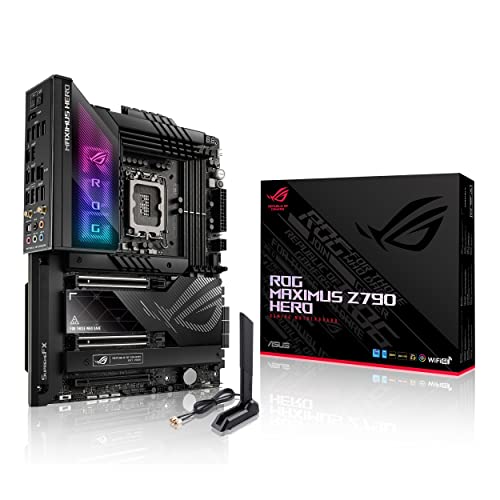
ASUS ROG Maximus Z790 Hero
8.5/10

Overall score

Score
8.5/ 10
✕
What it is
Our main score for this model, 1–10. It combines specs, expert reviews, best-of lists, ratings from across the web and owners.
How we count it
Parts: Technical score 45%, Reviews score 20%, List score 20%, User score 10%, Sentiment score 5%
Marks: Each part gets a mark out of 10. For reviews, lists and owners, a typical model in this category gets about 8 and the best one gets 10.
No data yet: A part with no data shows "?". It counts as the mark of a weaker model in this category (4 in 5 models with data score higher). This way, models with reviews, lists and owners usually come out ahead.
Score distribution
▼
<55-66-77-88-99-10
Score components

45%

8.5

Technical score

20%

8.6

Reviews score

20%

8.2

List score

10%

8.9

User score

5%

7.1

Sentiment score

★Better than 96% of motherboards
8.5

Value for money

Value for money
8.5/ 10
✕
What it is
An indicator that combines the motherboard's overall rating with its cost.
When it matters
When you are looking for a motherboard that offers a strong balance of features, performance, and price.
Score distribution
▼
<55-66-77-88-99-10
Score components

70%

8.5

Overall score

30%

8.5

Price

★Better than 90%
8.5

Technical score

Technical score
8.5/ 10
✕
What it is
How good the specs are compared with the other models in this category, 1–10.
How we count it
Areas: We rate the specs in each area against the other models in this category.
Weighting: The areas that matter most to buyers count more. The shares are shown under Score components.
Share: The technical score is 45% of the overall score.
Score distribution
▼
<55-66-77-88-99-10
Score components

19%

8.9

Memory

16%

9.3

Platform

16%

7.5

Storage

15%

8.4

Network

13%

8.4

Ports

8%

6.6

Expansion

8%

9.4

Power & Cooling

5%

9.9

Audio

★Better than 92%
8.6

Reviews score

Reviews score
8.6/ 10
✕
What it is
Average grade from independent test sites, magazines and video reviewers, 1–10.
How we count it
Grades: Each review's own score is converted to 1–10; without one, we grade the review ourselves. Big test sites count more, short reviews half as much as full tests. A video review counts half.
Score: The average grade is 80% of the review mark; the number of reviews is the other 20% (1 review = 5, the typical number in this category = 8, the most-reviewed model = 10).
Enough data: With few reviews, the average grade is pulled toward the typical grade of this category. No reviews yet: 7.8 for now.
Share: Reviews count 20% of the overall score.
Score distribution
▼
<55-66-77-88-99-10

80%

8.4

Average grade

20%

9.6

Popularity

Grades by review (16)
9 reviews: 7 with a printed score, 2 estimated from the review. 7 video reviews, each counting half as much as a written test. Reviews count 20% of the overall score.
Ratings from across the web count in the User score, not in this score.
▲Better than 78%
8.9

User score

User score
8.9/ 10
✕
What it is
How happy buyers are with this model, based on ratings from across the web.
How we count it
Enough data: A model needs at least 1 rating from across the web. Without one, it counts as 7.9, the mark of a weaker rated model in this category.
Share: User score counts 10% of the overall score.
Score distribution
▼
<55-66-77-88-99-10

70%

8.6

Rating

30%

9.7

Popularity

▲Better than 74%
8.2

List score

List score
8.2/ 10
✕
What it is
How often independent test sites, magazines and video reviewers put this model in their best-of lists for this category.
How we count it
Points: The model in the most lists of this category gets 10; the others get 8 to 10 in proportion. In no list yet: 7.5. Lists count 20% of the overall score.
Enough data: Every list counts, even a single one. With fewer than 5 best-of lists in the category, this part is left out.
Lists with this model (1)
List score: in 1 of 63 lists (2%)
▲Better than 88%
  • asus-rog-maximus-z790-hero
  • asus-rog-maximus-z790-hero
  • asus-rog-maximus-z790-hero
  • asus-rog-maximus-z790-hero
  • asus-rog-maximus-z790-hero
  • asus-rog-maximus-z790-hero
asus-rog-maximus-z790-hero
Where to buy
*As an Amazon Associate, we earn from qualifying purchases.

What reviewers say about the ASUS ROG Maximus Z790 Hero

Based on 9 · 7

Reviewers like the M.2 slots and strong USB and Thunderbolt connectivity, but the steep price and networking draw consistent criticism.
Praised
Mixed views
Criticised
Pick a topic to see who said what

What owners say about the ASUS ROG Maximus Z790 Hero

Based on 89 owners sharing their experience in online comments

28%positive11%mixed61%negative

Owners praise strong performance and reliable operation, while BIOS boot failures and unstable high-speed memory cause the most frustration.

What owners dislike

  • Many owners report RAM failing to POST or crashing with XMP enabled, including 7200 MT/s kits and 4x16GB setups, with only default settings reliably working.14
  • Some owners report a black screen or endless boot loop during or after a BIOS update, sometimes needing a CMOS reset or a return to an older version.10
  • The Hyper M.2 card only supports one Gen 5 SSD and must sit in PCIe slot 2, which large GPUs often block, so Gen 5 use is limited.7
  • Owners report frequent game crashes and blue screens with the Intel 13th and 14th gen CPUs, which some hoped a BIOS update would fix.6
  • Owners say the BIOS update process is confusing, with the board restarting before the update finishes and it working only some of the time.6
  • Some owners get an 'invalid BIOS' or 'wrong file' error when flashing, and renaming the BIOS file sometimes resolves it.5
  • Owners with 13th gen CPUs report high temperatures near 100C, throttling, and BSODs, even with large air or AIO coolers.4
  • Owners report the Gen 5 SSD gets only about 12,000 MB/s in the Hyper card, and a Gen 4 SSD in M.2_1 can show Gen 3 x4 speeds.3
  • Owners report that ASUS Armoury Crate freezes the PC when installed and that the bundled software is unreliable.3
  • Owners say ASUS support is slow and unhelpful, with long waits on the phone and callbacks days later.3

Points mentioned by at least 3 owners, most mentioned first.

Loading...
Loading category ranking...

Technical Specifications of motherboard ASUS ROG Maximus Z790 Hero

Technical score
Technical score
8.5/ 10
✕
What it is
How good the specs are compared with the other models in this category, 1–10.
How we count it
Areas: We rate the specs in each area against the other models in this category.
Weighting: The areas that matter most to buyers count more. The shares are shown under Score components.
Share: The technical score is 45% of the overall score.
Score distribution
▼
<55-66-77-88-99-10
Score components:

19%

8.9

Memory

16%

9.3

Platform

16%

7.5

Storage

15%

8.4

Network

13%

8.4

Ports

8%

6.6

Expansion

8%

9.4

Power & Cooling

5%

9.9

Audio

8.5
Reviews score
8.6
User score
8.9
List score
8.2
Value for money
Value for money
8.5/ 10
✕
What it is
An indicator that combines the motherboard's overall rating with its cost.
When it matters
When you are looking for a motherboard that offers a strong balance of features, performance, and price.
Score distribution
▼
<55-66-77-88-99-10
Score components:

70%

8.5

Overall score

30%

8.5

Price

8.5
CPU socket
LGA 1700
This motherboard uses LGA 1700, which is more up-to-date than 54.7% of Motherboards and the same as 22.7% of Motherboards.
CPU platform
Intel
Chipset
Intel Z790
This motherboard uses Intel Z790, which is more capable than 77% of Motherboards and as capable as 6.3% of Motherboards.
Form factor
ATX
Integrated graphics support
yes
This motherboard supports integrated graphics. 10.2% of motherboards support this feature.
Rear outputs: HDMI + USB4 / Thunderbolt.
Show more
What reviewers say
DDR memory version
DDR5
This motherboard uses DDR5, which is more modern than 63.8% of Motherboards and the same as 36.2% of Motherboards.
Memory slots
4
This motherboard has 4 Memory slots, which is more than 21.9% of motherboards and equal to 72% of motherboards.
Maximum memory capacity
192 GB
This motherboard supports up to 192 GB of memory, which is more than 72% of motherboards and equal to 10.4% of motherboards.
Memory channels
2
Maximum RAM speed
7,800 MT/s
This motherboard supports memory speeds up to 7,800 MT/s, which is higher than that of 83.2% of motherboards and equal to that of 1.6% of motherboards.
Show more
What reviewers say
N. of M.2 sockets
5
This motherboard has 5 M.2 sockets, which is more than 94.8% of motherboards and equal to 4.3% of motherboards.
plus 2 via included expansion card.
M.2 slot interface per slot
3x PCIe 4.0 x4
This motherboard offers M.2 slots: 3x PCIe 4.0x4, which is faster than 69.3% of Motherboards and the same as 2.2% of Motherboards.
bundled card slots excluded.
N. of SATA 3 connectors
6
This motherboard has 6 SATA 3 connectors, which is more than 53.5% of motherboards and equal to 31.2% of motherboards.
Supported RAID levels
0/1/5/10
This motherboard RAID support: 0/1/5/10, which is more flexible than 32.5% of Motherboards and the same as 67.5% of Motherboards.
JBOD excluded from RAID-level set
NVMe RAID support
yes
This motherboard supports NVMe RAID. 40.2% of motherboards support this feature.
Show more
What reviewers say
N. of PCIe 5.0 x16 slots
2
This motherboard has 2 PCIe 5.0x16 slots, which is more than 95.1% of motherboards and equal to 4.4% of motherboards.
N. of PCIe 4.0 x16 slots
1
This motherboard has 1 PCIe 4.0x16 slots, which is more than 55.2% of motherboards and equal to 35.7% of motherboards.
N. of PCIe 3.0 x16 slots
0
This motherboard has 0 PCIe 3.0x16 slots, which is fewer than 59.6% of motherboards and equal to 40.4% of motherboards.
PCIe slot electrical configuration
x16
This motherboard splits its PCIe lanes as x16, which is less generous than 81% of Motherboards and the same as 16.1% of Motherboards.
PCIe bifurcation support
yes
This motherboard supports PCIe bifurcation. 40.3% of motherboards support this feature.
x8/x8.
Show more
Total USB ports (rear I/O)
12
This motherboard has 12 USB ports (rear I/O), which is more than 92.7% of motherboards and equal to 5.6% of motherboards.
Total USB ports (including headers)
21
This motherboard has 21 USB ports (including headers), which is more than 94.3% of motherboards and equal to 2.8% of motherboards.
Total USB-C ports (rear I/O)
3
This motherboard has 3 USB-C ports (rear I/O), which is more than 96.5% of motherboards and equal to 2.7% of motherboards.
Thunderbolt / USB4 Type-C ports counted.
Total USB-C ports (including headers)
4
This motherboard has 4 USB-C ports (including headers), which is more than 95.6% of motherboards and equal to 2.8% of motherboards.
includes internal USB-C header.
N. of USB 3.2 Gen2x2 ports (USB-C)
0
This motherboard has 0 USB 3.2 Gen2x2 ports (USB-C), which is fewer than 18% of motherboards and equal to 82% of motherboards.
Show more
What reviewers say
LAN speed
2.5 Gbps
This motherboard supports LAN speeds up to 2.5 Gbps, which is higher than that of 49% of motherboards and equal to that of 41.4% of motherboards.
LAN controller
Intel I226-V
This motherboard has a Intel I226-V LAN controller, which is faster than 94.7% of Motherboards and equal to 1.3% of Motherboards.
N. of RJ45 ports
1
This motherboard has 1 RJ45 ports, which is fewer than 14.4% of motherboards and equal to 85.6% of motherboards.
Wi-Fi connectivity
yes
This motherboard supports Wi-Fi connectivity. 50% of motherboards support this feature.
Wi-Fi version
Wi-Fi 6E (802.11ax)
This motherboard uses Wi-Fi 6E (802.11ax), which is newer than 71.5% of Motherboards and the same as 16.7% of Motherboards.
Show more
What reviewers say
Audio codec
ROG SupremeFX ALC4082
This motherboard uses ROG SupremeFX ALC4082, which is higher-end than 100% of Motherboards.
with ESS DAC.
Audio channels
7.1
This motherboard offers 7.1 audio channels, which is more than 4.7% of motherboards and equal to 95.3% of motherboards.
Audio SNR
120 dB
This motherboard has an audio SNR of 120 dB, which is higher than that of 55.6% of motherboards and equal to that of 41% of motherboards.
Headphone amp support
yes
This motherboard supports a headphone amp. 41.2% of motherboards support this feature.
headphone amp on rear port.
N. of 3.5mm audio jacks
5
This motherboard has 5 3.5mm audio jacks, which is more than 50.6% of motherboards and equal to 36.3% of motherboards.
Show more
VRM phases
20+1+2
This motherboard has 20+1+2 VRM phases, which is more than 96.9% of motherboards and equal to 0.5% of motherboards.
N. of CPU power connectors
2
This motherboard has 2 CPU power connectors, which is more than 54.9% of motherboards and equal to 44.8% of motherboards.
N. of fan headers
7
This motherboard has 7 fan headers, which is more than 72.4% of motherboards and equal to 9.8% of motherboards.
Pump header
yes
This motherboard has a pump header. 22.1% of motherboards include this feature.
Pump header max current
3 A
This motherboard supports up to 3 A on the pump header, which is higher than that of 77.8% of motherboards and equal to that of 22.2% of motherboards.
Show more

ASUS ROG Maximus Z790 Hero vs the average motherboard

246810TotalPlatformMemoryStorageExpansionPortsNetworkAudioPower & Cooling
  • 3 more M.2 sockets
    This motherboard has more M.2 sockets than the average motherboard (5 vs 2). The average motherboard has 2 M.2 socket/s.
    plus 2 via included expansion card.
    5 vs 2
  • 2 more PCIe 5.0x16 slots
    This motherboard has more PCIe 5.0x16 slots than the average motherboard (2 vs 0). The average motherboard has 0 PCIe 5.0x16 slot/s.
    2 vs 0
  • 4 more rear USB ports
    This motherboard has more rear USB ports than the average motherboard (12 vs 8). The average motherboard has 8 rear USB port/s.
    12 vs 8
  • 4 more USB 3.2 Gen2 ports
    This motherboard has more USB 3.2 Gen2 ports than the average motherboard (5 vs 1). The average motherboard has 1 USB 3.2 Gen2 port/s.
    5 vs 1
  • More modern memory type
    This motherboard uses a more modern memory type than the average motherboard (DDR5 vs DDR4).
    DDR5 vs DDR4
  • More capable onboard audio
    This motherboard has a higher-end audio codec than the average motherboard (ROG SupremeFX ALC4082 vs Realtek ALC897).
    with ESS DAC.
    ROG SupremeFX ALC4082 vs Realtek ALC897
  • More capable LAN controller
    This motherboard has a faster LAN controller than the average motherboard (Intel I226-V vs Killer + Intel + Realtek).
    Intel I226-V vs Killer + Intel + Realtek
  • More VRM phases
    This motherboard has more VRM phases than the average motherboard (20+1+2 vs 10). The average motherboard has 10 VRM phase/s.
    20+1+2 vs 10
  • 11% better value for money
    ASUS ROG Maximus Z790 Hero has better value for money than the average motherboard (8.47 vs 7.6).
    8.47 vs 7.63
  • More up-to-date socket
    This motherboard uses a more up-to-date socket than the average motherboard (LGA 1700 vs LGA 1151).
    LGA 1,700 vs LGA 1,151
  • Integrated I/O shield
    This motherboard has an integrated I/O shield, while the average motherboard does not. 46.6% of motherboards include an integrated I/O shield.
    Pre-mounted I/O shield.
  • Includes POST code display
    This motherboard has a POST code display, while the average motherboard does not. 26.7% of motherboards include a POST code display.
  • Rear-panel CMOS reset button
    This motherboard has a rear-panel CMOS reset button, while the average motherboard does not. 26.5% of motherboards include a rear-panel CMOS reset button.
  • More modern memory type
    This motherboard uses a more modern memory type than the average motherboard (DDR5 vs DDR4).
    DDR5 vs DDR4
  • 50% more maximum memory capacity
    This motherboard has more maximum memory capacity than the average motherboard (192 GB vs 128 GB). The average motherboard supports 128 GB of memory.
    192 GB vs 128 GB
  • 66% higher maximum RAM speed
    This motherboard has a higher maximum RAM speed than the average motherboard (7,800 MT/s vs 4,699.5 MT/s). The average motherboard supports RAM speed of 4,699.5 MT/s.
    7,800 MT/s vs 4,699.5 MT/s
  • 56% higher overclocked RAM speed
    This motherboard has a higher overclocked RAM speed than the average motherboard (7,800 MT/s vs 5,000 MT/s). The average motherboard supports overclocked RAM speed of 5,000 MT/s.
    top speed depends on CPU and memory setup
    7,800 MT/s vs 5,000 MT/s
  • 3 more M.2 sockets
    This motherboard has more M.2 sockets than the average motherboard (5 vs 2). The average motherboard has 2 M.2 socket/s.
    plus 2 via included expansion card.
    5 vs 2
  • 2 more SATA 3 connectors
    This motherboard has more SATA 3 connectors than the average motherboard (6 vs 4). The average motherboard has 4 SATA 3 connectors.
    6 vs 4
  • 2 more PCIe 5.0x16 slots
    This motherboard has more PCIe 5.0x16 slots than the average motherboard (2 vs 0). The average motherboard has 0 PCIe 5.0x16 slot/s.
    2 vs 0
  • 1 more PCIe 4.0x16 slots
    This motherboard has more PCIe 4.0x16 slots than the average motherboard (1 vs 0). The average motherboard has 0 PCIe 4.0x16 slot/s.
    1 vs 0
  • 1 more PCIe x4 slots
    This motherboard has more PCIe x4 slots than the average motherboard (1 vs 0). The average motherboard has 0 PCIe x4 slot/s.
    1 vs 0
  • 4 more rear USB ports
    This motherboard has more rear USB ports than the average motherboard (12 vs 8). The average motherboard has 8 rear USB port/s.
    12 vs 8
  • 4 more USB 3.2 Gen2 ports
    This motherboard has more USB 3.2 Gen2 ports than the average motherboard (5 vs 1). The average motherboard has 1 USB 3.2 Gen2 port/s.
    5 vs 1
  • 2 more rear USB-C ports
    This motherboard has more rear USB-C ports than the average motherboard (3 vs 1). The average motherboard has 1 rear USB-C port/s.
    Thunderbolt / USB4 Type-C ports counted.
    3 vs 1
  • 6 more total USB connections
    This motherboard has more total USB connections than the average motherboard (21 vs 15). The average motherboard has 15 total USB connections.
    21 vs 15
  • 1 more USB 3.2 Gen2 USB-C ports
    This motherboard has more USB 3.2 Gen2 USB-C ports than the average motherboard (1 vs 0). The average motherboard has 0 USB 3.2 Gen2 USB-C port/s.
    1 vs 0
  • 3 more total USB-C connections
    This motherboard has more total USB-C connections than the average motherboard (4 vs 1). The average motherboard has 1 total USB-C connections.
    includes internal USB-C header.
    4 vs 1
  • 1 more USB 3.2 Gen1 headers
    This motherboard has more USB 3.2 Gen1 headers than the average motherboard (2 vs 1). The average motherboard has 1 USB 3.2 Gen1 header/s.
    two internal headers
    2 vs 1
  • 2 more USB4 40Gbps ports
    This motherboard has more USB4 40Gbps ports than the average motherboard (2 vs 0). The average motherboard has 0 USB4 40Gbps port/s.
    Thunderbolt 4.
    2 vs 0
  • 2 more Thunderbolt 3 ports
    This motherboard has more Thunderbolt 3 ports than the average motherboard (2 vs 0). The average motherboard has 0 Thunderbolt 3 port/s.
    2 vs 0
  • 1 more USB 3.2 Gen2 headers
    This motherboard has more USB 3.2 Gen2 headers than the average motherboard (1 vs 0). The average motherboard has 0 USB 3.2 Gen2 header/s.
    20Gbps Type-C header
    1 vs 0
  • More capable LAN controller
    This motherboard has a faster LAN controller than the average motherboard (Intel I226-V vs Killer + Intel + Realtek).
    Intel I226-V vs Killer + Intel + Realtek
  • More recent Wi-Fi standard
    This motherboard has a more recent Wi-Fi standard than the average motherboard (Wi-Fi 6E (802.11ax) vs Wi-Fi 5 (802.11ac)).
    Wi-Fi 6E (802.11ax) vs Wi-Fi 5 (802.11ac)
  • Supports Bluetooth
    This motherboard supports Bluetooth, while the average motherboard does not. 49% of motherboards support Bluetooth.
  • More capable onboard audio
    This motherboard has a higher-end audio codec than the average motherboard (ROG SupremeFX ALC4082 vs Realtek ALC897).
    with ESS DAC.
    ROG SupremeFX ALC4082 vs Realtek ALC897
  • 5 dB higher audio SNR
    This motherboard has a higher audio SNR than the average motherboard (120 dB vs 115 dB). The average motherboard has audio SNR of 115 dB.
    120 dB vs 115 dB
  • 2 more 3.5mm audio jacks
    This motherboard has more 3.5mm audio jacks than the average motherboard (5 vs 3). The average motherboard has 3 3.5mm audio jacks.
    5 vs 3
  • More VRM phases
    This motherboard has more VRM phases than the average motherboard (20+1+2 vs 10). The average motherboard has 10 VRM phase/s.
    20+1+2 vs 10
  • 1 more CPU power connectors
    This motherboard has more CPU power connectors than the average motherboard (2 vs 1). The average motherboard has 1 CPU power connectors.
    2 vs 1
  • 1.5 more fan headers
    This motherboard has more fan headers than the average motherboard (7 vs 5.5). The average motherboard has 5.5 fan header/s.
    7 vs 5.5
  • 1 more ARGB headers
    This motherboard has more ARGB headers than the average motherboard (3 vs 2). The average motherboard has 2 ARGB header/s.
    3 vs 2
  • Includes onboard RGB lighting
    This motherboard has onboard RGB lighting, while the average motherboard does not. 50% of motherboards include onboard RGB lighting.
    Polymo Lighting on the I/O shroud
  • 1 A higher pump header current limit
    This motherboard has a higher pump header current than the average motherboard (3 A vs 2 A). The average motherboard provides pump header current of 2 A.
    3 A vs 2 A
  • Less generous lane split
    This motherboard splits its PCIe lanes less generously than the average motherboard (x16 vs x16/x0/x4, x8/x8/x4).
    x16 vs x16/x0/x4, x8/x8/x4
  • Slower NVMe storage slots
    This motherboard has slower M.2 slots than the average motherboard (3x PCIe 4x4 vs 1x PCIe 5x4, 2x PCIe 4x4).
    bundled card slots excluded.
    3x PCIe 4.0x4 vs 1x PCIe 5.0x4, 2x PCIe 4.0x4
  • 1 fewer DisplayPort outputs
    This motherboard has fewer DisplayPort outputs than the average motherboard (0 vs 1). The average motherboard has 1 DisplayPort outputs.
    0 vs 1
  • More basic chipset
    This motherboard uses a more basic chipset than the average motherboard (Intel Z790 vs Intel B860).
    Intel Z790 vs Intel B860
  • 2.53x more expensive
    ASUS ROG Maximus Z790 Hero is more expensive than the average motherboard (£380 vs £150).
    £380 vs £150
  • 1 fewer PCIe x1 slots
    This motherboard has fewer PCIe x1 slots than the average motherboard (0 vs 1). The average motherboard has 1 PCIe x1 slot/s.
    0 vs 1
  • 1 fewer PCIe 3.0x16 slots
    This motherboard has fewer PCIe 3.0x16 slots than the average motherboard (0 vs 1). The average motherboard has 1 PCIe 3.0x16 slot/s.
    0 vs 1
  • 2.53x more expensive
    ASUS ROG Maximus Z790 Hero is more expensive than the average motherboard (£380 vs £150).
    £380 vs £150
  • More basic chipset
    This motherboard uses a more basic chipset than the average motherboard (Intel Z790 vs Intel B860).
    Intel Z790 vs Intel B860
  • Slower NVMe storage slots
    This motherboard has slower M.2 slots than the average motherboard (3x PCIe 4x4 vs 1x PCIe 5x4, 2x PCIe 4x4).
    bundled card slots excluded.
    3x PCIe 4.0x4 vs 1x PCIe 5.0x4, 2x PCIe 4.0x4
  • Less generous lane split
    This motherboard splits its PCIe lanes less generously than the average motherboard (x16 vs x16/x0/x4, x8/x8/x4).
    x16 vs x16/x0/x4, x8/x8/x4
  • 1 fewer PCIe x1 slots
    This motherboard has fewer PCIe x1 slots than the average motherboard (0 vs 1). The average motherboard has 1 PCIe x1 slot/s.
    0 vs 1
  • 1 fewer PCIe 3.0x16 slots
    This motherboard has fewer PCIe 3.0x16 slots than the average motherboard (0 vs 1). The average motherboard has 1 PCIe 3.0x16 slot/s.
    0 vs 1
  • 1 fewer DisplayPort outputs
    This motherboard has fewer DisplayPort outputs than the average motherboard (0 vs 1). The average motherboard has 1 DisplayPort outputs.
    0 vs 1

Video reviews

Hands-on testing, unboxing, and real-world video evaluations

9.0
Kleo Yan
≈ estimated
18/02/2024
Hands-on review · unboxing, testing and layout notes
Verdict
ASUS ROG Maximus Z790 Hero is a solid board that runs cool, with a few minor flaws.
5.0
Bricktronics
≈ estimated
18/02/2023
Unboxing and install · Cyberpunk and Cinebench tests
Verdict
ASUS ROG Maximus Z790 Hero is not a good value at its high price, with many features most users don't need.
7.0
OC3D TV
≈ estimated
20/10/2022
Hands-on review · overclocking and cooling tests
Verdict
ASUS ROG Maximus Z790 Hero is a very capable board, though thin documentation and tricky overclocking hold it back.
9.0
Roberto Jorge Tech
≈ estimated
09/12/2022
Overview · feature tour and M.2 speed claim
Verdict
ASUS ROG Maximus Z790 Hero has excellent hardware and software, a strong high-end board for enthusiasts.
Hands-on video, no verdict

Expert reviews

In-depth analysis and verdict from leading tech publications

9.0
windowscentral.com
✓ explicit
25/10/2022
Performance test · Z790 board
Verdict
The ASUS ROG Maximus Z790 Hero is one of the best boards for Core i7 or i9 13th Gen builds focused on overclocking, but overkill for a Core i5.
9.0
pcworld.com
✓ explicit
16/11/2022
Full review · Creator-gamer board
Verdict
The ASUS ROG Maximus Z790 Hero suits both gamers and content creators, with plenty of Thunderbolt 4 and USB ports, but lacks 10GbE networking.
8.6
pcgamer.com
✓ explicit
13/12/2022
Hands-on test · Z790 board
Verdict
The ASUS ROG Maximus Z790 Hero is a reliable, feature-rich board for fast DDR5 and overclocking, though it is expensive for a Maximus entry model.
7.8
geekawhat.com
✓ explicit
20/10/2022
Feature review · Z790 board
Verdict
The ASUS ROG Maximus Z790 Hero is a top-end Intel board with easy-to-use build features, Thunderbolt 4 and PCIe 5.0, but it needs DDR5 memory.
8.0
tomshardware.com
✓ explicit
31/12/2022
Lab test · High-end motherboard
Verdict
The ASUS ROG Maximus Z790 Hero is a well-equipped, strong performer whose price is hard to justify against similar cheaper boards.
9.0
igorslab.de
≈ estimated
07/04/2023
Lab test · Overclocking board
Verdict
The ASUS ROG Maximus Z790 Hero is a very stable overclocker that runs DDR5-7800 reliably enough for daily use, though its price is high for the socket.
9.2
profesionalreview.com
✓ explicit
20/10/2022
Full review · High-end Z790 board
Verdict
The ASUS ROG Maximus Z790 Hero is a powerful Intel board with five M.2 slots, but its power stages are unchanged from the Z690 Hero.
9.0
sologamer.cl
✓ explicit
13 de noviembre de 2022
Unboxing review · Z790 board
Verdict
The ASUS ROG Maximus Z790 Hero fits standard ATX cases and adds two extra M.2 drives through a card, but its power stages match the previous generation.
9.0
elchapuzasinformatico.com
≈ estimated
21/10/2022
Benchmark review · Z790 board
Verdict
The ASUS ROG Maximus Z790 Hero suits a high-end Intel build like the i9-13900K, with a strong VRM and fast DDR5, but lacks AMD EXPO memory.

Third-party reviews

What customers like about ASUS ROG Maximus Z790 Hero

  • Exceptional build quality with a heavy, robust feel and premium metal backplate.
  • Highly user-friendly BIOS and AI features that make overclocking simple for enthusiasts.
  • Comprehensive connectivity including dual Thunderbolt 4 ports and multiple M.2 slots (up to 5 total with the included Hyper M.2 card).
  • Innovative 'Q-Release' button for easy PCIe card removal and tool-less 'Q-Latch' for M.2 drives.
  • Stable VRM power delivery capable of handling high-end Intel i9 processors without overheating.
  • Aesthetically pleasing design with customizable 'Polymo' RGB lighting on the I/O shroud.

What customers don't like about ASUS ROG Maximus Z790 Hero

  • High premium price point compared to other Z790 boards with similar core features.
  • Lack of 10Gb Ethernet, which is often expected at this high-end enthusiast price bracket.
  • Potential stability issues when running four sticks of high-speed DDR5 RAM; some users report it works best with only two sticks.
  • Intel I226-V 2.5Gb Ethernet controller has been reported by some users to experience connectivity drops or speed capping.
  • Default 'Multi-Core Enhancement' settings can cause significantly higher CPU temperatures and power draw if not manually adjusted.
  • Armoury Crate software is frequently cited as being bloated or difficult to use for lighting and driver management.

Verdict

The ASUS ROG Maximus Z790 Hero is a high-end ATX motherboard featuring the Intel LGA 1700 socket and Z790 chipset, supporting 12th, 13th, and 14th Gen Core processors. It is equipped with a robust 20+1 teamed power stage design rated for 90A, four DDR5 slots supporting speeds up to 7800+ MT/s (OC), and two PCIe 5.0 x16 expansion slots. Storage is extensive with three onboard M.2 slots and an included ROG Hyper M.2 card that adds a PCIe 5.0-ready slot, alongside dual Thunderbolt 4 ports and Wi-Fi 6E connectivity. Main pros include its exceptional overclocking stability, premium SupremeFX ALC4082 audio with an ESS ES9218 Quad DAC, and DIY-friendly features like the PCIe Slot Q-Release and M.2 Q-Latch. However, notable cons include its high price point and the inclusion of only 2.5Gb Ethernet, which lags behind some competitors offering 10Gb LAN.

Compare ASUS ROG Maximus Z790 Hero with other products in the Motherboards category

1Product to compare no. 1
VS
2Product to compare no. 2
VS
3Product to compare no. 3 (optional)

Graphic comparison of ASUS ROG Maximus Z790 Hero and other products in the Motherboards category

No results found