Scored using Graphics cards Methodology v1.0
Graphics cards Methodology v1.0
Mathematical & Unbiased Scoring
Products in this category are scored under Frontum Graphics cards Methodology v1.0: technical specifications plus authentic consumer ratings, with 0% commercial bias.
Explore Graphics cards Methodology v1.0

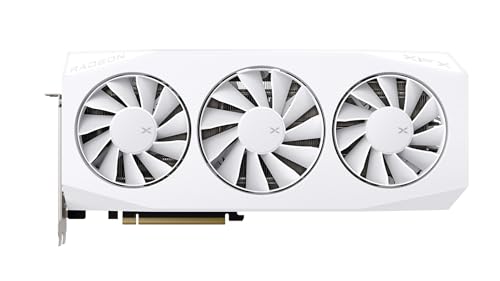
XFX Mercury Radeon RX 9060 XT OC Gaming Edition 16GB Review | 118 Data compared

Avg. price:~£400VRAM:16 GBMemory bus width:128 bitThermal Design Power (TDP):160 W

XFX Mercury Radeon RX 9060 XT OC Gaming Edition 16GB Review: Compare 118 technical specifications and user reviews to see how this product ranks in the Graphics cards category and whether it is worth buying.
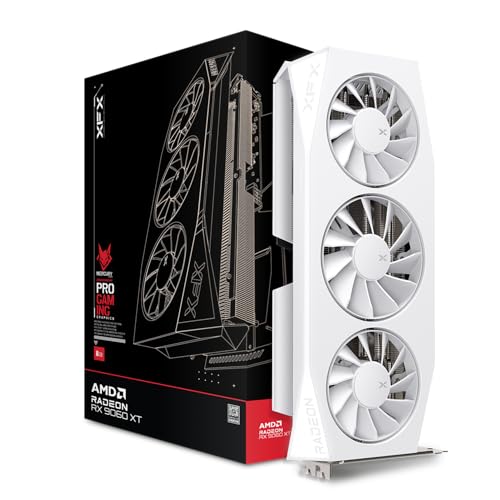
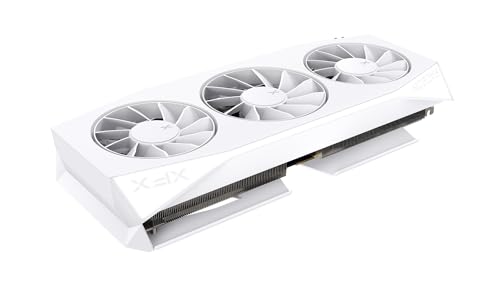
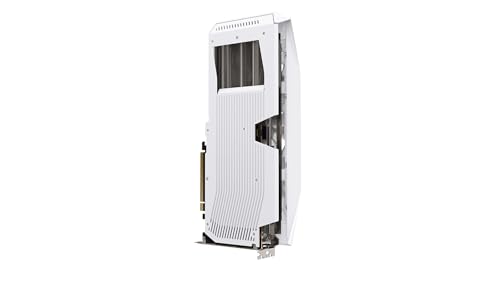
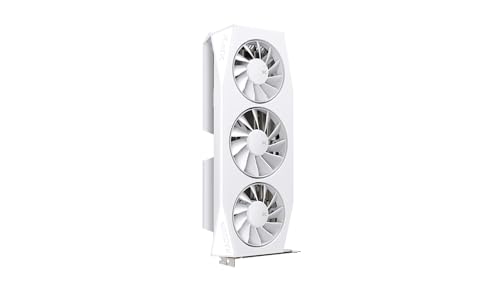
XFX Mercury Radeon RX 9060 XT OC Gaming Edition 16GB
7.1/10

Overall score

Score
7.1/ 10
✕
What it is
An overall evaluation of the graphics card's quality, based on technical analyses and user reviews.
When it matters
When you need a quick reference to identify the best graphics cards on the market.
Score distribution
â–¼
<55-66-77-88-99-10
Score components

90%

7.0

Technical score

10%

8.2

User score

â–¼Worse than 51% of graphics cards
7.5

Value for money

Value for money
7.5/ 10
✕
What it is
An indicator that combines the graphics card's overall rating with its cost.
When it matters
When you are looking for a graphics card that offers a strong balance of performance, features, and price.
Score distribution
â–¼
<55-66-77-88-99-10
Score components

70%

7.1

Overall score

30%

8.4

Price

â–²Better than 64%
7.0

Technical score

Technical score
7.0/ 10
✕
What it is
An assessment of technical performance for products in the Graphics cards category across these key areas: Performance, Memory, Platform & Features, Connectivity & Media, Power & Cooling, Design.
When it matters
When you want to compare graphics cards based on technical performance and available features.
Score distribution
â–¼
<55-66-77-88-99-10
Score components

44%

6.0

Performance

24%

6.0

Memory

12%

9.4

Power & Cooling

11%

9.4

Platform & Features

5%

7.2

Design

4%

8.9

Connectivity & Media

â–¼Worse than 51%
8.2

User score

User score
8.2/ 10
✕
What it is
A rating that combines user reviews and the total number of reviews received by the graphics card.
When it matters
When you want to understand how a graphics card performs in real use and how reliable it is in terms of performance, temperatures, noise, stability, and long-term ownership.
Score distribution
â–¼
<55-66-77-88-99-10
Score components

70%

8.8

User ratings

30%

6.7

Number of reviews

Based on ratings from across the web.
â–²Better than 64%
  • xfx-mercury-radeon-rx-9060-xt-oc-gaming-edition-16gb
  • xfx-mercury-radeon-rx-9060-xt-oc-gaming-edition-16gb
  • xfx-mercury-radeon-rx-9060-xt-oc-gaming-edition-16gb
  • xfx-mercury-radeon-rx-9060-xt-oc-gaming-edition-16gb
  • xfx-mercury-radeon-rx-9060-xt-oc-gaming-edition-16gb
xfx-mercury-radeon-rx-9060-xt-oc-gaming-edition-16gb
Best prices
*As an Amazon Associate, we earn from qualifying purchases.
Loading...
Loading category ranking...

Technical Specifications of graphics card XFX Mercury Radeon RX 9060 XT OC Gaming Edition 16GB

Technical score
Technical score
7.0/ 10
✕
What it is
An assessment of technical performance for products in the Graphics cards category across these key areas: Performance, Memory, Platform & Features, Connectivity & Media, Power & Cooling, Design.
When it matters
When you want to compare graphics cards based on technical performance and available features.
Score distribution
â–¼
<55-66-77-88-99-10
Score components:

44%

6.0

Performance

24%

6.0

Memory

12%

9.4

Power & Cooling

11%

9.4

Platform & Features

5%

7.2

Design

4%

8.9

Connectivity & Media

7.0
User score
User score
8.2/ 10
✕
What it is
A rating that combines user reviews and the total number of reviews received by the graphics card.
When it matters
When you want to understand how a graphics card performs in real use and how reliable it is in terms of performance, temperatures, noise, stability, and long-term ownership.
Score distribution
â–¼
<55-66-77-88-99-10
Score components

70%

8.8

User ratings

30%

6.7

Number of reviews

Based on ratings from across the web.
8.2
Popularity
Popularity
6.7/ 10
✕
What it is
An indicator based on the number of reviews received by the graphics card.
When it matters
When you prefer a graphics card that has already been chosen and reviewed by many other users.
Score distribution
â–¼
<55-66-77-88-99-10
Popularity:
XFX Mercury Radeon RX 9060 XT OC Gaming Edition 16GB has a popularity score of 6.7 points, which is higher than that of 63.5% of products in this category.
6.7
Value for money
Value for money
7.5/ 10
✕
What it is
An indicator that combines the graphics card's overall rating with its cost.
When it matters
When you are looking for a graphics card that offers a strong balance of performance, features, and price.
Score distribution
â–¼
<55-66-77-88-99-10
Score components:

70%

7.1

Overall score

30%

8.4

Price

7.5
3DMark Time Spy benchmark score
15,681 points
This graphics card scores 15,681 points in 3DMark Time Spy, which is higher than 53.2% of graphics cards.
3DMark Port Royal score
9,713 points
This graphics card scores 9,713 points in 3DMark Port Royal, which is higher than 52.2% of graphics cards and equal to 0.5% of graphics cards.
PassMark (G3D) result
20,528 points
This graphics card scores 20,528 points in PassMark G3D, which is lower than 59.3% of graphics cards and equal to 0.2% of graphics cards.
PassMark (DirectCompute) result
28,995 points
This graphics card scores 28,995 points in PassMark DirectCompute, which is higher than 93.2% of graphics cards and equal to 2.2% of graphics cards.
Floating-point performance
27.2 TFLOPS
This graphics card delivers 27.2 TFLOPS floating-point performance, which is higher than that of 55.7% of graphics cards and equal to that of 0.3% of graphics cards.
Show more
VRAM
16 GB
This graphics card has 16 GB of VRAM, which is more than 61.5% of graphics cards and equal to 28.6% of graphics cards.
Memory type
GDDR6
GDDR version
GDDR6
This graphics card uses GDDR6 memory, which is newer than on 15.9% of graphics cards and equal to 40.3% of graphics cards.
Memory bus width
128 bit
This graphics card uses a 128 bit memory bus, which is narrower than that of 69.6% of graphics cards and equal to that of 26% of graphics cards.
Maximum memory bandwidth
322.3 GB/s
This graphics card reaches 322.3 GB/s memory bandwidth, which is lower than that of 65.8% of graphics cards and equal to that of 0.4% of graphics cards.
Show more
PCI Express (PCIe) version
5
This graphics card supports PCIe 5, which is newer than on 74.5% of graphics cards and equal to 25.6% of graphics cards.
PCIe lanes
x16
This graphics card uses x16 PCIe lanes, which is more than 23.4% of graphics cards and equal to 76.6% of graphics cards.
DirectX version
12
This graphics card supports DirectX 12, which is older than on 81.8% of graphics cards and equal to 16.9% of graphics cards.
Vulkan version
1.3
This graphics card supports Vulkan 1.3, which is older than on 79.4% of graphics cards and equal to 15.7% of graphics cards.
OpenGL version
4.6
This graphics card supports OpenGL 4.6, which is more advanced than on 1.9% of graphics cards and equal to 98.1% of graphics cards.
Show more
Max displays supported
4
This graphics card supports up to 4 displays, which is more than 8.3% of graphics cards and equal to 88.9% of graphics cards.
Max digital resolution
7680x4320
This graphics card supports a maximum digital resolution of 7680x4320, which is higher than that of 9% of graphics cards and equal to that of 91% of graphics cards.
DisplayPort outputs
2
This graphics card offers 2 DisplayPort outputs, which is fewer than 79.1% of graphics cards and equal to 9.5% of graphics cards.
DisplayPort version
2.1
This graphics card supports DisplayPort 2.1, which is more advanced than on 67.5% of graphics cards and equal to 8% of graphics cards.
DisplayPort link rates
54 Gbps
This graphics card supports DisplayPort link rates up to 54 Gbps, which is faster than on 80.4% of graphics cards and equal to 4.6% of graphics cards.
Show more
Thermal Design Power (TDP)
160 W
This graphics card has a TDP of 160 W, which is lower than that of 68% of graphics cards and equal to that of 4.8% of graphics cards.
Power consumption while under peak load
180 W
This graphics card draws 180 W under peak load, which is lower than 61.4% of graphics cards and equal to 3.9% of graphics cards.
Recommended PSU wattage
450 W
This graphics card recommends a 450 W PSU, which is lower than that of 84.5% of graphics cards and equal to that of 6% of graphics cards.
Board power limit
300 W
This graphics card has a board power limit of 300 W, which is higher than that of 67.4% of graphics cards and equal to that of 5.5% of graphics cards.
PCIe power spec
75 W
Show more
Size
320x 135x 62 mm
This graphics card measures 320x135x 62 mm, which is larger than 70.6% of graphics cards and equal in size to 0.4% of graphics cards.
Length
326 mm
This graphics card is 326 mm long, which is longer than 78.4% of graphics cards and equal in length to 0.1% of graphics cards.
Height
127 mm
This graphics card is 127 mm tall, which is taller than 53.5% of graphics cards and equal in height to 1.2% of graphics cards.
Slot width
2 slot/s
This graphics card occupies 2 slot/s, which is slimmer than 53.4% of graphics cards and equal in width to 42.5% of graphics cards.
Weight
1,012 g
This graphics card weighs 1,012 g, which is lighter than 50.7% of graphics cards and equal in weight to 0.1% of graphics cards.
Show more

XFX Mercury Radeon RX 9060 XT OC Gaming Edition 16GB vs the average graphics card

246810TotalPerformanceMemoryPlatform & FeaturesConnectivity & MediaPower & CoolingDesign
  • 32.5% higher boost clock speed
    This graphics card has a higher boost GPU clock than the average graphics card (3320 MHz vs 2505 MHz). The average graphics card has a boost GPU clock of 2505 MHz.
    3,320 MHz vs 2,505 MHz
  • 4 GB more VRAM
    This graphics card has more VRAM than the average graphics card (16 GB vs 12 GB). The average graphics card has 12 GB VRAM.
    16 GB vs 12 GB
  • 43.9% faster VRAM clock
    This graphics card has a higher VRAM clock than the average graphics card (2518 MHz vs 1750 MHz). The average graphics card runs its VRAM at 1750 MHz.
    2,518 MHz vs 1,750 MHz
  • 30.8% lower PSU requirement
    This graphics card has a lower PSU requirement than the average graphics card (450 W vs 650 W). The average graphics card has a PSU requirement of 650 W.
    450 W vs 650 W
  • 20% smaller process node
    This graphics card has a lower process node than the average graphics card (4 nm vs 5 nm). The average graphics card uses a process node of 5 nm.
    4 nm vs 5 nm
  • Newer PCIe version
    This graphics card supports a newer PCIe version than the average graphics card (5 vs 4).
    5.0 vs 4.0
  • 30.2% higher pixel rate
    This graphics card has a higher pixel rate than the average graphics card (212.5 GPixel/s vs 163.2 GPixel/s). The average graphics card has a pixel rate of 163.2 GPixel/s.
    212.5 GPixel/s vs 163.2 GPixel/s
  • 25.6% lower TDP
    This graphics card has a lower TDP than the average graphics card (160 W vs 215 W). The average graphics card has a TDP of 215 W.
    160 W vs 215 W
  • 2.2% higher user score
    User score
    8.2/ 10
    ✕
    What it is
    A rating that combines user reviews and the total number of reviews received by the graphics card.
    When it matters
    When you want to understand how a graphics card performs in real use and how reliable it is in terms of performance, temperatures, noise, stability, and long-term ownership.
    Score distribution
    â–¼
    â–¼
    <55-66-77-88-99-10
    XFX Mercury Radeon RX 9060 XT OC Gaming Edition 16GB
    the average graphics card
    XFX Mercury Radeon RX 9060 XT OC Gaming Edition 16GB has a higher user score than the average graphics card (8.18 vs 8.000).
    8.18 vs 8
  • 32.5% higher boost clock speed
    This graphics card has a higher boost GPU clock than the average graphics card (3320 MHz vs 2505 MHz). The average graphics card has a boost GPU clock of 2505 MHz.
    3,320 MHz vs 2,505 MHz
  • 30.2% higher pixel rate
    This graphics card has a higher pixel rate than the average graphics card (212.5 GPixel/s vs 163.2 GPixel/s). The average graphics card has a pixel rate of 163.2 GPixel/s.
    212.5 GPixel/s vs 163.2 GPixel/s
  • 2.4x higher compute score
    This graphics card has a higher compute score than the average graphics card (28995 points vs 12074 points). The average graphics card has a compute score of 12074 points.
    28,995 points vs 12,074 points
  • 4 GB more VRAM
    This graphics card has more VRAM than the average graphics card (16 GB vs 12 GB). The average graphics card has 12 GB VRAM.
    16 GB vs 12 GB
  • 43.9% faster VRAM clock
    This graphics card has a higher VRAM clock than the average graphics card (2518 MHz vs 1750 MHz). The average graphics card runs its VRAM at 1750 MHz.
    2,518 MHz vs 1,750 MHz
  • 8x more Infinity Cache
    This graphics card has more Infinity Cache than the average graphics card (32 MB vs 4 MB). The average graphics card has 4 MB Infinity Cache.
    32 MB vs 4 MB
  • 20% smaller process node
    This graphics card has a lower process node than the average graphics card (4 nm vs 5 nm). The average graphics card uses a process node of 5 nm.
    4 nm vs 5 nm
  • Newer PCIe version
    This graphics card supports a newer PCIe version than the average graphics card (5 vs 4).
    5.0 vs 4.0
  • 2 newer
    This graphics card was released more recently than the average graphics card (2025 vs 2023).
    June 2025
    2,025 vs 2,023
  • Newer DisplayPort version
    This graphics card supports a newer DisplayPort version than the average graphics card (2.1 vs 1.4a).
    2.1 vs 1.4a
  • 2.7x higher DisplayPort bandwidth
    This graphics card has a higher DisplayPort bandwidth than the average graphics card (54 Gbps vs 20 Gbps). The average graphics card has DisplayPort bandwidth of 20 Gbps.
    54 Gbps vs 20 Gbps
  • 30.8% lower PSU requirement
    This graphics card has a lower PSU requirement than the average graphics card (450 W vs 650 W). The average graphics card has a PSU requirement of 650 W.
    450 W vs 650 W
  • 25.6% lower TDP
    This graphics card has a lower TDP than the average graphics card (160 W vs 215 W). The average graphics card has a TDP of 215 W.
    160 W vs 215 W
  • 8.5 dB quieter under load
    This graphics card has a lower load noise level than the average graphics card (26.9 dB vs 35.4 dB). The average graphics card has a load noise level of 35.4 dB.
    26.9 dB vs 35.4 dB
  • 0.5 slot/s slimmer design
    This graphics card occupies fewer slots than the average graphics card (2 slot/s vs 2.5 slot/s). The average graphics card occupies 2.5 slot/s.
    2 slot/s vs 2.5 slot/s
  • 128 bit narrower memory bus
    This graphics card has a narrower memory bus than the average graphics card (128 bit vs 256 bit). The average graphics card has a memory bus width of 256 bit.
    128 bit vs 256 bit
  • No CUDA support
    This graphics card does not support CUDA, the average graphics card does.
  • No DLSS support
    This graphics card does not support DLSS, the average graphics card does.
  • 56 fewer TMUs
    This graphics card has fewer TMUs than the average graphics card (128 vs 184). The average graphics card has 184 TMUs.
    128 vs 184
  • 8 fewer compute units
    This graphics card has fewer compute units than the average graphics card (32 vs 40). The average graphics card has 40 compute units.
    32 vs 40
  • 80 fewer AI cores
    This graphics card has fewer AI cores than the average graphics card (64 vs 144). The average graphics card has 144 AI cores.
    64 vs 144
  • No RGB lighting
    This graphics card does not include RGB lighting, the average graphics card does.
  • 8 fewer ray tracing cores
    This graphics card has fewer ray tracing cores than the average graphics card (32 vs 40). The average graphics card has 40 ray tracing cores.
    32 vs 40
  • No CUDA support
    This graphics card does not support CUDA, the average graphics card does.
  • 56 fewer TMUs
    This graphics card has fewer TMUs than the average graphics card (128 vs 184). The average graphics card has 184 TMUs.
    128 vs 184
  • 8 fewer compute units
    This graphics card has fewer compute units than the average graphics card (32 vs 40). The average graphics card has 40 compute units.
    32 vs 40
  • 80 fewer AI cores
    This graphics card has fewer AI cores than the average graphics card (64 vs 144). The average graphics card has 144 AI cores.
    64 vs 144
  • 8 fewer ray tracing cores
    This graphics card has fewer ray tracing cores than the average graphics card (32 vs 40). The average graphics card has 40 ray tracing cores.
    32 vs 40
  • 9.4% lower PassMark score
    This graphics card has a lower PassMark score than the average graphics card (20528 points vs 22653 points). The average graphics card has a PassMark score of 22653 points.
    20,528 points vs 22,653 points
  • 2,304 fewer FP32 units
    This graphics card has fewer FP32 units than the average graphics card (2048 vs 4,352). The average graphics card has 4,352 FP32 units.
    2,048 vs 4,352
  • 128 bit narrower memory bus
    This graphics card has a narrower memory bus than the average graphics card (128 bit vs 256 bit). The average graphics card has a memory bus width of 256 bit.
    128 bit vs 256 bit
  • 28.1% lower memory bandwidth
    This graphics card has a lower memory bandwidth than the average graphics card (322.3 GB/s vs 448 GB/s). The average graphics card has a memory bandwidth of 448 GB/s.
    322.3 GB/s vs 448 GB/s
  • 83.3% smaller L2 cache
    This graphics card has fewer L2 cache than the average graphics card (4 MB vs 24 MB). The average graphics card has 24 MB L2 cache.
    4 MB vs 24 MB
  • No DLSS support
    This graphics card does not support DLSS, the average graphics card does.
  • No XeSS support
    This graphics card does not support XeSS, the average graphics card does.
  • Older encoder generation
    This graphics card uses an older encoder generation than the average graphics card (3 vs 8). The average graphics card uses encoder generation 8.
    3 vs 8
  • Older Vulkan version
    This graphics card supports an older Vulkan version than the average graphics card (1.3 vs 1.4).
    1.3 vs 1.4
  • Older DirectX version
    This graphics card supports an older DirectX version than the average graphics card (12 vs 12 Ultimate).
    12 vs 12 Ultimate
  • Older OpenCL version
    This graphics card supports an older OpenCL version than the average graphics card (2.2 vs 3).
    2.2 vs 3.0
  • 1 fewer DisplayPort outputs
    This graphics card has fewer DisplayPort outputs than the average graphics card (2 vs 3). The average graphics card has 3 DisplayPort outputs.
    2 vs 3
  • Narrower decode codec support
    This graphics card supports narrower hardware decode codec support than the average graphics card (H.264/H.265/AV1/VP9 vs H.264/H.265/AV1/VP9/MPEG-2/VC-1).
    H.264/H.265/AV1/VP9 vs H.264/H.265/AV1/VP9/MPEG-2/VC-1
  • 2 fewer monitors per output type
    This graphics card supports fewer monitors per output type than the average graphics card (1 vs 3). The average graphics card supports 3 monitors per output type.
    1 vs 3
  • 15 °C lower thermal ceiling
    This graphics card has a lower thermal ceiling than the average graphics card (110 °C vs 95 °C). The average graphics card has a thermal ceiling of 95 °C.
    110 °C vs 95 °C
  • 33.3% higher board power limit
    This graphics card has a higher board power limit than the average graphics card (300 W vs 225 W). The average graphics card has a board power limit of 225 W.
    300 W vs 225 W
  • No RGB lighting
    This graphics card does not include RGB lighting, the average graphics card does.
  • 41 mm longer card length
    This graphics card is longer than the average graphics card (326 mm vs 285 mm). The average graphics card has a length of 285 mm.
    326 mm vs 285 mm

Video reviews

Hands-on testing, unboxing, and real-world video evaluations

Expert reviews

In-depth analysis and verdict from leading tech publications

I
ign.com
04/06/2025
Summary of the review
T
tuttotech.net
05/06/2025
Summary of the review
M
multiplayer.it
10/06/2025
Summary of the review

Third-party reviews

Based on ratings from across the web.
Reviews last updated: June 2026 · How we calculate this

What we like about XFX Mercury Radeon RX 9060 XT OC Gaming Edition 16GB

  • Generous 16GB VRAM provides excellent future-proofing for high-resolution gaming and creative tasks.
  • Strong price-to-performance ratio, often undercutting competitors like the RTX 5060 Ti.
  • Significant improvements in ray tracing performance compared to previous AMD generations.
  • Efficient triple-fan cooling system that remains quiet even under heavy load.
  • Low power consumption for its performance tier, making it suitable for 650W power supplies.
  • Sleek and attractive design with a full-length white LED element and premium metal backplate.
  • Supports modern features like FSR 4 and AV1 hardware encoding for streaming.

What we don't like about XFX Mercury Radeon RX 9060 XT OC Gaming Edition 16GB

  • Large physical dimensions (triple-slot width, ~32cm length) may cause fitting issues in smaller cases.
  • Ray tracing performance, while improved, still generally trails behind equivalent NVIDIA GPUs.
  • Narrow 128-bit memory bus can act as a bottleneck at 4K resolutions.
  • Stock fan curve can be aggressive and loud, sometimes requiring manual adjustment in software.
  • Lack of customizable RGB lighting (fixed white LED bar only).
  • Requires disabling CSM in BIOS for installation, which can be difficult for some users.

Verdict

The XFX Mercury Radeon RX 9060 XT OC Gaming Edition 16GB is a mid-range performance card built on the RDNA 4 architecture with 2,048 stream processors, 32 Ray Accelerators, and 64 AI Accelerators. It features 16GB of GDDR6 memory on a 128-bit bus with a 20 Gbps clock speed, delivering a factory-overclocked boost clock of up to 3320 MHz and a game clock of 2780 MHz. Housed in a premium 3-slot Mercury series shroud with triple-fan cooling and a full metal backplate, the card offers excellent efficiency with a 160W TDP (increased to 181W for OC headroom) powered by a single 8-pin connector. Its main pros include massive VRAM for high-texture 1440p gaming, exceptionally quiet and cool operation, and native support for PCIe 5.0 and DisplayPort 2.1a. Primary cons are its relatively narrow 128-bit memory bus which may limit ultra-high resolution scaling, a lack of widespread RGB lighting for enthusiasts, and a large physical footprint that requires significant case clearance.

Compare XFX Mercury Radeon RX 9060 XT OC Gaming Edition 16GB with other products in the Graphics cards category

1Product to compare no. 1
VS
2Product to compare no. 2
VS
3Product to compare no. 3 (optional)

Graphic comparison of XFX Mercury Radeon RX 9060 XT OC Gaming Edition 16GB and other products in the Graphics cards category

No results found