Scored using Tablets Methodology v3.0
Tablets Methodology v3.0
Mathematical & Unbiased Scoring
Products in this category are scored under Frontum Tablets Methodology v3.0: the technical score from the specifications is the base, and independent expert and video reviews (up to ±0.5 points), owner opinions (up to ±0.3) and best-of lists (up to +0.3) move it up or down.
Explore Tablets Methodology v3.0

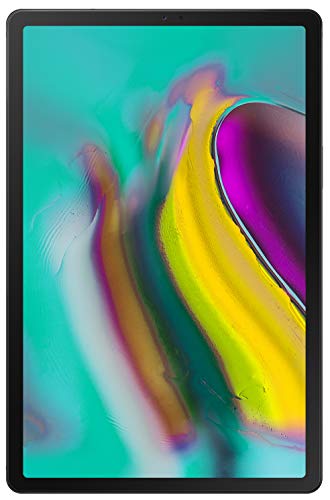
Samsung Galaxy Tab S 10.5 WiFi (3GB + 32GB) review: 168 specs compared

Avg. price:~£440RAM capacity:3 GBInternal storage:32 GBScreen size:10.5 inchesChipset:Exynos 5420

Samsung Galaxy Tab S 10.5 WiFi (3GB + 32GB) Review: Compare 168 technical specifications and 29 expert reviews to see how this product ranks in the Tablets category and whether it is worth buying.

7.4/10

Overall score

Score
7.4/ 10
✕
What it is
Our main score for this model, 1–10. It combines specs, best-of lists, expert reviews and owners.
How we count it
Parts: Technical score 35%, List score 30%, Reviews score 25%, Sentiment score 10%
Marks: Each part gets a mark out of 10. For reviews, lists and owners, a typical model in this category gets about 8 and the best one gets 10.
No data yet: A part with no data shows "?". It counts as the mark of a weaker model in this category (4 in 5 models with data score higher). This way, models with reviews, lists and owners usually come out ahead.
Score distribution
â–¼
<55-66-77-88-99-10
Score components

35%

6.1

Technical score

30%

?

List scoreNot enough data yet, so we use 7.5, the mark of a weaker model in this category

25%

8.4

Reviews score

10%

9.3

Sentiment score

â–²Better than 69% of tablets
7.7

Value for money

Value for money
7.7/ 10
✕
What it is
An indicator that combines the tablet's overall rating with its cost.
When it matters
When you are looking for a tablet with a good balance between quality and price.
Score distribution
â–¼
<55-66-77-88-99-10
Score components

70%

7.4

Overall score

30%

8.2

Price

â–²Better than 57%
6.1

Technical score

Technical score
6.1/ 10
✕
What it is
How good the specs are compared with the other models in this category, 1–10.
How we count it
Areas: We rate the specs in each area against the other models in this category.
Weighting: The areas that matter most to buyers count more. The shares are shown under Score components.
Share: The technical score is 35% of the overall score.
Score distribution
â–¼
<55-66-77-88-99-10
Score components

22%

5.9

Performance

20%

7.1

Display

16%

6.3

Camera

14%

4.6

Battery

12%

6.0

Connectivity

8%

7.2

Software

5%

6.3

Design

3%

4.8

Audio

â–²Better than 50%
8.4

Reviews score

Reviews score
8.4/ 10
✕
What it is
Average grade from independent test sites, magazines and video reviewers, 1–10.
How we count it
Grades: Each review's own score is converted to 1–10; without one, we grade the review ourselves. Big test sites count more, short reviews half as much as full tests. A video review counts half.
Score: The average grade is 80% of the review mark; the number of reviews is the other 20% (1 review = 5, the typical number in this category = 8, the most-reviewed model = 10).
Enough data: With few reviews, the average grade is pulled toward the typical grade of this category. No reviews yet: 7.4 for now.
Share: Reviews count 25% of the overall score.
Score distribution
â–¼
<55-66-77-88-99-10

80%

8.3

Average grade

20%

8.7

Popularity

Grades by review (29)
29 reviews: 20 with a printed score, 9 estimated from the review. Reviews count 25% of the overall score.
User ratings collected online are not part of this score.
â–²Better than 86%
?

List score

List score
7.5/ 10
✕
What it is
How often independent test sites, magazines and video reviewers put this model in their best-of lists for this category.
How we count it
Points: The model in the most lists of this category gets 10; the others get 8 to 10 in proportion. In no list yet: 7.5. Lists count 30% of the overall score.
Enough data: Every list counts, even a single one. With fewer than 5 best-of lists in the category, this part is left out.
Lists with this model (0)
Not in any best-of list yet, so this part counts as 7.5. Models in a list get 8 to 10.
Not in any best-of list yet
  • No image
No image
Where to buy
    N/A~ £440
Best rankings
Available: ranking among products currently available (including other versions of this product).All: ranking among all products in the database.
Other versions:
3GB + 32GB3GB + 16GB

What reviewers say about the Samsung Galaxy Tab S 10.5 WiFi (3GB + 32GB)

Based on 26

Reviewers praise the stunning screen and thin, light body, but dislike the design and cheap-feeling build.
Praised
Mixed views
Criticised
Pick a topic to see who said what

What owners say about the Samsung Galaxy Tab S 10.5 WiFi (3GB + 32GB)

Based on 207 owners sharing their experience in online comments

62%positive14%mixed24%negative

Owners love the vivid AMOLED display and media experience, while lag and battery problems are the main frustrations.

What owners dislike

  • Owners say the tablet lags and stutters, especially in the TouchWiz interface, Chrome and multitasking, and that a custom launcher helps.35
  • Owners report battery drain, slow charging and battery failures, with some needing a battery replacement after about a year.11
  • Owners say software updates slowed the tablet down or caused Wi-Fi problems, and some updates left it slower than before.7
  • Owners say the screen cracks easily when dropped, and repairs are expensive because the glass and digitizer must be replaced together.6
  • Owners report faulty audio, such as one earpiece going silent, headphones not being detected, or low volume from the speakers.6
  • Owners say the software comes with many preinstalled apps that take up storage and cannot be removed without rooting.6
  • Owners say the tablet has fewer games and apps than the iPad, so some popular titles are not available.4
  • Owners say Wi-Fi stopped working after a software update, with the switch greyed out and no internet access.4
  • Owners say the tablet charges slowly and has no fast charging, and some report it takes hours to recharge.4
  • Owners report USB and SD cards stopped being recognized after the Lollipop update, and the microSD card cover can fail to close.4

Points mentioned by at least 3 owners, most mentioned first.

Loading...
Loading category ranking...

Technical Specifications of tablet Samsung Galaxy Tab S 10.5 WiFi (3GB + 32GB)

Technical score
Technical score
6.1/ 10
✕
What it is
How good the specs are compared with the other models in this category, 1–10.
How we count it
Areas: We rate the specs in each area against the other models in this category.
Weighting: The areas that matter most to buyers count more. The shares are shown under Score components.
Share: The technical score is 35% of the overall score.
Score distribution
â–¼
<55-66-77-88-99-10
Score components:

22%

5.9

Performance

20%

7.1

Display

16%

6.3

Camera

14%

4.6

Battery

12%

6.0

Connectivity

8%

7.2

Software

5%

6.3

Design

3%

4.8

Audio

6.1
Reviews score
8.4
List score
?
Value for money
Value for money
7.7/ 10
✕
What it is
An indicator that combines the tablet's overall rating with its cost.
When it matters
When you are looking for a tablet with a good balance between quality and price.
Score distribution
â–¼
<55-66-77-88-99-10
Score components:

70%

7.4

Overall score

30%

8.2

Price

7.7
RAM capacity
3 GB
This tablet has 3 GB of RAM, which is less than 52.9% of tablets and equal to 8.4% of tablets.
Process node
28 nm
This tablet is built on a 28 nm process, which is larger than 65.1% of tablets and equal to 17.6% of tablets.
Internal storage
32 GB
This tablet has 32 GB of internal storage, which is less than 60.9% of tablets and equal to 17.9% of tablets.
Geekbench 6 single-core score
?
Chipset
Exynos 5420
This tablet runs on Exynos 5420, which is more advanced than 76.9% of tablets and equal to 0.5% of tablets.
Show more
What reviewers say
Screen resolution
2560×1600
This tablet has a 2560×1600 screen, which is sharper than 77.5% of tablets and equal to 10% of tablets.
Refresh rate
60 Hz
This tablet has a 60 Hz screen, which is smoother than 0.1% of tablets and equal to 73.4% of tablets.
Display type
OLED/AMOLED
This tablet uses a OLED/AMOLED display type. 92.5% of tablets use this display technology.
Pixel density
288 ppi
This tablet has a pixel density of 288 ppi, which is higher than 88.7% of tablets and equal to 0.4% of tablets.
Display glass type
Corning Gorilla Glass 3
This tablet protects its screen with Corning Gorilla Glass 3, which is more durable than 80.2% of tablets and the same as 11.2% of tablets.
Show more
What reviewers say
Optical image stabilization
no
This tablet does not support optical stabilisation. 0.4% of tablets offer this.
Main camera megapixels
8 MP
This tablet has a rear camera with 8 MP resolution, which is higher than 36.4% of tablets and equal to 31.9% of tablets.
Front camera megapixels
2.1 MP
This tablet has a front camera with 2.1 MP resolution, which is lower than 52.6% of tablets and equal to 1.2% of tablets.
Main camera aperture
f/2.4
This tablet has a main camera aperture of f/2.4, which is narrower than 70% of tablets and equal to 17.5% of tablets.
Optical zoom
N/A
Show more
Battery capacity
7,900 mAh
This tablet has 7,900 mAh battery capacity, which is larger than 70.1% of tablets and equal to 0.1% of tablets.
Charging speed
10 W
This tablet charges at 10 W, which is slower than 60.9% of tablets and equal to 33.3% of tablets.
Battery life
9 hours
This tablet has a battery life of 9 hours, which is shorter than that of 62.7% of tablets and equal to that of 6.9% of tablets.
Wireless charging
no
This tablet does not support wireless charging. 1.5% of tablets offer this.
Fast charging
no
This tablet does not support fast charging. 56.9% of tablets offer this.
Show more
What reviewers say
LTE support
no
This tablet does not have built-in LTE. 42.9% of tablets offer this.
Wi-Fi connectivity
yes
This tablet connects to Wi-Fi. 0.2% of tablets offer this.
GPS
yes
This tablet has built-in GPS. 17.1% of tablets offer this.
5G connectivity
no
This tablet does not support 5G. 8.1% of tablets offer this.
NFC
no
This tablet does not include NFC. 10.8% of tablets offer this.
Show more
What reviewers say
Operating system
Android
This tablet uses the Android operating system, which is more advanced than the one used by 23.2%.
Update support duration
short
This tablet offers short update support, which is shorter than the support period of 52.4% of tablets and equal to that of 47.6% of tablets.
Direct OS updates
yes
This tablet supports direct OS updates. 20.3% of tablets offer this.
On-device AI
no
This tablet does not support on-device AI. 28.3% of tablets support this capability.
App tracking protection
no
This tablet does not support app tracking protection. 28.4% of tablets offer this.
Show more
What reviewers say
IP rating
not rated
This tablet's IP rating is not rated, which is less protected than 16.5% of tablets and the same as 83.6% of tablets.
Weight
465 g
This tablet weighs 465 g, which is lighter than 59.7% of tablets and equal to 1.8% of tablets.
Backlit keyboard
no
This tablet does not support a backlit keyboard. 9.7% of tablets support backlit keyboards.
Keyboard accessory
yes
This tablet supports a keyboard accessory. 15.8% of tablets support this option.
Pen latency
N/A
Show more
What reviewers say
Number of microphones
1
This tablet has a microphone array of 1, which is more than 0.2% of tablets and equal to 54.8% of tablets.
aptX Adaptive
no
This tablet does not support aptX Adaptive. 6.9% of tablets offer this.
Dolby Atmos support
no
This tablet does not support Dolby Atmos. 31.3% of tablets support Dolby Atmos.
N. of speakers
2
This tablet includes 2 speakers, which is more than in 9.8% of tablets and equal to the number in 60.8% of tablets.
FM radio
no
This tablet does not include an FM radio. 19% of tablets offer this.
Show more
What reviewers say

Samsung Galaxy Tab S 10.5 WiFi (3GB + 32GB) vs the average tablet

246810TotalPerformanceDisplayCameraBatteryConnectivitySoftwareDesignAudio
  • More advanced chipset
    This tablet has a more advanced chipset than the average tablet (Exynos 5420 vs MediaTek MT8169A).
    Exynos 5,420 vs MediaTek MT8169A
  • Better display type
    This tablet features a better display type than the average tablet (OLED/AMOLED vs IPS LCD). The average tablet uses IPS LCD display technology.
    OLED/AMOLED vs IPS LCD
  • 102 nits higher typical brightness
    This tablet has a higher typical brightness than the average tablet (502 nits vs 400 nits). The average tablet reaches 400 nits typical brightness.
    502 nits vs 400 nits
  • More vivid contrast
    This tablet has more contrast than the average tablet (1,000,000:1 vs 1015:1). The average tablet has a contrast ratio of 1015:1.
    1,000,000:1 vs 1,015:1
  • 30.3% sharper screen detail
    This tablet has sharper screen detail than the average tablet (288 ppi vs 221 ppi). The average tablet has a pixel density of 221 ppi.
    288 ppi vs 221 ppi
  • Sharper display
    This tablet has a sharper screen than the average tablet (2560×1600 vs 1920×1200).
    2,560×1,600 vs 1,920×1,200
  • 145 nits brighter screen
    This tablet is brighter than the average tablet (546 nits vs 401 nits). The average tablet reaches 401 nits.
    546 nits vs 401 nits
  • 20.0% higher review score
    Reviews score
    8.4/ 10
    ✕
    What it is
    Average grade from independent test sites, magazines and video reviewers, 1–10.
    How we count it
    Grades: Each review's own score is converted to 1–10; without one, we grade the review ourselves. Big test sites count more, short reviews half as much as full tests. A video review counts half.
    Score: The average grade is 80% of the review mark; the number of reviews is the other 20% (1 review = 5, the typical number in this category = 8, the most-reviewed model = 10).
    Enough data: With few reviews, the average grade is pulled toward the typical grade of this category. No reviews yet: 7.4 for now.
    Share: Reviews count 25% of the overall score.
    Score distribution
    â–¼
    <55-66-77-88-99-10

    80%

    8.3

    Average grade

    20%

    8.7

    Popularity

    Grades by review (29)
    29 reviews: 20 with a printed score, 9 estimated from the review. Reviews count 25% of the overall score.
    User ratings collected online are not part of this score.
    8.4 vs 7.0
  • 20.0% higher review score
    Reviews score
    8.4/ 10
    ✕
    What it is
    Average grade from independent test sites, magazines and video reviewers, 1–10.
    How we count it
    Grades: Each review's own score is converted to 1–10; without one, we grade the review ourselves. Big test sites count more, short reviews half as much as full tests. A video review counts half.
    Score: The average grade is 80% of the review mark; the number of reviews is the other 20% (1 review = 5, the typical number in this category = 8, the most-reviewed model = 10).
    Enough data: With few reviews, the average grade is pulled toward the typical grade of this category. No reviews yet: 7.4 for now.
    Share: Reviews count 25% of the overall score.
    Score distribution
    â–¼
    <55-66-77-88-99-10

    80%

    8.3

    Average grade

    20%

    8.7

    Popularity

    Grades by review (29)
    29 reviews: 20 with a printed score, 9 estimated from the review. Reviews count 25% of the overall score.
    User ratings collected online are not part of this score.
    8.4 vs 7.0
  • 24.0% higher sentiment score
    9.3 vs 7.5
  • More advanced chipset
    This tablet has a more advanced chipset than the average tablet (Exynos 5420 vs MediaTek MT8169A).
    Exynos 5,420 vs MediaTek MT8169A
  • Better display type
    This tablet features a better display type than the average tablet (OLED/AMOLED vs IPS LCD). The average tablet uses IPS LCD display technology.
    OLED/AMOLED vs IPS LCD
  • 102 nits higher typical brightness
    This tablet has a higher typical brightness than the average tablet (502 nits vs 400 nits). The average tablet reaches 400 nits typical brightness.
    502 nits vs 400 nits
  • More vivid contrast
    This tablet has more contrast than the average tablet (1,000,000:1 vs 1015:1). The average tablet has a contrast ratio of 1015:1.
    1,000,000:1 vs 1,015:1
  • 30.3% sharper screen detail
    This tablet has sharper screen detail than the average tablet (288 ppi vs 221 ppi). The average tablet has a pixel density of 221 ppi.
    288 ppi vs 221 ppi
  • Sharper display
    This tablet has a sharper screen than the average tablet (2560×1600 vs 1920×1200).
    2,560×1,600 vs 1,920×1,200
  • 145 nits brighter screen
    This tablet is brighter than the average tablet (546 nits vs 401 nits). The average tablet reaches 401 nits.
    546 nits vs 401 nits
  • 0.4 inches larger screen
    This tablet has a larger screen than the average tablet (10.5 inches vs 10.1 inches). The average tablet measures 10.1 inches.
    10.5 inches vs 10.1 inches
  • 480 Hz higher PWM dimming frequency
    This tablet has a higher PWM dimming frequency than the average tablet (480 Hz vs 0 Hz). The average tablet has PWM dimming frequency of 0 Hz.
    480 Hz vs 0 Hz
  • More durable glass
    This tablet has more durable glass than the average tablet (Corning Gorilla Glass 3 vs Corning Gorilla Glass). The average tablet uses Corning Gorilla Glass.
    Corning Gorilla Glass 3 vs Corning Gorilla Glass
  • Supports manual ISO
    This tablet supports manual ISO, while the average tablet does not. 45.9% of tablets support manual ISO.
  • Supports slow-motion video
    This tablet supports slow-motion recording, while the average tablet does not. 37.3% of tablets support slow-motion recording.
  • Built-in camera flash
    This tablet has a camera flash, while the average tablet does not. 45.5% of tablets have one.
  • 19.7% larger battery capacity
    This tablet has a larger battery capacity than the average tablet (7,900 mAh vs 6,600 mAh). The average tablet offers 6,600 mAh of battery capacity.
    7,900 mAh vs 6,600 mAh
  • Fingerprint unlocking
    This tablet supports fingerprint unlocking, while the average tablet does not. 16% of tablets offer this.
    Fingerprint scanner in the home button.
  • Supports HDMI output
    This tablet supports HDMI output, while the average tablet does not. 49.8% of tablets offer this.
    via MHL adapter
  • 1.4 mm thinner
    This tablet is thinner than the average tablet (6.6 mm vs 8 mm). The average tablet is 8 mm thick.
    6.6 mm vs 8 mm
  • No USB-C port
    This tablet does not have a USB Type-C port, while the average tablet does. 54% of tablets have one.
  • Shorter update support
    This tablet offers shorter update support than the average tablet (short vs medium). The average tablet gets medium of update support.
    short vs medium
  • No fast charging
    This tablet does not support fast charging, while the average tablet does. 56.8% of tablets support fast charging.
  • More basic graphics
    This tablet has less advanced graphics than the average tablet (Mali-T628 MP6 vs Mali-G51).
    Mali-T628 MP6 vs Mali-G51
  • Narrower front camera aperture
    This tablet has a narrower front camera aperture than the average tablet (f/2.4 vs f/2.2). The average tablet's front camera aperture is f/2.2.
    f/2.4 vs f/2.2
  • No manual exposure control
    This tablet does not support manual exposure, while the average tablet does. 63.6% of tablets support manual exposure.
  • No picture-in-picture mode
    This tablet does not support picture-in-picture, the average tablet does. 61.4% of tablets support picture-in-picture.
  • No manual white balance
    This tablet does not support manual white balance, while the average tablet does. 51.5% of tablets support manual white balance.
  • 69.2% more expensive
    Samsung Galaxy Tab S 10.5 WiFi (3GB + 32GB) is more expensive than the average tablet (£440 vs £260).
    £440 vs £260
  • More basic graphics
    This tablet has less advanced graphics than the average tablet (Mali-T628 MP6 vs Mali-G51).
    Mali-T628 MP6 vs Mali-G51
  • 2x larger process node
    This tablet has a larger process node than the average tablet (28 nm vs 14 nm). The average tablet is built on 14 nm.
    28 nm vs 14 nm
  • 50% less internal storage
    This tablet has less internal storage than the average tablet (32 GB vs 64 GB). The average tablet has 64 GB of internal storage.
    32 GB vs 64 GB
  • 1 GB less RAM
    This tablet has less RAM than the average tablet (3 GB vs 4 GB). The average tablet has 4 GB of RAM.
    3 GB vs 4 GB
  • 5 years older
    This tablet was released earlier than the average tablet (2014 vs 2019). The average tablet was released in 2019.
    July 2014
    2014 vs 2019
  • 5% lower CPU speed
    This tablet has a lower CPU speed than the average tablet (1.9 GHz vs 2 GHz). The average tablet has CPU speed of 2 GHz.
    1.9 GHz vs 2 GHz
  • Narrower front camera aperture
    This tablet has a narrower front camera aperture than the average tablet (f/2.4 vs f/2.2). The average tablet's front camera aperture is f/2.2.
    f/2.4 vs f/2.2
  • No manual exposure control
    This tablet does not support manual exposure, while the average tablet does. 63.6% of tablets support manual exposure.
  • No manual white balance
    This tablet does not support manual white balance, while the average tablet does. 51.5% of tablets support manual white balance.
  • 2.9 MP lower front resolution
    This tablet has a lower-resolution front camera than the average tablet (2.1 MP vs 5 MP). The average tablet has a front camera of 5 MP.
    2.1 MP vs 5 MP
  • No backside-illuminated sensor
    This tablet does not have a BSI sensor, while the average tablet does. 52.6% of tablets have a BSI sensor.
  • Narrower main camera aperture
    This tablet has a narrower main camera aperture than the average tablet (f/2.4 vs f/2.2). The average tablet's main camera aperture is f/2.2.
    f/2.4 vs f/2.2
  • No fast charging
    This tablet does not support fast charging, while the average tablet does. 56.8% of tablets support fast charging.
  • 44.4% slower charging
    This tablet charges slower than the average tablet (10 W vs 18 W). The average tablet charges at 18 W.
    10 W vs 18 W
  • 1 hours shorter battery life
    This tablet offers shorter battery life than the average tablet (9 hours vs 10 hours). The average tablet offers 10 hours of battery life.
    9 hours vs 10 hours
  • No USB-C port
    This tablet does not have a USB Type-C port, while the average tablet does. 54% of tablets have one.
  • Older Bluetooth version
    This tablet has an older Bluetooth version than the average tablet (4 vs 5).
    4 vs 5
  • Shorter update support
    This tablet offers shorter update support than the average tablet (short vs medium). The average tablet gets medium of update support.
    short vs medium
  • No picture-in-picture mode
    This tablet does not support picture-in-picture, the average tablet does. 61.4% of tablets support picture-in-picture.
  • No dark mode
    This tablet does not support dark mode, while the average tablet does. 57.7% of tablets offer this.
  • 47.3 mm taller
    This tablet is taller than the average tablet (247.3 mm vs 200 mm). The average tablet is 200 mm tall.
    247.3 mm vs 200 mm

Expert reviews

In-depth analysis and verdict from leading tech publications
8.3
cnet.com
✓ explicit
24/06/2014
Full review · Entertainment slate
Verdict
The Samsung Galaxy Tab S 10.5 is a thin, light tablet with a vivid screen that suits movie and magazine fans, though it can lag with many apps open.
8.0
pcmag.com
✓ explicit
24/06/2014
Full review · Media and Wi-Fi
Verdict
The Samsung Galaxy Tab S 10.5 is slim with an excellent screen, but the iPad Air is the better choice for most tasks.
9.0
techadvisor.com
✓ explicit
01/08/2014
Full review · Media-focused tablet
Verdict
The Samsung Galaxy Tab S 10.5 is one of Samsung's best tablets, with a thin body and long battery life, though its plastic build feels cheap.
8.0
wired.com
✓ explicit
22/08/2014
Full review · Thin and light
Verdict
The Samsung Galaxy Tab S 10.5 is very thin and light with an excellent AMOLED screen, though its plastic body feels less solid than an iPad's.
7.8
theverge.com
✓ explicit
24/06/2014
Full review · Design and software
Verdict
The Samsung Galaxy Tab S 10.5 has a great screen and light build, but cluttered software and plain plastic design make it hard to recommend over an iPad.
8.0
avforums.com
✓ explicit
20/08/2014
Full review · Display and performance
Verdict
The Samsung Galaxy Tab S 10.5 has an excellent display and smooth performance in most games, though it still flexes and feels less solid than an iPad Air.
8.0
ubergizmo.com
≈ estimated
17/09/2014
Daily-use test · Entertainment tablet
Verdict
The Galaxy Tab S 10.5 is a light, vivid tablet with good battery life for everyday browsing and movies, but its fingerprint reader is fiddly.
9.0
techradar.com
✓ explicit
09/12/2014
Full review · iPad rival
Verdict
The Galaxy Tab S is strong competition for the iPad, with a sharp screen and plenty of power, though its bundled extras feel niche.
8.0
gizmodo.com
≈ estimated
24/06/2014
Hands-on review · Screen-focused tablet
Verdict
The Galaxy Tab S 10.5 has the best tablet screen so far, a strong pick for video and photo work, though thin speakers and occasional stutter let it down.
10
stuff.tv
✓ explicit
27/07/2014
Long-term review · Screen and battery
Verdict
The Galaxy Tab S 10.5 pairs an excellent screen and long battery life with useful Multi Window, but it stutters and feels less solid than an iPad Air.
8.0
digitaltrends.com
✓ explicit
23/08/2019
Full review · Family Android tablet
Verdict
The Galaxy Tab S 10.5 is a thin, light tablet with an excellent screen and strong performance, suited to households sharing one device, though its fingerprint reader is awkward.
9.0
trustedreviews.com
✓ explicit
13/06/2014
Full review · Big-screen Android tablet
Verdict
The Galaxy Tab S 10.5 is the best 10-inch Android tablet, with an excellent screen and long battery life, though its fingerprint reader and unremovable Samsung software let it down.
T
t3.com
21/07/2014
✓ explicit
8.0
Summary of the review
W
whathifi.com
22/08/2014
✓ explicit
8.0
Summary of the review
E
expertreviews.co.uk
07/09/2015
✓ explicit
8.0
Summary of the review
9.0
connect.de
≈ estimated
07/08/2014
Lab test · Slim design tablet
Verdict
The Galaxy Tab S 10.5 suits indoor use with its sharp screen and slim body, but it is dim outdoors and lasts about eight hours.
7.8
computerbild.de
✓ explicit
18/07/2014
Full test · iPad Air rival
Verdict
The Galaxy Tab S 10.5 has a sharp, color-accurate screen and quick performance, but it trails the iPad Air on battery life.
8.0
pcwelt.de
≈ estimated
13/06/2014
First hands-on · Premium Android tablet
Verdict
The Galaxy Tab S 10.5 is a thin, sharp tablet with a sturdy cover system, but this first look cannot yet judge its battery life.
8.4
computerwoche.de
✓ explicit
25/08/2014
Lab test · Battery and games
Verdict
The Galaxy Tab S 10.5 is slim, light and smooth in games, with a deep-contrast screen, but it oversaturates colors and trails the iPad Air on web battery life.
9.0
chip.de
≈ estimated
15/09/2014
Full test · Color-rich Android tablet
Verdict
The Galaxy Tab S 10.5 has a vivid, deep-black AMOLED screen and a slim body, but its plastic build is only average and it charges slowly.

Verdict

The Samsung Galaxy Tab S 10.5 WiFi (SM-T800) is a premium tablet featuring a stunning 10.5-inch Super AMOLED display with a 2560 x 1600 resolution and a high pixel density of 288 ppi. Under the hood, the WiFi model is powered by the Exynos 5 Octa 5420 processor (comprising 1.9GHz and 1.3GHz quad-core chips) paired with 3GB of RAM and 32GB of internal storage, which is expandable up to 128GB via a microSD slot. Its main characteristics include an exceptionally thin 6.6mm profile, a lightweight 465g build, a fingerprint scanner for security, and an 8MP rear camera with LED flash. Key pros include the vibrant, high-contrast screen that covers 90% of the Adobe RGB colour gamut, long-lasting 7900mAh battery life, and efficient multitasking with the Multi Window feature; however, cons include a relatively slow charging time and integrated stereo speakers that some reviewers describe as having a tinny sound at high volumes.

Compare Samsung Galaxy Tab S 10.5 WiFi (3GB + 32GB) with other tablets

1Product to compare no. 1
VS
2Product to compare no. 2
VS
3Product to compare no. 3 (optional)

Graphic comparison of Samsung Galaxy Tab S 10.5 WiFi (3GB + 32GB) and other tablets

No results found