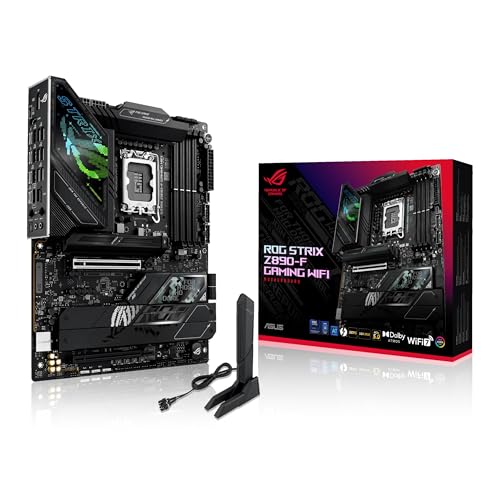
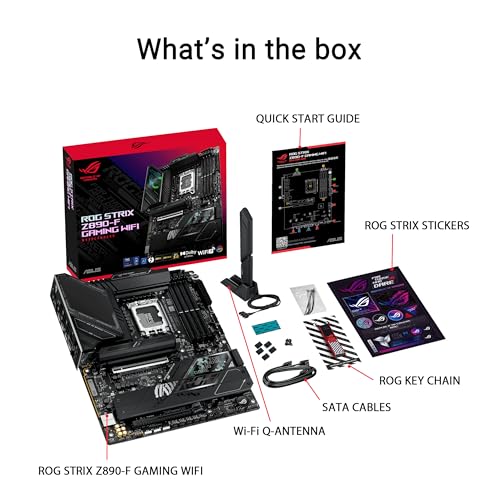
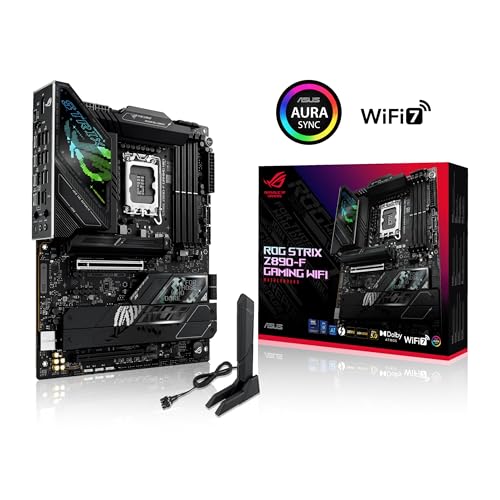
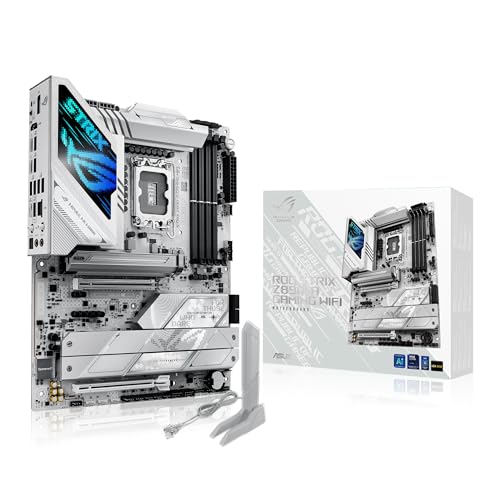
ASUS ROG Strix Z890 F Gaming WiFi Review | 107 Data compared

Avg. price in UK:~£310Avg. price in US:~$430CPU socket:LGA 1851Chipset:Intel Z890Form factor:ATX

ASUS ROG Strix Z890 F Gaming WiFi Review: Compare 107 technical specifications and user reviews to see how this product ranks in the Motherboards category and whether it is worth buying.

9.3

Overall score

Score
9.3/ 10
✕
What it is
An overall evaluation of the motherboard's quality, based on technical analyses and user reviews.
When it matters
When you need a quick reference to identify the best motherboards on the market.
Score distribution
â–¼
<55-66-77-88-99-10
Score components

90%

9.4

Technical Score

10%

8.4

User score

★Better than 99% of motherboards
9.4

Technical Score

Technical score
9.4/ 10
✕
What it is
An assessment of technical performance for products in the Motherboards category across these key areas: Platform & Features, Memory, Storage, Expansion, Ports & USB, Network, Audio, Power & Cooling.
When it matters
When you want to compare motherboards based on technical performance and available features.
Score distribution
â–¼
<55-66-77-88-99-10
Score components

19%

9.9

Memory

16%

9.3

Platform & Features

16%

9.7

Storage

15%

9.7

Network

13%

9.3

Ports & USB

8%

8.5

Expansion

8%

8.9

Power & Cooling

5%

9.3

Audio

★Better than 99% of motherboards
8.4

User score

User score
8.4/ 10
✕
What it is
A rating that combines user reviews and the total number of reviews received by the motherboard.
When it matters
When you want to understand how a motherboard performs in real-world builds and how reliable it is in terms of stability, BIOS usability, connectivity, and long-term ownership.
Score distribution
â–¼
<55-66-77-88-99-10
Score components

70%

9.2

User reviews

30%

6.4

Popularity

User score:
United Kingdom
amazon
4.5
(45)
amazon
4.8
(22)
United States
Amazon_logo.png
4.5
(45)
Amazon_logo.png
4.8
(22)

(Reviews last updated: May 2026)

â–²Better than 70% of motherboards
  • asus-rog-strix-z890-f-gaming-wifi
  • asus-rog-strix-z890-f-gaming-wifi
  • asus-rog-strix-z890-f-gaming-wifi
  • asus-rog-strix-z890-f-gaming-wifi
  • asus-rog-strix-z890-f-gaming-wifi
  • asus-rog-strix-z890-f-gaming-wifi
  • asus-rog-strix-z890-f-gaming-wifi
asus-rog-strix-z890-f-gaming-wifi

Best prices in UK

Best rankings

Available: ranking among products currently available (including other versions of this product).All: ranking among all products in the database.
Loading...
Loading category ranking...

Verdict

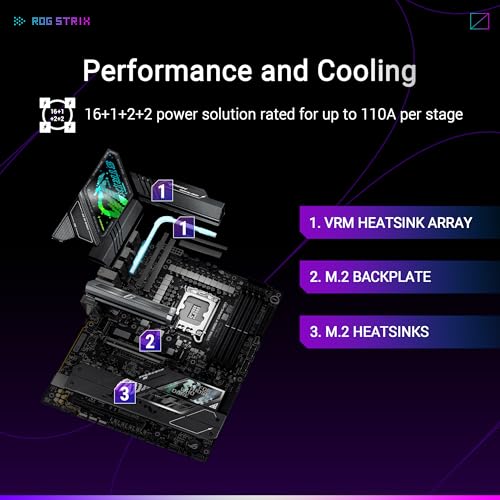
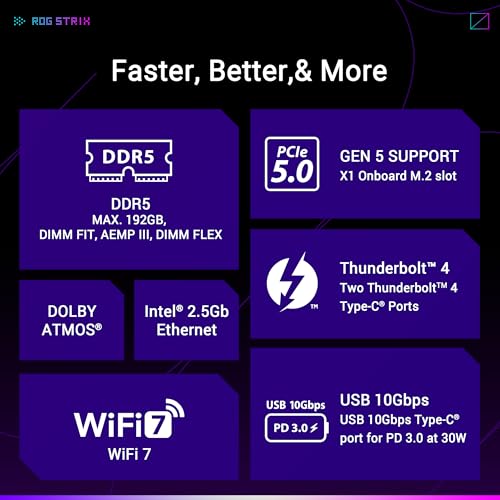
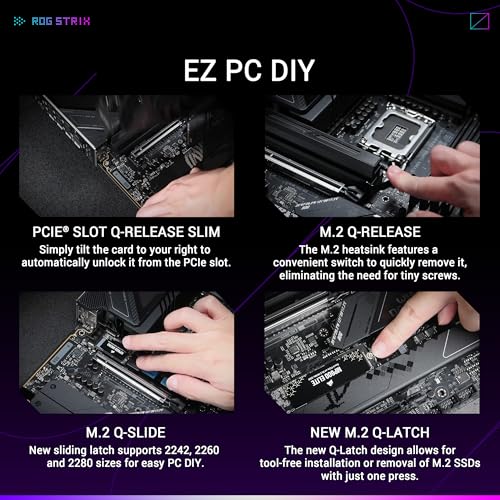
The ASUS ROG Strix Z890-F Gaming WiFi is a high-performance ATX motherboard built on the Intel Z890 chipset and LGA 1851 socket, designed to support Intel Core Ultra processors (Series 2). It features a robust 16+1+2+2 power stage design rated for 110A to ensure stable power delivery, alongside support for up to 192GB of DDR5 memory with overclocking speeds exceeding 8600+ MT/s. Connectivity is a major strength, offering dual Thunderbolt 4 ports, PCIe 5.0 for both the primary GPU slot and an onboard M.2 slot, as well as high-speed WiFi 7 and 2.5Gb Ethernet. Main pros include its 'DIY-friendly' features like the PCIe Slot Q-Release Slim and M.2 Q-Latch, excellent build quality, and a comprehensive five-slot M.2 storage array. However, some users may find the 2.5Gb Ethernet and slightly lower RAM speed support to be minor drawbacks compared to higher-tier competitors like the Z890-E model.

Technical Specifications of motherboard ASUS ROG Strix Z890 F Gaming WiFi

Technical Score
Technical score
9.4/ 10
✕
What it is
An assessment of technical performance for products in the Motherboards category across these key areas: Platform & Features, Memory, Storage, Expansion, Ports & USB, Network, Audio, Power & Cooling.
When it matters
When you want to compare motherboards based on technical performance and available features.
Score distribution
â–¼
<55-66-77-88-99-10
Score components:

19%

9.9

Memory

16%

9.3

Platform & Features

16%

9.7

Storage

15%

9.7

Network

13%

9.3

Ports & USB

8%

8.5

Expansion

8%

8.9

Power & Cooling

5%

9.3

Audio

9.4
ASUS ROG Strix Z890 F Gaming WiFi has a technical score of 9.4 points, which is higher than that of 99.6% of products in this category.
User score
User score
8.4/ 10
✕
What it is
A rating that combines user reviews and the total number of reviews received by the motherboard.
When it matters
When you want to understand how a motherboard performs in real-world builds and how reliable it is in terms of stability, BIOS usability, connectivity, and long-term ownership.
Score distribution
â–¼
<55-66-77-88-99-10
Score components

70%

9.2

User reviews

30%

6.4

Popularity

User score:
United Kingdom
amazon
4.5
(45)
amazon
4.8
(22)
United States
Amazon_logo.png
4.5
(45)
Amazon_logo.png
4.8
(22)

(Reviews last updated: May 2026)

8.4
ASUS ROG Strix Z890 F Gaming WiFi has a user score of 8.36 points, which is higher than that of 69.6% of products in this category.
Popularity
Popularity
6.4/ 10
✕
What it is
An indicator based on the number of reviews received by the motherboard.
When it matters
When you prefer a motherboard that has already been bought and reviewed by many other users.
Score distribution
â–¼
<55-66-77-88-99-10
Popularity:
ASUS ROG Strix Z890 F Gaming WiFi has a popularity score of 6.4 points, which is higher than that of 51.2% of products in this category.
6.4
ASUS ROG Strix Z890 F Gaming WiFi has a popularity score of 6.4 points, which is higher than that of 51.2% of products in this category.
Ratio quality/price
Value for money
9.2/ 10
✕
What it is
An indicator that combines the motherboard's overall rating with its cost.
When it matters
When you are looking for a motherboard that offers a strong balance of features, performance, and price.
Score distribution
â–¼
<55-66-77-88-99-10
Score components:

60%

9.3

Overall score

40%

8.9

Price

9.2
ASUS ROG Strix Z890 F Gaming WiFi has a value-for-money score of 9.2 points, which is higher than that of 98.9% of products in this category.
Brand name
Asus
CPU socket
LGA 1851
CPU socket
LGA 1851
This motherboard uses the LGA 1851 CPU socket, which is more advanced than that of 77.7% of motherboards and equal to that of 8.1% of motherboards.
CPU platform
Intel
CPU platform
Intel
This motherboard is built for the Intel CPU platform, which is more versatile than that of 31.6% of motherboards and equal to that of 68.4% of motherboards.
Chipset
Intel Z890
Chipset
Intel Z890
This motherboard uses the Intel Z890 chipset, which is more advanced than that of 94.5% of motherboards and equal to that of 3.8% of motherboards.
Form factor
ATX
Form factor
ATX
This motherboard has the ATX form factor, which is more versatile than that of 47.8% of motherboards and equal to that of 52.2% of motherboards.
Show more
DDR memory version
DDR5
DDR memory version
DDR5
This motherboard uses DDR5 memory, which is newer than that of 64.3% of motherboards and equal to that of 35.7% of motherboards.
Memory slots
4
Memory slots
4
This motherboard has 4 Memory slots, which is more than 21.5% of motherboards and equal to 72.5% of motherboards.
Maximum memory capacity
256 GB
Maximum memory capacity
256 GB
This motherboard supports up to 256 GB of memory, which is more than 82.9% of motherboards and equal to 16.4% of motherboards.
requires BIOS update for full capacity
Memory channels
2
Memory channels
2
This motherboard supports 2 memory channels, which is more than 0.2% of motherboards and equal to 92.6% of motherboards.
Maximum RAM speed
9,066 MT/s
Maximum RAM speed
9,066 MT/s
This motherboard supports memory speeds up to 9,066 MT/s, which is higher than that of 96.4% of motherboards and equal to that of 1.3% of motherboards.
Show more
N. of M.2 sockets
5
N. of M.2 sockets
5
This motherboard has 5 M.2 sockets, which is more than 94.8% of motherboards and equal to 4.3% of motherboards.
M.2 slot interface per slot
1x PCIe 5.0 x4, 3x PCIe 4.0 x4, 1x PCIe 4.0 x4/SATA
M.2 slot interface per slot
1x PCIe 5.0 x4, 3x PCIe 4.0 x4, 1x PCIe 4.0 x4/SATA
This motherboard offers 1x PCIe 5.0x4, 3x PCIe 4.0x4, 1x PCIe 4.0x4/SATA for M.2 slot interfaces, which is faster than that of 96.4% of motherboards and equal to that of 0.9% of motherboards.
N. of SATA 3 connectors
4
N. of SATA 3 connectors
4
This motherboard has 4 SATA 3 connectors, which is more than 5.6% of motherboards and equal to 46.2% of motherboards.
Supported RAID levels
0/1/5/10
Supported RAID levels
0/1/5/10
This motherboard supports RAID levels 0/1/5/10, which is broader than 32% of motherboards and equal to 68% of motherboards.
NVMe RAID support
yes
NVMe RAID support
yes
This motherboard supports NVMe RAID. 40.3% of motherboards support this feature.
Show more
N. of PCIe 5.0 x16 slots
1
N. of PCIe 5.0 x16 slots
1
This motherboard has 1 PCIe 5.0x16 slots, which is more than 68.6% of motherboards and equal to 26.6% of motherboards.
N. of PCIe 4.0 x16 slots
1
N. of PCIe 4.0 x16 slots
1
This motherboard has 1 PCIe 4.0x16 slots, which is more than 55.5% of motherboards and equal to 35.4% of motherboards.
runs at x4 mode
N. of PCIe 3.0 x16 slots
0
N. of PCIe 3.0 x16 slots
0
This motherboard has 0 PCIe 3.0x16 slots, which is fewer than 59.6% of motherboards and equal to 40.4% of motherboards.
PCIe slot electrical configuration
x16/x0/x4
PCIe slot electrical configuration
x16/x0/x4
This motherboard uses x16/x0/x4 for PCIe slot electrical configuration, which is more flexible than that of 51% of motherboards and equal to that of 9.6% of motherboards.
PCIe bifurcation support
yes
PCIe bifurcation support
yes
This motherboard supports PCIe bifurcation. 40.4% of motherboards support this feature.
x8/x4/x4.
Show more
Total USB ports (rear I/O)
14
Total USB ports (rear I/O)
14
This motherboard has 14 USB ports (rear I/O), which is more than 99.2% of motherboards and equal to 0.6% of motherboards.
Total USB ports (including headers)
23
Total USB ports (including headers)
23
This motherboard has 23 USB ports (including headers), which is more than 98.5% of motherboards and equal to 0.9% of motherboards.
Total USB-C ports (rear I/O)
2
Total USB-C ports (rear I/O)
2
This motherboard has 2 USB-C ports (rear I/O), which is more than 84.2% of motherboards and equal to 12.3% of motherboards.
Thunderbolt / USB4 Type-C ports counted.
Total USB-C ports (including headers)
5
Total USB-C ports (including headers)
5
This motherboard has 5 USB-C ports (including headers), which is more than 98.4% of motherboards and equal to 1.2% of motherboards.
includes internal USB-C header.
N. of USB 3.2 Gen2x2 ports (USB-C)
0
N. of USB 3.2 Gen2x2 ports (USB-C)
0
This motherboard has 0 USB 3.2 Gen2x2 ports (USB-C), which is fewer than 18.3% of motherboards and equal to 81.7% of motherboards.
Thunderbolt excluded.
Show more
LAN speed
2.5 Gbps
LAN speed
2.5 Gbps
This motherboard supports LAN speeds up to 2.5 Gbps, which is higher than that of 49.3% of motherboards and equal to that of 41.4% of motherboards.
LAN controller
?
N. of RJ45 ports
1
N. of RJ45 ports
1
This motherboard has 1 RJ45 ports, which is fewer than 14.4% of motherboards and equal to 85.6% of motherboards.
Wi-Fi connectivity
yes
Wi-Fi connectivity
yes
This motherboard supports Wi-Fi connectivity. 50% of motherboards support this feature.
Wi-Fi version
Wi-Fi 7 (802.11be)
Wi-Fi version
Wi-Fi 7 (802.11be)
This motherboard supports Wi-Fi 7 (802.11be), which is newer than that of 88.7% of motherboards and equal to that of 11.3% of motherboards.
Show more
Audio codec
Realtek ALC4080
Audio codec
Realtek ALC4080
This motherboard uses the Realtek ALC4080 audio codec, which is more advanced than that of 90.3% of motherboards and equal to that of 6.5% of motherboards.
Audio channels
7.1
Audio channels
7.1
This motherboard offers 7.1 audio channels, which is more than 4.9% of motherboards and equal to 95.1% of motherboards.
Audio SNR
120 dB
Audio SNR
120 dB
This motherboard has an audio SNR of 120 dB, which is higher than that of 56% of motherboards and equal to that of 40.5% of motherboards.
Headphone amp support
yes
Headphone amp support
yes
This motherboard supports a headphone amp. 40.8% of motherboards support this feature.
headphone amp on front panel.
N. of 3.5mm audio jacks
2
N. of 3.5mm audio jacks
2
This motherboard has 2 3.5mm audio jacks, which is fewer than 88.6% of motherboards and equal to 11.1% of motherboards.
Show more
VRM phases
16
VRM phases
16
This motherboard has 16 VRM phases, which is more than 79.6% of motherboards and equal to 3.4% of motherboards.
N. of CPU power connectors
2
N. of CPU power connectors
2
This motherboard has 2 CPU power connectors, which is more than 54.6% of motherboards and equal to 45.1% of motherboards.
N. of fan headers
8
N. of fan headers
8
This motherboard has 8 fan headers, which is more than 82.2% of motherboards and equal to 15% of motherboards.
Pump header
yes
Pump header
yes
This motherboard has a pump header. 21.9% of motherboards include this feature.
Pump header max current
1 A
Pump header max current
1 A
This motherboard supports up to 1 A on the pump header, which is lower than that of 56.3% of motherboards and equal to that of 19.7% of motherboards.
Show more

ASUS ROG Strix Z890 F Gaming WiFi vs the average motherboard

246810TotalPlatform & FeaturesMemoryStorageExpansionPorts & USBNetworkAudioPower & Cooling
  • 3 more M.2 sockets
    N. of M.2 sockets
    5
    This motherboard has more M.2 sockets than the average motherboard (5 vs 2). The average motherboard has 2 M.2 socket/s.
    5 vs 2
  • 6 more rear USB ports
    Total USB ports (rear I/O)
    14
    This motherboard has more rear USB ports than the average motherboard (14 vs 8). The average motherboard has 8 rear USB port/s.
    14 vs 8
  • 2x more maximum memory capacity
    Maximum memory capacity
    256 GB
    This motherboard has more maximum memory capacity than the average motherboard (256 GB vs 128 GB). The average motherboard supports 128 GB of memory.
    requires BIOS update for full capacity
    256 GB vs 128 GB
  • Newer CPU socket
    CPU socket
    LGA 1851
    This motherboard has newer CPU socket than the average motherboard (LGA 1851 vs LGA 1151). The average motherboard uses LGA 1151 CPU socket.
    LGA 1,851 vs LGA 1,151
  • Newer DDR memory generation
    DDR memory version
    DDR5
    This motherboard has newer DDR memory generation than the average motherboard (DDR5 vs DDR4). The average motherboard supports DDR4 memory.
    DDR5 vs DDR4
  • 3 more USB 3.2 Gen2 ports
    N. of USB 3.2 Gen2 ports (USB-A)
    4
    This motherboard has more USB 3.2 Gen2 ports than the average motherboard (4 vs 1). The average motherboard has 1 USB 3.2 Gen2 port/s.
    4 vs 1
  • Newer Wi-Fi standard
    Wi-Fi version
    Wi-Fi 7 (802.11be)
    This motherboard has newer Wi-Fi standard than the average motherboard (Wi-Fi 7 (802.11be) vs Wi-Fi 5 (802.11ac)). The average motherboard supports Wi-Fi 5 (802.11ac) Wi-Fi.
    Wi-Fi 7 (802.11be) vs Wi-Fi 5 (802.11ac)
  • 1 more PCIe 5.0x16 slots
    N. of PCIe 5.0 x16 slots
    1
    This motherboard has more PCIe 5.0x16 slots than the average motherboard (1 vs 0). The average motherboard has 0 PCIe 5.0x16 slot/s.
    1 vs 0
  • 24.1% better value for money
    ASUS ROG Strix Z890 F Gaming WiFi has better value for money than the average motherboard (9.2 vs 7.4).
    9.2 vs 7.41
  • Newer CPU socket
    CPU socket
    LGA 1851
    This motherboard has newer CPU socket than the average motherboard (LGA 1851 vs LGA 1151). The average motherboard uses LGA 1151 CPU socket.
    LGA 1,851 vs LGA 1,151
  • Integrated I/O shield
    Integrated I/O shield
    yes
    This motherboard has an integrated I/O shield, while the average motherboard does not. 46% of motherboards include an integrated I/O shield.
  • Rear-panel CMOS reset button
    Rear-panel CMOS reset button
    yes
    This motherboard has a rear-panel CMOS reset button, while the average motherboard does not. 26.7% of motherboards include a rear-panel CMOS reset button.
  • Better motherboard chipset
    Chipset
    Intel Z890
    This motherboard has better motherboard chipset than the average motherboard (Intel Z890 vs Intel B860). The average motherboard uses Intel B860 chipset.
    Intel Z890 vs Intel B860
  • Includes onboard power button
    Onboard power button
    yes
    This motherboard has an onboard power button, while the average motherboard does not. 27.7% of motherboards include an onboard power button.
  • 2x more maximum memory capacity
    Maximum memory capacity
    256 GB
    This motherboard has more maximum memory capacity than the average motherboard (256 GB vs 128 GB). The average motherboard supports 128 GB of memory.
    requires BIOS update for full capacity
    256 GB vs 128 GB
  • Newer DDR memory generation
    DDR memory version
    DDR5
    This motherboard has newer DDR memory generation than the average motherboard (DDR5 vs DDR4). The average motherboard supports DDR4 memory.
    DDR5 vs DDR4
  • 91.5% higher maximum RAM speed
    Maximum RAM speed
    9,066 MT/s
    This motherboard has a higher maximum RAM speed than the average motherboard (9066 MT/s vs 4733 MT/s). The average motherboard supports RAM speed of 4733 MT/s.
    9,066 MT/s vs 4,733 MT/s
  • 83.8% higher overclocked RAM speed
    Maximum overclocked RAM speed
    9,066 MT/s
    This motherboard has a higher overclocked RAM speed than the average motherboard (9066 MT/s vs 4933 MT/s). The average motherboard supports overclocked RAM speed of 4933 MT/s.
    9,066 MT/s vs 4,933 MT/s
  • 3 more M.2 sockets
    N. of M.2 sockets
    5
    This motherboard has more M.2 sockets than the average motherboard (5 vs 2). The average motherboard has 2 M.2 socket/s.
    5 vs 2
  • Faster M.2 slot interfaces
    M.2 slot interface per slot
    1x PCIe 5.0 x4, 3x PCIe 4.0 x4, 1x PCIe 4.0 x4/SATA
    This motherboard has faster M.2 slot interfaces than the average motherboard (1x PCIe 5x4, 3x PCIe 4x4, 1x PCIe 4x4/SATA vs 1x PCIe 5x4, 2x PCIe 4x4). The average motherboard uses 1x PCIe 5.0x4, 2x PCIe 4.0x4 M.2 slot interfaces.
    1x PCIe 5.0x4, 3x PCIe 4.0x4, 1x PCIe 4.0x4/SATA vs 1x PCIe 5.0x4, 2x PCIe 4.0x4
  • 1 more PCIe 5.0x16 slots
    N. of PCIe 5.0 x16 slots
    1
    This motherboard has more PCIe 5.0x16 slots than the average motherboard (1 vs 0). The average motherboard has 0 PCIe 5.0x16 slot/s.
    1 vs 0
  • 1 more PCIe 4.0x16 slots
    N. of PCIe 4.0 x16 slots
    1
    This motherboard has more PCIe 4.0x16 slots than the average motherboard (1 vs 0). The average motherboard has 0 PCIe 4.0x16 slot/s.
    runs at x4 mode
    1 vs 0
  • 1 more PCIe x4 slots
    N. of PCIe x4 slots
    1
    This motherboard has more PCIe x4 slots than the average motherboard (1 vs 0). The average motherboard has 0 PCIe x4 slot/s.
    1 vs 0
  • 6 more rear USB ports
    Total USB ports (rear I/O)
    14
    This motherboard has more rear USB ports than the average motherboard (14 vs 8). The average motherboard has 8 rear USB port/s.
    14 vs 8
  • 3 more USB 3.2 Gen2 ports
    N. of USB 3.2 Gen2 ports (USB-A)
    4
    This motherboard has more USB 3.2 Gen2 ports than the average motherboard (4 vs 1). The average motherboard has 1 USB 3.2 Gen2 port/s.
    4 vs 1
  • 2 more USB 3.2 Gen2 USB-C ports
    N. of USB 3.2 Gen2 ports (USB-C)
    2
    This motherboard has more USB 3.2 Gen2 USB-C ports than the average motherboard (2 vs 0). The average motherboard has 0 USB 3.2 Gen2 USB-C port/s.
    2 vs 0
  • 8 more total USB connections
    Total USB ports (including headers)
    23
    This motherboard has more total USB connections than the average motherboard (23 vs 15). The average motherboard has 15 total USB connections.
    23 vs 15
  • 1 more rear USB-C ports
    Total USB-C ports (rear I/O)
    2
    This motherboard has more rear USB-C ports than the average motherboard (2 vs 1). The average motherboard has 1 rear USB-C port/s.
    Thunderbolt / USB4 Type-C ports counted.
    2 vs 1
  • 4 more total USB-C connections
    Total USB-C ports (including headers)
    5
    This motherboard has more total USB-C connections than the average motherboard (5 vs 1). The average motherboard has 1 total USB-C connections.
    includes internal USB-C header.
    5 vs 1
  • 1 more USB 3.2 Gen1 headers
    N. of USB 3.2 Gen1 headers (USB-A)
    2
    This motherboard has more USB 3.2 Gen1 headers than the average motherboard (2 vs 1). The average motherboard has 1 USB 3.2 Gen1 header/s.
    two internal headers
    2 vs 1
  • 1 more USB4 or Thunderbolt headers
    N. of USB4 / Thunderbolt headers (USB-C)
    1
    This motherboard has more USB4 or Thunderbolt headers than the average motherboard (1 vs 0). The average motherboard has 0 USB4 or Thunderbolt header/s.
    1 vs 0
  • 1 more USB 3.2 Gen2 headers
    N. of USB 3.2 Gen2 headers (USB-C)
    1
    This motherboard has more USB 3.2 Gen2 headers than the average motherboard (1 vs 0). The average motherboard has 0 USB 3.2 Gen2 header/s.
    1 vs 0
  • 1 more USB 3.2 Gen2x2 headers
    N. of USB 3.2 Gen2x2 headers (USB-C)
    1
    This motherboard has more USB 3.2 Gen2x2 headers than the average motherboard (1 vs 0). The average motherboard has 0 USB 3.2 Gen2x2 header/s.
    1 vs 0
  • Newer Wi-Fi standard
    Wi-Fi version
    Wi-Fi 7 (802.11be)
    This motherboard has newer Wi-Fi standard than the average motherboard (Wi-Fi 7 (802.11be) vs Wi-Fi 5 (802.11ac)). The average motherboard supports Wi-Fi 5 (802.11ac) Wi-Fi.
    Wi-Fi 7 (802.11be) vs Wi-Fi 5 (802.11ac)
  • Supports Bluetooth
    Bluetooth connectivity
    yes
    This motherboard supports Bluetooth, while the average motherboard does not. 48.9% of motherboards support Bluetooth.
  • Better audio codec
    Audio codec
    Realtek ALC4080
    This motherboard has better audio codec than the average motherboard (Realtek ALC4080 vs Realtek ALC897). The average motherboard uses Realtek ALC897 audio codec.
    Realtek ALC4080 vs Realtek ALC897
  • 5 dB higher audio SNR
    Audio SNR
    120 dB
    This motherboard has a higher audio SNR than the average motherboard (120 dB vs 115 dB). The average motherboard has audio SNR of 115 dB.
    120 dB vs 115 dB
  • 1 more CPU power connectors
    N. of CPU power connectors
    2
    This motherboard has more CPU power connectors than the average motherboard (2 vs 1). The average motherboard has 1 CPU power connectors.
    2 vs 1
  • More VRM phases
    VRM phases
    16
    This motherboard has more VRM phases than the average motherboard (16 vs 10). The average motherboard has 10 VRM phase/s.
    16 vs 10
  • 2.5 more fan headers
    N. of fan headers
    8
    This motherboard has more fan headers than the average motherboard (8 vs 5.5). The average motherboard has 5.5 fan header/s.
    8 vs 5.5
  • 1 more ARGB headers
    N. of ARGB headers (3-pin)
    3
    This motherboard has more ARGB headers than the average motherboard (3 vs 2). The average motherboard has 2 ARGB header/s.
    3 vs 2
  • 3 fewer 3.5mm audio jacks
    N. of 3.5mm audio jacks
    2
    This motherboard has fewer 3.5mm audio jacks than the average motherboard (2 vs 5). The average motherboard has 5 3.5mm audio jacks.
    2 vs 5
  • 93.8% more expensive
    ASUS ROG Strix Z890 F Gaming WiFi is more expensive than the average motherboard (£310 vs £160).
    £310 vs £160
  • 1 fewer PS/2 ports
    N. of PS/2 ports
    0
    This motherboard has fewer PS/2 ports than the average motherboard (0 vs 1). The average motherboard has 1 PS/2 port/s.
    0 vs 1
  • 1 fewer PCIe x1 slots
    N. of PCIe x1 slots
    0
    This motherboard has fewer PCIe x1 slots than the average motherboard (0 vs 1). The average motherboard has 1 PCIe x1 slot/s.
    0 vs 1
  • Less flexible PCIe lane configuration
    PCIe slot electrical configuration
    x16/x0/x4
    This motherboard has less flexible PCIe lane configuration than the average motherboard (x16/x0/x4 vs x16/x0/x4, x8/x8/x4). The average motherboard uses x16/x0/x4, x8/x8/x4 PCIe slot lane configuration.
    x16/x0/x4 vs x16/x0/x4, x8/x8/x4
  • Fewer useful accessories
    Included accessories
    2x SATA cables, Wi-Fi antenna, M.2 kit
    This motherboard has fewer useful accessories than the average motherboard (2x SATA cables, Wi-Fi antenna, M.2 kit vs 2x SATA cables, Wi-Fi antenna, M.2 kit, front-panel adapter, RGB cable). The average motherboard comes with 2x SATA cables, Wi-Fi antenna, M.2 kit, front-panel adapter, RGB cable.
    2x SATA cables, Wi-Fi antenna, M.2 kit vs 2x SATA cables, Wi-Fi antenna, M.2 kit, front-panel adapter, RGB cable
  • 61 mm wider
    Width
    305 mm
    This motherboard is wider than the average motherboard (305 mm vs 244 mm). The average motherboard width is 244 mm.
    305 mm vs 244 mm
  • 1 A lower pump header current limit
    Pump header max current
    1 A
    This motherboard has a lower pump header current than the average motherboard (1 A vs 2 A). The average motherboard provides pump header current of 2 A.
    1 A vs 2 A
  • 93.8% more expensive
    ASUS ROG Strix Z890 F Gaming WiFi is more expensive than the average motherboard (£310 vs £160).
    £310 vs £160
  • Fewer useful accessories
    Included accessories
    2x SATA cables, Wi-Fi antenna, M.2 kit
    This motherboard has fewer useful accessories than the average motherboard (2x SATA cables, Wi-Fi antenna, M.2 kit vs 2x SATA cables, Wi-Fi antenna, M.2 kit, front-panel adapter, RGB cable). The average motherboard comes with 2x SATA cables, Wi-Fi antenna, M.2 kit, front-panel adapter, RGB cable.
    2x SATA cables, Wi-Fi antenna, M.2 kit vs 2x SATA cables, Wi-Fi antenna, M.2 kit, front-panel adapter, RGB cable
  • 1 fewer PCIe x1 slots
    N. of PCIe x1 slots
    0
    This motherboard has fewer PCIe x1 slots than the average motherboard (0 vs 1). The average motherboard has 1 PCIe x1 slot/s.
    0 vs 1
  • Less flexible PCIe lane configuration
    PCIe slot electrical configuration
    x16/x0/x4
    This motherboard has less flexible PCIe lane configuration than the average motherboard (x16/x0/x4 vs x16/x0/x4, x8/x8/x4). The average motherboard uses x16/x0/x4, x8/x8/x4 PCIe slot lane configuration.
    x16/x0/x4 vs x16/x0/x4, x8/x8/x4
  • 1 fewer PCIe 3.0x16 slots
    N. of PCIe 3.0 x16 slots
    0
    This motherboard has fewer PCIe 3.0x16 slots than the average motherboard (0 vs 1). The average motherboard has 1 PCIe 3.0x16 slot/s.
    0 vs 1
  • 1 fewer PS/2 ports
    N. of PS/2 ports
    0
    This motherboard has fewer PS/2 ports than the average motherboard (0 vs 1). The average motherboard has 1 PS/2 port/s.
    0 vs 1
  • 3 fewer 3.5mm audio jacks
    N. of 3.5mm audio jacks
    2
    This motherboard has fewer 3.5mm audio jacks than the average motherboard (2 vs 5). The average motherboard has 5 3.5mm audio jacks.
    2 vs 5
  • No rear line-in
    Line-in (rear, 3.5mm)
    no
    This motherboard does not have rear line-in, while the average motherboard does. 94.7% of motherboards include rear line-in.
  • 61 mm wider
    Width
    305 mm
    This motherboard is wider than the average motherboard (305 mm vs 244 mm). The average motherboard width is 244 mm.
    305 mm vs 244 mm
  • 1 A lower pump header current limit
    Pump header max current
    1 A
    This motherboard has a lower pump header current than the average motherboard (1 A vs 2 A). The average motherboard provides pump header current of 2 A.
    1 A vs 2 A

Graphic comparison of ASUS ROG Strix Z890 F Gaming WiFi and other products in the Motherboards category

No results found

Third-party reviews

(Reviews last updated: May 2026)

What customers like about ASUS ROG Strix Z890 F Gaming WiFi?

  • Excellent build quality and reliable construction
  • Comprehensive connectivity including dual Thunderbolt 4 and WiFi 7
  • User-friendly DIY features like PCIe Slot Q-Release Slim and M.2 Q-Latch
  • Robust 16+1+2+2 power delivery (110A phases) for high-end CPUs
  • Strong cooling performance with impressive VRM and M.2 temperatures
  • Aggressive default BIOS profiles that boost performance out-of-the-box
  • NPU Boost feature provides significant gains for AI-driven workloads

What customers dislike about ASUS ROG Strix Z890 F Gaming WiFi?

  • Relatively high price point compared to some mid-range Z890 competitors
  • Lack of a dedicated Q-Code diagnostic display (uses Q-LED instead)
  • Lower maximum RAM speeds (8,600MT/s) compared to some rival flagship boards
  • Limited to 2.5Gbps Ethernet while some competitors offer 5Gbps or 10Gbps
  • Aggressive BIOS settings can lead to higher power consumption and CPU heat
  • Secondary PCIe x16 slot is limited to Gen 4.0 x4 speeds

Video reviews

Hands-on testing, unboxing, and real-world video evaluations
Compare ASUS ROG Strix Z890 F Gaming WiFi with other products in the Motherboards category

1Product to compare no. 1
VS
2Product to compare no. 2
VS
3Product to compare no. 3 (optional)