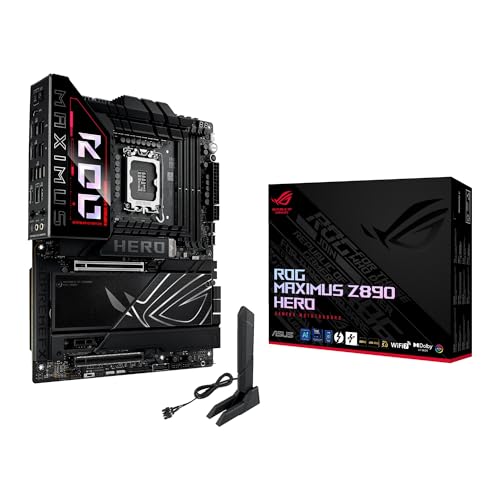
ASUS ROG Maximus Z890 Hero BTF Review | 107 Data compared

Avg. price in UK:~£550Avg. price in US:~$700CPU socket:LGA 1851Chipset:Intel Z890Form factor:ATX

ASUS ROG Maximus Z890 Hero BTF Review: Compare 107 technical specifications and user reviews to see how this product ranks in the Motherboards category and whether it is worth buying.

9.2

Overall score

Score
9.2/ 10
✕
What it is
An overall evaluation of the motherboard's quality, based on technical analyses and user reviews.
When it matters
When you need a quick reference to identify the best motherboards on the market.
Score distribution
â–¼
<55-66-77-88-99-10
Score components

90%

9.4

Technical Score

10%

7.5

User score

★Better than 99% of motherboards
9.4

Technical Score

Technical score
9.4/ 10
✕
What it is
An assessment of technical performance for products in the Motherboards category across these key areas: Platform & Features, Memory, Storage, Expansion, Ports & USB, Network, Audio, Power & Cooling.
When it matters
When you want to compare motherboards based on technical performance and available features.
Score distribution
â–¼
<55-66-77-88-99-10
Score components

19%

9.9

Memory

16%

9.6

Platform & Features

16%

9.8

Storage

15%

9.2

Network

13%

9.2

Ports & USB

8%

7.9

Expansion

8%

9.5

Power & Cooling

5%

9.5

Audio

★Better than 99% of motherboards
7.5

User score

User score
7.5/ 10
✕
What it is
A rating that combines user reviews and the total number of reviews received by the motherboard.
When it matters
When you want to understand how a motherboard performs in real-world builds and how reliable it is in terms of stability, BIOS usability, connectivity, and long-term ownership.
Score distribution
â–¼
<55-66-77-88-99-10
Score components

70%

8.6

User reviews

30%

4.9

Popularity

User score:
United Kingdom
amazon
4.3
(19)

(Reviews last updated: May 2026)

â–¼Worse than 81% of motherboards
  • asus-rog-maximus-z890-hero-btf
  • asus-rog-maximus-z890-hero-btf
  • asus-rog-maximus-z890-hero-btf
  • asus-rog-maximus-z890-hero-btf
asus-rog-maximus-z890-hero-btf

Best prices in UK

Best rankings

Available: ranking among products currently available (including other versions of this product).All: ranking among all products in the database.
Loading...
Loading category ranking...

Verdict

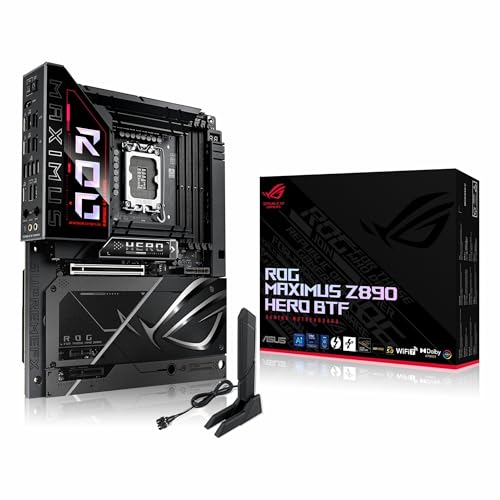
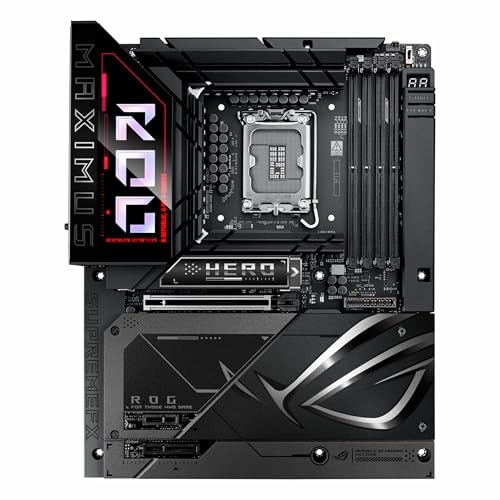
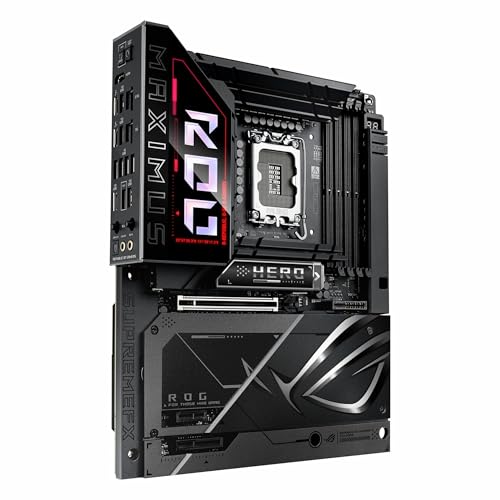
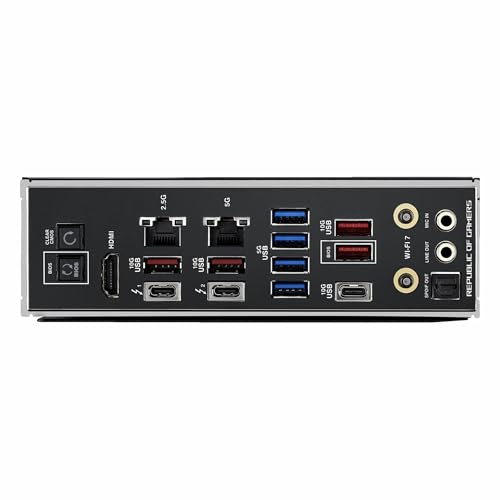
The ASUS ROG Maximus Z890 Hero BTF is a premium ATX motherboard designed for Intel Core Ultra (Series 2) processors on the LGA 1851 socket, distinguished by its 'Back-to-the-Future' (BTF) hidden-connector design that moves power, fan, and USB headers to the rear for a cable-free aesthetic. It features a robust 22+1+2+2 power stage delivery (110A), NitroPath DRAM technology supporting DDR5 speeds up to 9200+ MT/s, and a high-power graphics card slot capable of delivering 600W directly through the board. Connectivity is extensive with WiFi 7, dual Thunderbolt 4 ports, 5Gb and 2.5Gb Ethernet, and six M.2 slots (three supporting PCIe 5.0). Main pros include its ultra-clean build potential, advanced AI-driven overclocking/cooling features, and industry-leading memory stability. Cons include a high premium price point and the requirement for a specific BTF-compatible chassis to utilize the rear-mounted connectors.

Technical Specifications of motherboard ASUS ROG Maximus Z890 Hero BTF

Technical Score
Technical score
9.4/ 10
✕
What it is
An assessment of technical performance for products in the Motherboards category across these key areas: Platform & Features, Memory, Storage, Expansion, Ports & USB, Network, Audio, Power & Cooling.
When it matters
When you want to compare motherboards based on technical performance and available features.
Score distribution
â–¼
<55-66-77-88-99-10
Score components:

19%

9.9

Memory

16%

9.6

Platform & Features

16%

9.8

Storage

15%

9.2

Network

13%

9.2

Ports & USB

8%

7.9

Expansion

8%

9.5

Power & Cooling

5%

9.5

Audio

9.4
ASUS ROG Maximus Z890 Hero BTF has a technical score of 9.4 points, which is higher than that of 99.5% of products in this category.
User score
User score
7.5/ 10
✕
What it is
A rating that combines user reviews and the total number of reviews received by the motherboard.
When it matters
When you want to understand how a motherboard performs in real-world builds and how reliable it is in terms of stability, BIOS usability, connectivity, and long-term ownership.
Score distribution
â–¼
<55-66-77-88-99-10
Score components

70%

8.6

User reviews

30%

4.9

Popularity

User score:
United Kingdom
amazon
4.3
(19)

(Reviews last updated: May 2026)

7.5
ASUS ROG Maximus Z890 Hero BTF has a user score of 7.48 points, which is lower than that of 81.4% of products in this category.
Popularity
Popularity
4.9/ 10
✕
What it is
An indicator based on the number of reviews received by the motherboard.
When it matters
When you prefer a motherboard that has already been bought and reviewed by many other users.
Score distribution
â–¼
<55-66-77-88-99-10
Popularity:
ASUS ROG Maximus Z890 Hero BTF has a popularity score of 4.9 points, which is lower than that of 63.6% of products in this category.
4.9
ASUS ROG Maximus Z890 Hero BTF has a popularity score of 4.9 points, which is lower than that of 63.6% of products in this category.
Ratio quality/price
Value for money
8.7/ 10
✕
What it is
An indicator that combines the motherboard's overall rating with its cost.
When it matters
When you are looking for a motherboard that offers a strong balance of features, performance, and price.
Score distribution
â–¼
<55-66-77-88-99-10
Score components:

60%

9.2

Overall score

40%

7.6

Price

8.7
ASUS ROG Maximus Z890 Hero BTF has a value-for-money score of 8.7 points, which is higher than that of 85.6% of products in this category.
Brand name
Asus
CPU socket
LGA 1851
CPU socket
LGA 1851
This motherboard uses the LGA 1851 CPU socket, which is more advanced than that of 77.7% of motherboards and equal to that of 8.1% of motherboards.
CPU platform
Intel
CPU platform
Intel
This motherboard is built for the Intel CPU platform, which is more versatile than that of 31.6% of motherboards and equal to that of 68.4% of motherboards.
Chipset
Intel Z890
Chipset
Intel Z890
This motherboard uses the Intel Z890 chipset, which is more advanced than that of 94.5% of motherboards and equal to that of 3.8% of motherboards.
Form factor
ATX
Form factor
ATX
This motherboard has the ATX form factor, which is more versatile than that of 47.8% of motherboards and equal to that of 52.2% of motherboards.
Back-connect / BTF layout requires a compatible case.
Show more
DDR memory version
DDR5
DDR memory version
DDR5
This motherboard uses DDR5 memory, which is newer than that of 64.3% of motherboards and equal to that of 35.7% of motherboards.
Memory slots
4
Memory slots
4
This motherboard has 4 Memory slots, which is more than 21.5% of motherboards and equal to 72.5% of motherboards.
Maximum memory capacity
256 GB
Maximum memory capacity
256 GB
This motherboard supports up to 256 GB of memory, which is more than 82.9% of motherboards and equal to 16.4% of motherboards.
Memory channels
2
Memory channels
2
This motherboard supports 2 memory channels, which is more than 0.2% of motherboards and equal to 92.6% of motherboards.
Maximum RAM speed
9,200 MT/s
Maximum RAM speed
9,200 MT/s
This motherboard supports memory speeds up to 9,200 MT/s, which is higher than that of 97.7% of motherboards and equal to that of 1.2% of motherboards.
Show more
N. of M.2 sockets
6
N. of M.2 sockets
6
This motherboard has 6 M.2 sockets, which is more than 99.1% of motherboards and equal to 0.7% of motherboards.
M.2 slot interface per slot
1x PCIe 5.0 x4, 1x PCIe 4.0 x4, 2x PCIe 5.0 x4, 2x PCIe 4.0 x4
M.2 slot interface per slot
1x PCIe 5.0 x4, 1x PCIe 4.0 x4, 2x PCIe 5.0 x4, 2x PCIe 4.0 x4
This motherboard offers 1x PCIe 5.0x4, 1x PCIe 4.0x4, 2x PCIe 5.0x4, 2x PCIe 4.0x4 for M.2 slot interfaces, which is faster than that of 99.8% of motherboards and equal to that of 0.1% of motherboards.
N. of SATA 3 connectors
4
N. of SATA 3 connectors
4
This motherboard has 4 SATA 3 connectors, which is more than 5.6% of motherboards and equal to 46.2% of motherboards.
Supported RAID levels
0/1/5/10
Supported RAID levels
0/1/5/10
This motherboard supports RAID levels 0/1/5/10, which is broader than 32% of motherboards and equal to 68% of motherboards.
NVMe RAID support
yes
NVMe RAID support
yes
This motherboard supports NVMe RAID. 40.3% of motherboards support this feature.
Show more
N. of PCIe 5.0 x16 slots
1
N. of PCIe 5.0 x16 slots
1
This motherboard has 1 PCIe 5.0x16 slots, which is more than 68.6% of motherboards and equal to 26.6% of motherboards.
lane split supported
N. of PCIe 4.0 x16 slots
1
N. of PCIe 4.0 x16 slots
1
This motherboard has 1 PCIe 4.0x16 slots, which is more than 55.5% of motherboards and equal to 35.4% of motherboards.
runs at x4 mode
N. of PCIe 3.0 x16 slots
0
N. of PCIe 3.0 x16 slots
0
This motherboard has 0 PCIe 3.0x16 slots, which is fewer than 59.6% of motherboards and equal to 40.4% of motherboards.
PCIe slot electrical configuration
x16
PCIe slot electrical configuration
x16
This motherboard uses x16 for PCIe slot electrical configuration, which is less flexible than that of 81% of motherboards and equal to that of 16.1% of motherboards.
PCIe bifurcation support
yes
PCIe bifurcation support
yes
This motherboard supports PCIe bifurcation. 40.4% of motherboards support this feature.
x8/x4/x4.
Show more
Total USB ports (rear I/O)
11
Total USB ports (rear I/O)
11
This motherboard has 11 USB ports (rear I/O), which is more than 91% of motherboards and equal to 1.6% of motherboards.
Total USB ports (including headers)
21
Total USB ports (including headers)
21
This motherboard has 21 USB ports (including headers), which is more than 94.3% of motherboards and equal to 2.8% of motherboards.
Total USB-C ports (rear I/O)
3
Total USB-C ports (rear I/O)
3
This motherboard has 3 USB-C ports (rear I/O), which is more than 96.6% of motherboards and equal to 2.7% of motherboards.
Total USB-C ports (including headers)
5
Total USB-C ports (including headers)
5
This motherboard has 5 USB-C ports (including headers), which is more than 98.4% of motherboards and equal to 1.2% of motherboards.
N. of USB 3.2 Gen2x2 ports (USB-C)
0
N. of USB 3.2 Gen2x2 ports (USB-C)
0
This motherboard has 0 USB 3.2 Gen2x2 ports (USB-C), which is fewer than 18.3% of motherboards and equal to 81.7% of motherboards.
Thunderbolt excluded.
Show more
LAN speed
5 Gbps
LAN speed
5 Gbps
This motherboard supports LAN speeds up to 5 Gbps, which is higher than that of 90.8% of motherboards and equal to that of 5% of motherboards.
also includes 2.5GbE secondary port
LAN controller
Killer + Intel + Realtek
LAN controller
Killer + Intel + Realtek
This motherboard uses the Killer + Intel + Realtek LAN controller, which is less advanced than that of 64.6% of motherboards and equal to that of 28.7% of motherboards.
dual LAN
N. of RJ45 ports
2
N. of RJ45 ports
2
This motherboard has 2 RJ45 ports, which is more than 85.7% of motherboards and equal to 13.4% of motherboards.
Wi-Fi connectivity
yes
Wi-Fi connectivity
yes
This motherboard supports Wi-Fi connectivity. 50% of motherboards support this feature.
Wi-Fi version
Wi-Fi 7 (802.11be)
Wi-Fi version
Wi-Fi 7 (802.11be)
This motherboard supports Wi-Fi 7 (802.11be), which is newer than that of 88.7% of motherboards and equal to that of 11.3% of motherboards.
Show more
Audio codec
Realtek ALC4082
Audio codec
Realtek ALC4082
This motherboard uses the Realtek ALC4082 audio codec, which is more advanced than that of 96.8% of motherboards and equal to that of 3.1% of motherboards.
with ESS DAC.
Audio channels
7.1
Audio channels
7.1
This motherboard offers 7.1 audio channels, which is more than 4.9% of motherboards and equal to 95.1% of motherboards.
Audio SNR
120 dB
Audio SNR
120 dB
This motherboard has an audio SNR of 120 dB, which is higher than that of 56% of motherboards and equal to that of 40.5% of motherboards.
Headphone amp support
yes
Headphone amp support
yes
This motherboard supports a headphone amp. 40.8% of motherboards support this feature.
N. of 3.5mm audio jacks
2
N. of 3.5mm audio jacks
2
This motherboard has 2 3.5mm audio jacks, which is fewer than 88.6% of motherboards and equal to 11.1% of motherboards.
Show more
VRM phases
22+1+2+2
VRM phases
22+1+2+2
This motherboard has 22+1+2+2 VRM phases, which is more than 98.6% of motherboards and equal to 0.1% of motherboards.
N. of CPU power connectors
2
N. of CPU power connectors
2
This motherboard has 2 CPU power connectors, which is more than 54.6% of motherboards and equal to 45.1% of motherboards.
N. of fan headers
8
N. of fan headers
8
This motherboard has 8 fan headers, which is more than 82.2% of motherboards and equal to 15% of motherboards.
Pump header
yes
Pump header
yes
This motherboard has a pump header. 21.9% of motherboards include this feature.
Pump header max current
3 A
Pump header max current
3 A
This motherboard supports up to 3 A on the pump header, which is higher than that of 77.8% of motherboards and equal to that of 22.1% of motherboards.
Show more

ASUS ROG Maximus Z890 Hero BTF vs the average motherboard

246810TotalPlatform & FeaturesMemoryStorageExpansionPorts & USBNetworkAudioPower & Cooling
  • 4 more M.2 sockets
    N. of M.2 sockets
    6
    This motherboard has more M.2 sockets than the average motherboard (6 vs 2). The average motherboard has 2 M.2 socket/s.
    6 vs 2
  • 2x more maximum memory capacity
    Maximum memory capacity
    256 GB
    This motherboard has more maximum memory capacity than the average motherboard (256 GB vs 128 GB). The average motherboard supports 128 GB of memory.
    256 GB vs 128 GB
  • Newer CPU socket
    CPU socket
    LGA 1851
    This motherboard has newer CPU socket than the average motherboard (LGA 1851 vs LGA 1151). The average motherboard uses LGA 1151 CPU socket.
    LGA 1,851 vs LGA 1,151
  • Newer DDR memory generation
    DDR memory version
    DDR5
    This motherboard has newer DDR memory generation than the average motherboard (DDR5 vs DDR4). The average motherboard supports DDR4 memory.
    DDR5 vs DDR4
  • 3 more rear USB ports
    Total USB ports (rear I/O)
    11
    This motherboard has more rear USB ports than the average motherboard (11 vs 8). The average motherboard has 8 rear USB port/s.
    11 vs 8
  • 3 more USB 3.2 Gen2 ports
    N. of USB 3.2 Gen2 ports (USB-A)
    4
    This motherboard has more USB 3.2 Gen2 ports than the average motherboard (4 vs 1). The average motherboard has 1 USB 3.2 Gen2 port/s.
    4 vs 1
  • Better audio codec
    Audio codec
    Realtek ALC4082
    This motherboard has better audio codec than the average motherboard (Realtek ALC4082 vs Realtek ALC897). The average motherboard uses Realtek ALC897 audio codec.
    with ESS DAC.
    Realtek ALC4082 vs Realtek ALC897
  • More VRM phases
    VRM phases
    22+1+2+2
    This motherboard has more VRM phases than the average motherboard (22+1+2+2 vs 10). The average motherboard has 10 VRM phase/s.
    22+1+2+2 vs 10
  • 18% better value for money
    ASUS ROG Maximus Z890 Hero BTF has better value for money than the average motherboard (8.75 vs 7.4).
    8.75 vs 7.41
  • Newer CPU socket
    CPU socket
    LGA 1851
    This motherboard has newer CPU socket than the average motherboard (LGA 1851 vs LGA 1151). The average motherboard uses LGA 1151 CPU socket.
    LGA 1,851 vs LGA 1,151
  • Integrated I/O shield
    Integrated I/O shield
    yes
    This motherboard has an integrated I/O shield, while the average motherboard does not. 46% of motherboards include an integrated I/O shield.
  • Includes POST code display
    POST code display
    yes
    This motherboard has a POST code display, while the average motherboard does not. 27.2% of motherboards include a POST code display.
  • Rear-panel CMOS reset button
    Rear-panel CMOS reset button
    yes
    This motherboard has a rear-panel CMOS reset button, while the average motherboard does not. 26.7% of motherboards include a rear-panel CMOS reset button.
  • Better motherboard chipset
    Chipset
    Intel Z890
    This motherboard has better motherboard chipset than the average motherboard (Intel Z890 vs Intel B860). The average motherboard uses Intel B860 chipset.
    Intel Z890 vs Intel B860
  • Includes onboard power button
    Onboard power button
    yes
    This motherboard has an onboard power button, while the average motherboard does not. 27.7% of motherboards include an onboard power button.
  • Broader Windows support
    Supported Windows versions
    Windows 11, Windows 10, Windows 7
    This motherboard has broader Windows support than the average motherboard (Windows 11, Windows 10, Windows 7 vs Windows 11, Windows 10). The average motherboard supports Windows 11, Windows 10.
    Windows 11 22H2+.
    Windows 11, Windows 10, Windows 7 vs Windows 11, Windows 10
  • 2x more maximum memory capacity
    Maximum memory capacity
    256 GB
    This motherboard has more maximum memory capacity than the average motherboard (256 GB vs 128 GB). The average motherboard supports 128 GB of memory.
    256 GB vs 128 GB
  • Newer DDR memory generation
    DDR memory version
    DDR5
    This motherboard has newer DDR memory generation than the average motherboard (DDR5 vs DDR4). The average motherboard supports DDR4 memory.
    DDR5 vs DDR4
  • 94.4% higher maximum RAM speed
    Maximum RAM speed
    9,200 MT/s
    This motherboard has a higher maximum RAM speed than the average motherboard (9200 MT/s vs 4733 MT/s). The average motherboard supports RAM speed of 4733 MT/s.
    9,200 MT/s vs 4,733 MT/s
  • 86.5% higher overclocked RAM speed
    Maximum overclocked RAM speed
    9,200 MT/s
    This motherboard has a higher overclocked RAM speed than the average motherboard (9200 MT/s vs 4933 MT/s). The average motherboard supports overclocked RAM speed of 4933 MT/s.
    9,200 MT/s vs 4,933 MT/s
  • 4 more M.2 sockets
    N. of M.2 sockets
    6
    This motherboard has more M.2 sockets than the average motherboard (6 vs 2). The average motherboard has 2 M.2 socket/s.
    6 vs 2
  • Faster M.2 slot interfaces
    M.2 slot interface per slot
    1x PCIe 5.0 x4, 1x PCIe 4.0 x4, 2x PCIe 5.0 x4, 2x PCIe 4.0 x4
    This motherboard has faster M.2 slot interfaces than the average motherboard (1x PCIe 5x4, 1x PCIe 4x4, 2x PCIe 5x4, 2x PCIe 4x4 vs 1x PCIe 5x4, 2x PCIe 4x4). The average motherboard uses 1x PCIe 5.0x4, 2x PCIe 4.0x4 M.2 slot interfaces.
    1x PCIe 5.0x4, 1x PCIe 4.0x4, 2x PCIe 5.0x4, 2x PCIe 4.0x4 vs 1x PCIe 5.0x4, 2x PCIe 4.0x4
  • 1 more PCIe 5.0x16 slots
    N. of PCIe 5.0 x16 slots
    1
    This motherboard has more PCIe 5.0x16 slots than the average motherboard (1 vs 0). The average motherboard has 0 PCIe 5.0x16 slot/s.
    lane split supported
    1 vs 0
  • 1 more PCIe 4.0x16 slots
    N. of PCIe 4.0 x16 slots
    1
    This motherboard has more PCIe 4.0x16 slots than the average motherboard (1 vs 0). The average motherboard has 0 PCIe 4.0x16 slot/s.
    runs at x4 mode
    1 vs 0
  • 1 more PCIe x4 slots
    N. of PCIe x4 slots
    1
    This motherboard has more PCIe x4 slots than the average motherboard (1 vs 0). The average motherboard has 0 PCIe x4 slot/s.
    1 vs 0
  • 3 more rear USB ports
    Total USB ports (rear I/O)
    11
    This motherboard has more rear USB ports than the average motherboard (11 vs 8). The average motherboard has 8 rear USB port/s.
    11 vs 8
  • 3 more USB 3.2 Gen2 ports
    N. of USB 3.2 Gen2 ports (USB-A)
    4
    This motherboard has more USB 3.2 Gen2 ports than the average motherboard (4 vs 1). The average motherboard has 1 USB 3.2 Gen2 port/s.
    4 vs 1
  • 2 more rear USB-C ports
    Total USB-C ports (rear I/O)
    3
    This motherboard has more rear USB-C ports than the average motherboard (3 vs 1). The average motherboard has 1 rear USB-C port/s.
    3 vs 1
  • 6 more total USB connections
    Total USB ports (including headers)
    21
    This motherboard has more total USB connections than the average motherboard (21 vs 15). The average motherboard has 15 total USB connections.
    21 vs 15
  • 1 more USB 3.2 Gen2 USB-C ports
    N. of USB 3.2 Gen2 ports (USB-C)
    1
    This motherboard has more USB 3.2 Gen2 USB-C ports than the average motherboard (1 vs 0). The average motherboard has 0 USB 3.2 Gen2 USB-C port/s.
    1 vs 0
  • 4 more total USB-C connections
    Total USB-C ports (including headers)
    5
    This motherboard has more total USB-C connections than the average motherboard (5 vs 1). The average motherboard has 1 total USB-C connections.
    5 vs 1
  • 1 more USB 3.2 Gen1 headers
    N. of USB 3.2 Gen1 headers (USB-A)
    2
    This motherboard has more USB 3.2 Gen1 headers than the average motherboard (2 vs 1). The average motherboard has 1 USB 3.2 Gen1 header/s.
    two internal headers
    2 vs 1
  • 1 more USB4 or Thunderbolt headers
    N. of USB4 / Thunderbolt headers (USB-C)
    1
    This motherboard has more USB4 or Thunderbolt headers than the average motherboard (1 vs 0). The average motherboard has 0 USB4 or Thunderbolt header/s.
    1 vs 0
  • 1 more USB 3.2 Gen2 headers
    N. of USB 3.2 Gen2 headers (USB-C)
    1
    This motherboard has more USB 3.2 Gen2 headers than the average motherboard (1 vs 0). The average motherboard has 0 USB 3.2 Gen2 header/s.
    20Gbps Type-C header
    1 vs 0
  • 1 more USB 3.2 Gen2x2 headers
    N. of USB 3.2 Gen2x2 headers (USB-C)
    1
    This motherboard has more USB 3.2 Gen2x2 headers than the average motherboard (1 vs 0). The average motherboard has 0 USB 3.2 Gen2x2 header/s.
    1 vs 0
  • Newer Wi-Fi standard
    Wi-Fi version
    Wi-Fi 7 (802.11be)
    This motherboard has newer Wi-Fi standard than the average motherboard (Wi-Fi 7 (802.11be) vs Wi-Fi 5 (802.11ac)). The average motherboard supports Wi-Fi 5 (802.11ac) Wi-Fi.
    Wi-Fi 7 (802.11be) vs Wi-Fi 5 (802.11ac)
  • 2x higher LAN speed
    LAN speed
    5 Gbps
    This motherboard has a higher LAN speed than the average motherboard (5 Gbps vs 2.5 Gbps). The average motherboard offers LAN speed of 2.5 Gbps.
    also includes 2.5GbE secondary port
    5 Gbps vs 2.5 Gbps
  • Supports Bluetooth
    Bluetooth connectivity
    yes
    This motherboard supports Bluetooth, while the average motherboard does not. 48.9% of motherboards support Bluetooth.
  • Better audio codec
    Audio codec
    Realtek ALC4082
    This motherboard has better audio codec than the average motherboard (Realtek ALC4082 vs Realtek ALC897). The average motherboard uses Realtek ALC897 audio codec.
    with ESS DAC.
    Realtek ALC4082 vs Realtek ALC897
  • 5 dB higher audio SNR
    Audio SNR
    120 dB
    This motherboard has a higher audio SNR than the average motherboard (120 dB vs 115 dB). The average motherboard has audio SNR of 115 dB.
    120 dB vs 115 dB
  • More VRM phases
    VRM phases
    22+1+2+2
    This motherboard has more VRM phases than the average motherboard (22+1+2+2 vs 10). The average motherboard has 10 VRM phase/s.
    22+1+2+2 vs 10
  • 1 more CPU power connectors
    N. of CPU power connectors
    2
    This motherboard has more CPU power connectors than the average motherboard (2 vs 1). The average motherboard has 1 CPU power connectors.
    2 vs 1
  • 2.5 more fan headers
    N. of fan headers
    8
    This motherboard has more fan headers than the average motherboard (8 vs 5.5). The average motherboard has 5.5 fan header/s.
    8 vs 5.5
  • 1 more ARGB headers
    N. of ARGB headers (3-pin)
    3
    This motherboard has more ARGB headers than the average motherboard (3 vs 2). The average motherboard has 2 ARGB header/s.
    3 vs 2
  • 1 A higher pump header current limit
    Pump header max current
    3 A
    This motherboard has a higher pump header current than the average motherboard (3 A vs 2 A). The average motherboard provides pump header current of 2 A.
    3 A vs 2 A
  • Less flexible PCIe lane configuration
    PCIe slot electrical configuration
    x16
    This motherboard has less flexible PCIe lane configuration than the average motherboard (x16 vs x16/x0/x4, x8/x8/x4). The average motherboard uses x16/x0/x4, x8/x8/x4 PCIe slot lane configuration.
    x16 vs x16/x0/x4, x8/x8/x4
  • No multi-GPU support
    Multi-GPU support
    no
    This motherboard does not support multi-GPU, while the average motherboard does. 54.6% of motherboards support multi-GPU.
  • 3 fewer 3.5mm audio jacks
    N. of 3.5mm audio jacks
    2
    This motherboard has fewer 3.5mm audio jacks than the average motherboard (2 vs 5). The average motherboard has 5 3.5mm audio jacks.
    2 vs 5
  • 1 fewer DisplayPort outputs
    N. of DisplayPort outputs
    0
    This motherboard has fewer DisplayPort outputs than the average motherboard (0 vs 1). The average motherboard has 1 DisplayPort outputs.
    0 vs 1
  • 3.44x more expensive
    ASUS ROG Maximus Z890 Hero BTF is more expensive than the average motherboard (£550 vs £160).
    £550 vs £160
  • 1 fewer RGB headers
    N. of RGB headers (4-pin)
    0
    This motherboard has fewer RGB headers than the average motherboard (0 vs 1). The average motherboard has 1 RGB header/s.
    0 vs 1
  • 1 fewer PS/2 ports
    N. of PS/2 ports
    0
    This motherboard has fewer PS/2 ports than the average motherboard (0 vs 1). The average motherboard has 1 PS/2 port/s.
    0 vs 1
  • 1 fewer RJ45 ports
    N. of RJ45 ports
    2
    This motherboard has fewer RJ45 ports than the average motherboard (2 vs 1). The average motherboard has 1 RJ45 port/s.
    2 vs 1
  • 3.44x more expensive
    ASUS ROG Maximus Z890 Hero BTF is more expensive than the average motherboard (£550 vs £160).
    £550 vs £160
  • 7% lower user score
    User score
    7.5/ 10
    ✕
    What it is
    A rating that combines user reviews and the total number of reviews received by the motherboard.
    When it matters
    When you want to understand how a motherboard performs in real-world builds and how reliable it is in terms of stability, BIOS usability, connectivity, and long-term ownership.
    Score distribution
    ▼▼
    <55-66-77-88-99-10
    ASUS ROG Maximus Z890 Hero BTF
    the average motherboard
    ASUS ROG Maximus Z890 Hero BTF has a lower user score than the average motherboard (7.48 vs 8.000).
    7.48 vs 8
  • 29.1% less popular
    ASUS ROG Maximus Z890 Hero BTF is less popular than the average motherboard (4.85 vs 6.3).
    4.85 vs 6.26
  • No TPM connector
    TPM connector
    no
    This motherboard does not have a TPM connector, while the average motherboard does. 88% of motherboards include a TPM connector.
    Firmware TPM/PTT only.
  • Less flexible PCIe lane configuration
    PCIe slot electrical configuration
    x16
    This motherboard has less flexible PCIe lane configuration than the average motherboard (x16 vs x16/x0/x4, x8/x8/x4). The average motherboard uses x16/x0/x4, x8/x8/x4 PCIe slot lane configuration.
    x16 vs x16/x0/x4, x8/x8/x4
  • No multi-GPU support
    Multi-GPU support
    no
    This motherboard does not support multi-GPU, while the average motherboard does. 54.6% of motherboards support multi-GPU.
  • 1 fewer PCIe 3.0x16 slots
    N. of PCIe 3.0 x16 slots
    0
    This motherboard has fewer PCIe 3.0x16 slots than the average motherboard (0 vs 1). The average motherboard has 1 PCIe 3.0x16 slot/s.
    0 vs 1
  • 1 fewer DisplayPort outputs
    N. of DisplayPort outputs
    0
    This motherboard has fewer DisplayPort outputs than the average motherboard (0 vs 1). The average motherboard has 1 DisplayPort outputs.
    0 vs 1
  • 1 fewer PS/2 ports
    N. of PS/2 ports
    0
    This motherboard has fewer PS/2 ports than the average motherboard (0 vs 1). The average motherboard has 1 PS/2 port/s.
    0 vs 1
  • 2 fewer USB 2.0 ports
    N. of USB 2.0 ports
    0
    This motherboard has fewer USB 2.0 ports than the average motherboard (0 vs 2). The average motherboard has 2 USB 2.0 port/s.
    0 vs 2
  • 1 fewer RJ45 ports
    N. of RJ45 ports
    2
    This motherboard has fewer RJ45 ports than the average motherboard (2 vs 1). The average motherboard has 1 RJ45 port/s.
    2 vs 1
  • 3 fewer 3.5mm audio jacks
    N. of 3.5mm audio jacks
    2
    This motherboard has fewer 3.5mm audio jacks than the average motherboard (2 vs 5). The average motherboard has 5 3.5mm audio jacks.
    2 vs 5
  • 1 fewer RGB headers
    N. of RGB headers (4-pin)
    0
    This motherboard has fewer RGB headers than the average motherboard (0 vs 1). The average motherboard has 1 RGB header/s.
    0 vs 1

Graphic comparison of ASUS ROG Maximus Z890 Hero BTF and other products in the Motherboards category

No results found

Third-party reviews

United Kingdom

(Reviews last updated: May 2026)

What customers like about ASUS ROG Maximus Z890 Hero BTF?

  • Clean aesthetic with hidden rear connectors (BTF design) for effortless cable management
  • Premium power delivery (22+1+2+2 VRM) capable of handling flagship Intel Core Ultra 9 285K processors
  • Advanced memory support featuring NitroPath DRAM technology for stable overclocking beyond 9000 MT/s
  • Extensive storage options with six M.2 slots, including support for three PCIe 5.0 drives
  • Modern connectivity including Thunderbolt 5 (80Gbps) and Wi-Fi 7 with dual 2.5G/5G Ethernet ports
  • Excellent cooling solution with massive heatsinks and heat pipes for VRM and SSD stability

What customers dislike about ASUS ROG Maximus Z890 Hero BTF?

  • High premium price point makes it prohibitively expensive for most users
  • BTF design requires specific cases with rear-entry motherboard tray cutouts
  • Populating specific Gen 5 M.2 slots can reduce the primary PCIe x16 slot lanes to x8
  • Massive VRM heatsinks may cause clearance issues with some large air coolers
  • PCIe Slot Q-Release mechanism can feel unnatural and occasionally get stuck
  • Lack of 10G Ethernet on a flagship-tier board

Video reviews

Hands-on testing, unboxing, and real-world video evaluations
Compare ASUS ROG Maximus Z890 Hero BTF with other products in the Motherboards category

1Product to compare no. 1
VS
2Product to compare no. 2
VS
3Product to compare no. 3 (optional)