Scored using Tablets Methodology v3.0
Tablets Methodology v3.0
Mathematical & Unbiased Scoring
Products in this category are scored under Frontum Tablets Methodology v3.0: the technical score from the specifications is the base, and independent expert and video reviews (up to ±0.5 points), owner opinions (up to ±0.3) and best-of lists (up to +0.3) move it up or down.
Explore Tablets Methodology v3.0

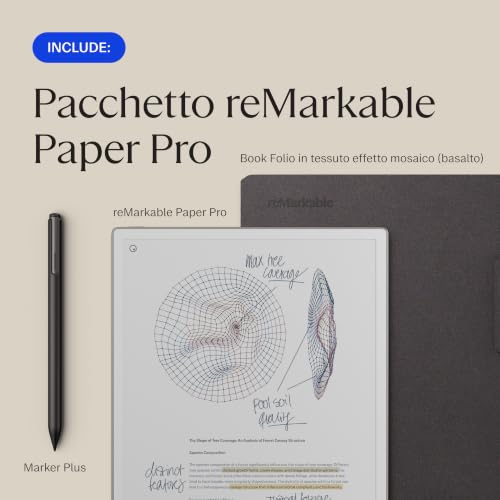
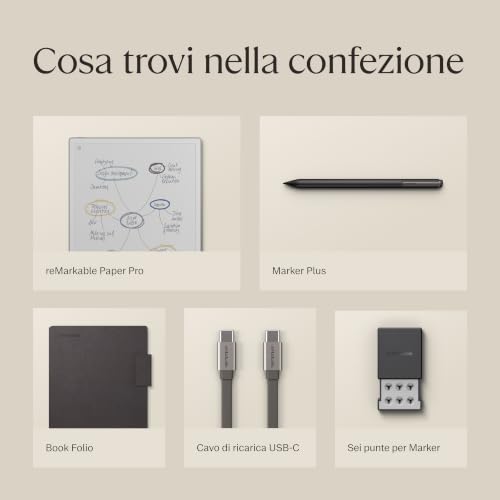
reMarkable Paper Pro (2GB + 64GB) review: 168 specs compared

Avg. price:~£570RAM capacity:2 GBInternal storage:64 GBScreen size:10.3 inchesChipset:?

reMarkable Paper Pro (2GB + 64GB) Review: Compare 168 technical specifications, 68 expert and video reviews and 6 best-of lists to see how this product ranks in the Tablets category and whether it is worth buying.
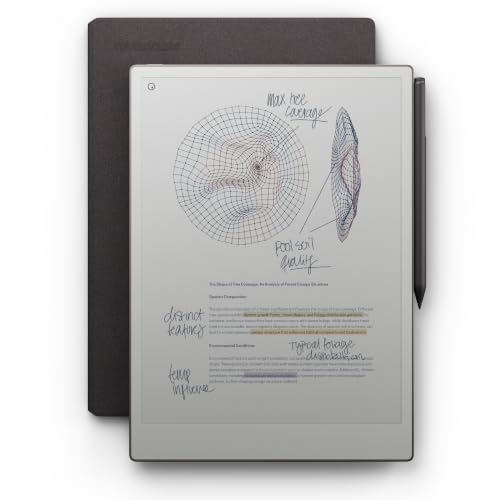
reMarkable Paper Pro (2GB + 64GB)
7.4/10

Overall score

Score
7.4/ 10
✕
What it is
Our main score for this model, 1–10. It combines specs, best-of lists, expert reviews and owners.
How we count it
Parts: Technical score 35%, List score 30%, Reviews score 25%, Sentiment score 10%
Marks: Each part gets a mark out of 10. For reviews, lists and owners, a typical model in this category gets about 8 and the best one gets 10.
No data yet: A part with no data shows "?". It counts as the mark of a weaker model in this category (4 in 5 models with data score higher). This way, models with reviews, lists and owners usually come out ahead.
Score distribution
▼
<55-66-77-88-99-10
Score components

35%

5.8

Technical score

30%

8.3

List score

25%

8.4

Reviews score

10%

8.2

Sentiment score

▲Better than 69% of tablets
7.4

Value for money

Value for money
7.4/ 10
✕
What it is
An indicator that combines the tablet's overall rating with its cost.
When it matters
When you are looking for a tablet with a good balance between quality and price.
Score distribution
▼
<55-66-77-88-99-10
Score components

70%

7.4

Overall score

30%

7.5

Price

▼Worse than 62%
5.8

Technical score

Technical score
5.8/ 10
✕
What it is
How good the specs are compared with the other models in this category, 1–10.
How we count it
Areas: We rate the specs in each area against the other models in this category.
Weighting: The areas that matter most to buyers count more. The shares are shown under Score components.
Share: The technical score is 35% of the overall score.
Score distribution
▼
<55-66-77-88-99-10
Score components

22%

5.5

Performance

20%

6.7

Display

16%

4.0

Camera

14%

5.7

Battery

12%

6.3

Connectivity

8%

6.8

Software

5%

7.6

Design

3%

2.8

Audio

▼Worse than 61%
8.4

Reviews score

Reviews score
8.4/ 10
✕
What it is
Average grade from independent test sites, magazines and video reviewers, 1–10.
How we count it
Grades: Each review's own score is converted to 1–10; without one, we grade the review ourselves. Big test sites count more, short reviews half as much as full tests. A video review counts half.
Score: The average grade is 80% of the review mark; the number of reviews is the other 20% (1 review = 5, the typical number in this category = 8, the most-reviewed model = 10).
Enough data: With few reviews, the average grade is pulled toward the typical grade of this category. No reviews yet: 7.4 for now.
Share: Reviews count 25% of the overall score.
Score distribution
▼
<55-66-77-88-99-10

80%

8.1

Average grade

20%

9.5

Popularity

Grades by review (68)
51 reviews: 25 with a printed score, 26 estimated from the review. 17 video reviews, each counting half as much as a written test. Reviews count 25% of the overall score.
User ratings collected online are not part of this score.
▲Better than 86%
8.3

List score

List score
8.3/ 10
✕
What it is
How often independent test sites, magazines and video reviewers put this model in their best-of lists for this category.
How we count it
Points: The model in the most lists of this category gets 10; the others get 8 to 10 in proportion. In no list yet: 7.5. Lists count 30% of the overall score.
Enough data: Every list counts, even a single one. With fewer than 5 best-of lists in the category, this part is left out.
Lists with this model (6)
List score: in 6 of 136 lists (4%)
★Better than 97%
  • remarkable-paper-pro-2gb-64gb
  • remarkable-paper-pro-2gb-64gb
  • remarkable-paper-pro-2gb-64gb
  • remarkable-paper-pro-2gb-64gb
  • remarkable-paper-pro-2gb-64gb
  • remarkable-paper-pro-2gb-64gb
  • remarkable-paper-pro-2gb-64gb
  • remarkable-paper-pro-2gb-64gb
  • remarkable-paper-pro-2gb-64gb
  • remarkable-paper-pro-2gb-64gb
  • remarkable-paper-pro-2gb-64gb
  • remarkable-paper-pro-2gb-64gb
  • remarkable-paper-pro-2gb-64gb
  • remarkable-paper-pro-2gb-64gb
remarkable-paper-pro-2gb-64gb
Where to buy
    N/A~ £570
Best rankings
Available: ranking among products currently available (including other versions of this product).All: ranking among all products in the database.

What reviewers say about the reMarkable Paper Pro (2GB + 64GB)

Based on 51 · 17

Reviewers love the writing feel and solid build, but call it expensive and find the software and reading experience limited.
Praised
Mixed views
Criticised
Pick a topic to see who said what

What owners say about the reMarkable Paper Pro (2GB + 64GB)

Based on 166 owners sharing their experience in online comments

44%positive19%mixed37%negative

Owners love the paper-like writing and focused note-taking, while the steep price and distracting screen refreshes hold it back.

What owners dislike

  • Owners find the price hard to justify, with some comparing it to full tablets and saying it is worth it only for heavy note-takers.25
  • Owners say the screen flickers and refreshes often, especially when turning pages, scrolling, or drawing with colour, and coloured areas can leave ghosting.18
  • Owners find the first three front-light levels too weak to help, and say the screen is too dark in evenings even at full brightness.16
  • Owners say colours look pale, black looks bluish rather than deep black, and the red pen colour appears orange.11
  • Owners say the pen feels too slippery on the glass surface, feeling hard and closer to an iPad than to real paper.10
  • Owners report screens breaking, freezing or failing to start after about a year, and some say notes vanished when the device was offline.8
  • Owners say support is slow, screen repairs are not offered, and replacements can take two months or arrive refurbished with faults.8
  • Owners say the interface is slow and laggy, with zooming and landscape scrolling glitches and leftover traces of earlier screens.8
  • Owners say it cannot open Kindle libraries, EPUB links and indexes are lost, and books often must be converted to PDF first.7
  • Owners report pen offset, so second strokes do not line up, accuracy slipping with static, and the pen disconnecting until the device is reset.6

Points mentioned by at least 3 owners, most mentioned first.

Loading...
Loading category ranking...

Technical Specifications of tablet reMarkable Paper Pro (2GB + 64GB)

Technical score
Technical score
5.8/ 10
✕
What it is
How good the specs are compared with the other models in this category, 1–10.
How we count it
Areas: We rate the specs in each area against the other models in this category.
Weighting: The areas that matter most to buyers count more. The shares are shown under Score components.
Share: The technical score is 35% of the overall score.
Score distribution
▼
<55-66-77-88-99-10
Score components:

22%

5.5

Performance

20%

6.7

Display

16%

4.0

Camera

14%

5.7

Battery

12%

6.3

Connectivity

8%

6.8

Software

5%

7.6

Design

3%

2.8

Audio

5.8
Reviews score
8.4
List score
8.3
Value for money
Value for money
7.4/ 10
✕
What it is
An indicator that combines the tablet's overall rating with its cost.
When it matters
When you are looking for a tablet with a good balance between quality and price.
Score distribution
▼
<55-66-77-88-99-10
Score components:

70%

7.4

Overall score

30%

7.5

Price

7.4
RAM capacity
2 GB
This tablet has 2 GB of RAM, which is less than 61.3% of tablets and equal to 15.5% of tablets.
Process node
28 nm
This tablet is built on a 28 nm process, which is larger than 65.1% of tablets and equal to 17.6% of tablets.
Internal storage
64 GB
This tablet has 64 GB of internal storage, which is more than 39.1% of tablets and equal to 17% of tablets.
Geekbench 6 single-core score
?
Chipset
?
Show more
What reviewers say
Screen resolution
2160×1620
This tablet has a 2160×1620 screen, which is sharper than 73.7% of tablets and equal to 0.4% of tablets.
Refresh rate
?
Display type
E-Ink
This tablet uses a E-Ink display type. 99.8% of tablets use this display technology.
Pixel density
229 ppi
This tablet has a pixel density of 229 ppi, which is higher than 64.3% of tablets and equal to 0.5% of tablets.
Display glass type
?
Show more
What reviewers say
Optical image stabilization
no
This tablet does not support optical stabilisation. 0.4% of tablets offer this.
Main camera megapixels
N/A
Front camera megapixels
N/A
Main camera aperture
N/A
Optical zoom
N/A
Show more
Battery capacity
5,030 mAh
This tablet has 5,030 mAh battery capacity, which is smaller than 69.9% of tablets.
Charging speed
15 W
This tablet charges at 15 W, which is slower than 52.1% of tablets and equal to 6.3% of tablets.
Battery life
20 hours
This tablet has a battery life of 20 hours, which is longer than that of 95.8% of tablets and equal to that of 1.4% of tablets.
Wireless charging
no
This tablet does not support wireless charging. 1.5% of tablets offer this.
Fast charging
no
This tablet does not support fast charging. 56.9% of tablets offer this.
Show more
What reviewers say
LTE support
no
This tablet does not have built-in LTE. 42.9% of tablets offer this.
Wi-Fi connectivity
yes
This tablet connects to Wi-Fi. 0.2% of tablets offer this.
GPS
no
This tablet does not have built-in GPS. 82.9% of tablets offer this.
5G connectivity
no
This tablet does not support 5G. 8.1% of tablets offer this.
NFC
no
This tablet does not include NFC. 10.8% of tablets offer this.
Show more
What reviewers say
Operating system
?
Update support duration
long
This tablet offers long update support, which is longer than the support period of 80% of tablets and equal to that of 20% of tablets.
Direct OS updates
yes
This tablet supports direct OS updates. 20.3% of tablets offer this.
On-device AI
no
This tablet does not support on-device AI. 28.3% of tablets support this capability.
App tracking protection
no
This tablet does not support app tracking protection. 28.4% of tablets offer this.
Show more
IP rating
not rated
This tablet's IP rating is not rated, which is less protected than 16.5% of tablets and the same as 83.6% of tablets.
Weight
525 g
This tablet weighs 525 g, which is heavier than 61.1% of tablets and equal to 0.6% of tablets.
Backlit keyboard
yes
This tablet supports a backlit keyboard. 90.4% of tablets support backlit keyboards.
Keyboard accessory
yes
This tablet supports a keyboard accessory. 15.8% of tablets support this option.
Pen latency
12 ms
This tablet has a pen latency of 12 ms, which is higher than that of 65% of tablets and equal to that of 0.8% of tablets.
Show more
What reviewers say
Number of microphones
0
This tablet has a microphone array of 0, which is fewer than 99.8% of tablets and equal to 0.2% of tablets.
aptX Adaptive
no
This tablet does not support aptX Adaptive. 6.9% of tablets offer this.
Dolby Atmos support
no
This tablet does not support Dolby Atmos. 31.3% of tablets support Dolby Atmos.
N. of speakers
0
This tablet includes 0 speakers, which is fewer than in 99.9% of tablets and equal to the number in 0.1% of tablets.
FM radio
no
This tablet does not include an FM radio. 19% of tablets offer this.
Show more

reMarkable Paper Pro (2GB + 64GB) vs the average tablet

246810TotalPerformanceDisplayCameraBatteryConnectivitySoftwareDesignAudio
  • 10 hours longer battery life
    This tablet offers longer battery life than the average tablet (20 hours vs 10 hours). The average tablet offers 10 hours of battery life.
    20 hours vs 10 hours
  • Longer update support
    This tablet offers longer update support than the average tablet (long vs medium). The average tablet gets medium of update support.
    long vs medium
  • Includes anti-reflection coating
    This tablet has anti-reflection coating, the average tablet does not. 24.6% of tablets use anti-reflection coating.
  • Sharper display
    This tablet has a sharper screen than the average tablet (2160×1620 vs 1920×1200).
    2,160×1,620 vs 1,920×1,200
  • Stylus included
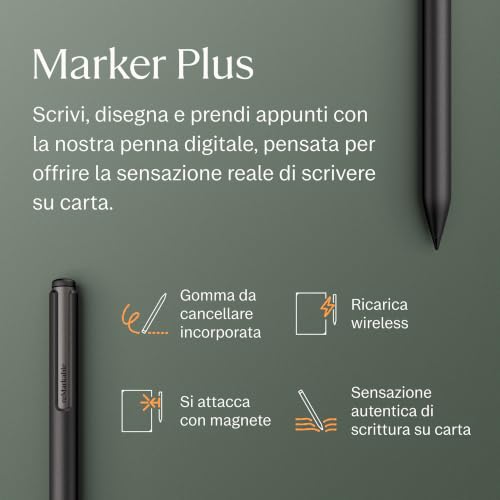
    This tablet includes a stylus, while the average tablet does not. 17.2% of tablets offer this.
  • 20.0% higher review score
    Reviews score
    8.4/ 10
    ✕
    What it is
    Average grade from independent test sites, magazines and video reviewers, 1–10.
    How we count it
    Grades: Each review's own score is converted to 1–10; without one, we grade the review ourselves. Big test sites count more, short reviews half as much as full tests. A video review counts half.
    Score: The average grade is 80% of the review mark; the number of reviews is the other 20% (1 review = 5, the typical number in this category = 8, the most-reviewed model = 10).
    Enough data: With few reviews, the average grade is pulled toward the typical grade of this category. No reviews yet: 7.4 for now.
    Share: Reviews count 25% of the overall score.
    Score distribution
    ▼
    <55-66-77-88-99-10

    80%

    8.1

    Average grade

    20%

    9.5

    Popularity

    Grades by review (68)
    51 reviews: 25 with a printed score, 26 estimated from the review. 17 video reviews, each counting half as much as a written test. Reviews count 25% of the overall score.
    User ratings collected online are not part of this score.
    8.4 vs 7.0
  • 2.9 mm thinner
    This tablet is thinner than the average tablet (5.1 mm vs 8 mm). The average tablet is 8 mm thick.
    5.1 mm vs 8 mm
  • Supports drawing
    This tablet is suitable for drawing, while the average tablet is not. 40% of tablets are suitable for drawing.
  • 20.0% higher review score
    Reviews score
    8.4/ 10
    ✕
    What it is
    Average grade from independent test sites, magazines and video reviewers, 1–10.
    How we count it
    Grades: Each review's own score is converted to 1–10; without one, we grade the review ourselves. Big test sites count more, short reviews half as much as full tests. A video review counts half.
    Score: The average grade is 80% of the review mark; the number of reviews is the other 20% (1 review = 5, the typical number in this category = 8, the most-reviewed model = 10).
    Enough data: With few reviews, the average grade is pulled toward the typical grade of this category. No reviews yet: 7.4 for now.
    Share: Reviews count 25% of the overall score.
    Score distribution
    ▼
    <55-66-77-88-99-10

    80%

    8.1

    Average grade

    20%

    9.5

    Popularity

    Grades by review (68)
    51 reviews: 25 with a printed score, 26 estimated from the review. 17 video reviews, each counting half as much as a written test. Reviews count 25% of the overall score.
    User ratings collected online are not part of this score.
    8.4 vs 7.0
  • 5.1% higher list score
    List score
    8.3/ 10
    ✕
    What it is
    How often independent test sites, magazines and video reviewers put this model in their best-of lists for this category.
    How we count it
    Points: The model in the most lists of this category gets 10; the others get 8 to 10 in proportion. In no list yet: 7.5. Lists count 30% of the overall score.
    Enough data: Every list counts, even a single one. With fewer than 5 best-of lists in the category, this part is left out.
    Lists with this model (6)
    List score: in 6 of 136 lists (4%)
    8.3 vs 7.9
  • More advanced memory type
    This tablet uses more advanced memory than the average tablet (LPDDR4 vs LPDDR3).
    LPDDR4 vs LPDDR3
  • Includes anti-reflection coating
    This tablet has anti-reflection coating, the average tablet does not. 24.6% of tablets use anti-reflection coating.
  • Sharper display
    This tablet has a sharper screen than the average tablet (2160×1620 vs 1920×1200).
    2,160×1,620 vs 1,920×1,200
  • 0.2 inches larger screen
    This tablet has a larger screen than the average tablet (10.3 inches vs 10.1 inches). The average tablet measures 10.1 inches.
    10.3 inches vs 10.1 inches
  • 3.6% sharper screen detail
    This tablet has sharper screen detail than the average tablet (229 ppi vs 221 ppi). The average tablet has a pixel density of 221 ppi.
    229 ppi vs 221 ppi
  • 10 hours longer battery life
    This tablet offers longer battery life than the average tablet (20 hours vs 10 hours). The average tablet offers 10 hours of battery life.
    20 hours vs 10 hours
  • Newer Bluetooth version
    This tablet has a newer Bluetooth version than the average tablet (5.1 vs 5).
    5.1 vs 5
  • Longer update support
    This tablet offers longer update support than the average tablet (long vs medium). The average tablet gets medium of update support.
    long vs medium
  • Stylus included
    This tablet includes a stylus, while the average tablet does not. 17.2% of tablets offer this.
  • 2.9 mm thinner
    This tablet is thinner than the average tablet (5.1 mm vs 8 mm). The average tablet is 8 mm thick.
    5.1 mm vs 8 mm
  • Supports drawing
    This tablet is suitable for drawing, while the average tablet is not. 40% of tablets are suitable for drawing.
  • Includes backlit keyboard
    This tablet has a backlit keyboard, the average tablet does not. 9.6% of tablets offer a backlit keyboard.
  • Supports stylus tilt
    This tablet supports stylus tilt, the average tablet does not. 33.5% of tablets support stylus tilt.
  • Inferior display type
    This tablet has an inferior display type compared to the average tablet (E-Ink vs IPS LCD). 0.00% of tablets use the superior display type.
    E-Ink vs IPS LCD
  • 4 fewer CPU threads
    This tablet has fewer CPU threads than the average tablet (4 vs 8). The average tablet has 8 CPU threads.
    4 vs 8
  • No fast charging
    This tablet does not support fast charging, while the average tablet does. 56.8% of tablets support fast charging.
  • No continuous video AF
    This tablet does not support continuous video AF, the average tablet does. 57.7% of tablets support continuous video autofocus.
  • 2 GB less RAM
    This tablet has less RAM than the average tablet (2 GB vs 4 GB). The average tablet has 4 GB of RAM.
    2 GB vs 4 GB
  • More basic graphics
    This tablet has less advanced graphics than the average tablet (Vivante GC7000 vs Mali-G51).
    Vivante GC7000 vs Mali-G51
  • No split-screen
    This tablet does not support split-screen, the average tablet does. 72.8% of tablets support split-screen.
  • No tap-to-focus
    This tablet does not support touch autofocus, while the average tablet does. 83% of tablets support touch autofocus.
  • 2.19x more expensive
    reMarkable Paper Pro (2GB + 64GB) is more expensive than the average tablet (£570 vs £260).
    £570 vs £260
  • 4 fewer CPU threads
    This tablet has fewer CPU threads than the average tablet (4 vs 8). The average tablet has 8 CPU threads.
    4 vs 8
  • More basic graphics
    This tablet has less advanced graphics than the average tablet (Vivante GC7000 vs Mali-G51).
    Vivante GC7000 vs Mali-G51
  • 2 GB less RAM
    This tablet has less RAM than the average tablet (2 GB vs 4 GB). The average tablet has 4 GB of RAM.
    2 GB vs 4 GB
  • 2x larger process node
    This tablet has a larger process node than the average tablet (28 nm vs 14 nm). The average tablet is built on 14 nm.
    28 nm vs 14 nm
  • 81.9% less memory bandwidth
    This tablet has less memory bandwidth than the average tablet (2.7 GB/s vs 14.9 GB/s). The average tablet has 14.9 GB/s of memory bandwidth.
    2.7 GB/s vs 14.9 GB/s
  • No big.LITTLE architecture
    This tablet does not support big.LITTLE architecture, while the average tablet does. 51.7% of tablets support big.LITTLE architecture.
  • 10% lower CPU speed
    This tablet has a lower CPU speed than the average tablet (1.8 GHz vs 2 GHz). The average tablet has CPU speed of 2 GHz.
    1.8 GHz vs 2 GHz
  • Inferior display type
    This tablet has an inferior display type compared to the average tablet (E-Ink vs IPS LCD). 0.00% of tablets use the superior display type.
    E-Ink vs IPS LCD
  • No continuous video AF
    This tablet does not support continuous video AF, the average tablet does. 57.7% of tablets support continuous video autofocus.
  • No tap-to-focus
    This tablet does not support touch autofocus, while the average tablet does. 83% of tablets support touch autofocus.
  • No manual exposure control
    This tablet does not support manual exposure, while the average tablet does. 63.6% of tablets support manual exposure.
  • No HDR photo mode
    This tablet does not have HDR photo mode, the average tablet does. 79.8% of tablets support HDR photo mode.
  • No manual white balance
    This tablet does not support manual white balance, while the average tablet does. 51.5% of tablets support manual white balance.
  • No burst mode
    This tablet does not support burst mode, the average tablet does. 60.6% of tablets support burst mode.
  • No panorama mode
    This tablet does not support panorama mode, while the average tablet does. 78.6% of tablets support panorama mode.
  • No backside-illuminated sensor
    This tablet does not have a BSI sensor, while the average tablet does. 52.6% of tablets have a BSI sensor.
  • No timelapse video
    This tablet does not support timelapse video, while the average tablet does. 57.5% of tablets support timelapse video.
  • Non-CMOS image sensor
    This tablet does not have a CMOS sensor, while the average tablet does. 99.4% of tablets have a CMOS sensor.
  • No fast charging
    This tablet does not support fast charging, while the average tablet does. 56.8% of tablets support fast charging.
  • 23.8% smaller battery capacity
    This tablet has a smaller battery capacity than the average tablet (5,030 mAh vs 6,600 mAh). The average tablet offers 6,600 mAh of battery capacity.
    5,030 mAh vs 6,600 mAh
  • 16.7% slower charging
    This tablet charges slower than the average tablet (15 W vs 18 W). The average tablet charges at 18 W.
    15 W vs 18 W
  • No GPS
    This tablet does not include GPS, while the average tablet does. 82.9% of tablets include GPS.
  • No face recognition
    This tablet does not have face recognition, the average tablet does. 56.4% of tablets support face recognition.
  • No Ethernet support
    This tablet does not have Ethernet support, the average tablet does. 76.5% of tablets support Ethernet.
  • No split-screen
    This tablet does not support split-screen, the average tablet does. 72.8% of tablets support split-screen.
  • No picture-in-picture mode
    This tablet does not support picture-in-picture, the average tablet does. 61.4% of tablets support picture-in-picture.
  • No camera and mic privacy
    This tablet does not support camera and mic privacy, while the average tablet does. 56.6% of tablets offer this.
  • No multi-user mode
    User score
    8.6/ 10
    ✕
    What it is
    Average of independent expert reviews and videos, graded by us; missing reviews count as 7/10.
    When it matters
    When you want to know how independent test sites and video reviewers rate the product in real use.
    Score distribution
    ▼
    ▼
    <55-66-77-88-99-10
    reMarkable Paper Pro
    the average tablet
    reMarkable Paper Pro (2GB + 64GB) does not support multi-user mode, while the average tablet does. 73.8% of tablets offer this.
  • No full-page screenshots
    This tablet does not support full-page screenshots, the average tablet does. 53% of tablets support full-page screenshots.
  • No voice commands
    This tablet does not support voice commands, while the average tablet does. 96.3% of tablets offer this.
  • No widgets
    This tablet does not support widgets, the average tablet does. 93.6% of tablets support widgets.
  • No dark mode
    This tablet does not support dark mode, while the average tablet does. 57.7% of tablets offer this.
  • No offline voice recognition
    This tablet does not support offline voice recognition, the average tablet does. 76.4% of tablets support offline voice recognition.
  • 7.1% heavier
    This tablet is heavier than the average tablet (525 g vs 490 g). The average tablet weighs 490 g.
    525 g vs 490 g
  • 74.1 mm taller
    This tablet is taller than the average tablet (274.1 mm vs 200 mm). The average tablet is 200 mm tall.
    274.1 mm vs 200 mm
  • 3 ms higher pen latency
    This tablet has higher pen latency than the average tablet (12 ms vs 9 ms). The average tablet has pen latency of 9 ms.
    12 ms vs 9 ms
  • 21.3 mm wider
    This tablet is wider than the average tablet (196.6 mm vs 175.3 mm). The average tablet is 175.3 mm wide.
    196.6 mm vs 175.3 mm
  • No headphone jack
    This tablet does not include a 3.5 mm headphone jack, while the average tablet does. 72.8% of tablets offer this.
  • 2 fewer speakers
    This tablet has less speakers than the average tablet (0 vs 2). The average tablet has 2 speakers.
    0 vs 2

Video reviews

Hands-on testing, unboxing, and real-world video evaluations

9.0
A Designer's Life
≈ estimated
05/03/2026
Long-term review · daily use for over a year
Verdict
reMarkable Paper Pro is the best all-round choice for most people, though limited software and cost are drawbacks.
9.0
The Tech Plug
≈ estimated
04/12/2025
Long-term test · 6 months of daily use
Verdict
reMarkable Paper Pro offers the purest writing experience despite its flaws, and still leads the pack.
8.0
6 Months Later
≈ estimated
15/09/2025
Long-term test · 6 months of daily use
Verdict
reMarkable Paper Pro is generally recommended as an upgrade over the earlier model, though price and subscription remain drawbacks.
9.0
Spencer Scott Pugh
≈ estimated
03/05/2025
Hands-on review · a few weeks of use
Verdict
reMarkable Paper Pro is a focused writing tool that stays a top pick despite its premium price and limited apps.
8.0
How To Do Stuff
≈ estimated
29/03/2025
Long-term review · 6 months of use
Verdict
reMarkable Paper Pro is valuable for distraction-free writing and reading, but it is not a replacement for a full tablet.
7.0
Vladimir Kostek
≈ estimated
15/03/2025
Long-term review · 6 months of use, sketching and colour notes
Verdict
reMarkable Paper Pro is very good for colour sketching and highlighting, but it does not fully live up to the Pro name.
5.0
Harris Craycraft
≈ estimated
17/11/2024
Hands-on review · design, pen, layers and file handling
Verdict
reMarkable Paper Pro is a great overall device, but its high price and limits make it hard to recommend to others.
8.0
Trusted Reviews
≈ estimated
26/10/2024
Hands-on review · battery life and price comparison
Verdict
reMarkable Paper Pro is an impressive notebook replacement, but the cheaper reMarkable 2 is the one to recommend to most people.
9.0
CoCreative Design
≈ estimated
25/10/2024
Hands-on review · 2 weeks of daily use
Verdict
reMarkable Paper Pro suits distraction-free writing and typing well, though battery falls short of its claims and spell check is missing.
7.0
Brandon Boswell
≈ estimated
18/10/2024
Daily-use review · comparison with the reMarkable 2
Verdict
reMarkable Paper Pro is worth it for sketching and colour work, but not an easy upgrade for black-and-white note-takers.
9.0
My Deep Guide
≈ estimated
15/10/2024
Long-term test · three weeks of daily use
Verdict
reMarkable Paper Pro is a pleasure to use, with an excellent ghost-free refresh and an ideal screen size, though it has compromises.
7.0
Brad Colbow
≈ estimated
10/10/2024
Hands-on review · sketching, software and upgrade assessment
Verdict
reMarkable Paper Pro is a solid upgrade if you already own the reMarkable 2, but it is limited as a notebook beyond sketching.
More graded video reviews (3)
creator’s own scoreestimated by us

Expert reviews

In-depth analysis and verdict from leading tech publications
7.0
wired.com
✓ explicit
13/09/2024
Hands-on review · Digital notebook
Verdict
The reMarkable Paper Pro is a focused, pen-like notebook that suits people who miss paper, but its price and the extra keyboard cost hurt.
7.0
uk.pcmag.com
✓ explicit
30/09/2024
Full review · Note-taking tablet
Verdict
The reMarkable Paper Pro is a lag-free note-taker with a strong front light, but limited format support and slow performance hold back ebook reading.
8.5
xda-developers.com
✓ explicit
27/02/2025
Month-long test · Handwritten notes
Verdict
The reMarkable Paper Pro is a distraction-free, paper-like notebook that encourages handwriting over typing, but it skips integration with other note apps.
8.0
techradar.com
✓ explicit
[No date provided]
In-depth review · Writing tablet
Verdict
The reMarkable Paper Pro is a stripped-back writing tablet with a color screen and reading light, best for those who want no web browser, apps or clock.
10
t3.com
✓ explicit
25/05/2025
Everyday use review · E Ink notebook
Verdict
The reMarkable Paper Pro suits people turning paper notebooks into one digital system, if they can spare the extra cash.
8.0
crackberry.com
≈ estimated
09/12/2024
Upgrade review · Color E Ink tablet
Verdict
The reMarkable Paper Pro is a larger, faster upgrade over the reMarkable 2 with color and a reading light, though grayscale shading shows more dithering.
9.0
thequalityedit.com
≈ estimated
17/04/2025
Daily-use review · Note-taking tablet
Verdict
The reMarkable Paper Pro is sleeker and faster than the reMarkable 2, best for new buyers, while current owners of the older model can skip it.
9.0
womanandhome.com
✓ explicit
[No date provided]
Lifestyle review · Paper-like tablet
Verdict
The reMarkable Paper Pro is a premium, paper-like digital notebook, ideal for note-takers and sketchers, but it has no built-in bookstore.
10
itpro.com
✓ explicit
29/11/2024
Hands-on review · Distraction-free notepad
Verdict
The reMarkable Paper Pro is a paper-like color notebook that suits focused note-taking, though its price is hard to justify for small businesses.
6.0
gizmodo.com
✓ explicit
21/03/2026
Hands-on review · Notebook and e-reader
Verdict
The reMarkable Paper Pro has a convincing paper feel and a handy reading light, but it is slow and costly for what it does.
7.0
me.pcmag.com
✓ explicit
21/03/2026
Hands-on review · Writing-focused e-ink tablet
Verdict
The reMarkable Paper Pro writes better than most e-ink tablets, but its weak front light, muted colors and single-purpose design limit it.
8.0
goodhousekeeping.com
≈ estimated
25/09/2025
Hands-on test · Digital notebook
Verdict
The reMarkable Paper Pro suits serious note-takers who want paper-like writing and color, but it is expensive and cannot browse the internet.
9.0
6monthslater.net
≈ estimated
31/10/2026
Long-term test · Color e-ink notebook
Verdict
The reMarkable Paper Pro is a favorite for notes and document markup, with simple, well-organized software and useful color, though color refreshes take getting used to.
9.0
overkill.wtf
≈ estimated
14/05/2025
Long-term use · Minimal writing device
Verdict
The reMarkable Paper Pro is a favorite for all writing and PDF markup, with a backlight and color, but it runs no apps and has no browser.
8.0
notebookcheck.net
≈ estimated
25/03/2025
Lab test · Distraction-free notebook
Verdict
The reMarkable Paper Pro is a strong digital notebook for notes and marking up documents, but it has no apps, browser or speakers and is expensive.
9.0
trustedreviews.com
✓ explicit
11/10/2024
Hands-on review · Color e-ink tablet
Verdict
The reMarkable Paper Pro is the best E-Ink tablet tested, with color and a backlight, though its high price suits only people who need more than the reMarkable 2.
9.0
cnn.com
≈ estimated
18/11/2024
Long-term test · Color writing tablet
Verdict
The reMarkable Paper Pro is ideal for writing and reading PDFs, with a backlight and color, but its larger size may not fit every bag.
7.0
howtogeek.com
✓ explicit
04/12/2024
Hands-on test · Color e-ink notebook
Verdict
The reMarkable Paper Pro is one of the best digital note-takers, with a paper-like color screen, but its feature set is limited for the price.
8.4
mashable.com
✓ explicit
04/09/2024
Hands-on review · Color e-ink notebook
Verdict
The reMarkable Paper Pro suits students and casual sketchers who want color notes, though its color is still a work in progress.
8.0
digitaltrends.com
✓ explicit
07/10/2024
Hands-on test · Color note-taking
Verdict
The reMarkable Paper Pro is a thin, distraction-free notebook for handwritten notes, but it is a weak e-reader and a costly one.

Third-party reviews

What customers like about reMarkable Paper Pro (2GB + 64GB)

  • Industry-leading, tactile, paper-like writing experience
  • Large 11.8-inch display provides substantial space for note-taking and PDF annotation
  • Integrated front light enables use in low-light environments
  • Distraction-free software environment with no notifications or social apps
  • Premium, slim aluminum build quality with a high-end feel
  • Low-latency stylus input makes handwriting feel immediate and natural
  • Color display allows for better organization through highlighting and color-coded notes

What customers don't like about reMarkable Paper Pro (2GB + 64GB)

  • High price point for both the tablet and essential accessories like the Marker
  • Muted and desaturated color quality compared to standard tablets
  • Noticeable ghosting and frequent screen refreshes, especially when using color
  • Significant battery drain when using the front light or WiFi
  • Limited file support and lack of third-party apps like Kindle or web browsers
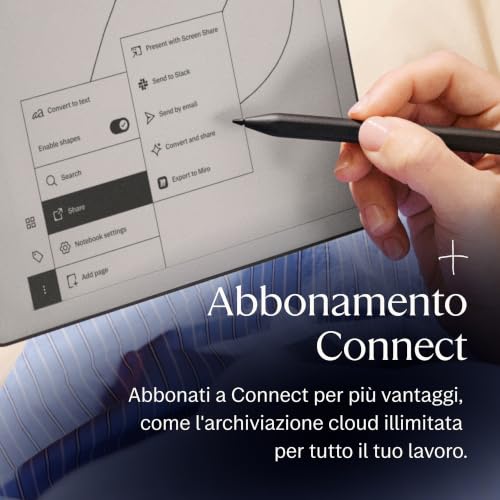
  • Core features like handwriting-to-text conversion and cloud sync require a paid subscription
  • Large and bulky form factor can be less portable than previous models or competitors

Verdict

The reMarkable Paper Pro is a high-end digital notebook featuring a 11.8-inch Canvas Color display with a 2160 x 1620 resolution (229 PPI) and a custom 1.8 GHz quad-core processor. Equipped with 2GB of LPDDR4 RAM and 64GB of internal storage, it offers a premium, ultra-slim 5.1mm build designed for a distraction-free writing experience. Main pros include a significantly reduced writing latency of 12ms, a new adjustable reading light for low-light use, and a battery life that can last up to two weeks on a single charge. However, some users have noted cons such as muted or 'greyish' color saturation typical of E Ink, a relatively dim backlight compared to traditional tablets, and occasional sluggishness when navigating complex documents or menus.

Compare reMarkable Paper Pro (2GB + 64GB) with other tablets

1Product to compare no. 1
VS
2Product to compare no. 2
VS
3Product to compare no. 3 (optional)

Graphic comparison of reMarkable Paper Pro (2GB + 64GB) and other tablets

No results found