Scored using Tablets Methodology v3.0
Tablets Methodology v3.0
Mathematical & Unbiased Scoring
Products in this category are scored under Frontum Tablets Methodology v3.0: the technical score from the specifications is the base, and independent expert and video reviews (up to ±0.5 points), owner opinions (up to ±0.3) and best-of lists (up to +0.3) move it up or down.
Explore Tablets Methodology v3.0

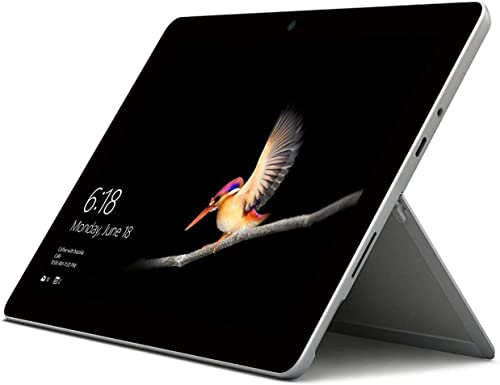
Microsoft Surface Go WiFi (4GB + 64GB) review: 168 specs compared

Avg. price:~£400RAM capacity:4 GBInternal storage:64 GBScreen size:10 inchesChipset:Intel Pentium Gold 4415Y

Microsoft Surface Go WiFi (4GB + 64GB) Review: Compare 168 technical specifications and 36 expert and video reviews to see how this product ranks in the Tablets category and whether it is worth buying.
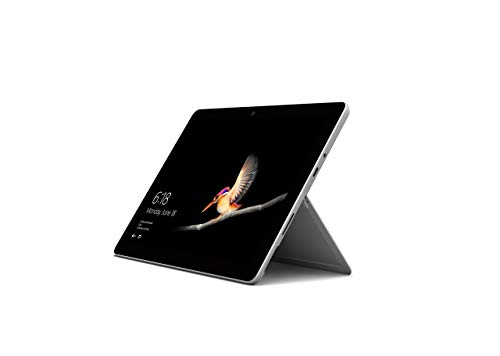
Microsoft Surface Go WiFi (4GB + 64GB)
7.3/10

Overall score

Score
7.3/ 10
✕
What it is
Our main score for this model, 1–10. It combines specs, best-of lists, expert reviews and owners.
How we count it
Parts: Technical score 35%, List score 30%, Reviews score 25%, Sentiment score 10%
Marks: Each part gets a mark out of 10. For reviews, lists and owners, a typical model in this category gets about 8 and the best one gets 10.
No data yet: A part with no data shows "?". It counts as the mark of a weaker model in this category (4 in 5 models with data score higher). This way, models with reviews, lists and owners usually come out ahead.
Score distribution
â–¼
<55-66-77-88-99-10
Score components

35%

5.9

Technical score

30%

?

List scoreNot enough data yet, so we use 7.5, the mark of a weaker model in this category

25%

7.9

Reviews score

10%

10

Sentiment score

â–²Better than 64% of tablets
7.6

Value for money

Value for money
7.6/ 10
✕
What it is
An indicator that combines the tablet's overall rating with its cost.
When it matters
When you are looking for a tablet with a good balance between quality and price.
Score distribution
â–¼
<55-66-77-88-99-10
Score components

70%

7.3

Overall score

30%

8.4

Price

â–²Better than 50%
5.9

Technical score

Technical score
5.9/ 10
✕
What it is
How good the specs are compared with the other models in this category, 1–10.
How we count it
Areas: We rate the specs in each area against the other models in this category.
Weighting: The areas that matter most to buyers count more. The shares are shown under Score components.
Share: The technical score is 35% of the overall score.
Score distribution
â–¼
<55-66-77-88-99-10
Score components

22%

5.2

Performance

20%

5.5

Display

16%

6.8

Camera

14%

3.8

Battery

12%

7.3

Connectivity

8%

8.3

Software

5%

6.7

Design

3%

5.5

Audio

â–¼Worse than 56%
7.9

Reviews score

Reviews score
7.9/ 10
✕
What it is
Average grade from independent test sites, magazines and video reviewers, 1–10.
How we count it
Grades: Each review's own score is converted to 1–10; without one, we grade the review ourselves. Big test sites count more, short reviews half as much as full tests. A video review counts half.
Score: The average grade is 80% of the review mark; the number of reviews is the other 20% (1 review = 5, the typical number in this category = 8, the most-reviewed model = 10).
Enough data: With few reviews, the average grade is pulled toward the typical grade of this category. No reviews yet: 7.4 for now.
Share: Reviews count 25% of the overall score.
Score distribution
â–¼
<55-66-77-88-99-10

80%

7.7

Average grade

20%

8.9

Popularity

Grades by review (36)
21 reviews: 11 with a printed score, 10 estimated from the review. 15 video reviews, each counting half as much as a written test. Reviews count 25% of the overall score.
User ratings collected online are not part of this score.
â–²Better than 52%
?

List score

List score
7.5/ 10
✕
What it is
How often independent test sites, magazines and video reviewers put this model in their best-of lists for this category.
How we count it
Points: The model in the most lists of this category gets 10; the others get 8 to 10 in proportion. In no list yet: 7.5. Lists count 30% of the overall score.
Enough data: Every list counts, even a single one. With fewer than 5 best-of lists in the category, this part is left out.
Lists with this model (0)
Not in any best-of list yet, so this part counts as 7.5. Models in a list get 8 to 10.
Not in any best-of list yet
  • microsoft-surface-go-4gb-64gb-wifi
  • microsoft-surface-go-4gb-64gb-wifi
  • microsoft-surface-go-4gb-64gb-wifi
  • microsoft-surface-go-4gb-64gb-wifi
  • microsoft-surface-go-4gb-64gb-wifi
  • microsoft-surface-go-4gb-64gb-wifi
  • microsoft-surface-go-4gb-64gb-wifi
  • microsoft-surface-go-4gb-64gb-wifi
microsoft-surface-go-4gb-64gb-wifi
Where to buy
*As an Amazon Associate, we earn from qualifying purchases.
Available versions:
4GB + 64GB
Other versions:

What reviewers say about the Microsoft Surface Go WiFi (4GB + 64GB)

Based on 21 · 15

Reviewers love the light, well-built design and sharp screen, but complain about the costly accessories, sluggish performance and few ports.
Praised
Mixed views
Criticised
Pick a topic to see who said what

What owners say about the Microsoft Surface Go WiFi (4GB + 64GB)

Based on 210 owners sharing their experience in online comments

77%positive9%mixed14%negative

Owners praise its portable, versatile Windows design for everyday work, but slow performance and short battery life hold it back.

What owners dislike

  • Demanding work such as video editing, audio recording and large Excel files lags or crashes, and many open browser tabs slow it down.29
  • Owners report typing and scrolling lag, a poor on-screen keyboard in tablet mode, touch that did not work, and pen tips that break easily.10
  • Google Chrome is slow to load and lags, with CPU spikes, while Microsoft Edge and Firefox run smoothly on the same device.8
  • Owners feel the price is high for the hardware, and that the keyboard, pen and Office add-ons cost too much on top.8
  • Battery often lasts only about 3 to 5 hours with video, note-taking or gaming, and drains faster with LTE on.6
  • In Windows S mode only Microsoft Store apps install, so many owners switch it out of S mode to add the programs they need.6
  • Tablet use has few apps, with some news apps missing, and Windows tablet mode and the touch keyboard feel awkward next to an iPad.5
  • The small screen feels cramped for spreadsheets, data work and everyday use as a main computer.4

Points mentioned by at least 3 owners, most mentioned first.

Loading...
Loading category ranking...

Technical Specifications of tablet Microsoft Surface Go WiFi (4GB + 64GB)

Technical score
Technical score
5.9/ 10
✕
What it is
How good the specs are compared with the other models in this category, 1–10.
How we count it
Areas: We rate the specs in each area against the other models in this category.
Weighting: The areas that matter most to buyers count more. The shares are shown under Score components.
Share: The technical score is 35% of the overall score.
Score distribution
â–¼
<55-66-77-88-99-10
Score components:

22%

5.2

Performance

20%

5.5

Display

16%

6.8

Camera

14%

3.8

Battery

12%

7.3

Connectivity

8%

8.3

Software

5%

6.7

Design

3%

5.5

Audio

5.9
Reviews score
7.9
List score
?
Value for money
Value for money
7.6/ 10
✕
What it is
An indicator that combines the tablet's overall rating with its cost.
When it matters
When you are looking for a tablet with a good balance between quality and price.
Score distribution
â–¼
<55-66-77-88-99-10
Score components:

70%

7.3

Overall score

30%

8.4

Price

7.6
RAM capacity
4 GB
This tablet has 4 GB of RAM, which is more than 47.2% of tablets and equal to 17.8% of tablets.
Process node
14 nm
This tablet is built on a 14 nm process, which is smaller than 44.6% of tablets and equal to 8.5% of tablets.
Internal storage
64 GB
This tablet has 64 GB of internal storage, which is more than 39.1% of tablets and equal to 17% of tablets.
Geekbench 6 single-core score
346 points
This tablet scores 346 points in single-core tests, which is lower than 77.1% of tablets and equal to 0.2% of tablets.
Chipset
Intel Pentium Gold 4415Y
This tablet runs on Intel Pentium Gold 4415Y, which is less advanced than 55.9% of tablets and equal to 0.1% of tablets.
Show more
What reviewers say
Screen resolution
1800×1200
This tablet has a 1800×1200 screen, which is less sharp than 61% of tablets and equal to 0.1% of tablets.
Refresh rate
60 Hz
This tablet has a 60 Hz screen, which is smoother than 0.1% of tablets and equal to 73.4% of tablets.
Display type
IPS LCD
This tablet uses a IPS LCD display type. 17% of tablets use this display technology.
Pixel density
217 ppi
This tablet has a pixel density of 217 ppi, which is lower than 51.8% of tablets and equal to 0.2% of tablets.
Display glass type
Corning Gorilla Glass 3
This tablet protects its screen with Corning Gorilla Glass 3, which is more durable than 80.2% of tablets and the same as 11.2% of tablets.
Show more
What reviewers say
Optical image stabilization
no
This tablet does not support optical stabilisation. 0.4% of tablets offer this.
Main camera megapixels
8 MP
This tablet has a rear camera with 8 MP resolution, which is higher than 36.4% of tablets and equal to 31.9% of tablets.
Front camera megapixels
5 MP
This tablet has a front camera with 5 MP resolution, which is higher than 48.6% of tablets and equal to 19.7% of tablets.
Main camera aperture
f/2.0
This tablet has a main camera aperture of f/2.0, which is wider than 57.4% of tablets and equal to 24.7% of tablets.
Optical zoom
1xxx
This tablet has 1xx optical zoom, which is stronger than 18.2% of tablets and equal to 80.9% of tablets.
Show more
Battery capacity
3,411 mAh
This tablet has 3,411 mAh battery capacity, which is smaller than 94.1% of tablets.
Charging speed
24 W
This tablet charges at 24 W, which is faster than 69% of tablets and equal to 1.4% of tablets.
Battery life
6 hours
This tablet has a battery life of 6 hours, which is shorter than that of 92% of tablets and equal to that of 2.6% of tablets.
Wireless charging
no
This tablet does not support wireless charging. 1.5% of tablets offer this.
Fast charging
yes
This tablet supports fast charging. 43.2% of tablets offer this.
Show more
What reviewers say
LTE support
no
This tablet does not have built-in LTE. 42.9% of tablets offer this.
Wi-Fi connectivity
yes
This tablet connects to Wi-Fi. 0.2% of tablets offer this.
GPS
yes
This tablet has built-in GPS. 17.1% of tablets offer this.
5G connectivity
no
This tablet does not support 5G. 8.1% of tablets offer this.
NFC
no
This tablet does not include NFC. 10.8% of tablets offer this.
Show more
What reviewers say
Operating system
Windows
This tablet uses the Windows operating system, which is less advanced than the one used by 84.2%.
Update support duration
medium
This tablet offers medium update support, which is longer than the support period of 47.6% of tablets and equal to that of 32.4% of tablets.
Direct OS updates
yes
This tablet supports direct OS updates. 20.3% of tablets offer this.
On-device AI
no
This tablet does not support on-device AI. 28.3% of tablets support this capability.
App tracking protection
yes
This tablet supports app tracking protection. 71.6% of tablets offer this.
Show more
What reviewers say
IP rating
not rated
This tablet's IP rating is not rated, which is less protected than 16.5% of tablets and the same as 83.6% of tablets.
Weight
522 g
This tablet weighs 522 g, which is heavier than 60.3% of tablets and equal to 0.1% of tablets.
Backlit keyboard
yes
This tablet supports a backlit keyboard. 90.4% of tablets support backlit keyboards.
Keyboard accessory
yes
This tablet supports a keyboard accessory. 15.8% of tablets support this option.
Pen latency
21 ms
This tablet has a pen latency of 21 ms, which is higher than that of 76.2% of tablets and equal to that of 4.9% of tablets.
Show more
What reviewers say
Number of microphones
?
aptX Adaptive
no
This tablet does not support aptX Adaptive. 6.9% of tablets offer this.
Dolby Atmos support
no
This tablet does not support Dolby Atmos. 31.3% of tablets support Dolby Atmos.
N. of speakers
2
This tablet includes 2 speakers, which is more than in 9.8% of tablets and equal to the number in 60.8% of tablets.
FM radio
no
This tablet does not include an FM radio. 19% of tablets offer this.
Show more
What reviewers say

Microsoft Surface Go WiFi (4GB + 64GB) vs the average tablet

246810TotalPerformanceDisplayCameraBatteryConnectivitySoftwareDesignAudio
  • Supports DisplayPort over USB-C
    This tablet supports DisplayPort over USB-C, the average tablet does not. 21.3% of tablets support DisplayPort over USB-C.
  • Supports eSIM
    This tablet supports eSIM, the average tablet does not. 11.3% of tablets support eSIM.
  • Supports manual shutter speed
    This tablet supports manual shutter speed, while the average tablet does not. 21.8% of tablets support manual shutter speed.
  • More advanced chipset
    This tablet has a more advanced chipset than the average tablet (Intel Pentium Gold 4415Y vs MediaTek MT8169A).
    Intel Pentium Gold 4415Y vs MediaTek MT8169A
  • Wider front camera aperture
    This tablet has a wider front camera aperture than the average tablet (f/2 vs f/2.2). The average tablet's front camera aperture is f/2.2.
    f/2.0 vs f/2.2
  • Monitors battery health
    This tablet monitors battery health, while the average tablet does not. 36.7% of tablets monitor battery health.
  • More vivid contrast
    This tablet has more contrast than the average tablet (1500:1 vs 1015:1). The average tablet has a contrast ratio of 1015:1.
    1,500:1 vs 1,015:1
  • Faster USB ports
    This tablet has faster USB ports than the average tablet (USB 3.2 Gen 1 vs USB 2).
    USB 3.2 Gen 1 vs USB 2.0
  • 33.3% higher sentiment score
    10.0 vs 7.5
  • 12.9% higher review score
    Reviews score
    7.9/ 10
    ✕
    What it is
    Average grade from independent test sites, magazines and video reviewers, 1–10.
    How we count it
    Grades: Each review's own score is converted to 1–10; without one, we grade the review ourselves. Big test sites count more, short reviews half as much as full tests. A video review counts half.
    Score: The average grade is 80% of the review mark; the number of reviews is the other 20% (1 review = 5, the typical number in this category = 8, the most-reviewed model = 10).
    Enough data: With few reviews, the average grade is pulled toward the typical grade of this category. No reviews yet: 7.4 for now.
    Share: Reviews count 25% of the overall score.
    Score distribution
    â–¼
    <55-66-77-88-99-10

    80%

    7.7

    Average grade

    20%

    8.9

    Popularity

    Grades by review (36)
    21 reviews: 11 with a printed score, 10 estimated from the review. 15 video reviews, each counting half as much as a written test. Reviews count 25% of the overall score.
    User ratings collected online are not part of this score.
    7.9 vs 7.0
  • More advanced chipset
    This tablet has a more advanced chipset than the average tablet (Intel Pentium Gold 4415Y vs MediaTek MT8169A).
    Intel Pentium Gold 4415Y vs MediaTek MT8169A
  • 2x more memory bandwidth
    This tablet has more memory bandwidth than the average tablet (29.8 GB/s vs 14.9 GB/s). The average tablet has 14.9 GB/s of memory bandwidth.
    29.8 GB/s vs 14.9 GB/s
  • Supports multithreading
    This tablet supports multithreading, while the average tablet does not. 9.9% of tablets support multithreading.
  • 20 more GPU execution units
    This tablet has more GPU execution units than the average tablet (24 vs 4). The average tablet has 4 GPU execution units.
    24 vs 4
  • More vivid contrast
    This tablet has more contrast than the average tablet (1500:1 vs 1015:1). The average tablet has a contrast ratio of 1015:1.
    1,500:1 vs 1,015:1
  • 4.17x faster touch response
    This tablet samples touch faster than the average tablet (500 Hz vs 120 Hz). The average tablet samples touch at 120 Hz.
    500 Hz vs 120 Hz
  • Supports HDR10
    This tablet supports HDR10, while the average tablet does not. 21.7% of tablets support HDR10.
  • More durable glass
    This tablet has more durable glass than the average tablet (Corning Gorilla Glass 3 vs Corning Gorilla Glass). The average tablet uses Corning Gorilla Glass.
    Corning Gorilla Glass 3 vs Corning Gorilla Glass
  • Supports manual shutter speed
    This tablet supports manual shutter speed, while the average tablet does not. 21.8% of tablets support manual shutter speed.
  • Wider front camera aperture
    This tablet has a wider front camera aperture than the average tablet (f/2 vs f/2.2). The average tablet's front camera aperture is f/2.2.
    f/2.0 vs f/2.2
  • Wider main camera aperture
    This tablet has a wider main camera aperture than the average tablet (f/2 vs f/2.2). The average tablet's main camera aperture is f/2.2.
    f/2.0 vs f/2.2
  • Monitors battery health
    This tablet monitors battery health, while the average tablet does not. 36.7% of tablets monitor battery health.
  • 33.3% faster charging
    This tablet charges faster than the average tablet (24 W vs 18 W). The average tablet charges at 18 W.
    24 W vs 18 W
  • Supports DisplayPort over USB-C
    This tablet supports DisplayPort over USB-C, the average tablet does not. 21.3% of tablets support DisplayPort over USB-C.
  • Supports eSIM
    This tablet supports eSIM, the average tablet does not. 11.3% of tablets support eSIM.
  • Faster USB ports
    This tablet has faster USB ports than the average tablet (USB 3.2 Gen 1 vs USB 2).
    USB 3.2 Gen 1 vs USB 2.0
  • Supports HDMI output
    This tablet supports HDMI output, while the average tablet does not. 49.8% of tablets offer this.
    via USB-C video-out adapter
  • Supports live text recognition
    This tablet supports live text recognition, while the average tablet does not. 35.1% of tablets offer this.
  • Supports app tracking protection
    This tablet supports app tracking protection, while the average tablet does not. 28.4% of tablets offer this.
  • Supports app offloading
    This tablet supports app offloading, while the average tablet does not. 26.3% of tablets offer this.
  • Supports extra dim mode
    This tablet supports extra dim mode, while the average tablet does not. 35.9% of tablets offer this.
  • Supports drawing
    This tablet is suitable for drawing, while the average tablet is not. 40% of tablets are suitable for drawing.
  • Includes backlit keyboard
    This tablet has a backlit keyboard, the average tablet does not. 9.6% of tablets offer a backlit keyboard.
  • Supports stylus tilt
    This tablet supports stylus tilt, the average tablet does not. 33.5% of tablets support stylus tilt.
  • 4 hours shorter battery life
    This tablet offers shorter battery life than the average tablet (6 hours vs 10 hours). The average tablet offers 10 hours of battery life.
    6 hours vs 10 hours
  • 4 fewer CPU threads
    This tablet has fewer CPU threads than the average tablet (4 vs 8). The average tablet has 8 CPU threads.
    4 vs 8
  • 48.3% smaller battery capacity
    This tablet has a smaller battery capacity than the average tablet (3,411 mAh vs 6,600 mAh). The average tablet offers 6,600 mAh of battery capacity.
    3,411 mAh vs 6,600 mAh
  • Less advanced operating system
    This tablet runs on a less advanced operating system than the average tablet (Windows vs Android). Operating system choice shapes app support, updates, and ecosystem features.
    Windows vs Android
  • No HDR photo mode
    This tablet does not have HDR photo mode, the average tablet does. 79.8% of tablets support HDR photo mode.
  • 51 nits dimmer screen
    This tablet is dimmer than the average tablet (350 nits vs 401 nits). The average tablet reaches 401 nits.
    350 nits vs 401 nits
  • No manual white balance
    This tablet does not support manual white balance, while the average tablet does. 51.5% of tablets support manual white balance.
  • 20% lower CPU speed
    This tablet has a lower CPU speed than the average tablet (1.6 GHz vs 2 GHz). The average tablet has CPU speed of 2 GHz.
    1.6 GHz vs 2 GHz
  • 53.9% more expensive
    Microsoft Surface Go WiFi (4GB + 64GB) is more expensive than the average tablet (£400 vs £260).
    £400 vs £260
  • 4 fewer CPU threads
    This tablet has fewer CPU threads than the average tablet (4 vs 8). The average tablet has 8 CPU threads.
    4 vs 8
  • 20% lower CPU speed
    This tablet has a lower CPU speed than the average tablet (1.6 GHz vs 2 GHz). The average tablet has CPU speed of 2 GHz.
    1.6 GHz vs 2 GHz
  • No big.LITTLE architecture
    This tablet does not support big.LITTLE architecture, while the average tablet does. 51.7% of tablets support big.LITTLE architecture.
  • 37.8% lower multi-core score
    This tablet has a lower multi-core score than the average tablet (1,176 points vs 1,891 points). The average tablet scores 1,891 points in multi-core tests.
    1,176 points vs 1,891 points
  • 52.5% lower single-core score
    This tablet has a lower single-core score than the average tablet (346 points vs 729 points). The average tablet scores 729 points in single-core tests.
    346 points vs 729 points
  • 51 nits dimmer screen
    This tablet is dimmer than the average tablet (350 nits vs 401 nits). The average tablet reaches 401 nits.
    350 nits vs 401 nits
  • 0.1 inches smaller screen
    This tablet has a smaller screen than the average tablet (10 inches vs 10.1 inches). The average tablet measures 10.1 inches.
    10 inches vs 10.1 inches
  • Less sharp display
    This tablet has a less sharp screen than the average tablet (1800×1200 vs 1920×1200).
    1,800×1,200 vs 1,920×1,200
  • No HDR photo mode
    This tablet does not have HDR photo mode, the average tablet does. 79.8% of tablets support HDR photo mode.
  • No manual white balance
    This tablet does not support manual white balance, while the average tablet does. 51.5% of tablets support manual white balance.
  • 4 hours shorter battery life
    This tablet offers shorter battery life than the average tablet (6 hours vs 10 hours). The average tablet offers 10 hours of battery life.
    6 hours vs 10 hours
  • 48.3% smaller battery capacity
    This tablet has a smaller battery capacity than the average tablet (3,411 mAh vs 6,600 mAh). The average tablet offers 6,600 mAh of battery capacity.
    3,411 mAh vs 6,600 mAh
  • Older Bluetooth version
    This tablet has an older Bluetooth version than the average tablet (4.1 vs 5).
    4.1 vs 5
  • Less advanced operating system
    This tablet runs on a less advanced operating system than the average tablet (Windows vs Android). Operating system choice shapes app support, updates, and ecosystem features.
    Windows vs Android
  • No full-page screenshots
    This tablet does not support full-page screenshots, the average tablet does. 53% of tablets support full-page screenshots.
  • 12 ms higher pen latency
    This tablet has higher pen latency than the average tablet (21 ms vs 9 ms). The average tablet has pen latency of 9 ms.
    21 ms vs 9 ms
  • 69.7 mm wider
    This tablet is wider than the average tablet (245 mm vs 175.3 mm). The average tablet is 175.3 mm wide.
    245 mm vs 175.3 mm
  • 6.5% heavier
    This tablet is heavier than the average tablet (522 g vs 490 g). The average tablet weighs 490 g.
    522 g vs 490 g

Video reviews

Hands-on testing, unboxing, and real-world video evaluations

8.0
Maddy Parada
≈ estimated
19/04/2020
Long-term use · student perspective and accessory tests
Verdict
Microsoft Surface Go WiFi is worth the money for students, though the charging connection can come loose.
7.0
My Next Tablet
≈ estimated
01/10/2018
Hands-on review · battery test, Windows and pen use
Verdict
Microsoft Surface Go WiFi has an excellent build and pen, but it is too expensive to recommend except as a small second device.
9.0
Editors Keys
≈ estimated
29/08/2018
Hands-on review · travel use, camera, keyboard and battery
Verdict
Microsoft Surface Go WiFi is not for heavy photo or video editing, but it is a strong second device for travelling professionals.
9.0
Ian Dixon
≈ estimated
28/08/2018
Hands-on review · performance, apps and tablet mode
Verdict
Microsoft Surface Go WiFi is a small, responsive device for light work and casual games, not for heavy software.
8.0
The Verge
≈ estimated
07/08/2018
Hands-on review · S mode, performance and port tests
Verdict
Microsoft Surface Go WiFi is a strong small Windows machine for Windows fans, though S mode and app gaps are real limits.
6.0
MobileTechReview
≈ estimated
04/08/2018
Hands-on review · battery, charging and Windows tests
Verdict
Microsoft Surface Go WiFi is a niche product: portable with full Windows, but slow, so an iPad or Android tablet is easier.
7.0
Unboxio
≈ estimated
04/03/2023
Hands-on review · battery, performance and keyboard tests
Verdict
Microsoft Surface Go WiFi is good for light tasks and a tight budget, but performance is limited and it is not for demanding work.
6.0
Digital Trends
≈ estimated
02/08/2018
Hands-on review · keyboard, tablet mode and battery tests
Verdict
Microsoft Surface Go WiFi is far from perfect and hard to recommend to most people, though it may be Microsoft's best attempt yet.

Expert reviews

In-depth analysis and verdict from leading tech publications

8.5
theverge.com
✓ explicit
07/08/2018
Hands-on review · Compact Windows tablet
Verdict
The Surface Go is a tiny Windows tablet that handles browsing, Office and email well, but gaming and heavy photo editing are out of reach.
7.5
cnet.com
✓ explicit
13/08/2018
Hands-on review · Two-in-one tablet
Verdict
The Surface Go is a compact Windows tablet that suits coffee-shop writing and light work, though its battery life is short and the keyboard costs extra.
7.0
pcmag.com
✓ explicit
02/08/2018
Full review · Windows tablet
Verdict
The Surface Go is a shrunken Surface Pro, best for light work, travel and classrooms, though its processor is slow.
9.0
techradar.com
✓ explicit
10/12/2020
Full review · Windows tablet
Verdict
The Surface Go is a stylish 10-inch Windows tablet with a good display and speakers, though it's less powerful than an iPad.
8.0
theguardian.com
≈ estimated
06/09/2018
Full review · Windows tablet
Verdict
The Surface Go is a capable little work machine with its Type Cover, but missing streaming apps make it a weaker media tablet.
9.0
techadvisor.com
✓ explicit
05/10/2018
Full review · Small Windows 2-in-1
Verdict
The Surface Go is a small, well-built Windows 2-in-1 that runs smoothly for everyday work, though its 10-inch screen and separately sold keyboard are its limits.
9.0
wired.com
✓ explicit
23/08/2018
Hands-on review · iPad alternative
Verdict
The Surface Go is a work-focused Windows tablet that becomes a capable little laptop with its Type Cover, but it falls short of an iPad for entertainment.
6.5
mashable.com
✓ explicit
02/08/2018
Hands-on review · Daily use test
Verdict
The Surface Go is well built and sharp-screened, but its slow Pentium chip and Windows 10 on a small screen make daily use frustrating.
8.0
expertreviews.co.uk
✓ explicit
09/12/2019
Hands-on review · Keyboard tablet
Verdict
The Surface Go is best with its keyboard attached, offering a sharp screen and pleasant typing, but Windows feels cramped on a 10-inch display.
6.0
technikfaultier.com
≈ estimated
13/10/2018
Two-week test · Performance focus
Verdict
The Surface Go has a solid build and sharp touchscreen, but its slow performance and high accessory cost make it hard to recommend over an iPad.
6.0
computerbild.de
✓ explicit
13/11/2018
Lab test · Windows convertible
Verdict
The Surface Go is light, slim and well made with enough power for everyday work, but Windows 10 is only moderately suited to tablet use.
6.0
heise.de
✓ explicit
22/09/2018
Hands-on test · Compact Windows laptop
Verdict
The Surface Go is a compact travel laptop with a good screen and keyboard, but modest performance and a battery that could last longer hold it back.
8.0
notebooks-und-mobiles.de
≈ estimated
10/08/2018
Lab test · Windows tablet
Verdict
The Surface Go is a sturdy Windows tablet for mobile work with balanced speakers and USB-C monitor output, but it weighs more than an iPad.
7.0
zdnet.fr
≈ estimated
27/08/2018
Three-week review · Portable tablet
Verdict
The Surface Go is a light, compact Windows tablet for short writing and email on the move, but it can't replace a laptop and is awkward on the lap.
8.0
tablette-tactile.net
≈ estimated
18/07/2019
Hands-on test · Two-in-one hybrid
Verdict
The Surface Go is a well-built, light hybrid for office work and browsing, though its battery and cramped keyboard are weak points.
8.0
smartworld.it
≈ estimated
21/03/2019
Full review · Windows tablet
Verdict
The Surface Go is a miniature Surface that's solid and responsive for media and light work, but its battery is limited and its small keyboard suits only light typing.
8.0
tech.fanpage.it
≈ estimated
22/11/2018
Hands-on review · Compact Windows tablet
Verdict
The Surface Go is a compact Windows tablet that handles everyday work well on the move, but its small battery lasts at most about four and a half hours.
8.0
digitalic.it
≈ estimated
10/08/2018
Review · Tablet-laptop hybrid
Verdict
The Surface Go is a surprisingly capable Surface for light work and travel, but as a pure tablet it can't match an iPad.
8.5
tweakers.net
✓ explicit
29/08/2018
Full review · Entry-level tablet
Verdict
The Surface Go is well built, with a sharp screen and quick face login, but its slow base storage and extra keyboard cost hold it back.
8.0
fwd.nl
≈ estimated
07/11/2018
Full review · Compact work tablet
Verdict
The Surface Go is a compact, light tablet for work and video that handles Office and many open windows well, though its battery and narrow keyboard are weak points.

Third-party reviews

What customers like about Microsoft Surface Go WiFi (4GB + 64GB)

  • Extremely portable and lightweight, making it ideal for travel and secondary use
  • Premium build quality with a sturdy magnesium body and a highly adjustable integrated kickstand
  • Sharp and bright 10-inch high-resolution touchscreen with vivid colors
  • Versatile full Windows 10/11 experience in a tablet form factor, allowing for standard desktop applications
  • Excellent Windows Hello facial recognition for quick and secure logins
  • Responsive Surface Pen support for note-taking and sketching

Verdict

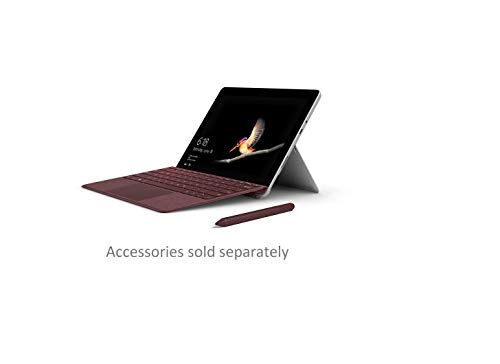
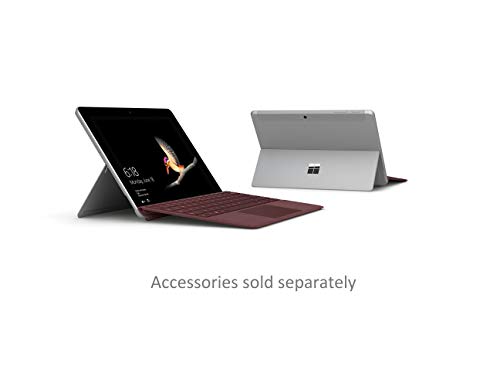
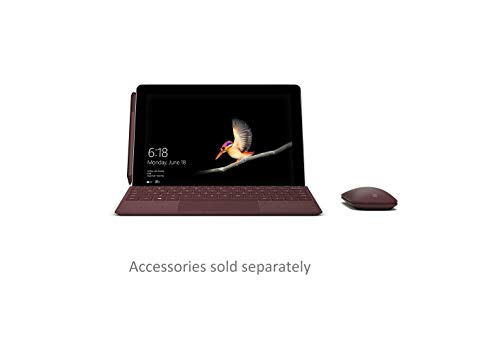
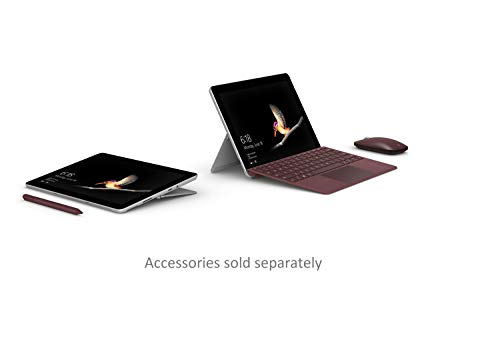
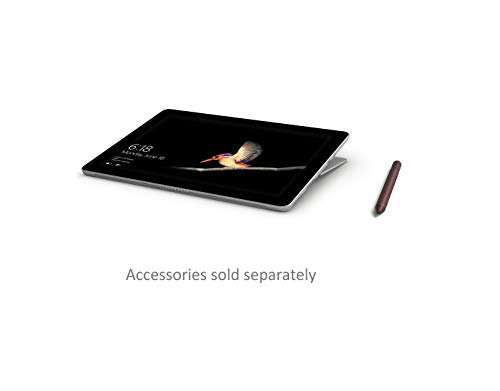
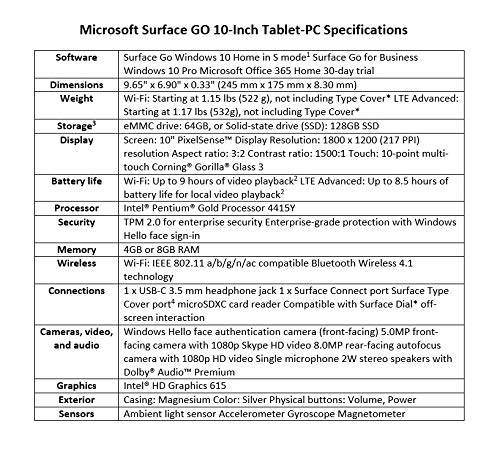
The Microsoft Surface Go (1st Gen) is an ultra-portable 10-inch 2-in-1 tablet featuring a 10-inch PixelSense touchscreen display with an 1800 x 1200 resolution and a productivity-focused 3:2 aspect ratio. This base configuration is equipped with an Intel Pentium Gold 4415Y processor, 4GB of RAM, and 64GB of eMMC storage, housed in a premium magnesium alloy chassis weighing just 1.15 lbs. Key highlights include a built-in multi-position kickstand (up to 165°), a Windows Hello facial recognition camera, and versatile connectivity with a USB-C port and a microSDXC card reader. While it excels in build quality and portability for light tasks like web browsing and Office 365, its primary drawbacks are the relatively slow eMMC storage compared to SSDs, limited 4GB of memory for intensive multitasking, and the fact that essential accessories like the Type Cover and Surface Pen are sold separately.

Compare Microsoft Surface Go WiFi (4GB + 64GB) with other tablets

1Product to compare no. 1
VS
2Product to compare no. 2
VS
3Product to compare no. 3 (optional)

Graphic comparison of Microsoft Surface Go WiFi (4GB + 64GB) and other tablets

No results found