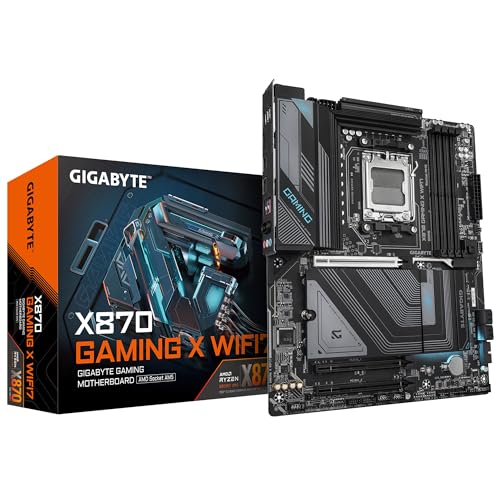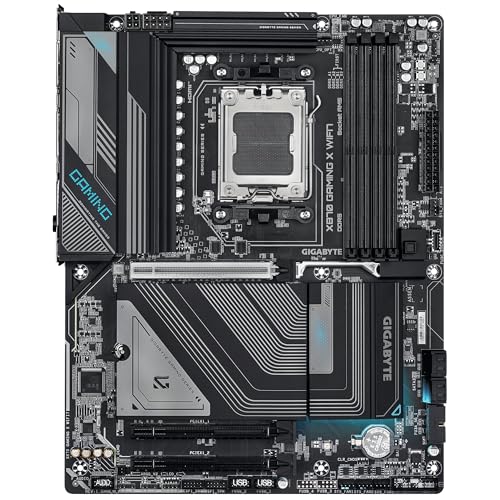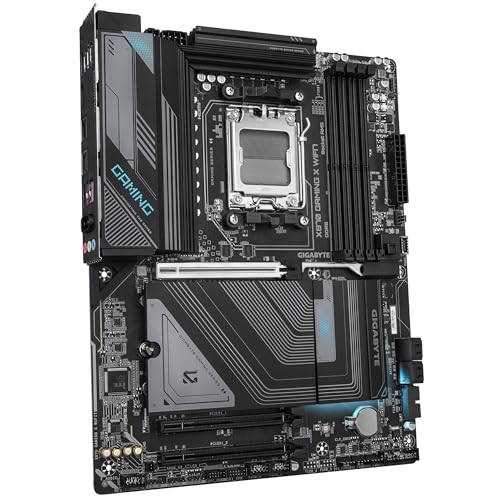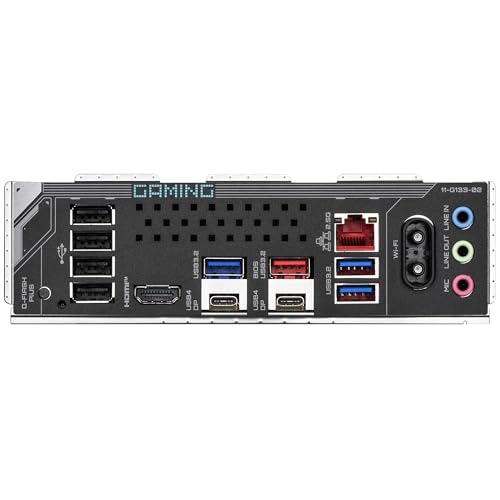
GIGABYTE X870 Gaming X WiFi 7 Review | 107 Data compared

GIGABYTE X870 Gaming X WiFi 7 Review | 107 Data compared

double-arrow
  • Avg. price in UK: ~£170
  • Avg. price in US: ~$210
  • CPU socket: AM5
  • Chipset: AMD X870
  • Form factor: ATX

GIGABYTE X870 Gaming X WiFi 7 review. Compare 107 technical specifications and user reviews to see how this product ranks in the Motherboards category and whether it is worth buying.

8.5

Overall score

What it is: An overall evaluation of the motherboard's quality, based on technical analyses and user reviews.

When it matters: When you need a quick reference to identify the best motherboards on the market.

Score components:

90.0%

8.5

Technical Score

10.0%

8.3

User score

Excellent
8.5

Technical Score

What it is: An assessment of technical performance for products in the Motherboards category across these key areas: Platform & Features, Memory, Storage, Expansion, Ports & USB, Network, Audio, Power & Cooling.

When it matters: When you want to compare motherboards based on technical performance and available features.

Score components:

19.0%

9.9

Memory

16.0%

9.2

Platform & Features

16.0%

8.3

Storage

15.0%

9.2

Network

13.0%

6.8

Ports & USB

8.0%

6.3

Expansion

8.0%

8.7

Power & Cooling

5.0%

6.9

Audio

Excellent
8.3

User score

What it is: A rating that combines user reviews and the total number of reviews received by the motherboard.

When it matters: When you want to understand how a motherboard performs in real-world builds and how reliable it is in terms of stability, BIOS usability, connectivity, and long-term ownership.

Score components:

70.0%

8.6

User reviews

30.0%

7.7

Popularity

User score:
United Kingdom
amazon
4.2
(107)
amazon
4.6
(75)
United States
Amazon_logo.png
4.1
(109)
Amazon_logo.png
4.6
(75)

(Reviews last updated: May 2026)

Excellent
  • 9.0
    Gaming

    Score components:

    28.0%

    8.3

    VRM phases

    22.0%

    7.8

    N. of M.2 sockets

    18.0%

    10

    LAN speed

    17.0%

    10

    Maximum RAM speed

    15.0%

    10

    N. of PCIe 5.0 x16 slots

  • gigabyte-x870-gaming-x-wifi7
  • gigabyte-x870-gaming-x-wifi7
  • gigabyte-x870-gaming-x-wifi7
  • gigabyte-x870-gaming-x-wifi7
gigabyte-x870-gaming-x-wifi7

Best prices in UK

Best rankings

?

Available: ranking among products currently available (including other versions of this product).
All: ranking among all products in the database.

Verdict

The Gigabyte X870 Gaming X WIFI7 is a high-performance ATX motherboard built for AMD Socket AM5, supporting Ryzen 9000, 8000, and 7000 series processors. Key specifications include a robust 16+2+2 digital twin-phase VRM design, dual-channel DDR5 memory support up to 8000MHz (OC), and a high-speed PCIe 5.0 x16 slot. It excels in connectivity with dual 40Gbps USB4 Type-C ports, 2.5GbE LAN, and ultra-fast Wi-Fi 7. Main pros include its 'EZ-Latch' DIY-friendly design for screwless M.2 and PCIe installation, comprehensive thermal management, and future-proof storage options via one PCIe 5.0 and two PCIe 4.0 M.2 slots. However, notable cons include the lack of built-in RGB lighting, the absence of onboard diagnostic LEDs, and limited PCIe 5.0 M.2 slots compared to higher-tier models.

Technical Specifications of motherboard GIGABYTE X870 Gaming X WiFi 7

Technical Score

What it is: An assessment of technical performance for products in the Motherboards category across these key areas: Platform & Features, Memory, Storage, Expansion, Ports & USB, Network, Audio, Power & Cooling.

When it matters: When you want to compare motherboards based on technical performance and available features.

Score components:

19.0%

9.9

Memory

16.0%

9.2

Platform & Features

16.0%

8.3

Storage

15.0%

9.2

Network

13.0%

6.8

Ports & USB

8.0%

6.3

Expansion

8.0%

8.7

Power & Cooling

5.0%

6.9

Audio

8.5
GIGABYTE X870 Gaming X WiFi 7 has a technical score of 8.49 points, which is higher than that of 85.2% of products in this category.
User score

What it is: A rating that combines user reviews and the total number of reviews received by the motherboard.

When it matters: When you want to understand how a motherboard performs in real-world builds and how reliable it is in terms of stability, BIOS usability, connectivity, and long-term ownership.

Score components:

70.0%

8.6

User reviews

30.0%

7.7

Popularity

User score:
United Kingdom
amazon
4.2
(107)
amazon
4.6
(75)
United States
Amazon_logo.png
4.1
(109)
Amazon_logo.png
4.6
(75)

(Reviews last updated: May 2026)

8.3
GIGABYTE X870 Gaming X WiFi 7 has a user score of 8.34 points, which is higher than that of 68.8% of products in this category.
Popularity
What it is: An indicator based on the number of reviews received by the motherboard.
When it matters: When you prefer a motherboard that has already been bought and reviewed by many other users.
7.7
GIGABYTE X870 Gaming X WiFi 7 has a popularity of 7.7 points, which is higher than 67.9% of products in this category.
Ratio quality/price

What it is: An indicator that combines the motherboard's overall rating with its cost.

When it matters: When you are looking for a motherboard that offers a strong balance of features, performance, and price.

Score components:

60.0%

8.5

Overall score

40.0%

9.6

Price

8.8
GIGABYTE X870 Gaming X WiFi 7 has a quality-to-price ratio of 8.8 points, which is higher than 88.4% of products in this category.
Brand name
What it is: The brand that makes the motherboard.
When it matters: When you have a brand preference for support, BIOS, or build quality.

Importance: LOW

Gigabyte
CPU socket
What it is: The socket type the motherboard is built to support.
When it matters: When you need the motherboard to match a specific CPU.

Importance: HIGH

AM5
GIGABYTE X870 Gaming X WiFi 7 uses the AM5 CPU socket, which is more advanced than that of 85.8% of motherboards and equal to that of 14.2% of motherboards.
CPU platform
What it is: The processor platform supported by the motherboard, indicating compatibility with Intel or AMD processors.
When it matters: When choosing a motherboard to match your chosen processor brand (Intel or AMD).

Importance: LOW

Good value: Intel

AMD
GIGABYTE X870 Gaming X WiFi 7 is built for the AMD CPU platform, which is less common than that of 68.5% of motherboards and equal to that of 31.5% of motherboards.
Chipset
What it is: The chipset that defines the motherboard platform and many of its features.
When it matters: When you compare platform features, connectivity, and CPU support.

Importance: HIGH

AMD X870
GIGABYTE X870 Gaming X WiFi 7 uses the AMD X870 chipset, which is more advanced than that of 93.1% of motherboards and equal to that of 1.4% of motherboards.
Form factor
What it is: The physical size standard of the motherboard, such as ATX or Micro-ATX.
When it matters: When you need the board to fit a specific case size.

Importance: LOW

ATX
GIGABYTE X870 Gaming X WiFi 7 has the ATX form factor, which is more versatile than that of 47.8% of motherboards and equal to that of 52.2% of motherboards.
Show more
DDR memory version
What it is: The RAM generation the motherboard supports, such as DDR4 or DDR5.
When it matters: When you need the board to match a certain memory platform.

Importance: HIGH

Good value: DDR5

DDR5
GIGABYTE X870 Gaming X WiFi 7 uses DDR5 memory, which is newer than that of 64.3% of motherboards and equal to that of 35.7% of motherboards.
Memory slots
What it is: The number of RAM slots on the motherboard.
When it matters: When you want more room for future memory upgrades.

Importance: MEDIUM

Good value: >=4

4
GIGABYTE X870 Gaming X WiFi 7 has 4 Memory slots, which is more than 21.5% of motherboards and equal to 72.5% of motherboards.
Maximum memory capacity
What it is: The largest total amount of RAM the motherboard supports.
When it matters: When you plan a build with very high memory capacity.

Importance: HIGH

Good value: >=128 GB

256 GB
GIGABYTE X870 Gaming X WiFi 7 supports up to 256 GB of memory, which is more than 82.9% of motherboards and equal to 16.4% of motherboards.
Memory channels
What it is: The memory channel configuration supported by the motherboard platform.
When it matters: When memory bandwidth matters for your build.

Importance: LOW

2
GIGABYTE X870 Gaming X WiFi 7 supports 2 memory channels, which is more than 0.2% of motherboards and equal to 92.6% of motherboards.
Maximum RAM speed
What it is: The highest officially supported memory speed for the motherboard.
When it matters: When you choose RAM and want to know the supported speed ceiling.

Importance: LOW

Good value: >=6400 MT/s

8,200 MT/s
GIGABYTE X870 Gaming X WiFi 7 supports memory speeds up to 8,200 MT/s, which is higher than that of 90.7% of motherboards and equal to that of 2.3% of motherboards.
Show more
N. of M.2 sockets
What it is: The number of M.2 slots available on the motherboard.
When it matters: When you want room for more NVMe or M.2 drives.

Importance: HIGH

Good value: >=3

3
GIGABYTE X870 Gaming X WiFi 7 has 3 M.2 sockets, which is more than 65.2% of motherboards and equal to 18.8% of motherboards.
M.2 slot interface per slot
What it is: The storage or PCIe interface available for each M.2 slot on the motherboard.
When it matters: When you want to check which drives each M.2 slot can use.

Importance: MEDIUM

1x PCIe 5 x4, 1x PCIe 4 x4/x2, 1x PCIe 4 x2
GIGABYTE X870 Gaming X WiFi 7 offers 1x PCIe 5.0x4, 1x PCIe 4.0x4/x2, 1x PCIe 4.0x2 for M.2 slot interfaces, which is faster than that of 88.6% of motherboards and equal to that of 0.1% of motherboards.
N. of SATA 3 connectors
What it is: The number of SATA 6Gb/s connectors on the motherboard.
When it matters: When you plan to connect multiple SATA drives.

Importance: LOW

Good value: >=6

4
GIGABYTE X870 Gaming X WiFi 7 has 4 SATA 3 connectors, which is more than 5.6% of motherboards and equal to 46.2% of motherboards.
Supported RAID levels
What it is: The RAID modes officially supported by the motherboard storage platform.
When it matters: When you plan to use multiple drives in a RAID setup.

Importance: LOW

0/1/5/10
GIGABYTE X870 Gaming X WiFi 7 supports RAID levels 0/1/5/10, which is broader than 32% of motherboards and equal to 68% of motherboards.
NVMe only
NVMe RAID support
What it is: Shows whether the board supports RAID configurations that use NVMe SSDs.
When it matters: When you plan to use multiple NVMe drives in RAID.

Importance: MEDIUM

yes
GIGABYTE X870 Gaming X WiFi 7 supports NVMe RAID. 40.3% of motherboards support this feature.
RAID 5 requires Ryzen 9000 series CPU
Show more
N. of PCIe 5.0 x16 slots
What it is: The number of PCIe 5.0 x16 physical slots on the motherboard.
When it matters: When you want the newest high-bandwidth expansion slots.

Importance: LOW

Good value: >=1

1
GIGABYTE X870 Gaming X WiFi 7 has 1 PCIe 5.0x16 slots, which is more than 68.6% of motherboards and equal to 26.6% of motherboards.
Gen5 mode depends on CPU
N. of PCIe 4.0 x16 slots
What it is: The number of PCIe 4.0 x16 physical slots on the motherboard.
When it matters: When you want more room for modern expansion cards.

Importance: LOW

Good value: >=1

0
GIGABYTE X870 Gaming X WiFi 7 has 0 PCIe 4.0x16 slots, which is fewer than 44.5% of motherboards and equal to 55.5% of motherboards.
runs at x1 mode
N. of PCIe 3.0 x16 slots
What it is: The number of PCIe 3.0 x16 physical slots on the motherboard.
When it matters: When you need more full-length expansion slots.

Importance: LOW

2
GIGABYTE X870 Gaming X WiFi 7 has 2 PCIe 3.0x16 slots, which is more than 67.3% of motherboards and equal to 15.4% of motherboards.
runs at x1 mode
PCIe slot electrical configuration
What it is: The actual lane wiring used by the motherboard PCIe slots.
When it matters: When you need to know how much bandwidth each slot really gets.

Importance: LOW

x16/x1/x1
GIGABYTE X870 Gaming X WiFi 7 uses x16/x1/x1 for PCIe slot electrical configuration, which is less flexible than that of 59% of motherboards and equal to that of 5.6% of motherboards.
PCIe bifurcation support
What it is: Shows whether the board can split PCIe lanes across multiple devices from one slot or link.
When it matters: When you plan multi-SSD adapters or more advanced expansion setups.

Importance: LOW

Good value: yes

yes
GIGABYTE X870 Gaming X WiFi 7 supports PCIe bifurcation. 40.4% of motherboards support this feature.
x8/x8.
Show more
Total USB ports (rear I/O)
What it is: The total number of rear USB ports available on the motherboard.
When it matters: When you use many USB devices directly from the back of the PC.

Importance: HIGH

Good value: >=8

10
GIGABYTE X870 Gaming X WiFi 7 has 10 USB ports (rear I/O), which is more than 75.5% of motherboards and equal to 15.5% of motherboards.
Total USB ports (including headers)
What it is: The total number of USB ports supported when rear ports and internal headers are counted together.
When it matters: When you want to know the board's full USB expansion potential.

Importance: MEDIUM

Good value: >=14

16
GIGABYTE X870 Gaming X WiFi 7 has 16 USB ports (including headers), which is more than 61.1% of motherboards and equal to 10.1% of motherboards.
includes USB4 / Thunderbolt ports.
Total USB-C ports (rear I/O)
What it is: The total number of rear USB-C ports on the motherboard.
When it matters: When you want more USB-C devices connected without adapters.

Importance: MEDIUM

Good value: >=1

2
GIGABYTE X870 Gaming X WiFi 7 has 2 USB-C ports (rear I/O), which is more than 84.2% of motherboards and equal to 12.3% of motherboards.
Total USB-C ports (including headers)
What it is: The total number of USB-C ports supported when rear ports and internal headers are counted together.
When it matters: When you want more USB-C connectivity across the whole build.

Importance: LOW

Good value: >=2

3
GIGABYTE X870 Gaming X WiFi 7 has 3 USB-C ports (including headers), which is more than 84.6% of motherboards and equal to 11% of motherboards.
N. of USB 3.2 Gen2x2 ports (USB-C)
What it is: The number of rear USB 3.2 Gen2x2 Type-C ports on the motherboard.
When it matters: When you want very fast USB-C connectivity on the rear I/O.

Importance: LOW

Good value: >=1

0
GIGABYTE X870 Gaming X WiFi 7 has 0 USB 3.2 Gen2x2 ports (USB-C), which is fewer than 18.3% of motherboards and equal to 81.7% of motherboards.
USB4 excluded.
Show more
LAN speed
What it is: The maximum wired Ethernet speed supported by the motherboard.
When it matters: When you want faster wired networking.

Importance: HIGH

Good value: 2.5GbE

2.5 Gbps
GIGABYTE X870 Gaming X WiFi 7 supports LAN speeds up to 2.5 Gbps, which is higher than that of 49.3% of motherboards and equal to that of 41.4% of motherboards.
LAN controller
What it is: The model of onboard Ethernet controller used by the motherboard.
When it matters: When you compare networking hardware quality and features.

Importance: MEDIUM

Killer + Intel + Realtek
GIGABYTE X870 Gaming X WiFi 7 uses the Killer + Intel + Realtek LAN controller, which is less advanced than that of 64.6% of motherboards and equal to that of 28.7% of motherboards.
N. of RJ45 ports
What it is: The number of wired Ethernet ports on the motherboard.
When it matters: When you need one or more wired network connections.

Importance: MEDIUM

1
GIGABYTE X870 Gaming X WiFi 7 has 1 RJ45 ports, which is fewer than 14.4% of motherboards and equal to 85.6% of motherboards.
Wi-Fi connectivity
What it is: Shows whether the motherboard includes onboard Wi-Fi hardware instead of requiring a separate adapter.
When it matters: When you want wireless networking without adding an extra card.

Importance: LOW

Good value: yes

yes
GIGABYTE X870 Gaming X WiFi 7 supports Wi-Fi connectivity. 50% of motherboards support this feature.
Wi-Fi version
What it is: The supported Wi-Fi generation, such as Wi-Fi 6 or Wi-Fi 7.
When it matters: When you care about wireless speed and router compatibility.

Importance: HIGH

Good value: Wi-Fi 6E (802.11ax)

Wi-Fi 7 (802.11be)
GIGABYTE X870 Gaming X WiFi 7 supports Wi-Fi 7 (802.11be), which is newer than that of 88.7% of motherboards and equal to that of 11.3% of motherboards.
Show more
Audio codec
What it is: The onboard audio codec used by the motherboard.
When it matters: When sound quality from the built-in audio matters to you.

Importance: MEDIUM

Realtek ALC1220
GIGABYTE X870 Gaming X WiFi 7 uses the Realtek ALC1,220 audio codec, which is more advanced than that of 65.3% of motherboards and equal to that of 12.9% of motherboards.
Audio channels
What it is: The audio channel configuration supported by the onboard sound solution.
When it matters: When you want surround sound from the motherboard audio outputs.

Importance: LOW

Good value: 7.1

7.1
GIGABYTE X870 Gaming X WiFi 7 offers 7.1 audio channels, which is more than 4.9% of motherboards and equal to 95.1% of motherboards.
surround needs jack retasking.
Audio SNR
What it is: The signal-to-noise ratio of the onboard audio solution.
When it matters: When you care about cleaner onboard audio output.

Importance: LOW

Good value: >=120 dB

0 dB
GIGABYTE X870 Gaming X WiFi 7 has an audio SNR of 0 dB, which is lower than that of 98.5% of motherboards and equal to that of 1.5% of motherboards.
Headphone amp support
What it is: Shows whether the onboard audio path includes dedicated headphone amplification for harder-to-drive headsets.
When it matters: When you use harder-to-drive headphones from the onboard audio.

Importance: LOW

Good value: yes

yes
GIGABYTE X870 Gaming X WiFi 7 supports a headphone amp. 40.8% of motherboards support this feature.
Smart Headphone Amp.
N. of 3.5mm audio jacks
What it is: The number of rear 3.5mm audio jacks on the motherboard.
When it matters: When you want more analog audio connection options.

Importance: LOW

Good value: >=5

3
GIGABYTE X870 Gaming X WiFi 7 has 3 3.5mm audio jacks, which is fewer than 50.4% of motherboards and equal to 38.1% of motherboards.
Show more
VRM phases
What it is: The number of power-delivery phases used by the motherboard VRM.
When it matters: When you care about CPU power delivery and overclocking headroom.

Importance: MEDIUM

Good value: >=12

16+2+2
GIGABYTE X870 Gaming X WiFi 7 has 16+2+2 VRM phases, which is more than 91.5% of motherboards and equal to 1.1% of motherboards.
N. of CPU power connectors
What it is: The number of CPU power connectors on the motherboard.
When it matters: When you care about power delivery for higher-end CPUs.

Importance: LOW

Good value: >=2

2
GIGABYTE X870 Gaming X WiFi 7 has 2 CPU power connectors, which is more than 54.6% of motherboards and equal to 45.1% of motherboards.
N. of fan headers
What it is: The number of headers available for case or CPU fans.
When it matters: When your build uses several fans.

Importance: LOW

Good value: >=6

6
GIGABYTE X870 Gaming X WiFi 7 has 6 fan headers, which is more than 50% of motherboards and equal to 22.3% of motherboards.
Pump header
What it is: Shows whether the motherboard includes a dedicated header designed for a liquid-cooling pump.
When it matters: When you build with an AIO or custom liquid cooling loop.

Importance: LOW

Good value: yes

yes
GIGABYTE X870 Gaming X WiFi 7 has a pump header. 21.9% of motherboards include this feature.
Pump header max current
What it is: The maximum current the dedicated pump header can supply.
When it matters: When you want to make sure the pump header can power your cooling setup.

Importance: LOW

Good value: >=2 A

2 A
GIGABYTE X870 Gaming X WiFi 7 supports up to 2 A on the pump header, which is higher than that of 45.4% of motherboards and equal to that of 32.4% of motherboards.
Show more

GIGABYTE X870 Gaming X WiFi 7 vs the average motherboard

  • Newer CPU socket
    GIGABYTE X870 Gaming X WiFi 7 has newer CPU socket than the average motherboard (AM5 vs LGA 1,151). The average motherboard uses LGA 1,151 CPU socket.
    What it is: The socket type the motherboard is built to support.
    When it matters: When you need the motherboard to match a specific CPU.

    Importance: HIGH

    GIGABYTE X870 Gaming X WiFi 7 has newer CPU socket than the average motherboard (AM5 vs LGA 1,151). The average motherboard uses LGA 1,151 CPU socket.AM5 vs LGA 1151
  • 2x more maximum memory capacity
    GIGABYTE X870 Gaming X WiFi 7 has more maximum memory capacity than the average motherboard (256 GB vs 128 GB). The average motherboard supports 128 GB of memory.
    What it is: The largest total amount of RAM the motherboard supports.
    When it matters: When you plan a build with very high memory capacity.

    Importance: HIGH

    Good value: >=128 GB

    GIGABYTE X870 Gaming X WiFi 7 has more maximum memory capacity than the average motherboard (256 GB vs 128 GB). The average motherboard supports 128 GB of memory.256 GB vs 128 GB
  • Newer DDR memory generation
    GIGABYTE X870 Gaming X WiFi 7 has newer DDR memory generation than the average motherboard (DDR5 vs DDR4). The average motherboard supports DDR4 memory.
    What it is: The RAM generation the motherboard supports, such as DDR4 or DDR5.
    When it matters: When you need the board to match a certain memory platform.

    Importance: HIGH

    Good value: DDR5

    GIGABYTE X870 Gaming X WiFi 7 has newer DDR memory generation than the average motherboard (DDR5 vs DDR4). The average motherboard supports DDR4 memory.DDR5 vs DDR4
  • Newer Wi-Fi standard
    GIGABYTE X870 Gaming X WiFi 7 has newer Wi-Fi standard than the average motherboard (Wi-Fi 7 (802.11be) vs Wi-Fi 5 (802.11ac)). The average motherboard supports Wi-Fi 5 (802.11ac) Wi-Fi.
    What it is: The supported Wi-Fi generation, such as Wi-Fi 6 or Wi-Fi 7.
    When it matters: When you care about wireless speed and router compatibility.

    Importance: HIGH

    Good value: Wi-Fi 6E (802.11ax)

    GIGABYTE X870 Gaming X WiFi 7 has newer Wi-Fi standard than the average motherboard (Wi-Fi 7 (802.11be) vs Wi-Fi 5 (802.11ac)). The average motherboard supports Wi-Fi 5 (802.11ac) Wi-Fi.Wi-Fi 7 (802.11be) vs Wi-Fi 5 (802.11ac)
  • 1 more PCIe 5.0x16 slots
    GIGABYTE X870 Gaming X WiFi 7 has more PCIe 5.0x16 slots than the average motherboard (1 vs 0). The average motherboard has 0 PCIe 5.0x16 slot/s.
    Gen5 mode depends on CPU
    What it is: The number of PCIe 5.0 x16 physical slots on the motherboard.
    When it matters: When you want the newest high-bandwidth expansion slots.

    Importance: LOW

    Good value: >=1

    GIGABYTE X870 Gaming X WiFi 7 has more PCIe 5.0x16 slots than the average motherboard (1 vs 0). The average motherboard has 0 PCIe 5.0x16 slot/s.1 vs 0
  • 2 more rear USB ports
    GIGABYTE X870 Gaming X WiFi 7 has more rear USB ports than the average motherboard (10 vs 8). The average motherboard has 8 rear USB port/s.
    What it is: The total number of rear USB ports available on the motherboard.
    When it matters: When you use many USB devices directly from the back of the PC.

    Importance: HIGH

    Good value: >=8

    GIGABYTE X870 Gaming X WiFi 7 has more rear USB ports than the average motherboard (10 vs 8). The average motherboard has 8 rear USB port/s.10 vs 8
  • 1 more M.2 sockets
    GIGABYTE X870 Gaming X WiFi 7 has more M.2 sockets than the average motherboard (3 vs 2). The average motherboard has 2 M.2 socket/s.
    What it is: The number of M.2 slots available on the motherboard.
    When it matters: When you want room for more NVMe or M.2 drives.

    Importance: HIGH

    Good value: >=3

    GIGABYTE X870 Gaming X WiFi 7 has more M.2 sockets than the average motherboard (3 vs 2). The average motherboard has 2 M.2 socket/s.3 vs 2
  • More VRM phases
    GIGABYTE X870 Gaming X WiFi 7 has more VRM phases than the average motherboard (16+2+2 vs 10). The average motherboard has 10 VRM phase/s.
    What it is: The number of power-delivery phases used by the motherboard VRM.
    When it matters: When you care about CPU power delivery and overclocking headroom.

    Importance: MEDIUM

    Good value: >=12

    GIGABYTE X870 Gaming X WiFi 7 has more VRM phases than the average motherboard (16+2+2 vs 10). The average motherboard has 10 VRM phase/s.16+2+2 vs 10
  • Newer CPU socket
    GIGABYTE X870 Gaming X WiFi 7 has newer CPU socket than the average motherboard (AM5 vs LGA 1,151). The average motherboard uses LGA 1,151 CPU socket.
  • Integrated I/O shield
    GIGABYTE X870 Gaming X WiFi 7 has an integrated I/O shield, while the average motherboard does not. 46% of motherboards include an integrated I/O shield.
  • Includes onboard power button
    GIGABYTE X870 Gaming X WiFi 7 has an onboard power button, while the average motherboard does not. 27.7% of motherboards include an onboard power button.
  • Includes onboard reset button
    GIGABYTE X870 Gaming X WiFi 7 has an onboard reset button, while the average motherboard does not. 27.6% of motherboards include an onboard reset button.
  • Broader Windows support
    GIGABYTE X870 Gaming X WiFi 7 has broader Windows support than the average motherboard (Windows 11, Windows 10, Windows 7 vs Windows 11, Windows 10). The average motherboard supports Windows 11, Windows 10.
  • Better motherboard chipset
    GIGABYTE X870 Gaming X WiFi 7 has better motherboard chipset than the average motherboard (AMD X870 vs Intel B860). The average motherboard uses Intel B860 chipset.
  • 2x more maximum memory capacity
    GIGABYTE X870 Gaming X WiFi 7 has more maximum memory capacity than the average motherboard (256 GB vs 128 GB). The average motherboard supports 128 GB of memory.
  • Newer DDR memory generation
    GIGABYTE X870 Gaming X WiFi 7 has newer DDR memory generation than the average motherboard (DDR5 vs DDR4). The average motherboard supports DDR4 memory.
  • 73.3% higher maximum RAM speed
    GIGABYTE X870 Gaming X WiFi 7 has a higher maximum RAM speed than the average motherboard (8,200 MT/s vs 4,733 MT/s). The average motherboard supports RAM speed of 4,733 MT/s.
  • 66.2% higher overclocked RAM speed
    GIGABYTE X870 Gaming X WiFi 7 has a higher overclocked RAM speed than the average motherboard (8,200 MT/s vs 4,933 MT/s). The average motherboard supports overclocked RAM speed of 4,933 MT/s.
  • 1 more M.2 sockets
    GIGABYTE X870 Gaming X WiFi 7 has more M.2 sockets than the average motherboard (3 vs 2). The average motherboard has 2 M.2 socket/s.
  • 1 more PCIe 5.0x16 slots
    GIGABYTE X870 Gaming X WiFi 7 has more PCIe 5.0x16 slots than the average motherboard (1 vs 0). The average motherboard has 0 PCIe 5.0x16 slot/s.
  • 1 more PCIe x1 slots
    GIGABYTE X870 Gaming X WiFi 7 has more PCIe x1 slots than the average motherboard (2 vs 1). The average motherboard has 1 PCIe x1 slot/s.
  • 2 more rear USB ports
    GIGABYTE X870 Gaming X WiFi 7 has more rear USB ports than the average motherboard (10 vs 8). The average motherboard has 8 rear USB port/s.
  • 1 more rear USB-C ports
    GIGABYTE X870 Gaming X WiFi 7 has more rear USB-C ports than the average motherboard (2 vs 1). The average motherboard has 1 rear USB-C port/s.
  • 2 more total USB-C connections
    GIGABYTE X870 Gaming X WiFi 7 has more total USB-C connections than the average motherboard (3 vs 1). The average motherboard has 1 total USB-C connections.
  • 1 more USB 3.2 Gen2x2 headers
    GIGABYTE X870 Gaming X WiFi 7 has more USB 3.2 Gen2x2 headers than the average motherboard (1 vs 0). The average motherboard has 0 USB 3.2 Gen2x2 header/s.
  • 1 more total USB connections
    GIGABYTE X870 Gaming X WiFi 7 has more total USB connections than the average motherboard (16 vs 15). The average motherboard has 15 total USB connections.
  • 2 more USB 2.0 ports
    GIGABYTE X870 Gaming X WiFi 7 has more USB 2.0 ports than the average motherboard (4 vs 2). The average motherboard has 2 USB 2.0 port/s.
  • Newer Wi-Fi standard
    GIGABYTE X870 Gaming X WiFi 7 has newer Wi-Fi standard than the average motherboard (Wi-Fi 7 (802.11be) vs Wi-Fi 5 (802.11ac)). The average motherboard supports Wi-Fi 5 (802.11ac) Wi-Fi.
  • Supports Bluetooth
    GIGABYTE X870 Gaming X WiFi 7 supports Bluetooth, while the average motherboard does not. 48.9% of motherboards support Bluetooth.
  • Better audio codec
    GIGABYTE X870 Gaming X WiFi 7 has better audio codec than the average motherboard (Realtek ALC1,220 vs Realtek ALC897). The average motherboard uses Realtek ALC897 audio codec.
  • More VRM phases
    GIGABYTE X870 Gaming X WiFi 7 has more VRM phases than the average motherboard (16+2+2 vs 10). The average motherboard has 10 VRM phase/s.
  • 1 more CPU power connectors
    GIGABYTE X870 Gaming X WiFi 7 has more CPU power connectors than the average motherboard (2 vs 1). The average motherboard has 1 CPU power connectors.
  • 1 more ARGB headers
    GIGABYTE X870 Gaming X WiFi 7 has more ARGB headers than the average motherboard (3 vs 2). The average motherboard has 2 ARGB header/s.
  • Fewer useful accessories
    GIGABYTE X870 Gaming X WiFi 7 has fewer useful accessories than the average motherboard (SATA cables, Wi-Fi antenna, front-panel adapter vs 2x SATA cables, Wi-Fi antenna, M.2 kit, front-panel adapter, RGB cable). The average motherboard comes with 2x SATA cables, Wi-Fi antenna, M.2 kit, front-panel adapter, RGB cable.
  • Older CPU platform
    GIGABYTE X870 Gaming X WiFi 7 uses the AMD CPU platform compared to Intel on the average motherboard. The average motherboard uses Intel CPU platform.
  • No multi-GPU support
    GIGABYTE X870 Gaming X WiFi 7 does not support multi-GPU, while the average motherboard does. 54.6% of motherboards support multi-GPU.
    Single PCIe x16 slot only.
  • Less flexible PCIe lane configuration
    GIGABYTE X870 Gaming X WiFi 7 has less flexible PCIe lane configuration than the average motherboard (x16/x1/x1 vs x16/x0/x4, x8/x8/x4). The average motherboard uses x16/x0/x4, x8/x8/x4 PCIe slot lane configuration.
  • 1 fewer DisplayPort outputs
    GIGABYTE X870 Gaming X WiFi 7 has fewer DisplayPort outputs than the average motherboard (0 vs 1). The average motherboard has 1 DisplayPort outputs.
  • 1 fewer USB 3.2 Gen1 ports
    GIGABYTE X870 Gaming X WiFi 7 has fewer USB 3.2 Gen1 ports than the average motherboard (3 vs 4). The average motherboard has 4 USB 3.2 Gen1 port/s.
  • 1 fewer PS/2 ports
    GIGABYTE X870 Gaming X WiFi 7 has fewer PS/2 ports than the average motherboard (0 vs 1). The average motherboard has 1 PS/2 port/s.
  • 115 dB lower audio SNR
    GIGABYTE X870 Gaming X WiFi 7 has a lower audio SNR than the average motherboard (0 dB vs 115 dB). The average motherboard has audio SNR of 115 dB.
  • 2 fewer 3.5mm audio jacks
    GIGABYTE X870 Gaming X WiFi 7 has fewer 3.5mm audio jacks than the average motherboard (3 vs 5). The average motherboard has 5 3.5mm audio jacks.
  • No optical S/PDIF out
    GIGABYTE X870 Gaming X WiFi 7 does not have optical S/PDIF out, while the average motherboard does. 55.8% of motherboards include optical S/PDIF out.
  • No onboard RGB lighting
    GIGABYTE X870 Gaming X WiFi 7 does not have onboard RGB lighting, while the average motherboard does. 50.4% of motherboards include onboard RGB lighting.
  • 115 dB lower audio SNR
    GIGABYTE X870 Gaming X WiFi 7 has a lower audio SNR than the average motherboard (0 dB vs 115 dB). The average motherboard has audio SNR of 115 dB.
    What it is: The signal-to-noise ratio of the onboard audio solution.
    When it matters: When you care about cleaner onboard audio output.

    Importance: LOW

    Good value: >=120 dB

    GIGABYTE X870 Gaming X WiFi 7 has a lower audio SNR than the average motherboard (0 dB vs 115 dB). The average motherboard has audio SNR of 115 dB.0 dB vs 115 dB
  • No multi-GPU support
    GIGABYTE X870 Gaming X WiFi 7 does not support multi-GPU, while the average motherboard does. 54.6% of motherboards support multi-GPU.
    Single PCIe x16 slot only.
    What it is: Shows whether the board can run more than one graphics card in a supported multi-GPU configuration.
    When it matters: When you plan to run more than one graphics card.

    Importance: LOW

    Good value: yes

    GIGABYTE X870 Gaming X WiFi 7 does not support multi-GPU, while the average motherboard does. 54.6% of motherboards support multi-GPU.
  • Less flexible PCIe lane configuration
    GIGABYTE X870 Gaming X WiFi 7 has less flexible PCIe lane configuration than the average motherboard (x16/x1/x1 vs x16/x0/x4, x8/x8/x4). The average motherboard uses x16/x0/x4, x8/x8/x4 PCIe slot lane configuration.
    What it is: The actual lane wiring used by the motherboard PCIe slots.
    When it matters: When you need to know how much bandwidth each slot really gets.

    Importance: LOW

    GIGABYTE X870 Gaming X WiFi 7 has less flexible PCIe lane configuration than the average motherboard (x16/x1/x1 vs x16/x0/x4, x8/x8/x4). The average motherboard uses x16/x0/x4, x8/x8/x4 PCIe slot lane configuration.x16/x1/x1 vs x16/x0/x4, x8/x8/x4
  • 1 fewer DisplayPort outputs
    GIGABYTE X870 Gaming X WiFi 7 has fewer DisplayPort outputs than the average motherboard (0 vs 1). The average motherboard has 1 DisplayPort outputs.
    What it is: The number of DisplayPort video outputs on the motherboard.
    When it matters: When you want to connect compatible displays through the rear I/O.

    Importance: LOW

    Good value: >=1

    GIGABYTE X870 Gaming X WiFi 7 has fewer DisplayPort outputs than the average motherboard (0 vs 1). The average motherboard has 1 DisplayPort outputs.0 vs 1
  • 2 fewer 3.5mm audio jacks
    GIGABYTE X870 Gaming X WiFi 7 has fewer 3.5mm audio jacks than the average motherboard (3 vs 5). The average motherboard has 5 3.5mm audio jacks.
    What it is: The number of rear 3.5mm audio jacks on the motherboard.
    When it matters: When you want more analog audio connection options.

    Importance: LOW

    Good value: >=5

    GIGABYTE X870 Gaming X WiFi 7 has fewer 3.5mm audio jacks than the average motherboard (3 vs 5). The average motherboard has 5 3.5mm audio jacks.3 vs 5
  • 1 fewer USB 3.2 Gen1 ports
    GIGABYTE X870 Gaming X WiFi 7 has fewer USB 3.2 Gen1 ports than the average motherboard (3 vs 4). The average motherboard has 4 USB 3.2 Gen1 port/s.
    What it is: The number of rear USB 3.2 Gen1 Type-A ports on the motherboard.
    When it matters: When you want more standard USB ports with faster transfer speeds.

    Importance: LOW

    Good value: >=4

    GIGABYTE X870 Gaming X WiFi 7 has fewer USB 3.2 Gen1 ports than the average motherboard (3 vs 4). The average motherboard has 4 USB 3.2 Gen1 port/s.3 vs 4
  • No onboard RGB lighting
    GIGABYTE X870 Gaming X WiFi 7 does not have onboard RGB lighting, while the average motherboard does. 50.4% of motherboards include onboard RGB lighting.
    What it is: Shows whether the motherboard itself includes built-in RGB lighting elements.
    When it matters: When you want lighting effects without adding extra strips first.

    Importance: LOW

    Good value: yes

    GIGABYTE X870 Gaming X WiFi 7 does not have onboard RGB lighting, while the average motherboard does. 50.4% of motherboards include onboard RGB lighting.
  • 1 fewer PS/2 ports
    GIGABYTE X870 Gaming X WiFi 7 has fewer PS/2 ports than the average motherboard (0 vs 1). The average motherboard has 1 PS/2 port/s.
    What it is: The number of PS/2 ports on the motherboard rear I/O.
    When it matters: When you want support for older keyboards or mice.

    Importance: LOW

    GIGABYTE X870 Gaming X WiFi 7 has fewer PS/2 ports than the average motherboard (0 vs 1). The average motherboard has 1 PS/2 port/s.0 vs 1

Graphic comparison of GIGABYTE X870 Gaming X WiFi 7 and other products in the Motherboards category

Attribute category
Attribute
No results found

Third-party reviews

(Reviews last updated: May 2026)

Video reviews

Compare GIGABYTE X870 Gaming X WiFi 7 with other products in the Motherboards category

VS
VS

Compare