Scored using Motherboards Methodology v3.0
Motherboards Methodology v3.0
Mathematical & Unbiased Scoring
Products in this category are scored under Frontum Motherboards Methodology v3.0: the technical score from the specifications is the base, and independent expert and video reviews (up to ±0.5 points), owner opinions (up to ±0.3) and best-of lists (up to +0.3) move it up or down.
Explore Motherboards Methodology v3.0

GIGABYTE B550M AORUS Elite review: 109 specs compared

Avg. price:~£80CPU socket:AM4Chipset:AMD B550Form factor:microATX

GIGABYTE B550M AORUS Elite Review: Compare 109 technical specifications, 2 expert and video reviews and 3 best-of lists to see how this product ranks in the Motherboards category and whether it is worth buying.
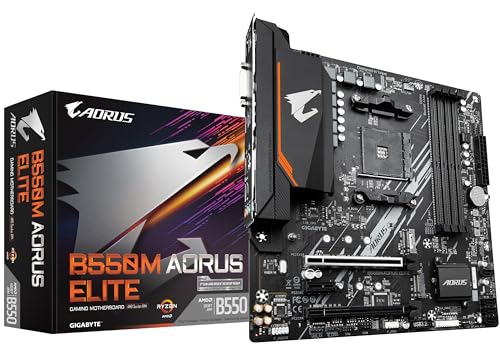
GIGABYTE B550M AORUS Elite
6.8/10

Overall score

Score
6.8/ 10
✕
What it is
Our main score for this model, 1–10. It combines specs, expert reviews, best-of lists, owners and ratings from across the web.
How we count it
Parts: Technical score 40%, Reviews score 20%, List score 20%, Sentiment score 10%, User score 10%
Marks: Each part gets a mark out of 10. For reviews, lists and owners, a typical model in this category gets about 8 and the best one gets 10.
No data yet: A part with no data shows "?". It counts as the mark of a weaker model in this category (4 in 5 models with data score higher). This way, models with reviews, lists and owners usually come out ahead.
Score distribution
▼
<55-66-77-88-99-10
Score components

40%

5.4

Technical score

20%

5.4

Reviews score

20%

8.7

List score

10%

9.0

Sentiment score

10%

9.1

User score

▼Worse than 57% of motherboards
7.8

Value for money

Value for money
7.8/ 10
✕
What it is
An indicator that combines the motherboard's overall rating with its cost.
When it matters
When you are looking for a motherboard that offers a strong balance of features, performance, and price.
Score distribution
▼
<55-66-77-88-99-10
Score components

70%

6.8

Overall score

30%

10

Price

▲Better than 53%
5.4

Technical score

Technical score
5.4/ 10
✕
What it is
How good the specs are compared with the other models in this category, 1–10.
How we count it
Areas: We rate the specs in each area against the other models in this category.
Weighting: The areas that matter most to buyers count more. The shares are shown under Score components.
Share: The technical score is 40% of the overall score.
Score distribution
▼
<55-66-77-88-99-10
Score components

19%

7.1

Memory

16%

8.3

Platform

16%

5.4

Storage

15%

3.0

Network

13%

2.6

Ports

8%

4.1

Expansion

8%

6.0

Power & Cooling

5%

6.1

Audio

▼Worse than 63%
5.4

Reviews score

Reviews score
5.4/ 10
✕
What it is
Average grade from independent test sites, magazines and video reviewers, 1–10.
How we count it
Grades: Each review's own score is converted to 1–10; without one, we grade the review ourselves. Big test sites count more, short reviews half as much as full tests. A video review counts half.
Score: The average grade is 80% of the review mark; the number of reviews is the other 20% (1 review = 5, the typical number in this category = 8, the most-reviewed model = 10).
Enough data: With few reviews, the average grade is pulled toward the typical grade of this category. No reviews yet: 7.8 for now.
Share: Reviews count 20% of the overall score.
Score distribution
▼
<55-66-77-88-99-10

5.4

Mark 8.1 is below the typical mark 8.3 of this category, so it cannot lift the score above the technical score

80%

8.4

Average grade

20%

6.9

Popularity

Grades by review (2)
2 video reviews, each counting half as much as a written test. Reviews count 20% of the overall score.
Ratings from across the web count in the User score, not in this score.
▼Worse than 82%
9.1

User score

User score
9.1/ 10
✕
What it is
How happy buyers are with this model, based on ratings from across the web.
How we count it
Enough data: A model needs at least 1 rating from across the web. Without one, it counts as 7.9, the mark of a weaker rated model in this category.
Share: User score counts 10% of the overall score.
Score distribution
▼
<55-66-77-88-99-10

70%

8.7

Rating

30%

10

Popularity

▲Better than 84%
8.7

List score

List score
8.7/ 10
✕
What it is
How often independent test sites, magazines and video reviewers put this model in their best-of lists for this category.
How we count it
Points: The model in the most lists of this category gets 10; the others get 8 to 10 in proportion. In no list yet: 7.5. Lists count 20% of the overall score.
Enough data: Every list counts, even a single one. With fewer than 5 best-of lists in the category, this part is left out.
Lists with this model (3)
List score: in 3 of 64 lists (5%)
★Better than 98%
  • gigabyte-b550m-aorus-elite
  • gigabyte-b550m-aorus-elite
  • gigabyte-b550m-aorus-elite
  • gigabyte-b550m-aorus-elite
  • gigabyte-b550m-aorus-elite
gigabyte-b550m-aorus-elite
Where to buy
*As an Amazon Associate, we earn from qualifying purchases.

What owners say about the GIGABYTE B550M AORUS Elite

Based on 191 owners sharing their experience in online comments

46%positive13%mixed41%negative

Owners value broad Ryzen support and smooth gaming, but startup, RAM stability, and SATA placement cause frustration.

What owners dislike

  • Some boards stop at the AORUS logo, show a black screen, or reboot into BIOS without finding the boot drive.17
  • Four-stick setups often crash or show no video, and some kits stay stuck at 2667 to 3200 MHz instead of their rated speed.15
  • Long or three-fan graphics cards cover the SATA ports, often leaving only two usable, and cables can't fit between card and board.11
  • Each board revision needs its own BIOS file, and the wrong one fails with an invalid image error; the BIOS also has limited tuning options.9
  • Some boards die within months or about a year, or arrive defective, and some owners report warranty swaps.8
  • Games crash or go black, and the PC can shut off or restart suddenly, sometimes after a BIOS update or when the VRM overheats.7
  • Chips like the 5600X can run above 60°C on a stock cooler, and one VRM hit 115°C and caused restarts.6
  • During games the screen can go black or drop out after a few minutes; turning off Precision Boost Overdrive helped some owners.5
  • Only one internal USB header, so a case and water cooler together don't fit; owners also wanted more USB-C ports.3
  • Only three fan headers are on the board, one for the CPU and two for case fans, while it has four RGB headers instead.3

Points mentioned by at least 3 owners, most mentioned first.

Loading...
Loading category ranking...

Technical Specifications of motherboard GIGABYTE B550M AORUS Elite

Technical score
Technical score
5.4/ 10
✕
What it is
How good the specs are compared with the other models in this category, 1–10.
How we count it
Areas: We rate the specs in each area against the other models in this category.
Weighting: The areas that matter most to buyers count more. The shares are shown under Score components.
Share: The technical score is 40% of the overall score.
Score distribution
▼
<55-66-77-88-99-10
Score components:

19%

7.1

Memory

16%

8.3

Platform

16%

5.4

Storage

15%

3.0

Network

13%

2.6

Ports

8%

4.1

Expansion

8%

6.0

Power & Cooling

5%

6.1

Audio

5.4
Reviews score
5.4
User score
9.1
List score
8.7
Value for money
Value for money
7.8/ 10
✕
What it is
An indicator that combines the motherboard's overall rating with its cost.
When it matters
When you are looking for a motherboard that offers a strong balance of features, performance, and price.
Score distribution
▼
<55-66-77-88-99-10
Score components:

70%

6.8

Overall score

30%

10

Price

7.8
CPU socket
AM4
This motherboard uses AM4, which is more up-to-date than 38.2% of Motherboards and the same as 13.3% of Motherboards.
CPU platform
AMD
Chipset
AMD B550
This motherboard uses AMD B550, which is more capable than 49.9% of Motherboards and as capable as 4.8% of Motherboards.
Form factor
microATX
Integrated graphics support
yes
This motherboard supports integrated graphics. 10.2% of motherboards support this feature.
Show more
DDR memory version
DDR4
This motherboard uses DDR4, which is more modern than 13.4% of Motherboards and the same as 50.4% of Motherboards.
Memory slots
4
This motherboard has 4 Memory slots, which is more than 21.9% of motherboards and equal to 72% of motherboards.
Maximum memory capacity
128 GB
This motherboard supports up to 128 GB of memory, which is more than 40.1% of motherboards and equal to 31.9% of motherboards.
Memory channels
2
Maximum RAM speed
4,733 MT/s
This motherboard supports memory speeds up to 4,733 MT/s, which is higher than that of 50% of motherboards and equal to that of 1.4% of motherboards.
Show more
N. of M.2 sockets
2
This motherboard has 2 M.2 sockets, which is more than 30.5% of motherboards and equal to 34.5% of motherboards.
M.2 slot interface per slot
1x PCIe 4.0 x4/SATA, 1x PCIe 3.0 x2/SATA
This motherboard offers M.2 slots: 1x PCIe 4.0x4/SATA, 1x PCIe 3.0x2/SATA, which is faster than 63.6% of Motherboards.
N. of SATA 3 connectors
4
This motherboard has 4 SATA 3 connectors, which is more than 6.1% of motherboards and equal to 46.8% of motherboards.
Supported RAID levels
0/1/10
This motherboard RAID support: 0/1/10, which is less flexible than 67.6% of Motherboards and the same as 23.6% of Motherboards.
NVMe RAID support
yes
This motherboard supports NVMe RAID. 40.2% of motherboards support this feature.
Show more
N. of PCIe 5.0 x16 slots
0
This motherboard has 0 PCIe 5.0x16 slots, which is fewer than 31.6% of motherboards and equal to 68.4% of motherboards.
N. of PCIe 4.0 x16 slots
1
This motherboard has 1 PCIe 4.0x16 slots, which is more than 55.2% of motherboards and equal to 35.7% of motherboards.
N. of PCIe 3.0 x16 slots
1
This motherboard has 1 PCIe 3.0x16 slots, which is more than 40.5% of motherboards and equal to 26.8% of motherboards.
runs at x4 mode
PCIe slot electrical configuration
x16/x4, x16/x0
This motherboard splits its PCIe lanes as x16/x4, x16/x0, which is more generous than 50.3% of Motherboards and the same as 0.3% of Motherboards.
PCIe bifurcation support
yes
This motherboard supports PCIe bifurcation. 40.3% of motherboards support this feature.
Show more
Total USB ports (rear I/O)
8
This motherboard has 8 USB ports (rear I/O), which is more than 40.6% of motherboards and equal to 30.3% of motherboards.
Total USB ports (including headers)
12
This motherboard has 12 USB ports (including headers), which is fewer than 72.4% of motherboards and equal to 16.2% of motherboards.
Total USB-C ports (rear I/O)
0
This motherboard has 0 USB-C ports (rear I/O), which is fewer than 64.2% of motherboards and equal to 35.8% of motherboards.
Total USB-C ports (including headers)
0
This motherboard has 0 USB-C ports (including headers), which is fewer than 69.5% of motherboards and equal to 30.5% of motherboards.
N. of USB 3.2 Gen2x2 ports (USB-C)
0
This motherboard has 0 USB 3.2 Gen2x2 ports (USB-C), which is fewer than 18% of motherboards and equal to 82% of motherboards.
Show more
LAN speed
1 Gbps
This motherboard supports LAN speeds up to 1 Gbps, which is lower than that of 51.1% of motherboards and equal to that of 48.9% of motherboards.
LAN controller
Realtek RTL8118
This motherboard has a Realtek RTL8118 LAN controller, which is slower than 52% of Motherboards and equal to 0.9% of Motherboards.
N. of RJ45 ports
1
This motherboard has 1 RJ45 ports, which is fewer than 14.4% of motherboards and equal to 85.6% of motherboards.
Wi-Fi connectivity
no
This motherboard does not support Wi-Fi connectivity. 50.1% of motherboards support this feature.
Wi-Fi version
N/A
Show more
Audio codec
Realtek ALC887
This motherboard uses Realtek ALC887, which is lower-end than 89.1% of Motherboards and the same as 7.8% of Motherboards.
Audio channels
7.1
This motherboard offers 7.1 audio channels, which is more than 4.7% of motherboards and equal to 95.3% of motherboards.
Audio SNR
97 dB
This motherboard has an audio SNR of 97 dB, which is lower than that of 65.7% of motherboards and equal to that of 16.9% of motherboards.
Headphone amp support
no
This motherboard does not support a headphone amp. 58.8% of motherboards support this feature.
N. of 3.5mm audio jacks
3
This motherboard has 3 3.5mm audio jacks, which is more than 11.3% of motherboards and equal to 39.3% of motherboards.
Show more
VRM phases
5+3
This motherboard has 5+3 VRM phases, which is fewer than 80.1% of motherboards and equal to 0.5% of motherboards.
N. of CPU power connectors
1
This motherboard has 1 CPU power connectors, which is fewer than 45.2% of motherboards and equal to 54.9% of motherboards.
N. of fan headers
3
This motherboard has 3 fan headers, which is fewer than 77.1% of motherboards and equal to 14.8% of motherboards.
Pump header
yes
This motherboard has a pump header. 22.1% of motherboards include this feature.
Pump header max current
2 A
This motherboard supports up to 2 A on the pump header, which is higher than that of 45.1% of motherboards and equal to that of 32.6% of motherboards.
Show more

GIGABYTE B550M AORUS Elite vs the average motherboard

246810TotalPlatformMemoryStorageExpansionPortsNetworkAudioPower & Cooling
  • Integrated I/O shield
    This motherboard has an integrated I/O shield, while the average motherboard does not. 46.6% of motherboards include an integrated I/O shield.
  • 1 more PCIe 4.0x16 slots
    This motherboard has more PCIe 4.0x16 slots than the average motherboard (1 vs 0). The average motherboard has 0 PCIe 4.0x16 slot/s.
    1 vs 0
  • More up-to-date socket
    This motherboard uses a more up-to-date socket than the average motherboard (AM4 vs LGA 1151).
    AM4 vs LGA 1,151
  • Supports ECC memory
    This motherboard supports ECC memory, while the average motherboard does not. 20.9% of motherboards support ECC memory.
    ECC requires compatible CPU.
  • More capable LAN controller
    This motherboard has a faster LAN controller than the average motherboard (Realtek RTL8118 vs Killer + Intel + Realtek).
    Realtek RTL8118 vs Killer + Intel + Realtek
  • 1 more RGB headers
    This motherboard has more RGB headers than the average motherboard (2 vs 1). The average motherboard has 1 RGB header/s.
    2 vs 1
  • 11.5% higher list score
    List score
    8.7/ 10
    ✕
    What it is
    How often independent test sites, magazines and video reviewers put this model in their best-of lists for this category.
    How we count it
    Points: The model in the most lists of this category gets 10; the others get 8 to 10 in proportion. In no list yet: 7.5. Lists count 20% of the overall score.
    Enough data: Every list counts, even a single one. With fewer than 5 best-of lists in the category, this part is left out.
    Lists with this model (3)
    List score: in 3 of 64 lists (5%)
    8.7 vs 7.8
  • 23.0% higher user score
    User score
    9.1/ 10
    ✕
    What it is
    How happy buyers are with this model, based on ratings from across the web.
    How we count it
    Enough data: A model needs at least 1 rating from across the web. Without one, it counts as 7.9, the mark of a weaker rated model in this category.
    Share: User score counts 10% of the overall score.
    Score distribution
    ▼
    <55-66-77-88-99-10

    70%

    8.7

    Rating

    30%

    10

    Popularity

    9.1 vs 7.4
  • 11.5% higher list score
    List score
    8.7/ 10
    ✕
    What it is
    How often independent test sites, magazines and video reviewers put this model in their best-of lists for this category.
    How we count it
    Points: The model in the most lists of this category gets 10; the others get 8 to 10 in proportion. In no list yet: 7.5. Lists count 20% of the overall score.
    Enough data: Every list counts, even a single one. With fewer than 5 best-of lists in the category, this part is left out.
    Lists with this model (3)
    List score: in 3 of 64 lists (5%)
    8.7 vs 7.8
  • 23.0% higher user score
    User score
    9.1/ 10
    ✕
    What it is
    How happy buyers are with this model, based on ratings from across the web.
    How we count it
    Enough data: A model needs at least 1 rating from across the web. Without one, it counts as 7.9, the mark of a weaker rated model in this category.
    Share: User score counts 10% of the overall score.
    Score distribution
    ▼
    <55-66-77-88-99-10

    70%

    8.7

    Rating

    30%

    10

    Popularity

    9.1 vs 7.4
  • 87.5% cheaper
    GIGABYTE B550M AORUS Elite is cheaper than the average motherboard (£80 vs £150).
    £80 vs £150
  • 20.0% higher sentiment score
    9.0 vs 7.5
  • Integrated I/O shield
    This motherboard has an integrated I/O shield, while the average motherboard does not. 46.6% of motherboards include an integrated I/O shield.
  • More up-to-date socket
    This motherboard uses a more up-to-date socket than the average motherboard (AM4 vs LGA 1151).
    AM4 vs LGA 1,151
  • Supports ECC memory
    This motherboard supports ECC memory, while the average motherboard does not. 20.9% of motherboards support ECC memory.
    ECC requires compatible CPU.
  • 1 more PCIe 4.0x16 slots
    This motherboard has more PCIe 4.0x16 slots than the average motherboard (1 vs 0). The average motherboard has 0 PCIe 4.0x16 slot/s.
    1 vs 0
  • More capable LAN controller
    This motherboard has a faster LAN controller than the average motherboard (Realtek RTL8118 vs Killer + Intel + Realtek).
    Realtek RTL8118 vs Killer + Intel + Realtek
  • 1 more RGB headers
    This motherboard has more RGB headers than the average motherboard (2 vs 1). The average motherboard has 1 RGB header/s.
    2 vs 1
  • Includes onboard RGB lighting
    This motherboard has onboard RGB lighting, while the average motherboard does not. 50% of motherboards include onboard RGB lighting.
  • 60% lower LAN speed
    This motherboard has a lower LAN speed than the average motherboard (1 Gbps vs 2.5 Gbps). The average motherboard offers LAN speed of 2.5 Gbps.
    1 Gbps vs 2.5 Gbps
  • More basic chipset
    This motherboard uses a more basic chipset than the average motherboard (AMD B550 vs Intel B860).
    AMD B550 vs Intel B860
  • No Wi-Fi connectivity
    This motherboard does not support Wi-Fi connectivity, while the average motherboard does. 50.1% of motherboards support Wi-Fi connectivity.
  • 1 fewer rear USB-C ports
    This motherboard has fewer rear USB-C ports than the average motherboard (0 vs 1). The average motherboard has 1 rear USB-C port/s.
    0 vs 1
  • 26.0% lower review score
    Reviews score
    5.4/ 10
    ✕
    What it is
    Average grade from independent test sites, magazines and video reviewers, 1–10.
    How we count it
    Grades: Each review's own score is converted to 1–10; without one, we grade the review ourselves. Big test sites count more, short reviews half as much as full tests. A video review counts half.
    Score: The average grade is 80% of the review mark; the number of reviews is the other 20% (1 review = 5, the typical number in this category = 8, the most-reviewed model = 10).
    Enough data: With few reviews, the average grade is pulled toward the typical grade of this category. No reviews yet: 7.8 for now.
    Share: Reviews count 20% of the overall score.
    Score distribution
    ▼
    <55-66-77-88-99-10

    5.4

    Mark 8.1 is below the typical mark 8.3 of this category, so it cannot lift the score above the technical score

    80%

    8.4

    Average grade

    20%

    6.9

    Popularity

    Grades by review (2)
    2 video reviews, each counting half as much as a written test. Reviews count 20% of the overall score.
    Ratings from across the web count in the User score, not in this score.
    5.4 vs 7.3
  • No Wi-Fi antenna included
    This motherboard does not include a Wi-Fi antenna, while the average motherboard does. 51.1% of motherboards include a Wi-Fi antenna.
  • 3 fewer total USB connections
    This motherboard has fewer total USB connections than the average motherboard (12 vs 15). The average motherboard has 15 total USB connections.
    12 vs 15
  • Fewer RAID options
    This motherboard offers fewer RAID levels than the average motherboard (0/1/10 vs 0/1/5/10).
    0/1/10 vs 0/1/5/10
  • 26.0% lower review score
    Reviews score
    5.4/ 10
    ✕
    What it is
    Average grade from independent test sites, magazines and video reviewers, 1–10.
    How we count it
    Grades: Each review's own score is converted to 1–10; without one, we grade the review ourselves. Big test sites count more, short reviews half as much as full tests. A video review counts half.
    Score: The average grade is 80% of the review mark; the number of reviews is the other 20% (1 review = 5, the typical number in this category = 8, the most-reviewed model = 10).
    Enough data: With few reviews, the average grade is pulled toward the typical grade of this category. No reviews yet: 7.8 for now.
    Share: Reviews count 20% of the overall score.
    Score distribution
    ▼
    <55-66-77-88-99-10

    5.4

    Mark 8.1 is below the typical mark 8.3 of this category, so it cannot lift the score above the technical score

    80%

    8.4

    Average grade

    20%

    6.9

    Popularity

    Grades by review (2)
    2 video reviews, each counting half as much as a written test. Reviews count 20% of the overall score.
    Ratings from across the web count in the User score, not in this score.
    5.4 vs 7.3
  • More basic chipset
    This motherboard uses a more basic chipset than the average motherboard (AMD B550 vs Intel B860).
    AMD B550 vs Intel B860
  • No debug LED indicators
    This motherboard does not have debug LED indicators, while the average motherboard does. 78.7% of motherboards include debug LED indicators.
  • Fewer RAID options
    This motherboard offers fewer RAID levels than the average motherboard (0/1/10 vs 0/1/5/10).
    0/1/10 vs 0/1/5/10
  • Slower NVMe storage slots
    This motherboard has slower M.2 slots than the average motherboard (1x PCIe 4x4/SATA, 1x PCIe 3x2/SATA vs 1x PCIe 5x4, 2x PCIe 4x4).
    1x PCIe 4.0x4/SATA, 1x PCIe 3.0x2/SATA vs 1x PCIe 5.0x4, 2x PCIe 4.0x4
  • No multi-GPU support
    This motherboard does not support multi-GPU, while the average motherboard does. 53.9% of motherboards support multi-GPU.
    Secondary slot is chipset-fed / reduced-width only.
  • Less generous lane split
    This motherboard splits its PCIe lanes less generously than the average motherboard (x16/x4, x16/x0 vs x16/x0/x4, x8/x8/x4).
    x16/x4, x16/x0 vs x16/x0/x4, x8/x8/x4
  • 1 fewer rear USB-C ports
    This motherboard has fewer rear USB-C ports than the average motherboard (0 vs 1). The average motherboard has 1 rear USB-C port/s.
    0 vs 1
  • 3 fewer total USB connections
    This motherboard has fewer total USB connections than the average motherboard (12 vs 15). The average motherboard has 15 total USB connections.
    12 vs 15
  • 1 fewer USB 3.2 Gen2 ports
    This motherboard has fewer USB 3.2 Gen2 ports than the average motherboard (0 vs 1). The average motherboard has 1 USB 3.2 Gen2 port/s.
    0 vs 1
  • 1 fewer DisplayPort outputs
    This motherboard has fewer DisplayPort outputs than the average motherboard (0 vs 1). The average motherboard has 1 DisplayPort outputs.
    other video outputs only
    0 vs 1
  • 1 fewer USB 2.0 headers
    This motherboard has fewer USB 2.0 headers than the average motherboard (1 vs 2). The average motherboard has 2 USB 2.0 header/s.
    1 vs 2
  • 1 fewer total USB-C connections
    This motherboard has fewer total USB-C connections than the average motherboard (0 vs 1). The average motherboard has 1 total USB-C connections.
    0 vs 1
  • 60% lower LAN speed
    This motherboard has a lower LAN speed than the average motherboard (1 Gbps vs 2.5 Gbps). The average motherboard offers LAN speed of 2.5 Gbps.
    1 Gbps vs 2.5 Gbps
  • No Wi-Fi connectivity
    This motherboard does not support Wi-Fi connectivity, while the average motherboard does. 50.1% of motherboards support Wi-Fi connectivity.
  • No Wi-Fi antenna included
    This motherboard does not include a Wi-Fi antenna, while the average motherboard does. 51.1% of motherboards include a Wi-Fi antenna.
  • 18 dB lower audio SNR
    This motherboard has a lower audio SNR than the average motherboard (97 dB vs 115 dB). The average motherboard has audio SNR of 115 dB.
    97 dB vs 115 dB
  • No headphone amp support
    This motherboard does not support a headphone amp, while the average motherboard does. 58.8% of motherboards support a headphone amp.
  • Less capable onboard audio
    This motherboard has a lower-end audio codec than the average motherboard (Realtek ALC887 vs Realtek ALC897).
    Realtek ALC887 vs Realtek ALC897
  • No optical S/PDIF out
    This motherboard does not have optical S/PDIF out, while the average motherboard does. 55.4% of motherboards include optical S/PDIF out.
  • Fewer VRM phases
    This motherboard has fewer VRM phases than the average motherboard (5+3 vs 10). The average motherboard has 10 VRM phase/s.
    5+3 vs 10
  • 2.5 fewer fan headers
    This motherboard has fewer fan headers than the average motherboard (3 vs 5.5). The average motherboard has 5.5 fan header/s.
    3 vs 5.5

Video reviews

Hands-on testing, unboxing, and real-world video evaluations

9.0
Bido Tech
≈ estimated
11/09/2023
Unboxing and review · BIOS update and feature tour
Verdict
GIGABYTE B550M AORUS Elite is an excellent alternative for Ryzen 3000 and 5000 builds that want PCIe 4.0.
8.0
Juan Plaza
≈ estimated
15/04/2024
Hands-on review · upgrade options and pros and cons
Verdict
GIGABYTE B550M AORUS Elite is recommended despite some dated features, thanks to its upgrade options.
Overview video
Hands-on video, no verdict

Third-party reviews

What customers like about GIGABYTE B550M AORUS Elite

  • Strong price-to-performance ratio for a budget-friendly DDR4 build
  • Support for PCIe 4.0 on both the primary GPU slot and one M.2 slot
  • Robust build quality with solid aluminum heatsinks for VRM cooling
  • Convenient Q-Flash Plus feature allows BIOS updates without a CPU or RAM installed
  • Pre-installed I/O shield simplifies the PC assembly process
  • User-friendly BIOS interface with easy access to XMP profiles

What customers don't like about GIGABYTE B550M AORUS Elite

  • Limited to standard Gigabit LAN instead of the faster 2.5G standard
  • Restricted connectivity with only 4 SATA ports and 3 fan headers
  • Lacks modern high-speed ports such as USB-C on the rear I/O panel
  • A large graphics card can physically block access to one of the SATA ports
  • The secondary M.2 slot is limited to PCIe 3.0 x2 speeds, reducing performance for a second NVMe drive
  • Mid-range audio chip (Realtek) may not satisfy high-fidelity audio requirements

Verdict

The Gigabyte B550M Aorus Elite is a Micro-ATX motherboard featuring the AMD B550 chipset with support for Ryzen 5000, 4000 G, and 3000 series processors. Key specifications include a 5+3 phases pure digital VRM with low RDS(on) MOSFETs, four DDR4 DIMM slots supporting up to 128GB (OC speeds up to 4733MHz), and an Ultra Durable PCIe 4.0 x16 slot. Storage is handled by dual NVMe M.2 connectors (one PCIe 4.0 x4 and one PCIe 3.0 x2) alongside four SATA 6Gb/s ports. Main pros include a solid price-to-performance ratio, PCIe 4.0 support for modern GPUs/SSDs, and convenient features like Q-Flash Plus and Smart Fan 5. However, notable cons include the lack of a USB Type-C port, a mid-range Realtek audio chip, and a standard Gigabit LAN instead of the faster 2.5GbE found on higher-end models.

Compare GIGABYTE B550M AORUS Elite with other products in the Motherboards category

1Product to compare no. 1
VS
2Product to compare no. 2
VS
3Product to compare no. 3 (optional)

Graphic comparison of GIGABYTE B550M AORUS Elite and other products in the Motherboards category

No results found