Scored using Motherboards Methodology v3.0
Motherboards Methodology v3.0
Mathematical & Unbiased Scoring
Products in this category are scored under Frontum Motherboards Methodology v3.0: the technical score from the specifications is the base, and independent expert and video reviews (up to ±0.5 points), owner opinions (up to ±0.3) and best-of lists (up to +0.3) move it up or down.
Explore Motherboards Methodology v3.0

ASUS ROG Strix Z490-E Gaming review: 109 specs compared

Avg. price:~£260CPU socket:LGA 1200Chipset:Intel Z490Form factor:ATX

ASUS ROG Strix Z490-E Gaming Review: Compare 109 technical specifications and 13 expert and video reviews to see how this product ranks in the Motherboards category and whether it is worth buying.
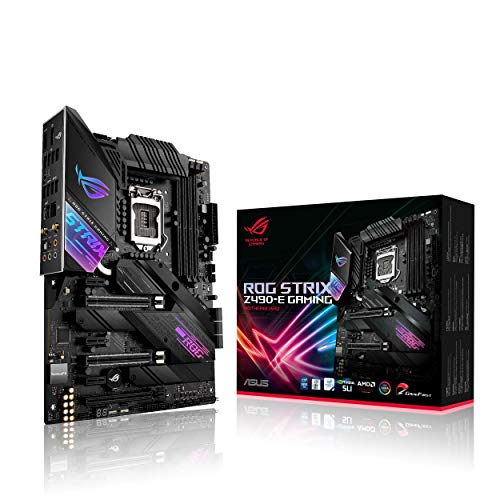
ASUS ROG Strix Z490-E Gaming
7.8/10

Overall score

Score
7.8/ 10
✕
What it is
Our main score for this model, 1–10. It combines specs, expert reviews, best-of lists, owners and ratings from across the web.
How we count it
Parts: Technical score 40%, Reviews score 20%, List score 20%, Sentiment score 10%, User score 10%
Marks: Each part gets a mark out of 10. For reviews, lists and owners, a typical model in this category gets about 8 and the best one gets 10.
No data yet: A part with no data shows "?". It counts as the mark of a weaker model in this category (4 in 5 models with data score higher). This way, models with reviews, lists and owners usually come out ahead.
Score distribution
â–¼
<55-66-77-88-99-10
Score components

40%

7.3

Technical score

20%

8.6

Reviews score

20%

?

List scoreNot enough data yet, so we use 7.5, the mark of a weaker model in this category

10%

7.3

Sentiment score

10%

9.4

User score

â–²Better than 80% of motherboards
8.2

Value for money

Value for money
8.2/ 10
✕
What it is
An indicator that combines the motherboard's overall rating with its cost.
When it matters
When you are looking for a motherboard that offers a strong balance of features, performance, and price.
Score distribution
â–¼
<55-66-77-88-99-10
Score components

70%

7.8

Overall score

30%

9.2

Price

â–²Better than 78%
7.3

Technical score

Technical score
7.3/ 10
✕
What it is
How good the specs are compared with the other models in this category, 1–10.
How we count it
Areas: We rate the specs in each area against the other models in this category.
Weighting: The areas that matter most to buyers count more. The shares are shown under Score components.
Share: The technical score is 40% of the overall score.
Score distribution
â–¼
<55-66-77-88-99-10
Score components

19%

7.0

Memory

16%

8.5

Platform

16%

5.4

Storage

15%

8.1

Network

13%

7.2

Ports

8%

4.6

Expansion

8%

8.9

Power & Cooling

5%

9.6

Audio

â–²Better than 71%
8.6

Reviews score

Reviews score
8.6/ 10
✕
What it is
Average grade from independent test sites, magazines and video reviewers, 1–10.
How we count it
Grades: Each review's own score is converted to 1–10; without one, we grade the review ourselves. Big test sites count more, short reviews half as much as full tests. A video review counts half.
Score: The average grade is 80% of the review mark; the number of reviews is the other 20% (1 review = 5, the typical number in this category = 8, the most-reviewed model = 10).
Enough data: With few reviews, the average grade is pulled toward the typical grade of this category. No reviews yet: 7.8 for now.
Share: Reviews count 20% of the overall score.
Score distribution
â–¼
<55-66-77-88-99-10

80%

8.4

Average grade

20%

9.4

Popularity

Grades by review (13)
10 reviews: 4 with a printed score, 6 estimated from the review. 3 video reviews, each counting half as much as a written test. Reviews count 20% of the overall score.
Ratings from across the web count in the User score, not in this score.
â–²Better than 78%
9.4

User score

User score
9.4/ 10
✕
What it is
How happy buyers are with this model, based on ratings from across the web.
How we count it
Enough data: A model needs at least 1 rating from across the web. Without one, it counts as 7.9, the mark of a weaker rated model in this category.
Share: User score counts 10% of the overall score.
Score distribution
â–¼
<55-66-77-88-99-10

70%

9.2

Rating

30%

10

Popularity

★Better than 95%
?

List score

List score
7.5/ 10
✕
What it is
How often independent test sites, magazines and video reviewers put this model in their best-of lists for this category.
How we count it
Points: The model in the most lists of this category gets 10; the others get 8 to 10 in proportion. In no list yet: 7.5. Lists count 20% of the overall score.
Enough data: Every list counts, even a single one. With fewer than 5 best-of lists in the category, this part is left out.
Lists with this model (0)
Not in any best-of list yet, so this part counts as 7.5. Models in a list get 8 to 10.
Not in any best-of list yet
  • asus-rog-strix-z490-e-gaming
  • asus-rog-strix-z490-e-gaming
  • asus-rog-strix-z490-e-gaming
  • asus-rog-strix-z490-e-gaming
  • asus-rog-strix-z490-e-gaming
  • asus-rog-strix-z490-e-gaming
  • asus-rog-strix-z490-e-gaming
asus-rog-strix-z490-e-gaming
Where to buy
    N/A~ £260
Best rankings
Available: ranking among products currently available (including other versions of this product).All: ranking among all products in the database.

What reviewers say about the ASUS ROG Strix Z490-E Gaming

Based on 10 · 3

Reviewers praise the strong power delivery, generous rear ports and solid cooling, but criticise the limited M.2 storage, PCIe layout and value.
Praised
Mixed views
Criticised
Pick a topic to see who said what

What owners say about the ASUS ROG Strix Z490-E Gaming

Based on 68 owners sharing their experience in online comments

35%positive11%mixed54%negative

Owners value strong gaming and overclocking performance, but frequent Ethernet failures and BIOS, memory, and boot problems dominate frustrations.

What owners dislike

  • Ethernet shows as connected but pages won't load, and wired internet drops out, with some owners reporting packet loss on certain drivers.14
  • Some owners cannot enable XMP, and RAM stays stuck at 2133 MHz or fails to boot at its rated speed, including on Corsair Dominator Platinum kits.9
  • After a BIOS update such as 1003 or 2201, some owners get random crashes, Windows restart errors, performance drops in games, or boot loops.7
  • The second M.2 slot runs at only about 1.5 to 1.7 GB/s for some owners, and the lower slot sits hot under the graphics card.4
  • Some owners get a CPU fan error at startup when using an AIO pump header, or A9 and A0 codes on the LED display.3
  • Some owners find the Asus utility software won't install or work correctly, and Windows updates fail to install.3
  • Some owners find the motherboard does not detect an M.2 or SATA drive in BIOS, so Windows cannot be installed or booted.3
  • Some owners cannot change the CPU multiplier, with the CPU stuck at about 3.6 GHz even after setting all-core 5 GHz, and settings are not saved.3
  • Some owners report the included WiFi card does not work, and Bluetooth may not be detected until the external WiFi antenna is installed.3
  • Some owners find the pump header lights don't work or the board doesn't show up in iCUE, and the ROG logo light stops working.3

Points mentioned by at least 3 owners, most mentioned first.

Loading...
Loading category ranking...

Technical Specifications of motherboard ASUS ROG Strix Z490-E Gaming

Technical score
Technical score
7.3/ 10
✕
What it is
How good the specs are compared with the other models in this category, 1–10.
How we count it
Areas: We rate the specs in each area against the other models in this category.
Weighting: The areas that matter most to buyers count more. The shares are shown under Score components.
Share: The technical score is 40% of the overall score.
Score distribution
â–¼
<55-66-77-88-99-10
Score components:

19%

7.0

Memory

16%

8.5

Platform

16%

5.4

Storage

15%

8.1

Network

13%

7.2

Ports

8%

4.6

Expansion

8%

8.9

Power & Cooling

5%

9.6

Audio

7.3
Reviews score
8.6
User score
9.4
List score
?
Value for money
Value for money
8.2/ 10
✕
What it is
An indicator that combines the motherboard's overall rating with its cost.
When it matters
When you are looking for a motherboard that offers a strong balance of features, performance, and price.
Score distribution
â–¼
<55-66-77-88-99-10
Score components:

70%

7.8

Overall score

30%

9.2

Price

8.2
CPU socket
LGA 1200
This motherboard uses LGA 1200, which is less up-to-date than 61.9% of Motherboards and the same as 8.8% of Motherboards.
CPU platform
Intel
Chipset
Intel Z490
This motherboard uses Intel Z490, which is less capable than 57.2% of Motherboards and as capable as 2.8% of Motherboards.
Form factor
ATX
Integrated graphics support
yes
This motherboard supports integrated graphics. 10.2% of motherboards support this feature.
Show more
What reviewers say
DDR memory version
DDR4
This motherboard uses DDR4, which is more modern than 13.4% of Motherboards and the same as 50.4% of Motherboards.
Memory slots
4
This motherboard has 4 Memory slots, which is more than 21.9% of motherboards and equal to 72% of motherboards.
Maximum memory capacity
128 GB
This motherboard supports up to 128 GB of memory, which is more than 40.1% of motherboards and equal to 31.9% of motherboards.
Memory channels
2
Maximum RAM speed
4,800 MT/s
This motherboard supports memory speeds up to 4,800 MT/s, which is higher than that of 51.4% of motherboards and equal to that of 5.1% of motherboards.
Show more
N. of M.2 sockets
2
This motherboard has 2 M.2 sockets, which is more than 30.5% of motherboards and equal to 34.5% of motherboards.
M.2 slot interface per slot
1x PCIe 3.0 x4/SATA, 1x PCIe 3.0 x4
This motherboard offers M.2 slots: 1x PCIe 3.0x4/SATA, 1x PCIe 3.0x4, which is slower than 64.3% of Motherboards and the same as 3.2% of Motherboards.
N. of SATA 3 connectors
6
This motherboard has 6 SATA 3 connectors, which is more than 53.5% of motherboards and equal to 31.2% of motherboards.
Supported RAID levels
0/1/5/10
This motherboard RAID support: 0/1/5/10, which is more flexible than 32.5% of Motherboards and the same as 67.5% of Motherboards.
JBOD excluded from RAID-level set
NVMe RAID support
yes
This motherboard supports NVMe RAID. 40.2% of motherboards support this feature.
Show more
What reviewers say
N. of PCIe 5.0 x16 slots
0
This motherboard has 0 PCIe 5.0x16 slots, which is fewer than 31.6% of motherboards and equal to 68.4% of motherboards.
N. of PCIe 4.0 x16 slots
0
This motherboard has 0 PCIe 4.0x16 slots, which is fewer than 44.8% of motherboards and equal to 55.2% of motherboards.
N. of PCIe 3.0 x16 slots
2
This motherboard has 2 PCIe 3.0x16 slots, which is more than 67.3% of motherboards and equal to 15.4% of motherboards.
PCIe slot electrical configuration
x16/x0/x4, x8/x8/x4
This motherboard splits its PCIe lanes as x16/x0/x4, x8/x8/x4, which is more generous than 62.6% of Motherboards and the same as 12.4% of Motherboards.
PCIe bifurcation support
yes
This motherboard supports PCIe bifurcation. 40.3% of motherboards support this feature.
x8/x8.
Show more
What reviewers say
Total USB ports (rear I/O)
10
This motherboard has 10 USB ports (rear I/O), which is more than 75.7% of motherboards and equal to 15.4% of motherboards.
Total USB ports (including headers)
17
This motherboard has 17 USB ports (including headers), which is more than 71.3% of motherboards and equal to 10.4% of motherboards.
Total USB-C ports (rear I/O)
1
This motherboard has 1 USB-C ports (rear I/O), which is more than 35.8% of motherboards and equal to 48.3% of motherboards.
Total USB-C ports (including headers)
2
This motherboard has 2 USB-C ports (including headers), which is more than 51.7% of motherboards and equal to 33% of motherboards.
N. of USB 3.2 Gen2x2 ports (USB-C)
0
This motherboard has 0 USB 3.2 Gen2x2 ports (USB-C), which is fewer than 18% of motherboards and equal to 82% of motherboards.
Show more
What reviewers say
LAN speed
2.5 Gbps
This motherboard supports LAN speeds up to 2.5 Gbps, which is higher than that of 49% of motherboards and equal to that of 41.4% of motherboards.
LAN controller
Intel I225-V
This motherboard has a Intel I225-V LAN controller, which is faster than 90.1% of Motherboards and equal to 4.2% of Motherboards.
N. of RJ45 ports
1
This motherboard has 1 RJ45 ports, which is fewer than 14.4% of motherboards and equal to 85.6% of motherboards.
Wi-Fi connectivity
yes
This motherboard supports Wi-Fi connectivity. 50% of motherboards support this feature.
Wi-Fi version
Wi-Fi 6 (802.11ax)
This motherboard uses Wi-Fi 6 (802.11ax), which is newer than 60.3% of Motherboards and the same as 11.2% of Motherboards.
Show more
What reviewers say
Audio codec
SupremeFX S1220A
This motherboard uses SupremeFX S1220A, which is higher-end than 87% of Motherboards and the same as 3.3% of Motherboards.
Audio channels
7.1
This motherboard offers 7.1 audio channels, which is more than 4.7% of motherboards and equal to 95.3% of motherboards.
surround needs jack retasking.
Audio SNR
120 dB
This motherboard has an audio SNR of 120 dB, which is higher than that of 55.6% of motherboards and equal to that of 41% of motherboards.
Headphone amp support
yes
This motherboard supports a headphone amp. 41.2% of motherboards support this feature.
supports up to 600Ω.
N. of 3.5mm audio jacks
5
This motherboard has 5 3.5mm audio jacks, which is more than 50.6% of motherboards and equal to 36.3% of motherboards.
Show more
VRM phases
14+2
This motherboard has 14+2 VRM phases, which is more than 77.1% of motherboards and equal to 1.1% of motherboards.
N. of CPU power connectors
2
This motherboard has 2 CPU power connectors, which is more than 54.9% of motherboards and equal to 44.8% of motherboards.
N. of fan headers
8
This motherboard has 8 fan headers, which is more than 82.2% of motherboards and equal to 15% of motherboards.
Pump header
yes
This motherboard has a pump header. 22.1% of motherboards include this feature.
Multiple pump-capable headers.
Pump header max current
3 A
This motherboard supports up to 3 A on the pump header, which is higher than that of 77.8% of motherboards and equal to that of 22.2% of motherboards.
Show more
What reviewers say

ASUS ROG Strix Z490-E Gaming vs the average motherboard

246810TotalPlatformMemoryStorageExpansionPortsNetworkAudioPower & Cooling
  • More capable LAN controller
    This motherboard has a faster LAN controller than the average motherboard (Intel I225-V vs Killer + Intel + Realtek).
    Intel I225-V vs Killer + Intel + Realtek
  • 2 more USB 3.2 Gen2 ports
    This motherboard has more USB 3.2 Gen2 ports than the average motherboard (3 vs 1). The average motherboard has 1 USB 3.2 Gen2 port/s.
    3 vs 1
  • 2 more rear USB ports
    This motherboard has more rear USB ports than the average motherboard (10 vs 8). The average motherboard has 8 rear USB port/s.
    10 vs 8
  • More capable onboard audio
    This motherboard has a higher-end audio codec than the average motherboard (SupremeFX S1220A vs Realtek ALC897).
    SupremeFX S1220A vs Realtek ALC897
  • 1 more CPU power connectors
    This motherboard has more CPU power connectors than the average motherboard (2 vs 1). The average motherboard has 1 CPU power connectors.
    2 vs 1
  • Integrated I/O shield
    This motherboard has an integrated I/O shield, while the average motherboard does not. 46.6% of motherboards include an integrated I/O shield.
    Pre-mounted I/O shield.
  • 1 more USB 3.2 Gen2 USB-C ports
    This motherboard has more USB 3.2 Gen2 USB-C ports than the average motherboard (1 vs 0). The average motherboard has 0 USB 3.2 Gen2 USB-C port/s.
    1 vs 0
  • Includes POST code display
    This motherboard has a POST code display, while the average motherboard does not. 26.7% of motherboards include a POST code display.
    Q-Code display.
  • 17.8% higher review score
    Reviews score
    8.6/ 10
    ✕
    What it is
    Average grade from independent test sites, magazines and video reviewers, 1–10.
    How we count it
    Grades: Each review's own score is converted to 1–10; without one, we grade the review ourselves. Big test sites count more, short reviews half as much as full tests. A video review counts half.
    Score: The average grade is 80% of the review mark; the number of reviews is the other 20% (1 review = 5, the typical number in this category = 8, the most-reviewed model = 10).
    Enough data: With few reviews, the average grade is pulled toward the typical grade of this category. No reviews yet: 7.8 for now.
    Share: Reviews count 20% of the overall score.
    Score distribution
    â–¼
    <55-66-77-88-99-10

    80%

    8.4

    Average grade

    20%

    9.4

    Popularity

    Grades by review (13)
    10 reviews: 4 with a printed score, 6 estimated from the review. 3 video reviews, each counting half as much as a written test. Reviews count 20% of the overall score.
    Ratings from across the web count in the User score, not in this score.
    8.6 vs 7.3
  • 27.0% higher user score
    User score
    9.4/ 10
    ✕
    What it is
    How happy buyers are with this model, based on ratings from across the web.
    How we count it
    Enough data: A model needs at least 1 rating from across the web. Without one, it counts as 7.9, the mark of a weaker rated model in this category.
    Share: User score counts 10% of the overall score.
    Score distribution
    â–¼
    <55-66-77-88-99-10

    70%

    9.2

    Rating

    30%

    10

    Popularity

    9.4 vs 7.4
  • Integrated I/O shield
    This motherboard has an integrated I/O shield, while the average motherboard does not. 46.6% of motherboards include an integrated I/O shield.
    Pre-mounted I/O shield.
  • Includes POST code display
    This motherboard has a POST code display, while the average motherboard does not. 26.7% of motherboards include a POST code display.
    Q-Code display.
  • More up-to-date socket
    This motherboard uses a more up-to-date socket than the average motherboard (LGA 1200 vs LGA 1151).
    LGA 1,200 vs LGA 1,151
  • 2 more SATA 3 connectors
    This motherboard has more SATA 3 connectors than the average motherboard (6 vs 4). The average motherboard has 4 SATA 3 connectors.
    6 vs 4
  • 1 more PCIe x4 slots
    This motherboard has more PCIe x4 slots than the average motherboard (1 vs 0). The average motherboard has 0 PCIe x4 slot/s.
    1 vs 0
  • 2 more PCIe x1 slots
    This motherboard has more PCIe x1 slots than the average motherboard (3 vs 1). The average motherboard has 1 PCIe x1 slot/s.
    3 vs 1
  • 2 more USB 3.2 Gen2 ports
    This motherboard has more USB 3.2 Gen2 ports than the average motherboard (3 vs 1). The average motherboard has 1 USB 3.2 Gen2 port/s.
    3 vs 1
  • 2 more rear USB ports
    This motherboard has more rear USB ports than the average motherboard (10 vs 8). The average motherboard has 8 rear USB port/s.
    10 vs 8
  • 1 more USB 3.2 Gen2 USB-C ports
    This motherboard has more USB 3.2 Gen2 USB-C ports than the average motherboard (1 vs 0). The average motherboard has 0 USB 3.2 Gen2 USB-C port/s.
    1 vs 0
  • 2 more total USB connections
    This motherboard has more total USB connections than the average motherboard (17 vs 15). The average motherboard has 15 total USB connections.
    17 vs 15
  • 1 more USB4 or Thunderbolt headers
    This motherboard has more USB4 or Thunderbolt headers than the average motherboard (1 vs 0). The average motherboard has 0 USB4 or Thunderbolt header/s.
    1 vs 0
  • 1 more USB 3.2 Gen2 headers
    This motherboard has more USB 3.2 Gen2 headers than the average motherboard (1 vs 0). The average motherboard has 0 USB 3.2 Gen2 header/s.
    Gen 2 Type-C header
    1 vs 0
  • 1 more total USB-C connections
    This motherboard has more total USB-C connections than the average motherboard (2 vs 1). The average motherboard has 1 total USB-C connections.
    2 vs 1
  • More capable LAN controller
    This motherboard has a faster LAN controller than the average motherboard (Intel I225-V vs Killer + Intel + Realtek).
    Intel I225-V vs Killer + Intel + Realtek
  • Supports Bluetooth
    This motherboard supports Bluetooth, while the average motherboard does not. 49% of motherboards support Bluetooth.
  • More recent Wi-Fi standard
    This motherboard has a more recent Wi-Fi standard than the average motherboard (Wi-Fi 6 (802.11ax) vs Wi-Fi 5 (802.11ac)).
    Wi-Fi 6 (802.11ax) vs Wi-Fi 5 (802.11ac)
  • More capable onboard audio
    This motherboard has a higher-end audio codec than the average motherboard (SupremeFX S1220A vs Realtek ALC897).
    SupremeFX S1220A vs Realtek ALC897
  • 5 dB higher audio SNR
    This motherboard has a higher audio SNR than the average motherboard (120 dB vs 115 dB). The average motherboard has audio SNR of 115 dB.
    120 dB vs 115 dB
  • 2 more 3.5mm audio jacks
    This motherboard has more 3.5mm audio jacks than the average motherboard (5 vs 3). The average motherboard has 3 3.5mm audio jacks.
    5 vs 3
  • 1 more CPU power connectors
    This motherboard has more CPU power connectors than the average motherboard (2 vs 1). The average motherboard has 1 CPU power connectors.
    2 vs 1
  • More VRM phases
    This motherboard has more VRM phases than the average motherboard (14+2 vs 10). The average motherboard has 10 VRM phase/s.
    14+2 vs 10
  • 2.5 more fan headers
    This motherboard has more fan headers than the average motherboard (8 vs 5.5). The average motherboard has 5.5 fan header/s.
    8 vs 5.5
  • 1 more RGB headers
    This motherboard has more RGB headers than the average motherboard (2 vs 1). The average motherboard has 1 RGB header/s.
    2 vs 1
  • Includes onboard RGB lighting
    This motherboard has onboard RGB lighting, while the average motherboard does not. 50% of motherboards include onboard RGB lighting.
  • 1 A higher pump header current limit
    This motherboard has a higher pump header current than the average motherboard (3 A vs 2 A). The average motherboard provides pump header current of 2 A.
    3 A vs 2 A
  • More basic chipset
    This motherboard uses a more basic chipset than the average motherboard (Intel Z490 vs Intel B860).
    Intel Z490 vs Intel B860
  • Slower NVMe storage slots
    This motherboard has slower M.2 slots than the average motherboard (1x PCIe 3x4/SATA, 1x PCIe 3x4 vs 1x PCIe 5x4, 2x PCIe 4x4).
    1x PCIe 3.0x4/SATA, 1x PCIe 3.0x4 vs 1x PCIe 5.0x4, 2x PCIe 4.0x4
  • 2 fewer USB 3.2 Gen1 ports
    This motherboard has fewer USB 3.2 Gen1 ports than the average motherboard (2 vs 4). The average motherboard has 4 USB 3.2 Gen1 port/s.
    2 vs 4
  • Less recent Bluetooth version
    This motherboard has a less recent Bluetooth version than the average motherboard (5.1 vs 5.4).
    5.1 vs 5.4
  • 73.3% more expensive
    ASUS ROG Strix Z490-E Gaming is more expensive than the average motherboard (£260 vs £150).
    £260 vs £150
  • 73.3% more expensive
    ASUS ROG Strix Z490-E Gaming is more expensive than the average motherboard (£260 vs £150).
    £260 vs £150
  • More basic chipset
    This motherboard uses a more basic chipset than the average motherboard (Intel Z490 vs Intel B860).
    Intel Z490 vs Intel B860
  • Slower NVMe storage slots
    This motherboard has slower M.2 slots than the average motherboard (1x PCIe 3x4/SATA, 1x PCIe 3x4 vs 1x PCIe 5x4, 2x PCIe 4x4).
    1x PCIe 3.0x4/SATA, 1x PCIe 3.0x4 vs 1x PCIe 5.0x4, 2x PCIe 4.0x4
  • 2 fewer USB 3.2 Gen1 ports
    This motherboard has fewer USB 3.2 Gen1 ports than the average motherboard (2 vs 4). The average motherboard has 4 USB 3.2 Gen1 port/s.
    2 vs 4
  • Less recent Bluetooth version
    This motherboard has a less recent Bluetooth version than the average motherboard (5.1 vs 5.4).
    5.1 vs 5.4

Video reviews

Hands-on testing, unboxing, and real-world video evaluations

8.0
Jacob Terkelsen
≈ estimated
18/09/2020
Hands-on review · overclocking, memory and thermal tests
Verdict
ASUS ROG Strix Z490-E Gaming is a strong top-tier board with good stability, though its value is hard to justify against sibling models.
9.0
Mero
≈ estimated
05/08/2020
Unboxing · first impressions and feature walkthrough
Verdict
ASUS ROG Strix Z490-E Gaming is presented as one of the best motherboards available right now, with strong build quality.
9.0
foxtrot ostrich
≈ estimated
07/06/2020
Unboxing · build quality and layout first look
Verdict
ASUS ROG Strix Z490-E Gaming feels well built and is worth its cost for the quality and features it offers.
Overview video
Overview video
Overview video
Not graded
Not graded
Not graded
Hands-on video, no verdict

Expert reviews

In-depth analysis and verdict from leading tech publications
8.0
bit-tech.net
≈ estimated
29/05/2020
Hands-on test · Z490 board
Verdict
The ROG Strix Z490-E Gaming looks great and cools its power circuitry well, but it skips power and reset buttons and a CMOS clear switch.
9.0
me.pcmag.com
✓ explicit
30/09/2020
Full review · Z490 motherboard
Verdict
The ASUS ROG Strix Z490-E Gaming has a deep rear panel, quiet cooling and a dependable Windows driver setup, but its top M.2 slot is awkward to reach.
7.0
tomshardware.com
✓ explicit
05/08/2020
Lab test · Z490 board
Verdict
The ASUS ROG Strix Z490-E Gaming is a capable, efficient board that overclocks to 5.2GHz easily, but the ASRock Velocita is the better buy on price.
9.0
overclock3d.net
≈ estimated
27/05/2020
Review · Enthusiast Z490 board
Verdict
The ASUS ROG Strix Z490-E Gaming overclocks to 5.2GHz on par with flagship boards and has plenty of connectivity, but its logo design divides opinion.
8.0
gamezoom.net
≈ estimated
03/06/2020
Lab test · ATX motherboard
Verdict
The ASUS ROG Strix Z490-E Gaming is a neatly made ATX board with clear layout and a well-organized BIOS, suited to gaming PCs with heavy graphics cards.
8.0
madboxpc.com
≈ estimated
31/08/2020
Overclock test · ATX motherboard
Verdict
The ASUS ROG Strix Z490-E Gaming is a balanced, good-looking board with strong power and Wi-Fi 6, but it is weaker at overclocking.
9.0
masgamers.com
≈ estimated
16/10/2020
Real-world review · ATX motherboard
Verdict
The ASUS ROG Strix Z490-E Gaming is a complete, well-built board that is hard to beat for the money, though it lacks PCIe 4.0.
9.0
pcgaming.tech
✓ explicit
26/07/2020
Feature review · ATX motherboard
Verdict
The ASUS ROG Strix Z490-E Gaming is a feature-rich board for gamers, with a strong power section, Wi-Fi 6 and 2.5Gb LAN, but overclocking needs K chips.
8.3
recensionedigitale.it
✓ explicit
26/11/2020
Two-week test · ATX motherboard
Verdict
The ASUS ROG Strix Z490-E Gaming is a stylish, well-connected board for gamers, though its upper M.2 slot is awkward to reach during assembly.
7.0
techtesters.eu
≈ estimated
03/06/2020
Hands-on test · ATX motherboard
Verdict
The ASUS ROG Strix Z490-E Gaming is a solid middle-tier board whose strong power section and CPU-free BIOS updates suit gamers who skip top-end overclock features.

Third-party reviews

What customers like about ASUS ROG Strix Z490-E Gaming

  • High-quality build with robust power delivery (14+2 power stages) for stable overclocking
  • Excellent cooling features, including large heatsinks and an optional active VRM cooling fan
  • Extensive connectivity options with support for WiFi 6, 2.5Gb Ethernet, and a deep rear I/O panel featuring nine USB ports
  • User-friendly BIOS that simplifies the overclocking and setup process for both novice and advanced users
  • Premium aesthetics with customizable RGB lighting that appeals to gaming enthusiasts
  • Useful troubleshooting features such as a Q-Code debug display and BIOS Flashback button

What customers don't like about ASUS ROG Strix Z490-E Gaming

  • The first M.2 slot is difficult to access, requiring the removal of multiple plastic shrouds and heat spreaders
  • Intel I225-V 2.5Gb Ethernet controller has known hardware and driver instability issues in early revisions
  • Asus 'Armoury Crate' and 'AI Suite' software are frequently described as bloated and prone to causing system instability
  • Relatively high price point compared to other midrange Z490 options, with some premium features missing that are found on higher-end series
  • Placement of certain headers and connectors, such as the 8+4 pin CPU power, can be difficult to access in tight cases
  • Inconsistent memory profile availability, with some users noting XMP options are only accessible in specific BIOS modes

Verdict

The Asus ROG Strix Z490-E Gaming is a high-end ATX motherboard designed for 10th Gen Intel Core processors on the LGA 1200 socket, featuring a robust 14+2 power stage VRM with active cooling to support stable overclocking. It offers extensive connectivity, including dual M.2 slots with heatsinks, Intel Wi-Fi 6, 2.5Gb Ethernet, and a diverse rear I/O with 10 USB ports (including USB 3.2 Gen 2 Type-C) alongside HDMI 1.4 and DisplayPort 1.4 outputs. Key pros include its superior power delivery, high-quality SupremeFX S1220A audio, and user-friendly AI overclocking tools; however, some users find the top M.2 slot difficult to access due to its plastic shroud and note that the board carries a premium price compared to entry-level Z490 options.

Compare ASUS ROG Strix Z490-E Gaming with other products in the Motherboards category

1Product to compare no. 1
VS
2Product to compare no. 2
VS
3Product to compare no. 3 (optional)

Graphic comparison of ASUS ROG Strix Z490-E Gaming and other products in the Motherboards category

No results found