Scored using Motherboards Methodology v3.0
Motherboards Methodology v3.0
Mathematical & Unbiased Scoring
Products in this category are scored under Frontum Motherboards Methodology v3.0: the technical score from the specifications is the base, and independent expert and video reviews (up to ±0.5 points), owner opinions (up to ±0.3) and best-of lists (up to +0.3) move it up or down.
Explore Motherboards Methodology v3.0

ASUS Prime Z690-P-CSM review: 109 specs compared

Avg. price:~£220CPU socket:LGA 1700Chipset:Intel Z690Form factor:ATX

ASUS Prime Z690-P-CSM Review: Compare 109 technical specifications to see how this product ranks in the Motherboards category and whether it is worth buying.
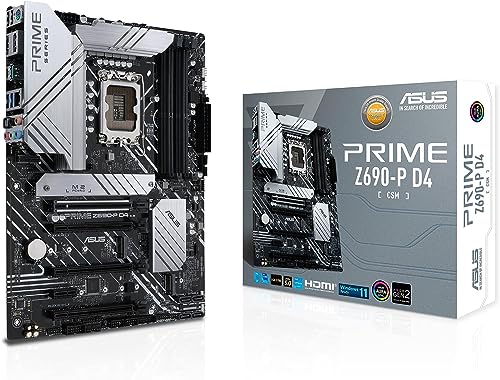
ASUS Prime Z690-P-CSM
7.4/10

Overall score

Score
7.4/ 10
✕
What it is
Our main score for this model, 1–10. It combines specs, expert reviews, best-of lists, owners and ratings from across the web.
How we count it
Parts: Technical score 40%, Reviews score 20%, List score 20%, Sentiment score 10%, User score 10%
Marks: Each part gets a mark out of 10. For reviews, lists and owners, a typical model in this category gets about 8 and the best one gets 10.
No data yet: A part with no data shows "?". It counts as the mark of a weaker model in this category (4 in 5 models with data score higher). This way, models with reviews, lists and owners usually come out ahead.
Score distribution
â–¼
<55-66-77-88-99-10
Score components

40%

7.2

Technical score

20%

?

Reviews scoreNot enough data yet, so we use 7.8, the mark of a weaker model in this category

20%

?

List scoreNot enough data yet, so we use 7.5, the mark of a weaker model in this category

10%

?

Sentiment scoreNot enough data yet, so we use 7.0, the mark of a weaker model in this category

10%

?

User scoreNot enough data yet, so we use 7.9, the mark of a weaker model in this category

â–²Better than 68% of motherboards
8.0

Value for money

Value for money
8.0/ 10
✕
What it is
An indicator that combines the motherboard's overall rating with its cost.
When it matters
When you are looking for a motherboard that offers a strong balance of features, performance, and price.
Score distribution
â–¼
<55-66-77-88-99-10
Score components

70%

7.4

Overall score

30%

9.4

Price

â–²Better than 66%
7.2

Technical score

Technical score
7.2/ 10
✕
What it is
How good the specs are compared with the other models in this category, 1–10.
How we count it
Areas: We rate the specs in each area against the other models in this category.
Weighting: The areas that matter most to buyers count more. The shares are shown under Score components.
Share: The technical score is 40% of the overall score.
Score distribution
â–¼
<55-66-77-88-99-10
Score components

19%

8.6

Memory

16%

7.9

Platform

16%

6.5

Storage

15%

7.3

Network

13%

4.3

Ports

8%

6.6

Expansion

8%

8.4

Power & Cooling

5%

8.0

Audio

â–²Better than 70%
?

Reviews score

Reviews score
✕
What it is
Average grade from independent test sites, magazines and video reviewers, 1–10.
How we count it
Grades: Each review's own score is converted to 1–10; without one, we grade the review ourselves. Big test sites count more, short reviews half as much as full tests. A video review counts half.
Score: The average grade is 80% of the review mark; the number of reviews is the other 20% (1 review = 5, the typical number in this category = 8, the most-reviewed model = 10).
Enough data: With few reviews, the average grade is pulled toward the typical grade of this category. No reviews yet: 7.8 for now.
Share: Reviews count 20% of the overall score.
Score distribution
â–¼
<55-66-77-88-99-10
Grades by review (0)
We have not found an independent test of this model yet. Until we do, its review part counts as 7.8.
Ratings from across the web count in the User score, not in this score.
No expert tests yet
?

User score

User score
7.9/ 10
✕
What it is
How happy buyers are with this model, based on ratings from across the web.
How we count it
Enough data: A model needs at least 1 rating from across the web. Without one, it counts as 7.9, the mark of a weaker rated model in this category.
Share: User score counts 10% of the overall score.
Score distribution
â–¼
<55-66-77-88-99-10
No ratings from across the web yet, so it counts as 7.9, the mark of a weaker rated model in this category.
No ratings from across the web yet
?

List score

List score
7.5/ 10
✕
What it is
How often independent test sites, magazines and video reviewers put this model in their best-of lists for this category.
How we count it
Points: The model in the most lists of this category gets 10; the others get 8 to 10 in proportion. In no list yet: 7.5. Lists count 20% of the overall score.
Enough data: Every list counts, even a single one. With fewer than 5 best-of lists in the category, this part is left out.
Lists with this model (0)
Not in any best-of list yet, so this part counts as 7.5. Models in a list get 8 to 10.
Not in any best-of list yet
  • asus-prime-z690-p-csm
asus-prime-z690-p-csm
Where to buy
    N/A~ £220
Loading...
Loading category ranking...

Technical Specifications of motherboard ASUS Prime Z690-P-CSM

Technical score
Technical score
7.2/ 10
✕
What it is
How good the specs are compared with the other models in this category, 1–10.
How we count it
Areas: We rate the specs in each area against the other models in this category.
Weighting: The areas that matter most to buyers count more. The shares are shown under Score components.
Share: The technical score is 40% of the overall score.
Score distribution
â–¼
<55-66-77-88-99-10
Score components:

19%

8.6

Memory

16%

7.9

Platform

16%

6.5

Storage

15%

7.3

Network

13%

4.3

Ports

8%

6.6

Expansion

8%

8.4

Power & Cooling

5%

8.0

Audio

7.2
Reviews score
7.8
User score
?
List score
?
Value for money
Value for money
8.0/ 10
✕
What it is
An indicator that combines the motherboard's overall rating with its cost.
When it matters
When you are looking for a motherboard that offers a strong balance of features, performance, and price.
Score distribution
â–¼
<55-66-77-88-99-10
Score components:

70%

7.4

Overall score

30%

9.4

Price

8.0
CPU socket
LGA 1700
This motherboard uses LGA 1700, which is more up-to-date than 54.7% of Motherboards and the same as 22.7% of Motherboards.
CPU platform
Intel
Chipset
Intel Z690
This motherboard uses Intel Z690, which is more capable than 68.4% of Motherboards and as capable as 3.7% of Motherboards.
Form factor
ATX
Integrated graphics support
yes
This motherboard supports integrated graphics. 10.2% of motherboards support this feature.
Show more
DDR memory version
DDR5
This motherboard uses DDR5, which is more modern than 63.8% of Motherboards and the same as 36.2% of Motherboards.
Memory slots
4
This motherboard has 4 Memory slots, which is more than 21.9% of motherboards and equal to 72% of motherboards.
Maximum memory capacity
192 GB
This motherboard supports up to 192 GB of memory, which is more than 72% of motherboards and equal to 10.4% of motherboards.
requires BIOS update for full capacity
Memory channels
2
Maximum RAM speed
4,800 MT/s
This motherboard supports memory speeds up to 4,800 MT/s, which is higher than that of 51.4% of motherboards and equal to that of 5.1% of motherboards.
Show more
N. of M.2 sockets
3
This motherboard has 3 M.2 sockets, which is more than 65.1% of motherboards and equal to 18.9% of motherboards.
M.2 slot interface per slot
2x PCIe 4.0 x4, 1x PCIe 4.0 x4/SATA
This motherboard offers M.2 slots: 2x PCIe 4.0x4, 1x PCIe 4.0x4/SATA, which is faster than 64.9% of Motherboards and the same as 1.8% of Motherboards.
N. of SATA 3 connectors
4
This motherboard has 4 SATA 3 connectors, which is more than 6.1% of motherboards and equal to 46.8% of motherboards.
Supported RAID levels
0/1/5/10
This motherboard RAID support: 0/1/5/10, which is more flexible than 32.5% of Motherboards and the same as 67.5% of Motherboards.
NVMe RAID support
yes
This motherboard supports NVMe RAID. 40.2% of motherboards support this feature.
Show more
N. of PCIe 5.0 x16 slots
1
This motherboard has 1 PCIe 5.0x16 slots, which is more than 68.4% of motherboards and equal to 26.6% of motherboards.
N. of PCIe 4.0 x16 slots
1
This motherboard has 1 PCIe 4.0x16 slots, which is more than 55.2% of motherboards and equal to 35.7% of motherboards.
runs at x4 mode
N. of PCIe 3.0 x16 slots
2
This motherboard has 2 PCIe 3.0x16 slots, which is more than 67.3% of motherboards and equal to 15.4% of motherboards.
PCIe slot electrical configuration
x16/x0/x4
This motherboard splits its PCIe lanes as x16/x0/x4, which is more generous than 51% of Motherboards and the same as 9.6% of Motherboards.
PCIe bifurcation support
yes
This motherboard supports PCIe bifurcation. 40.3% of motherboards support this feature.
Show more
Total USB ports (rear I/O)
6
This motherboard has 6 USB ports (rear I/O), which is fewer than 63.8% of motherboards and equal to 32.8% of motherboards.
Total USB ports (including headers)
15
This motherboard has 15 USB ports (including headers), which is more than 47.7% of motherboards and equal to 13.5% of motherboards.
Total USB-C ports (rear I/O)
1
This motherboard has 1 USB-C ports (rear I/O), which is more than 35.8% of motherboards and equal to 48.3% of motherboards.
Total USB-C ports (including headers)
2
This motherboard has 2 USB-C ports (including headers), which is more than 51.7% of motherboards and equal to 33% of motherboards.
N. of USB 3.2 Gen2x2 ports (USB-C)
1
This motherboard has 1 USB 3.2 Gen2x2 ports (USB-C), which is more than 82.1% of motherboards and equal to 17.7% of motherboards.
Show more
LAN speed
2.5 Gbps
This motherboard supports LAN speeds up to 2.5 Gbps, which is higher than that of 49% of motherboards and equal to that of 41.4% of motherboards.
LAN controller
Killer + Intel + Realtek
This motherboard has a Killer + Intel + Realtek LAN controller, which is slower than 64.6% of Motherboards and equal to 28.7% of Motherboards.
N. of RJ45 ports
1
This motherboard has 1 RJ45 ports, which is fewer than 14.4% of motherboards and equal to 85.6% of motherboards.
Wi-Fi connectivity
yes
This motherboard supports Wi-Fi connectivity. 50% of motherboards support this feature.
Wi-Fi version
Wi-Fi 6 (802.11ax)
This motherboard uses Wi-Fi 6 (802.11ax), which is newer than 60.3% of Motherboards and the same as 11.2% of Motherboards.
Show more
Audio codec
Realtek ALC897
This motherboard uses Realtek ALC897, which is higher-end than 20.2% of Motherboards and the same as 29.9% of Motherboards.
Audio channels
7.1
This motherboard offers 7.1 audio channels, which is more than 4.7% of motherboards and equal to 95.3% of motherboards.
Audio SNR
120 dB
This motherboard has an audio SNR of 120 dB, which is higher than that of 55.6% of motherboards and equal to that of 41% of motherboards.
Headphone amp support
no
This motherboard does not support a headphone amp. 58.8% of motherboards support this feature.
N. of 3.5mm audio jacks
5
This motherboard has 5 3.5mm audio jacks, which is more than 50.6% of motherboards and equal to 36.3% of motherboards.
Show more
VRM phases
14+1
This motherboard has 14+1 VRM phases, which is more than 75.2% of motherboards and equal to 0.4% of motherboards.
N. of CPU power connectors
2
This motherboard has 2 CPU power connectors, which is more than 54.9% of motherboards and equal to 44.8% of motherboards.
N. of fan headers
6
This motherboard has 6 fan headers, which is more than 50% of motherboards and equal to 22.3% of motherboards.
Pump header
yes
This motherboard has a pump header. 22.1% of motherboards include this feature.
Pump header max current
1 A
This motherboard supports up to 1 A on the pump header, which is lower than that of 56.5% of motherboards and equal to that of 19.6% of motherboards.
Show more

ASUS Prime Z690-P-CSM vs the average motherboard

246810TotalPlatformMemoryStorageExpansionPortsNetworkAudioPower & Cooling
  • More modern memory type
    This motherboard uses a more modern memory type than the average motherboard (DDR5 vs DDR4).
    DDR5 vs DDR4
  • 1 more PCIe 5.0x16 slots
    This motherboard has more PCIe 5.0x16 slots than the average motherboard (1 vs 0). The average motherboard has 0 PCIe 5.0x16 slot/s.
    1 vs 0
  • 1 more USB 3.2 Gen2x2 USB-C ports
    This motherboard has more USB 3.2 Gen2x2 USB-C ports than the average motherboard (1 vs 0). The average motherboard has 0 USB 3.2 Gen2x2 USB-C port/s.
    1 vs 0
  • More up-to-date socket
    This motherboard uses a more up-to-date socket than the average motherboard (LGA 1700 vs LGA 1151).
    LGA 1,700 vs LGA 1,151
  • 1 more M.2 sockets
    This motherboard has more M.2 sockets than the average motherboard (3 vs 2). The average motherboard has 2 M.2 socket/s.
    3 vs 2
  • 50% more maximum memory capacity
    This motherboard has more maximum memory capacity than the average motherboard (192 GB vs 128 GB). The average motherboard supports 128 GB of memory.
    requires BIOS update for full capacity
    192 GB vs 128 GB
  • 1 more CPU power connectors
    This motherboard has more CPU power connectors than the average motherboard (2 vs 1). The average motherboard has 1 CPU power connectors.
    2 vs 1
  • 1 more PCIe 4.0x16 slots
    This motherboard has more PCIe 4.0x16 slots than the average motherboard (1 vs 0). The average motherboard has 0 PCIe 4.0x16 slot/s.
    runs at x4 mode
    1 vs 0
  • More up-to-date socket
    This motherboard uses a more up-to-date socket than the average motherboard (LGA 1700 vs LGA 1151).
    LGA 1,700 vs LGA 1,151
  • More modern memory type
    This motherboard uses a more modern memory type than the average motherboard (DDR5 vs DDR4).
    DDR5 vs DDR4
  • 50% more maximum memory capacity
    This motherboard has more maximum memory capacity than the average motherboard (192 GB vs 128 GB). The average motherboard supports 128 GB of memory.
    requires BIOS update for full capacity
    192 GB vs 128 GB
  • 1 more M.2 sockets
    This motherboard has more M.2 sockets than the average motherboard (3 vs 2). The average motherboard has 2 M.2 socket/s.
    3 vs 2
  • 1 more PCIe 5.0x16 slots
    This motherboard has more PCIe 5.0x16 slots than the average motherboard (1 vs 0). The average motherboard has 0 PCIe 5.0x16 slot/s.
    1 vs 0
  • 1 more PCIe 4.0x16 slots
    This motherboard has more PCIe 4.0x16 slots than the average motherboard (1 vs 0). The average motherboard has 0 PCIe 4.0x16 slot/s.
    runs at x4 mode
    1 vs 0
  • 1 more PCIe x4 slots
    This motherboard has more PCIe x4 slots than the average motherboard (1 vs 0). The average motherboard has 0 PCIe x4 slot/s.
    1 vs 0
  • 1 more USB 3.2 Gen2x2 USB-C ports
    This motherboard has more USB 3.2 Gen2x2 USB-C ports than the average motherboard (1 vs 0). The average motherboard has 0 USB 3.2 Gen2x2 USB-C port/s.
    1 vs 0
  • 1 more USB 3.2 Gen1 headers
    This motherboard has more USB 3.2 Gen1 headers than the average motherboard (2 vs 1). The average motherboard has 1 USB 3.2 Gen1 header/s.
    two internal headers
    2 vs 1
  • 1 more USB4 or Thunderbolt headers
    This motherboard has more USB4 or Thunderbolt headers than the average motherboard (1 vs 0). The average motherboard has 0 USB4 or Thunderbolt header/s.
    1 vs 0
  • 1 more total USB-C connections
    This motherboard has more total USB-C connections than the average motherboard (2 vs 1). The average motherboard has 1 total USB-C connections.
    2 vs 1
  • More recent Wi-Fi standard
    This motherboard has a more recent Wi-Fi standard than the average motherboard (Wi-Fi 6 (802.11ax) vs Wi-Fi 5 (802.11ac)).
    Wi-Fi 6 (802.11ax) vs Wi-Fi 5 (802.11ac)
  • 5 dB higher audio SNR
    This motherboard has a higher audio SNR than the average motherboard (120 dB vs 115 dB). The average motherboard has audio SNR of 115 dB.
    120 dB vs 115 dB
  • 2 more 3.5mm audio jacks
    This motherboard has more 3.5mm audio jacks than the average motherboard (5 vs 3). The average motherboard has 3 3.5mm audio jacks.
    5 vs 3
  • 1 more CPU power connectors
    This motherboard has more CPU power connectors than the average motherboard (2 vs 1). The average motherboard has 1 CPU power connectors.
    2 vs 1
  • More VRM phases
    This motherboard has more VRM phases than the average motherboard (14+1 vs 10). The average motherboard has 10 VRM phase/s.
    14+1 vs 10
  • 1 more ARGB headers
    This motherboard has more ARGB headers than the average motherboard (3 vs 2). The average motherboard has 2 ARGB header/s.
    3 vs 2
  • Includes onboard RGB lighting
    This motherboard has onboard RGB lighting, while the average motherboard does not. 50% of motherboards include onboard RGB lighting.
    integrated Aura Sync lighting
  • 2 fewer rear USB ports
    This motherboard has fewer rear USB ports than the average motherboard (6 vs 8). The average motherboard has 8 rear USB port/s.
    6 vs 8
  • No BIOS flashback support
    This motherboard does not support BIOS flashback, while the average motherboard does. 51.3% of motherboards support BIOS flashback.
  • No Wi-Fi antenna included
    This motherboard does not include a Wi-Fi antenna, while the average motherboard does. 51.1% of motherboards include a Wi-Fi antenna.
  • More basic chipset
    This motherboard uses a more basic chipset than the average motherboard (Intel Z690 vs Intel B860).
    Intel Z690 vs Intel B860
  • 2 fewer USB 3.2 Gen1 ports
    This motherboard has fewer USB 3.2 Gen1 ports than the average motherboard (2 vs 4). The average motherboard has 4 USB 3.2 Gen1 port/s.
    2 vs 4
  • No multi-GPU support
    This motherboard does not support multi-GPU, while the average motherboard does. 53.9% of motherboards support multi-GPU.
    Secondary slot is chipset-fed / reduced-width only.
  • Slower NVMe storage slots
    This motherboard has slower M.2 slots than the average motherboard (2x PCIe 4x4, 1x PCIe 4x4/SATA vs 1x PCIe 5x4, 2x PCIe 4x4).
    2x PCIe 4.0x4, 1x PCIe 4.0x4/SATA vs 1x PCIe 5.0x4, 2x PCIe 4.0x4
  • No headphone amp support
    This motherboard does not support a headphone amp, while the average motherboard does. 58.8% of motherboards support a headphone amp.
  • 46.7% more expensive
    ASUS Prime Z690-P-CSM is more expensive than the average motherboard (£220 vs £150).
    £220 vs £150
  • No BIOS flashback support
    This motherboard does not support BIOS flashback, while the average motherboard does. 51.3% of motherboards support BIOS flashback.
  • More basic chipset
    This motherboard uses a more basic chipset than the average motherboard (Intel Z690 vs Intel B860).
    Intel Z690 vs Intel B860
  • Fewer BIOS update methods
    This motherboard offers fewer BIOS update methods than the average motherboard (UEFI utility, Windows app vs UEFI utility, flashback, Windows app).
    UEFI utility, Windows app vs UEFI utility, flashback, Windows app
  • Slower NVMe storage slots
    This motherboard has slower M.2 slots than the average motherboard (2x PCIe 4x4, 1x PCIe 4x4/SATA vs 1x PCIe 5x4, 2x PCIe 4x4).
    2x PCIe 4.0x4, 1x PCIe 4.0x4/SATA vs 1x PCIe 5.0x4, 2x PCIe 4.0x4
  • No multi-GPU support
    This motherboard does not support multi-GPU, while the average motherboard does. 53.9% of motherboards support multi-GPU.
    Secondary slot is chipset-fed / reduced-width only.
  • Less generous lane split
    This motherboard splits its PCIe lanes less generously than the average motherboard (x16/x0/x4 vs x16/x0/x4, x8/x8/x4).
    x16/x0/x4 vs x16/x0/x4, x8/x8/x4
  • 2 fewer rear USB ports
    This motherboard has fewer rear USB ports than the average motherboard (6 vs 8). The average motherboard has 8 rear USB port/s.
    6 vs 8
  • 2 fewer USB 3.2 Gen1 ports
    This motherboard has fewer USB 3.2 Gen1 ports than the average motherboard (2 vs 4). The average motherboard has 4 USB 3.2 Gen1 port/s.
    2 vs 4
  • No Wi-Fi antenna included
    This motherboard does not include a Wi-Fi antenna, while the average motherboard does. 51.1% of motherboards include a Wi-Fi antenna.
  • No headphone amp support
    This motherboard does not support a headphone amp, while the average motherboard does. 58.8% of motherboards support a headphone amp.
  • 1 A lower pump header current limit
    This motherboard has a lower pump header current than the average motherboard (1 A vs 2 A). The average motherboard provides pump header current of 2 A.
    1 A vs 2 A

Third-party reviews

What customers like about ASUS Prime Z690-P-CSM

  • Future-proof connectivity with support for PCIe 5.0 and DDR5 memory modules.
  • Solid power delivery (14+1 DrMOS) capable of handling mid-to-high tier 12th/13th Gen Intel CPUs.
  • Comprehensive cooling features, including large VRM and M.2 heatsinks.
  • Includes 2.5 Gb Ethernet and USB 3.2 Gen 2x2 Type-C for fast data transfers.
  • CSM (Corporate Stable Model) status offers better long-term availability and management software like ASUS Control Center Express.
  • Retains legacy support for PS/2 ports, which is valued by some workstation and Linux users.

What customers don't like about ASUS Prime Z690-P-CSM

  • Lacks a BIOS Flashback button, making it difficult to update the BIOS without a compatible CPU already installed.
  • Limited to only four SATA ports, which may be restrictive for users with many legacy storage drives.
  • PCB design is often described as basic or 'unimpressive' compared to higher-end ROG or TUF gaming lines.
  • The PCIe slot layout can be awkward, with some slots sharing bandwidth or limited to lower electrical speeds.
  • Some users reported issues with RAM slot durability or long-term stability after several months of use.
  • No built-in Wi-Fi on the standard model, requiring an additional card or the specific 'WIFI' variant.

Verdict

The ASUS Prime Z690-P CSM is an ATX motherboard built for 12th, 13th, and 14th Gen Intel processors on the LGA 1700 socket, featuring a 14+1 DrMOS power stage design and DDR5 memory support up to 6000 MHz (O.C.). It offers high-speed connectivity with a PCIe 5.0 x16 slot, three M.2 slots (up to PCIe 4.0), 2.5 Gb Ethernet, and USB 3.2 Gen 2x2 Type-C, alongside Corporate Stable Model (CSM) features like ASUS Control Center Express for IT management. Key pros include its future-proof PCIe 5.0 support, robust cooling with large VRM heatsinks, and specialized business management tools. However, notable cons include its relatively basic 4-layer PCB design and a more modest 14+1 VRM setup compared to higher-end Z690 models, which may limit extreme overclocking headroom for top-tier i9 processors.

Compare ASUS Prime Z690-P-CSM with other products in the Motherboards category

1Product to compare no. 1
VS
2Product to compare no. 2
VS
3Product to compare no. 3 (optional)

Graphic comparison of ASUS Prime Z690-P-CSM and other products in the Motherboards category

No results found