Scored using Drawing tablets Methodology v1.0
Drawing tablets Methodology v1.0
Mathematical & Unbiased Scoring
Products in this category are evaluated mathematically under Frontumo Drawing tablets Methodology v1.0 using verified laboratory benchmarks, technical specifications, and authentic consumer ratings with 0% commercial bias.
Explore Drawing tablets Methodology v1.0

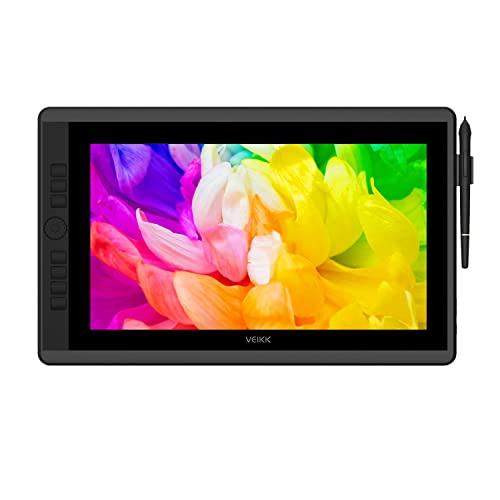
VEIKK Studio VK2200 Pro Review | 66 Data compared

Avg. price:~£380Type:pen displayActive drawing area:127792 mm²Resolution:1920x1080Pen pressure levels:8192Report rate:290 RPS

VEIKK Studio VK2200 Pro Review: Compare 66 technical specifications and user reviews to see how this product ranks in the Drawing tablets category and whether it is worth buying.

7.8

Overall score

Score
7.8/ 10
✕
What it is
An overall evaluation of the drawing tablet's quality, based on technical analyses and user reviews.
When it matters
When you need a quick reference to identify the best drawing tablets on the market.
Score distribution
▼
<55-66-77-88-99-10
Score components

90%

7.8

Technical score

10%

?

User score

▲Better than 85% of drawing-tablets
7.8

Technical score

Technical score
7.8/ 10
✕
What it is
An assessment of technical performance for products in the Drawing tablets category across these key areas: Form Factor, Display & Color, Pen & Input, Connectivity, Controls & Extras.
When it matters
When you want to compare drawing tablets based on technical performance and available features.
Score distribution
▼
<55-66-77-88-99-10
Score components

50%

8.2

Pen & Input

40%

7.5

Display & Color

4%

7.2

Form Factor

3%

6.8

Connectivity

3%

9.1

Controls & Extras

▲Better than 85% of drawing-tablets
?

User score

User score
8.0/ 10
✕
What it is
A rating that combines user reviews and the total number of reviews received by the drawing tablet.
When it matters
When you want to know how a drawing tablet performs in real use and how reliable it remains over time according to user feedback.
Score distribution
▼
<55-66-77-88-99-10
Score components

70%

?

User ratings

30%

?

Number of reviews

  • No image
No image

Best prices

    N/A~ £380

Best rankings

Available: ranking among products currently available (including other versions of this product).All: ranking among all products in the database.
Loading...
Loading category ranking...

Technical Specifications of drawing tablet VEIKK Studio VK2200 Pro

Technical score
Technical score
7.8/ 10
✕
What it is
An assessment of technical performance for products in the Drawing tablets category across these key areas: Form Factor, Display & Color, Pen & Input, Connectivity, Controls & Extras.
When it matters
When you want to compare drawing tablets based on technical performance and available features.
Score distribution
▼
<55-66-77-88-99-10
Score components:

50%

8.2

Pen & Input

40%

7.5

Display & Color

4%

7.2

Form Factor

3%

6.8

Connectivity

3%

9.1

Controls & Extras

7.8
User score
User score
8.0/ 10
✕
What it is
A rating that combines user reviews and the total number of reviews received by the drawing tablet.
When it matters
When you want to know how a drawing tablet performs in real use and how reliable it remains over time according to user feedback.
Score distribution
▼
<55-66-77-88-99-10
Score components

70%

?

User ratings

30%

?

Number of reviews

?
Popularity
Popularity
1.0/ 10
✕
What it is
An indicator based on the number of reviews received by the drawing tablet.
When it matters
When you prefer to buy a product chosen and reviewed by many other consumers.
Score distribution
▼
<55-66-77-88-99-10
Popularity:
VEIKK Studio VK2200 Pro has a popularity score of 1 point, which is lower than 65% of drawing tablets.
1.0
Value for money
Value for money
8.0/ 10
✕
What it is
An indicator that combines the drawing tablet's overall rating with its cost.
When it matters
When you are looking for a drawing tablet with a good balance between quality and price.
Score distribution
▼
<55-66-77-88-99-10
Score components:

60%

7.8

Overall score

40%

8.5

Price

8.0
Type
pen display
Display
yes
Display
yes
This drawing tablet has a display. This feature is present on 47.9% of drawing tablets.
Compatibility
Windows / macOS / Linux / ChromeOS / Android
Wireless capability
no
Wireless capability
no
This drawing tablet does not support wireless use. 18.6% of drawing tablets support wireless use.
Weight
5 g
Weight
5 g
This drawing tablet weighs 5 g, lighter than 100% of drawing tablets.
Show more
Active drawing area
127,792 mm²
Active drawing area
127,792 mm²
This drawing tablet offers an active drawing area of 127,792 mm², larger than that of 87.8% of drawing tablets and equal to that of 3.2% of drawing tablets.
476.64 x 268.11 mm.
Screen size
21.5 inch
Screen size
21.5 inch
This drawing tablet has a screen size of 21.5 inch, larger than that of 68.8% of drawing tablets and equal to that of 15.1% of drawing tablets.
Resolution
1920x1080
Resolution
1920x1080
This drawing tablet has a display resolution of 1920x1080, higher than that of 52.6% of drawing tablets and equal to that of 27.3% of drawing tablets.
Pixel density
102 ppi
Pixel density
102 ppi
This drawing tablet has a pixel density of 102 ppi, lower than that of 87.1% of drawing tablets and equal to that of 11.8% of drawing tablets.
Typical brightness
270 nits
Typical brightness
270 nits
This drawing tablet has a typical brightness of 270 nits, higher than that of 78% of drawing tablets.
Show more
Stylus included
yes
Stylus included
yes
This drawing tablet comes with a stylus. This feature is present on 100% of drawing tablets.
Two pens included.
Pen technology
EMR (battery-free)
Pen technology
EMR (battery-free)
This drawing tablet uses EMR (battery-free) pen technology, more advanced than that of 4.6% of drawing tablets and equal to that of 95.4% of drawing tablets.
Pen pressure levels
8,192
Pen pressure levels
8,192
This drawing tablet supports 8,192 pen pressure levels, more than 9.3% of drawing tablets and equal to 75.8% of drawing tablets.
Pen resolution
5,080 LPI
Pen resolution
5,080 LPI
This drawing tablet supports a pen resolution of 5,080 LPI, higher than that of 5.7% of drawing tablets and equal to that of 94.3% of drawing tablets.
Report rate
290 RPS
Report rate
290 RPS
This drawing tablet has a report rate of 290 RPS, higher than that of 83.5% of drawing tablets and equal to that of 8.2% of drawing tablets.
Show more
Bluetooth connectivity
no
Bluetooth connectivity
no
This drawing tablet does not support Bluetooth. 13.1% of drawing tablets support Bluetooth.
USB 3.2 Gen 2 (USB-C) ports
0
USB 3.2 Gen 2 (USB-C) ports
0
This drawing tablet has 0 USB 3.2 Gen 2 (USB-C) ports, fewer than 17.4% of drawing tablets and equal to 82.6% of drawing tablets.
USB 3.2 Gen 1 (USB-C) ports
?
USB 3.2 Gen 2 (USB-A) ports
0
USB 3.2 Gen 2 (USB-A) ports
0
This drawing tablet has 0 USB 3.2 Gen 2 (USB-A) ports, fewer than 1.1% of drawing tablets and equal to 99% of drawing tablets.
USB 3.2 Gen 1 (USB-A) ports
0
USB 3.2 Gen 1 (USB-A) ports
0
This drawing tablet has 0 USB 3.2 Gen 1 (USB-A) ports, fewer than 1.6% of drawing tablets and equal to 98.4% of drawing tablets.
Show more
N. of express keys
8
N. of express keys
8
This drawing tablet has 8 express keys, more than 58.4% of drawing tablets and equal to 26.3% of drawing tablets.
N. of dials
2
N. of dials
2
This drawing tablet has 2 dials, more than 96.2% of drawing tablets and equal to 3.8% of drawing tablets.
Stand included
yes
Stand included
yes
This drawing tablet comes with a stand. This feature is present on 29.5% of drawing tablets.
Fold-out legs
no
Fold-out legs
no
This drawing tablet does not have fold-out legs. 7.3% of drawing tablets have fold-out legs.
Uses attached adjustable stand.
Pen stand included
yes
Pen stand included
yes
This drawing tablet comes with a pen stand. This feature is present on 58.9% of drawing tablets.
Pen holder stores spare nibs.
Show more

VEIKK Studio VK2200 Pro vs the average drawing tablet

246810TotalForm FactorDisplay & ColorPen & InputConnectivityControls & Extras
  • 87,028 mm² larger work area
    Active drawing area
    127,792 mm²
    This drawing tablet has a larger active drawing area than the average drawing tablet (127792 mm² vs 40764 mm²). The average drawing tablet offers an active drawing area of 40764 mm².
    476.64 x 268.11 mm.
    127,792 mm² vs 40,764 mm²
  • 24.5% higher report rate
    Report rate
    290 RPS
    This drawing tablet has a higher report rate than the average drawing tablet (290 RPS vs 233 RPS). The average drawing tablet has a report rate of 233 RPS.
    290 RPS vs 233 RPS
  • Fully laminated display
    Full lamination
    yes
    This drawing tablet has full lamination, while the average drawing tablet does not. 39% of drawing tablets have full lamination.
  • 5.9 inch larger display
    Screen size
    21.5 inch
    This drawing tablet has a larger screen than the average drawing tablet (21.5 inch vs 15.6 inch). The average drawing tablet has a screen size of 15.6 inch.
    21.5 inch vs 15.6 inch
  • 2 more dials
    N. of dials
    2
    This drawing tablet has more dials than the average drawing tablet (2 vs 0). The average drawing tablet has 0 dials.
    2 vs 0
  • 18 more nibs included
    N. of nibs included
    28
    This drawing tablet includes more replacement nibs than the average drawing tablet (28 vs 10). The average drawing tablet includes 10 replacement nibs.
    28 vs 10
  • Anti-reflection coating
    Anti-reflection coating
    yes
    This drawing tablet has an anti-reflection coating, while the average drawing tablet does not. 47.7% of drawing tablets have an anti-reflection coating.
  • Integrated display
    Display
    yes
    This drawing tablet has a display, while the average drawing tablet does not. 48.2% of drawing tablets have a display.
  • 5.8% better value for money
    VEIKK Studio VK2200 Pro has a higher value-for-money score than the average drawing tablet (8.04 vs 7.6).
    8.04 vs 7.6
  • Integrated display
    Display
    yes
    This drawing tablet has a display, while the average drawing tablet does not. 48.2% of drawing tablets have a display.
  • 99.3% lighter design
    Weight
    5 g
    This drawing tablet is lighter than the average drawing tablet (5 g vs 740 g). The average drawing tablet weighs 740 g.
    5 g vs 740 g
  • 87,028 mm² larger work area
    Active drawing area
    127,792 mm²
    This drawing tablet has a larger active drawing area than the average drawing tablet (127792 mm² vs 40764 mm²). The average drawing tablet offers an active drawing area of 40764 mm².
    476.64 x 268.11 mm.
    127,792 mm² vs 40,764 mm²
  • Fully laminated display
    Full lamination
    yes
    This drawing tablet has full lamination, while the average drawing tablet does not. 39% of drawing tablets have full lamination.
  • 5.9 inch larger display
    Screen size
    21.5 inch
    This drawing tablet has a larger screen than the average drawing tablet (21.5 inch vs 15.6 inch). The average drawing tablet has a screen size of 15.6 inch.
    21.5 inch vs 15.6 inch
  • Anti-reflection coating
    Anti-reflection coating
    yes
    This drawing tablet has an anti-reflection coating, while the average drawing tablet does not. 47.7% of drawing tablets have an anti-reflection coating.
  • 3 % wider Adobe RGB coverage
    Adobe RGB coverage
    95 %
    This drawing tablet covers more Adobe RGB than the average drawing tablet (95 % vs 92 %). The average drawing tablet covers 92 % of Adobe RGB.
    95 % vs 92 %
  • 20 nits brighter display
    Typical brightness
    270 nits
    This drawing tablet has higher typical brightness than the average drawing tablet (270 nits vs 250 nits). The average drawing tablet has a typical brightness of 250 nits.
    270 nits vs 250 nits
  • 24.5% higher report rate
    Report rate
    290 RPS
    This drawing tablet has a higher report rate than the average drawing tablet (290 RPS vs 233 RPS). The average drawing tablet has a report rate of 233 RPS.
    290 RPS vs 233 RPS
  • 18 more nibs included
    N. of nibs included
    28
    This drawing tablet includes more replacement nibs than the average drawing tablet (28 vs 10). The average drawing tablet includes 10 replacement nibs.
    28 vs 10
  • 9.1% lighter pen
    Pen weight
    12 g
    This drawing tablet includes a lighter pen than the average drawing tablet (12 g vs 13.2 g). The average drawing tablet pen weighs 13.2 g.
    12 g vs 13.2 g
  • 1 more HDMI ports
    HDMI ports
    1
    This drawing tablet has more HDMI ports than the average drawing tablet (1 vs 0). The average drawing tablet has 0 HDMI ports.
    1 vs 0
  • 0.3 m longer cable
    Cable length
    1.8 m
    This drawing tablet has a longer cable than the average drawing tablet (1.8 m vs 1.5 m). The average drawing tablet has a cable length of 1.5 m.
    1.8 m vs 1.5 m
  • 2 more dials
    N. of dials
    2
    This drawing tablet has more dials than the average drawing tablet (2 vs 0). The average drawing tablet has 0 dials.
    2 vs 0
  • Stand included
    Stand included
    yes
    This drawing tablet comes with a stand, while the average drawing tablet does not. 29.8% of drawing tablets come with a stand.
  • 2 more express keys
    N. of express keys
    8
    This drawing tablet has more express keys than the average drawing tablet (8 vs 6). The average drawing tablet has 6 express keys.
    8 vs 6
  • 38.6% lower pixel density
    Pixel density
    102 ppi
    This drawing tablet has a lower pixel density than the average drawing tablet (102 ppi vs 166 ppi). The average drawing tablet has a pixel density of 166 ppi.
    102 ppi vs 166 ppi
  • 199.2 mm bulkier body
    Width
    556 mm
    This drawing tablet is wider than the average drawing tablet (556 mm vs 356.8 mm). The average drawing tablet is 356.8 mm wide.
    556 mm vs 356.8 mm
  • 107 mm taller body
    Height
    330 mm
    This drawing tablet is taller than the average drawing tablet (330 mm vs 223 mm). The average drawing tablet is 223 mm tall.
    330 mm vs 223 mm
  • 7.5 mm thicker body
    Thickness
    18 mm
    This drawing tablet is thicker than the average drawing tablet (18 mm vs 10.5 mm). The average drawing tablet is 10.5 mm thick.
    18 mm vs 10.5 mm
  • 6.16x less popular
    VEIKK Studio VK2200 Pro has a lower popularity than the average drawing tablet (1 vs 6.2).
    1 vs 6.16
  • 5.14x higher power consumption
    Power consumption
    36 W
    This drawing tablet uses more power than the average drawing tablet (36 W vs 7 W). The average drawing tablet uses 7 W of power.
    Maximum power-on rating.
    36 W vs 7 W
  • 2.38x more expensive
    VEIKK Studio VK2200 Pro is more expensive than the average drawing tablet (£380 vs £160).
    £380 vs £160
  • 6.16x less popular
    VEIKK Studio VK2200 Pro has a lower popularity than the average drawing tablet (1 vs 6.2).
    1 vs 6.16
  • 2.38x more expensive
    VEIKK Studio VK2200 Pro is more expensive than the average drawing tablet (£380 vs £160).
    £380 vs £160
  • 199.2 mm bulkier body
    Width
    556 mm
    This drawing tablet is wider than the average drawing tablet (556 mm vs 356.8 mm). The average drawing tablet is 356.8 mm wide.
    556 mm vs 356.8 mm
  • 107 mm taller body
    Height
    330 mm
    This drawing tablet is taller than the average drawing tablet (330 mm vs 223 mm). The average drawing tablet is 223 mm tall.
    330 mm vs 223 mm
  • 7.5 mm thicker body
    Thickness
    18 mm
    This drawing tablet is thicker than the average drawing tablet (18 mm vs 10.5 mm). The average drawing tablet is 10.5 mm thick.
    18 mm vs 10.5 mm
  • 38.6% lower pixel density
    Pixel density
    102 ppi
    This drawing tablet has a lower pixel density than the average drawing tablet (102 ppi vs 166 ppi). The average drawing tablet has a pixel density of 166 ppi.
    102 ppi vs 166 ppi
  • 5.14x higher power consumption
    Power consumption
    36 W
    This drawing tablet uses more power than the average drawing tablet (36 W vs 7 W). The average drawing tablet uses 7 W of power.
    Maximum power-on rating.
    36 W vs 7 W

Video reviews

Hands-on testing, unboxing, and real-world video evaluations

Expert reviews

In-depth analysis and verdict from leading tech publications
P
petapixel.com
03/06/2022
Summary of the review
M
macsources.com
22/07/2022
Summary of the review
P
postperspective.com
25/08/2022
Summary of the review
C
cinelinx.com
09/05/2022
Summary of the review
P
photofocus.com
29/05/2023
Summary of the review
C
carritube.com
08/12/2022
Summary of the review
P
pocnetwork.net
26/05/2022
Summary of the review
W
windowscentral.com
08/06/2022
Summary of the review

Third-party reviews

What we like about VEIKK Studio VK2200 Pro

  • Exceptional value for money, significantly cheaper than similar-sized competitors
  • Large 21.5-inch fully laminated screen reduces parallax and provides a natural drawing surface
  • Smooth, matte screen texture offers a comfortable 'paper-like' feel without being slippery
  • Features 8 'SilentPress' shortcut keys and 2 customisable quick dials for improved workflow
  • Highly adjustable and solid built-in stand supports multiple viewing angles
  • Includes a rich accessory package with two battery-free pens and numerous spare nibs
  • Battery-free stylus is responsive with 8,192 levels of pressure sensitivity and 60° tilt support

What we don't like about VEIKK Studio VK2200 Pro

  • Software and driver issues, including unresponsive settings panels and intermittent input lag
  • Native 1080p resolution may feel low for its large size, especially when compared to high-end displays
  • Default screen brightness can be lackluster or dim compared to primary monitors
  • Shortcut keys are fixed on the left side, which is unergonomic for left-handed artists
  • Occasional parallax and cursor calibration issues reported by some users
  • Screen surface is a 'dust magnet' and may show signs of wear with heavy long-term use
  • The stylus lacks a dedicated physical eraser button, making the drawing process slightly more tedious

Verdict

The Veikk Studio VK2200 Pro is a 21.5-inch pen display featuring a 1920x1080 FHD IPS fully laminated screen with 92% NTSC (120% sRGB) color gamut and an anti-glare matte glass surface for a paper-like drawing feel. Its primary characteristics include two customizable quick dials and eight silent shortcut keys, alongside a battery-free stylus supporting 8,192 levels of pressure sensitivity and ±60° tilt. Main pros include its highly competitive price point, sturdy adjustable stand (15° to 85°), and excellent drawing performance with minimal parallax due to the laminated display. However, notable cons include its relatively low 1080p resolution for its large size, potential software driver inconsistencies (particularly on macOS), and the lack of a built-in pen eraser.

Compare VEIKK Studio VK2200 Pro with other products in the Drawing tablets category

1Product to compare no. 1
VS
2Product to compare no. 2
VS
3Product to compare no. 3 (optional)

Graphic comparison of VEIKK Studio VK2200 Pro and other products in the Drawing tablets category

No results found