Scored using Tablets Methodology v3.0
Tablets Methodology v3.0
Mathematical & Unbiased Scoring
Products in this category are scored under Frontum Tablets Methodology v3.0: the technical score from the specifications is the base, and independent expert and video reviews (up to ±0.5 points), owner opinions (up to ±0.3) and best-of lists (up to +0.3) move it up or down.
Explore Tablets Methodology v3.0

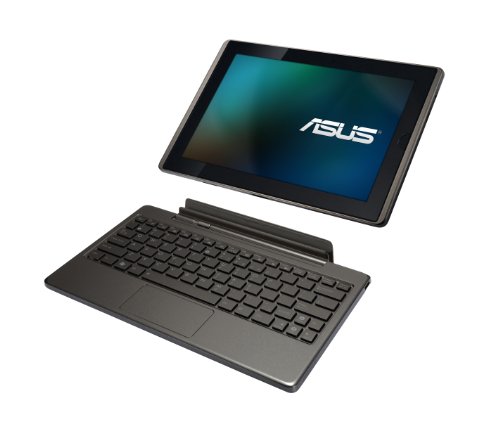
Asus Transformer TF101 (1GB + 32GB) review: 168 specs compared

Avg. price:~£440RAM capacity:1 GBInternal storage:32 GBScreen size:10.1 inchesChipset:Nvidia Tegra 2 T20

Asus Transformer TF101 (1GB + 32GB) Review: Compare 168 technical specifications and 29 expert and video reviews to see how this product ranks in the Tablets category and whether it is worth buying.
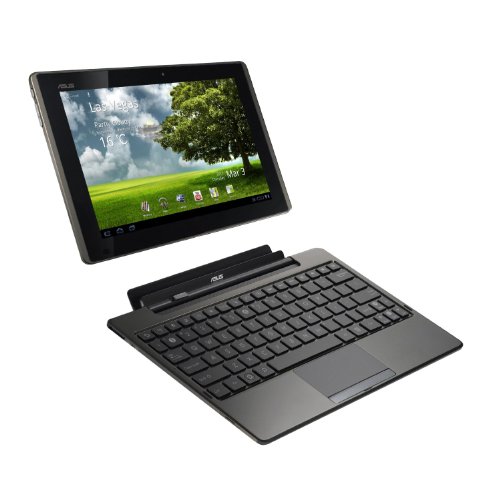
Asus Transformer TF101 (1GB + 32GB)
6.5/10

Overall score

Score
6.5/ 10
✕
What it is
Our main score for this model, 1–10. It combines specs, best-of lists, expert reviews and owners.
How we count it
Parts: Technical score 35%, List score 30%, Reviews score 25%, Sentiment score 10%
Marks: Each part gets a mark out of 10. For reviews, lists and owners, a typical model in this category gets about 8 and the best one gets 10.
No data yet: A part with no data shows "?". It counts as the mark of a weaker model in this category (4 in 5 models with data score higher). This way, models with reviews, lists and owners usually come out ahead.
Score distribution
▼
<55-66-77-88-99-10
Score components

35%

4.7

Technical score

30%

?

List scoreNot enough data yet, so we use 7.5, the mark of a weaker model in this category

25%

8.3

Reviews score

10%

4.7

Sentiment score

▼Worse than 71% of tablets
7.0

Value for money

Value for money
7.0/ 10
✕
What it is
An indicator that combines the tablet's overall rating with its cost.
When it matters
When you are looking for a tablet with a good balance between quality and price.
Score distribution
▼
<55-66-77-88-99-10
Score components

70%

6.5

Overall score

30%

8.2

Price

▼Worse than 83%
4.7

Technical score

Technical score
4.7/ 10
✕
What it is
How good the specs are compared with the other models in this category, 1–10.
How we count it
Areas: We rate the specs in each area against the other models in this category.
Weighting: The areas that matter most to buyers count more. The shares are shown under Score components.
Share: The technical score is 35% of the overall score.
Score distribution
▼
<55-66-77-88-99-10
Score components

22%

3.8

Performance

20%

5.1

Display

16%

5.4

Camera

14%

3.5

Battery

12%

5.6

Connectivity

8%

6.0

Software

5%

4.5

Design

3%

4.8

Audio

▼Worse than 94%
8.3

Reviews score

Reviews score
8.3/ 10
✕
What it is
Average grade from independent test sites, magazines and video reviewers, 1–10.
How we count it
Grades: Each review's own score is converted to 1–10; without one, we grade the review ourselves. Big test sites count more, short reviews half as much as full tests. A video review counts half.
Score: The average grade is 80% of the review mark; the number of reviews is the other 20% (1 review = 5, the typical number in this category = 8, the most-reviewed model = 10).
Enough data: With few reviews, the average grade is pulled toward the typical grade of this category. No reviews yet: 7.4 for now.
Share: Reviews count 25% of the overall score.
Score distribution
▼
<55-66-77-88-99-10

80%

8.2

Average grade

20%

8.7

Popularity

Grades by review (29)
23 reviews: 14 with a printed score, 9 estimated from the review. 6 video reviews, each counting half as much as a written test. Reviews count 25% of the overall score.
User ratings collected online are not part of this score.
▲Better than 80%
?

List score

List score
7.5/ 10
✕
What it is
How often independent test sites, magazines and video reviewers put this model in their best-of lists for this category.
How we count it
Points: The model in the most lists of this category gets 10; the others get 8 to 10 in proportion. In no list yet: 7.5. Lists count 30% of the overall score.
Enough data: Every list counts, even a single one. With fewer than 5 best-of lists in the category, this part is left out.
Lists with this model (0)
Not in any best-of list yet, so this part counts as 7.5. Models in a list get 8 to 10.
Not in any best-of list yet
  • asus-transformer-tf101-32gb-1gb-32gb
  • asus-transformer-tf101-32gb-1gb-32gb
asus-transformer-tf101-32gb-1gb-32gb
Where to buy
    N/A~ £440
Best rankings
Available: ranking among products currently available (including other versions of this product).All: ranking among all products in the database.

What reviewers say about the Asus Transformer TF101 (1GB + 32GB)

Based on 23 · 7

Reviewers like the battery life, screen and keyboard dock, but find the input controls frustrating and are split on software.
Praised
Mixed views
Criticised
Pick a topic to see who said what

What owners say about the Asus Transformer TF101 (1GB + 32GB)

Based on 107 owners sharing their experience in online comments

48%positive7%mixed45%negative

Owners value its long life and recovery guides, while aging software and boot or power failures cause the most frustration.

What owners dislike

  • Flashing sometimes stops mid-partition or says Done with no change, and gives a blob-not-extracted error; one owner fixed it by fully unzipping EasyFlasher.12
  • After a flash, some tablets reboot repeatedly or hang on the Eee Pad or CyanogenMod spinning logo and never reach the home screen.10
  • Some tablets only charge when switched off, shut down randomly, or show a blinking red light and won't turn on.9
  • Windows 10 often blocks the APX driver over signature errors, so owners had to disable driver signing and manually pick the Naked Driver.9
  • Without Google support, owners cannot sign in to the app store, which shows a secure connection error, and older apps stop opening.5
  • Some owners receive mail but browsing reports connection problems, and others find Wi-Fi shows no signal at all.3
  • On some units the touchscreen suddenly stopped working; one owner found a USB mouse through OTG works as a workaround.3
  • Owners could not find the CM and Gapps files or the stock ROM under the names shown, so the process stopped.3

Points mentioned by at least 3 owners, most mentioned first.

Loading...
Loading category ranking...

Technical Specifications of tablet Asus Transformer TF101 (1GB + 32GB)

Technical score
Technical score
4.7/ 10
✕
What it is
How good the specs are compared with the other models in this category, 1–10.
How we count it
Areas: We rate the specs in each area against the other models in this category.
Weighting: The areas that matter most to buyers count more. The shares are shown under Score components.
Share: The technical score is 35% of the overall score.
Score distribution
▼
<55-66-77-88-99-10
Score components:

22%

3.8

Performance

20%

5.1

Display

16%

5.4

Camera

14%

3.5

Battery

12%

5.6

Connectivity

8%

6.0

Software

5%

4.5

Design

3%

4.8

Audio

4.7
Reviews score
8.3
List score
?
Value for money
Value for money
7.0/ 10
✕
What it is
An indicator that combines the tablet's overall rating with its cost.
When it matters
When you are looking for a tablet with a good balance between quality and price.
Score distribution
▼
<55-66-77-88-99-10
Score components:

70%

6.5

Overall score

30%

8.2

Price

7.0
RAM capacity
1 GB
This tablet has 1 GB of RAM, which is less than 78% of tablets and equal to 19.1% of tablets.
Process node
40 nm
This tablet is built on a 40 nm process, which is larger than 86.9% of tablets and equal to 8% of tablets.
Internal storage
32 GB
This tablet has 32 GB of internal storage, which is less than 60.9% of tablets and equal to 17.9% of tablets.
Geekbench 6 single-core score
?
Chipset
Nvidia Tegra 2 T20
This tablet runs on Nvidia Tegra 2 T20, which is less advanced than 70.5% of tablets and equal to 2.6% of tablets.
Show more
What reviewers say
Screen resolution
1280×800
This tablet has a 1280×800 screen, which is less sharp than 68.1% of tablets and equal to 21.7% of tablets.
Refresh rate
60 Hz
This tablet has a 60 Hz screen, which is smoother than 0.1% of tablets and equal to 73.4% of tablets.
Display type
IPS LCD
This tablet uses a IPS LCD display type. 17% of tablets use this display technology.
Pixel density
149 ppi
This tablet has a pixel density of 149 ppi, which is lower than 86.8% of tablets and equal to 9.2% of tablets.
Display glass type
Corning Gorilla Glass
This tablet protects its screen with Corning Gorilla Glass, which is more durable than 45.4% of tablets and the same as 32.8% of tablets.
Show more
What reviewers say
Optical image stabilization
no
This tablet does not support optical stabilisation. 0.4% of tablets offer this.
Main camera megapixels
5 MP
This tablet has a rear camera with 5 MP resolution, which is lower than 63.7% of tablets and equal to 26% of tablets.
Front camera megapixels
1.2 MP
This tablet has a front camera with 1.2 MP resolution, which is lower than 86.3% of tablets and equal to 4.8% of tablets.
Main camera aperture
?
Optical zoom
1xxx
This tablet has 1xx optical zoom, which is stronger than 18.2% of tablets and equal to 80.9% of tablets.
Show more
What reviewers say
Battery capacity
3,300 mAh
This tablet has 3,300 mAh battery capacity, which is smaller than 94.6% of tablets and equal to 0.1% of tablets.
Charging speed
15 W
This tablet charges at 15 W, which is slower than 52.1% of tablets and equal to 6.3% of tablets.
Battery life
9.5 hours
This tablet has a battery life of 9.5 hours, which is shorter than that of 61.4% of tablets and equal to that of 1.2% of tablets.
Wireless charging
no
This tablet does not support wireless charging. 1.5% of tablets offer this.
Fast charging
no
This tablet does not support fast charging. 56.9% of tablets offer this.
Show more
What reviewers say
LTE support
no
This tablet does not have built-in LTE. 42.9% of tablets offer this.
Wi-Fi connectivity
yes
This tablet connects to Wi-Fi. 0.2% of tablets offer this.
GPS
yes
This tablet has built-in GPS. 17.1% of tablets offer this.
5G connectivity
no
This tablet does not support 5G. 8.1% of tablets offer this.
NFC
no
This tablet does not include NFC. 10.8% of tablets offer this.
Show more
What reviewers say
Operating system
Android
This tablet uses the Android operating system, which is more advanced than the one used by 23.2%.
Update support duration
short
This tablet offers short update support, which is shorter than the support period of 52.4% of tablets and equal to that of 47.6% of tablets.
Direct OS updates
yes
This tablet supports direct OS updates. 20.3% of tablets offer this.
On-device AI
no
This tablet does not support on-device AI. 28.3% of tablets support this capability.
App tracking protection
no
This tablet does not support app tracking protection. 28.4% of tablets offer this.
Show more
What reviewers say
IP rating
not rated
This tablet's IP rating is not rated, which is less protected than 16.5% of tablets and the same as 83.6% of tablets.
Weight
680 g
This tablet weighs 680 g, which is heavier than 86.9% of tablets and equal to 0.4% of tablets.
Backlit keyboard
no
This tablet does not support a backlit keyboard. 9.7% of tablets support backlit keyboards.
Keyboard accessory
yes
This tablet supports a keyboard accessory. 15.8% of tablets support this option.
Pen latency
N/A
Show more
Number of microphones
1
This tablet has a microphone array of 1, which is more than 0.2% of tablets and equal to 54.8% of tablets.
aptX Adaptive
no
This tablet does not support aptX Adaptive. 6.9% of tablets offer this.
Dolby Atmos support
no
This tablet does not support Dolby Atmos. 31.3% of tablets support Dolby Atmos.
N. of speakers
2
This tablet includes 2 speakers, which is more than in 9.8% of tablets and equal to the number in 60.8% of tablets.
FM radio
no
This tablet does not include an FM radio. 19% of tablets offer this.
Show more

Asus Transformer TF101 (1GB + 32GB) vs the average tablet

246810TotalPerformanceDisplayCameraBatteryConnectivitySoftwareDesignAudio
  • Supports manual ISO
    This tablet supports manual ISO, while the average tablet does not. 45.9% of tablets support manual ISO.
  • 18.6% higher review score
    Reviews score
    8.3/ 10
    ✕
    What it is
    Average grade from independent test sites, magazines and video reviewers, 1–10.
    How we count it
    Grades: Each review's own score is converted to 1–10; without one, we grade the review ourselves. Big test sites count more, short reviews half as much as full tests. A video review counts half.
    Score: The average grade is 80% of the review mark; the number of reviews is the other 20% (1 review = 5, the typical number in this category = 8, the most-reviewed model = 10).
    Enough data: With few reviews, the average grade is pulled toward the typical grade of this category. No reviews yet: 7.4 for now.
    Share: Reviews count 25% of the overall score.
    Score distribution
    ▼
    <55-66-77-88-99-10

    80%

    8.2

    Average grade

    20%

    8.7

    Popularity

    Grades by review (29)
    23 reviews: 14 with a printed score, 9 estimated from the review. 6 video reviews, each counting half as much as a written test. Reviews count 25% of the overall score.
    User ratings collected online are not part of this score.
    8.3 vs 7.0
  • More advanced chipset
    This tablet has a more advanced chipset than the average tablet (Nvidia Tegra 2 T20 vs MediaTek MT8169A).
    Nvidia Tegra 2 T20 vs MediaTek MT8169A
  • Supports HDMI output
    This tablet supports HDMI output, while the average tablet does not. 49.8% of tablets offer this.
    mini-HDMI port
  • 4 more GPU execution units
    This tablet has more GPU execution units than the average tablet (8 vs 4). The average tablet has 4 GPU execution units.
    8 vs 4
  • 18.6% higher review score
    Reviews score
    8.3/ 10
    ✕
    What it is
    Average grade from independent test sites, magazines and video reviewers, 1–10.
    How we count it
    Grades: Each review's own score is converted to 1–10; without one, we grade the review ourselves. Big test sites count more, short reviews half as much as full tests. A video review counts half.
    Score: The average grade is 80% of the review mark; the number of reviews is the other 20% (1 review = 5, the typical number in this category = 8, the most-reviewed model = 10).
    Enough data: With few reviews, the average grade is pulled toward the typical grade of this category. No reviews yet: 7.4 for now.
    Share: Reviews count 25% of the overall score.
    Score distribution
    ▼
    <55-66-77-88-99-10

    80%

    8.2

    Average grade

    20%

    8.7

    Popularity

    Grades by review (29)
    23 reviews: 14 with a printed score, 9 estimated from the review. 6 video reviews, each counting half as much as a written test. Reviews count 25% of the overall score.
    User ratings collected online are not part of this score.
    8.3 vs 7.0
  • More advanced chipset
    This tablet has a more advanced chipset than the average tablet (Nvidia Tegra 2 T20 vs MediaTek MT8169A).
    Nvidia Tegra 2 T20 vs MediaTek MT8169A
  • 4 more GPU execution units
    This tablet has more GPU execution units than the average tablet (8 vs 4). The average tablet has 4 GPU execution units.
    8 vs 4
  • Supports manual ISO
    This tablet supports manual ISO, while the average tablet does not. 45.9% of tablets support manual ISO.
  • Supports HDMI output
    This tablet supports HDMI output, while the average tablet does not. 49.8% of tablets offer this.
    mini-HDMI port
  • 6 fewer CPU threads
    This tablet has fewer CPU threads than the average tablet (2 vs 8). The average tablet has 8 CPU threads.
    2 vs 8
  • 3.8 MP lower front resolution
    This tablet has a lower-resolution front camera than the average tablet (1.2 MP vs 5 MP). The average tablet has a front camera of 5 MP.
    1.2 MP vs 5 MP
  • No USB-C port
    This tablet does not have a USB Type-C port, while the average tablet does. 54% of tablets have one.
  • 3 GB less RAM
    This tablet has less RAM than the average tablet (1 GB vs 4 GB). The average tablet has 4 GB of RAM.
    1 GB vs 4 GB
  • 50% lower CPU speed
    This tablet has a lower CPU speed than the average tablet (1 GHz vs 2 GHz). The average tablet has CPU speed of 2 GHz.
    1 GHz vs 2 GHz
  • 50% smaller battery capacity
    This tablet has a smaller battery capacity than the average tablet (3,300 mAh vs 6,600 mAh). The average tablet offers 6,600 mAh of battery capacity.
    3,300 mAh vs 6,600 mAh
  • Shorter update support
    This tablet offers shorter update support than the average tablet (short vs medium). The average tablet gets medium of update support.
    short vs medium
  • No fast charging
    This tablet does not support fast charging, while the average tablet does. 56.8% of tablets support fast charging.
  • 37.3% lower sentiment score
    4.7 vs 7.5
  • 8.2% worse value for money
    Asus Transformer TF101 (1GB + 32GB) has worse value for money than the average tablet (6.98 vs 7.6).
    6.98 vs 7.55
  • 69.2% more expensive
    Asus Transformer TF101 (1GB + 32GB) is more expensive than the average tablet (£440 vs £260).
    £440 vs £260
  • 6 fewer CPU threads
    This tablet has fewer CPU threads than the average tablet (2 vs 8). The average tablet has 8 CPU threads.
    2 vs 8
  • 3 GB less RAM
    This tablet has less RAM than the average tablet (1 GB vs 4 GB). The average tablet has 4 GB of RAM.
    1 GB vs 4 GB
  • 50% lower CPU speed
    This tablet has a lower CPU speed than the average tablet (1 GHz vs 2 GHz). The average tablet has CPU speed of 2 GHz.
    1 GHz vs 2 GHz
  • More basic graphics
    This tablet has less advanced graphics than the average tablet (NVIDIA ULP GeForce vs Mali-G51).
    NVIDIA ULP GeForce vs Mali-G51
  • 2.86x larger process node
    This tablet has a larger process node than the average tablet (40 nm vs 14 nm). The average tablet is built on 14 nm.
    40 nm vs 14 nm
  • 1,199 MHz slower RAM speed
    This tablet has a lower RAM speed than the average tablet (667 MHz vs 1,866 MHz). The average tablet has RAM speed of 1,866 MHz.
    667 MHz vs 1,866 MHz
  • 82.1% less memory bandwidth
    This tablet has less memory bandwidth than the average tablet (2.7 GB/s vs 14.9 GB/s). The average tablet has 14.9 GB/s of memory bandwidth.
    2.67 GB/s vs 14.9 GB/s
  • No big.LITTLE architecture
    This tablet does not support big.LITTLE architecture, while the average tablet does. 51.7% of tablets support big.LITTLE architecture.
  • 50% less internal storage
    This tablet has less internal storage than the average tablet (32 GB vs 64 GB). The average tablet has 64 GB of internal storage.
    32 GB vs 64 GB
  • 8 years older
    This tablet was released earlier than the average tablet (2011 vs 2019). The average tablet was released in 2019.
    March 2011
    2011 vs 2019
  • More basic memory type
    This tablet uses less advanced memory than the average tablet (DDR2 vs LPDDR3).
    DDR2 vs LPDDR3
  • 32.6% softer screen detail
    This tablet has softer screen detail than the average tablet (149 ppi vs 221 ppi). The average tablet has a pixel density of 221 ppi.
    149 ppi vs 221 ppi
  • Less sharp display
    This tablet has a less sharp screen than the average tablet (1280×800 vs 1920×1200).
    1,280×800 vs 1,920×1,200
  • 1 nits dimmer screen
    This tablet is dimmer than the average tablet (400 nits vs 401 nits). The average tablet reaches 401 nits.
    400 nits vs 401 nits
  • 3.8 MP lower front resolution
    This tablet has a lower-resolution front camera than the average tablet (1.2 MP vs 5 MP). The average tablet has a front camera of 5 MP.
    1.2 MP vs 5 MP
  • No continuous video AF
    This tablet does not support continuous video AF, the average tablet does. 57.7% of tablets support continuous video autofocus.
  • Worse main-camera video
    This tablet supports worse main-camera video recording than the average tablet (720x30 fps vs 1080x30 fps). The average tablet supports 1080x30 fps main-camera video recording.
    720x30 fps vs 1080x30 fps
  • 3 MP lower rear resolution
    This tablet has a lower-resolution rear camera than the average tablet (5 MP vs 8 MP). The average tablet has a rear camera of 8 MP.
    5 MP vs 8 MP
  • No manual exposure control
    This tablet does not support manual exposure, while the average tablet does. 63.6% of tablets support manual exposure.
  • No HDR photo mode
    This tablet does not have HDR photo mode, the average tablet does. 79.8% of tablets support HDR photo mode.
  • No backside-illuminated sensor
    This tablet does not have a BSI sensor, while the average tablet does. 52.6% of tablets have a BSI sensor.
  • 50% smaller battery capacity
    This tablet has a smaller battery capacity than the average tablet (3,300 mAh vs 6,600 mAh). The average tablet offers 6,600 mAh of battery capacity.
    3,300 mAh vs 6,600 mAh
  • No fast charging
    This tablet does not support fast charging, while the average tablet does. 56.8% of tablets support fast charging.
  • 0.5 hours shorter battery life
    This tablet offers shorter battery life than the average tablet (9.5 hours vs 10 hours). The average tablet offers 10 hours of battery life.
    9.5 hours vs 10 hours
  • 16.7% slower charging
    This tablet charges slower than the average tablet (15 W vs 18 W). The average tablet charges at 18 W.
    15 W vs 18 W
  • No USB-C port
    This tablet does not have a USB Type-C port, while the average tablet does. 54% of tablets have one.
  • Older Bluetooth version
    This tablet has an older Bluetooth version than the average tablet (2.1 vs 5).
    2.1 vs 5
  • Older Wi-Fi standard
    This tablet has an older Wi-Fi standard than the average tablet (Wi-Fi 4 (802.11n) vs Wi-Fi 5 (802.11ac)).
    Wi-Fi 4 (802.11n) vs Wi-Fi 5 (802.11ac)
  • Fewer Wi-Fi bands
    This tablet supports fewer Wi-Fi bands than the average tablet (2.4GHz vs 2.4GHz/5GHz). The average tablet supports 2.4GHz/5GHz Wi-Fi bands.
    2.4GHz vs 2.4GHz/5GHz
  • No Ethernet support
    This tablet does not have Ethernet support, the average tablet does. 76.5% of tablets support Ethernet.
  • Shorter update support
    This tablet offers shorter update support than the average tablet (short vs medium). The average tablet gets medium of update support.
    short vs medium
  • No split-screen
    This tablet does not support split-screen, the average tablet does. 72.8% of tablets support split-screen.
  • No picture-in-picture mode
    This tablet does not support picture-in-picture, the average tablet does. 61.4% of tablets support picture-in-picture.
  • No camera and mic privacy
    This tablet does not support camera and mic privacy, while the average tablet does. 56.6% of tablets offer this.
  • No multi-user mode
    User score
    8.0/ 10
    ✕
    What it is
    Average of independent expert reviews and videos, graded by us; missing reviews count as 7/10.
    When it matters
    When you want to know how independent test sites and video reviewers rate the product in real use.
    Score distribution
    ▼
    ▼
    <55-66-77-88-99-10
    Asus Transformer TF101
    the average tablet
    Asus Transformer TF101 (1GB + 32GB) does not support multi-user mode, while the average tablet does. 73.8% of tablets offer this.
  • No full-page screenshots
    This tablet does not support full-page screenshots, the average tablet does. 53% of tablets support full-page screenshots.
  • No location privacy
    This tablet does not support location privacy, while the average tablet does. 76.7% of tablets offer this.
  • No dark mode
    This tablet does not support dark mode, while the average tablet does. 57.7% of tablets offer this.
  • No offline voice recognition
    This tablet does not support offline voice recognition, the average tablet does. 76.4% of tablets support offline voice recognition.
  • 38.8% heavier
    This tablet is heavier than the average tablet (680 g vs 490 g). The average tablet weighs 490 g.
    680 g vs 490 g
  • 5 mm thicker
    This tablet is thicker than the average tablet (13 mm vs 8 mm). The average tablet is 8 mm thick.
    13 mm vs 8 mm

Video reviews

Hands-on testing, unboxing, and real-world video evaluations

9.0
BASIC thinking
≈ estimated
05/05/2011
Hands-on review · battery, browser and benchmark tests
Verdict
Asus Transformer TF101 is the best Android Honeycomb tablet available, especially with the keyboard dock for productivity.
9.0
Adam Savage’s Tested
≈ estimated
21/10/2011
Hands-on review · keyboard dock, screen and typing tests
Verdict
Asus Transformer TF101 is a very appealing Android tablet, but its keyboard and laptop-style shortcomings are noticeable.
8.0
Adam Savage’s Tested
≈ estimated
21/10/2011
Hands-on review · keyboard dock and battery test
Verdict
Asus Transformer TF101 is easy to recommend for its keyboard dock, though it falls short of a true laptop.
8.0
LoOsE_uNiT
≈ estimated
19/10/2011
Hands-on test · HDMI output to TV after 9 weeks
Verdict
Asus Transformer TF101's HDMI output works well with sound, though playback can stutter under heavy load.
9.0
iGyaan
≈ estimated
01/10/2011
Unboxing and first look · dock and cover tests
Verdict
Asus Transformer TF101 makes a very positive first impression, especially the keyboard dock, with a full review to follow.
8.0
UltrabookReview
≈ estimated
19/04/2011
Review conclusions · hands-on tests of speed, browser and camera
Verdict
Asus Transformer TF101 has very good hardware and is one of the best Android options, but software lag and camera issues hold it back.
Hands-on video, no verdict
Shop video
Hands-on video, no verdict
Overview video
Overview video

Expert reviews

In-depth analysis and verdict from leading tech publications
8.0
theverge.com
✓ explicit
10/10/2011
Hands-on review · Honeycomb tablet
Verdict
The Asus Eee Pad Transformer TF101 has a bright IPS screen and a keyboard dock, but its plastic build, large size, and weak rear camera hold it back.
9.0
techradar.com
✓ explicit
10/05/2011
Quick review · Netbook-style tablet
Verdict
The Asus Eee Pad Transformer TF101 is a fast, well-priced Honeycomb tablet that doubles as a netbook, though its fiddly on-screen keyboard and poor camera hold it back.
7.0
pcworld.com
✓ explicit
06/05/2011
Hands-on review · Keyboard dock
Verdict
The Asus Eee Pad Transformer TF101 works well on its own and gains an SD slot, USB port and extra battery with its keyboard dock, but it feels flimsy.
7.0
uk.pcmag.com
✓ explicit
03/02/2012
Full review · Budget Honeycomb tablet
Verdict
The Asus Eee Pad Transformer TF101 is one of the best Android tablets for the money, with no key features missing, but it doesn't stand out from its rivals.
8.6
notebookcheck.net
✓ explicit
25/05/2011
Lab test · Display and battery
Verdict
The Asus Transformer TF101 is a good tablet with a wide-viewing-angle screen and long battery life, but its office software can't replace a PC.
8.0
whathifi.com
✓ explicit
20/07/2011
Full review · Screen and dock
Verdict
The Asus Eee Pad Transformer TF101 is an affordable Apple alternative whose screen and dock tempt, provided you can live with the odd glitch.
9.0
mobiletechreview.com
≈ estimated
19/05/2011
Full review · Display and dock
Verdict
The Asus Eee Pad Transformer is a low-priced Android tablet whose excellent IPS screen and useful keyboard dock outweigh its plasticky back.
9.0
gadgetsmagazine.com.ph
✓ explicit
03/06/2011
Hands-on review · Keyboard dock
Verdict
The Asus Eee Pad Transformer TF101 is a solid Android rival to the iPad, with a useful keyboard battery and strong gaming, but app choice is thin.
7.0
djitz.com
≈ estimated
16/02/2012
Personal review · Budget Android tablet
Verdict
The Asus Transformer TF101 is an affordable, sharp Android tablet that suits developers and Android fans, though its sound is weak and its apps trail iOS.
8.0
laptopmag.com
✓ explicit
20/04/2011
Full review · Keyboard dock test
Verdict
The Asus Eee Pad Transformer is a light, good-looking tablet whose keyboard dock suits people who type a lot, though docking is fiddly.
8.0
jrs-s.net
≈ estimated
15/08/2011
Week-long review · Keyboard dock
Verdict
The Asus Eee Pad Transformer is an excellent tablet, but its keyboard dock is not yet a good netbook because Android apps handle physical keys poorly.
9.0
decryptedtech.com
≈ estimated
10/10/2011
Long-term test · Tablet with dock
Verdict
The Asus Eee Pad Transformer TF101 is a comfortable tablet whose dock adds ports and battery, though its keyboard feels rough and only one charger is supplied.
8.0
yugatech.com
≈ estimated
12/09/2011
Hands-on review · Tablet with dock
Verdict
The Asus Transformer TF101 is a responsive tablet whose dock makes it a productive netbook with long battery life, though its camera is poor and its screen reflects badly.
6.0
chip.de
≈ estimated
22/06/2011
Hands-on test · Keyboard hybrid
Verdict
The Asus Transformer TF101 is a well-built hybrid that becomes a laptop with its keyboard dock, but weak video support and a short battery hold it back.
7.2
computerbild.de
✓ explicit
18/07/2011
Lab test · Netbook-style tablet
Verdict
The Asus Eee Pad Transformer TF101 has a sharp screen and long battery, and its dock turns it into a netbook, but videos stutter.
7.0
connect.de
≈ estimated
21/10/2011
Lab test · Keyboard hybrid
Verdict
The Asus Eee Pad Transformer TF101 is a sturdy tablet whose keyboard dock adds much longer battery life, though its screen struggles in strong sunlight.
10
bilanz.ch
✓ explicit
14/06/2011
Hands-on test · Tablet with keyboard
Verdict
The Asus Eee Pad Transformer TF101 is a well-built, fairly priced netbook-style tablet whose keyboard recharges it, but it lacks mobile internet.
9.0
hifitest.de
✓ explicit
07/05/2012
Hands-on test · Honeycomb tablet
Verdict
The Asus Eee Pad TF101G is a fast tablet with an excellent display for browsing and photo galleries, but its typing and media format support are limited.
8.6
android-user.de
✓ explicit
08/09/2023
Hands-on test · Tablet with dock
Verdict
The Asus Transformer TF101 is a strong Android tablet whose keyboard dock turns it into a netbook replacement that runs up to 16 hours.
7.2
01net.com
✓ explicit
24/05/2011
Hands-on test · Keyboard hybrid
Verdict
The Asus Eee Pad Transformer TF101 is good value, and its keyboard dock adds a lot of battery life, but it has no 3G and no USB charging.

Third-party reviews

What customers like about Asus Transformer TF101 (1GB + 32GB)

  • Versatile 2-in-1 hybrid design with a detachable keyboard dock that turns the tablet into a netbook.
  • Excellent battery life, reaching up to 16 hours when the tablet is combined with the docking station.
  • High-quality 10.1-inch IPS display with wide viewing angles and vibrant colours.
  • Extensive connectivity options including mini-HDMI, a microSD slot on the tablet, and two USB ports plus a full-size SD card reader on the dock.
  • Aggressive and affordable pricing compared to early competitors like the Motorola Xoom or iPad 2.

What customers don't like about Asus Transformer TF101 (1GB + 32GB)

  • Early software instability with reports of occasional OS crashes, laggy UI navigation, and random reboots.
  • Limited selection of Android apps specifically optimised for the tablet's larger screen and keyboard input.
  • Underwhelming camera performance with grainy images and jerky 720p video recording.
  • Physical keyboard on the dock can feel cramped for touch typists, and the touchpad is noted as being oversensitive.
  • Proprietary charging cable is considered too short and does not include a charging indicator light on the tablet.

Verdict

The ASUS Eee Pad Transformer TF101 is a versatile 10.1-inch Android tablet powered by a 1.0 GHz dual-core NVIDIA Tegra 2 processor, featuring 1GB of RAM and 32GB of internal storage. Its standout characteristic is the optional keyboard docking station that transforms the device into a netbook while extending battery life from roughly 9.5 hours to up to 16 hours. Main pros include a brilliant 1280 x 800 IPS display with 178-degree viewing angles, a mini-HDMI port for 1080p output, and a scratch-resistant glass build. However, some users have reported cons such as occasional software lag within the Honeycomb interface, the absence of a rear camera flash, and a proprietary charging cable that is notably short.

Compare Asus Transformer TF101 (1GB + 32GB) with other tablets

1Product to compare no. 1
VS
2Product to compare no. 2
VS
3Product to compare no. 3 (optional)

Graphic comparison of Asus Transformer TF101 (1GB + 32GB) and other tablets

No results found