Scored using Tablets Methodology v3.0
Tablets Methodology v3.0
Mathematical & Unbiased Scoring
Products in this category are scored under Frontum Tablets Methodology v3.0: the technical score from the specifications is the base, and independent expert and video reviews (up to ±0.5 points), owner opinions (up to ±0.3) and best-of lists (up to +0.3) move it up or down.
Explore Tablets Methodology v3.0

Alldocube Kido 8 review: 168 specs compared

Avg. price:~£?RAM capacity:3 GBInternal storage:32 GBScreen size:8 inchesChipset:?

Alldocube Kido 8 Review: Compare 168 technical specifications to see how this product ranks in the Tablets category and whether it is worth buying.
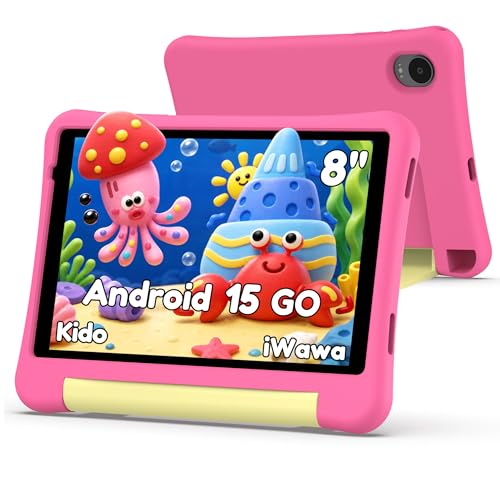
Alldocube Kido 8
7.0/10

Overall score

Score
7.0/ 10
✕
What it is
Our main score for this model, 1–10. It combines specs, best-of lists, expert reviews and owners.
How we count it
Parts: Technical score 35%, List score 30%, Reviews score 25%, Sentiment score 10%
Marks: Each part gets a mark out of 10. For reviews, lists and owners, a typical model in this category gets about 8 and the best one gets 10.
No data yet: A part with no data shows "?". It counts as the mark of a weaker model in this category (4 in 5 models with data score higher). This way, models with reviews, lists and owners usually come out ahead.
Score distribution
▼
<55-66-77-88-99-10
Score components

35%

6.3

Technical score

30%

?

List scoreNot enough data yet, so we use 7.5, the mark of a weaker model in this category

25%

?

Reviews scoreNot enough data yet, so we use 7.4, the mark of a weaker model in this category

10%

?

Sentiment scoreNot enough data yet, so we use 6.9, the mark of a weaker model in this category

▲Better than 52% of tablets
?

Value for money

Value for money
✕
What it is
An indicator that combines the tablet's overall rating with its cost.
When it matters
When you are looking for a tablet with a good balance between quality and price.
Score distribution
▼
<55-66-77-88-99-10
Score components

70%

7.0

Overall score

30%

?

Price

Price not known yet
6.3

Technical score

Technical score
6.3/ 10
✕
What it is
How good the specs are compared with the other models in this category, 1–10.
How we count it
Areas: We rate the specs in each area against the other models in this category.
Weighting: The areas that matter most to buyers count more. The shares are shown under Score components.
Share: The technical score is 35% of the overall score.
Score distribution
▼
<55-66-77-88-99-10
Score components

22%

6.5

Performance

20%

5.7

Display

16%

7.0

Camera

14%

5.7

Battery

12%

6.8

Connectivity

8%

6.4

Software

5%

6.1

Design

3%

6.0

Audio

▲Better than 56%
?

Reviews score

Reviews score
✕
What it is
Average grade from independent test sites, magazines and video reviewers, 1–10.
How we count it
Grades: Each review's own score is converted to 1–10; without one, we grade the review ourselves. Big test sites count more, short reviews half as much as full tests. A video review counts half.
Score: The average grade is 80% of the review mark; the number of reviews is the other 20% (1 review = 5, the typical number in this category = 8, the most-reviewed model = 10).
Enough data: With few reviews, the average grade is pulled toward the typical grade of this category. No reviews yet: 7.4 for now.
Share: Reviews count 25% of the overall score.
Score distribution
▼
<55-66-77-88-99-10
Grades by review (0)
We have not found an independent test of this model yet. Until we do, its review part counts as 7.4.
User ratings collected online are not part of this score.
No expert tests yet
?

List score

List score
7.5/ 10
✕
What it is
How often independent test sites, magazines and video reviewers put this model in their best-of lists for this category.
How we count it
Points: The model in the most lists of this category gets 10; the others get 8 to 10 in proportion. In no list yet: 7.5. Lists count 30% of the overall score.
Enough data: Every list counts, even a single one. With fewer than 5 best-of lists in the category, this part is left out.
Lists with this model (0)
Not in any best-of list yet, so this part counts as 7.5. Models in a list get 8 to 10.
Not in any best-of list yet
  • alldocube-kido-8
  • alldocube-kido-8
  • alldocube-kido-8
  • alldocube-kido-8
  • alldocube-kido-8
  • alldocube-kido-8
  • alldocube-kido-8
  • alldocube-kido-8
  • alldocube-kido-8
  • alldocube-kido-8
alldocube-kido-8
alldocube-kido-8
alldocube-kido-8
alldocube-kido-8
alldocube-kido-8
alldocube-kido-8
alldocube-kido-8
alldocube-kido-8
alldocube-kido-8
alldocube-kido-8
Where to buy
*As an Amazon Associate, we earn from qualifying purchases.
Loading...
Loading category ranking...

Tablets model ranking

Ranked #286 of 1,179 models in Tablets (Overall score)

Technical Specifications of tablet Alldocube Kido 8

Technical score
Technical score
6.3/ 10
✕
What it is
How good the specs are compared with the other models in this category, 1–10.
How we count it
Areas: We rate the specs in each area against the other models in this category.
Weighting: The areas that matter most to buyers count more. The shares are shown under Score components.
Share: The technical score is 35% of the overall score.
Score distribution
▼
<55-66-77-88-99-10
Score components:

22%

6.5

Performance

20%

5.7

Display

16%

7.0

Camera

14%

5.7

Battery

12%

6.8

Connectivity

8%

6.4

Software

5%

6.1

Design

3%

6.0

Audio

6.3
Reviews score
7.4
List score
?
Value for money
Value for money
7.9/ 10
✕
What it is
An indicator that combines the tablet's overall rating with its cost.
When it matters
When you are looking for a tablet with a good balance between quality and price.
Score distribution
▼
<55-66-77-88-99-10
Score components:

70%

7.0

Overall score

30%

?

Price

7.9
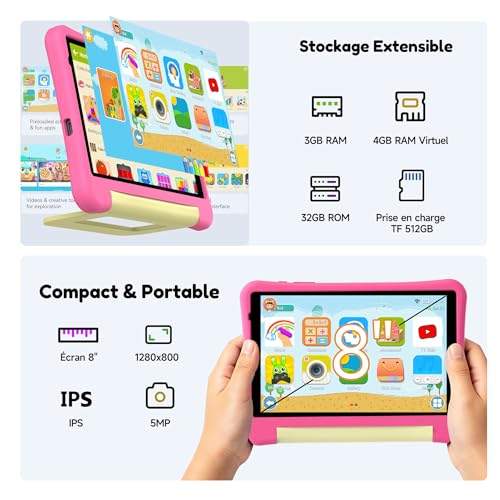
RAM capacity
3 GB
This tablet has 3 GB of RAM, which is less than 52.9% of tablets and equal to 8.4% of tablets.
Process node
?
Internal storage
32 GB
This tablet has 32 GB of internal storage, which is less than 60.9% of tablets and equal to 17.9% of tablets.
Geekbench 6 single-core score
?
Chipset
?
Show more
Screen resolution
1280×800
This tablet has a 1280×800 screen, which is less sharp than 68.1% of tablets and equal to 21.7% of tablets.
Refresh rate
60 Hz
This tablet has a 60 Hz screen, which is smoother than 0.1% of tablets and equal to 73.4% of tablets.
Display type
IPS LCD
This tablet uses a IPS LCD display type. 17% of tablets use this display technology.
Pixel density
189 ppi
This tablet has a pixel density of 189 ppi, which is lower than 66.5% of tablets and equal to 6.8% of tablets.
Display glass type
?
Show more
Optical image stabilization
no
This tablet does not support optical stabilisation. 0.4% of tablets offer this.
Main camera megapixels
?
Front camera megapixels
?
Main camera aperture
?
Optical zoom
1xxx
This tablet has 1xx optical zoom, which is stronger than 18.2% of tablets and equal to 80.9% of tablets.
Show more
Battery capacity
?
Charging speed
10 W
This tablet charges at 10 W, which is slower than 60.9% of tablets and equal to 33.3% of tablets.
Battery life
?
Wireless charging
no
This tablet does not support wireless charging. 1.5% of tablets offer this.
Fast charging
no
This tablet does not support fast charging. 56.9% of tablets offer this.
Show more
LTE support
no
This tablet does not have built-in LTE. 42.9% of tablets offer this.
Wi-Fi connectivity
yes
This tablet connects to Wi-Fi. 0.2% of tablets offer this.
GPS
yes
This tablet has built-in GPS. 17.1% of tablets offer this.
5G connectivity
no
This tablet does not support 5G. 8.1% of tablets offer this.
NFC
no
This tablet does not include NFC. 10.8% of tablets offer this.
Show more
Operating system
?
Update support duration
short
This tablet offers short update support, which is shorter than the support period of 52.4% of tablets and equal to that of 47.6% of tablets.
Direct OS updates
no
This tablet does not support direct OS updates. 79.8% of tablets offer this.
On-device AI
no
This tablet does not support on-device AI. 28.3% of tablets support this capability.
App tracking protection
no
This tablet does not support app tracking protection. 28.4% of tablets offer this.
Show more
IP rating
not rated
This tablet's IP rating is not rated, which is less protected than 16.5% of tablets and the same as 83.6% of tablets.
Weight
?
Backlit keyboard
no
This tablet does not support a backlit keyboard. 9.7% of tablets support backlit keyboards.
Keyboard accessory
no
This tablet does not support a keyboard accessory. 84.3% of tablets support this option.
Pen latency
N/A
Show more
Number of microphones
1
This tablet has a microphone array of 1, which is more than 0.2% of tablets and equal to 54.8% of tablets.
aptX Adaptive
no
This tablet does not support aptX Adaptive. 6.9% of tablets offer this.
Dolby Atmos support
no
This tablet does not support Dolby Atmos. 31.3% of tablets support Dolby Atmos.
N. of speakers
?
FM radio
?
Show more

Alldocube Kido 8 vs the average tablet

246810TotalPerformanceDisplayCameraBatteryConnectivitySoftwareDesignAudio
  • Shorter update support
    This tablet offers shorter update support than the average tablet (short vs medium). The average tablet gets medium of update support.
    short vs medium
  • No fast charging
    This tablet does not support fast charging, while the average tablet does. 56.8% of tablets support fast charging.
  • No direct OS updates
    This tablet does not support direct OS updates, while the average tablet does. 79.7% of tablets offer this.
  • 2.1 inches smaller screen
    This tablet has a smaller screen than the average tablet (8 inches vs 10.1 inches). The average tablet measures 10.1 inches.
    8 inches vs 10.1 inches
  • No manual exposure control
    This tablet does not support manual exposure, while the average tablet does. 63.6% of tablets support manual exposure.
  • Less sharp display
    This tablet has a less sharp screen than the average tablet (1280×800 vs 1920×1200).
    1,280×800 vs 1,920×1,200
  • No manual white balance
    This tablet does not support manual white balance, while the average tablet does. 51.5% of tablets support manual white balance.
  • 44.4% slower charging
    This tablet charges slower than the average tablet (10 W vs 18 W). The average tablet charges at 18 W.
    10 W vs 18 W
  • 1,066 MHz slower RAM speed
    This tablet has a lower RAM speed than the average tablet (800 MHz vs 1,866 MHz). The average tablet has RAM speed of 1,866 MHz.
    800 MHz vs 1,866 MHz
  • 50% less internal storage
    This tablet has less internal storage than the average tablet (32 GB vs 64 GB). The average tablet has 64 GB of internal storage.
    32 GB vs 64 GB
  • 1 GB less RAM
    This tablet has less RAM than the average tablet (3 GB vs 4 GB). The average tablet has 4 GB of RAM.
    3 GB vs 4 GB
  • 2.1 inches smaller screen
    This tablet has a smaller screen than the average tablet (8 inches vs 10.1 inches). The average tablet measures 10.1 inches.
    8 inches vs 10.1 inches
  • Less sharp display
    This tablet has a less sharp screen than the average tablet (1280×800 vs 1920×1200).
    1,280×800 vs 1,920×1,200
  • 14.5% softer screen detail
    This tablet has softer screen detail than the average tablet (189 ppi vs 221 ppi). The average tablet has a pixel density of 221 ppi.
    189 ppi vs 221 ppi
  • No manual exposure control
    This tablet does not support manual exposure, while the average tablet does. 63.6% of tablets support manual exposure.
  • No manual white balance
    This tablet does not support manual white balance, while the average tablet does. 51.5% of tablets support manual white balance.
  • No backside-illuminated sensor
    This tablet does not have a BSI sensor, while the average tablet does. 52.6% of tablets have a BSI sensor.
  • No timelapse video
    This tablet does not support timelapse video, while the average tablet does. 57.5% of tablets support timelapse video.
  • No fast charging
    This tablet does not support fast charging, while the average tablet does. 56.8% of tablets support fast charging.
  • 44.4% slower charging
    This tablet charges slower than the average tablet (10 W vs 18 W). The average tablet charges at 18 W.
    10 W vs 18 W
  • No face recognition
    This tablet does not have face recognition, the average tablet does. 56.4% of tablets support face recognition.
  • Shorter update support
    This tablet offers shorter update support than the average tablet (short vs medium). The average tablet gets medium of update support.
    short vs medium
  • No direct OS updates
    This tablet does not support direct OS updates, while the average tablet does. 79.7% of tablets offer this.
  • No camera and mic privacy
    This tablet does not support camera and mic privacy, while the average tablet does. 56.6% of tablets offer this.
  • No offline voice recognition
    This tablet does not support offline voice recognition, the average tablet does. 76.4% of tablets support offline voice recognition.
  • No keyboard accessory
    This tablet does not support a keyboard accessory, the average tablet does. 84.2% of tablets support a keyboard accessory.

Third-party reviews

What customers like about Alldocube Kido 8

  • The screen is 8 inches, which is easy to hold for long reading.
  • The 1280×800 screen at 189 ppi is sharp enough for books.
  • Wi-Fi works on both 2.4GHz and 5GHz bands.
  • GPS lets it find its place on a map.
  • Split-screen mode lets two apps share the display.
  • The USB Type-C port uses the same cable as many phones.

What customers don't like about Alldocube Kido 8

  • At 8 inches the screen is small for watching films with others.
  • No gyroscope, so tilt-based games and motion controls will not work.
  • No ambient light sensor, so brightness must be set by hand.
  • USB 2.0 makes file transfers slow.
  • Software updates are supported for only a short time.

Verdict

If you want something to read in bed, the Alldocube Kido 8 is small enough to hold in one hand. The screen runs at 1280×800 and 189 ppi, which is sharp enough for books and web pages. The 3 GB of RAM and 32 GB of eMMC storage are modest, and the 800 MHz RAM is slow, so heavy apps will feel sluggish. Charging at 10 W is slow, and the 60 Hz screen scrolls less smoothly than faster ones. The bigger gap is in the extras: no gyroscope, no ambient light sensor, no keyboard and no offline voice recognition. Software updates are supported for a short time only. It suits someone who wants a light tablet for books, video and simple browsing, and who does not mind a basic set of features.

Compare Alldocube Kido 8 with other tablets

1Product to compare no. 1
VS
2Product to compare no. 2
VS
3Product to compare no. 3 (optional)

Graphic comparison of Alldocube Kido 8 and other tablets

No results found