Scored using Motherboards Methodology v3.0
Motherboards Methodology v3.0
Mathematical & Unbiased Scoring
Products in this category are scored under Frontum Motherboards Methodology v3.0: the technical score from the specifications is the base, and independent expert and video reviews (up to ±0.5 points), owner opinions (up to ±0.3) and best-of lists (up to +0.3) move it up or down.
Explore Motherboards Methodology v3.0

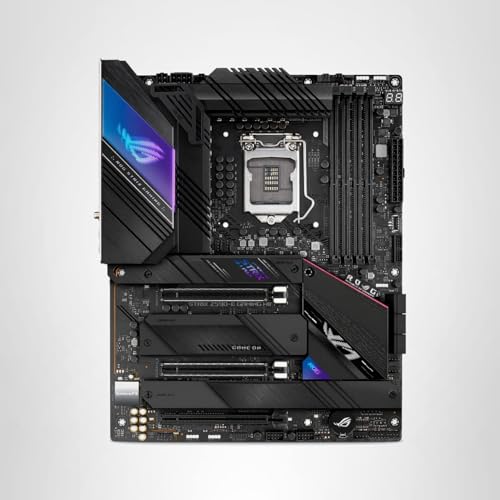
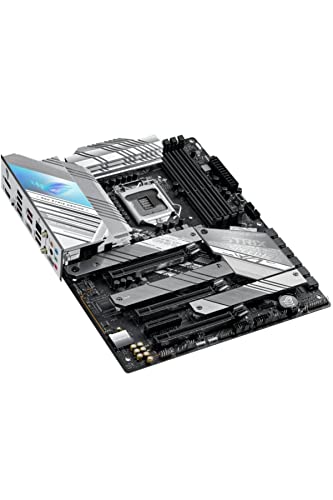
ASUS ROG Strix Z590-E Gaming WiFi review: 109 specs compared

Avg. price:~£330CPU socket:LGA 1200Chipset:Intel Z590Form factor:ATX

ASUS ROG Strix Z590-E Gaming WiFi Review: Compare 109 technical specifications and 14 expert and video reviews to see how this product ranks in the Motherboards category and whether it is worth buying.
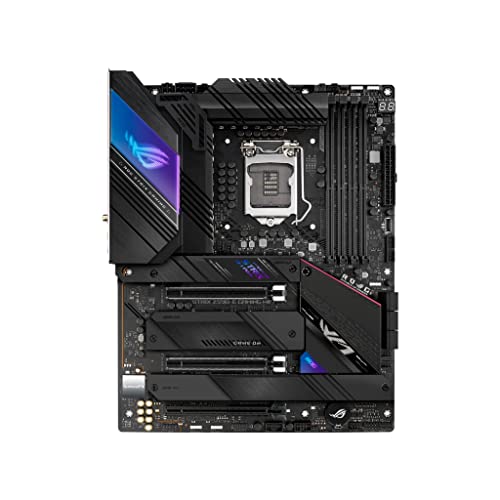
ASUS ROG Strix Z590-E Gaming WiFi
8.2/10

Overall score

Score
8.2/ 10
✕
What it is
Our main score for this model, 1–10. It combines specs, expert reviews, best-of lists, ratings from across the web and owners.
How we count it
Parts: Technical score 45%, Reviews score 20%, List score 20%, User score 10%, Sentiment score 5%
Marks: Each part gets a mark out of 10. For reviews, lists and owners, a typical model in this category gets about 8 and the best one gets 10.
No data yet: A part with no data shows "?". It counts as the mark of a weaker model in this category (4 in 5 models with data score higher). This way, models with reviews, lists and owners usually come out ahead.
Score distribution
â–¼
<55-66-77-88-99-10
Score components

45%

7.9

Technical score

20%

8.8

Reviews score

20%

?

List scoreNot enough data yet, so we use 7.5, the mark of a weaker model in this category

10%

9.4

User score

5%

7.5

Sentiment score

★Better than 90% of motherboards
8.3

Value for money

Value for money
8.3/ 10
✕
What it is
An indicator that combines the motherboard's overall rating with its cost.
When it matters
When you are looking for a motherboard that offers a strong balance of features, performance, and price.
Score distribution
â–¼
<55-66-77-88-99-10
Score components

70%

8.2

Overall score

30%

8.8

Price

â–²Better than 82%
7.9

Technical score

Technical score
7.9/ 10
✕
What it is
How good the specs are compared with the other models in this category, 1–10.
How we count it
Areas: We rate the specs in each area against the other models in this category.
Weighting: The areas that matter most to buyers count more. The shares are shown under Score components.
Share: The technical score is 45% of the overall score.
Score distribution
â–¼
<55-66-77-88-99-10
Score components

19%

7.0

Memory

16%

8.7

Platform

16%

7.6

Storage

15%

9.5

Network

13%

7.7

Ports

8%

4.4

Expansion

8%

9.0

Power & Cooling

5%

9.7

Audio

â–²Better than 83%
8.8

Reviews score

Reviews score
8.8/ 10
✕
What it is
Average grade from independent test sites, magazines and video reviewers, 1–10.
How we count it
Grades: Each review's own score is converted to 1–10; without one, we grade the review ourselves. Big test sites count more, short reviews half as much as full tests. A video review counts half.
Score: The average grade is 80% of the review mark; the number of reviews is the other 20% (1 review = 5, the typical number in this category = 8, the most-reviewed model = 10).
Enough data: With few reviews, the average grade is pulled toward the typical grade of this category. No reviews yet: 7.8 for now.
Share: Reviews count 20% of the overall score.
Score distribution
â–¼
<55-66-77-88-99-10

80%

8.7

Average grade

20%

9.4

Popularity

Grades by review (14)
9 reviews: 4 with a printed score, 5 estimated from the review. 5 video reviews, each counting half as much as a written test. Reviews count 20% of the overall score.
Ratings from across the web count in the User score, not in this score.
★Better than 95%
9.4

User score

User score
9.4/ 10
✕
What it is
How happy buyers are with this model, based on ratings from across the web.
How we count it
Enough data: A model needs at least 1 rating from across the web. Without one, it counts as 7.9, the mark of a weaker rated model in this category.
Share: User score counts 10% of the overall score.
Score distribution
â–¼
<55-66-77-88-99-10

70%

9.2

Rating

30%

10

Popularity

★Better than 95%
?

List score

List score
7.5/ 10
✕
What it is
How often independent test sites, magazines and video reviewers put this model in their best-of lists for this category.
How we count it
Points: The model in the most lists of this category gets 10; the others get 8 to 10 in proportion. In no list yet: 7.5. Lists count 20% of the overall score.
Enough data: Every list counts, even a single one. With fewer than 5 best-of lists in the category, this part is left out.
Lists with this model (0)
Not in any best-of list yet, so this part counts as 7.5. Models in a list get 8 to 10.
Not in any best-of list yet
  • asus-rog-strix-z590-e-gaming-wifi
  • asus-rog-strix-z590-e-gaming-wifi
  • asus-rog-strix-z590-e-gaming-wifi
  • asus-rog-strix-z590-e-gaming-wifi
  • asus-rog-strix-z590-e-gaming-wifi
  • asus-rog-strix-z590-e-gaming-wifi
  • asus-rog-strix-z590-e-gaming-wifi
  • asus-rog-strix-z590-e-gaming-wifi
  • asus-rog-strix-z590-e-gaming-wifi
  • asus-rog-strix-z590-e-gaming-wifi
asus-rog-strix-z590-e-gaming-wifi
Where to buy
*As an Amazon Associate, we earn from qualifying purchases.
Best rankings
Available: ranking among products currently available (including other versions of this product).All: ranking among all products in the database.

What reviewers say about the ASUS ROG Strix Z590-E Gaming WiFi

Based on 9 · 5

Reviewers praise the power delivery, cooling and build, but criticise the limited PCIe slots and high price.
Praised
Criticised
Pick a topic to see who said what
Loading...
Loading category ranking...

Technical Specifications of motherboard ASUS ROG Strix Z590-E Gaming WiFi

Technical score
Technical score
7.9/ 10
✕
What it is
How good the specs are compared with the other models in this category, 1–10.
How we count it
Areas: We rate the specs in each area against the other models in this category.
Weighting: The areas that matter most to buyers count more. The shares are shown under Score components.
Share: The technical score is 45% of the overall score.
Score distribution
â–¼
<55-66-77-88-99-10
Score components:

19%

7.0

Memory

16%

8.7

Platform

16%

7.6

Storage

15%

9.5

Network

13%

7.7

Ports

8%

4.4

Expansion

8%

9.0

Power & Cooling

5%

9.7

Audio

7.9
Reviews score
8.8
User score
9.4
List score
?
Value for money
Value for money
8.3/ 10
✕
What it is
An indicator that combines the motherboard's overall rating with its cost.
When it matters
When you are looking for a motherboard that offers a strong balance of features, performance, and price.
Score distribution
â–¼
<55-66-77-88-99-10
Score components:

70%

8.2

Overall score

30%

8.8

Price

8.3
CPU socket
LGA 1200
This motherboard uses LGA 1200, which is less up-to-date than 61.9% of Motherboards and the same as 8.8% of Motherboards.
CPU platform
Intel
Chipset
Intel Z590
This motherboard uses Intel Z590, which is less capable than 50.2% of Motherboards and as capable as 2.3% of Motherboards.
Form factor
ATX
Integrated graphics support
yes
This motherboard supports integrated graphics. 10.2% of motherboards support this feature.
Show more
What reviewers say
DDR memory version
DDR4
This motherboard uses DDR4, which is more modern than 13.4% of Motherboards and the same as 50.4% of Motherboards.
Memory slots
4
This motherboard has 4 Memory slots, which is more than 21.9% of motherboards and equal to 72% of motherboards.
Maximum memory capacity
128 GB
This motherboard supports up to 128 GB of memory, which is more than 40.1% of motherboards and equal to 31.9% of motherboards.
Memory channels
2
Maximum RAM speed
5,333 MT/s
This motherboard supports memory speeds up to 5,333 MT/s, which is higher than that of 63% of motherboards and equal to that of 5.1% of motherboards.
maximum depends on CPU configuration
Show more
N. of M.2 sockets
4
This motherboard has 4 M.2 sockets, which is more than 84.1% of motherboards and equal to 10.7% of motherboards.
M.2 slot interface per slot
2x PCIe 4.0 x4, 1x PCIe 3.0 x4, 1x PCIe 3.0 x4/SATA
This motherboard offers M.2 slots: 2x PCIe 4.0x4, 1x PCIe 3.0x4, 1x PCIe 3.0x4/SATA, which is faster than 76.9% of Motherboards and the same as 0.1% of Motherboards.
one slot requires 11th Gen CPU.
N. of SATA 3 connectors
6
This motherboard has 6 SATA 3 connectors, which is more than 53.5% of motherboards and equal to 31.2% of motherboards.
Supported RAID levels
0/1/5/10
This motherboard RAID support: 0/1/5/10, which is more flexible than 32.5% of Motherboards and the same as 67.5% of Motherboards.
JBOD excluded from RAID-level set
NVMe RAID support
yes
This motherboard supports NVMe RAID. 40.2% of motherboards support this feature.
Show more
What reviewers say
N. of PCIe 5.0 x16 slots
0
This motherboard has 0 PCIe 5.0x16 slots, which is fewer than 31.6% of motherboards and equal to 68.4% of motherboards.
N. of PCIe 4.0 x16 slots
2
This motherboard has 2 PCIe 4.0x16 slots, which is more than 90.9% of motherboards and equal to 6.4% of motherboards.
N. of PCIe 3.0 x16 slots
1
This motherboard has 1 PCIe 3.0x16 slots, which is more than 40.5% of motherboards and equal to 26.8% of motherboards.
runs at x4 mode
PCIe slot electrical configuration
x16/x0/x4, x8/x8/x4
This motherboard splits its PCIe lanes as x16/x0/x4, x8/x8/x4, which is more generous than 62.6% of Motherboards and the same as 12.4% of Motherboards.
Depends on CPU.
PCIe bifurcation support
yes
This motherboard supports PCIe bifurcation. 40.3% of motherboards support this feature.
Show more
What reviewers say
Total USB ports (rear I/O)
10
This motherboard has 10 USB ports (rear I/O), which is more than 75.7% of motherboards and equal to 15.4% of motherboards.
Total USB ports (including headers)
17
This motherboard has 17 USB ports (including headers), which is more than 71.3% of motherboards and equal to 10.4% of motherboards.
Total USB-C ports (rear I/O)
2
This motherboard has 2 USB-C ports (rear I/O), which is more than 84.2% of motherboards and equal to 12.2% of motherboards.
Total USB-C ports (including headers)
3
This motherboard has 3 USB-C ports (including headers), which is more than 84.7% of motherboards and equal to 10.9% of motherboards.
N. of USB 3.2 Gen2x2 ports (USB-C)
1
This motherboard has 1 USB 3.2 Gen2x2 ports (USB-C), which is more than 82.1% of motherboards and equal to 17.7% of motherboards.
Show more
LAN speed
2.5 Gbps
This motherboard supports LAN speeds up to 2.5 Gbps, which is higher than that of 49% of motherboards and equal to that of 41.4% of motherboards.
LAN controller
Intel I225-V
This motherboard has a Intel I225-V LAN controller, which is faster than 90.1% of Motherboards and equal to 4.2% of Motherboards.
N. of RJ45 ports
2
This motherboard has 2 RJ45 ports, which is more than 85.6% of motherboards and equal to 13.3% of motherboards.
Wi-Fi connectivity
yes
This motherboard supports Wi-Fi connectivity. 50% of motherboards support this feature.
Wi-Fi version
Wi-Fi 6E (802.11ax)
This motherboard uses Wi-Fi 6E (802.11ax), which is newer than 71.5% of Motherboards and the same as 16.7% of Motherboards.
Show more
What reviewers say
Audio codec
Realtek ALC4080
This motherboard uses Realtek ALC4080, which is higher-end than 90.4% of Motherboards and the same as 6.4% of Motherboards.
Audio channels
7.1
This motherboard offers 7.1 audio channels, which is more than 4.7% of motherboards and equal to 95.3% of motherboards.
Audio SNR
120 dB
This motherboard has an audio SNR of 120 dB, which is higher than that of 55.6% of motherboards and equal to that of 41% of motherboards.
Headphone amp support
yes
This motherboard supports a headphone amp. 41.2% of motherboards support this feature.
Savitech SV3H712 amp.
N. of 3.5mm audio jacks
5
This motherboard has 5 3.5mm audio jacks, which is more than 50.6% of motherboards and equal to 36.3% of motherboards.
Show more
VRM phases
14+2
This motherboard has 14+2 VRM phases, which is more than 77.1% of motherboards and equal to 1.1% of motherboards.
N. of CPU power connectors
2
This motherboard has 2 CPU power connectors, which is more than 54.9% of motherboards and equal to 44.8% of motherboards.
N. of fan headers
8
This motherboard has 8 fan headers, which is more than 82.2% of motherboards and equal to 15% of motherboards.
Pump header
yes
This motherboard has a pump header. 22.1% of motherboards include this feature.
Pump header max current
3 A
This motherboard supports up to 3 A on the pump header, which is higher than that of 77.8% of motherboards and equal to that of 22.2% of motherboards.
Show more
What reviewers say

ASUS ROG Strix Z590-E Gaming WiFi vs the average motherboard

246810TotalPlatformMemoryStorageExpansionPortsNetworkAudioPower & Cooling
  • 2 more M.2 sockets
    This motherboard has more M.2 sockets than the average motherboard (4 vs 2). The average motherboard has 2 M.2 socket/s.
    4 vs 2
  • 1 more RJ45 ports
    This motherboard has more RJ45 ports than the average motherboard (2 vs 1). The average motherboard has 1 RJ45 port/s.
    2 vs 1
  • More capable LAN controller
    This motherboard has a faster LAN controller than the average motherboard (Intel I225-V vs Killer + Intel + Realtek).
    Intel I225-V vs Killer + Intel + Realtek
  • More capable onboard audio
    This motherboard has a higher-end audio codec than the average motherboard (Realtek ALC4080 vs Realtek ALC897).
    Realtek ALC4080 vs Realtek ALC897
  • 1 more USB 3.2 Gen2x2 USB-C ports
    This motherboard has more USB 3.2 Gen2x2 USB-C ports than the average motherboard (1 vs 0). The average motherboard has 0 USB 3.2 Gen2x2 USB-C port/s.
    1 vs 0
  • 2 more rear USB ports
    This motherboard has more rear USB ports than the average motherboard (10 vs 8). The average motherboard has 8 rear USB port/s.
    10 vs 8
  • 2 more PCIe 4.0x16 slots
    This motherboard has more PCIe 4.0x16 slots than the average motherboard (2 vs 0). The average motherboard has 0 PCIe 4.0x16 slot/s.
    2 vs 0
  • 1 more rear USB-C ports
    This motherboard has more rear USB-C ports than the average motherboard (2 vs 1). The average motherboard has 1 rear USB-C port/s.
    2 vs 1
  • 7.3% higher review score
    Reviews score
    8.8/ 10
    ✕
    What it is
    Average grade from independent test sites, magazines and video reviewers, 1–10.
    How we count it
    Grades: Each review's own score is converted to 1–10; without one, we grade the review ourselves. Big test sites count more, short reviews half as much as full tests. A video review counts half.
    Score: The average grade is 80% of the review mark; the number of reviews is the other 20% (1 review = 5, the typical number in this category = 8, the most-reviewed model = 10).
    Enough data: With few reviews, the average grade is pulled toward the typical grade of this category. No reviews yet: 7.8 for now.
    Share: Reviews count 20% of the overall score.
    Score distribution
    â–¼
    <55-66-77-88-99-10

    80%

    8.7

    Average grade

    20%

    9.4

    Popularity

    Grades by review (14)
    9 reviews: 4 with a printed score, 5 estimated from the review. 5 video reviews, each counting half as much as a written test. Reviews count 20% of the overall score.
    Ratings from across the web count in the User score, not in this score.
    8.8 vs 8.2
  • 11.9% higher user score
    User score
    9.4/ 10
    ✕
    What it is
    How happy buyers are with this model, based on ratings from across the web.
    How we count it
    Enough data: A model needs at least 1 rating from across the web. Without one, it counts as 7.9, the mark of a weaker rated model in this category.
    Share: User score counts 10% of the overall score.
    Score distribution
    â–¼
    <55-66-77-88-99-10

    70%

    9.2

    Rating

    30%

    10

    Popularity

    9.4 vs 8.4
  • 9.4% better value for money
    ASUS ROG Strix Z590-E Gaming WiFi has better value for money than the average motherboard (8.35 vs 7.6).
    8.35 vs 7.63
  • Integrated I/O shield
    This motherboard has an integrated I/O shield, while the average motherboard does not. 46.6% of motherboards include an integrated I/O shield.
  • Includes POST code display
    This motherboard has a POST code display, while the average motherboard does not. 26.7% of motherboards include a POST code display.
    Q-Code display.
  • Rear-panel CMOS reset button
    This motherboard has a rear-panel CMOS reset button, while the average motherboard does not. 26.5% of motherboards include a rear-panel CMOS reset button.
  • More up-to-date socket
    This motherboard uses a more up-to-date socket than the average motherboard (LGA 1200 vs LGA 1151).
    LGA 1,200 vs LGA 1,151
  • 13.5% higher maximum RAM speed
    This motherboard has a higher maximum RAM speed than the average motherboard (5,333 MT/s vs 4,699.5 MT/s). The average motherboard supports RAM speed of 4,699.5 MT/s.
    maximum depends on CPU configuration
    5,333 MT/s vs 4,699.5 MT/s
  • 2 more M.2 sockets
    This motherboard has more M.2 sockets than the average motherboard (4 vs 2). The average motherboard has 2 M.2 socket/s.
    4 vs 2
  • 2 more SATA 3 connectors
    This motherboard has more SATA 3 connectors than the average motherboard (6 vs 4). The average motherboard has 4 SATA 3 connectors.
    6 vs 4
  • 2 more PCIe 4.0x16 slots
    This motherboard has more PCIe 4.0x16 slots than the average motherboard (2 vs 0). The average motherboard has 0 PCIe 4.0x16 slot/s.
    2 vs 0
  • 1 more USB 3.2 Gen2x2 USB-C ports
    This motherboard has more USB 3.2 Gen2x2 USB-C ports than the average motherboard (1 vs 0). The average motherboard has 0 USB 3.2 Gen2x2 USB-C port/s.
    1 vs 0
  • 2 more rear USB ports
    This motherboard has more rear USB ports than the average motherboard (10 vs 8). The average motherboard has 8 rear USB port/s.
    10 vs 8
  • 1 more rear USB-C ports
    This motherboard has more rear USB-C ports than the average motherboard (2 vs 1). The average motherboard has 1 rear USB-C port/s.
    2 vs 1
  • 1 more USB 3.2 Gen2 ports
    This motherboard has more USB 3.2 Gen2 ports than the average motherboard (2 vs 1). The average motherboard has 1 USB 3.2 Gen2 port/s.
    2 vs 1
  • 2 more total USB-C connections
    This motherboard has more total USB-C connections than the average motherboard (3 vs 1). The average motherboard has 1 total USB-C connections.
    3 vs 1
  • 2 more total USB connections
    This motherboard has more total USB connections than the average motherboard (17 vs 15). The average motherboard has 15 total USB connections.
    17 vs 15
  • 1 more USB4 or Thunderbolt headers
    This motherboard has more USB4 or Thunderbolt headers than the average motherboard (1 vs 0). The average motherboard has 0 USB4 or Thunderbolt header/s.
    1 vs 0
  • 1 more USB 3.2 Gen2 headers
    This motherboard has more USB 3.2 Gen2 headers than the average motherboard (1 vs 0). The average motherboard has 0 USB 3.2 Gen2 header/s.
    Gen 2x2 Type-C header
    1 vs 0
  • 1 more RJ45 ports
    This motherboard has more RJ45 ports than the average motherboard (2 vs 1). The average motherboard has 1 RJ45 port/s.
    2 vs 1
  • More capable LAN controller
    This motherboard has a faster LAN controller than the average motherboard (Intel I225-V vs Killer + Intel + Realtek).
    Intel I225-V vs Killer + Intel + Realtek
  • More recent Wi-Fi standard
    This motherboard has a more recent Wi-Fi standard than the average motherboard (Wi-Fi 6E (802.11ax) vs Wi-Fi 5 (802.11ac)).
    Wi-Fi 6E (802.11ax) vs Wi-Fi 5 (802.11ac)
  • Supports Bluetooth
    This motherboard supports Bluetooth, while the average motherboard does not. 49% of motherboards support Bluetooth.
    Bluetooth 5.2.
  • More capable onboard audio
    This motherboard has a higher-end audio codec than the average motherboard (Realtek ALC4080 vs Realtek ALC897).
    Realtek ALC4080 vs Realtek ALC897
  • 5 dB higher audio SNR
    This motherboard has a higher audio SNR than the average motherboard (120 dB vs 115 dB). The average motherboard has audio SNR of 115 dB.
    120 dB vs 115 dB
  • 2 more 3.5mm audio jacks
    This motherboard has more 3.5mm audio jacks than the average motherboard (5 vs 3). The average motherboard has 3 3.5mm audio jacks.
    5 vs 3
  • 1 more CPU power connectors
    This motherboard has more CPU power connectors than the average motherboard (2 vs 1). The average motherboard has 1 CPU power connectors.
    2 vs 1
  • More VRM phases
    This motherboard has more VRM phases than the average motherboard (14+2 vs 10). The average motherboard has 10 VRM phase/s.
    14+2 vs 10
  • 2.5 more fan headers
    This motherboard has more fan headers than the average motherboard (8 vs 5.5). The average motherboard has 5.5 fan header/s.
    8 vs 5.5
  • 1 more ARGB headers
    This motherboard has more ARGB headers than the average motherboard (3 vs 2). The average motherboard has 2 ARGB header/s.
    3 vs 2
  • Includes onboard RGB lighting
    This motherboard has onboard RGB lighting, while the average motherboard does not. 50% of motherboards include onboard RGB lighting.
    lighting on the I/O shroud
  • 1 A higher pump header current limit
    This motherboard has a higher pump header current than the average motherboard (3 A vs 2 A). The average motherboard provides pump header current of 2 A.
    3 A vs 2 A
  • More basic chipset
    This motherboard uses a more basic chipset than the average motherboard (Intel Z590 vs Intel B860).
    Intel Z590 vs Intel B860
  • Slower NVMe storage slots
    This motherboard has slower M.2 slots than the average motherboard (2x PCIe 4x4, 1x PCIe 3x4, 1x PCIe 3x4/SATA vs 1x PCIe 5x4, 2x PCIe 4x4).
    one slot requires 11th Gen CPU.
    2x PCIe 4.0x4, 1x PCIe 3.0x4, 1x PCIe 3.0x4/SATA vs 1x PCIe 5.0x4, 2x PCIe 4.0x4
  • 2.2x more expensive
    ASUS ROG Strix Z590-E Gaming WiFi is more expensive than the average motherboard (£330 vs £150).
    £330 vs £150
  • 1 fewer PCIe x1 slots
    This motherboard has fewer PCIe x1 slots than the average motherboard (0 vs 1). The average motherboard has 1 PCIe x1 slot/s.
    0 vs 1
  • Less recent Bluetooth version
    This motherboard has a less recent Bluetooth version than the average motherboard (5.2 vs 5.4).
    5.2 vs 5.4
  • 2.2x more expensive
    ASUS ROG Strix Z590-E Gaming WiFi is more expensive than the average motherboard (£330 vs £150).
    £330 vs £150
  • More basic chipset
    This motherboard uses a more basic chipset than the average motherboard (Intel Z590 vs Intel B860).
    Intel Z590 vs Intel B860
  • Slower NVMe storage slots
    This motherboard has slower M.2 slots than the average motherboard (2x PCIe 4x4, 1x PCIe 3x4, 1x PCIe 3x4/SATA vs 1x PCIe 5x4, 2x PCIe 4x4).
    one slot requires 11th Gen CPU.
    2x PCIe 4.0x4, 1x PCIe 3.0x4, 1x PCIe 3.0x4/SATA vs 1x PCIe 5.0x4, 2x PCIe 4.0x4
  • 1 fewer PCIe x1 slots
    This motherboard has fewer PCIe x1 slots than the average motherboard (0 vs 1). The average motherboard has 1 PCIe x1 slot/s.
    0 vs 1
  • Less recent Bluetooth version
    This motherboard has a less recent Bluetooth version than the average motherboard (5.2 vs 5.4).
    5.2 vs 5.4

Video reviews

Hands-on testing, unboxing, and real-world video evaluations

8.0
Salty News Network
≈ estimated
03/04/2021
Build video · benchmarks and installation
Verdict
ASUS ROG Strix Z590-E Gaming WiFi is recommended for 11th gen builds, with fast PCIe 4.0 storage and tool-free M.2 mounting.
9.0
TheTanelChannel
✓ explicit
30/03/2021
Hands-on review · software, overclocking and I/O tests
Verdict
ASUS ROG Strix Z590-E Gaming WiFi is well built and feature packed, and a strong pick for anyone building a Z590 system.
9.0
The Tech Tank
≈ estimated
29/03/2021
First impressions · early tests with a 10th gen CPU
Verdict
ASUS ROG Strix Z590-E Gaming WiFi is a solid board with robust power delivery, though it is not ideal with 10th gen chips.
8.0
ACT Computers
≈ estimated
25/07/2023
Short unboxing · first look at the board
Verdict
ASUS ROG Strix Z590-E Gaming WiFi is a high-end board that most buyers should be happy with.
9.0
TheTechDuo
≈ estimated
25/04/2021
First look · unboxing and feature overview
Verdict
ASUS ROG Strix Z590-E Gaming WiFi is clearly recommended for new 11th gen builds, with better connectivity and easier M.2 mounting.
Hands-on video, no verdict
Overview video
Hands-on video, no verdict
Not graded

Expert reviews

In-depth analysis and verdict from leading tech publications

9.0
m.hexus.net
≈ estimated
16/04/2021
Hands-on test · Networking and power
Verdict
The ASUS ROG Strix Z590-E Gaming WiFi offers strong networking, power circuitry well beyond its needs and four M.2 slots, though its I/O shroud lighting looks blurry.
9.0
earlyaxes.co.za
≈ estimated
14/07/2021
Hands-on test · Gaming performance
Verdict
The ASUS ROG Strix Z590-E Gaming WIFI is a good-looking board with strong gaming frame rates, Wi-Fi 6E and plenty of ports; price is its main drawback.
8.6
custompc.com
✓ explicit
16/11/2023
Lab test · Cooling and overclocking
Verdict
The ASUS ROG Strix Z590-E Gaming WiFi is a well-finished board with tool-free M.2 slots and cool VRMs, but overclocking takes more work than rival boards.
9.0
hardware-helden.de
≈ estimated
02/03/2021
Review · Z590 ATX board
Verdict
The ROG Strix Z590-E Gaming WIFI is a well-equipped ATX board with strong 70A power stages and Wi-Fi 6E, though some slots share bandwidth.
9.0
gamezoom.net
≈ estimated
07/05/2021
Lab test · Layout and power
Verdict
The ASUS ROG Strix Z590-E Gaming WiFi is a cleanly built board with a 16-phase power section and reinforced PCIe slots, suited to 10th and 11th Gen Intel builds.
8.0
clubic.com
✓ explicit
12/04/2021
Hands-on test · High-end build
Verdict
The ASUS ROG Strix Z590-E Gaming WiFi is nicely finished with fast networking and strong power for Core i9, but it costs a lot and has few slots.
9.0
charlestech.fr
✓ explicit
19/06/2024
Hands-on test · Storage and networking
Verdict
The ASUS ROG Strix Z590-E Gaming WiFi is a strong gaming board whose PCIe 4.0 SSD speeds stand out, but Wi-Fi was a bit disappointing and overclocking is limited.
9.2
hardzone.es
✓ explicit
19/05/2021
Hands-on test · Layout and power
Verdict
The ASUS ROG Strix Z590-E Gaming WiFi feels upscale for its class, with tool-free M.2 slots and a passive chipset cooler, though ASUS does not name its audio chip.
9.5
elchapuzasinformatico.com
≈ estimated
07/04/2021
Hands-on test · BIOS and overclocking
Verdict
The ASUS ROG Strix Z590-E Gaming WiFi is an upper mid-range board with fast networking and PCIe 4.0 storage, but overclocking headroom is limited.

Third-party reviews

What customers like about ASUS ROG Strix Z590-E Gaming WiFi

  • Excellent connectivity including WiFi 6E, dual 2.5Gb Ethernet, and USB 3.2 Gen 2x2 Type-C
  • Comprehensive storage options with four M.2 slots (two supporting PCIe 4.0)
  • User-friendly DIY features like the M.2 Q-Latch and LED debug/Q-Code display
  • Robust power delivery (14+2 phase VRM) with massive heatsinks for cooling
  • Highly intuitive BIOS and effective AI overclocking/noise cancellation features
  • Premium aesthetics with customizable RGB and high-quality build materials

What customers don't like about ASUS ROG Strix Z590-E Gaming WiFi

  • High price point compared to other Z590 mid-range alternatives
  • Inconsistent overclocking performance reported with high-end CPUs like the i9-11900K
  • Presence of older USB 2.0 ports on the rear I/O instead of more modern standards
  • Lack of Thunderbolt 4 ports which are found on some competing enthusiast boards
  • No hybrid fan headers, requiring users to manually select between AIO and air cooling profiles
  • Polarizing 'glitched' Strix logo design on the heatsinks

Verdict

The ASUS ROG Strix Z590-E Gaming WiFi is a flagship ATX motherboard designed for 11th Gen Intel Core processors, featuring a robust 14+2 power stage VRM and an optimized thermal design with large heatsinks for stable overclocking. Key technical characteristics include support for up to 128GB of DDR4 memory at speeds up to 5333MHz (OC), four M.2 slots (including two PCIe 4.0), and cutting-edge connectivity with onboard WiFi 6E, dual Intel 2.5Gb Ethernet, and a USB 3.2 Gen 2x2 Type-C port. Its main pros are the exceptional storage flexibility, premium ROG SupremeFX ALC4080 audio with a Savitech amplifier, and DIY-friendly features like BIOS FlashBack and a pre-mounted I/O shield. However, notable cons include the high premium price point, the absence of Thunderbolt 4 ports, and the continued inclusion of legacy USB 2.0 ports on the rear panel.

Compare ASUS ROG Strix Z590-E Gaming WiFi with other products in the Motherboards category

1Product to compare no. 1
VS
2Product to compare no. 2
VS
3Product to compare no. 3 (optional)

Graphic comparison of ASUS ROG Strix Z590-E Gaming WiFi and other products in the Motherboards category

No results found