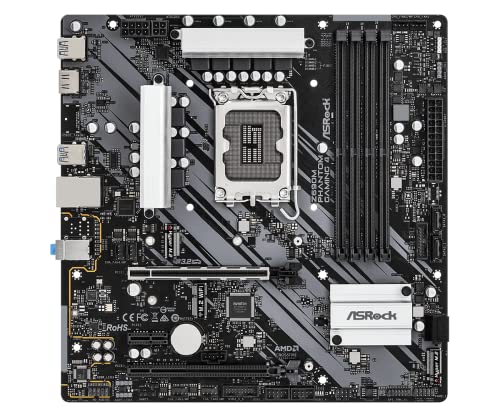
ASRock Z690M Phantom Gaming 4 Review | 107 Data compared

double-arrow
  • Avg. price in UK: ~£170
  • Avg. price in US: ~$130
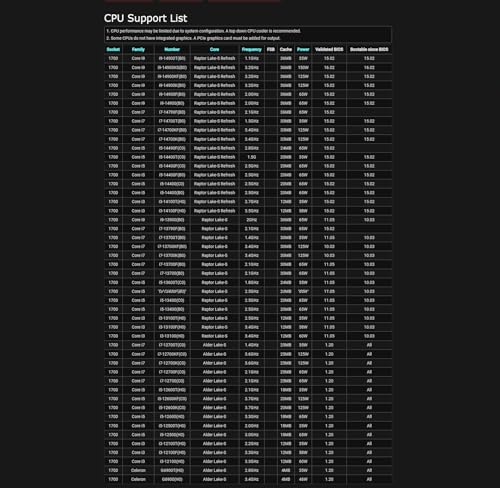
  • CPU socket: LGA 1700
  • Chipset: Intel Z690
  • Form factor: microATX

ASRock Z690M Phantom Gaming 4 review. Compare 107 technical specifications and user reviews to see how it ranks among motherboards and if it is worth buying.

6.1

Overall score

What it is: An overall evaluation of the motherboard's quality, based on technical analyses and user reviews.

When it matters: When you need a quick reference to identify the best motherboards on the market.

Score components:

90.0%

6.0

Technical Score

10.0%

6.7

User score

Good
6.0

Technical Score

What it is: An assessment of the motherboard's technical performance, covering key areas such as power delivery, CPU and memory support, expansion, storage, connectivity, cooling, BIOS features, and design.

When it matters: When you want to compare motherboards based on technical performance and available features.

Score components:

19.0%

7.0

Memory

16.0%

7.5

Platform & Features

16.0%

6.2

Storage

15.0%

5.3

Network

13.0%

3.4

Ports & USB

8.0%

3.8

Expansion

8.0%

7.4

Power & Cooling

5.0%

6.6

Audio

Good
6.7

User score

What it is: A rating that combines user reviews and the total number of reviews received by the motherboard.

When it matters: When you want to understand how a motherboard performs in real-world builds and how reliable it is in terms of stability, BIOS usability, connectivity, and long-term ownership.

Score components:

70.0%

8.2

User reviews

30.0%

3.2

Popularity

User score:
United Kingdom
amazon
4.1
(32)
United States
Amazon_logo.png
4.1
(33)

(Reviews last updated: May 2026)

Good
  • 4.6
    Gaming

    Score components:

    28.0%

    4.8

    VRM phases

    22.0%

    5.5

    N. of M.2 sockets

    18.0%

    4.6

    LAN speed

    17.0%

    6.3

    Maximum RAM speed

    15.0%

    1.0

    N. of PCIe 5.0 x16 slots

  • asrock-z690m-phantom-gaming-4
  • asrock-z690m-phantom-gaming-4
  • asrock-z690m-phantom-gaming-4
asrock-z690m-phantom-gaming-4

Best prices in UK

Best rankings

?

Available: ranking among products currently available (including other versions of this product).
All: ranking among all products in the database.

Verdict

The ASRock Z690M Phantom Gaming 4 is a budget-oriented micro-ATX motherboard built on the Intel Z690 chipset, supporting 12th, 13th, and 14th Gen Intel Core processors via the LGA1700 socket. Key specifications include a 7-phase Dr.MOS power design, four DDR4 DIMM slots supporting up to 128GB at 5333+ MHz (OC), and a primary PCIe 4.0 x16 slot reinforced with steel. Storage is handled by dual Hyper M.2 slots (PCIe Gen4 x4) and four SATA3 ports, while connectivity features Intel Gigabit LAN and rear USB 3.2 Gen2 ports. Its main pros include an affordable entry point for the Z690 platform, stable overclocking support for mid-range CPUs, and a compact form factor suitable for smaller builds. However, notable cons include the lack of a PCIe 5.0 slot (unlike many other Z690 boards), a relatively basic Realtek ALC897 audio codec, and the absence of integrated Wi-Fi or high-speed 2.5GbE networking.

Technical Specifications of ASRock Z690M Phantom Gaming 4

Technical Score

What it is: An assessment of the motherboard's technical performance, covering key areas such as power delivery, CPU and memory support, expansion, storage, connectivity, cooling, BIOS features, and design.

When it matters: When you want to compare motherboards based on technical performance and available features.

Score components:

19.0%

7.0

Memory

16.0%

7.5

Platform & Features

16.0%

6.2

Storage

15.0%

5.3

Network

13.0%

3.4

Ports & USB

8.0%

3.8

Expansion

8.0%

7.4

Power & Cooling

5.0%

6.6

Audio

6.0
ASRock Z690M Phantom Gaming 4 has a technical score of 5.98 points, which is lower than that of 57.4% of products in this category.
User score

What it is: A rating that combines user reviews and the total number of reviews received by the motherboard.

When it matters: When you want to understand how a motherboard performs in real-world builds and how reliable it is in terms of stability, BIOS usability, connectivity, and long-term ownership.

Score components:

70.0%

8.2

User reviews

30.0%

3.2

Popularity

User score:
United Kingdom
amazon
4.1
(32)
United States
Amazon_logo.png
4.1
(33)

(Reviews last updated: May 2026)

6.7
ASRock Z690M Phantom Gaming 4 has a user score of 6.71 points, which is lower than that of 84.3% of products in this category.
Popularity
What it is: An indicator based on the number of reviews received by the motherboard.
When it matters: When you prefer a motherboard that has already been bought and reviewed by many other users.
3.2
ASRock Z690M Phantom Gaming 4 has a popularity of 3.2 points, which is lower than 57.9% of products in this category.
Ratio quality/price

What it is: An indicator that combines the motherboard's overall rating with its cost.

When it matters: When you are looking for a motherboard that offers a strong balance of features, performance, and price.

Score components:

60.0%

6.1

Overall score

40.0%

9.6

Price

7.1
ASRock Z690M Phantom Gaming 4 has a quality-to-price ratio of 7.1 points, which is lower than 58.1% of products in this category.
Brand name
What it is: The brand that makes the motherboard.
When it matters: When you have a brand preference for support, BIOS, or build quality.

Importance: MEDIUM

Asrock
CPU socket
What it is: The socket type the motherboard is built to support.
When it matters: When you need the motherboard to match a specific CPU.

Importance: HIGH

LGA 1700
ASRock Z690M Phantom Gaming 4 uses the LGA 1700 CPU socket, which is more advanced than that of 55% of motherboards and equal to that of 22.7% of motherboards.
CPU platform

Importance: MEDIUM

Intel
Chipset
What it is: The chipset that defines the motherboard platform and many of its features.
When it matters: When you compare platform features, connectivity, and CPU support.

Importance: HIGH

Intel Z690
ASRock Z690M Phantom Gaming 4 uses the Intel Z690 chipset, which is more advanced than that of 68.6% of motherboards and equal to that of 3.8% of motherboards.
Form factor
What it is: The physical size standard of the motherboard, such as ATX or Micro-ATX.
When it matters: When you need the board to fit a specific case size.

Importance: HIGH

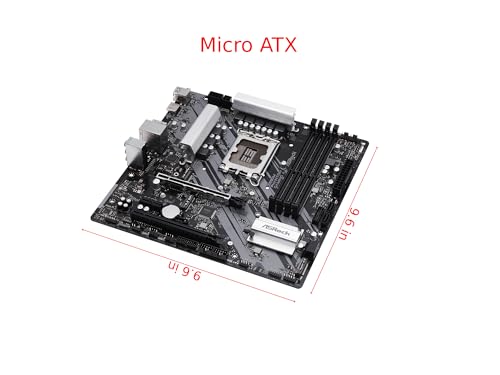
microATX
ASRock Z690M Phantom Gaming 4 has the microATX form factor, which is less versatile than that of 52.2% of motherboards and equal to that of 32.4% of motherboards.
Show more
DDR memory version
What it is: The RAM generation the motherboard supports, such as DDR4 or DDR5.
When it matters: When you need the board to match a certain memory platform.

Importance: HIGH

Good value: DDR5

DDR4
ASRock Z690M Phantom Gaming 4 uses DDR4 memory, which is newer than that of 13.6% of motherboards and equal to that of 51% of motherboards.
Memory slots
What it is: The number of RAM slots on the motherboard.
When it matters: When you want more room for future memory upgrades.

Importance: HIGH

Good value: >=4

4
ASRock Z690M Phantom Gaming 4 has 4 Memory slots, which is more than 21.5% of motherboards and equal to 72.5% of motherboards.
Maximum memory capacity
What it is: The largest total amount of RAM the motherboard supports.
When it matters: When you plan a build with very high memory capacity.

Importance: HIGH

Good value: >=128 GB

128 GB
ASRock Z690M Phantom Gaming 4 supports up to 128 GB of memory, which is more than 40.4% of motherboards and equal to 32.1% of motherboards.
Memory channels
What it is: The memory channel configuration supported by the motherboard platform.
When it matters: When memory bandwidth matters for your build.

Importance: MEDIUM

2
ASRock Z690M Phantom Gaming 4 supports 2 memory channels, which is more than 0.2% of motherboards and equal to 92.5% of motherboards.
Maximum RAM speed
What it is: The highest officially supported memory speed for the motherboard.
When it matters: When you choose RAM and want to know the supported speed ceiling.

Importance: HIGH

Good value: >=6400 MT/s

5,333 MT/s
ASRock Z690M Phantom Gaming 4 supports memory speeds up to 5333 MT/s, which is higher than that of 62.9% of motherboards and equal to that of 5.2% of motherboards.
Show more
N. of M.2 sockets
What it is: The number of M.2 slots available on the motherboard.
When it matters: When you want room for more NVMe or M.2 drives.

Importance: HIGH

Good value: >=3

2
ASRock Z690M Phantom Gaming 4 has 2 M.2 sockets, which is more than 30.8% of motherboards and equal to 34.6% of motherboards.
M.2 slot interface per slot
What it is: The storage or PCIe interface available for each M.2 slot on the motherboard.
When it matters: When you want to check which drives each M.2 slot can use.

Importance: HIGH

2x PCIe 4.0 x4
ASRock Z690M Phantom Gaming 4 offers 2x PCIe 4.0x4 for M.2 slot interfaces, which is faster than that of 56.3% of motherboards and equal to that of 5.2% of motherboards.
N. of SATA 3 connectors
What it is: The number of SATA 6Gb/s connectors on the motherboard.
When it matters: When you plan to connect multiple SATA drives.

Importance: MEDIUM

Good value: >=6

4
ASRock Z690M Phantom Gaming 4 has 4 SATA 3 connectors, which is more than 5.6% of motherboards and equal to 46.3% of motherboards.
Supported RAID levels
What it is: The RAID modes officially supported by the motherboard storage platform.
When it matters: When you plan to use multiple drives in a RAID setup.

Importance: MEDIUM

0/1/5/10
ASRock Z690M Phantom Gaming 4 supports RAID levels 0/1/5/10, which is broader than 31.8% of motherboards and equal to 68.2% of motherboards.
NVMe RAID support
What it is: Shows whether the board supports RAID configurations that use NVMe SSDs.
When it matters: When you plan to use multiple NVMe drives in RAID.

Importance: LOW

yes
ASRock Z690M Phantom Gaming 4 supports NVMe RAID. 40.3% of motherboards support this feature.
Show more
N. of PCIe 5.0 x16 slots
What it is: The number of PCIe 5.0 x16 physical slots on the motherboard.
When it matters: When you want the newest high-bandwidth expansion slots.

Importance: HIGH

Good value: >=1

0
ASRock Z690M Phantom Gaming 4 has 0 PCIe 5.0x16 slots, which is equal to 68.5% of motherboards.
N. of PCIe 4.0 x16 slots
What it is: The number of PCIe 4.0 x16 physical slots on the motherboard.
When it matters: When you want more room for modern expansion cards.

Importance: HIGH

Good value: >=1

1
ASRock Z690M Phantom Gaming 4 has 1 PCIe 4.0x16 slots, which is more than 55.6% of motherboards and equal to 35.3% of motherboards.
N. of PCIe 3.0 x16 slots
What it is: The number of PCIe 3.0 x16 physical slots on the motherboard.
When it matters: When you need more full-length expansion slots.

Importance: MEDIUM

1
ASRock Z690M Phantom Gaming 4 has 1 PCIe 3.0x16 slots, which is more than 40.6% of motherboards and equal to 26.7% of motherboards.
PCIe slot electrical configuration
What it is: The actual lane wiring used by the motherboard PCIe slots.
When it matters: When you need to know how much bandwidth each slot really gets.

Importance: HIGH

?
PCIe bifurcation support
What it is: Shows whether the board can split PCIe lanes across multiple devices from one slot or link.
When it matters: When you plan multi-SSD adapters or more advanced expansion setups.

Importance: MEDIUM

no
ASRock Z690M Phantom Gaming 4 does not support PCIe bifurcation. 61% of motherboards support this feature.
Show more
Total USB ports (rear I/O)
What it is: The total number of rear USB ports available on the motherboard.
When it matters: When you use many USB devices directly from the back of the PC.

Importance: MEDIUM

Good value: >=8

6
ASRock Z690M Phantom Gaming 4 has 6 USB ports (rear I/O), which is fewer than 64.2% of motherboards and equal to 32.9% of motherboards.
Total USB ports (including headers)
What it is: The total number of USB ports supported when rear ports and internal headers are counted together.
When it matters: When you want to know the board's full USB expansion potential.

Importance: MEDIUM

Good value: >=14

14
ASRock Z690M Phantom Gaming 4 has 14 USB ports (including headers), which is fewer than 51.8% of motherboards and equal to 12.9% of motherboards.
Total USB-C ports (rear I/O)
What it is: The total number of rear USB-C ports on the motherboard.
When it matters: When you want more USB-C devices connected without adapters.

Importance: MEDIUM

Good value: >=1

0
ASRock Z690M Phantom Gaming 4 has 0 USB-C ports (rear I/O), which is fewer than 64.6% of motherboards and equal to 35.4% of motherboards.
Total USB-C ports (including headers)
What it is: The total number of USB-C ports supported when rear ports and internal headers are counted together.
When it matters: When you want more USB-C connectivity across the whole build.

Importance: MEDIUM

Good value: >=2

0
ASRock Z690M Phantom Gaming 4 has 0 USB-C ports (including headers), which is fewer than 69.6% of motherboards and equal to 30.4% of motherboards.
N. of USB 3.2 Gen2x2 ports (USB-C)
What it is: The number of rear USB 3.2 Gen2x2 Type-C ports on the motherboard.
When it matters: When you want very fast USB-C connectivity on the rear I/O.

Importance: HIGH

Good value: >=1

0
ASRock Z690M Phantom Gaming 4 has 0 USB 3.2 Gen2x2 ports (USB-C), which is equal to 81.6% of motherboards.
Show more
LAN speed
What it is: The maximum wired Ethernet speed supported by the motherboard.
When it matters: When you want faster wired networking.

Importance: HIGH

Good value: 2.5GbE

1 Gbps
ASRock Z690M Phantom Gaming 4 supports LAN speeds up to 1 Gbps, which is lower than that of 50.8% of motherboards and equal to that of 49.1% of motherboards.
LAN controller
What it is: The model of onboard Ethernet controller used by the motherboard.
When it matters: When you compare networking hardware quality and features.

Importance: MEDIUM

Intel I219-V
ASRock Z690M Phantom Gaming 4 uses the Intel I219-V LAN controller, which is more advanced than that of 41% of motherboards and equal to that of 14.2% of motherboards.
N. of RJ45 ports
What it is: The number of wired Ethernet ports on the motherboard.
When it matters: When you need one or more wired network connections.

Importance: LOW

1
ASRock Z690M Phantom Gaming 4 has 1 RJ45 ports, which is equal to 85.6% of motherboards.
Wi-Fi connectivity
What it is: Shows whether the motherboard includes onboard Wi-Fi hardware instead of requiring a separate adapter.
When it matters: When you want wireless networking without adding an extra card.

Importance: MEDIUM

no
ASRock Z690M Phantom Gaming 4 does not support Wi-Fi connectivity. 49.1% of motherboards support this feature.
Optional Key E module slot only.
Wi-Fi version
What it is: The supported Wi-Fi generation, such as Wi-Fi 6 or Wi-Fi 7.
When it matters: When you care about wireless speed and router compatibility.

Importance: MEDIUM

Good value: Wi-Fi 6E (802.11ax)

N/A
Show more
Audio codec
What it is: The onboard audio codec used by the motherboard.
When it matters: When sound quality from the built-in audio matters to you.

Importance: MEDIUM

Realtek ALC897
ASRock Z690M Phantom Gaming 4 uses the Realtek ALC897 audio codec, which is less advanced than that of 50.8% of motherboards and equal to that of 29.3% of motherboards.
Audio channels
What it is: The audio channel configuration supported by the onboard sound solution.
When it matters: When you want surround sound from the motherboard audio outputs.

Importance: LOW

Good value: 7.1

7.1
ASRock Z690M Phantom Gaming 4 offers 7.1 audio channels, which is more than 4.9% of motherboards and equal to 95.1% of motherboards.
Audio SNR
What it is: The signal-to-noise ratio of the onboard audio solution.
When it matters: When you care about cleaner onboard audio output.

Importance: MEDIUM

Good value: >=120 dB

97 dB
ASRock Z690M Phantom Gaming 4 has an audio SNR of 97 dB, which is lower than that of 67.3% of motherboards and equal to that of 16.8% of motherboards.
Headphone amp support
What it is: Shows whether the onboard audio path includes dedicated headphone amplification for harder-to-drive headsets.
When it matters: When you use harder-to-drive headphones from the onboard audio.

Importance: LOW

?
N. of 3.5mm audio jacks
What it is: The number of rear 3.5mm audio jacks on the motherboard.
When it matters: When you want more analog audio connection options.

Importance: LOW

Good value: >=5

3
ASRock Z690M Phantom Gaming 4 has 3 3.5mm audio jacks, which is fewer than 50.3% of motherboards and equal to 38.2% of motherboards.
Show more
VRM phases
What it is: The number of power-delivery phases used by the motherboard VRM.
When it matters: When you care about CPU power delivery and overclocking headroom.

Importance: HIGH

Good value: >=12

7
ASRock Z690M Phantom Gaming 4 has 7 VRM phases, which is fewer than 82.4% of motherboards and equal to 0.8% of motherboards.
N. of CPU power connectors
What it is: The number of CPU power connectors on the motherboard.
When it matters: When you care about power delivery for higher-end CPUs.

Importance: HIGH

Good value: >=2

?
N. of fan headers
What it is: The number of headers available for case or CPU fans.
When it matters: When your build uses several fans.

Importance: MEDIUM

Good value: >=6

6
ASRock Z690M Phantom Gaming 4 has 6 fan headers, which is more than 50.3% of motherboards and equal to 22.3% of motherboards.
Pump header
What it is: Shows whether the motherboard includes a dedicated header designed for a liquid-cooling pump.
When it matters: When you build with an AIO or custom liquid cooling loop.

Importance: MEDIUM

yes
ASRock Z690M Phantom Gaming 4 has a pump header. 23.1% of motherboards include this feature.
Pump header max current
What it is: The maximum current the dedicated pump header can supply.
When it matters: When you want to make sure the pump header can power your cooling setup.

Importance: LOW

Good value: >=2 A

2 A
ASRock Z690M Phantom Gaming 4 supports up to 2 A on the pump header, which is higher than that of 43.3% of motherboards and equal to that of 33.4% of motherboards.
Show more

ASRock Z690M Phantom Gaming 4 vs the average motherboard

  • Newer CPU socket
    ASRock Z690M Phantom Gaming 4 has newer CPU socket than the average motherboard (LGA 1,700 vs LGA 1,151). The average motherboard uses LGA 1,151 CPU socket.
    What it is: The socket type the motherboard is built to support.
    When it matters: When you need the motherboard to match a specific CPU.

    Importance: HIGH

    ASRock Z690M Phantom Gaming 4 has newer CPU socket than the average motherboard (LGA 1,700 vs LGA 1,151). The average motherboard uses LGA 1,151 CPU socket.LGA 1700 vs LGA 1151
  • 1 more PCIe 4.0x16 slots
    ASRock Z690M Phantom Gaming 4 has more PCIe 4.0x16 slots than the average motherboard (1 vs 0). The average motherboard has 0 PCIe 4.0x16 slot/s.
    What it is: The number of PCIe 4.0 x16 physical slots on the motherboard.
    When it matters: When you want more room for modern expansion cards.

    Importance: HIGH

    Good value: >=1

    ASRock Z690M Phantom Gaming 4 has more PCIe 4.0x16 slots than the average motherboard (1 vs 0). The average motherboard has 0 PCIe 4.0x16 slot/s.1 vs 0
  • 1 more USB 3.2 Gen1 headers
    ASRock Z690M Phantom Gaming 4 has more USB 3.2 Gen1 headers than the average motherboard (2 vs 1). The average motherboard has 1 USB 3.2 Gen1 header/s.
    two internal headers
    What it is: The number of internal USB 3.2 Gen1 headers for front-panel Type-A ports.
    When it matters: When your case has front USB-A ports to connect.

    Importance: MEDIUM

    Good value: >=1

    ASRock Z690M Phantom Gaming 4 has more USB 3.2 Gen1 headers than the average motherboard (2 vs 1). The average motherboard has 1 USB 3.2 Gen1 header/s.2 vs 1
  • 1 more USB 3.2 Gen2 ports
    ASRock Z690M Phantom Gaming 4 has more USB 3.2 Gen2 ports than the average motherboard (2 vs 1). The average motherboard has 1 USB 3.2 Gen2 port/s.
    What it is: The number of rear USB 3.2 Gen2 Type-A ports on the motherboard.
    When it matters: When you want faster USB-A ports for storage or accessories.

    Importance: MEDIUM

    Good value: >=2

    ASRock Z690M Phantom Gaming 4 has more USB 3.2 Gen2 ports than the average motherboard (2 vs 1). The average motherboard has 1 USB 3.2 Gen2 port/s.2 vs 1
  • More BIOS update options
    ASRock Z690M Phantom Gaming 4 has more BIOS update options than the average motherboard (UEFI utility, flashback, Windows app, internet flash vs UEFI utility, flashback, Windows app). The average motherboard offers UEFI utility, flashback, Windows app BIOS update methods.
    What it is: The available ways to update the motherboard BIOS.
    When it matters: When you want easier BIOS maintenance and recovery.

    Importance: LOW

    ASRock Z690M Phantom Gaming 4 has more BIOS update options than the average motherboard (UEFI utility, flashback, Windows app, internet flash vs UEFI utility, flashback, Windows app). The average motherboard offers UEFI utility, flashback, Windows app BIOS update methods.UEFI utility, flashback, Windows app, internet flash vs UEFI utility, flashback, Windows app
  • 1 more USB4 or Thunderbolt headers
    ASRock Z690M Phantom Gaming 4 has more USB4 or Thunderbolt headers than the average motherboard (1 vs 0). The average motherboard has 0 USB4 or Thunderbolt header/s.
    What it is: The number of internal USB4 or Thunderbolt headers on the motherboard.
    When it matters: When you plan to add high-speed front USB-C or Thunderbolt connections.

    Importance: MEDIUM

    ASRock Z690M Phantom Gaming 4 has more USB4 or Thunderbolt headers than the average motherboard (1 vs 0). The average motherboard has 0 USB4 or Thunderbolt header/s.1 vs 0
  • 1 more ARGB headers
    ASRock Z690M Phantom Gaming 4 has more ARGB headers than the average motherboard (3 vs 2). The average motherboard has 2 ARGB header/s.
    What it is: The number of 3-pin addressable RGB headers available on the motherboard.
    When it matters: When you want to connect more ARGB lighting devices.

    Importance: LOW

    Good value: >=2

    ASRock Z690M Phantom Gaming 4 has more ARGB headers than the average motherboard (3 vs 2). The average motherboard has 2 ARGB header/s.3 vs 2
  • 61 mm shorter
    ASRock Z690M Phantom Gaming 4 is shorter than the average motherboard (244 mm vs 305 mm). The average motherboard height is 305 mm.
    What it is: The physical height of the motherboard.
    When it matters: When you check case fit or compare board size.

    Importance: LOW

    ASRock Z690M Phantom Gaming 4 is shorter than the average motherboard (244 mm vs 305 mm). The average motherboard height is 305 mm.244 mm vs 305 mm
  • Newer CPU socket
    ASRock Z690M Phantom Gaming 4 has newer CPU socket than the average motherboard (LGA 1,700 vs LGA 1,151). The average motherboard uses LGA 1,151 CPU socket.
  • More BIOS update options
    ASRock Z690M Phantom Gaming 4 has more BIOS update options than the average motherboard (UEFI utility, flashback, Windows app, internet flash vs UEFI utility, flashback, Windows app). The average motherboard offers UEFI utility, flashback, Windows app BIOS update methods.
  • 15.9% higher maximum RAM speed
    ASRock Z690M Phantom Gaming 4 has a higher maximum RAM speed than the average motherboard (5,333 MT/s vs 4,600 MT/s). The average motherboard supports RAM speed of 4,600 MT/s.
  • 1 more PCIe 4.0x16 slots
    ASRock Z690M Phantom Gaming 4 has more PCIe 4.0x16 slots than the average motherboard (1 vs 0). The average motherboard has 0 PCIe 4.0x16 slot/s.
  • 1 more USB 3.2 Gen1 headers
    ASRock Z690M Phantom Gaming 4 has more USB 3.2 Gen1 headers than the average motherboard (2 vs 1). The average motherboard has 1 USB 3.2 Gen1 header/s.
  • 1 more USB 3.2 Gen2 ports
    ASRock Z690M Phantom Gaming 4 has more USB 3.2 Gen2 ports than the average motherboard (2 vs 1). The average motherboard has 1 USB 3.2 Gen2 port/s.
  • 1 more USB4 or Thunderbolt headers
    ASRock Z690M Phantom Gaming 4 has more USB4 or Thunderbolt headers than the average motherboard (1 vs 0). The average motherboard has 0 USB4 or Thunderbolt header/s.
  • 1 more ARGB headers
    ASRock Z690M Phantom Gaming 4 has more ARGB headers than the average motherboard (3 vs 2). The average motherboard has 2 ARGB header/s.
  • 61 mm shorter
    ASRock Z690M Phantom Gaming 4 is shorter than the average motherboard (244 mm vs 305 mm). The average motherboard height is 305 mm.
  • 1 more fan headers
    ASRock Z690M Phantom Gaming 4 has more fan headers than the average motherboard (6 vs 5). The average motherboard has 5 fan header/s.
  • No BIOS flashback support
    ASRock Z690M Phantom Gaming 4 does not support BIOS flashback, while the average motherboard does. 50.8% of motherboards support BIOS flashback.
  • More basic motherboard chipset
    ASRock Z690M Phantom Gaming 4 has more basic motherboard chipset than the average motherboard (Intel Z690 vs Intel B860). The average motherboard uses Intel B860 chipset.
  • Less versatile form factor
    ASRock Z690M Phantom Gaming 4 has less versatile form factor than the average motherboard (microATX vs ATX). The average motherboard comes in ATX form factor.
  • Slower M.2 slot interfaces
    ASRock Z690M Phantom Gaming 4 has slower M.2 slot interfaces than the average motherboard (2x PCIe 4.0x4 vs 1x PCIe 5.0x4, 2x PCIe 4.0x4). The average motherboard uses 1x PCIe 5.0x4, 2x PCIe 4.0x4 M.2 slot interfaces.
  • No PCIe bifurcation support
    ASRock Z690M Phantom Gaming 4 does not support PCIe bifurcation, while the average motherboard does. 61% of motherboards support PCIe bifurcation.
  • 2 fewer rear USB ports
    ASRock Z690M Phantom Gaming 4 has fewer rear USB ports than the average motherboard (6 vs 8). The average motherboard has 8 rear USB port/s.
  • 1 fewer rear USB-C ports
    ASRock Z690M Phantom Gaming 4 has fewer rear USB-C ports than the average motherboard (0 vs 1). The average motherboard has 1 rear USB-C port/s.
  • 1 fewer DisplayPort outputs
    ASRock Z690M Phantom Gaming 4 has fewer DisplayPort outputs than the average motherboard (0 vs 1). The average motherboard has 1 DisplayPort outputs.
  • 1 fewer total USB connections
    ASRock Z690M Phantom Gaming 4 has fewer total USB connections than the average motherboard (14 vs 15). The average motherboard has 15 total USB connections.
  • 1 fewer total USB-C connections
    ASRock Z690M Phantom Gaming 4 has fewer total USB-C connections than the average motherboard (0 vs 1). The average motherboard has 1 total USB-C connections.
  • 2 fewer USB 2.0 ports
    ASRock Z690M Phantom Gaming 4 has fewer USB 2.0 ports than the average motherboard (0 vs 2). The average motherboard has 2 USB 2.0 port/s.
  • 60% lower LAN speed
    ASRock Z690M Phantom Gaming 4 has a lower LAN speed than the average motherboard (1 Gbps vs 2.5 Gbps). The average motherboard offers LAN speed of 2.5 Gbps.
  • No Wi-Fi antenna included
    ASRock Z690M Phantom Gaming 4 does not include a Wi-Fi antenna, while the average motherboard does. 51.1% of motherboards include a Wi-Fi antenna.
  • 18 dB lower audio SNR
    ASRock Z690M Phantom Gaming 4 has a lower audio SNR than the average motherboard (97 dB vs 115 dB). The average motherboard has audio SNR of 115 dB.
  • More basic audio codec
    ASRock Z690M Phantom Gaming 4 has more basic audio codec than the average motherboard (Realtek ALC897 vs Realtek ALC898). The average motherboard uses Realtek ALC898 audio codec.
  • 2 fewer 3.5mm audio jacks
    ASRock Z690M Phantom Gaming 4 has fewer 3.5mm audio jacks than the average motherboard (3 vs 5). The average motherboard has 5 3.5mm audio jacks.
  • No optical S/PDIF out
    ASRock Z690M Phantom Gaming 4 does not have optical S/PDIF out, while the average motherboard does. 55.7% of motherboards include optical S/PDIF out.
  • Fewer VRM phases
    ASRock Z690M Phantom Gaming 4 has fewer VRM phases than the average motherboard (7 vs 10). The average motherboard has 10 VRM phase/s.
  • No onboard RGB lighting
    ASRock Z690M Phantom Gaming 4 does not have onboard RGB lighting, while the average motherboard does. 50.3% of motherboards include onboard RGB lighting.
  • 60% lower LAN speed
    ASRock Z690M Phantom Gaming 4 has a lower LAN speed than the average motherboard (1 Gbps vs 2.5 Gbps). The average motherboard offers LAN speed of 2.5 Gbps.
    What it is: The maximum wired Ethernet speed supported by the motherboard.
    When it matters: When you want faster wired networking.

    Importance: HIGH

    Good value: 2.5GbE

    ASRock Z690M Phantom Gaming 4 has a lower LAN speed than the average motherboard (1 Gbps vs 2.5 Gbps). The average motherboard offers LAN speed of 2.5 Gbps.1 Gbps vs 2.5 Gbps
  • 2 fewer rear USB ports
    ASRock Z690M Phantom Gaming 4 has fewer rear USB ports than the average motherboard (6 vs 8). The average motherboard has 8 rear USB port/s.
    What it is: The total number of rear USB ports available on the motherboard.
    When it matters: When you use many USB devices directly from the back of the PC.

    Importance: MEDIUM

    Good value: >=8

    ASRock Z690M Phantom Gaming 4 has fewer rear USB ports than the average motherboard (6 vs 8). The average motherboard has 8 rear USB port/s.6 vs 8
  • Slower M.2 slot interfaces
    ASRock Z690M Phantom Gaming 4 has slower M.2 slot interfaces than the average motherboard (2x PCIe 4.0x4 vs 1x PCIe 5.0x4, 2x PCIe 4.0x4). The average motherboard uses 1x PCIe 5.0x4, 2x PCIe 4.0x4 M.2 slot interfaces.
    What it is: The storage or PCIe interface available for each M.2 slot on the motherboard.
    When it matters: When you want to check which drives each M.2 slot can use.

    Importance: HIGH

    ASRock Z690M Phantom Gaming 4 has slower M.2 slot interfaces than the average motherboard (2x PCIe 4.0x4 vs 1x PCIe 5.0x4, 2x PCIe 4.0x4). The average motherboard uses 1x PCIe 5.0x4, 2x PCIe 4.0x4 M.2 slot interfaces.2x PCIe 4.0x4 vs 1x PCIe 5.0x4, 2x PCIe 4.0x4
  • No BIOS flashback support
    ASRock Z690M Phantom Gaming 4 does not support BIOS flashback, while the average motherboard does. 50.8% of motherboards support BIOS flashback.
    What it is: Shows whether the motherboard can update BIOS without needing a fully installed or supported CPU to boot first.
    When it matters: When you may need to update BIOS before the system can boot.

    Importance: MEDIUM

    ASRock Z690M Phantom Gaming 4 does not support BIOS flashback, while the average motherboard does. 50.8% of motherboards support BIOS flashback.
  • No PCIe bifurcation support
    ASRock Z690M Phantom Gaming 4 does not support PCIe bifurcation, while the average motherboard does. 61% of motherboards support PCIe bifurcation.
    What it is: Shows whether the board can split PCIe lanes across multiple devices from one slot or link.
    When it matters: When you plan multi-SSD adapters or more advanced expansion setups.

    Importance: MEDIUM

    ASRock Z690M Phantom Gaming 4 does not support PCIe bifurcation, while the average motherboard does. 61% of motherboards support PCIe bifurcation.
  • 1 fewer rear USB-C ports
    ASRock Z690M Phantom Gaming 4 has fewer rear USB-C ports than the average motherboard (0 vs 1). The average motherboard has 1 rear USB-C port/s.
    What it is: The total number of rear USB-C ports on the motherboard.
    When it matters: When you want more USB-C devices connected without adapters.

    Importance: MEDIUM

    Good value: >=1

    ASRock Z690M Phantom Gaming 4 has fewer rear USB-C ports than the average motherboard (0 vs 1). The average motherboard has 1 rear USB-C port/s.0 vs 1
  • No Wi-Fi antenna included
    ASRock Z690M Phantom Gaming 4 does not include a Wi-Fi antenna, while the average motherboard does. 51.1% of motherboards include a Wi-Fi antenna.
    What it is: Shows whether the external Wi-Fi antenna is included with the motherboard package.
    When it matters: When the board has Wi-Fi and you want it ready to use right away.

    Importance: LOW

    ASRock Z690M Phantom Gaming 4 does not include a Wi-Fi antenna, while the average motherboard does. 51.1% of motherboards include a Wi-Fi antenna.
  • More basic motherboard chipset
    ASRock Z690M Phantom Gaming 4 has more basic motherboard chipset than the average motherboard (Intel Z690 vs Intel B860). The average motherboard uses Intel B860 chipset.
    What it is: The chipset that defines the motherboard platform and many of its features.
    When it matters: When you compare platform features, connectivity, and CPU support.

    Importance: HIGH

    ASRock Z690M Phantom Gaming 4 has more basic motherboard chipset than the average motherboard (Intel Z690 vs Intel B860). The average motherboard uses Intel B860 chipset.Intel Z690 vs Intel B860

Graphic comparison of ASRock Z690M Phantom Gaming 4 and

Attribute category
Attribute
No results found

Third-party reviews

United Kingdom
United States

(Reviews last updated: May 2026)

What customers like about ASRock Z690M Phantom Gaming 4?

  • Extremely affordable compared to other Z690 or Z790 boards
  • Provides access to Z-series features like CPU overclocking at a budget price point
  • Includes PCIe 5.0 x16 slot for modern graphics cards
  • Offers multiple M.2 slots (up to 3) for high-speed storage
  • Equipped with a decent number of fan headers (6 total)
  • Micro-ATX form factor makes it suitable for smaller case builds

What customers dislike about ASRock Z690M Phantom Gaming 4?

  • Weak VRM design (typically 7 to 9 phases) which may struggle with high-end CPUs like the i9-12900K
  • Lack of integrated Wi-Fi or Bluetooth on the base model
  • Poor VRM cooling/heatsinks compared to mid-range boards
  • Buggy software utilities (e.g., ASRock Phantom Gaming Tuning) reported by users
  • Limited rear I/O port selection and no front-panel USB-C header
  • No BIOS flashback button, making updates difficult without a compatible CPU
  • Customer support and documentation are often criticized as inadequate

Video reviews

Compare ASRock Z690M Phantom Gaming 4 with

VS
VS

Compare