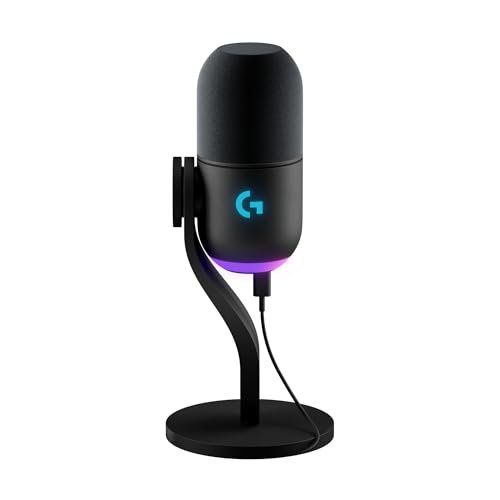

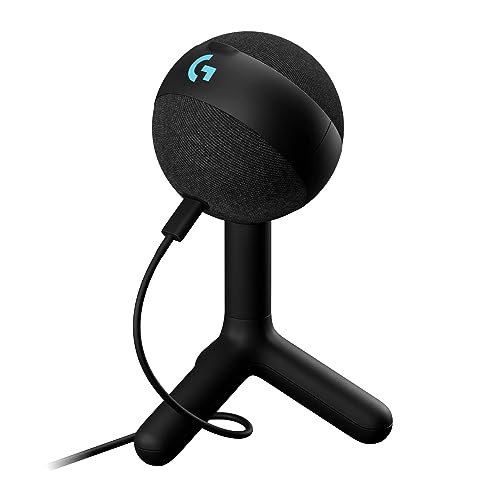
Are Logitech microphones good?
Logitech microphones are good for gaming, streaming, calls, and spoken content when the buyer wants USB-C simplicity and intends to use Logitech G HUB. Yeti GX is the stronger choice in a noisy or untreated room because its dynamic capsule is designed for close speech and adds on-body gain, mute, visible level feedback, and Smart Audio Lock; Yeti Orb is the inexpensive compact option for a quieter desk.
The range is less suitable for users who need direct headphone monitoring, XLR expansion, several pickup patterns, or operation that is independent of desktop software. Neither microphone has a 3.5 mm output, Orb has no physical controls, and the main Blue VO!CE presets, EQ, noise reduction, and LIGHTSYNC settings live in G HUB. With only a condenser and a dynamic model, Logitech offers a clear two-way choice rather than a broad studio family.
Who should consider buying Logitech microphones?
The following users are the strongest fit for Logitech microphones:
- Gamers in untreated rooms: Yeti GX works close to the mouth and rejects more keyboard, fan, and room sound than the condenser Orb.
- Streamers who want hardware control: GX provides a physical gain wheel, mute, level indication, and Smart Audio Lock without requiring every adjustment during the broadcast to begin in software.
- Buyers with a quiet compact desk: Yeti Orb is small, light, and inexpensive, and its cardioid condenser can sound clear when placed close and away from the keyboard.
- Logitech G HUB users: Both models integrate with Blue VO!CE processing and LIGHTSYNC RGB, making them natural additions to an existing Logitech gaming setup.
- Users recording loud or energetic speech: GX handles up to 135 dB SPL and is less likely to overload when the speaker becomes excited, while Orb is rated to 117 dB SPL.
- Buyers who do not need headphone monitoring: Both microphones suit users who already monitor through a computer, headset, interface, or mixer and can accept the lack of a microphone headphone socket.

How do Logitech microphones differ from other microphones?
Logitech microphones differ from many desktop microphones by being designed around a gaming-software ecosystem rather than standalone studio controls. Both use USB-C, LIGHTSYNC RGB, and Logitech G HUB with Blue VO!CE presets, EQ, noise reduction, and routing functions, so their feature set expands when they are used on a supported computer with the application installed.
Yeti GX is unusually focused for a gaming USB microphone. Its dynamic capsule, tight pickup, 24-bit/96 kHz recording, 135 dB maximum SPL, and Smart Audio Lock target close energetic speech without clipping, while the physical wheel provides gain and mute feedback. It trades that control for a higher £110 price and a 616 g body that benefits from a stable mount.
Yeti Orb takes the opposite approach. The £60 cardioid condenser weighs about 230 g with its stand and records at 24-bit/48 kHz, but it removes all physical gain and mute controls. That makes Orb visually and mechanically simple, while increasing its dependence on careful placement and G HUB when keyboard pickup, level, or processing needs correction.
The common omission is monitoring. Unlike many podcast-oriented USB microphones, neither Logitech model includes a 3.5 mm headphone output, mic/playback mix, or zero-latency monitor path. They are therefore strongest for a gamer already wearing a USB or wireless headset, not for a vocalist or podcaster who expects to monitor directly from the microphone.
How do Logitech Yeti GX and Yeti Orb differ?
Yeti GX is the better Logitech microphone for noisy rooms and control-heavy streaming, while Yeti Orb is the better inexpensive choice for a quiet compact desk. GX uses a dynamic capsule with focused pickup, records at up to 24-bit/96 kHz, handles 135 dB SPL, and is meant to sit close to the mouth. Orb uses a cardioid condenser, records at 24-bit/48 kHz, handles 117 dB SPL, and captures more room and keyboard sound when placed at the same distance.
The controls are equally different. GX has onboard gain, mute, a level indicator, and Smart Audio Lock; Orb has no physical controls or level display, so gain, mute, Blue VO!CE presets, and cleanup depend on G HUB or the recording application. Both use USB-C, a two-metre cable, LIGHTSYNC RGB, Windows and macOS support, and neither provides a headphone output or zero-latency monitoring.
GX is also the larger commitment: it costs about £110, weighs around 616 g, and includes a stand plus mount adapter, so it suits a permanent boom-arm or desk position. Orb costs about £60, weighs roughly 230 g with its stand, and is easier to fit into a small setup. Choose GX for close dynamic rejection and hardware control; choose Orb for simple condenser clarity when the room and software workflow can support it.
How much do Logitech microphones cost?
Logitech microphones cost about £60-£110. Yeti Orb is the £60 entry model, giving buyers a USB-C cardioid condenser, 24-bit/48 kHz recording, LIGHTSYNC RGB, and Blue VO!CE support without physical gain, mute, or monitoring controls.
Yeti GX costs roughly £110 because it adds the dynamic capsule, closer room-noise rejection, 24-bit/96 kHz operation, 135 dB SPL handling, onboard gain and mute, level feedback, Smart Audio Lock, and a mount adapter. The extra £50 is worthwhile when the room is noisy or live control matters; Orb remains the better value when compact size and simple software-controlled speech are enough.
What should you consider while choosing Logitech microphones?
The main points to consider while choosing a Logitech microphone are as follows:
- Dynamic GX or condenser Orb: Choose GX for close speech, stronger keyboard and room rejection, and louder voices; choose Orb for a quieter space where a sensitive cardioid condenser can stay close to the mouth.
- Placement and working distance: GX is designed for close end-address use, while Orb must be aimed from its active side and kept away from the keyboard and speakers. Software noise reduction cannot fully repair a microphone placed too far away.
- Hardware controls: GX provides onboard gain, mute, level feedback, and Smart Audio Lock. Orb has no body controls, so make sure software mute and input-level adjustment are acceptable during calls or broadcasts.
- Monitoring path: Neither model has a headphone socket, mic/playback mix, or zero-latency monitoring. Plan to hear the microphone through a computer, headset, interface, or software path and account for any delay.
- G HUB and Blue VO!CE: Both models rely on Logitech G HUB for Blue VO!CE presets, EQ, noise reduction, routing options, and LIGHTSYNC control. Confirm operating-system support and decide whether the essential sound should remain usable when G HUB is closed.
- Mounting, cable, and desk space: GX weighs about 616 g and includes a stand and mount adapter; Orb weighs roughly 230 g with its compact stand. Both use USB-C and a two-metre cable, so check boom-arm capacity, port clearance, and cable routing before fixing the microphone position.