
Are Blue Yeti USB microphones good?
Blue Yeti USB microphones are good desktop choices for streaming, podcasting, calls, voice-over, and simple music recording when you want monitoring and useful controls without buying a separate audio interface. Their strongest shared feature is flexibility: every model has cardioid and omnidirectional pickup, a headphone output with zero-latency monitoring, hardware mute, and USB power.
The range is broader than the familiar original Yeti suggests. Nano reduces size and weight to 630 g, Yeti X adds a four-capsule array, a visible level meter, 24-bit recording, filters, and software-driven controls, while Yeti Pro adds balanced XLR and supports sample rates up to 192 kHz. This gives the family credible options for a small desk, a feature-heavy stream, or a setup that may later move to an audio interface.
The main limitation is that these are side-address condenser microphones, not noise-rejecting headset or broadcast dynamics. A Yeti placed far across a desk will capture more keyboard, fan, and room sound than the same microphone positioned about 10–20 cm from the mouth. The original Yeti and Pro are also heavy at roughly 1.55 kg with their stands, most models use older mini-USB or micro-USB connectors, and the package does not include pop protection or shock isolation.
Who should consider buying Blue Yeti USB microphones?
The following users are the best fit for a Blue Yeti USB microphone:
- Streamers and video creators: Yeti X or the original Yeti provides direct monitoring, mute, gain control, and multiple patterns for a fixed desktop setup.
- Solo podcasters and voice-over beginners: Cardioid mode gives a simple one-microphone workflow without requiring an interface, provided the room is reasonably quiet.
- Remote workers and online teachers: Yeti Nano saves desk space while retaining mute and headphone monitoring for calls and lessons.
- Musicians recording demos: Omnidirectional, stereo, and bidirectional modes on selected models support room sound, two-person sessions, and wider sources when isolation is not the priority.
- Buyers planning an XLR upgrade: Yeti Pro is the only model in this group that can move from USB operation to a balanced XLR interface.

How do Blue Yeti USB microphones differ from other microphones?
Blue Yeti USB microphones differ from many competing desktop microphones by combining side-address condenser capsules, direct headphone monitoring, and more than one pickup pattern in a self-contained stand-mounted design. Most inexpensive USB microphones offer only cardioid pickup, whereas the original Yeti, Yeti Pro, and Yeti X provide four patterns; Nano keeps cardioid and omnidirectional modes in a smaller body.
The extra patterns solve specific jobs rather than automatically improving a solo voice. Cardioid is the normal choice for one speaker, bidirectional can capture two people facing each other, omnidirectional records a room or round-table discussion, and stereo can preserve width from music or ambience. Every pattern also captures more of the environment when the microphone is placed too far away, so close placement remains more important than the pattern count.
Monitoring and controls are another defining advantage. All four models provide a 3.5 mm headphone output and zero-latency monitoring, while the original Yeti, Pro, and X include onboard gain. Yeti X goes further with a visible level indicator, high-pass filtering, DSP presets, lighting, mix control, and loopback support; Nano is intentionally simpler and lacks onboard gain.
The family is less suitable when maximum background-noise rejection, portability, or modern connectivity matters most. These microphones are heavier and more room-sensitive than compact dynamics, none includes a shock mount or pop filter, and the USB models use mini-USB or micro-USB rather than USB-C. Yeti Pro is the exception for expansion because its balanced XLR output can feed an interface, but phantom power is then required and its USB-specific convenience no longer defines the signal path.
How do the main Blue Yeti microphone models differ?
The main Blue Yeti microphone models are as follows:
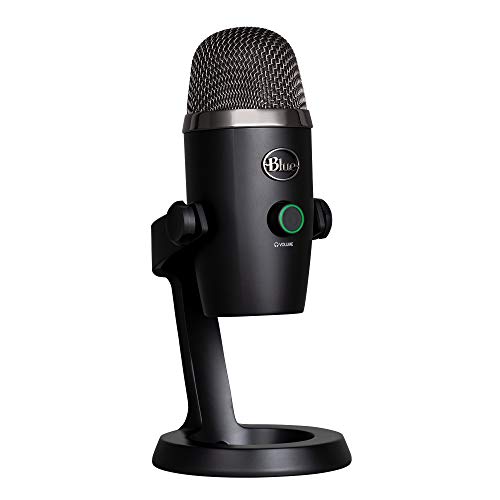
- Blue Yeti Nano: Nano is the smallest and lightest option at about 630 g with its stand. It records at 24-bit/48 kHz, provides cardioid and omnidirectional patterns, mute, and zero-latency monitoring, but omits onboard gain, mix control, stereo, and bidirectional pickup; it is the best fit for a compact desk and straightforward solo speech.
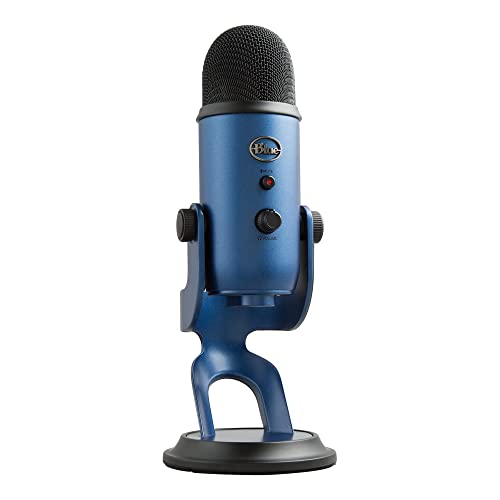
- Blue Yeti: The original Yeti is the familiar all-rounder with a triple-capsule array, four pickup patterns, hardware gain, mute, and headphone monitoring. Its 16-bit/48 kHz USB interface is less modern than the other models, but the controls and pattern flexibility remain useful for podcasting, streaming, calls, and occasional two-person or music recording.
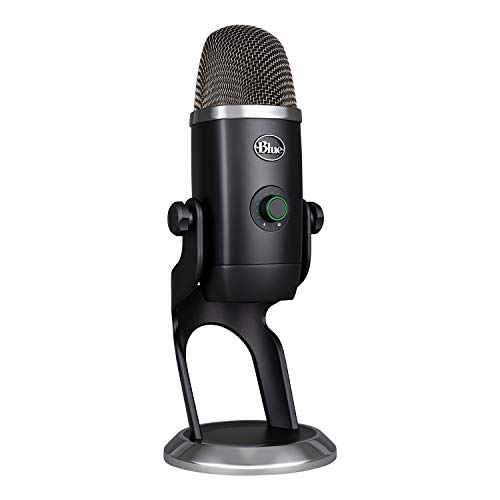
- Blue Yeti X: Yeti X is the feature-focused streaming model with a four-capsule array, 24-bit/48 kHz recording, four patterns, an LED level meter, onboard gain, mix control, high-pass filtering, DSP presets, loopback, and lighting. It suits creators who want visible metering and software processing at the microphone, although it remains a large room-sensitive condenser and still uses micro-USB.
- Blue Yeti Pro: Yeti Pro is the recording-oriented model with USB and balanced XLR outputs, four patterns, onboard gain, direct monitoring, and up to 24-bit/192 kHz digital recording. It is the only choice here for an eventual XLR interface or mixer, but it is also the most expensive, weighs about 1.55 kg with its stand, and needs 48 V phantom power when used through XLR.
How much do Blue Yeti USB microphones cost?
Blue Yeti USB microphones generally cost about £90-£220. The Yeti Nano and original Yeti sit around £90 and are the value choices: Nano prioritizes compact size and 24-bit/48 kHz recording, while the original model trades a larger, heavier body for four pickup patterns and onboard gain.
Yeti X is typically around £150 and charges more for its level meter, four-capsule array, mix control, filters, DSP presets, loopback, and lighting. Yeti Pro reaches roughly £220 because it adds balanced XLR and recording rates up to 24-bit/192 kHz. Include a boom arm or stable stand, pop filter, and possibly a shock mount in the working budget, because none of the four packages includes pop or vibration isolation.
What should you consider while choosing a Blue Yeti USB microphone?
The main points to consider while choosing a Blue Yeti USB microphone are as follows:
- Model and recording path: Choose Nano for a compact two-pattern USB setup, the original Yeti for inexpensive four-pattern flexibility, Yeti X for metering and software features, or Yeti Pro when balanced XLR is genuinely required. Yeti Pro needs an interface and 48 V phantom power in XLR mode; the other models are USB-only.
- Pickup patterns: Cardioid is the normal mode for one close speaker, while omnidirectional, bidirectional, and stereo patterns serve room sound, two-person interviews, or wider sources. Extra patterns are useful only when the recording job needs them and do not prevent room or keyboard noise.
- Bit depth and sample rate: The original Yeti records at 16-bit/48 kHz, Nano and Yeti X at 24-bit/48 kHz, and Yeti Pro reaches 24-bit/192 kHz. Twenty-four-bit recording provides more level-setting headroom, but placement and acoustics matter more than very high sample rates for normal speech.
- Gain, monitoring, and software: All four models provide zero-latency headphone monitoring and mute, but Nano lacks onboard microphone gain. Check whether you need a mic/playback mix, visible meter, DSP, loopback, or lighting, and which functions require companion software.
- Desk space and mounting: Nano weighs about 630 g with its stand, while the original Yeti and Pro are approximately 1.55 kg and Yeti X about 1.28 kg. Confirm that a boom arm supports the weight and can place the side-address capsule 10–20 cm from the mouth without blocking the screen.
- Room, plosives, and vibration: These condensers reproduce room reflections, fans, and keyboards more readily than a close dynamic microphone. Use close cardioid placement and plan suitable pop and shock isolation because none includes a pop filter, windscreen, or shock mount.
- Connector and platform: The range uses mini-USB or micro-USB rather than USB-C, so confirm the correct data cable and adapter. Windows, macOS, iOS, and Android support are available, but app routing and mobile power should be tested, and these models are not Xbox-compatible.