Logitech Signature M650 Review | 78 Data compared

double-arrow
  • Avg. price in UK: ~£35
  • Avg. price in US: ~$40
  • Connectivity: wireless+wired
  • Maximum polling rate: 125 Hz
  • Maximum DPI: 4000 DPI
  • Weight: 101.4 g

Logitech Signature M650 review. Compare 78 technical specifications and user reviews to see how it ranks among mice and if it is worth buying.

5.7

Overall score

What it is: An overall evaluation of the mouse's quality, based on technical analyses and user reviews.

When it matters: When you need a quick reference to identify the best mice on the market.

Score components:

80.0%

4.8

Technical Score

20.0%

9.4

User score

Good
4.8

Technical Score

What it is: An assessment of the mouse's technical performance, covering key areas such as sensor performance, buttons and features, connectivity, battery life, ergonomics, software, and build quality.

When it matters: When you want to compare mice based on technical performance and available features.

Score components:

36.0%

3.9

Performance & Sensor

22.0%

4.5

Controls

16.0%

5.9

Design

14.0%

3.3

Features

7.0%

9.8

Connectivity

5.0%

6.6

Battery & Charging

Poor
9.4

User score

What it is: A rating that combines user reviews and the total number of reviews received by the mouse.

When it matters: When you want to understand how a mouse performs in daily use or gaming and how reliable it is in terms of comfort, button feel, tracking accuracy, and long-term durability.

Score components:

70.0%

9.1

User reviews

30.0%

10

Popularity

User score:
United Kingdom
amazon
4.6
(13602)
amazon
4.5
(12348)
amazon
4.2
(196)
amazon
4.3
(185)
amazon
4.6
(43)
amazon
4.6
(20)
amazon
4.8
(18)
amazon
5.0
(4)
amazon
5.0
(1)
United States
Amazon_logo.png
4.5
(7311)
Amazon_logo.png
4.7
(1657)
Amazon_logo.png
4.6
(901)
Amazon_logo.png
4.5
(770)
Amazon_logo.png
4.4
(272)
Amazon_logo.png
4.5
(125)
Amazon_logo.png
4.3
(37)
Amazon_logo.png
4.7
(36)
Amazon_logo.png
4.8
(20)

(Reviews last updated: May 2026)

Exceptional
  • 2.9
    Gaming

    Score components:

    28.0%

    1.0

    Maximum polling rate

    24.0%

    6.6

    N. of programmable buttons

    20.0%

    1.0

    Onboard memory profiles

    16.0%

    1.0

    Maximum tracking speed

    12.0%

    5.4

    Weight

  • logitech-signature-m650
  • logitech-signature-m650
  • logitech-signature-m650
  • logitech-signature-m650
  • logitech-signature-m650
  • logitech-signature-m650
  • logitech-signature-m650
logitech-signature-m650

Best prices in UK

Best rankings

?

Available: ranking among products currently available (including other versions of this product).
All: ranking among all products in the database.

Verdict

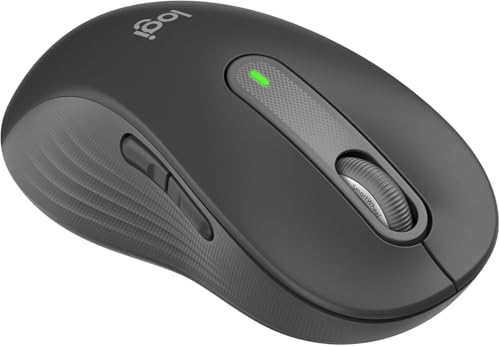
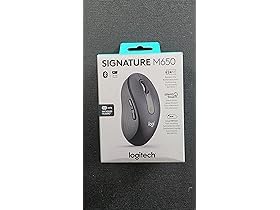
The Logitech Signature M650 is a wireless productivity mouse featuring a 400–4000 DPI optical sensor and SilentTouch technology that reduces click noise by 90%. It is uniquely available in three configurations—regular, large (M650 L), and a dedicated left-handed version—and includes a SmartWheel for automatic switching between line-by-line and high-speed scrolling. Main pros include its remarkable 24-month battery life from a single AA battery, dual connectivity via Bluetooth Low Energy or the Logi Bolt USB receiver, and five customizable buttons. Notable cons include its inability to pair with multiple devices simultaneously, a lack of rechargeable power, and a fixed 125Hz polling rate that makes it unsuitable for gaming.

Technical Specifications of Logitech Signature M650

Technical Score

What it is: An assessment of the mouse's technical performance, covering key areas such as sensor performance, buttons and features, connectivity, battery life, ergonomics, software, and build quality.

When it matters: When you want to compare mice based on technical performance and available features.

Score components:

36.0%

3.9

Performance & Sensor

22.0%

4.5

Controls

16.0%

5.9

Design

14.0%

3.3

Features

7.0%

9.8

Connectivity

5.0%

6.6

Battery & Charging

4.8
Logitech Signature M650 has a technical score of 4.83 points, which is lower than that of 73.8% of products in this category.
User score

What it is: A rating that combines user reviews and the total number of reviews received by the mouse.

When it matters: When you want to understand how a mouse performs in daily use or gaming and how reliable it is in terms of comfort, button feel, tracking accuracy, and long-term durability.

Score components:

70.0%

9.1

User reviews

30.0%

10

Popularity

User score:
United Kingdom
amazon
4.6
(13602)
amazon
4.5
(12348)
amazon
4.2
(196)
amazon
4.3
(185)
amazon
4.6
(43)
amazon
4.6
(20)
amazon
4.8
(18)
amazon
5.0
(4)
amazon
5.0
(1)
United States
Amazon_logo.png
4.5
(7311)
Amazon_logo.png
4.7
(1657)
Amazon_logo.png
4.6
(901)
Amazon_logo.png
4.5
(770)
Amazon_logo.png
4.4
(272)
Amazon_logo.png
4.5
(125)
Amazon_logo.png
4.3
(37)
Amazon_logo.png
4.7
(36)
Amazon_logo.png
4.8
(20)

(Reviews last updated: May 2026)

9.4
Logitech Signature M650 has a user score of 9.38 points, which is higher than that of 92.4% of products in this category.
Popularity
What it is: An indicator based on the number of reviews received by the mouse.
When it matters: When you prefer a mouse that has already been chosen and reviewed by many other users.
10
Logitech Signature M650 has a popularity of 10 points, which is higher than 63.3% of products in this category.
Ratio quality/price

What it is: An indicator that combines the mouse's overall rating with its cost.

When it matters: When you are looking for a mouse that offers a strong balance of performance, features, and price.

Score components:

60.0%

5.7

Overall score

40.0%

10

Price

7.0
Logitech Signature M650 has a quality-to-price ratio of 7 points, which is lower than 60.5% of products in this category.
Brand name
What it is: The manufacturer or brand of the product.
When it matters: When you prefer a specific ecosystem, support network, or design philosophy.

Importance: MEDIUM

Logitech
Maximum polling rate
What it is: The maximum number of position reports the mouse can send to the computer each second, measured in Hertz (Hz).
When it matters: When you are chasing the lowest possible input delay for competitive play and want the mouse reporting as often as possible.

Importance: HIGH

Good value: >=1000 Hz

125 Hz
Logitech Signature M650 has a maximum polling rate of 125 Hz, which is lower than 75.8% of mice and equal to 23.9% of mice.
Wired polling rate
What it is: The polling rate the mouse reaches when it is connected with a cable.
When it matters: When you mainly use the mouse wired and want maximum responsiveness.

Importance: HIGH

Good value: >=1000 Hz

N/A
2.4 GHz polling rate
What it is: The polling rate available when the mouse is used over a 2.4 GHz wireless connection.
When it matters: When you use the 2.4 GHz receiver and want near-wired performance.

Importance: HIGH

Good value: >=1000 Hz

125 Hz
Logitech Signature M650 has a 2.4 GHz polling rate of 125 Hz, which is lower than 70.9% of mice and equal to 28.7% of mice.
Bluetooth polling rate
What it is: The polling rate available when the mouse is connected through Bluetooth.
When it matters: When you use Bluetooth and want to understand the trade-off in responsiveness.

Importance: LOW

Good value: >=125 Hz

125 Hz
Logitech Signature M650 has a Bluetooth polling rate of 125 Hz, which is higher than 66.8% of mice and equal to 31.8% of mice.
Show more
Connectivity
What it is: The mouse's high-level connectivity class: wired only, wireless only, or both wired and wireless.
When it matters: When you need to know at a glance whether the mouse is wired, wireless, or flexible enough to support both.

Importance: HIGH

wireless+wired
Logitech Signature M650 supports wireless+wired connectivity, which is more versatile than 56.8% of mice and equal to 43.3% of mice.
connection modes: wired / Bluetooth / 2.4 GHz.
Bluetooth support
What it is: Shows whether the mouse can connect over Bluetooth instead of relying only on a wired link or proprietary USB receiver.
When it matters: When you want a dongle-free connection option for laptops, tablets, or devices with limited USB ports.

Importance: MEDIUM

yes
Logitech Signature M650 supports Bluetooth. 64.5% of mice support Bluetooth.
Bluetooth version
What it is: The Bluetooth standard version supported by the mouse for wireless connectivity and compatibility.
When it matters: When you care about Bluetooth compatibility, efficiency, and connection quality.

Importance: LOW

Good value: >=5.1

5.1
Logitech Signature M650 uses Bluetooth 5.1, which is newer than 86% of mice and equal to 6.4% of mice.
Proprietary 2.4 GHz support
What it is: Shows whether the mouse supports the brand's dedicated 2.4 GHz wireless system rather than relying only on Bluetooth.
When it matters: When you want the brand's fast low-latency wireless mode instead of depending only on Bluetooth performance.

Importance: MEDIUM

yes
Logitech Signature M650 supports proprietary 2.4 GHz wireless. 38.5% of mice support proprietary 2.4 GHz wireless.
Receiver included
What it is: Shows whether a compatible wireless receiver is included in the box instead of needing to be bought separately.
When it matters: When you expect full wireless use immediately and do not want to buy extra accessories just to get started.

Importance: MEDIUM

yes
Logitech Signature M650 includes a receiver. 37.7% of mice include a receiver.
Show more
Battery life
What it is: The operating time the mouse can deliver on a full charge or a fresh set of batteries under normal use.
When it matters: When the mouse needs to last through workdays, travel, or repeated gaming sessions without constant charging.

Importance: HIGH

Good value: >400 hours

N/A
Battery capacity
What it is: The amount of energy the built-in battery can store, measured in milliampere-hours (mAh).
When it matters: When you want rough battery context behind the runtime claim instead of judging endurance from marketing hours alone.

Importance: MEDIUM

Good value: >=500 mAh

N/A
Battery form factor
What it is: The battery format used by the mouse, such as AA, AAA, integrated rechargeable cell, or another form.
When it matters: When you care whether the mouse uses easy-to-replace AA or AAA cells or a sealed rechargeable pack.

Importance: LOW

AA
Rechargeable battery
What it is: Shows whether the mouse uses a rechargeable battery instead of relying only on disposable cells.
When it matters: When you prefer topping the mouse up over USB or a dock instead of buying disposable batteries repeatedly.

Importance: HIGH

no
Logitech Signature M650 does not use a rechargeable battery. 46% of mice use a rechargeable battery.
Removable battery
What it is: Shows whether the battery can be removed and replaced by the user instead of being sealed inside the mouse.
When it matters: When long-term serviceability matters and you would rather replace the battery than replace the whole mouse later.

Importance: LOW

yes
Logitech Signature M650 uses a removable battery. 77.8% of mice use a removable battery.
Show more
N. of buttons
What it is: The total number of physical buttons available on the mouse body.
When it matters: When you need enough physical controls for shortcuts, MMO binds, browser actions, or productivity commands.

Importance: HIGH

Good value: >=7

5
Logitech Signature M650 has 5 buttons, which is less than 76.9% of mice and equal to 9.7% of mice.
N. of side buttons
What it is: The number of buttons placed on the side of the mouse, typically for thumb access.
When it matters: When thumb-access buttons matter for browser navigation, MMOs, or productivity shortcuts.

Importance: MEDIUM

Good value: >=2

2
Logitech Signature M650 has 2 side buttons, which is more than 15.1% of mice and equal to 68.4% of mice.
N. of programmable buttons
What it is: The number of mouse buttons that can be customized or reassigned through software or onboard settings.
When it matters: When remapping flexibility matters and you want more actions moved off the keyboard.

Importance: HIGH

Good value: >=7

5
Logitech Signature M650 has 5 programmable buttons, which is less than 63.7% of mice and equal to 13.7% of mice.
DPI switching button
What it is: Shows whether the mouse includes a dedicated control for changing DPI levels on the fly.
When it matters: When you want to swap sensitivity instantly for sniping, browsing, editing, or different game genres.

Importance: MEDIUM

no
Logitech Signature M650 does not include a DPI switching button. 85.4% of mice include a DPI switching button.
Profile switching button
What it is: Shows whether the mouse includes a dedicated control for changing onboard or saved profiles during use.
When it matters: When you switch between saved profiles for different games or work routines.

Importance: LOW

no
Logitech Signature M650 does not include a profile switching button. 16.8% of mice include a profile switching button.
Show more
Orientation
What it is: The hand orientation the mouse is designed for, such as right-handed, left-handed, or ambidextrous use.
When it matters: When hand comfort matters and you need a shape that fits your grip and dominant hand.

Importance: HIGH

Right-handed
Weight
What it is: The overall weight of the mouse itself, which influences portability, comfort, and movement feel.
When it matters: When you care about how light or substantial the mouse feels during long sessions.

Importance: HIGH

Good value: <100 g

101.4 g
Logitech Signature M650 weighs 101.4 g, which is heavier than 73.2% of mice.
Extra weights
What it is: The total weight of removable extra weights included for tuning the balance or feel of the mouse.
When it matters: When you care about tuning balance and overall heft instead of being locked into the stock feel.

Importance: LOW

0 g
Logitech Signature M650 comes with 0 g of extra weights, which is equal to 95.4% of mice.
Cable length
What it is: The length of the supplied cable used for wired operation or charging, usually measured in meters.
When it matters: When you need enough cable reach across your desk or charging setup.

Importance: LOW

Good value: >=1.8 m

N/A
Cable type
What it is: The construction style of the cable, such as braided, rubber, or paracord, which affects flexibility and durability.
When it matters: When cable drag, flexibility, and durability affect how the mouse feels in use.

Importance: LOW

N/A
Show more
Onboard memory profiles
What it is: The number of user profiles that can be stored directly in the mouse memory for use without reconfiguring software each time.
When it matters: When you use different games, apps, or devices and want settings saved directly on the mouse.

Importance: MEDIUM

Good value: >=3

0
Logitech Signature M650 supports 0 onboard memory profiles, which is less than 52.5% of mice and equal to 47.5% of mice.
Onboard memory size
What it is: The amount of onboard memory available inside the mouse for storing settings, macros, or profiles.
When it matters: When you store complex macros, settings, or several onboard profiles.

Importance: LOW

Good value: >=512 KB

0 KB
Logitech Signature M650 has 0 KB of onboard memory, which is equal to 82.6% of mice.
no onboard memory.
Software name
What it is: The name of the official software used to configure the mouse, update firmware, or customize features.
When it matters: When software ecosystem and customization tools influence your buying decision.

Importance: LOW

Logi Options+
Firmware upgradable
What it is: Shows whether the mouse can receive firmware updates for fixes, compatibility improvements, or feature changes.
When it matters: When you want the option for later fixes, stability improvements, or performance tweaks after purchase.

Importance: LOW

yes
Logitech Signature M650 supports firmware updates. 27.3% of mice support firmware updates.
Suitable for gaming
What it is: Shows whether the mouse is positioned or tuned around gaming-focused speed, latency, and control features.
When it matters: When fast clicks, low latency, and gaming-oriented features are priorities.

Importance: MEDIUM

no
Logitech Signature M650 is not suitable for gaming. 75.8% of mice are suitable for gaming.

Logitech Signature M650 vs the average mouse

  • Silent primary switches
    Logitech Signature M650 uses silent primary switches, while the average mouse does not. 14.4% of mice use silent primary switches.
    Silent click buttons.
    What it is: Shows whether the main left and right buttons are designed for quieter clicking than standard switches.
    When it matters: When you work in quiet spaces and want less click noise.

    Importance: MEDIUM

    Logitech Signature M650 uses silent primary switches, while the average mouse does not. 14.4% of mice use silent primary switches.
  • Free-spin scroll mode
    Logitech Signature M650 offers a free-spin scroll mode, while the average mouse does not. 3.9% of mice offer a free-spin scroll mode.
    Automatic ratchet/free-spin switching.
    What it is: Shows whether the scroll wheel can switch from stepped scrolling to a smooth free-spin mode.
    When it matters: When you move through long spreadsheets, documents, or web pages and want faster, smoother scrolling.

    Importance: LOW

    Logitech Signature M650 offers a free-spin scroll mode, while the average mouse does not. 3.9% of mice offer a free-spin scroll mode.
  • Gesture support
    Logitech Signature M650 supports gesture controls, while the average mouse does not. 6.6% of mice support gesture controls.
    Vendor gesture software.
    What it is: Shows whether the mouse supports gesture-based commands instead of relying only on standard button clicks and wheel actions.
    When it matters: When navigation shortcuts and productivity gestures would save time across browsers, desktops, or creative apps.

    Importance: LOW

    Logitech Signature M650 supports gesture controls, while the average mouse does not. 6.6% of mice support gesture controls.
  • Removable battery
    Logitech Signature M650 uses a removable battery, while the average mouse does not. 22.3% of mice use a removable battery.
    What it is: Shows whether the battery can be removed and replaced by the user instead of being sealed inside the mouse.
    When it matters: When long-term serviceability matters and you would rather replace the battery than replace the whole mouse later.

    Importance: LOW

    Logitech Signature M650 uses a removable battery, while the average mouse does not. 22.3% of mice use a removable battery.
  • 80.5 mm shorter mouse length
    Logitech Signature M650 is 37.8 mm long, while the average mouse is 118.3 mm long.
    What it is: The overall front-to-back length of the mouse body.
    When it matters: When hand size and grip style are central to comfort and you want to avoid a mouse that feels too short or too stretched out.

    Importance: MEDIUM

    Logitech Signature M650 is 37.8 mm long, while the average mouse is 118.3 mm long.37.8 mm vs 118.3 mm
  • 17.3% higher user score
    Logitech Signature M650 has a higher user score than the average mouse (9.38 vs 8.000).
    What it is: A rating that combines user reviews and the total number of reviews received by the mouse.
    When it matters: When you want to understand how a mouse performs in daily use or gaming and how reliable it is in terms of comfort, button feel, tracking accuracy, and long-term durability.
    Logitech Signature M650 has a higher user score than the average mouse (9.38 vs 8.000).9.38 vs 8
  • Versatile connectivity
    Logitech Signature M650 supports wireless+wired connectivity, while the average mouse supports wireless connectivity.
    connection modes: wired / Bluetooth / 2.4 GHz.
    What it is: The mouse's high-level connectivity class: wired only, wireless only, or both wired and wireless.
    When it matters: When you need to know at a glance whether the mouse is wired, wireless, or flexible enough to support both.

    Importance: HIGH

    Logitech Signature M650 supports wireless+wired connectivity, while the average mouse supports wireless connectivity.wireless+wired vs wireless
  • Bluetooth support
    Logitech Signature M650 supports Bluetooth, while the average mouse does not. 35.5% of mice support Bluetooth.
    What it is: Shows whether the mouse can connect over Bluetooth instead of relying only on a wired link or proprietary USB receiver.
    When it matters: When you want a dongle-free connection option for laptops, tablets, or devices with limited USB ports.

    Importance: MEDIUM

    Logitech Signature M650 supports Bluetooth, while the average mouse does not. 35.5% of mice support Bluetooth.
  • Versatile connectivity
    Logitech Signature M650 supports wireless+wired connectivity, while the average mouse supports wireless connectivity.
  • Bluetooth support
    Logitech Signature M650 supports Bluetooth, while the average mouse does not. 35.5% of mice support Bluetooth.
  • Receiver storage inside mouse
    Logitech Signature M650 has receiver storage inside the mouse, while the average mouse does not. 45.9% of mice have receiver storage inside the mouse.
  • Removable battery
    Logitech Signature M650 uses a removable battery, while the average mouse does not. 22.3% of mice use a removable battery.
  • Silent primary switches
    Logitech Signature M650 uses silent primary switches, while the average mouse does not. 14.4% of mice use silent primary switches.
  • Free-spin scroll mode
    Logitech Signature M650 offers a free-spin scroll mode, while the average mouse does not. 3.9% of mice offer a free-spin scroll mode.
  • Gesture support
    Logitech Signature M650 supports gesture controls, while the average mouse does not. 6.6% of mice support gesture controls.
  • 80.5 mm shorter mouse length
    Logitech Signature M650 is 37.8 mm long, while the average mouse is 118.3 mm long.
  • 87.5% lower maximum polling rate
    Logitech Signature M650 has a maximum polling rate of 125 Hz, while the average mouse has a maximum polling rate of 1,000 Hz.
  • 92.5% lower tracking speed
    Logitech Signature M650 has a maximum tracking speed of 30 IPS, while the average mouse has a maximum tracking speed of 400 IPS.
  • 87.5% lower 2.4 GHz polling rate
    Logitech Signature M650 has a 2.4 GHz polling rate of 125 Hz, while the average mouse has a 2.4 GHz polling rate of 1,000 Hz.
  • 60% lower maximum DPI
    Logitech Signature M650 has a maximum DPI of 4,000 DPI, while the average mouse has a maximum DPI of 10,000 DPI.
  • 200 DPI higher minimum setting
    Logitech Signature M650 has a minimum DPI of 400 DPI, while the average mouse has a minimum DPI of 200 DPI.
  • 20 million clicks shorter switch lifespan
    Logitech Signature M650 has a switch durability of 10 million clicks, while the average mouse has a switch durability of 30 million clicks.
  • 1 fewer programmable buttons
    Logitech Signature M650 has 5 programmable buttons, while the average mouse has 6 programmable buttons.
  • No DPI switching button
    Logitech Signature M650 does not include a DPI switching button, while the average mouse does. 85.3% of mice include a DPI switching button.
  • 22.5% higher mouse weight
    Logitech Signature M650 weighs 101.4 g, while the average mouse weighs 82.745 g.
  • Thin glide feet
    Logitech Signature M650 uses 0.6 mm thick mouse feet, while the average mouse uses 0.8 mm thick mouse feet.
  • No RGB lighting
    Logitech Signature M650 does not have RGB lighting, while the average mouse does. 56.3% of mice have RGB lighting.
  • 1 fewer onboard profiles
    Logitech Signature M650 supports 0 onboard memory profiles, while the average mouse supports 1 onboard memory profiles.
  • Not suitable for gaming
    Logitech Signature M650 is not suitable for gaming, while the average mouse is. 75.8% of mice are suitable for gaming.
  • 87.5% lower maximum polling rate
    Logitech Signature M650 has a maximum polling rate of 125 Hz, while the average mouse has a maximum polling rate of 1,000 Hz.
    What it is: The maximum number of position reports the mouse can send to the computer each second, measured in Hertz (Hz).
    When it matters: When you are chasing the lowest possible input delay for competitive play and want the mouse reporting as often as possible.

    Importance: HIGH

    Good value: >=1000 Hz

    Logitech Signature M650 has a maximum polling rate of 125 Hz, while the average mouse has a maximum polling rate of 1,000 Hz.125 Hz vs 1000 Hz
  • 20 million clicks shorter switch lifespan
    Logitech Signature M650 has a switch durability of 10 million clicks, while the average mouse has a switch durability of 30 million clicks.
    What it is: The rated click lifespan of the primary switches, usually expressed in millions of clicks.
    When it matters: When heavy clicking, long-term reliability, and avoiding early switch failure are part of the buying decision.

    Importance: MEDIUM

    Good value: >=70 million clicks

    Logitech Signature M650 has a switch durability of 10 million clicks, while the average mouse has a switch durability of 30 million clicks.10 million clicks vs 30 million clicks
  • 92.5% lower tracking speed
    Logitech Signature M650 has a maximum tracking speed of 30 IPS, while the average mouse has a maximum tracking speed of 400 IPS.
    What it is: The highest movement speed the sensor can track accurately before it starts losing precision, usually expressed in inches per second (IPS).
    When it matters: When you make very fast swipes and do not want the sensor to lose tracking.

    Importance: HIGH

    Good value: >=400 IPS

    Logitech Signature M650 has a maximum tracking speed of 30 IPS, while the average mouse has a maximum tracking speed of 400 IPS.30 IPS vs 400 IPS
  • 22.5% higher mouse weight
    Logitech Signature M650 weighs 101.4 g, while the average mouse weighs 82.745 g.
    What it is: The overall weight of the mouse itself, which influences portability, comfort, and movement feel.
    When it matters: When you care about how light or substantial the mouse feels during long sessions.

    Importance: HIGH

    Good value: <100 g

    Logitech Signature M650 weighs 101.4 g, while the average mouse weighs 82.745 g.101.4 g vs 82.745 g
  • 1 fewer onboard profiles
    Logitech Signature M650 supports 0 onboard memory profiles, while the average mouse supports 1 onboard memory profiles.
    What it is: The number of user profiles that can be stored directly in the mouse memory for use without reconfiguring software each time.
    When it matters: When you use different games, apps, or devices and want settings saved directly on the mouse.

    Importance: MEDIUM

    Good value: >=3

    Logitech Signature M650 supports 0 onboard memory profiles, while the average mouse supports 1 onboard memory profiles.0 vs 1
  • 1 fewer programmable buttons
    Logitech Signature M650 has 5 programmable buttons, while the average mouse has 6 programmable buttons.
    What it is: The number of mouse buttons that can be customized or reassigned through software or onboard settings.
    When it matters: When remapping flexibility matters and you want more actions moved off the keyboard.

    Importance: HIGH

    Good value: >=7

    Logitech Signature M650 has 5 programmable buttons, while the average mouse has 6 programmable buttons.5 vs 6
  • 87.5% lower 2.4 GHz polling rate
    Logitech Signature M650 has a 2.4 GHz polling rate of 125 Hz, while the average mouse has a 2.4 GHz polling rate of 1,000 Hz.
    What it is: The polling rate available when the mouse is used over a 2.4 GHz wireless connection.
    When it matters: When you use the 2.4 GHz receiver and want near-wired performance.

    Importance: HIGH

    Good value: >=1000 Hz

    Logitech Signature M650 has a 2.4 GHz polling rate of 125 Hz, while the average mouse has a 2.4 GHz polling rate of 1,000 Hz.125 Hz vs 1000 Hz
  • Not suitable for gaming
    Logitech Signature M650 is not suitable for gaming, while the average mouse is. 75.8% of mice are suitable for gaming.
    What it is: Shows whether the mouse is positioned or tuned around gaming-focused speed, latency, and control features.
    When it matters: When fast clicks, low latency, and gaming-oriented features are priorities.

    Importance: MEDIUM

    Logitech Signature M650 is not suitable for gaming, while the average mouse is. 75.8% of mice are suitable for gaming.

Graphic comparison of Logitech Signature M650 and

Attribute category
Attribute
No results found

Third-party reviews

What customers like about Logitech Signature M650?

  • Exceptionally quiet 'SilentTouch' clicks suitable for office environments
  • SmartWheel allows for both line-by-line precision and fast scrolling
  • Impressive battery life of up to 24 months on a single AA battery
  • Available in multiple sizes (Standard and L) and a dedicated left-handed version
  • Dual connectivity via Bluetooth Low Energy or the Logi Bolt USB receiver
  • Customizable side buttons through the Logi Options+ software
  • Comfortable, contoured shape with soft rubber side grips

What customers dislike about Logitech Signature M650?

  • Lacks multi-device pairing; can only connect to one device at a time
  • The standard size is reported as being quite small and narrow for many users
  • Side buttons are not silent like the main left/right click buttons
  • Uses a disposable AA battery instead of being rechargeable via USB-C
  • High click latency and low polling rate make it unsuitable for competitive gaming
  • The sensor does not track effectively on glass surfaces
  • Occasional reports of the rubber grip losing texture or becoming 'gummy' over time

Video reviews

Compare Logitech Signature M650 with

VS
VS

Compare