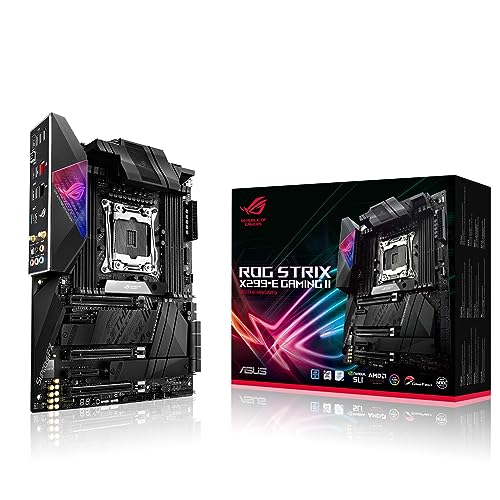
ASUS ROG Strix X299 E Gaming Review | 107 Data compared

double-arrow
  • Avg. price in UK: ~£400
  • Avg. price in US: ~$350
  • CPU socket: LGA 2066
  • Chipset: Intel X299
  • Form factor: ATX

ASUS ROG Strix X299 E Gaming review. Compare 107 technical specifications and user reviews to see how it ranks among motherboards and if it is worth buying.

7.2

Overall score

What it is: An overall evaluation of the motherboard's quality, based on technical analyses and user reviews.

When it matters: When you need a quick reference to identify the best motherboards on the market.

Score components:

90.0%

7.0

Technical Score

10.0%

8.6

User score

Very good
7.0

Technical Score

What it is: An assessment of the motherboard's technical performance, covering key areas such as power delivery, CPU and memory support, expansion, storage, connectivity, cooling, BIOS features, and design.

When it matters: When you want to compare motherboards based on technical performance and available features.

Score components:

19.0%

8.6

Memory

16.0%

6.7

Platform & Features

16.0%

6.1

Storage

15.0%

7.2

Network

13.0%

5.0

Ports & USB

8.0%

5.0

Expansion

8.0%

8.8

Power & Cooling

5.0%

9.6

Audio

Very good
8.6

User score

What it is: A rating that combines user reviews and the total number of reviews received by the motherboard.

When it matters: When you want to understand how a motherboard performs in real-world builds and how reliable it is in terms of stability, BIOS usability, connectivity, and long-term ownership.

Score components:

70.0%

8.4

User reviews

30.0%

9.0

Popularity

User score:
United Kingdom
amazon
4.2
(283)
amazon
4.2
(38)
United States
Amazon_logo.png
4.0
(103)

(Reviews last updated: May 2026)

Excellent
  • 5.1
    Gaming

    Score components:

    28.0%

    9.0

    VRM phases

    22.0%

    5.5

    N. of M.2 sockets

    18.0%

    4.6

    LAN speed

    17.0%

    2.5

    Maximum RAM speed

    15.0%

    1.0

    N. of PCIe 5.0 x16 slots

  • asus-rog-strix-x299-e-gaming
  • asus-rog-strix-x299-e-gaming
  • asus-rog-strix-x299-e-gaming
  • asus-rog-strix-x299-e-gaming
  • asus-rog-strix-x299-e-gaming
asus-rog-strix-x299-e-gaming

Best prices in UK

Best rankings

?

Available: ranking among products currently available (including other versions of this product).
All: ranking among all products in the database.

Verdict

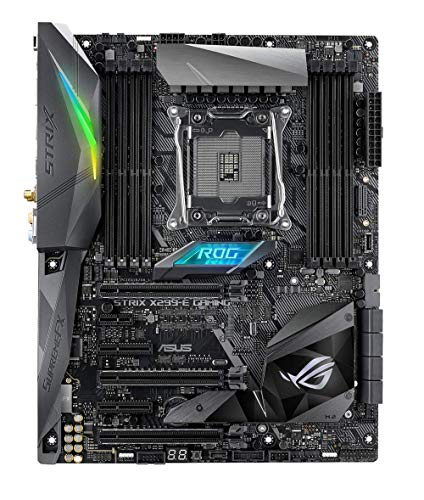
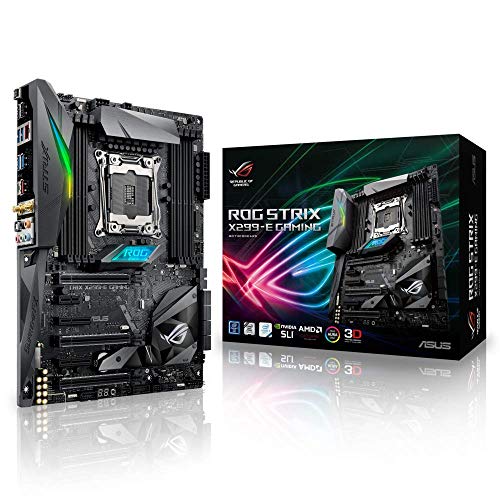
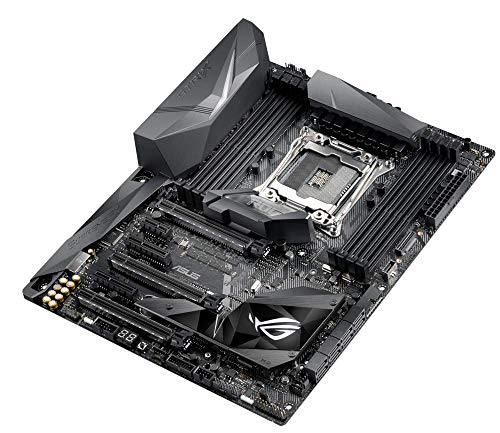
The ASUS ROG STRIX X299-E GAMING is an ATX motherboard built on the Intel X299 chipset for LGA 2066 socket Core X-Series processors. It features eight DDR4 DIMM slots supporting quad-channel memory up to 128GB at overclocked speeds of 4133MHz+, along with dual M.2 slots (one with an integrated heatsink) and 3-way SLI/CrossFireX support via steel-braced PCIe 3.0 slots. Connectivity highlights include onboard 2x2 802.11ac Wi-Fi, Intel Gigabit Ethernet, and a USB 3.1 Gen 2 front-panel header. Main pros include its robust overclocking capabilities facilitated by the OC Socket, high-fidelity SupremeFX S1220A audio, and extensive Aura Sync RGB customisation. Notable cons involve limited PCIe lane access when using lower-end 16-lane or 28-lane CPUs and the absence of a dedicated onboard CMOS clear or reset button.

Technical Specifications of ASUS ROG Strix X299 E Gaming

Technical Score

What it is: An assessment of the motherboard's technical performance, covering key areas such as power delivery, CPU and memory support, expansion, storage, connectivity, cooling, BIOS features, and design.

When it matters: When you want to compare motherboards based on technical performance and available features.

Score components:

19.0%

8.6

Memory

16.0%

6.7

Platform & Features

16.0%

6.1

Storage

15.0%

7.2

Network

13.0%

5.0

Ports & USB

8.0%

5.0

Expansion

8.0%

8.8

Power & Cooling

5.0%

9.6

Audio

7.0
ASUS ROG Strix X299 E Gaming has a technical score of 6.99 points, which is higher than that of 63% of products in this category.
User score

What it is: A rating that combines user reviews and the total number of reviews received by the motherboard.

When it matters: When you want to understand how a motherboard performs in real-world builds and how reliable it is in terms of stability, BIOS usability, connectivity, and long-term ownership.

Score components:

70.0%

8.4

User reviews

30.0%

9.0

Popularity

User score:
United Kingdom
amazon
4.2
(283)
amazon
4.2
(38)
United States
Amazon_logo.png
4.0
(103)

(Reviews last updated: May 2026)

8.6
ASUS ROG Strix X299 E Gaming has a user score of 8.58 points, which is higher than that of 74.9% of products in this category.
Popularity
What it is: An indicator based on the number of reviews received by the motherboard.
When it matters: When you prefer a motherboard that has already been bought and reviewed by many other users.
9.0
ASUS ROG Strix X299 E Gaming has a popularity of 9 points, which is higher than 77.2% of products in this category.
Ratio quality/price

What it is: An indicator that combines the motherboard's overall rating with its cost.

When it matters: When you are looking for a motherboard that offers a strong balance of features, performance, and price.

Score components:

60.0%

7.2

Overall score

40.0%

8.4

Price

7.5
ASUS ROG Strix X299 E Gaming has a quality-to-price ratio of 7.5 points, which is higher than 54% of products in this category.
Brand name
What it is: The brand that makes the motherboard.
When it matters: When you have a brand preference for support, BIOS, or build quality.

Importance: MEDIUM

Asus
CPU socket
What it is: The socket type the motherboard is built to support.
When it matters: When you need the motherboard to match a specific CPU.

Importance: HIGH

LGA 2066
ASUS ROG Strix X299 E Gaming uses the LGA 2066 CPU socket, which is more advanced than that of 51.8% of motherboards and equal to that of 2% of motherboards.
CPU platform

Importance: MEDIUM

Intel
Chipset
What it is: The chipset that defines the motherboard platform and many of its features.
When it matters: When you compare platform features, connectivity, and CPU support.

Importance: HIGH

Intel X299
ASUS ROG Strix X299 E Gaming uses the Intel X299 chipset, which is less advanced than that of 65.4% of motherboards and equal to that of 2% of motherboards.
Form factor
What it is: The physical size standard of the motherboard, such as ATX or Micro-ATX.
When it matters: When you need the board to fit a specific case size.

Importance: HIGH

ATX
ASUS ROG Strix X299 E Gaming has the ATX form factor, which is more versatile than that of 47.8% of motherboards and equal to that of 52.2% of motherboards.
Show more
DDR memory version
What it is: The RAM generation the motherboard supports, such as DDR4 or DDR5.
When it matters: When you need the board to match a certain memory platform.

Importance: HIGH

Good value: DDR5

DDR4
ASUS ROG Strix X299 E Gaming uses DDR4 memory, which is newer than that of 13.6% of motherboards and equal to that of 51% of motherboards.
Memory slots
What it is: The number of RAM slots on the motherboard.
When it matters: When you want more room for future memory upgrades.

Importance: HIGH

Good value: >=4

8
ASUS ROG Strix X299 E Gaming has 8 Memory slots, which is more than 94% of motherboards and equal to 5.7% of motherboards.
Maximum memory capacity
What it is: The largest total amount of RAM the motherboard supports.
When it matters: When you plan a build with very high memory capacity.

Importance: HIGH

Good value: >=128 GB

256 GB
ASUS ROG Strix X299 E Gaming supports up to 256 GB of memory, which is more than 82.8% of motherboards and equal to 16.5% of motherboards.
capacity depends on supported CPU
Memory channels
What it is: The memory channel configuration supported by the motherboard platform.
When it matters: When memory bandwidth matters for your build.

Importance: MEDIUM

4
ASUS ROG Strix X299 E Gaming supports 4 memory channels, which is more than 92.8% of motherboards and equal to 6.9% of motherboards.
some CPUs use only 2 channels
Maximum RAM speed
What it is: The highest officially supported memory speed for the motherboard.
When it matters: When you choose RAM and want to know the supported speed ceiling.

Importance: HIGH

Good value: >=6400 MT/s

2,666 MT/s
ASUS ROG Strix X299 E Gaming supports memory speeds up to 2666 MT/s, which is lower than that of 78.8% of motherboards and equal to that of 4.7% of motherboards.
Show more
N. of M.2 sockets
What it is: The number of M.2 slots available on the motherboard.
When it matters: When you want room for more NVMe or M.2 drives.

Importance: HIGH

Good value: >=3

2
ASUS ROG Strix X299 E Gaming has 2 M.2 sockets, which is more than 30.8% of motherboards and equal to 34.6% of motherboards.
M.2 slot interface per slot
What it is: The storage or PCIe interface available for each M.2 slot on the motherboard.
When it matters: When you want to check which drives each M.2 slot can use.

Importance: HIGH

1x PCIe 3.0 x4, 1x PCIe 3.0 x4/x2/SATA
ASUS ROG Strix X299 E Gaming offers 1x PCIe 3.0x4, 1x PCIe 3.0x4/x2/SATA for M.2 slot interfaces, which is slower than that of 59.8% of motherboards.
N. of SATA 3 connectors
What it is: The number of SATA 6Gb/s connectors on the motherboard.
When it matters: When you plan to connect multiple SATA drives.

Importance: MEDIUM

Good value: >=6

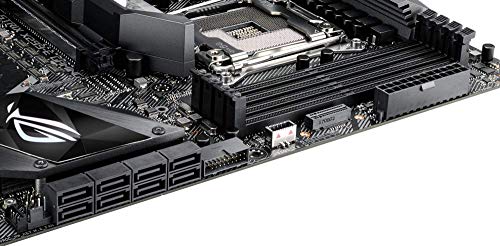
8
ASUS ROG Strix X299 E Gaming has 8 SATA 3 connectors, which is more than 85.5% of motherboards and equal to 11.2% of motherboards.
some SATA ports disabled with certain M.2 use
Supported RAID levels
What it is: The RAID modes officially supported by the motherboard storage platform.
When it matters: When you plan to use multiple drives in a RAID setup.

Importance: MEDIUM

0/1/5/10
ASUS ROG Strix X299 E Gaming supports RAID levels 0/1/5/10, which is broader than 31.8% of motherboards and equal to 68.2% of motherboards.
SATA only
NVMe RAID support
What it is: Shows whether the board supports RAID configurations that use NVMe SSDs.
When it matters: When you plan to use multiple NVMe drives in RAID.

Importance: LOW

yes
ASUS ROG Strix X299 E Gaming supports NVMe RAID. 40.3% of motherboards support this feature.
Intel VROC support
Show more
N. of PCIe 5.0 x16 slots
What it is: The number of PCIe 5.0 x16 physical slots on the motherboard.
When it matters: When you want the newest high-bandwidth expansion slots.

Importance: HIGH

Good value: >=1

0
ASUS ROG Strix X299 E Gaming has 0 PCIe 5.0x16 slots, which is equal to 68.5% of motherboards.
N. of PCIe 4.0 x16 slots
What it is: The number of PCIe 4.0 x16 physical slots on the motherboard.
When it matters: When you want more room for modern expansion cards.

Importance: HIGH

Good value: >=1

0
ASUS ROG Strix X299 E Gaming has 0 PCIe 4.0x16 slots, which is equal to 55.6% of motherboards.
N. of PCIe 3.0 x16 slots
What it is: The number of PCIe 3.0 x16 physical slots on the motherboard.
When it matters: When you need more full-length expansion slots.

Importance: MEDIUM

3
ASUS ROG Strix X299 E Gaming has 3 PCIe 3.0x16 slots, which is more than 82.8% of motherboards and equal to 11.1% of motherboards.
PCIe slot electrical configuration
What it is: The actual lane wiring used by the motherboard PCIe slots.
When it matters: When you need to know how much bandwidth each slot really gets.

Importance: HIGH

x16/x16/x8, x16/x16, x16/x8/x1, x8/x8/x1, x8/x8
ASUS ROG Strix X299 E Gaming uses x16/x16/x8, x16/x16, x16/x8/x1, x8/x8/x1, x8/x8 for PCIe slot electrical configuration, which is more flexible than that of 95.4% of motherboards.
Depends on CPU.
PCIe bifurcation support
What it is: Shows whether the board can split PCIe lanes across multiple devices from one slot or link.
When it matters: When you plan multi-SSD adapters or more advanced expansion setups.

Importance: MEDIUM

yes
ASUS ROG Strix X299 E Gaming supports PCIe bifurcation. 39.1% of motherboards support this feature.
Show more
Total USB ports (rear I/O)
What it is: The total number of rear USB ports available on the motherboard.
When it matters: When you use many USB devices directly from the back of the PC.

Importance: MEDIUM

Good value: >=8

8
ASUS ROG Strix X299 E Gaming has 8 USB ports (rear I/O), which is more than 40.3% of motherboards and equal to 30.7% of motherboards.
Total USB ports (including headers)
What it is: The total number of USB ports supported when rear ports and internal headers are counted together.
When it matters: When you want to know the board's full USB expansion potential.

Importance: MEDIUM

Good value: >=14

15
ASUS ROG Strix X299 E Gaming has 15 USB ports (including headers), which is more than 48.3% of motherboards and equal to 13.5% of motherboards.
Total USB-C ports (rear I/O)
What it is: The total number of rear USB-C ports on the motherboard.
When it matters: When you want more USB-C devices connected without adapters.

Importance: MEDIUM

Good value: >=1

1
ASUS ROG Strix X299 E Gaming has 1 USB-C ports (rear I/O), which is more than 35.4% of motherboards and equal to 48.8% of motherboards.
Total USB-C ports (including headers)
What it is: The total number of USB-C ports supported when rear ports and internal headers are counted together.
When it matters: When you want more USB-C connectivity across the whole build.

Importance: MEDIUM

Good value: >=2

2
ASUS ROG Strix X299 E Gaming has 2 USB-C ports (including headers), which is more than 51.8% of motherboards and equal to 32.8% of motherboards.
N. of USB 3.2 Gen2x2 ports (USB-C)
What it is: The number of rear USB 3.2 Gen2x2 Type-C ports on the motherboard.
When it matters: When you want very fast USB-C connectivity on the rear I/O.

Importance: HIGH

Good value: >=1

0
ASUS ROG Strix X299 E Gaming has 0 USB 3.2 Gen2x2 ports (USB-C), which is equal to 81.6% of motherboards.
10Gbps excluded.
Show more
LAN speed
What it is: The maximum wired Ethernet speed supported by the motherboard.
When it matters: When you want faster wired networking.

Importance: HIGH

Good value: 2.5GbE

1 Gbps
ASUS ROG Strix X299 E Gaming supports LAN speeds up to 1 Gbps, which is lower than that of 50.8% of motherboards and equal to that of 49.1% of motherboards.
LAN controller
What it is: The model of onboard Ethernet controller used by the motherboard.
When it matters: When you compare networking hardware quality and features.

Importance: MEDIUM

?
N. of RJ45 ports
What it is: The number of wired Ethernet ports on the motherboard.
When it matters: When you need one or more wired network connections.

Importance: LOW

1
ASUS ROG Strix X299 E Gaming has 1 RJ45 ports, which is equal to 85.6% of motherboards.
Wi-Fi connectivity
What it is: Shows whether the motherboard includes onboard Wi-Fi hardware instead of requiring a separate adapter.
When it matters: When you want wireless networking without adding an extra card.

Importance: MEDIUM

yes
ASUS ROG Strix X299 E Gaming supports Wi-Fi connectivity. 50.9% of motherboards support this feature.
Wi-Fi version
What it is: The supported Wi-Fi generation, such as Wi-Fi 6 or Wi-Fi 7.
When it matters: When you care about wireless speed and router compatibility.

Importance: MEDIUM

Good value: Wi-Fi 6E (802.11ax)

Wi-Fi 5 (802.11ac)
ASUS ROG Strix X299 E Gaming supports Wi-Fi 5 (802.11ac), which is newer than that of 49.7% of motherboards and equal to that of 10.7% of motherboards.
Show more
Audio codec
What it is: The onboard audio codec used by the motherboard.
When it matters: When sound quality from the built-in audio matters to you.

Importance: MEDIUM

SupremeFX S1220A
ASUS ROG Strix X299 E Gaming uses the SupremeFX S1220A audio codec, which is more advanced than that of 86.7% of motherboards and equal to that of 3.5% of motherboards.
Audio channels
What it is: The audio channel configuration supported by the onboard sound solution.
When it matters: When you want surround sound from the motherboard audio outputs.

Importance: LOW

Good value: 7.1

7.1
ASUS ROG Strix X299 E Gaming offers 7.1 audio channels, which is more than 4.9% of motherboards and equal to 95.1% of motherboards.
Audio SNR
What it is: The signal-to-noise ratio of the onboard audio solution.
When it matters: When you care about cleaner onboard audio output.

Importance: MEDIUM

Good value: >=120 dB

120 dB
ASUS ROG Strix X299 E Gaming has an audio SNR of 120 dB, which is higher than that of 55% of motherboards and equal to that of 41.5% of motherboards.
Headphone amp support
What it is: Shows whether the onboard audio path includes dedicated headphone amplification for harder-to-drive headsets.
When it matters: When you use harder-to-drive headphones from the onboard audio.

Importance: LOW

yes
ASUS ROG Strix X299 E Gaming supports a headphone amp. 37% of motherboards support this feature.
supports up to 600Ω.
N. of 3.5mm audio jacks
What it is: The number of rear 3.5mm audio jacks on the motherboard.
When it matters: When you want more analog audio connection options.

Importance: LOW

Good value: >=5

5
ASUS ROG Strix X299 E Gaming has 5 3.5mm audio jacks, which is more than 49.8% of motherboards and equal to 36.8% of motherboards.
Show more
VRM phases
What it is: The number of power-delivery phases used by the motherboard VRM.
When it matters: When you care about CPU power delivery and overclocking headroom.

Importance: HIGH

Good value: >=12

?
N. of CPU power connectors
What it is: The number of CPU power connectors on the motherboard.
When it matters: When you care about power delivery for higher-end CPUs.

Importance: HIGH

Good value: >=2

2
ASUS ROG Strix X299 E Gaming has 2 CPU power connectors, which is more than 54.6% of motherboards and equal to 45.3% of motherboards.
N. of fan headers
What it is: The number of headers available for case or CPU fans.
When it matters: When your build uses several fans.

Importance: MEDIUM

Good value: >=6

6
ASUS ROG Strix X299 E Gaming has 6 fan headers, which is more than 50.3% of motherboards and equal to 22.3% of motherboards.
Pump header
What it is: Shows whether the motherboard includes a dedicated header designed for a liquid-cooling pump.
When it matters: When you build with an AIO or custom liquid cooling loop.

Importance: MEDIUM

yes
ASUS ROG Strix X299 E Gaming has a pump header. 23.1% of motherboards include this feature.
Pump header max current
What it is: The maximum current the dedicated pump header can supply.
When it matters: When you want to make sure the pump header can power your cooling setup.

Importance: LOW

Good value: >=2 A

3 A
ASUS ROG Strix X299 E Gaming supports up to 3 A on the pump header, which is higher than that of 76.7% of motherboards and equal to that of 23.2% of motherboards.
AIO_PUMP 1A; W_PUMP 3A.
Show more

ASUS ROG Strix X299 E Gaming vs the average motherboard

  • 2x more maximum memory capacity
    ASUS ROG Strix X299 E Gaming has more maximum memory capacity than the average motherboard (256 GB vs 128 GB). The average motherboard supports 128 GB of memory.
    capacity depends on supported CPU
    What it is: The largest total amount of RAM the motherboard supports.
    When it matters: When you plan a build with very high memory capacity.

    Importance: HIGH

    Good value: >=128 GB

    ASUS ROG Strix X299 E Gaming has more maximum memory capacity than the average motherboard (256 GB vs 128 GB). The average motherboard supports 128 GB of memory.256 GB vs 128 GB
  • 4 more memory slots
    ASUS ROG Strix X299 E Gaming has more memory slots than the average motherboard (8 vs 4). The average motherboard has 4 memory slot/s.
    What it is: The number of RAM slots on the motherboard.
    When it matters: When you want more room for future memory upgrades.

    Importance: HIGH

    Good value: >=4

    ASUS ROG Strix X299 E Gaming has more memory slots than the average motherboard (8 vs 4). The average motherboard has 4 memory slot/s.8 vs 4
  • More flexible PCIe lane configuration
    ASUS ROG Strix X299 E Gaming has more flexible PCIe lane configuration than the average motherboard (x16/x16/x8, x16/x16, x16/x8/x1, x8/x8/x1, x8/x8 vs x16/x1). The average motherboard uses x16/x1 PCIe slot lane configuration.
    Depends on CPU.
    What it is: The actual lane wiring used by the motherboard PCIe slots.
    When it matters: When you need to know how much bandwidth each slot really gets.

    Importance: HIGH

    ASUS ROG Strix X299 E Gaming has more flexible PCIe lane configuration than the average motherboard (x16/x16/x8, x16/x16, x16/x8/x1, x8/x8/x1, x8/x8 vs x16/x1). The average motherboard uses x16/x1 PCIe slot lane configuration.x16/x16/x8, x16/x16, x16/x8/x1, x8/x8/x1, x8/x8 vs x16/x1
  • Includes POST code display
    ASUS ROG Strix X299 E Gaming has a POST code display, while the average motherboard does not. 27.2% of motherboards include a POST code display.
    Q-Code display.
    What it is: Shows whether the board includes a diagnostic POST code readout for boot troubleshooting.
    When it matters: When you troubleshoot boot issues and want clearer error information.

    Importance: LOW

    ASUS ROG Strix X299 E Gaming has a POST code display, while the average motherboard does not. 27.2% of motherboards include a POST code display.
  • 1 more CPU power connectors
    ASUS ROG Strix X299 E Gaming has more CPU power connectors than the average motherboard (2 vs 1). The average motherboard has 1 CPU power connectors.
    What it is: The number of CPU power connectors on the motherboard.
    When it matters: When you care about power delivery for higher-end CPUs.

    Importance: HIGH

    Good value: >=2

    ASUS ROG Strix X299 E Gaming has more CPU power connectors than the average motherboard (2 vs 1). The average motherboard has 1 CPU power connectors.2 vs 1
  • 1 more PCIe x4 slots
    ASUS ROG Strix X299 E Gaming has more PCIe x4 slots than the average motherboard (1 vs 0). The average motherboard has 0 PCIe x4 slot/s.
    What it is: The number of PCIe x4 slots on the motherboard.
    When it matters: When you need more mid-bandwidth expansion slots.

    Importance: MEDIUM

    ASUS ROG Strix X299 E Gaming has more PCIe x4 slots than the average motherboard (1 vs 0). The average motherboard has 0 PCIe x4 slot/s.1 vs 0
  • Newer CPU socket
    ASUS ROG Strix X299 E Gaming has newer CPU socket than the average motherboard (LGA 2,066 vs LGA 1,151). The average motherboard uses LGA 1,151 CPU socket.
    What it is: The socket type the motherboard is built to support.
    When it matters: When you need the motherboard to match a specific CPU.

    Importance: HIGH

    ASUS ROG Strix X299 E Gaming has newer CPU socket than the average motherboard (LGA 2,066 vs LGA 1,151). The average motherboard uses LGA 1,151 CPU socket.LGA 2066 vs LGA 1151
  • Better audio codec
    ASUS ROG Strix X299 E Gaming has better audio codec than the average motherboard (SupremeFX S1,220A vs Realtek ALC898). The average motherboard uses Realtek ALC898 audio codec.
    What it is: The onboard audio codec used by the motherboard.
    When it matters: When sound quality from the built-in audio matters to you.

    Importance: MEDIUM

    ASUS ROG Strix X299 E Gaming has better audio codec than the average motherboard (SupremeFX S1,220A vs Realtek ALC898). The average motherboard uses Realtek ALC898 audio codec.SupremeFX S1220A vs Realtek ALC898
  • Includes POST code display
    ASUS ROG Strix X299 E Gaming has a POST code display, while the average motherboard does not. 27.2% of motherboards include a POST code display.
  • Newer CPU socket
    ASUS ROG Strix X299 E Gaming has newer CPU socket than the average motherboard (LGA 2,066 vs LGA 1,151). The average motherboard uses LGA 1,151 CPU socket.
  • Broader Windows support
    ASUS ROG Strix X299 E Gaming has broader Windows support than the average motherboard (Windows 11, Windows 10, Windows 8.1, Windows 8, Windows 7 vs Windows 11, Windows 10). The average motherboard supports Windows 11, Windows 10.
  • Includes onboard power button
    ASUS ROG Strix X299 E Gaming has an onboard power button, while the average motherboard does not. 27.7% of motherboards include an onboard power button.
  • 2x more maximum memory capacity
    ASUS ROG Strix X299 E Gaming has more maximum memory capacity than the average motherboard (256 GB vs 128 GB). The average motherboard supports 128 GB of memory.
  • 4 more memory slots
    ASUS ROG Strix X299 E Gaming has more memory slots than the average motherboard (8 vs 4). The average motherboard has 4 memory slot/s.
  • More memory channels
    ASUS ROG Strix X299 E Gaming has more memory channels than the average motherboard (4 vs 2). The average motherboard has 2 memory channel/s.
  • 4 more SATA 3 connectors
    ASUS ROG Strix X299 E Gaming has more SATA 3 connectors than the average motherboard (8 vs 4). The average motherboard has 4 SATA 3 connectors.
  • More flexible PCIe lane configuration
    ASUS ROG Strix X299 E Gaming has more flexible PCIe lane configuration than the average motherboard (x16/x16/x8, x16/x16, x16/x8/x1, x8/x8/x1, x8/x8 vs x16/x1). The average motherboard uses x16/x1 PCIe slot lane configuration.
  • 1 more PCIe x4 slots
    ASUS ROG Strix X299 E Gaming has more PCIe x4 slots than the average motherboard (1 vs 0). The average motherboard has 0 PCIe x4 slot/s.
  • 2 more PCIe x1 slots
    ASUS ROG Strix X299 E Gaming has more PCIe x1 slots than the average motherboard (3 vs 1). The average motherboard has 1 PCIe x1 slot/s.
  • 2 more PCIe 3.0x16 slots
    ASUS ROG Strix X299 E Gaming has more PCIe 3.0x16 slots than the average motherboard (3 vs 1). The average motherboard has 1 PCIe 3.0x16 slot/s.
  • 1 more USB 3.2 Gen2 USB-C ports
    ASUS ROG Strix X299 E Gaming has more USB 3.2 Gen2 USB-C ports than the average motherboard (1 vs 0). The average motherboard has 0 USB 3.2 Gen2 USB-C port/s.
  • 1 more USB 3.2 Gen1 headers
    ASUS ROG Strix X299 E Gaming has more USB 3.2 Gen1 headers than the average motherboard (2 vs 1). The average motherboard has 1 USB 3.2 Gen1 header/s.
  • 1 more USB 3.2 Gen2 headers
    ASUS ROG Strix X299 E Gaming has more USB 3.2 Gen2 headers than the average motherboard (1 vs 0). The average motherboard has 0 USB 3.2 Gen2 header/s.
  • 1 more total USB-C connections
    ASUS ROG Strix X299 E Gaming has more total USB-C connections than the average motherboard (2 vs 1). The average motherboard has 1 total USB-C connections.
  • Supports Wi-Fi
    ASUS ROG Strix X299 E Gaming supports Wi-Fi connectivity, while the average motherboard does not. 49.1% of motherboards support Wi-Fi connectivity.
  • Supports Bluetooth
    ASUS ROG Strix X299 E Gaming supports Bluetooth, while the average motherboard does not. 47% of motherboards support Bluetooth.
  • Better audio codec
    ASUS ROG Strix X299 E Gaming has better audio codec than the average motherboard (SupremeFX S1,220A vs Realtek ALC898). The average motherboard uses Realtek ALC898 audio codec.
  • 5 dB higher audio SNR
    ASUS ROG Strix X299 E Gaming has a higher audio SNR than the average motherboard (120 dB vs 115 dB). The average motherboard has audio SNR of 115 dB.
  • 1 more CPU power connectors
    ASUS ROG Strix X299 E Gaming has more CPU power connectors than the average motherboard (2 vs 1). The average motherboard has 1 CPU power connectors.
  • 1 more RGB headers
    ASUS ROG Strix X299 E Gaming has more RGB headers than the average motherboard (2 vs 1). The average motherboard has 1 RGB header/s.
  • 1 more fan headers
    ASUS ROG Strix X299 E Gaming has more fan headers than the average motherboard (6 vs 5). The average motherboard has 5 fan header/s.
  • 1 A higher pump header current limit
    ASUS ROG Strix X299 E Gaming has a higher pump header current than the average motherboard (3 A vs 2 A). The average motherboard provides pump header current of 2 A.
  • More basic motherboard chipset
    ASUS ROG Strix X299 E Gaming has more basic motherboard chipset than the average motherboard (Intel X299 vs Intel B860). The average motherboard uses Intel B860 chipset.
  • No integrated graphics support
    ASUS ROG Strix X299 E Gaming does not support integrated graphics, while the average motherboard does. 89.4% of motherboards support integrated graphics.
  • No TPM connector
    ASUS ROG Strix X299 E Gaming does not have a TPM connector, while the average motherboard does. 86.7% of motherboards include a TPM connector.
    Firmware TPM/PTT only.
  • 4 older release date
    ASUS ROG Strix X299 E Gaming is older than the average motherboard (2,017 vs 2,021). The average motherboard was released in 2,021.
    June 2017
  • 42% lower maximum RAM speed
    ASUS ROG Strix X299 E Gaming has a lower maximum RAM speed than the average motherboard (2,666 MT/s vs 4,600 MT/s). The average motherboard supports RAM speed of 4,600 MT/s.
  • Slower M.2 slot interfaces
    ASUS ROG Strix X299 E Gaming has slower M.2 slot interfaces than the average motherboard (1x PCIe 3.0x4, 1x PCIe 3.0x4/x2/SATA vs 1x PCIe 5.0x4, 2x PCIe 4.0x4). The average motherboard uses 1x PCIe 5.0x4, 2x PCIe 4.0x4 M.2 slot interfaces.
  • 1 fewer DisplayPort outputs
    ASUS ROG Strix X299 E Gaming has fewer DisplayPort outputs than the average motherboard (0 vs 1). The average motherboard has 1 DisplayPort outputs.
  • 1 fewer USB 2.0 headers
    ASUS ROG Strix X299 E Gaming has fewer USB 2.0 headers than the average motherboard (1 vs 2). The average motherboard has 2 USB 2.0 header/s.
  • 1 fewer PS/2 ports
    ASUS ROG Strix X299 E Gaming has fewer PS/2 ports than the average motherboard (0 vs 1). The average motherboard has 1 PS/2 port/s.
  • 1 fewer HDMI outputs
    ASUS ROG Strix X299 E Gaming has fewer HDMI outputs than the average motherboard (0 vs 1). The average motherboard has 1 HDMI outputs.
  • 60% lower LAN speed
    ASUS ROG Strix X299 E Gaming has a lower LAN speed than the average motherboard (1 Gbps vs 2.5 Gbps). The average motherboard offers LAN speed of 2.5 Gbps.
  • Older Bluetooth version
    ASUS ROG Strix X299 E Gaming has older Bluetooth version than the average motherboard (4.2 vs 5.4). The average motherboard supports Bluetooth 5.4.
  • 1 fewer ARGB headers
    ASUS ROG Strix X299 E Gaming has fewer ARGB headers than the average motherboard (1 vs 2). The average motherboard has 2 ARGB header/s.
  • More basic motherboard chipset
    ASUS ROG Strix X299 E Gaming has more basic motherboard chipset than the average motherboard (Intel X299 vs Intel B860). The average motherboard uses Intel B860 chipset.
    What it is: The chipset that defines the motherboard platform and many of its features.
    When it matters: When you compare platform features, connectivity, and CPU support.

    Importance: HIGH

    ASUS ROG Strix X299 E Gaming has more basic motherboard chipset than the average motherboard (Intel X299 vs Intel B860). The average motherboard uses Intel B860 chipset.Intel X299 vs Intel B860
  • 60% lower LAN speed
    ASUS ROG Strix X299 E Gaming has a lower LAN speed than the average motherboard (1 Gbps vs 2.5 Gbps). The average motherboard offers LAN speed of 2.5 Gbps.
    What it is: The maximum wired Ethernet speed supported by the motherboard.
    When it matters: When you want faster wired networking.

    Importance: HIGH

    Good value: 2.5GbE

    ASUS ROG Strix X299 E Gaming has a lower LAN speed than the average motherboard (1 Gbps vs 2.5 Gbps). The average motherboard offers LAN speed of 2.5 Gbps.1 Gbps vs 2.5 Gbps
  • Slower M.2 slot interfaces
    ASUS ROG Strix X299 E Gaming has slower M.2 slot interfaces than the average motherboard (1x PCIe 3.0x4, 1x PCIe 3.0x4/x2/SATA vs 1x PCIe 5.0x4, 2x PCIe 4.0x4). The average motherboard uses 1x PCIe 5.0x4, 2x PCIe 4.0x4 M.2 slot interfaces.
    What it is: The storage or PCIe interface available for each M.2 slot on the motherboard.
    When it matters: When you want to check which drives each M.2 slot can use.

    Importance: HIGH

    ASUS ROG Strix X299 E Gaming has slower M.2 slot interfaces than the average motherboard (1x PCIe 3.0x4, 1x PCIe 3.0x4/x2/SATA vs 1x PCIe 5.0x4, 2x PCIe 4.0x4). The average motherboard uses 1x PCIe 5.0x4, 2x PCIe 4.0x4 M.2 slot interfaces.1x PCIe 3.0x4, 1x PCIe 3.0x4/x2/SATA vs 1x PCIe 5.0x4, 2x PCIe 4.0x4
  • No integrated graphics support
    ASUS ROG Strix X299 E Gaming does not support integrated graphics, while the average motherboard does. 89.4% of motherboards support integrated graphics.
    What it is: Shows whether the motherboard can output video from CPUs that include integrated graphics.
    When it matters: When you want video output without installing a graphics card.

    Importance: MEDIUM

    ASUS ROG Strix X299 E Gaming does not support integrated graphics, while the average motherboard does. 89.4% of motherboards support integrated graphics.
  • 42% lower maximum RAM speed
    ASUS ROG Strix X299 E Gaming has a lower maximum RAM speed than the average motherboard (2,666 MT/s vs 4,600 MT/s). The average motherboard supports RAM speed of 4,600 MT/s.
    What it is: The highest officially supported memory speed for the motherboard.
    When it matters: When you choose RAM and want to know the supported speed ceiling.

    Importance: HIGH

    Good value: >=6400 MT/s

    ASUS ROG Strix X299 E Gaming has a lower maximum RAM speed than the average motherboard (2,666 MT/s vs 4,600 MT/s). The average motherboard supports RAM speed of 4,600 MT/s.2666 MT/s vs 4600 MT/s
  • 1 fewer DisplayPort outputs
    ASUS ROG Strix X299 E Gaming has fewer DisplayPort outputs than the average motherboard (0 vs 1). The average motherboard has 1 DisplayPort outputs.
    What it is: The number of DisplayPort video outputs on the motherboard.
    When it matters: When you want to connect compatible displays through the rear I/O.

    Importance: MEDIUM

    Good value: >=1

    ASUS ROG Strix X299 E Gaming has fewer DisplayPort outputs than the average motherboard (0 vs 1). The average motherboard has 1 DisplayPort outputs.0 vs 1
  • 1 fewer USB 2.0 headers
    ASUS ROG Strix X299 E Gaming has fewer USB 2.0 headers than the average motherboard (1 vs 2). The average motherboard has 2 USB 2.0 header/s.
    What it is: The number of internal USB 2.0 headers available for case connections.
    When it matters: When your case or accessories need internal USB connections.

    Importance: LOW

    ASUS ROG Strix X299 E Gaming has fewer USB 2.0 headers than the average motherboard (1 vs 2). The average motherboard has 2 USB 2.0 header/s.1 vs 2
  • 2.5x more expensive
    ASUS ROG Strix X299 E Gaming is more expensive than the average motherboard (£400 vs £160).
    ASUS ROG Strix X299 E Gaming is more expensive than the average motherboard (£400 vs £160).£400 vs £160

Graphic comparison of ASUS ROG Strix X299 E Gaming and

Attribute category
Attribute
No results found

Third-party reviews

United States

(Reviews last updated: May 2026)

What customers like about ASUS ROG Strix X299 E Gaming?

  • High-quality aesthetic design with customizable RGB lighting and Aura Sync support
  • User-friendly and intuitive BIOS interface with easy updating via USB
  • Robust feature set including multiple fan headers, dedicated AIO pump headers, and metal-reinforced PCIe slots
  • Effective M.2 heatsink design that significantly lowers drive temperatures
  • Solid overclocking potential for high-end Core-X CPUs with stable power delivery
  • High-quality onboard SupremeFX audio performance
  • Good inclusion of accessories like 3D-printed mount options and Wi-Fi antennas

What customers dislike about ASUS ROG Strix X299 E Gaming?

  • Slow boot and POST times even when using high-speed NVMe M.2 drives
  • Limited number of external USB ports on the rear I/O panel
  • Unacceptable PCIe slot configuration limitations when using 28-lane processors instead of 44-lane models
  • Buggy software experiences reported with Aura Sync and early driver installations
  • Lack of some enthusiast-level physical buttons like onboard 'Clear CMOS' or 'Reset'
  • Mixed reports on VRM temperatures under extreme overclocking conditions
  • Potential confusion regarding RAID support for non-Intel M.2 drives

Video reviews

Compare ASUS ROG Strix X299 E Gaming with

VS
VS

Compare