
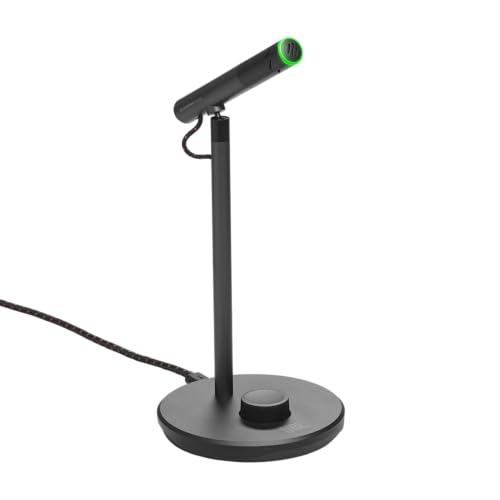
Are JBL microphones good?
JBL microphones have an average overall score of 7.9, ranking #4 among comparable microphone brands, and a user rating of 7.9, placing them at #17 based on user reviews.
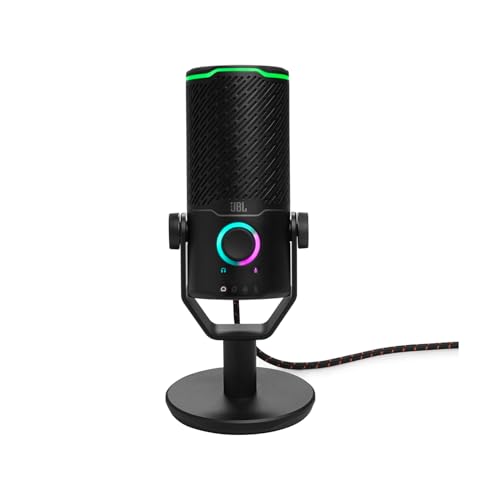
JBL Quantum Stream microphones are good when the priority is a self-contained USB desk setup with direct monitoring and controls within reach. Even the inexpensive Talk records at up to 24-bit/96 kHz and includes gain, mute, a headphone output, and loopback; the standard Quantum Stream adds a second capsule, omnidirectional pickup, touch control, and RGB lighting; Studio reaches 24-bit/192 kHz and offers four pickup patterns, a visible level indicator, microphone/playback mix, and more complete vocal accessories.
Their limitations follow directly from that focus. These are sensitive electret condensers rather than close-talk broadcast dynamics, so distance, keyboard noise, and room reflections matter. They are also USB-only: there is no XLR upgrade path, no wireless transmitter, and several routing or DSP functions depend on compatible software. JBL is strongest for one-person computer recording and less suitable for multi-microphone interfaces, handheld stage work, or untreated rooms where a dynamic capsule would provide easier isolation.
The chart below ranks microphone brands by average overall score.
[horizontal-chart-17722261969187988942009596606811630445561412665918]
Who should consider buying JBL microphones?
The following users are the strongest fit for JBL Quantum Stream microphones:
- PC and console streamers: USB operation, hardware mute, headphone monitoring, and loopback provide the core controls for a one-microphone gaming setup.
- First-time podcasters: Quantum Stream Talk offers an inexpensive direct-computer path, while the standard and Studio models add more pattern and monitoring flexibility.
- Remote workers and online teachers: Close desktop placement can produce clearer speech than a laptop microphone without requiring a separate interface.
- Solo creators using several pickup arrangements: Quantum Stream or Studio can switch from focused speech to room, interview, or wider capture when the environment is controlled.
- Buyers already using JBL Quantum software and lighting: Compatible models integrate naturally with the brand's desktop ecosystem, provided software dependence is acceptable.
How do JBL microphones differ from other microphones?
JBL microphones differ from many general-purpose USB microphones by treating pattern selection and live control as part of the gaming workflow. Quantum Stream moves beyond fixed cardioid with omnidirectional pickup, while Studio adds bidirectional and stereo modes as well, allowing one microphone to cover solo speech, a two-person conversation, room sound, or a wider source. The trade-off is that every wider pattern also captures more of the desk and room, so extra modes should be selected for a real recording need rather than left active by default.
The models also scale their control surfaces more deliberately than their prices suggest. Talk keeps the essentials—gain, mute, monitoring, and loopback—in a light body; Quantum Stream adds touch control and lighting; Studio adds a level display, mic/playback mix, more capsules, 192 kHz support, and a pop filter. Unlike hybrid USB/XLR microphones, however, the entire range remains tied to a computer or compatible USB host, making software support and routing more important than analogue preamp quality.
How do the JBL Quantum Stream models differ?
The JBL Quantum Stream models differ as follows:
- Quantum Stream Talk: This £30 entry model uses one capsule and a focused supercardioid-style voice mode for solo speech. It records at up to 24-bit/96 kHz and includes USB-C, gain, mute, two headphone-volume levels, direct monitoring, and loopback in a light 146 g body, but it lacks RGB and additional pickup patterns.
- Quantum Stream: This £70 dual-capsule model adds cardioid and omnidirectional pickup, touch control, RGB lighting, a longer 2.5 m cable, and 20 Hz–20 kHz coverage. Choose it when solo streaming sometimes expands to round-table or room capture, while remembering that omnidirectional mode increases background pickup.
- Quantum Stream Studio: This £100 three-capsule model adds four patterns, 24-bit/192 kHz recording, a level indicator, microphone/playback mix, and an included pop filter. Its 582 g metal body and broader controls suit a fixed production desk, although it needs a sturdier mount and remains USB-only.
How much do JBL microphones cost?
JBL Quantum Stream microphones generally cost about £30-£100. Quantum Stream Talk is the £30 entry point and already includes USB-C recording, gain, mute, headphone monitoring, and loopback, making it the practical choice when one focused voice mode is enough. Quantum Stream costs roughly £70 and adds two capsules, cardioid and omnidirectional pickup, touch control, RGB lighting, and a wider 20 Hz–20 kHz response.
Quantum Stream Studio reaches about £100. The additional cost buys three capsules, four pickup patterns, recording up to 24-bit/192 kHz, a level indicator, microphone/playback mix control, a metal body, and an included pop filter. It is worth the premium for creators who will use the pattern and monitoring flexibility; for ordinary solo speech, the less expensive models keep the same essential USB and headphone workflow.
What should you consider while choosing JBL microphones?
The main points to consider while choosing a JBL microphone are as follows:
- Model and pickup patterns: Choose Talk for one focused speaker, Quantum Stream when cardioid and omnidirectional modes are useful, or Studio for cardioid, omnidirectional, bidirectional, and stereo capture. Wider modes solve interviews and room recording but admit more background sound.
- Room and microphone distance: These are condenser microphones, so keep the active side roughly 10–20 cm from the mouth and control reflective surfaces, fans, and keyboard noise. A more expensive model does not compensate for distant placement.
- Recording resolution and host support: Talk and Quantum Stream reach 24-bit/96 kHz, while Studio supports 24-bit/192 kHz. Confirm that the operating system, application, and USB connection support the chosen format; normal speech rarely benefits from the highest rate alone.
- Monitoring and live controls: All models provide headphone monitoring, gain, and mute, but Studio adds a level indicator and microphone/playback mix. Decide which controls must be visible and adjustable without opening software during a live session.
- Software, loopback, and lighting: Loopback is available across the range, while DSP presets, routing, and RGB options vary. Verify which functions require JBL software and whether they remain available on the intended computer or console.
- Mounting and vocal protection: Talk weighs about 146 g, Quantum Stream 248 g, and Studio 582 g, which changes boom-arm and stand requirements. Studio includes a pop filter, while the others may need separate pop and vibration control depending on distance and desk movement.