Corsair K65 Pro Mini RGB Review | 64 Data compared

double-arrow
  • Avg. price in UK: ~£130
  • Avg. price in US: ~$110
  • Layout size: 65%
  • Connection type: USB
  • Switch type: optical
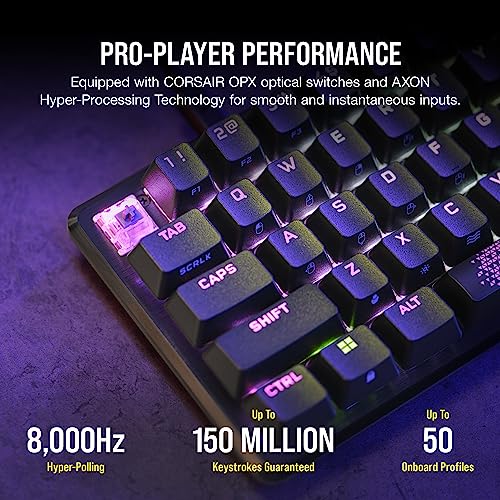
  • Polling rate: 8,000 Hz

Corsair K65 Pro Mini RGB review. Compare 64 technical specifications and user reviews to see how it ranks among keyboards and if it is worth buying.

6.5

Overall score

What it is: An overall evaluation of the keyboard's quality, based on technical analyses and user reviews.

When it matters: When you need a quick reference to identify the best keyboards on the market.

Score components:

80.0%

5.8

Technical Score

20.0%

9.2

User score

Good
5.8

Technical Score

What it is: An assessment of the keyboard's technical performance, covering key areas such as switch feel, typing and gaming performance, layout and features, connectivity, build quality, backlighting, software, and comfort.

When it matters: When you want to compare keyboards based on technical performance and available features.

Score components:

34.0%

4.8

Connectivity & Power

28.0%

5.7

Switches

20.0%

7.0

Materials

12.0%

6.8

Features

6.0%

5.1

Design

Good
9.2

User score

What it is: A rating that combines user reviews and the total number of reviews received by the keyboard.

When it matters: When you want to understand how a keyboard performs in daily use or gaming and how reliable it is in terms of typing feel, noise level, comfort, and long-term durability.

Score components:

70.0%

8.9

User reviews

30.0%

10

Popularity

User score:
United Kingdom
amazon
4.6
(98)
amazon
4.3
(93)
amazon
4.4
(53)
amazon
4.3
(45)
amazon
4.7
(41)
amazon
4.5
(41)
United States
Amazon_logo.png
4.6
(98)
Amazon_logo.png
4.3
(93)
Amazon_logo.png
4.4
(53)
Amazon_logo.png
4.3
(45)
Amazon_logo.png
4.7
(41)
Amazon_logo.png
4.5
(41)

(Reviews last updated: June 2026)

Exceptional
  • 4.6
    Gaming

    Score components:

    28.0%

    10

    Polling rate

    24.0%

    1.0

    Rapid trigger

    20.0%

    1.0

    Adjustable actuation

    16.0%

    1.0

    Hot-swappable switches

    12.0%

    10

    Onboard memory

  • 7.4
    Typing

    Score components:

    28.0%

    4.0

    Wrist rest included

    24.0%

    10

    Legend method

    20.0%

    10

    Adjustable feet

    15.0%

    9.0

    Typing angle

    13.0%

    4.0

    Pre-lubed stabilizers

  • 1.2
    Programming

    Score components:

    30.0%

    1.0

    QMK support

    26.0%

    1.0

    VIA support

    18.0%

    1.0

    Mac compatibility

    14.0%

    0.0

    Multi-device pairing

    12.0%

    4.0

    Connection type

  • corsair-k65-pro-mini-rgb
  • corsair-k65-pro-mini-rgb
  • corsair-k65-pro-mini-rgb
  • corsair-k65-pro-mini-rgb
  • corsair-k65-pro-mini-rgb
  • corsair-k65-pro-mini-rgb
  • corsair-k65-pro-mini-rgb
  • corsair-k65-pro-mini-rgb
corsair-k65-pro-mini-rgb

Best prices in UK

Best rankings

?

Available: ranking among products currently available (including other versions of this product).
All: ranking among all products in the database.

Verdict

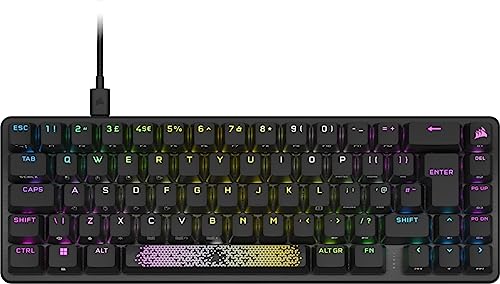
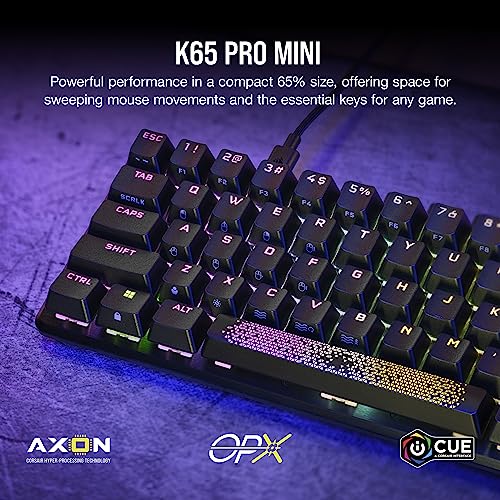
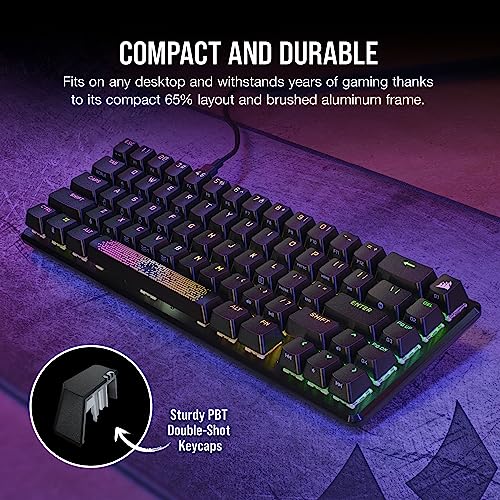
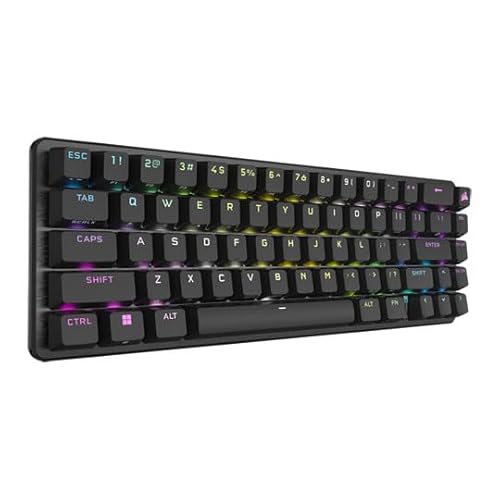
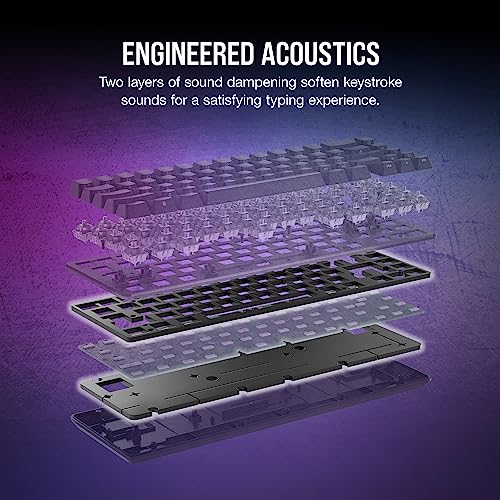
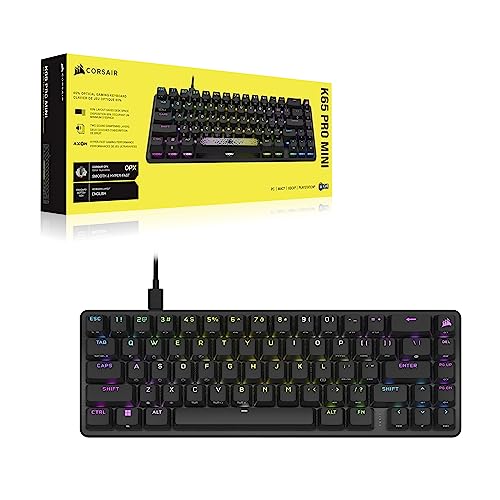
The Corsair K65 Pro Mini RGB is a compact 65% optical-mechanical gaming keyboard featuring a premium brushed aluminum top plate and durable PBT double-shot keycaps. It is powered by Corsair OPX linear optical switches with a rapid 1.0mm actuation distance and AXON hyper-processing technology that supports an 8,000Hz polling rate for near-instant input. Major pros include its space-saving design that retains dedicated arrow keys, dual layers of sound-dampening foam for improved acoustics, and extensive per-key RGB customization with up to 50 onboard profiles. Main cons include a high price point compared to competitors, the inability to hot-swap switches, and some users finding the optical switches overly sensitive for everyday typing.

Technical Specifications of Corsair K65 Pro Mini RGB

Technical Score

What it is: An assessment of the keyboard's technical performance, covering key areas such as switch feel, typing and gaming performance, layout and features, connectivity, build quality, backlighting, software, and comfort.

When it matters: When you want to compare keyboards based on technical performance and available features.

Score components:

34.0%

4.8

Connectivity & Power

28.0%

5.7

Switches

20.0%

7.0

Materials

12.0%

6.8

Features

6.0%

5.1

Design

5.8
Corsair K65 Pro Mini RGB has a technical score of 5.75 points, which is lower than that of 79.3% of products in this category.
User score

What it is: A rating that combines user reviews and the total number of reviews received by the keyboard.

When it matters: When you want to understand how a keyboard performs in daily use or gaming and how reliable it is in terms of typing feel, noise level, comfort, and long-term durability.

Score components:

70.0%

8.9

User reviews

30.0%

10

Popularity

User score:
United Kingdom
amazon
4.6
(98)
amazon
4.3
(93)
amazon
4.4
(53)
amazon
4.3
(45)
amazon
4.7
(41)
amazon
4.5
(41)
United States
Amazon_logo.png
4.6
(98)
Amazon_logo.png
4.3
(93)
Amazon_logo.png
4.4
(53)
Amazon_logo.png
4.3
(45)
Amazon_logo.png
4.7
(41)
Amazon_logo.png
4.5
(41)

(Reviews last updated: June 2026)

9.2
Corsair K65 Pro Mini RGB has a user score of 9.24 points, which is higher than that of 84% of products in this category.
Popularity
What it is: An indicator based on the number of reviews received by the keyboard.
When it matters: When you prefer a keyboard that has already been chosen and reviewed by many other users.
10
Corsair K65 Pro Mini RGB has a popularity of 10 points, which is higher than 68.6% of products in this category.
Ratio quality/price

What it is: An indicator that combines the keyboard's overall rating with its cost.

When it matters: When you are looking for a keyboard that offers a strong balance of performance, features, and price.

Score components:

60.0%

6.5

Overall score

40.0%

9.8

Price

7.5
Corsair K65 Pro Mini RGB has a quality-to-price ratio of 7.5 points, which is lower than 64.4% of products in this category.
Switch type
What it is: Identifies the switch technology used by the keyboard, such as mechanical, optical, or Hall effect.
When it matters: When you are choosing between different response technologies and their long-term behavior.

Importance: HIGH

optical
Switch feel
What it is: Describes the keypress character, such as linear, tactile, or clicky.
When it matters: When the sensation of each keypress changes comfort, control, and noise level for your use.

Importance: HIGH

linear
Switch name
What it is: States the specific switch model used by the keyboard.
When it matters: When the exact switch model matters because small tuning differences affect your preference.

Importance: MEDIUM

Corsair OPX
Actuation force
What it is: Measures how much force is needed to actuate a key.
When it matters: When finger fatigue, accidental presses, or key resistance matters to your typing style.

Importance: HIGH

45 g
Min actuation distance
What it is: Measures the shortest key travel needed to register an input.
When it matters: When faster key response matters and you want the shortest possible trigger point under your fingers.

Importance: MEDIUM

1 mm
Corsair K65 Pro Mini RGB has a minimum actuation distance of 1 mm, which is shorter than 75.8% of keyboards and equal to 2.9% of keyboards.
Show more
Keyboard type
What it is: Identifies the keyboard technology, such as mechanical, membrane, optical, or Hall effect.
When it matters: When you need a keyboard built around a specific switch technology or feel profile.

Importance: HIGH

optical
Layout size
What it is: States the keyboard form factor and how much of the standard keyset it includes.
When it matters: When desk space, portability, or access to a full key set affects how you work or play.

Importance: HIGH

65%
Layout standard
What it is: Specifies the regional layout standard, such as ANSI, ISO, or JIS.
When it matters: When you need a regional key layout that matches your language habits or keycap set.

Importance: MEDIUM

ANSI
N. of keys
What it is: States how many keys are present on the keyboard.
When it matters: When you need a certain number of keys for shortcuts, navigation, or a numpad.

Importance: MEDIUM

67
Corsair K65 Pro Mini RGB has 67 keys, which is fewer than 82.2% of keyboards and equal to 4.5% of keyboards.
Profile
What it is: Describes whether the keyboard uses a low-profile or standard-height design.
When it matters: When key height changes your typing comfort, travel distance, or the overall desk setup.

Importance: MEDIUM

standard
Show more
Connection type
What it is: Specifies how the keyboard connects, such as USB, 2.4 GHz wireless, or Bluetooth.
When it matters: When latency, cable management, or wireless flexibility is part of your buying decision.

Importance: HIGH

USB
Corsair K65 Pro Mini RGB offers USB connectivity, which is less versatile than 56.7% of keyboards and equal to 43.3% of keyboards.
Multi-device pairing
What it is: Shows whether the keyboard can stay paired with multiple devices for quicker switching.
When it matters: When you switch regularly between a laptop, tablet, and other devices on one desk.

Importance: HIGH

N/A
Bluetooth version
What it is: States the Bluetooth generation supported for wireless pairing.
When it matters: When wireless stability, compatibility, and energy efficiency are part of what you compare.

Importance: MEDIUM

N/A
Mac compatibility
What it is: Shows whether the keyboard is intended to work properly with macOS layouts, shortcuts, or legends.
When it matters: When you need the keyboard to work properly with macOS shortcuts and key mapping.

Importance: HIGH

no
Corsair K65 Pro Mini RGB is not Mac compatible. 55.9% of keyboards work with Mac.
Battery life
What it is: Estimates how long the keyboard can run on a full charge.
When it matters: When the keyboard needs to last through workweeks, travel, or long gaming stretches without constant charging.

Importance: HIGH

N/A
Show more
RGB lighting
What it is: Shows whether the keyboard includes customizable RGB lighting effects.
When it matters: When visual customization and desk aesthetics matter to your setup.

Importance: HIGH

yes
Corsair K65 Pro Mini RGB has RGB lighting. 12.3% of keyboards have RGB lighting.
Per-key RGB
What it is: Shows whether each key can be lit and controlled independently instead of sharing one uniform lighting zone.
When it matters: When customizing each key individually matters for visuals, games, or shortcut visibility.

Importance: HIGH

yes
Corsair K65 Pro Mini RGB has per-key RGB lighting. 23% of keyboards have per-key RGB lighting.
RGB zones
What it is: States how many RGB lighting zones can be controlled separately.
When it matters: When you want more lighting control than a simple all-at-once backlight can provide.

Importance: LOW

67
Corsair K65 Pro Mini RGB has 67 RGB zones, which is fewer than 65.8% of keyboards and equal to 4.3% of keyboards.
Underglow / side lighting
What it is: Shows whether the case includes lighting around the underside or outer edges in addition to the keys themselves.
When it matters: When edge lighting is part of the visual style you want from the keyboard.

Importance: MEDIUM

no
Corsair K65 Pro Mini RGB does not include underglow lighting. 31.7% of keyboards include underglow lighting.
Per-key RGB only.
Backlight direction
What it is: Specifies whether the switches use north-facing or south-facing backlighting.
When it matters: When you care about switch compatibility, keycap interference, or lighting placement.

Importance: LOW

north-facing
Show more
Case material
What it is: Describes the main material used for the keyboard case.
When it matters: When build feel, rigidity, and overall finish influence your sense of quality.

Importance: HIGH

aluminum/plastic
Plate material
What it is: Describes the material used for the mounting plate beneath the switches.
When it matters: When keyboard stiffness, sound profile, and bottom-out feel matter more than the switch spec sheet alone.

Importance: HIGH

aluminum
Keycap material
What it is: Describes the material used to make the keycaps.
When it matters: When surface texture, wear resistance, and sound of the keycaps affect your choice.

Importance: HIGH

PBT
Keycap profile
What it is: Describes the shape and height profile of the keycaps.
When it matters: When key shape and sculpting affect comfort, wrist angle, and the sound of each press.

Importance: MEDIUM

OEM
Legend method
What it is: Describes how the legends are applied to the keycaps, which affects durability and visibility.
When it matters: When you care about how long key legends stay readable after heavy use.

Importance: MEDIUM

double-shot
Corsair K65 Pro Mini RGB uses double-shot legends, which are more durable than 25.8% of keyboards and equal to 74.2% of keyboards.
Show more

Corsair K65 Pro Mini RGB vs the average keyboard

  • 0.8 mm shorter key travel
    Corsair K65 Pro Mini RGB has 3.2 mm of total travel, while the average keyboard has 4 mm.
    What it is: Measures the full distance a key can move from top to bottom.
    When it matters: When full key movement changes comfort, speed, or the way the keyboard feels under your fingers.

    Importance: MEDIUM

    Corsair K65 Pro Mini RGB has 3.2 mm of total travel, while the average keyboard has 4 mm.3.2 mm vs 4 mm
  • 8x higher polling rate
    Corsair K65 Pro Mini RGB has a higher polling rate than the average keyboard (8000 Hz vs 1000 Hz). The average keyboard has a polling rate of 1000 Hz.
    What it is: Measures how often the keyboard reports input to the computer each second.
    When it matters: When low input delay matters and you want the keyboard reporting to the PC as often as possible.

    Importance: HIGH

    Corsair K65 Pro Mini RGB has a higher polling rate than the average keyboard (8000 Hz vs 1000 Hz). The average keyboard has a polling rate of 1000 Hz.8000 Hz vs 1000 Hz
  • 1 mm shorter actuation distance
    Corsair K65 Pro Mini RGB has a longer maximum actuation distance than the average keyboard (1 mm vs 2 mm). The average keyboard has a maximum actuation distance of 2 mm.
    What it is: Measures the highest configurable actuation point or trigger position.
    When it matters: When you want precise control over how deep a key can be set to trigger for different games or typing styles.

    Importance: MEDIUM

    Corsair K65 Pro Mini RGB has a longer maximum actuation distance than the average keyboard (1 mm vs 2 mm). The average keyboard has a maximum actuation distance of 2 mm.1 mm vs 2 mm
  • 0.7 mm shorter actuation distance
    Corsair K65 Pro Mini RGB has a shorter minimum actuation distance than the average keyboard (1 mm vs 1.7 mm). The average keyboard has a minimum actuation distance of 1.7 mm.
    What it is: Measures the shortest key travel needed to register an input.
    When it matters: When faster key response matters and you want the shortest possible trigger point under your fingers.

    Importance: MEDIUM

    Corsair K65 Pro Mini RGB has a shorter minimum actuation distance than the average keyboard (1 mm vs 1.7 mm). The average keyboard has a minimum actuation distance of 1.7 mm.1 mm vs 1.7 mm
  • Built-in display
    Corsair K65 Pro Mini RGB has a built-in display, the average keyboard does not. 9.5% of keyboards have a built-in display.
    What it is: Shows whether the keyboard includes a built-in screen for status information, controls, or custom widgets.
    When it matters: When onboard information or direct controls on the keyboard are useful in daily use.

    Importance: MEDIUM

    Corsair K65 Pro Mini RGB has a built-in display, the average keyboard does not. 9.5% of keyboards have a built-in display.
  • 15.5% higher user score
    Corsair K65 Pro Mini RGB has a higher user score than the average keyboard (9.24 vs 8).
    What it is: A rating that combines user reviews and the total number of reviews received by the keyboard.
    When it matters: When you want to understand how a keyboard performs in daily use or gaming and how reliable it is in terms of typing feel, noise level, comfort, and long-term durability.
    Corsair K65 Pro Mini RGB has a higher user score than the average keyboard (9.24 vs 8).9.24 vs 8
  • 2 newer release date
    Corsair K65 Pro Mini RGB is newer than the average keyboard (2025 vs 2023). The average keyboard was released in 2023.
    April 2025.
    What it is: States when the keyboard was officially launched or became available.
    When it matters: When you prefer a newer board for more recent wireless standards, firmware support, or hardware revisions.

    Importance: LOW

    Corsair K65 Pro Mini RGB is newer than the average keyboard (2025 vs 2023). The average keyboard was released in 2023.2025 vs 2023
  • 40 mm narrower width
    Corsair K65 Pro Mini RGB is narrower than the average keyboard (315 mm vs 355 mm). The average keyboard width is 355 mm.
    What it is: Measures the keyboard from side to side.
    When it matters: When the keyboard has to match limited desk width or fit inside a specific setup.

    Importance: MEDIUM

    Corsair K65 Pro Mini RGB is narrower than the average keyboard (315 mm vs 355 mm). The average keyboard width is 355 mm.315 mm vs 355 mm
  • 2 newer release date
    Corsair K65 Pro Mini RGB is newer than the average keyboard (2025 vs 2023). The average keyboard was released in 2023.
  • 40 mm narrower width
    Corsair K65 Pro Mini RGB is narrower than the average keyboard (315 mm vs 355 mm). The average keyboard width is 355 mm.
  • 0.8 mm shorter key travel
    Corsair K65 Pro Mini RGB has 3.2 mm of total travel, while the average keyboard has 4 mm.
  • 8x higher polling rate
    Corsair K65 Pro Mini RGB has a higher polling rate than the average keyboard (8000 Hz vs 1000 Hz). The average keyboard has a polling rate of 1000 Hz.
  • 1 mm shorter actuation distance
    Corsair K65 Pro Mini RGB has a longer maximum actuation distance than the average keyboard (1 mm vs 2 mm). The average keyboard has a maximum actuation distance of 2 mm.
  • 0.7 mm shorter actuation distance
    Corsair K65 Pro Mini RGB has a shorter minimum actuation distance than the average keyboard (1 mm vs 1.7 mm). The average keyboard has a minimum actuation distance of 1.7 mm.
  • Built-in display
    Corsair K65 Pro Mini RGB has a built-in display, the average keyboard does not. 9.5% of keyboards have a built-in display.
  • 20 fewer keys
    Corsair K65 Pro Mini RGB has fewer keys than the average keyboard (67 vs 87). The average keyboard has 87 keys.
  • Less versatile connectivity
    Corsair K65 Pro Mini RGB offers less versatile connectivity than the average keyboard (USB vs USB / 2.4GHz / Bluetooth). The average keyboard offers USB / 2.4GHz / Bluetooth connectivity.
  • Limited Mac support
    Corsair K65 Pro Mini RGB is not Mac compatible, the average keyboard is. 55.8% of keyboards are Mac compatible.
  • No hot-swap support
    Corsair K65 Pro Mini RGB does not support hot-swappable switches, the average keyboard does. 65.5% of keyboards support hot-swappable switches.
  • No pre-lubed stabilizers
    Corsair K65 Pro Mini RGB does not have pre-lubed stabilizers, the average keyboard does. 81.1% of keyboards come with pre-lubed stabilizers.
  • 16 fewer RGB zones
    Corsair K65 Pro Mini RGB has fewer RGB zones than the average keyboard (67 vs 83). The average keyboard has 83 RGB zones.
  • Less versatile connectivity
    Corsair K65 Pro Mini RGB offers less versatile connectivity than the average keyboard (USB vs USB / 2.4GHz / Bluetooth). The average keyboard offers USB / 2.4GHz / Bluetooth connectivity.
    What it is: Specifies how the keyboard connects, such as USB, 2.4 GHz wireless, or Bluetooth.
    When it matters: When latency, cable management, or wireless flexibility is part of your buying decision.

    Importance: HIGH

    Corsair K65 Pro Mini RGB offers less versatile connectivity than the average keyboard (USB vs USB / 2.4GHz / Bluetooth). The average keyboard offers USB / 2.4GHz / Bluetooth connectivity.USB vs USB / 2.4GHz / Bluetooth
  • No hot-swap support
    Corsair K65 Pro Mini RGB does not support hot-swappable switches, the average keyboard does. 65.5% of keyboards support hot-swappable switches.
    What it is: Shows whether the switches can be removed and replaced without soldering.
    When it matters: When you want to try different switches, replace a bad switch easily, or tune feel without soldering work.

    Importance: HIGH

    Corsair K65 Pro Mini RGB does not support hot-swappable switches, the average keyboard does. 65.5% of keyboards support hot-swappable switches.
  • Limited Mac support
    Corsair K65 Pro Mini RGB is not Mac compatible, the average keyboard is. 55.8% of keyboards are Mac compatible.
    What it is: Shows whether the keyboard is intended to work properly with macOS layouts, shortcuts, or legends.
    When it matters: When you need the keyboard to work properly with macOS shortcuts and key mapping.

    Importance: HIGH

    Corsair K65 Pro Mini RGB is not Mac compatible, the average keyboard is. 55.8% of keyboards are Mac compatible.
  • No pre-lubed stabilizers
    Corsair K65 Pro Mini RGB does not have pre-lubed stabilizers, the average keyboard does. 81.1% of keyboards come with pre-lubed stabilizers.
    What it is: Shows whether the stabilizers arrive factory-lubricated instead of requiring manual tuning for smoother larger keys.
    When it matters: When larger keys like space, enter, and shift need to feel smoother and sound less rattly out of the box.

    Importance: MEDIUM

    Corsair K65 Pro Mini RGB does not have pre-lubed stabilizers, the average keyboard does. 81.1% of keyboards come with pre-lubed stabilizers.
  • 20 fewer keys
    Corsair K65 Pro Mini RGB has fewer keys than the average keyboard (67 vs 87). The average keyboard has 87 keys.
    What it is: States how many keys are present on the keyboard.
    When it matters: When you need a certain number of keys for shortcuts, navigation, or a numpad.

    Importance: MEDIUM

    Corsair K65 Pro Mini RGB has fewer keys than the average keyboard (67 vs 87). The average keyboard has 87 keys.67 vs 87
  • 16 fewer RGB zones
    Corsair K65 Pro Mini RGB has fewer RGB zones than the average keyboard (67 vs 83). The average keyboard has 83 RGB zones.
    What it is: States how many RGB lighting zones can be controlled separately.
    When it matters: When you want more lighting control than a simple all-at-once backlight can provide.

    Importance: LOW

    Corsair K65 Pro Mini RGB has fewer RGB zones than the average keyboard (67 vs 83). The average keyboard has 83 RGB zones.67 vs 83
  • 4.5% worse value for money
    Corsair K65 Pro Mini RGB has worse value for money than the average keyboard (7.47 vs 7.802).
    What it is: An indicator that combines the keyboard's overall rating with its cost.
    When it matters: When you are looking for a keyboard that offers a strong balance of performance, features, and price.
    Corsair K65 Pro Mini RGB has worse value for money than the average keyboard (7.47 vs 7.802).7.47 vs 7.8

Graphic comparison of Corsair K65 Pro Mini RGB and

Attribute category
Attribute
No results found

Third-party reviews

What customers like about Corsair K65 Pro Mini RGB?

  • The 65% layout includes essential arrow and utility keys while remaining compact for extra desk space.
  • Corsair OPX optical-mechanical switches offer rapid actuation and ultra-responsive performance for competitive gaming.
  • Dual layers of sound-dampening foam significantly improve the typing acoustics, reducing the hollowness found in older models.
  • Double-shot PBT keycaps are durable, resistant to wear and shine, and feature a premium textured feel.
  • Vibrant, per-key RGB backlighting with up to 20 customizable layers and impressive color distribution.
  • Advanced AXON technology supports up to 8,000Hz polling rate for near-instant input transmission.
  • Includes a detachable braided USB-C cable and an additional 'radiant' spacebar for extra flair.

What customers dislike about Corsair K65 Pro Mini RGB?

  • The highly sensitive optical switches can lead to accidental key presses, especially during everyday typing.
  • Some users reported software bugs where using certain FN key combinations could cause the keyboard to freeze.
  • The folding feet only provide a single incline angle, which may not be enough for all users' ergonomic needs.
  • Does not include a wrist rest, which some reviewers felt was necessary at its premium price point.
  • Higher price tag compared to competitors that offer similar features or wireless connectivity.
  • The aluminum top case is paired with a plastic bottom, which some users felt slightly diminished the premium feel.

Expert reviews

P
pcgamesn.com
01/12/2023
Summary of the review
P
pcguide.com
14/02/2025
Summary of the review
P
pcworld.com
13/07/2023
Summary of the review
M
mmorpg.com
26/07/2023
Summary of the review
M
me.ign.com
13/07/2023
Summary of the review
C
cravingtech.com
28/08/2023
Summary of the review
T
trustedreviews.com
13/07/2023
Summary of the review
R
rtings.com
21/09/2023
Summary of the review
K
kitguru.net
13/07/2023
Summary of the review
G
gamesradar.com
07/08/2023
Summary of the review
H
hardwareluxx.de
13/07/2023
Summary of the review
C
computerbase.de
13/07/2023
Summary of the review
A
actugaming.net
13/07/2023
Summary of the review
H
hardwarecooking.fr
13/07/2023
Summary of the review
L
larazon.es
16/07/2023
Summary of the review
H
hardware.info
13/07/2023
Summary of the review

Video reviews

Compare Corsair K65 Pro Mini RGB with

VS
VS

Compare