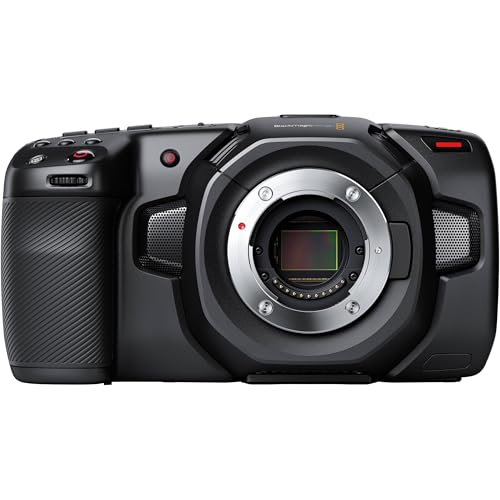

Are Blackmagic cameras good?
Blackmagic cameras are very good for narrative, commercial, documentary, studio, live-production, and independent filmmaking when image data and post-production control matter more than consumer-camera automation.
The strongest value is the recording workflow. Depending on the model, Blackmagic provides internal BRAW or ProRes, open-gate capture, dual-native ISO, timecode, professional exposure tools, XLR-class audio, and SD, CFast, CFexpress, or USB-C media. BRAW metadata integrates closely with DaVinci Resolve for color, proxies, audio, and delivery. The trade-off is automation: most bodies lack dependable continuous autofocus and IBIS, while internal ND is model-specific. Pocket, PYXIS, and URSA systems may also need external power, support, storage, monitoring, and audio, so budget the complete rig rather than only the body.
What are the main advantages of Blackmagic cameras?
The main advantages of Blackmagic cameras are as follows:
- Blackmagic RAW workflow: BRAW records high-bit-depth image data with selectable constant-bitrate or constant-quality compression while preserving camera metadata for post-production. It is tightly integrated with DaVinci Resolve, making proxy creation, color management, grading, and finishing unusually coherent from capture to delivery.
- Professional monitoring tools: Large touchscreens and the Blackmagic OS interface provide waveform, false color, zebras, focus peaking, frame guides, LUT monitoring, audio meters, and detailed recording status without requiring a menu-heavy consumer interface. These tools help expose log or RAW footage consistently on set.
- Strong image quality for the price: Pocket, Cinema, and PYXIS 6K models commonly provide around 13 stops of claimed dynamic range, while higher-end URSA Cine sensors reach beyond that depending on the model. Dual-native-ISO designs and high-resolution capture give filmmakers substantial grading latitude when exposure and lighting are controlled.
- Flexible recording media: Different models can record to SD UHS-II, CFast 2.0, CFexpress, external USB-C SSDs, or high-capacity URSA media modules. This lets a production balance cost, sustained data rate, capacity, and offload speed instead of being locked to one proprietary card format across the range.
- DaVinci Resolve ecosystem value: Many Blackmagic cameras include a DaVinci Resolve Studio license, which adds editing, Fusion visual effects, Fairlight audio, color grading, noise reduction, and delivery tools. Blackmagic also makes switchers, monitors, converters, capture cards, and control surfaces that integrate naturally into the same production environment.
What are the main disadvantages of Blackmagic cameras?
The main disadvantages of Blackmagic cameras are as follows:
- Limited autofocus automation: Most Blackmagic cameras offer single autofocus, push-to-focus, or basic lens control rather than modern continuous face, eye, animal, or vehicle tracking. Documentary operators working alone often need manual focus, a dedicated focus puller, or an external focusing system.
- Little or no in-body stabilization: Pocket, Cinema, PYXIS, and most URSA bodies depend on stabilized lenses, a shoulder rig, tripod, gimbal, or other support. Gyro metadata can assist stabilization in post on compatible cameras, but cropping and render time make it different from optical or sensor-shift stabilization during capture.
- Rigging and power add cost: A low body price can require a cage, rails, top handle, external battery plate, SSD holder, matte box, monitor, electronic viewfinder, audio hardware, and support system before the camera is production-ready. Pocket batteries in particular are better suited to short takes than an uninterrupted shooting day.
- Internal ND filters vary by model: Pocket Cinema Camera 6K Pro and many URSA or Studio configurations provide built-in ND filters, while Pocket 4K, Pocket 6K G2, Cinema Camera 6K, and PYXIS configurations may require lens filters or a matte box. This changes run-and-gun speed and should be checked before choosing between bodies that otherwise share a sensor.
- High data rates and rolling shutter require planning: BRAW, ProRes, high frame rates, and open-gate capture can generate large files and demand certified media, fast backups, and a powerful editing workstation. Sensor readout also differs by resolution and crop mode, so fast camera movement may show skew unless the selected mode is tested.

Who makes Blackmagic cameras?
Blackmagic cameras are made by Blackmagic Design Pty Ltd, a privately held Australian company founded in 2001 by filmmaker and engineer Grant Petty, who remains its chief executive. The company is headquartered in Melbourne and first became widely known for DeckLink video capture cards that lowered the cost of professional uncompressed video workflows.
Blackmagic expanded through ATEM switchers, HyperDeck recorders, converters, monitors, and software. Its 2009 acquisition of Da Vinci Systems produced the platform that became DaVinci Resolve; later deals added Cintel scanning and Fairlight audio. The 2.5K Blackmagic Cinema Camera, announced in 2012, established the company’s camera strategy: prioritize codecs, dynamic range, monitoring, and post-production integration over consumer autofocus and stills features. Pocket Cinema, URSA, Studio, Micro, Cinema Camera, and PYXIS families now serve small crews through high-end productions within the Blackmagic OS and Resolve ecosystem.
What are the main Blackmagic camera models?
The main Blackmagic camera models and families are as follows:
- Pocket Cinema Camera 4K: This compact Micro Four Thirds cinema camera records Blackmagic RAW and ProRes to CFast 2.0, SD UHS-II, or an external USB-C drive. Its lens mount is highly adaptable and the Four Thirds sensor supports compact optics, but there is no internal ND, continuous subject-tracking AF, or IBIS.
- Pocket Cinema Camera 6K G2 and 6K Pro: These Super 35 EF-mount bodies provide 6K BRAW, a larger sensor than the Pocket 4K, mini-XLR audio, and NP-F570 battery power. The 6K Pro adds a brighter tilting screen, built-in motorized ND filters, and support for an optional electronic viewfinder, making it the more complete handheld package.
- Cinema Camera 6K and PYXIS 6K: Cinema Camera 6K combines a full-frame 6K sensor, L mount, open-gate recording, and a large rear touchscreen in a Pocket-style body. PYXIS places similar imaging into a box body with side plates, stronger rigging and connection options, and mount variants suited to L, PL, or EF lens workflows.
- PYXIS 12K and URSA Cine families: PYXIS 12K brings a higher-resolution full-frame RGBW sensor to the modular box format, while URSA Cine models add more professional power, media, connections, cooling, and high-capacity production options. These cameras target commercials, features, virtual production, and crews that build around matte boxes, wireless video, follow focus, timecode, and cinema power.
- URSA Mini Pro and URSA Broadcast: URSA Mini Pro cameras combine shoulder-camera ergonomics, internal ND filters, interchangeable or adaptable cinema mounts, and higher-end recording options, including Super 35 12K models. URSA Broadcast variants emphasize B4 lenses, ENG controls, streaming, and live-production integration rather than compact narrative shooting.
- Studio and Micro Studio Camera families: Studio Cameras provide large displays, tally, talkback, return program feeds, Ethernet or SDI connections, and remote control for ATEM-based multicamera production. Micro Studio bodies reduce size for fixed positions, cranes, vehicles, or compact live rigs but normally require external monitoring and support.
How much do Blackmagic cameras cost?
New Blackmagic cameras generally cost about £1,000-£13,800 for the body or production package, with Pocket models at the lower end and fully equipped URSA Cine systems at the upper end.
Pocket Cinema Camera 4K commonly costs around £1,000-£1,200. Pocket Cinema Camera 6K G2 is typically about £1,600-£1,900, while the 6K Pro is approximately £2,100-£2,300 because it adds internal ND filters, a brighter tilting display, and optional viewfinder support.
Cinema Camera 6K generally costs £1,400-£1,700, while PYXIS 6K is about £2,800-£3,100 before rigging and PYXIS 12K about £4,300-£5,200. Studio and broadcast models commonly span £1,000-£3,900, depending on sensor and connections. URSA Mini Pro and URSA Cine systems range from roughly £6,000 for a body to £12,900-£13,800 or more for a production kit. Lenses, support, power, certified media, monitoring, audio, timecode, and backup storage can add another £900-£6,900.
How do Blackmagic cameras compare with RED models?
Blackmagic is usually the stronger value for BRAW capture, DaVinci Resolve integration, and built-in monitoring tools, while RED is stronger for R3D workflows, premium modular systems, global-shutter options, and established high-end rental pipelines. Neither brand is designed around consumer autofocus or in-body stabilization.
Blackmagic spans Pocket, PYXIS, Studio, Broadcast, and URSA bodies with false color, waveform monitoring, external recording, and a Resolve Studio license on many models. RED’s KOMODO and V-RAPTOR families emphasize modular RF/PL workflows, professional expansion, and production environments already standardized on RED media and accessories.
Blackmagic cameras cost roughly £1,000-£13,800, while current RED bodies generally begin around £5,200 and can exceed £17,200 before a full production kit. Blackmagic is easier to justify for small crews and multi-camera ownership; choose RED when R3D, a specific global-shutter body, or rental-house compatibility offsets the substantially higher rigged price.
What should you consider while choosing the best Blackmagic camera?
Consider the following points while choosing a Blackmagic camera:
- Production role and body shape: Pocket and Cinema Camera bodies provide an integrated rear screen, PYXIS is a modular box, URSA is designed for larger professional rigs, and Studio or Broadcast models target live production. Decide whether the camera will be handheld, shoulder-mounted, gimbal-mounted, fixed in a studio, or built into a multicamera system before comparing resolution.
- Sensor format and crop: Pocket 4K uses a Four Thirds sensor, Pocket 6K uses Super 35, and Cinema Camera 6K/PYXIS 6K use full frame, while URSA families include several sensor sizes. Calculate the field of view, rolling shutter, lens image-circle requirement, and depth-of-field behavior for the exact sensor and recording window.
- Lens mount and electronic control: Micro Four Thirds, EF, L, PL, and B4 configurations support very different lenses and adapters. Confirm image-circle coverage, flange-depth compatibility, aperture control, lens stabilization, autofocus commands, metadata, and whether the mount is fixed or interchangeable on the chosen body.
- BRAW, ProRes, and resolution: Check which codecs are available at the required resolution, frame rate, sensor area, and compression setting; ProRes is not offered identically across every new model. Estimate actual minutes per card for BRAW constant-bitrate or constant-quality modes rather than selecting media from the headline 4K, 6K, or 12K label.
- Dynamic range and exposure: Claimed dynamic range varies from roughly 13 stops on many Pocket/Cinema/PYXIS 6K models to higher figures on selected URSA Cine sensors. Test highlight roll-off, noise, dual-native-ISO behavior, and the intended color-managed Resolve workflow because a published stop count does not replace correct lighting and exposure.
- Autofocus and stabilization: Assume manual focus and external support unless the exact model and lens prove otherwise. Push autofocus, gyro metadata, optical lens stabilization, gimbals, and post stabilization each solve different problems and do not equal continuous subject tracking plus IBIS.
- ND filter configuration: Pocket 6K Pro and many URSA or Studio configurations include internal ND, while Pocket 4K, Pocket 6K G2, Cinema Camera 6K, and PYXIS may need screw-in filters or a matte box. Confirm filter strength, infrared control, lens changes, and run-and-gun speed for the intended lighting conditions.
- Media and data rate: Match SD UHS-II, CFast 2.0, CFexpress, USB-C SSD, or URSA media to the camera's certified sustained write requirements. Calculate daily footage volume, on-set copies, checksum verification, backup capacity, and post-production bandwidth before selecting a high-data-rate codec.
- Power, rigging, and monitoring: Price batteries, external power, cage or side plates, rails, handles, monitor or EVF, wireless video, timecode, follow focus, and cable management as one package. Check connector placement and screen visibility, because a small body can become awkward when every accessory is added without a rig plan.
- Audio, sync, and post workflow: Verify microphone inputs, phantom power, XLR or mini-XLR adapters, headphone monitoring, timecode, genlock, SDI/HDMI output, and ATEM control according to the production. Confirm that the editing system, Resolve version, GPU, storage, and collaborators can handle the chosen BRAW or ProRes files before shooting.