Scored using Wi-Fi extenders Methodology v3.0
Wi-Fi extenders Methodology v3.0
Mathematical & Unbiased Scoring
Products in this category are scored under Frontum Wi-Fi extenders Methodology v3.0: the technical score from the specifications is the base, and independent expert and video reviews (up to ±0.5 points), owner opinions (up to ±0.3) and best-of lists (up to +0.3) move it up or down.
Explore Wi-Fi extenders Methodology v3.0

D-Link DAP-1325 review: 64 specs compared

Avg. price:~£20Wi-Fi version:Wi-Fi 4 (802.11n)Wi-Fi speed:300 MbpsCoverage area:?

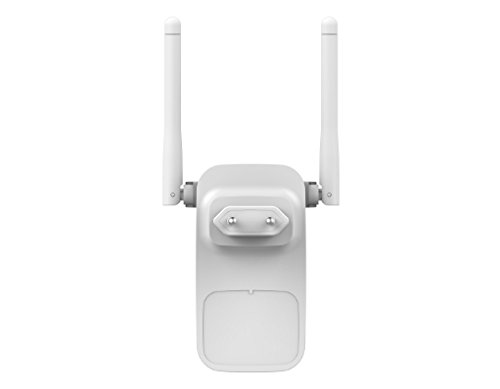
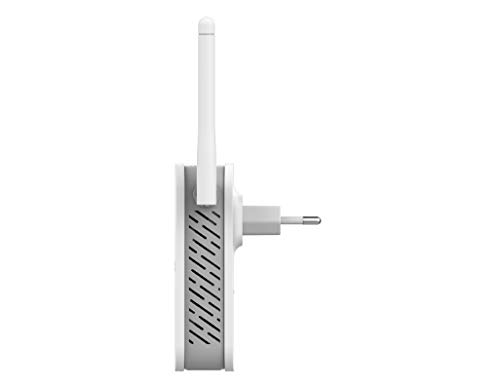
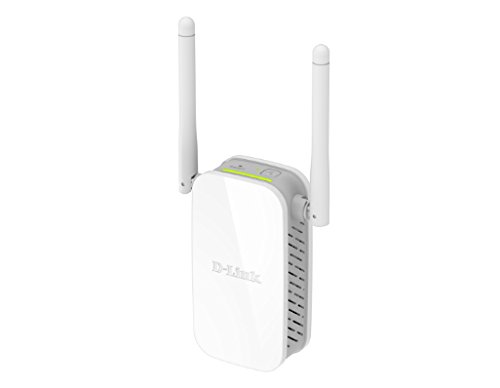
D-Link DAP-1325 Review: Compare 64 technical specifications and 1 expert and video reviews to see how this product ranks in the Wi-Fi extenders category and whether it is worth buying.
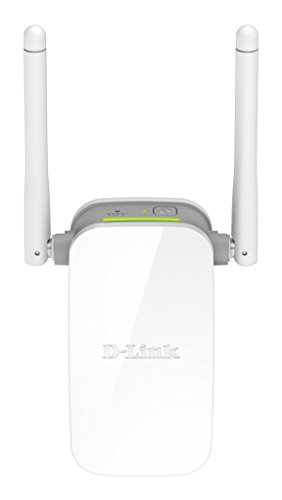
D-Link DAP-1325
6.4/10

Overall score

Score
6.4/ 10
✕
What it is
Our main score for this model, 1–10. It combines specs, best-of lists, expert reviews and ratings from across the web.
How we count it
Parts: Technical score 45%, List score 30%, Reviews score 15%, User score 10%
Marks: Each part gets a mark out of 10. For reviews, lists and owners, a typical model in this category gets about 8 and the best one gets 10.
No data yet: A part with no data shows "?". It counts as the mark of a weaker model in this category (4 in 5 models with data score higher). This way, models with reviews, lists and owners usually come out ahead.
Score distribution
â–¼
<55-66-77-88-99-10
Score components

45%

5.9

Technical score

30%

?

List scoreNot enough data yet, so we use 7.5, the mark of a weaker model in this category

15%

5.9

Reviews score

10%

5.9

User score

â–¼Worse than 80% of wi fi extenders
7.5

Value for money

Value for money
7.5/ 10
✕
What it is
An indicator that combines the Wi-Fi extender's overall rating with its cost.
When it matters
When you are looking for a Wi‑Fi extender with a good balance between performance and price.
Score distribution
â–¼
<55-66-77-88-99-10
Score components

70%

6.4

Overall score

30%

10

Price

â–¼Worse than 80%
5.9

Technical score

Technical score
5.9/ 10
✕
What it is
How good the specs are compared with the other models in this category, 1–10.
How we count it
Areas: We rate the specs in each area against the other models in this category.
Weighting: The areas that matter most to buyers count more. The shares are shown under Score components.
Share: The technical score is 45% of the overall score.
Score distribution
â–¼
<55-66-77-88-99-10
Score components

40%

4.6

Wi-Fi Performance

30%

6.5

Network

12%

9.7

Setup

10%

6.6

Hardware

8%

3.3

Ports

â–¼Worse than 78%
5.9

Reviews score

Reviews score
5.9/ 10
✕
What it is
Average grade from independent test sites, magazines and video reviewers, 1–10.
How we count it
Grades: Each review's own score is converted to 1–10; without one, we grade the review ourselves. Big test sites count more, short reviews half as much as full tests. A video review counts half.
Score: The average grade is 80% of the review mark; the number of reviews is the other 20% (1 review = 5, the typical number in this category = 8, the most-reviewed model = 10).
Enough data: With few reviews, the average grade is pulled toward the typical grade of this category. No reviews yet: 7.5 for now.
Share: Reviews count 15% of the overall score.
Score distribution
â–¼
<55-66-77-88-99-10

5.9

Mark 7.4 is below the typical mark 7.9 of this category, so it cannot lift the score above the technical score

80%

8.0

Average grade

20%

5.0

Popularity

Grades by review (1)
1 video review, counting half as much as a written test. Reviews count 15% of the overall score.
Ratings from across the web count in the User score, not in this score.
â–¼Worse than 84%
5.9

User score

User score
5.9/ 10
✕
What it is
How happy buyers are with this model, based on ratings from across the web.
How we count it
Enough data: A model needs at least 1 rating from across the web. Without one, it counts as 7.6, the mark of a weaker rated model in this category.
Share: User score counts 10% of the overall score.
Score distribution
â–¼
<55-66-77-88-99-10

5.9

Mark 7.4 is below the typical mark 8.1 of this category, so it cannot lift the score above the technical score

70%

7.4

Rating

30%

7.3

Popularity

â–¼Worse than 88%
?

List score

List score
7.5/ 10
✕
What it is
How often independent test sites, magazines and video reviewers put this model in their best-of lists for this category.
How we count it
Points: The model in the most lists of this category gets 10; the others get 8 to 10 in proportion. In no list yet: 7.5. Lists count 30% of the overall score.
Enough data: Every list counts, even a single one. With fewer than 5 best-of lists in the category, this part is left out.
Lists with this model (0)
Not in any best-of list yet, so this part counts as 7.5. Models in a list get 8 to 10.
Not in any best-of list yet
  • d-link-dap-1325
  • d-link-dap-1325
  • d-link-dap-1325
  • d-link-dap-1325
  • d-link-dap-1325
d-link-dap-1325
d-link-dap-1325
d-link-dap-1325
d-link-dap-1325
d-link-dap-1325
Where to buy
    N/A~ £20
Best rankings
Available: ranking among products currently available (including other versions of this product).All: ranking among all products in the database.
Loading...
Loading category ranking...

Technical Specifications of Wi-Fi extender D-Link DAP-1325

Technical score
Technical score
5.9/ 10
✕
What it is
How good the specs are compared with the other models in this category, 1–10.
How we count it
Areas: We rate the specs in each area against the other models in this category.
Weighting: The areas that matter most to buyers count more. The shares are shown under Score components.
Share: The technical score is 45% of the overall score.
Score distribution
â–¼
<55-66-77-88-99-10
Score components:

40%

4.6

Wi-Fi Performance

30%

6.5

Network

12%

9.7

Setup

10%

6.6

Hardware

8%

3.3

Ports

5.9
Reviews score
5.9
User score
5.9
List score
?
Value for money
Value for money
7.5/ 10
✕
What it is
An indicator that combines the Wi-Fi extender's overall rating with its cost.
When it matters
When you are looking for a Wi‑Fi extender with a good balance between performance and price.
Score distribution
â–¼
<55-66-77-88-99-10
Score components:

70%

6.4

Overall score

30%

10

Price

7.5
Wi-Fi version
Wi-Fi 4 (802.11n)
This Wi-Fi extender supports Wi-Fi 4 (802.11n), less advanced than 86.4% of Wi-Fi extenders and equal to 13.6% of Wi-Fi extenders.
Wi-Fi bands
Single-band
This Wi-Fi extender supports Single-band, less versatile than 85.6% of Wi-Fi extenders and equal to 14.4% of Wi-Fi extenders.
6 GHz band support
no
This Wi-Fi extender does not support the 6 GHz band. 3.9% of Wi-Fi extenders support the 6 GHz band.
Wi-Fi speed
300 Mbps
This Wi-Fi extender reaches 300 Mbps Wi-Fi speed, slower than 86.8% of Wi-Fi extenders and equal to 13.2% of Wi-Fi extenders.
Max speed 2.4 GHz
300 Mbps
This Wi-Fi extender reaches 300 Mbps on the 2.4 GHz band, which is slower than 55.8% of Wi-Fi extenders and equal to 42.9% of Wi-Fi extenders.
Show more
Ethernet backhaul
?
Mesh compatibility
?
Mesh standard
?
Roaming feature
yes
This Wi-Fi extender supports roaming. 11.8% of Wi-Fi extenders support roaming.
802.11k support
no
This Wi-Fi extender does not support 802.11k. 76.4% of Wi-Fi extenders support 802.11k.
Show more
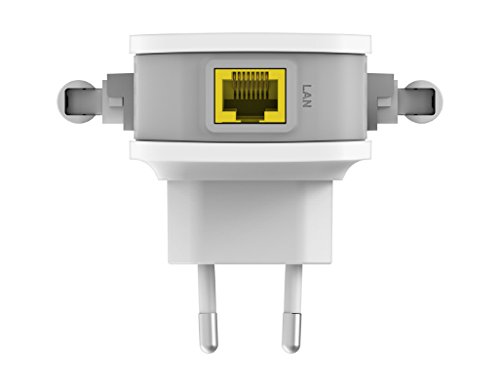
N. of LAN ports
1
This Wi-Fi extender has 1 LAN port/s, more than 7.4% of Wi-Fi extenders and equal to 79.1% of Wi-Fi extenders.
Ethernet port speed
0.1 Gbps
This Wi-Fi extender offers 0.1 Gbps Ethernet speed, slower than 70.6% of Wi-Fi extenders and equal to 26.7% of Wi-Fi extenders.
N. of USB ports
0
This Wi-Fi extender has 0 USB port/s, fewer than 2% of Wi-Fi extenders and equal to 98.1% of Wi-Fi extenders.
PoE standard
N/A
Dedicated smartphone app
yes
This Wi-Fi extender comes with a dedicated smartphone app. 10.4% of Wi-Fi extenders come with a dedicated smartphone app.
Web UI management
yes
This Wi-Fi extender has a web management interface. 1.3% of Wi-Fi extenders have a web management interface.
Automatic firmware updates
?
LED control
yes
This Wi-Fi extender has LED control. 9.7% of Wi-Fi extenders have LED control.
Buttons present
?
Show more
Mounting type
wall-plug
Portable design
yes
This Wi-Fi extender has a portable design. 24.5% of Wi-Fi extenders have a portable design.
Height
?
Width
?
Thickness
?
Show more

D-Link DAP-1325 vs the average Wi-Fi extender

246810TotalWi-Fi PerformanceNetworkPortsSetupHardware
  • 2.75x cheaper
    D-Link DAP-1325 is cheaper than the average Wi-Fi extender (£20 vs £55).
    £20 vs £55
  • 2.75x cheaper
    D-Link DAP-1325 is cheaper than the average Wi-Fi extender (£20 vs £55).
    £20 vs £55
  • No WPA3 support
    This Wi-Fi extender does not support WPA3, while the average Wi-Fi extender does. 63.8% of Wi-Fi extenders support WPA3.
  • 82.9% slower Wi-Fi speed
    This Wi-Fi extender reaches slower Wi-Fi speed than the average Wi-Fi extender (300 Mbps vs 1,750 Mbps). The average Wi-Fi extender reaches 1,750 Mbps Wi-Fi speed.
    300 Mbps vs 1,750 Mbps
  • No MU-MIMO support
    This Wi-Fi extender does not support MU-MIMO, while the average Wi-Fi extender does. 75% of Wi-Fi extenders support MU-MIMO.
  • Limited band support
    This Wi-Fi extender supports less versatile Wi-Fi bands than the average Wi-Fi extender (Single-band vs Dual-band). The average Wi-Fi extender supports Dual-band Wi-Fi bands.
    Single-band vs Dual-band
  • 90% slower Ethernet speed
    This Wi-Fi extender offers slower Ethernet speed than the average Wi-Fi extender (0.1 Gbps vs 1 Gbps). The average Wi-Fi extender offers 1 Gbps Ethernet speed.
    0.1 Gbps vs 1 Gbps
  • No 802.11k support
    This Wi-Fi extender does not support 802.11k, while the average Wi-Fi extender does. 75.8% of Wi-Fi extenders support 802.11k.
  • No band steering
    This Wi-Fi extender does not have band steering, while the average Wi-Fi extender does. 65.5% of Wi-Fi extenders have band steering.
  • Outdated Wi-Fi standard
    This Wi-Fi extender supports a less advanced Wi-Fi version than the average Wi-Fi extender (Wi-Fi 4 (802.11n) vs Wi-Fi 5 (802.11ac)). The average Wi-Fi extender supports Wi-Fi 5 (802.11ac).
    Wi-Fi 4 (802.11n) vs Wi-Fi 5 (802.11ac)
  • 19.2% lower review score
    Reviews score
    5.9/ 10
    ✕
    What it is
    Average grade from independent test sites, magazines and video reviewers, 1–10.
    How we count it
    Grades: Each review's own score is converted to 1–10; without one, we grade the review ourselves. Big test sites count more, short reviews half as much as full tests. A video review counts half.
    Score: The average grade is 80% of the review mark; the number of reviews is the other 20% (1 review = 5, the typical number in this category = 8, the most-reviewed model = 10).
    Enough data: With few reviews, the average grade is pulled toward the typical grade of this category. No reviews yet: 7.5 for now.
    Share: Reviews count 15% of the overall score.
    Score distribution
    â–¼
    <55-66-77-88-99-10

    5.9

    Mark 7.4 is below the typical mark 7.9 of this category, so it cannot lift the score above the technical score

    80%

    8.0

    Average grade

    20%

    5.0

    Popularity

    Grades by review (1)
    1 video review, counting half as much as a written test. Reviews count 15% of the overall score.
    Ratings from across the web count in the User score, not in this score.
    5.9 vs 7.3
  • 21.3% lower user score
    User score
    5.9/ 10
    ✕
    What it is
    How happy buyers are with this model, based on ratings from across the web.
    How we count it
    Enough data: A model needs at least 1 rating from across the web. Without one, it counts as 7.6, the mark of a weaker rated model in this category.
    Share: User score counts 10% of the overall score.
    Score distribution
    â–¼
    <55-66-77-88-99-10

    5.9

    Mark 7.4 is below the typical mark 8.1 of this category, so it cannot lift the score above the technical score

    70%

    7.4

    Rating

    30%

    7.3

    Popularity

    5.9 vs 7.5
  • 10.6% worse value for money
    D-Link DAP-1325 has a lower value-for-money score than the average Wi-Fi extender (7.46 vs 8.2).
    7.46 vs 8.25
  • 82.9% slower Wi-Fi speed
    This Wi-Fi extender reaches slower Wi-Fi speed than the average Wi-Fi extender (300 Mbps vs 1,750 Mbps). The average Wi-Fi extender reaches 1,750 Mbps Wi-Fi speed.
    300 Mbps vs 1,750 Mbps
  • No MU-MIMO support
    This Wi-Fi extender does not support MU-MIMO, while the average Wi-Fi extender does. 75% of Wi-Fi extenders support MU-MIMO.
  • Limited band support
    This Wi-Fi extender supports less versatile Wi-Fi bands than the average Wi-Fi extender (Single-band vs Dual-band). The average Wi-Fi extender supports Dual-band Wi-Fi bands.
    Single-band vs Dual-band
  • No band steering
    This Wi-Fi extender does not have band steering, while the average Wi-Fi extender does. 65.5% of Wi-Fi extenders have band steering.
  • Outdated Wi-Fi standard
    This Wi-Fi extender supports a less advanced Wi-Fi version than the average Wi-Fi extender (Wi-Fi 4 (802.11n) vs Wi-Fi 5 (802.11ac)). The average Wi-Fi extender supports Wi-Fi 5 (802.11ac).
    Wi-Fi 4 (802.11n) vs Wi-Fi 5 (802.11ac)
  • 25% slower 2.4 GHz speed
    This Wi-Fi extender delivers slower 2.4 GHz speeds than the average Wi-Fi extender (300 Mbps vs 400 Mbps). The average Wi-Fi extender reaches 400 Mbps on 2.4 GHz.
    300 Mbps vs 400 Mbps
  • Basic QAM level
    This Wi-Fi extender uses a less advanced QAM level than the average Wi-Fi extender (64-QAM vs 256-QAM). The average Wi-Fi extender uses 256-QAM.
    64-QAM vs 256-QAM
  • No WPA3 support
    This Wi-Fi extender does not support WPA3, while the average Wi-Fi extender does. 63.8% of Wi-Fi extenders support WPA3.
  • No 802.11k support
    This Wi-Fi extender does not support 802.11k, while the average Wi-Fi extender does. 75.8% of Wi-Fi extenders support 802.11k.
  • 90% slower Ethernet speed
    This Wi-Fi extender offers slower Ethernet speed than the average Wi-Fi extender (0.1 Gbps vs 1 Gbps). The average Wi-Fi extender offers 1 Gbps Ethernet speed.
    0.1 Gbps vs 1 Gbps

Video reviews

Hands-on testing, unboxing, and real-world video evaluations
8.0
The Trendy Blog
≈ estimated
17/03/2018
Unboxing and setup · one speed test
Verdict
D-Link DAP-1325 performed well for its low price, with simple setup and a clear speed gain on 2.4 GHz.
Not graded
Not graded
Not graded
Not graded
Not graded
Not graded

Third-party reviews

What customers like about D-Link DAP-1325

  • The app gives a simple way to set it up.
  • Roaming helps devices switch between this unit and the router.
  • The web page lets you change settings without an app.
  • A portable design means it can move between rooms.
  • LED control lets you switch off the status lights.
  • Beamforming helps aim the signal at connected devices.

What customers don't like about D-Link DAP-1325

  • 300 Mbps on one band is slow for several devices at once.
  • No MU-MIMO means several devices share the connection less efficiently.
  • No 802.11k or 802.11r and no band steering make switching between units less smooth.
  • The Ethernet port is only 0.1 Gbps, which slows wired devices.
  • It has no guest network, so visitors use your main network.

Verdict

For one room with a weak signal and light browsing, the D-Link DAP-1325 is a budget pick that keeps things simple. Its single band tops out at 300 Mbps, and there is no 5 GHz option at all. Setup is straightforward through the app, and the web page is there if you want more control. Roaming and beamforming are there, but the Ethernet port runs at 0.1 Gbps, which slows any wired device. The trade-off is that it has no MU-MIMO, no 802.11k, no WPA3 and no guest network, so it shares the connection less smoothly. It suits someone who needs a fix for one room and does not mind a basic set of extras. Anyone with a bigger home or a fast connection should look at a newer model instead.

Compare D-Link DAP-1325 with other products in the Wi-Fi extenders category

1Product to compare no. 1
VS
2Product to compare no. 2
VS
3Product to compare no. 3 (optional)

Graphic comparison of D-Link DAP-1325 and other products in the Wi-Fi extenders category

No results found