Scored using Routers Methodology v3.0
Routers Methodology v3.0
Mathematical & Unbiased Scoring
Products in this category are scored under Frontum Routers Methodology v3.0: the technical score from the specifications is the base, and independent expert and video reviews (up to ±0.5 points), owner opinions (up to ±0.3) and best-of lists (up to +0.3) move it up or down.
Explore Routers Methodology v3.0

TP-Link Archer MR600 review: 77 specs compared

Avg. price:~£120Wi-Fi version:Wi-Fi 5 (802.11ac)Wi-Fi speed:1200 MbpsLAN port speeds:1 GbpsMesh Wi-Fi:yes

TP-Link Archer MR600 Review: Compare 77 technical specifications, 17 expert and video reviews and 3 best-of lists to see how this product ranks in the Routers category and whether it is worth buying.
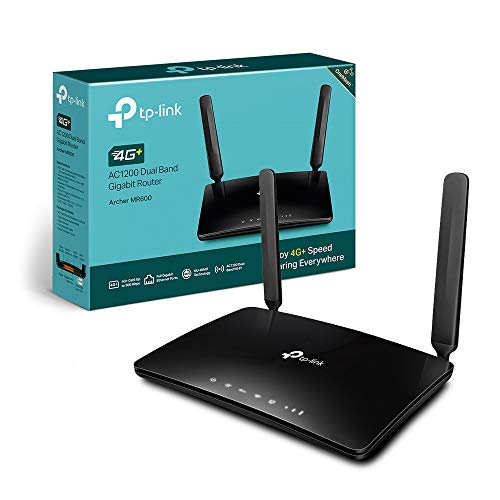
TP-Link Archer MR600
8.0/10

Overall score

Score
8.0/ 10
✕
What it is
Our main score for this model, 1–10. It combines specs, expert reviews, best-of lists and owners.
How we count it
Parts: Technical score 40%, Reviews score 25%, List score 25%, Sentiment score 10%
Marks: Each part gets a mark out of 10. For reviews, lists and owners, a typical model in this category gets about 8 and the best one gets 10.
No data yet: A part with no data shows "?". It counts as the mark of a weaker model in this category (4 in 5 models with data score higher). This way, models with reviews, lists and owners usually come out ahead.
Score distribution
▼
<55-66-77-88-99-10
Score components

40%

7.3

Technical score

25%

8.6

Reviews score

25%

8.4

List score

10%

8.5

Sentiment score

▲Better than 82% of routers
8.6

Value for money

Value for money
8.6/ 10
✕
What it is
An indicator that combines the router's overall rating with its cost.
When it matters
When you are looking for a router with a good balance between network performance, features, and price.
Score distribution
▼
<55-66-77-88-99-10
Score components

70%

8.0

Overall score

30%

9.9

Price

▲Better than 89%
7.3

Technical score

Technical score
7.3/ 10
✕
What it is
How good the specs are compared with the other models in this category, 1–10.
How we count it
Areas: We rate the specs in each area against the other models in this category.
Weighting: The areas that matter most to buyers count more. The shares are shown under Score components.
Share: The technical score is 40% of the overall score.
Score distribution
▼
<55-66-77-88-99-10
Score components

26%

6.5

Wireless

20%

5.4

Ports

18%

9.4

Networking

14%

8.0

Security

12%

8.0

Hardware

10%

8.0

Management

▲Better than 60%
8.6

Reviews score

Reviews score
8.6/ 10
✕
What it is
Average grade from independent test sites, magazines and video reviewers, 1–10.
How we count it
Grades: Each review's own score is converted to 1–10; without one, we grade the review ourselves. Big test sites count more, short reviews half as much as full tests. A video review counts half.
Score: The average grade is 80% of the review mark; the number of reviews is the other 20% (1 review = 5, the typical number in this category = 8, the most-reviewed model = 10).
Enough data: With few reviews, the average grade is pulled toward the typical grade of this category. No reviews yet: 7.7 for now.
Share: Reviews count 25% of the overall score.
Score distribution
▼
<55-66-77-88-99-10

80%

8.5

Average grade

20%

9.1

Popularity

Grades by review (17)
5 reviews: 1 with a printed score, 4 estimated from the review. 12 video reviews, each counting half as much as a written test. Reviews count 25% of the overall score.
User ratings collected online are not part of this score.
▲Better than 86%
8.4

List score

List score
8.4/ 10
✕
What it is
How often independent test sites, magazines and video reviewers put this model in their best-of lists for this category.
How we count it
Points: The model in the most lists of this category gets 10; the others get 8 to 10 in proportion. In no list yet: 7.5. Lists count 25% of the overall score.
Enough data: Every list counts, even a single one. With fewer than 5 best-of lists in the category, this part is left out.
Lists with this model (3)
List score: in 3 of 84 lists (4%)
▲Better than 87%
  • tp-link-archer-mr600
  • tp-link-archer-mr600
  • tp-link-archer-mr600
  • tp-link-archer-mr600
  • tp-link-archer-mr600
  • tp-link-archer-mr600
tp-link-archer-mr600
Where to buy
*As an Amazon Associate, we earn from qualifying purchases.
Best rankings
Available: ranking among products currently available (including other versions of this product).All: ranking among all products in the database.

What reviewers say about the TP-Link Archer MR600

Based on 6 · 13

Reviewers value the security, mesh support and fixed-line backup, but criticise the antennas and dated Wi-Fi, while mobile speed views are split.
Praised
Mixed views
Criticised
Pick a topic to see who said what

What owners say about the TP-Link Archer MR600

Based on 188 owners sharing their experience in online comments

29%positive19%mixed52%negative

Owners value fast mobile internet and affordable broadband alternatives, but many report unreliable connections, disappointing speeds, and limited band controls.

What owners dislike

  • Speeds often fall to 3 to 5 Mbps when the modem drops off the best tower, sometimes while speed tests still show around 50 Mbps.32
  • Owners see connected with no internet, SIMs not detected, or settings lost after power cuts, often needing a full reconfiguration.27
  • Owners say internet drops once or twice a day while Wi-Fi stays on, and a physical restart is needed to bring it back.21
  • Owners report weak signal, with one or two bars indoors and as little as 0 to 1 bar on a terrace, and external antennas sometimes not helping.12
  • Owners on V1 can't see the band selection option without beta firmware, and some find band changes slow, with the page taking 40 seconds.10
  • Owners say V1 units show firmware not up to date even after updating, get no new firmware, and one router stopped working after an update.9
  • Owners find Wi-Fi range weak, often reaching through only one wall, and some devices, such as cameras or thermostats, fail to connect.8
  • Owners say the 4G+ icon stays off and two bands, such as B1 with B7 or B3 with B1, won't aggregate, though each works alone.8
  • Owners see upload speeds far below download, sometimes under 1 Mbps, while a phone on the same SIM uploads faster.7
  • Owners report strict NAT on consoles despite port forwarding and DMZ, getting kicked from game groups, and ping spikes during matches.6

Points mentioned by at least 3 owners, most mentioned first.

Loading...
Loading category ranking...

Routers model ranking

Ranked #76 of 524 models in Routers (Overall score)

Technical Specifications of router TP-Link Archer MR600

Technical score
Technical score
7.3/ 10
✕
What it is
How good the specs are compared with the other models in this category, 1–10.
How we count it
Areas: We rate the specs in each area against the other models in this category.
Weighting: The areas that matter most to buyers count more. The shares are shown under Score components.
Share: The technical score is 40% of the overall score.
Score distribution
▼
<55-66-77-88-99-10
Score components:

26%

6.5

Wireless

20%

5.4

Ports

18%

9.4

Networking

14%

8.0

Security

12%

8.0

Hardware

10%

8.0

Management

7.3
Reviews score
8.6
List score
8.4
Value for money
Value for money
8.6/ 10
✕
What it is
An indicator that combines the router's overall rating with its cost.
When it matters
When you are looking for a router with a good balance between network performance, features, and price.
Score distribution
▼
<55-66-77-88-99-10
Score components:

70%

8.0

Overall score

30%

9.9

Price

8.6
Brand name
TP-Link
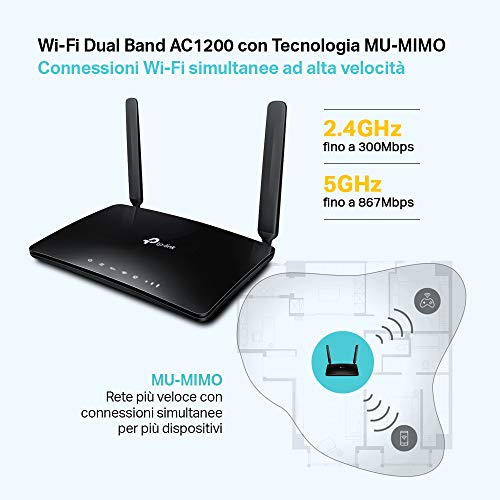
Wi-Fi version
Wi-Fi 5 (802.11ac)
This router uses Wi-Fi 5 (802.11ac), which is more advanced than 35.2% of routers and equal to 23.1% of routers.
Wi-Fi bands
2.4 GHz + 5 GHz
This router supports 2.4 GHz + 5 GHz Wi-Fi bands, which are more versatile than 24.2% of routers and equal to 65.6% of routers.
Wi-Fi speed
1,200 Mbps
This router delivers 1,200 Mbps Wi-Fi speed, which is lower than 55.6% of routers and equal to 6.6% of routers.
Channel widths supported
20 MHz + 40 MHz + 80 MHz
This router supports 20 MHz + 40 MHz + 80 MHz channel width options, which is more than 36.5% of routers and the same as 29.9% of routers.
Show more
What reviewers say
Wi-Fi security protocols
WPA/WPA2, WEP
This router supports WPA/WPA2, WEP Wi-Fi security protocols, which are less advanced than 96.5% of routers and equal to 1.6% of routers.
DoS protection
yes
This router includes DoS protection. 9.8% of routers include DoS protection.
SPI intrusion protection
yes
This router includes SPI-based intrusion protection. 4.7% of routers include SPI-based intrusion protection.
MAC address filtering
yes
This router supports MAC address filtering. 1.7% of routers include MAC address filtering.
URL filter
yes
This router supports URL filtering. 2.6% of routers include URL filtering.
Show more
What reviewers say
IPv6 support
yes
This router supports IPv6. 8.8% of routers are IPv6-ready.
Dynamic routing
no
This router does not support dynamic routing. 46.2% of routers support dynamic routing.
Inter-VLAN routing
?
VLAN tagging
yes
This router supports VLAN tagging. 33.6% of routers include VLAN tagging.
QoS
yes
This router includes QoS controls. 2.4% of routers include QoS controls.
Show more
What reviewers say
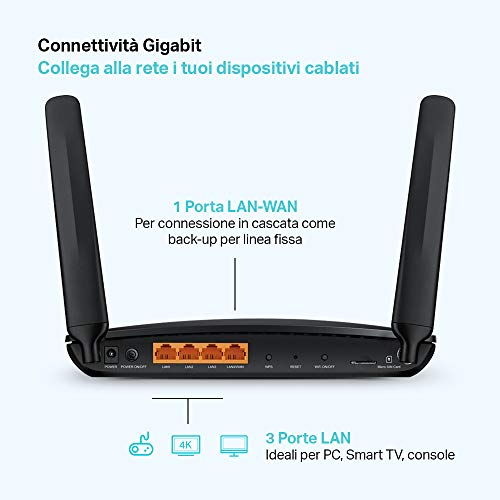
N. of LAN ports
3
This router has 3 LAN ports, which is fewer than 66% of routers and the same as 18.2% of routers.
LAN port speeds
1 Gbps
This router offers 1 Gbps on its LAN ports, which is faster than 25.7% of routers and on par with 56.1% of routers.
N. of WAN ports
1
This router has 1 WAN ports, which is more than 0.8% of routers and the same as 89.4% of routers.
N. of USB ports
0
This router has 0 USB ports, which is fewer than 60.1% of routers and the same as 39.9% of routers.
Power over Ethernet (PoE)
no
This router does not support Power over Ethernet (PoE). 1.7% of routers can be powered over Ethernet.
Show more
What reviewers say
Management interface
Web UI, App, Cloud
This router uses Web UI, App, Cloud for management, which is more advanced than 94.3% of routers and equal to 1.5% of routers.
Firmware upgrade method
Web UI, App, Automatic
This router supports Web UI, App, Automatic firmware update methods, which are more convenient than 71.9% of routers and equal to 27.2% of routers.
Traffic monitoring
yes
This router includes traffic monitoring. 13.9% of routers include traffic monitoring.
Guest Wi-Fi network
yes
This router offers a guest Wi‑Fi network. 7.3% of routers offer a guest Wi‑Fi network.
Captive portal
no
This router does not offer captive portal features. 22.4% of routers offer captive portal features.
Show more
CPU clock speed
?
RAM capacity
?
Internal storage
?
Hardware acceleration
yes
This router offers hardware acceleration. 24.9% of routers offer hardware acceleration.
N. of external antennas
2
This router has 2 external antennas, which is more than 41.2% of routers and the same as 16.5% of routers.
Show more
What reviewers say

TP-Link Archer MR600 vs the average router

246810TotalWirelessSecurityNetworkingPortsManagementHardware
  • Supports mesh Wi-Fi
    This router supports mesh Wi-Fi, while the average router does not. 45.2% of routers support mesh Wi-Fi.
  • Supports automatic failover
    This router offers automatic failover, while the average router does not. 31.2% of routers offer automatic failover.
  • Better management tools
    This router uses the management interface Web UI, App, Cloud, while the average router uses Web UI, App.
    Web UI, App, Cloud vs Web UI, App
  • Newer cellular modem
    This router uses a 4G cellular modem, while the average router uses none (external modem required).
    4G vs none (external modem required)
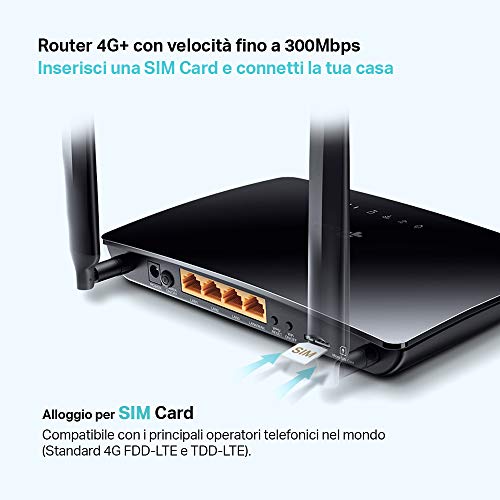
  • Includes SIM slot
    This router has a SIM slot, while the average router does not. 11.5% of routers have a SIM slot.
  • More advanced integrated modem
    This router uses a 4G integrated modem, while the average router uses none (external modem required).
    4G vs none (external modem required)
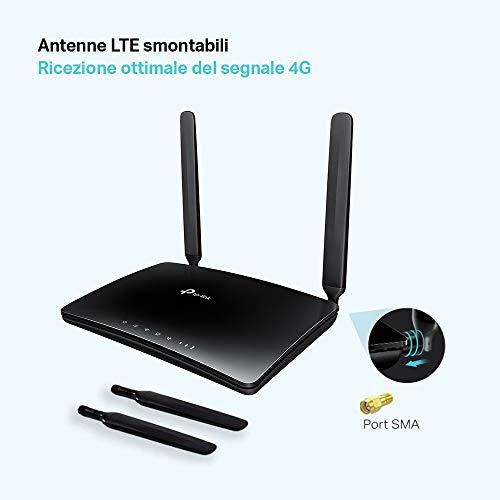
  • Removable antennas
    This router has removable antennas, while the average router does not. 27.8% of routers have removable antennas.
  • 11.7% higher review score
    Reviews score
    8.6/ 10
    ✕
    What it is
    Average grade from independent test sites, magazines and video reviewers, 1–10.
    How we count it
    Grades: Each review's own score is converted to 1–10; without one, we grade the review ourselves. Big test sites count more, short reviews half as much as full tests. A video review counts half.
    Score: The average grade is 80% of the review mark; the number of reviews is the other 20% (1 review = 5, the typical number in this category = 8, the most-reviewed model = 10).
    Enough data: With few reviews, the average grade is pulled toward the typical grade of this category. No reviews yet: 7.7 for now.
    Share: Reviews count 25% of the overall score.
    Score distribution
    ▼
    <55-66-77-88-99-10

    80%

    8.5

    Average grade

    20%

    9.1

    Popularity

    Grades by review (17)
    5 reviews: 1 with a printed score, 4 estimated from the review. 12 video reviews, each counting half as much as a written test. Reviews count 25% of the overall score.
    User ratings collected online are not part of this score.
    8.6 vs 7.7
  • 11.7% higher review score
    Reviews score
    8.6/ 10
    ✕
    What it is
    Average grade from independent test sites, magazines and video reviewers, 1–10.
    How we count it
    Grades: Each review's own score is converted to 1–10; without one, we grade the review ourselves. Big test sites count more, short reviews half as much as full tests. A video review counts half.
    Score: The average grade is 80% of the review mark; the number of reviews is the other 20% (1 review = 5, the typical number in this category = 8, the most-reviewed model = 10).
    Enough data: With few reviews, the average grade is pulled toward the typical grade of this category. No reviews yet: 7.7 for now.
    Share: Reviews count 25% of the overall score.
    Score distribution
    ▼
    <55-66-77-88-99-10

    80%

    8.5

    Average grade

    20%

    9.1

    Popularity

    Grades by review (17)
    5 reviews: 1 with a printed score, 4 estimated from the review. 12 video reviews, each counting half as much as a written test. Reviews count 25% of the overall score.
    User ratings collected online are not part of this score.
    8.6 vs 7.7
  • 6.3% better value for money
    TP-Link Archer MR600 has better value for money than the average router (8.59 vs 8.1).
    8.59 vs 8.08
  • Supports mesh Wi-Fi
    This router supports mesh Wi-Fi, while the average router does not. 45.2% of routers support mesh Wi-Fi.
  • Supports automatic failover
    This router offers automatic failover, while the average router does not. 31.2% of routers offer automatic failover.
  • Newer cellular modem
    This router uses a 4G cellular modem, while the average router uses none (external modem required).
    4G vs none (external modem required)
  • Includes SIM slot
    This router has a SIM slot, while the average router does not. 11.5% of routers have a SIM slot.
  • More advanced integrated modem
    This router uses a 4G integrated modem, while the average router uses none (external modem required).
    4G vs none (external modem required)
  • Better management tools
    This router uses the management interface Web UI, App, Cloud, while the average router uses Web UI, App.
    Web UI, App, Cloud vs Web UI, App
  • Removable antennas
    This router has removable antennas, while the average router does not. 27.8% of routers have removable antennas.
  • 1 fewer LAN ports
    This router has fewer LAN ports than the average router (3 vs 4). The average router has 4 LAN ports.
    3 vs 4
  • No VPN server support
    This router cannot act as a VPN server, while the average router can. 68.8% of routers can act as a VPN server.
  • 1 fewer USB ports
    This router has fewer USB ports than the average router (0 vs 1). The average router has 1 USB ports.
    0 vs 1
  • No DLNA support
    This router does not support DLNA, while the average router does. 50.4% of routers support DLNA.
  • 31.4% slower Wi-Fi speed
    This router has a lower Wi-Fi speed than the average router (1,200 Mbps vs 1,750 Mbps). The average router reaches Wi-Fi speed of 1,750 Mbps.
    1,200 Mbps vs 1,750 Mbps
  • Less capable NAS services
    This router includes none NAS services, while the average router includes SMB, media server.
    none vs SMB, media server
  • 87 mm thicker design
    This router is thicker than the average router (141 mm vs 54 mm). The average router is 54 mm thick.
    141 mm vs 54 mm
  • Weaker Wi-Fi security
    This router supports the Wi-Fi security protocols WPA/WPA2, WEP, while the average router supports WPA2, WPA/WPA2, WEP.
    WPA/WPA2, WEP vs WPA2, WPA/WPA2, WEP
  • 31.4% slower Wi-Fi speed
    This router has a lower Wi-Fi speed than the average router (1,200 Mbps vs 1,750 Mbps). The average router reaches Wi-Fi speed of 1,750 Mbps.
    1,200 Mbps vs 1,750 Mbps
  • Narrower DFS range
    This router has fewer supported DFS channels than the average router (52-64 + 100-140 vs 52-64 + 100-144). The average router supports 52-64 + 100-144 DFS channels.
    52-64 + 100-140 vs 52-64 + 100-144
  • No VPN server support
    This router cannot act as a VPN server, while the average router can. 68.8% of routers can act as a VPN server.
  • Weaker Wi-Fi security
    This router supports the Wi-Fi security protocols WPA/WPA2, WEP, while the average router supports WPA2, WPA/WPA2, WEP.
    WPA/WPA2, WEP vs WPA2, WPA/WPA2, WEP
  • 1 fewer LAN ports
    This router has fewer LAN ports than the average router (3 vs 4). The average router has 4 LAN ports.
    3 vs 4
  • 1 fewer USB ports
    This router has fewer USB ports than the average router (0 vs 1). The average router has 1 USB ports.
    0 vs 1
  • No DLNA support
    This router does not support DLNA, while the average router does. 50.4% of routers support DLNA.
  • Less capable NAS services
    This router includes none NAS services, while the average router includes SMB, media server.
    none vs SMB, media server
  • 87 mm thicker design
    This router is thicker than the average router (141 mm vs 54 mm). The average router is 54 mm thick.
    141 mm vs 54 mm

Video reviews

Hands-on testing, unboxing, and real-world video evaluations

9.0
Craig
≈ estimated
15/05/2024
Long-term use · about three years of home internet
Verdict
TP-Link Archer MR600 is a highly recommended 4G router with no problems over three years of use.
9.0
Geekanoids
≈ estimated
16/04/2021
Hands-on review · 4G speed tests and design
Verdict
TP-Link Archer MR600 is a strong alternative to wired broadband, especially where the 4G signal is good.
8.0
diyIndia
≈ estimated
06/09/2020
Unboxing and review · three weeks of use
Verdict
TP-Link Archer MR600 has been trouble-free for three weeks and works as a useful 4G backup, though band selection is missing.
9.0
NASCompares
≈ estimated
24/04/2020
Software review · about a month of use
Verdict
TP-Link Archer MR600 is feature-rich and good value, rivalling high-end routers as a mobile SIM device.
9.0
NASCompares
≈ estimated
09/02/2020
Hardware review · 4G backup router for travel and offices
Verdict
TP-Link Archer MR600 is a very good 4G router, but SIM compatibility depends on the mobile network.
9.0
Unbox hub
≈ estimated
22/02/2025
Unboxing · first look and speed test
Verdict
TP-Link Archer MR600 gives fast speeds and works straight out of the box with no extra settings needed.
Not graded yet
Not graded yet
Not graded yet
Not graded yet
Not graded yet
Not graded yet

Expert reviews

In-depth analysis and verdict from leading tech publications

8.0
expertreviews.co.uk
✓ explicit
10/10/2022
Hands-on test · 4G backup router
Verdict
The TP-Link Archer MR600 V2 suits a backup connection, switching to its SIM in ten seconds when broadband fails, but its Wi-Fi is slow and it has no 5G.
9.0
technodays.fr
≈ estimated
18/07/2021
Field test · Holiday home router
Verdict
The TP-Link Archer MR600 suits holiday homes and travel use, keeping a stable 4G signal with parental controls, but it lacks data-usage tracking.
9.0
tuttotech.net
≈ estimated
30/11/2020
Hands-on test · Mesh extender kit
Verdict
The TP-Link Archer MR600 and RE300 repeater form a dependable OneMesh pair that shares one Wi-Fi network, though the repeater can cut signal by up to half.
8.0
macitynet.it
≈ estimated
17/03/2020
Hands-on test · Dual-band SIM router
Verdict
The TP-Link Archer MR600 is a practical SIM router for offices and shops, with Gigabit wired ports, but its external antennas are bulky and it lacks USB.
8.0
italiamac.it
≈ estimated
02/08/2021
Hands-on test · Mesh 4G router
Verdict
The TP-Link Archer MR600 pairs with the RE300 repeater to give one Wi-Fi network across a home, and switches to 4G when the fixed line fails.

Third-party reviews

What customers like about TP-Link Archer MR600

  • 4G+ Cat6 modem with download speeds up to 300 Mbps
  • Four Gigabit Ethernet ports for wired devices
  • MU-MIMO and support for up to 64 devices
  • OneMesh support for a TP-Link mesh network
  • Cable on the WAN port turns it into a normal Wi-Fi router
  • Rated 4.5 out of 5 by over 14,000 Amazon UK buyers

What customers don't like about TP-Link Archer MR600

  • No USB port
  • No VPN server
  • Wi-Fi 5 AC1200 only, no 6 GHz band
  • Cat6 modem caps mobile speed at 300 Mbps

Verdict

Four Gigabit Ethernet ports, a 4G+ Cat6 modem and AC1200 dual-band Wi-Fi 5 define the Archer MR600. The modem downloads at up to 300 Mbps, and the Wi-Fi supports MU-MIMO and up to 64 devices. Two removable SMA antennas can be replaced for better reception, and a cable on the WAN port lets it work as an ordinary Wi-Fi router. OneMesh support allows it to join other TP-Link OneMesh devices in a mesh network. Guest Wi-Fi, parental controls and failover are included, and management runs through the Tether app or web interface. There is no USB port and no VPN server. More than 14,000 Amazon UK buyers have rated it 4.5 out of 5 on average. It is a mid-range choice for homes that want fast mobile internet and cabled devices.

Compare TP-Link Archer MR600 with other routers

1Product to compare no. 1
VS
2Product to compare no. 2
VS
3Product to compare no. 3 (optional)

Graphic comparison of TP-Link Archer MR600 and other routers

No results found