Scored using Motherboards Methodology v3.0
Motherboards Methodology v3.0
Mathematical & Unbiased Scoring
Products in this category are scored under Frontum Motherboards Methodology v3.0: the technical score from the specifications is the base, and independent expert and video reviews (up to ±0.5 points), owner opinions (up to ±0.3) and best-of lists (up to +0.3) move it up or down.
Explore Motherboards Methodology v3.0

MSI X99S MPower review: 109 specs compared

Avg. price:~£200CPU socket:LGA 2011-3Chipset:Intel X99Form factor:ATX

MSI X99S MPower Review: Compare 109 technical specifications and 3 expert reviews to see how this product ranks in the Motherboards category and whether it is worth buying.
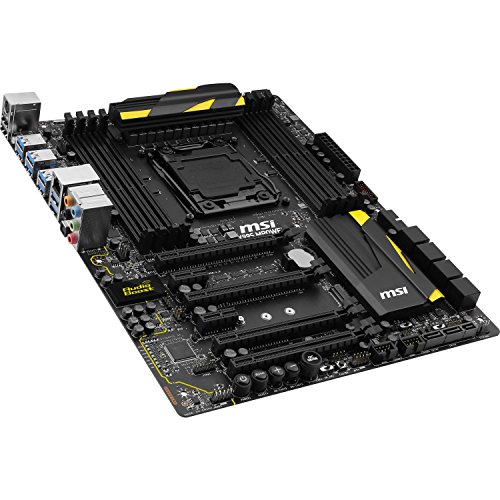
MSI X99S MPower
6.0/10

Overall score

Score
6.0/ 10
✕
What it is
Our main score for this model, 1–10. It combines specs, expert reviews, best-of lists, owners and ratings from across the web.
How we count it
Parts: Technical score 40%, Reviews score 20%, List score 20%, Sentiment score 10%, User score 10%
Marks: Each part gets a mark out of 10. For reviews, lists and owners, a typical model in this category gets about 8 and the best one gets 10.
No data yet: A part with no data shows "?". It counts as the mark of a weaker model in this category (4 in 5 models with data score higher). This way, models with reviews, lists and owners usually come out ahead.
Score distribution
â–¼
<55-66-77-88-99-10
Score components

40%

5.4

Technical score

20%

5.4

Reviews score

20%

?

List scoreNot enough data yet, so we use 7.5, the mark of a weaker model in this category

10%

?

Sentiment scoreNot enough data yet, so we use 7.0, the mark of a weaker model in this category

10%

5.4

User score

â–¼Worse than 87% of motherboards
7.0

Value for money

Value for money
7.0/ 10
✕
What it is
An indicator that combines the motherboard's overall rating with its cost.
When it matters
When you are looking for a motherboard that offers a strong balance of features, performance, and price.
Score distribution
â–¼
<55-66-77-88-99-10
Score components

70%

6.0

Overall score

30%

9.5

Price

â–¼Worse than 91%
5.4

Technical score

Technical score
5.4/ 10
✕
What it is
How good the specs are compared with the other models in this category, 1–10.
How we count it
Areas: We rate the specs in each area against the other models in this category.
Weighting: The areas that matter most to buyers count more. The shares are shown under Score components.
Share: The technical score is 40% of the overall score.
Score distribution
â–¼
<55-66-77-88-99-10
Score components

19%

6.8

Memory

16%

6.9

Platform

16%

4.1

Storage

15%

3.4

Network

13%

4.9

Ports

8%

2.9

Expansion

8%

6.5

Power & Cooling

5%

8.7

Audio

â–¼Worse than 64%
5.4

Reviews score

Reviews score
5.4/ 10
✕
What it is
Average grade from independent test sites, magazines and video reviewers, 1–10.
How we count it
Grades: Each review's own score is converted to 1–10; without one, we grade the review ourselves. Big test sites count more, short reviews half as much as full tests. A video review counts half.
Score: The average grade is 80% of the review mark; the number of reviews is the other 20% (1 review = 5, the typical number in this category = 8, the most-reviewed model = 10).
Enough data: With few reviews, the average grade is pulled toward the typical grade of this category. No reviews yet: 7.8 for now.
Share: Reviews count 20% of the overall score.
Score distribution
â–¼
<55-66-77-88-99-10

5.4

Mark 8.2 is below the typical mark 8.3 of this category, so it cannot lift the score above the technical score

80%

8.3

Average grade

20%

8.0

Popularity

Grades by review (3)
3 reviews: 1 with a printed score, 2 estimated from the review. Reviews count 20% of the overall score.
Ratings from across the web count in the User score, not in this score.
â–¼Worse than 82%
5.4

User score

User score
5.4/ 10
✕
What it is
How happy buyers are with this model, based on ratings from across the web.
How we count it
Enough data: A model needs at least 1 rating from across the web. Without one, it counts as 7.9, the mark of a weaker rated model in this category.
Share: User score counts 10% of the overall score.
Score distribution
â–¼
<55-66-77-88-99-10

5.4

Mark 7.6 is below the typical mark 8.4 of this category, so it cannot lift the score above the technical score

70%

8.1

Rating

30%

6.4

Popularity

â–¼Worse than 80%
?

List score

List score
7.5/ 10
✕
What it is
How often independent test sites, magazines and video reviewers put this model in their best-of lists for this category.
How we count it
Points: The model in the most lists of this category gets 10; the others get 8 to 10 in proportion. In no list yet: 7.5. Lists count 20% of the overall score.
Enough data: Every list counts, even a single one. With fewer than 5 best-of lists in the category, this part is left out.
Lists with this model (0)
Not in any best-of list yet, so this part counts as 7.5. Models in a list get 8 to 10.
Not in any best-of list yet
  • msi-x99s-mpower
msi-x99s-mpower
Where to buy
*As an Amazon Associate, we earn from qualifying purchases.
Best rankings
Available: ranking among products currently available (including other versions of this product).All: ranking among all products in the database.

What reviewers say about the MSI X99S MPower

Based on 3

Reviewers largely praise its overclocking ability, though not everyone was impressed.
Praised
Pick a topic to see who said what
Loading...
Loading category ranking...

Technical Specifications of motherboard MSI X99S MPower

Technical score
Technical score
5.4/ 10
✕
What it is
How good the specs are compared with the other models in this category, 1–10.
How we count it
Areas: We rate the specs in each area against the other models in this category.
Weighting: The areas that matter most to buyers count more. The shares are shown under Score components.
Share: The technical score is 40% of the overall score.
Score distribution
â–¼
<55-66-77-88-99-10
Score components:

19%

6.8

Memory

16%

6.9

Platform

16%

4.1

Storage

15%

3.4

Network

13%

4.9

Ports

8%

2.9

Expansion

8%

6.5

Power & Cooling

5%

8.7

Audio

5.4
Reviews score
5.4
User score
5.4
List score
?
Value for money
Value for money
7.0/ 10
✕
What it is
An indicator that combines the motherboard's overall rating with its cost.
When it matters
When you are looking for a motherboard that offers a strong balance of features, performance, and price.
Score distribution
â–¼
<55-66-77-88-99-10
Score components:

70%

6.0

Overall score

30%

9.5

Price

7.0
CPU socket
LGA 2011-3
This motherboard uses LGA 2011-3, which is less up-to-date than 84.4% of Motherboards and the same as 2.4% of Motherboards.
CPU platform
Intel
Chipset
Intel X99
This motherboard uses Intel X99, which is less capable than 67.9% of Motherboards and as capable as 2.3% of Motherboards.
Form factor
ATX
Integrated graphics support
no
This motherboard does not support integrated graphics. 89.9% of motherboards support this feature.
Show more
What reviewers say
DDR memory version
DDR4
This motherboard uses DDR4, which is more modern than 13.4% of Motherboards and the same as 50.4% of Motherboards.
Memory slots
8
This motherboard has 8 Memory slots, which is more than 93.9% of motherboards and equal to 5.8% of motherboards.
Maximum memory capacity
128 GB
This motherboard supports up to 128 GB of memory, which is more than 40.1% of motherboards and equal to 31.9% of motherboards.
Memory channels
4
Maximum RAM speed
3,333 MT/s
This motherboard supports memory speeds up to 3,333 MT/s, which is lower than that of 61.8% of motherboards and equal to that of 0.6% of motherboards.
Show more
N. of M.2 sockets
1
This motherboard has 1 M.2 sockets, which is fewer than 69.5% of motherboards and equal to 18.9% of motherboards.
M.2 slot interface per slot
1x PCIe 3.0 x4/SATA
This motherboard offers M.2 slots: 1x PCIe 3.0x4/SATA, which is slower than 74.3% of Motherboards and the same as 10.4% of Motherboards.
N. of SATA 3 connectors
10
This motherboard has 10 SATA 3 connectors, which is more than 96.6% of motherboards and equal to 3.3% of motherboards.
some SATA ports disabled with certain M.2 use
Supported RAID levels
0/1/5/10
This motherboard RAID support: 0/1/5/10, which is more flexible than 32.5% of Motherboards and the same as 67.5% of Motherboards.
NVMe RAID support
no
This motherboard does not support NVMe RAID. 59.9% of motherboards support this feature.
Show more
N. of PCIe 5.0 x16 slots
0
This motherboard has 0 PCIe 5.0x16 slots, which is fewer than 31.6% of motherboards and equal to 68.4% of motherboards.
N. of PCIe 4.0 x16 slots
0
This motherboard has 0 PCIe 4.0x16 slots, which is fewer than 44.8% of motherboards and equal to 55.2% of motherboards.
N. of PCIe 3.0 x16 slots
4
This motherboard has 4 PCIe 3.0x16 slots, which is more than 93.9% of motherboards and equal to 3.4% of motherboards.
PCIe slot electrical configuration
x16
This motherboard splits its PCIe lanes as x16, which is less generous than 81% of Motherboards and the same as 16.1% of Motherboards.
PCIe bifurcation support
no
This motherboard does not support PCIe bifurcation. 59.8% of motherboards support this feature.
Requires BIOS mod.
Show more
Total USB ports (rear I/O)
10
This motherboard has 10 USB ports (rear I/O), which is more than 75.7% of motherboards and equal to 15.4% of motherboards.
Total USB ports (including headers)
18
This motherboard has 18 USB ports (including headers), which is more than 81.8% of motherboards and equal to 5.2% of motherboards.
Total USB-C ports (rear I/O)
0
This motherboard has 0 USB-C ports (rear I/O), which is fewer than 64.2% of motherboards and equal to 35.8% of motherboards.
Total USB-C ports (including headers)
0
This motherboard has 0 USB-C ports (including headers), which is fewer than 69.5% of motherboards and equal to 30.5% of motherboards.
N. of USB 3.2 Gen2x2 ports (USB-C)
0
This motherboard has 0 USB 3.2 Gen2x2 ports (USB-C), which is fewer than 18% of motherboards and equal to 82% of motherboards.
Show more
LAN speed
1 Gbps
This motherboard supports LAN speeds up to 1 Gbps, which is lower than that of 51.1% of motherboards and equal to that of 48.9% of motherboards.
LAN controller
?
N. of RJ45 ports
1
This motherboard has 1 RJ45 ports, which is fewer than 14.4% of motherboards and equal to 85.6% of motherboards.
Wi-Fi connectivity
no
This motherboard does not support Wi-Fi connectivity. 50.1% of motherboards support this feature.
Wi-Fi version
N/A
Show more
Audio codec
Realtek ALC1150
This motherboard uses Realtek ALC1150, which is higher-end than 53% of Motherboards and the same as 9.1% of Motherboards.
Audio channels
7.1
This motherboard offers 7.1 audio channels, which is more than 4.7% of motherboards and equal to 95.3% of motherboards.
Audio SNR
115 dB
This motherboard has an audio SNR of 115 dB, which is higher than that of 47.7% of motherboards and equal to that of 7.6% of motherboards.
Headphone amp support
yes
This motherboard supports a headphone amp. 41.2% of motherboards support this feature.
supports up to 600Ω.
N. of 3.5mm audio jacks
6
This motherboard has 6 3.5mm audio jacks, which is more than 87% of motherboards and equal to 13% of motherboards.
Show more
VRM phases
12
This motherboard has 12 VRM phases, which is more than 55.4% of motherboards and equal to 4.4% of motherboards.
N. of CPU power connectors
2
This motherboard has 2 CPU power connectors, which is more than 54.9% of motherboards and equal to 44.8% of motherboards.
N. of fan headers
5
This motherboard has 5 fan headers, which is fewer than 50% of motherboards and equal to 14.6% of motherboards.
Pump header
no
This motherboard does not have a pump header. 77.9% of motherboards include this feature.
Pump header max current
0 A
This motherboard supports up to 0 A on the pump header, which is lower than that of 76.2% of motherboards and equal to that of 23.8% of motherboards.
Show more

MSI X99S MPower vs the average motherboard

246810TotalPlatformMemoryStorageExpansionPortsNetworkAudioPower & Cooling
  • 4 more memory slots
    This motherboard has more memory slots than the average motherboard (8 vs 4). The average motherboard has 4 memory slot/s.
    8 vs 4
  • 2 more rear USB ports
    This motherboard has more rear USB ports than the average motherboard (10 vs 8). The average motherboard has 8 rear USB port/s.
    10 vs 8
  • 1 more CPU power connectors
    This motherboard has more CPU power connectors than the average motherboard (2 vs 1). The average motherboard has 1 CPU power connectors.
    2 vs 1
  • Includes dual BIOS
    This motherboard has dual BIOS, while the average motherboard does not. 22.4% of motherboards include dual BIOS.
  • Includes POST code display
    This motherboard has a POST code display, while the average motherboard does not. 26.7% of motherboards include a POST code display.
  • 3 more total USB connections
    This motherboard has more total USB connections than the average motherboard (18 vs 15). The average motherboard has 15 total USB connections.
    18 vs 15
  • 1 more USB 3.2 Gen1 headers
    This motherboard has more USB 3.2 Gen1 headers than the average motherboard (2 vs 1). The average motherboard has 1 USB 3.2 Gen1 header/s.
    two internal headers
    2 vs 1
  • 6 more SATA 3 connectors
    This motherboard has more SATA 3 connectors than the average motherboard (10 vs 4). The average motherboard has 4 SATA 3 connectors.
    some SATA ports disabled with certain M.2 use
    10 vs 4
  • Includes dual BIOS
    This motherboard has dual BIOS, while the average motherboard does not. 22.4% of motherboards include dual BIOS.
  • Includes POST code display
    This motherboard has a POST code display, while the average motherboard does not. 26.7% of motherboards include a POST code display.
  • Rear-panel CMOS reset button
    This motherboard has a rear-panel CMOS reset button, while the average motherboard does not. 26.5% of motherboards include a rear-panel CMOS reset button.
  • 4 more memory slots
    This motherboard has more memory slots than the average motherboard (8 vs 4). The average motherboard has 4 memory slot/s.
    8 vs 4
  • 6 more SATA 3 connectors
    This motherboard has more SATA 3 connectors than the average motherboard (10 vs 4). The average motherboard has 4 SATA 3 connectors.
    some SATA ports disabled with certain M.2 use
    10 vs 4
  • 3 more PCIe 3.0x16 slots
    This motherboard has more PCIe 3.0x16 slots than the average motherboard (4 vs 1). The average motherboard has 1 PCIe 3.0x16 slot/s.
    4 vs 1
  • 1 more PCIe x1 slots
    This motherboard has more PCIe x1 slots than the average motherboard (2 vs 1). The average motherboard has 1 PCIe x1 slot/s.
    2 vs 1
  • 2 more rear USB ports
    This motherboard has more rear USB ports than the average motherboard (10 vs 8). The average motherboard has 8 rear USB port/s.
    10 vs 8
  • 3 more total USB connections
    This motherboard has more total USB connections than the average motherboard (18 vs 15). The average motherboard has 15 total USB connections.
    18 vs 15
  • 1 more USB 3.2 Gen1 headers
    This motherboard has more USB 3.2 Gen1 headers than the average motherboard (2 vs 1). The average motherboard has 1 USB 3.2 Gen1 header/s.
    two internal headers
    2 vs 1
  • 4 more USB 3.2 Gen1 ports
    This motherboard has more USB 3.2 Gen1 ports than the average motherboard (8 vs 4). The average motherboard has 4 USB 3.2 Gen1 port/s.
    8 vs 4
  • 3 more 3.5mm audio jacks
    This motherboard has more 3.5mm audio jacks than the average motherboard (6 vs 3). The average motherboard has 3 3.5mm audio jacks.
    6 vs 3
  • More capable onboard audio
    This motherboard has a higher-end audio codec than the average motherboard (Realtek ALC1150 vs Realtek ALC897).
    Realtek ALC1150 vs Realtek ALC897
  • 1 more CPU power connectors
    This motherboard has more CPU power connectors than the average motherboard (2 vs 1). The average motherboard has 1 CPU power connectors.
    2 vs 1
  • Includes onboard RGB lighting
    This motherboard has onboard RGB lighting, while the average motherboard does not. 50% of motherboards include onboard RGB lighting.
    integrated Mystic Light support
  • More VRM phases
    This motherboard has more VRM phases than the average motherboard (12 vs 10). The average motherboard has 10 VRM phase/s.
    12 vs 10
  • More basic chipset
    This motherboard uses a more basic chipset than the average motherboard (Intel X99 vs Intel B860).
    Intel X99 vs Intel B860
  • 60% lower LAN speed
    This motherboard has a lower LAN speed than the average motherboard (1 Gbps vs 2.5 Gbps). The average motherboard offers LAN speed of 2.5 Gbps.
    1 Gbps vs 2.5 Gbps
  • Slower NVMe storage slots
    This motherboard has slower M.2 slots than the average motherboard (1x PCIe 3x4/SATA vs 1x PCIe 5x4, 2x PCIe 4x4).
    1x PCIe 3.0x4/SATA vs 1x PCIe 5.0x4, 2x PCIe 4.0x4
  • No NVMe RAID support
    This motherboard does not support NVMe RAID, while the average motherboard does. 59.9% of motherboards support NVMe RAID.
  • No Wi-Fi connectivity
    This motherboard does not support Wi-Fi connectivity, while the average motherboard does. 50.1% of motherboards support Wi-Fi connectivity.
  • No BIOS flashback support
    This motherboard does not support BIOS flashback, while the average motherboard does. 51.3% of motherboards support BIOS flashback.
  • 1 fewer M.2 sockets
    This motherboard has fewer M.2 sockets than the average motherboard (1 vs 2). The average motherboard has 2 M.2 socket/s.
    1 vs 2
  • 1 fewer rear USB-C ports
    This motherboard has fewer rear USB-C ports than the average motherboard (0 vs 1). The average motherboard has 1 rear USB-C port/s.
    0 vs 1
  • 26.0% lower review score
    Reviews score
    5.4/ 10
    ✕
    What it is
    Average grade from independent test sites, magazines and video reviewers, 1–10.
    How we count it
    Grades: Each review's own score is converted to 1–10; without one, we grade the review ourselves. Big test sites count more, short reviews half as much as full tests. A video review counts half.
    Score: The average grade is 80% of the review mark; the number of reviews is the other 20% (1 review = 5, the typical number in this category = 8, the most-reviewed model = 10).
    Enough data: With few reviews, the average grade is pulled toward the typical grade of this category. No reviews yet: 7.8 for now.
    Share: Reviews count 20% of the overall score.
    Score distribution
    â–¼
    <55-66-77-88-99-10

    5.4

    Mark 8.2 is below the typical mark 8.3 of this category, so it cannot lift the score above the technical score

    80%

    8.3

    Average grade

    20%

    8.0

    Popularity

    Grades by review (3)
    3 reviews: 1 with a printed score, 2 estimated from the review. Reviews count 20% of the overall score.
    Ratings from across the web count in the User score, not in this score.
    5.4 vs 7.3
  • 27.0% lower user score
    User score
    5.4/ 10
    ✕
    What it is
    How happy buyers are with this model, based on ratings from across the web.
    How we count it
    Enough data: A model needs at least 1 rating from across the web. Without one, it counts as 7.9, the mark of a weaker rated model in this category.
    Share: User score counts 10% of the overall score.
    Score distribution
    â–¼
    <55-66-77-88-99-10

    5.4

    Mark 7.6 is below the typical mark 8.4 of this category, so it cannot lift the score above the technical score

    70%

    8.1

    Rating

    30%

    6.4

    Popularity

    5.4 vs 7.4
  • 9.6% worse value for money
    MSI X99S MPower has worse value for money than the average motherboard (7.02 vs 7.7).
    7.02 vs 7.7
  • 33.3% more expensive
    MSI X99S MPower is more expensive than the average motherboard (£200 vs £150).
    £200 vs £150
  • More basic chipset
    This motherboard uses a more basic chipset than the average motherboard (Intel X99 vs Intel B860).
    Intel X99 vs Intel B860
  • No BIOS flashback support
    This motherboard does not support BIOS flashback, while the average motherboard does. 51.3% of motherboards support BIOS flashback.
  • No integrated graphics support
    This motherboard does not support integrated graphics, while the average motherboard does. 89.8% of motherboards support integrated graphics.
  • Fewer BIOS update methods
    This motherboard offers fewer BIOS update methods than the average motherboard (UEFI utility, Windows app vs UEFI utility, flashback, Windows app).
    UEFI utility, Windows app vs UEFI utility, flashback, Windows app
  • Not ready for Windows 11
    This motherboard is not ready for Windows 11, while the average motherboard is. 77.4% of motherboards are ready for Windows 11.
  • Narrower Windows support
    This motherboard supports a narrower range of Windows versions than the average motherboard (Windows 10, Windows 8.1, Windows 7 vs Windows 11, Windows 10).
    Windows 10, Windows 8.1, Windows 7 vs Windows 11, Windows 10
  • More dated socket
    This motherboard uses a more dated socket than the average motherboard (LGA 2011-3 vs LGA 1151).
    LGA 2,011-3 vs LGA 1,151
  • 29.1% lower maximum RAM speed
    This motherboard has a lower maximum RAM speed than the average motherboard (3,333 MT/s vs 4,699.5 MT/s). The average motherboard supports RAM speed of 4,699.5 MT/s.
    3,333 MT/s vs 4,699.5 MT/s
  • 33.3% lower overclocked RAM speed
    This motherboard has a lower overclocked RAM speed than the average motherboard (3,333 MT/s vs 5,000 MT/s). The average motherboard supports overclocked RAM speed of 5,000 MT/s.
    3,333 MT/s vs 5,000 MT/s
  • Slower NVMe storage slots
    This motherboard has slower M.2 slots than the average motherboard (1x PCIe 3x4/SATA vs 1x PCIe 5x4, 2x PCIe 4x4).
    1x PCIe 3.0x4/SATA vs 1x PCIe 5.0x4, 2x PCIe 4.0x4
  • No NVMe RAID support
    This motherboard does not support NVMe RAID, while the average motherboard does. 59.9% of motherboards support NVMe RAID.
  • 1 fewer M.2 sockets
    This motherboard has fewer M.2 sockets than the average motherboard (1 vs 2). The average motherboard has 2 M.2 socket/s.
    1 vs 2
  • Less generous lane split
    This motherboard splits its PCIe lanes less generously than the average motherboard (x16 vs x16/x0/x4, x8/x8/x4).
    x16 vs x16/x0/x4, x8/x8/x4
  • No PCIe bifurcation support
    This motherboard does not support PCIe bifurcation, while the average motherboard does. 59.7% of motherboards support PCIe bifurcation.
    Requires BIOS mod.
  • 1 fewer rear USB-C ports
    This motherboard has fewer rear USB-C ports than the average motherboard (0 vs 1). The average motherboard has 1 rear USB-C port/s.
    0 vs 1
  • 1 fewer USB 3.2 Gen2 ports
    This motherboard has fewer USB 3.2 Gen2 ports than the average motherboard (0 vs 1). The average motherboard has 1 USB 3.2 Gen2 port/s.
    0 vs 1
  • 1 fewer DisplayPort outputs
    This motherboard has fewer DisplayPort outputs than the average motherboard (0 vs 1). The average motherboard has 1 DisplayPort outputs.
    0 vs 1
  • 1 fewer total USB-C connections
    This motherboard has fewer total USB-C connections than the average motherboard (0 vs 1). The average motherboard has 1 total USB-C connections.
    0 vs 1
  • 60% lower LAN speed
    This motherboard has a lower LAN speed than the average motherboard (1 Gbps vs 2.5 Gbps). The average motherboard offers LAN speed of 2.5 Gbps.
    1 Gbps vs 2.5 Gbps
  • No Wi-Fi connectivity
    This motherboard does not support Wi-Fi connectivity, while the average motherboard does. 50.1% of motherboards support Wi-Fi connectivity.
  • No Wi-Fi antenna included
    This motherboard does not include a Wi-Fi antenna, while the average motherboard does. 51.1% of motherboards include a Wi-Fi antenna.
  • 2 fewer ARGB headers
    This motherboard has fewer ARGB headers than the average motherboard (0 vs 2). The average motherboard has 2 ARGB header/s.
    0 vs 2
  • No pump header
    This motherboard does not have a pump header, while the average motherboard does. 77.9% of motherboards include a pump header.
  • 1 fewer RGB headers
    This motherboard has fewer RGB headers than the average motherboard (0 vs 1). The average motherboard has 1 RGB header/s.
    0 vs 1
  • 2 A lower pump header current limit
    This motherboard has a lower pump header current than the average motherboard (0 A vs 2 A). The average motherboard provides pump header current of 2 A.
    0 A vs 2 A
  • 0.5 fewer fan headers
    This motherboard has fewer fan headers than the average motherboard (5 vs 5.5). The average motherboard has 5.5 fan header/s.
    5 vs 5.5

Expert reviews

In-depth analysis and verdict from leading tech publications

7.0
bit-tech.net
≈ estimated
06/11/2014
Lab review · Budget overclocking board
Verdict
The MSI X99S MPower is a well-equipped overclocking board at a budget price, but tight graphics card spacing hurts air-cooled dual-card builds.
9.0
lanoc.org
≈ estimated
19/11/2014
Benchmark review · Budget X99 board
Verdict
The MSI X99S MPower matches pricier X99 boards on speed and features, with strong software, though its automatic overclock is weak and tuning by hand is needed.
8.0
geeknetic.es
✓ explicit
21/10/2014
Full review · Budget overclocking board
Verdict
The MSI X99S MPower is a simpler X99 board for overclockers on a budget, with on-screen CPU temperature and many clock controls.

Third-party reviews

What customers like about MSI X99S MPower

  • Excellent value for the X99 platform compared to high-end competitors
  • Strong manual overclocking performance with robust VRMs
  • High-speed Turbo M.2 slot (32Gb/s) for fast NVMe storage
  • User-friendly BIOS and feature-rich software suite (Command Center)
  • Clean black and yellow aesthetic with high-quality 'Military Class' components
  • Helpful physical buttons for overclocking and BIOS navigation

What customers don't like about MSI X99S MPower

  • Underwhelming auto-overclocking results with OC Genie
  • Reported USB 3.0/3.1 connectivity issues and port instability
  • Cramped layout where DIMM slots may interfere with large GPU backplates
  • Yellow color theme can be polarising for themed builds
  • Average on-board audio performance compared to dedicated solutions
  • Higher power consumption at full load compared to some alternatives

Verdict

The MSI X99S MPower is a high-performance ATX motherboard built on the Intel X99 chipset and LGA 2011-3 socket, specifically engineered for extreme overclocking with a 12-phase digital PWM and Military Class 4 components. Key technical specs include support for Quad-Channel DDR4 memory up to 3333MHz (OC), a 32Gbps Turbo M.2 slot, and four PCIe 3.0 x16 slots enabling 3-way SLI or CrossFire configurations. Main pros include its robust manual overclocking tools—such as onboard BCLK buttons and an LN2 slow mode switch—alongside excellent value compared to high-end rivals and a reliable Intel Gigabit LAN controller. However, notable cons include its lack of integrated Wi-Fi and Bluetooth, a relatively basic automated overclocking system (OC Genie), and the fact that its bold black-and-yellow aesthetic may not appeal to all users.

Compare MSI X99S MPower with other products in the Motherboards category

1Product to compare no. 1
VS
2Product to compare no. 2
VS
3Product to compare no. 3 (optional)

Graphic comparison of MSI X99S MPower and other products in the Motherboards category

No results found