Scored using Mice Methodology v1.0
Mice Methodology v1.0
Mathematical & Unbiased Scoring
Products in this category are scored under Frontum Mice Methodology v1.0: technical specifications plus authentic consumer ratings, with 0% commercial bias.
Explore Mice Methodology v1.0

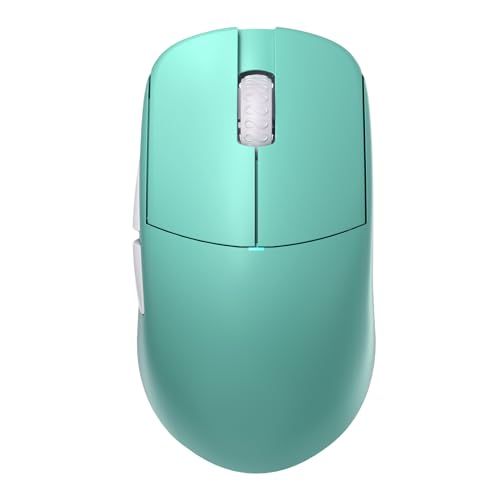
Pulsar X2 Mini Wireless Review | 78 Data compared

Avg. price:~£90Connectivity:wireless+wiredMaximum polling rate:1000 HzMaximum DPI:26000 DPIWeight:52 g

Pulsar X2 Mini Wireless Review: Compare 78 technical specifications and user reviews to see how this product ranks in the Mice category and whether it is worth buying.
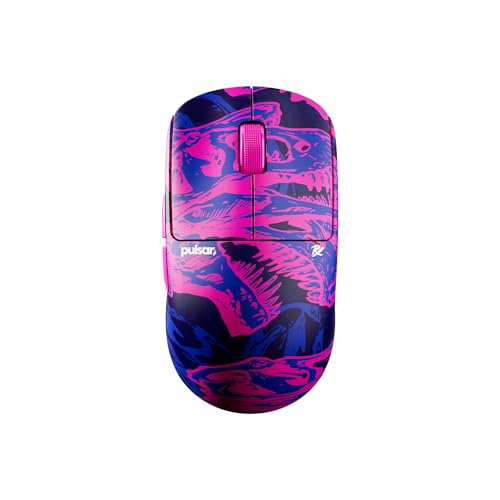
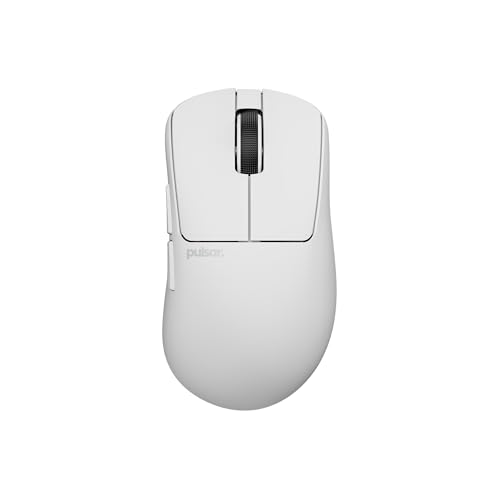
Pulsar X2 Mini Wireless
7.6/10

Overall score

Score
7.6/ 10
✕
What it is
An overall evaluation of the mouse's quality, based on technical analyses and user reviews.
When it matters
When you need a quick reference to identify the best mice on the market.
Score distribution
▼
<55-66-77-88-99-10
Score components

80%

7.5

Technical score

20%

8.0

User score

▲Better than 80% of mice
8.3

Value for money

Value for money
8.3/ 10
✕
What it is
An indicator that combines the mouse's overall rating with its cost.
When it matters
When you are looking for a mouse that offers a strong balance of performance, features, and price.
Score distribution
▼
<55-66-77-88-99-10
Score components

70%

7.6

Overall score

30%

10

Price

▲Better than 78%
7.5

Technical score

Technical score
7.5/ 10
✕
What it is
An assessment of technical performance for products in the Mice category across these key areas: Performance & Sensor, Connectivity, Battery & Charging, Controls, Design, Features.
When it matters
When you want to compare mice based on technical performance and available features.
Score distribution
▼
<55-66-77-88-99-10
Score components

36%

6.9

Performance & Sensor

22%

7.7

Controls

16%

9.4

Design

14%

6.1

Features

7%

9.6

Connectivity

5%

6.0

Battery & Charging

▲Better than 80%
8.0

User score

User score
8.0/ 10
✕
What it is
A rating that combines user reviews and the total number of reviews received by the mouse.
When it matters
When you want to understand how a mouse performs in daily use or gaming and how reliable it is in terms of comfort, button feel, tracking accuracy, and long-term durability.
Score distribution
▼
<55-66-77-88-99-10
Score components

70%

8.4

User ratings

30%

7.1

Number of reviews

Based on ratings from across the web.
▲Better than 55%
  • pulsar-x2-mini-wireless
  • pulsar-x2-mini-wireless
  • pulsar-x2-mini-wireless
  • pulsar-x2-mini-wireless
  • pulsar-x2-mini-wireless
  • pulsar-x2-mini-wireless
  • pulsar-x2-mini-wireless
  • pulsar-x2-mini-wireless
pulsar-x2-mini-wireless
Where to buy
*As an Amazon Associate, we earn from qualifying purchases.
Best rankings
Available: ranking among products currently available (including other versions of this product).All: ranking among all products in the database.

What owners say about the Pulsar X2 Mini Wireless

Based on 21 owners sharing their experience in online comments

43%positive14%mixed43%negative

Owners praise the comfortable shape and satisfying clicks, while failures, double-clicking, and creaks undermine confidence.

What owners dislike

  • Shell and buttons squeak or creak after a few weeks or months, with side clicks sometimes making noise when the finger slides sideways.4
  • Mouse stopped working after one to two months, with some owners reporting the buttons double-clicking before it died.3
  • Left click starts registering double or triple clicks after a few days, happening in roughly 30-40% of clicks for some owners.3

Points mentioned by at least 3 owners, most mentioned first.

Loading...
Loading category ranking...

Technical Specifications of mouse Pulsar X2 Mini Wireless

Technical score
Technical score
7.5/ 10
✕
What it is
An assessment of technical performance for products in the Mice category across these key areas: Performance & Sensor, Connectivity, Battery & Charging, Controls, Design, Features.
When it matters
When you want to compare mice based on technical performance and available features.
Score distribution
▼
<55-66-77-88-99-10
Score components:

36%

6.9

Performance & Sensor

22%

7.7

Controls

16%

9.4

Design

14%

6.1

Features

7%

9.6

Connectivity

5%

6.0

Battery & Charging

7.5
User score
User score
8.0/ 10
✕
What it is
A rating that combines user reviews and the total number of reviews received by the mouse.
When it matters
When you want to understand how a mouse performs in daily use or gaming and how reliable it is in terms of comfort, button feel, tracking accuracy, and long-term durability.
Score distribution
▼
<55-66-77-88-99-10
Score components

70%

8.4

User ratings

30%

7.1

Number of reviews

Based on ratings from across the web.
8.0
Popularity
Popularity
7.1/ 10
✕
What it is
An indicator based on the number of reviews received by the mouse.
When it matters
When you prefer a mouse that has already been chosen and reviewed by many other users.
Score distribution
▼
<55-66-77-88-99-10
Popularity:
Pulsar X2 Mini Wireless has a popularity score of 7.1 points, which is higher than that of 60% of products in this category.
7.1
Value for money
Value for money
8.3/ 10
✕
What it is
An indicator that combines the mouse's overall rating with its cost.
When it matters
When you are looking for a mouse that offers a strong balance of performance, features, and price.
Score distribution
▼
<55-66-77-88-99-10
Score components:

70%

7.6

Overall score

30%

10

Price

8.3
Brand name
Pulsar
Maximum polling rate
1,000 Hz
This mouse has a maximum polling rate of 1,000 Hz, which is higher than 27.8% of mice and equal to 55% of mice.
Wired polling rate
1,000 Hz
This mouse has a wired polling rate of 1,000 Hz, which is higher than 13.2% of mice and equal to 77.4% of mice.
2.4 GHz polling rate
1,000 Hz
This mouse has a 2.4 GHz polling rate of 1,000 Hz, which is higher than 33.4% of mice and equal to 46.9% of mice.
Bluetooth polling rate
0 Hz
This mouse has a Bluetooth polling rate of 0 Hz, which is lower than 36% of mice and equal to 64% of mice.
no Bluetooth mode.
Show more
Connectivity
wireless+wired
This mouse supports wireless+wired connectivity, which is more versatile than 56.8% of mice and equal to 43.3% of mice.
connection modes: wired / 2.4 GHz.
Bluetooth support
no
This mouse does not support Bluetooth. 35.6% of mice support Bluetooth.
Bluetooth version
N/A
Proprietary 2.4 GHz support
yes
This mouse supports proprietary 2.4 GHz wireless. 38.8% of mice support proprietary 2.4 GHz wireless.
Receiver included
yes
This mouse includes a receiver. 37.8% of mice include a receiver.
Show more
Battery life
70 hours
This mouse has a battery life of 70 hours, which is less than 62.4% of mice and equal to 14.1% of mice.
Battery capacity
300 mAh
This mouse has a battery capacity of 300 mAh, which is smaller than 70.3% of mice and equal to 19.9% of mice.
Battery form factor
integrated
Rechargeable battery
yes
This mouse uses a rechargeable battery. 54.2% of mice use a rechargeable battery.
Removable battery
no
This mouse does not use a removable battery. 22.3% of mice use a removable battery.
Show more
N. of buttons
5
This mouse has 5 buttons, which is less than 76.9% of mice and equal to 9.6% of mice.
N. of side buttons
2
This mouse has 2 side buttons, which is more than 15% of mice and equal to 68.6% of mice.
N. of programmable buttons
5
This mouse has 5 programmable buttons, which is less than 64.5% of mice and equal to 13.4% of mice.
DPI switching button
yes
This mouse includes a DPI switching button. 14.7% of mice include a DPI switching button.
Profile switching button
no
This mouse does not include a profile switching button. 16% of mice include a profile switching button.
Show more
Orientation
ambidextrous
Weight
52 g
This mouse weighs 52 g, which makes it lighter than 89.8% of mice and equal to 0.9% of mice.
Extra weights
0 g
This mouse comes with 0 g extra weights, which is less than 4.6% of mice and equal to 95.4% of mice.
Cable length
1.8 m
This mouse comes with a 1.8 m cable, which is longer than 18.4% of mice and equal to 65.2% of mice.
Cable type
paracord
Show more
Onboard memory profiles
1
This mouse stores 1 onboard profiles, which is more than 48% of mice and equal to 20% of mice.
Onboard memory size
?
Software name
Pulsar Fusion
Firmware upgradable
yes
This mouse supports firmware updates. 22.5% of mice support firmware updates.
Suitable for gaming
yes
This mouse is suitable for gaming. 23.9% of mice are suitable for gaming.

Pulsar X2 Mini Wireless vs the average mouse

246810TotalPerformance & SensorConnectivityBattery & ChargingControlsDesignFeatures
  • 50 million clicks longer switch lifespan
    This mouse offers switch durability of 80 million clicks, while the average mouse offers switch durability of 30 million clicks.
    80 million clicks vs 30 million clicks
  • 36.6% lower mouse weight
    This mouse weighs 52 g, while the average mouse weighs 82 g.
    52 g vs 82 g
  • 2.6x higher maximum DPI
    This mouse has a maximum DPI of 26,000 DPI, while the average mouse has a maximum DPI of 10,000 DPI.
    26,000 DPI vs 10,000 DPI
  • Adjustable lift-off distance
    This mouse supports adjustable lift-off distance, while the average mouse does not. 46.5% of mice support adjustable lift-off distance.
  • 62.5% higher tracking speed
    This mouse offers a maximum tracking speed of 650 IPS, while the average mouse offers a maximum tracking speed of 400 IPS.
    650 IPS vs 400 IPS
  • Usable while charging
    This mouse can be used while charging, while the average mouse cannot. 47.5% of mice can be used while charging.
  • 150 DPI lower minimum setting
    This mouse goes as low as 50 DPI, while the average mouse goes as low as 200 DPI.
    50 DPI vs 200 DPI
  • Adjustable debounce time
    This mouse supports adjustable debounce time, while the average mouse does not. 28.2% of mice support adjustable debounce time.
  • 2.6x higher maximum DPI
    This mouse has a maximum DPI of 26,000 DPI, while the average mouse has a maximum DPI of 10,000 DPI.
    26,000 DPI vs 10,000 DPI
  • Adjustable lift-off distance
    This mouse supports adjustable lift-off distance, while the average mouse does not. 46.5% of mice support adjustable lift-off distance.
  • 62.5% higher tracking speed
    This mouse offers a maximum tracking speed of 650 IPS, while the average mouse offers a maximum tracking speed of 400 IPS.
    650 IPS vs 400 IPS
  • 150 DPI lower minimum setting
    This mouse goes as low as 50 DPI, while the average mouse goes as low as 200 DPI.
    50 DPI vs 200 DPI
  • 25% higher maximum acceleration
    This mouse has a maximum acceleration of 50 G, while the average mouse has a maximum acceleration of 40 G.
    50 G vs 40 G
  • Versatile connectivity
    This mouse supports wireless+wired connectivity, while the average mouse supports wireless connectivity.
    connection modes: wired / 2.4 GHz.
    wireless+wired vs wireless
  • Usable while charging
    This mouse can be used while charging, while the average mouse cannot. 47.5% of mice can be used while charging.
  • Rechargeable battery
    This mouse uses a rechargeable battery, while the average mouse does not. 45.9% of mice use a rechargeable battery.
  • 50 million clicks longer switch lifespan
    This mouse offers switch durability of 80 million clicks, while the average mouse offers switch durability of 30 million clicks.
    80 million clicks vs 30 million clicks
  • Adjustable debounce time
    This mouse supports adjustable debounce time, while the average mouse does not. 28.2% of mice support adjustable debounce time.
  • 36.6% lower mouse weight
    This mouse weighs 52 g, while the average mouse weighs 82 g.
    52 g vs 82 g
  • Detachable cable
    This mouse comes with a detachable cable, while the average mouse does not. 43% of mice come with a detachable cable.
  • 1 fewer programmable buttons
    This mouse has 5 programmable buttons, while the average mouse has 6 programmable buttons.
    5 vs 6
  • Thin glide feet
    This mouse uses 0.6 mm thick mouse feet, while the average mouse uses 0.8 mm thick mouse feet.
    0.6 mm vs 0.8 mm
  • No RGB lighting
    This mouse does not have RGB lighting, while the average mouse does. 56.3% of mice have RGB lighting.
  • 15 hours shorter battery life
    This mouse has a battery life of 70 hours, while the average mouse has a battery life of 85 hours.
    70 hours vs 85 hours
  • 2.57x more expensive
    Pulsar X2 Mini Wireless is more expensive than the average mouse (£90 vs £35).
    £90 vs £35
  • 40% smaller battery capacity
    This mouse has a battery capacity of 300 mAh, while the average mouse has a battery capacity of 500 mAh.
    300 mAh vs 500 mAh
  • Poor default DPI tuning
    This mouse uses a default DPI of 800 DPI, while the average mouse uses a default DPI of 1,000 DPI.
    800 DPI vs 1,000 DPI
  • 2.57x more expensive
    Pulsar X2 Mini Wireless is more expensive than the average mouse (£90 vs £35).
    £90 vs £35
  • Poor default DPI tuning
    This mouse uses a default DPI of 800 DPI, while the average mouse uses a default DPI of 1,000 DPI.
    800 DPI vs 1,000 DPI
  • 15 hours shorter battery life
    This mouse has a battery life of 70 hours, while the average mouse has a battery life of 85 hours.
    70 hours vs 85 hours
  • 40% smaller battery capacity
    This mouse has a battery capacity of 300 mAh, while the average mouse has a battery capacity of 500 mAh.
    300 mAh vs 500 mAh
  • 1 fewer programmable buttons
    This mouse has 5 programmable buttons, while the average mouse has 6 programmable buttons.
    5 vs 6
  • No RGB lighting
    This mouse does not have RGB lighting, while the average mouse does. 56.3% of mice have RGB lighting.
  • Thin glide feet
    This mouse uses 0.6 mm thick mouse feet, while the average mouse uses 0.8 mm thick mouse feet.
    0.6 mm vs 0.8 mm

Video reviews

Hands-on testing, unboxing, and real-world video evaluations

9.0
statikvortex
≈ estimated
23/02/2023
Short-term usage review · about three months of use
Verdict
Pulsar X2 Mini Wireless is a great mouse most people should like, despite early quality issues.
9.5
Gen3D Tech
≈ estimated
12/12/2022
Hands-on review · two weeks of use · shape and QC
Verdict
Pulsar X2 Mini Wireless is a light, well-built small mouse the creator recommends, with some quality control caveats.
8.0
Brandon Taylor
≈ estimated
08/08/2022
Hands-on review · shape, grip and button feedback on a prototype
Verdict
Pulsar X2 Mini Wireless has a great shape and is a very good mouse, but rubbing buttons and a missing bottom-out hold it back.
6.0
boardzy
≈ estimated
05/08/2022
Review · two weeks of use
Verdict
Pulsar X2 Mini Wireless is not recommended yet because of the coating, but could earn a recommendation if the issues are fixed.
9.5
Hardware UnpluGGed
≈ estimated
11/09/2022
Hands-on review · X2 Medium and Mini compared
Verdict
Pulsar X2 Mini Wireless was the reviewers' pick, and they expect to keep using it for the foreseeable future.
8.0
hausgaming
≈ estimated
26/07/2022
First impressions · pre-production unit and shape comparison
Verdict
Pulsar X2 Mini Wireless is good value for money and feels very good for aggressive claw grip, though the mini is tight for relaxed claw.
9.0
Olicheck Gaming Tech
≈ estimated
20/08/2022
First impressions · unboxing, shape and gameplay check
Verdict
Pulsar X2 Mini Wireless is likely one of the best releases of the year, with a small dongle quality issue on the mini.
Overview video
Overview video
Overview video

Expert reviews

In-depth analysis and verdict from leading tech publications

T
techpowerup.com
22/11/2022
Summary of the review
R
rtings.com
02/02/2023
Summary of the review
techpowerup.com
22/11/2022
Build quality and teardown · Gaming mouse
Verdict
The Pulsar X2 Mini Wireless is solidly built with crisp, well-placed buttons, but its scroll wheel is noisy and its middle click needs firm pressure.
nookyyy.com
01/10/2022
Technical overview · Wireless gaming mouse
Verdict
The Pulsar X2 Mini Wireless is a light, compact gaming mouse with a 26,000 CPI sensor and suits players who want a small mouse.
C
cowcotland.com
24/10/2022
Summary of the review
xtremehardware.com
24/09/2022
Hands-on test · Ultralight gaming mouse
Verdict
The Pulsar X2 Mini is a smaller version of the Medium, with the same top PixArt sensor and switches, for fans of ultralight, compact mice.

Third-party reviews

Based on ratings from across the web.
Reviews last updated: November 2026 · How we calculate this

What customers like about Pulsar X2 Mini Wireless

  • Extremely lightweight design, typically weighing between 52g and 54g.
  • Excellent for fingertip and aggressive claw grip styles due to its small size and rear hump.
  • High-performance PixArt PAW3395 sensor provides precise tracking and responsiveness.
  • Crisp, tactile main button clicks with minimal pre-travel.
  • Smooth and consistent glide thanks to high-quality PTFE feet.
  • Solid build quality with no noticeable creaking or flexing even under pressure.
  • Top-tier side buttons and a well-defined, tactile scroll wheel.

What customers don't like about Pulsar X2 Mini Wireless

  • Unsuitable for palm grip users because of its small dimensions and low profile.
  • The smooth coating can become slippery, especially for users with sweaty hands.
  • Potential quality control issues, such as occasional main button rattle or inconsistent click feel.
  • Inconvenient placement of the DPI button on the bottom of the mouse.
  • Lack of on-device dongle storage, making it less convenient for travel.
  • Lacks advanced productivity features, making it strictly a gaming-focused device.

Verdict

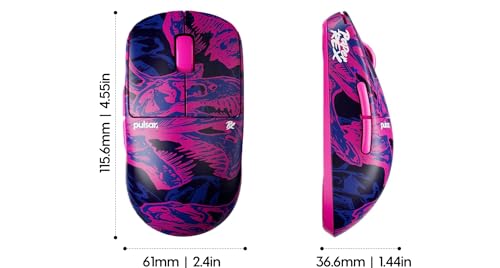
The Pulsar X2 Mini Wireless is an ultra-lightweight, symmetrical gaming mouse weighing just 52g, featuring the high-end PixArt PAW3395 sensor with 26,000 DPI, 650 IPS tracking, and 50G acceleration. Key characteristics include its compact dimensions (116mm x 61mm x 37mm), lag-free 2.4GHz wireless connectivity, and durable Kailh GM 8.0 switches rated for 80 million clicks. Main pros are its exceptionally low weight, precise sensor performance, and a comfortable shape optimized for claw and fingertip grips, supported by a 70-hour battery life. Notable cons include an inaccurate battery indicator in the software, lack of onboard dongle storage, and reported scroll wheel jitter or double-clicking issues in some batches.

Compare Pulsar X2 Mini Wireless with other products in the Mice category

1Product to compare no. 1
VS
2Product to compare no. 2
VS
3Product to compare no. 3 (optional)

Graphic comparison of Pulsar X2 Mini Wireless and other products in the Mice category

No results found