Scored using Keyboards Methodology v1.0
Keyboards Methodology v1.0
Mathematical & Unbiased Scoring
Products in this category are evaluated mathematically under Frontumo Keyboards Methodology v1.0 using verified laboratory benchmarks, technical specifications, and authentic consumer ratings with 0% commercial bias.
Explore Keyboards Methodology v1.0

Gravastar Mercury K1 Pro Review | 64 Data compared

Avg. price:~£170Layout size:75%Connection type:USB / 2.4GHz / BluetoothSwitch type:mechanicalPolling rate:1000 Hz

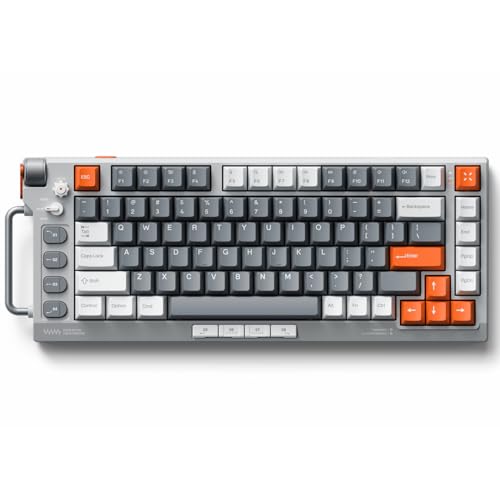
Gravastar Mercury K1 Pro Review: Compare 64 technical specifications and user reviews to see how this product ranks in the Keyboards category and whether it is worth buying.

7.6

Overall score

Score
7.6/ 10
✕
What it is
An overall evaluation of the keyboard's quality, based on technical analyses and user reviews.
When it matters
When you need a quick reference to identify the best keyboards on the market.
Score distribution
â–¼
<55-66-77-88-99-10
Score components

80%

7.2

Technical score

20%

9.2

User score

â–²Better than 81% of keyboards
7.2

Technical score

Technical score
7.2/ 10
✕
What it is
An assessment of technical performance for products in the Keyboards category across these key areas: Switches, Design, Connectivity & Power, Features, Materials.
When it matters
When you want to compare keyboards based on technical performance and available features.
Score distribution
â–¼
<55-66-77-88-99-10
Score components

34%

8.9

Connectivity & Power

28%

4.2

Switches

20%

8.5

Materials

12%

7.8

Features

6%

5.4

Design

â–²Better than 66% of keyboards
9.2

User score

User score
9.2/ 10
✕
What it is
A rating that combines user reviews and the total number of reviews received by the keyboard.
When it matters
When you want to understand how a keyboard performs in daily use or gaming and how reliable it is in terms of typing feel, noise level, comfort, and long-term durability.
Score distribution
â–¼
<55-66-77-88-99-10
Score components

70%

9.4

User ratings

30%

8.7

Number of reviews

Based on 1,230 buyer reviews from online shops.
How we calculate this
User ratings – average star rating across all shop listings, weighted by how many reviews each has, on a 1–10 scale.
Number of reviews – how many buyer reviews the product has, on a logarithmic scale; the 8% most-reviewed models in the category get 10.
★Better than 92% of keyboards
  • gravastar-mercury-k1-pro
  • gravastar-mercury-k1-pro
  • gravastar-mercury-k1-pro
  • gravastar-mercury-k1-pro
  • gravastar-mercury-k1-pro
  • gravastar-mercury-k1-pro
gravastar-mercury-k1-pro

Best prices

*As an Amazon Associate, we earn from qualifying purchases.

Best rankings

Available: ranking among products currently available (including other versions of this product).All: ranking among all products in the database.
Loading...
Loading category ranking...

Technical Specifications of keyboard Gravastar Mercury K1 Pro

Technical score
Technical score
7.2/ 10
✕
What it is
An assessment of technical performance for products in the Keyboards category across these key areas: Switches, Design, Connectivity & Power, Features, Materials.
When it matters
When you want to compare keyboards based on technical performance and available features.
Score distribution
â–¼
<55-66-77-88-99-10
Score components:

34%

8.9

Connectivity & Power

28%

4.2

Switches

20%

8.5

Materials

12%

7.8

Features

6%

5.4

Design

7.2
User score
User score
9.2/ 10
✕
What it is
A rating that combines user reviews and the total number of reviews received by the keyboard.
When it matters
When you want to understand how a keyboard performs in daily use or gaming and how reliable it is in terms of typing feel, noise level, comfort, and long-term durability.
Score distribution
â–¼
<55-66-77-88-99-10
Score components

70%

9.4

User ratings

30%

8.7

Number of reviews

Based on 1,230 buyer reviews from online shops.
How we calculate this
User ratings – average star rating across all shop listings, weighted by how many reviews each has, on a 1–10 scale.
Number of reviews – how many buyer reviews the product has, on a logarithmic scale; the 8% most-reviewed models in the category get 10.
9.2
Popularity
Popularity
8.7/ 10
✕
What it is
An indicator based on the number of reviews received by the keyboard.
When it matters
When you prefer a keyboard that has already been chosen and reviewed by many other users.
Score distribution
â–¼
<55-66-77-88-99-10
Popularity:
Gravastar Mercury K1 Pro has a popularity score of 8.7 points, which is higher than that of 80.1% of products in this category.
8.7
Value for money
Value for money
8.2/ 10
✕
What it is
An indicator that combines the keyboard's overall rating with its cost.
When it matters
When you are looking for a keyboard that offers a strong balance of performance, features, and price.
Score distribution
â–¼
<55-66-77-88-99-10
Score components:

60%

7.6

Overall score

40%

9.6

Price

8.2
Switch type
mechanical
Switch feel
linear
Switch name
?
Actuation force
45 g
Min actuation distance
1.2 mm
Min actuation distance
1.2 mm
This keyboard has a minimum actuation distance of 1.2 mm, which is shorter than 59.8% of keyboards and equal to 16.3% of keyboards.
Show more
Keyboard type
mechanical
Layout size
75%
Layout standard
?
N. of keys
79
N. of keys
79
This keyboard has 79 keys, which is fewer than 73.6% of keyboards and equal to 0.9% of keyboards.
Profile
standard
Show more
Connection type
USB / 2.4GHz / Bluetooth
Connection type
USB / 2.4GHz / Bluetooth
This keyboard offers USB / 2.4GHz / Bluetooth connectivity, which is more versatile than 57.3% of keyboards and equal to 42.7% of keyboards.
Multi-device pairing
yes
Multi-device pairing
yes
This keyboard supports multi-device pairing. 4.5% of keyboards support multi-device pairing.
Bluetooth version
5
Bluetooth version
5
This keyboard uses Bluetooth 5, which is newer than 51% of keyboards and equal to 15.7% of keyboards.
Mac compatibility
?
Battery life
470 h
Battery life
470 h
This keyboard lasts 470 h on a charge, which is longer than 84.2% of keyboards and equal to 0.6% of keyboards.
Show more
RGB lighting
yes
RGB lighting
yes
This keyboard has RGB lighting. 12.4% of keyboards have RGB lighting.
Per-key RGB
?
RGB zones
79
RGB zones
79
This keyboard has 79 RGB zones, which is fewer than 59% of keyboards and equal to 0.9% of keyboards.
Underglow / side lighting
?
Backlight direction
south-facing
Show more
Case material
aluminum
Plate material
FR4
Keycap material
PBT
Keycap profile
OEM
Legend method
dye-sub
Legend method
dye-sub
This keyboard uses dye-sub legends, which are less durable than 75.1% of keyboards and equal to 10.9% of keyboards.
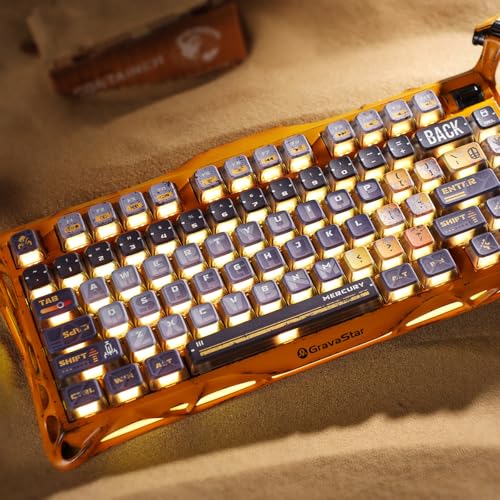
Official K1 Pro keycap spec says Pudding PBT with dye sublimation printing technology.
Show more

Gravastar Mercury K1 Pro vs the average keyboard

246810TotalDesignConnectivity & PowerSwitchesMaterialsFeatures
  • 290 h longer battery life
    Battery life
    470 h
    This keyboard lasts longer on a charge than the average keyboard (470 h vs 180 h). The average keyboard lasts 180 h on a charge.
    470 h vs 180 h
  • 0.5 mm shorter key travel
    Total travel distance
    3.5 mm
    This keyboard has 3.5 mm of total travel, while the average keyboard has 4 mm.
    3.5 mm vs 4 mm
  • 2x larger battery capacity
    Battery capacity
    8,000 mAh
    This keyboard has a larger battery than the average keyboard (8000 mAh vs 4000 mAh). The average keyboard has a battery capacity of 4000 mAh.
    8,000 mAh vs 4,000 mAh
  • Dedicated media keys
    Dedicated media keys
    yes
    This keyboard includes dedicated media keys, the average keyboard does not. 20.4% of keyboards include dedicated media keys.
  • Volume control wheel
    Volume wheel
    yes
    This keyboard includes a volume wheel, the average keyboard does not. 38.3% of keyboards include a volume wheel.
  • 0.5 mm shorter actuation distance
    Min actuation distance
    1.2 mm
    This keyboard has a shorter minimum actuation distance than the average keyboard (1.2 mm vs 1.7 mm). The average keyboard has a minimum actuation distance of 1.7 mm.
    1.2 mm vs 1.7 mm
  • 15% higher user score
    User score
    9.2/ 10
    ✕
    What it is
    A rating that combines user reviews and the total number of reviews received by the keyboard.
    When it matters
    When you want to understand how a keyboard performs in daily use or gaming and how reliable it is in terms of typing feel, noise level, comfort, and long-term durability.
    Score distribution
    â–¼
    â–¼
    <55-66-77-88-99-10
    Gravastar Mercury K1 Pro
    the average keyboard
    Gravastar Mercury K1 Pro has a higher user score than the average keyboard (9.20 vs 8.000).
    9.2 vs 8
  • 15% higher user score
    User score
    9.2/ 10
    ✕
    What it is
    A rating that combines user reviews and the total number of reviews received by the keyboard.
    When it matters
    When you want to understand how a keyboard performs in daily use or gaming and how reliable it is in terms of typing feel, noise level, comfort, and long-term durability.
    Score distribution
    â–¼
    â–¼
    <55-66-77-88-99-10
    Gravastar Mercury K1 Pro
    the average keyboard
    Gravastar Mercury K1 Pro has a higher user score than the average keyboard (9.20 vs 8.000).
    9.2 vs 8
  • 290 h longer battery life
    Battery life
    470 h
    This keyboard lasts longer on a charge than the average keyboard (470 h vs 180 h). The average keyboard lasts 180 h on a charge.
    470 h vs 180 h
  • 2x larger battery capacity
    Battery capacity
    8,000 mAh
    This keyboard has a larger battery than the average keyboard (8000 mAh vs 4000 mAh). The average keyboard has a battery capacity of 4000 mAh.
    8,000 mAh vs 4,000 mAh
  • 0.5 mm shorter key travel
    Total travel distance
    3.5 mm
    This keyboard has 3.5 mm of total travel, while the average keyboard has 4 mm.
    3.5 mm vs 4 mm
  • 0.5 mm shorter actuation distance
    Min actuation distance
    1.2 mm
    This keyboard has a shorter minimum actuation distance than the average keyboard (1.2 mm vs 1.7 mm). The average keyboard has a minimum actuation distance of 1.7 mm.
    1.2 mm vs 1.7 mm
  • Dedicated media keys
    Dedicated media keys
    yes
    This keyboard includes dedicated media keys, the average keyboard does not. 20.4% of keyboards include dedicated media keys.
  • Volume control wheel
    Volume wheel
    yes
    This keyboard includes a volume wheel, the average keyboard does not. 38.3% of keyboards include a volume wheel.
  • Less durable legends
    Legend method
    dye-sub
    This keyboard uses dye-sub legends, while the average keyboard uses double-shot.
    Official K1 Pro keycap spec says Pudding PBT with dye sublimation printing technology.
    dye-sub vs double-shot
  • 1.5 mm longer actuation distance
    Max actuation distance
    3.5 mm
    This keyboard has a shorter maximum actuation distance than the average keyboard (3.5 mm vs 2 mm). The average keyboard has a maximum actuation distance of 2 mm.
    Official Gravastar K1 Pro spec lists 3.5 mm total travel; the prior 1.2 mm value was the pre-travel, not the max travel.
    3.5 mm vs 2 mm
  • 8 fewer keys
    N. of keys
    79
    This keyboard has fewer keys than the average keyboard (79 vs 87). The average keyboard has 87 keys.
    79 vs 87
  • Older Bluetooth version
    Bluetooth version
    5.0
    This keyboard uses an older Bluetooth version than the average keyboard (5 vs 5.2). The average keyboard uses Bluetooth 5.2.
    5.0 vs 5.2
  • 5 h longer charging time
    Charging time
    10 h
    This keyboard charges more slowly than the average keyboard (10 h vs 5 h). The average keyboard takes 5 h to charge.
    10 h vs 5 h
  • 20.7% higher weight
    Weight
    1,180 g
    This keyboard weighs more than the average keyboard (1180 g vs 978 g). The average keyboard weighs 978 g.
    1,180 g vs 978 g
  • 19.35 mm higher keyboard height
    Height
    57.6 mm
    This keyboard is taller than the average keyboard (57.6 mm vs 38.25 mm). The average keyboard height is 38.25 mm.
    57.6 mm vs 38.25 mm
  • 30.8% more expensive
    Gravastar Mercury K1 Pro is more expensive than the average keyboard (£170 vs £130).
    £170 vs £130
  • 30.8% more expensive
    Gravastar Mercury K1 Pro is more expensive than the average keyboard (£170 vs £130).
    £170 vs £130
  • 8 fewer keys
    N. of keys
    79
    This keyboard has fewer keys than the average keyboard (79 vs 87). The average keyboard has 87 keys.
    79 vs 87
  • 20.7% higher weight
    Weight
    1,180 g
    This keyboard weighs more than the average keyboard (1180 g vs 978 g). The average keyboard weighs 978 g.
    1,180 g vs 978 g
  • 19.35 mm higher keyboard height
    Height
    57.6 mm
    This keyboard is taller than the average keyboard (57.6 mm vs 38.25 mm). The average keyboard height is 38.25 mm.
    57.6 mm vs 38.25 mm
  • 58.7 mm wider width
    Width
    415 mm
    This keyboard is wider than the average keyboard (415 mm vs 356.3 mm). The average keyboard width is 356.3 mm.
    415 mm vs 356.3 mm
  • 0.5 ° higher typing angle
    Typing angle
    5.5 °
    This keyboard has a higher typing angle than the average keyboard (5.5 ° vs 5 °). The average keyboard has a typing angle of 5 °.
    5.5 ° vs 5 °
  • Older Bluetooth version
    Bluetooth version
    5.0
    This keyboard uses an older Bluetooth version than the average keyboard (5 vs 5.2). The average keyboard uses Bluetooth 5.2.
    5.0 vs 5.2
  • 5 h longer charging time
    Charging time
    10 h
    This keyboard charges more slowly than the average keyboard (10 h vs 5 h). The average keyboard takes 5 h to charge.
    10 h vs 5 h
  • 1.5 mm longer actuation distance
    Max actuation distance
    3.5 mm
    This keyboard has a shorter maximum actuation distance than the average keyboard (3.5 mm vs 2 mm). The average keyboard has a maximum actuation distance of 2 mm.
    Official Gravastar K1 Pro spec lists 3.5 mm total travel; the prior 1.2 mm value was the pre-travel, not the max travel.
    3.5 mm vs 2 mm
  • Less durable legends
    Legend method
    dye-sub
    This keyboard uses dye-sub legends, while the average keyboard uses double-shot.
    Official K1 Pro keycap spec says Pudding PBT with dye sublimation printing technology.
    dye-sub vs double-shot
  • 4 fewer RGB zones
    RGB zones
    79
    This keyboard has fewer RGB zones than the average keyboard (79 vs 83). The average keyboard has 83 RGB zones.
    79 vs 83

Video reviews

Hands-on testing, unboxing, and real-world video evaluations

Expert reviews

In-depth analysis and verdict from leading tech publications

S
sypnotix.com
08/02/2025
Summary of the review
P
pcunboxing.com
27/11/2024
Summary of the review
T
the-gadgeteer.com
29/08/2024
Summary of the review
G
geardiary.com
15/05/2025
Summary of the review
T
trustedreviews.com
29/04/2025
Summary of the review
T
tomsguide.com
16/10/2024
Summary of the review
C
consollection.com
29/08/2024
Summary of the review

Third-party reviews

Based on 1,230 buyer reviews from online shops.
Reviews last updated: June 2026 · How we calculate this

What we like about Gravastar Mercury K1 Pro

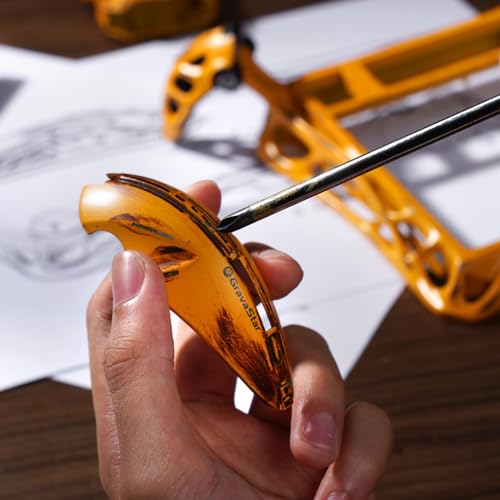
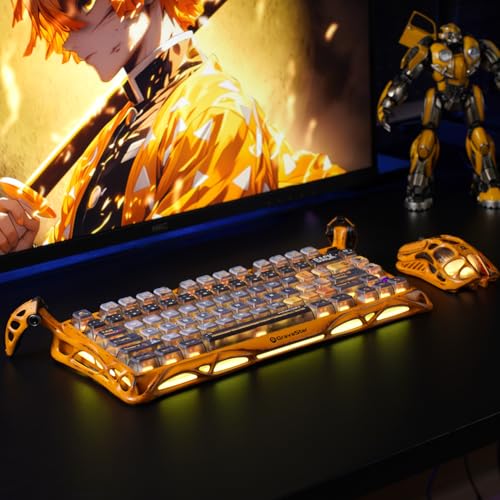
  • Unique sci-fi 'alien skeleton' aluminum alloy design that stands out on any desk
  • Exceptional typing experience with factory-lubricated Kailh Speedy Mint linear switches described as 'creamy' and 'buttery smooth'
  • High-quality sound profile with five layers of sound-dampening foam and a gasket-mount design to reduce metallic pings
  • Massive 8,000mAh battery life providing up to 470 hours of use (with RGB off)
  • Robust tri-mode connectivity including 2.4GHz wireless, Bluetooth 5.0, and wired USB-C
  • Functional and sturdy 'spider leg' adjustable feet that allow for multiple typing angles
  • Vibrant dual independent RGB systems (per-key and edge lighting) for deep customization

What we don't like about Gravastar Mercury K1 Pro

  • Polarising aesthetic that may be too 'bold' or 'gimmicky' for traditional users
  • Proprietary companion software is often described as non-user-friendly, basic, and prone to UI scaling issues
  • Lacks open-source support (QMK/VIA), which limits advanced key remapping for power users
  • Premium price point that may be hard to justify compared to similar mechanical boards
  • Non-translucent keycap legends make it difficult to use in dark environments without external light
  • Embedded logo/screen elements cannot be personalized, which some users consider a 'missed opportunity'
  • Potentially difficult customer support experience according to some user reports

Verdict

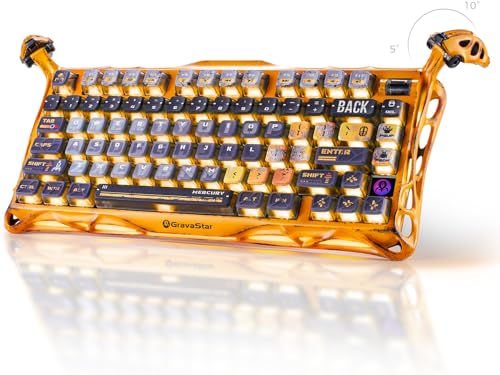
The GravaStar Mercury K1 Pro is a 75% layout (79 keys) wireless mechanical keyboard featuring a striking aluminum alloy skeletal exoskeleton and integrated "alien leg" kickstands for adjustable typing angles. It boasts a premium gasket-mounted design with five layers of sound-dampening foam, hot-swappable sockets supporting 3-pin/5-pin switches, and a tactile volume control knob. Performance is driven by custom GravaStar x Kailh linear switches (typically 45g actuation, 1.2mm pre-travel) and a massive 8,000mAh battery offering up to 470 hours of use via tri-mode connectivity (2.4GHz, Bluetooth 5.0, or USB-C). Main pros include its highly unique sci-fi aesthetic, exceptional out-of-the-box typing acoustics, and dual-zone RGB lighting systems; however, notable cons include proprietary software that is often cited as unintuitive, a lack of VIA/QMK support for advanced remapping, and a premium price point compared to standard gaming boards.

Compare Gravastar Mercury K1 Pro with other products in the Keyboards category

1Product to compare no. 1
VS
2Product to compare no. 2
VS
3Product to compare no. 3 (optional)

Graphic comparison of Gravastar Mercury K1 Pro and other products in the Keyboards category

No results found