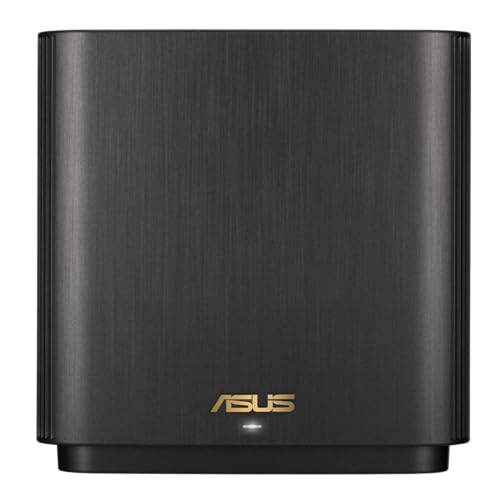
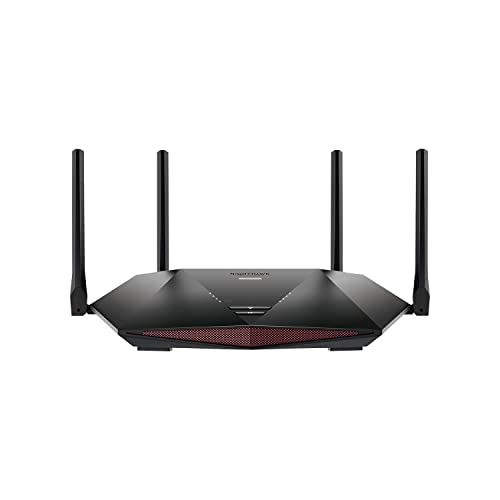
TP-Link Deco XE75 Review | 77 Data compared

double-arrow
  • Avg. price in UK: ~£230
  • Avg. price in US: ~$190
  • Wi-Fi version: Wi-Fi 6E (802.11ax)
  • Wi-Fi speed: 5400 Mbps
  • LAN port speeds: 1 Gbps
  • Wireless coverage: 270

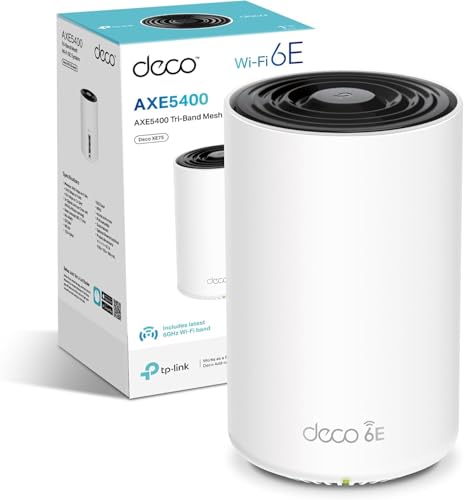
TP-Link Deco XE75 review. Compare 77 technical specifications and user reviews to see how it ranks among routers and if it is worth buying.

7.9

Overall score

What it is: An overall evaluation of the router's quality, based on technical analyses and user reviews.

When it matters: When you need a quick reference to identify the best routers on the market.

Score components:

90.0%

7.8

Technical Score

10.0%

9.1

User score

Very good
7.8

Technical Score

What it is: An assessment of the router's technical performance, covering key areas such as Wi-Fi performance, wired connectivity, security, software features, coverage, and design.

When it matters: When you want to compare routers based on technical performance and available features.

Score components:

26.0%

9.6

Wireless

20.0%

4.8

Ports

18.0%

7.9

Networking

14.0%

10

Security

12.0%

7.0

Hardware

10.0%

6.7

Management

Very good
9.1

User score

What it is: A rating that combines user reviews and the total number of reviews received by the router.

When it matters: When you want to know how a router performs in daily use and how reliable it is for speed, coverage, and stability according to user feedback.

Score components:

70.0%

8.8

User reviews

30.0%

10

Popularity

User score:
United Kingdom
amazon
4.4
(461)
amazon
4.6
(351)
amazon
4.2
(237)
amazon
4.4
(169)
amazon
4.1
(142)
amazon
4.4
(5)
United States
Amazon_logo.png
4.4
(453)
Amazon_logo.png
4.5
(112)

(Reviews last updated: May 2026)

Exceptional
  • 9.9
    Gaming

    Score components:

    33.0%

    10

    Wi-Fi speed

    28.0%

    9.5

    CPU clock speed

    22.0%

    10

    RAM capacity

    17.0%

    10

    Maximum connected devices

  • 6.7
    Travel

    Score components:

    40.0%

    7.0

    Weight

    30.0%

    10

    Wi-Fi speed

    20.0%

    4.0

    Cellular modem type

    10.0%

    1.0

    SIM slot

  • tp-link-deco-xe75
  • tp-link-deco-xe75
  • tp-link-deco-xe75
  • tp-link-deco-xe75
  • tp-link-deco-xe75
  • tp-link-deco-xe75
  • tp-link-deco-xe75
tp-link-deco-xe75
tp-link-deco-xe75
tp-link-deco-xe75
tp-link-deco-xe75
tp-link-deco-xe75
tp-link-deco-xe75
tp-link-deco-xe75

Best prices in UK

Best rankings

?

Available: ranking among products currently available (including other versions of this product).
All: ranking among all products in the database.

Verdict

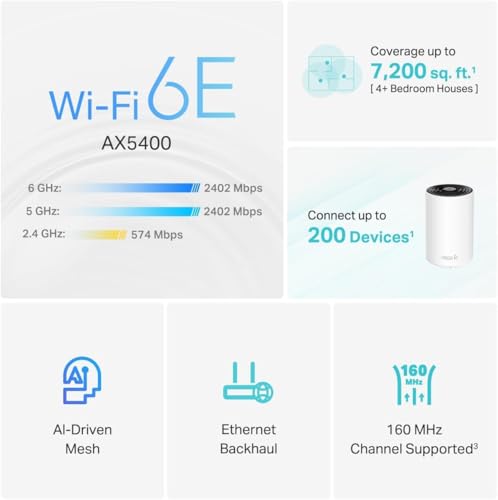
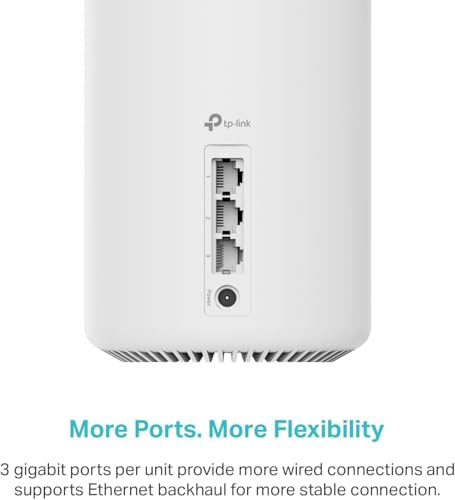
The TP-Link Deco XE75 is an AXE5400 tri-band mesh system featuring Wi-Fi 6E technology that utilizes the clear 6 GHz band for faster speeds and reduced congestion. It is powered by a 1.7 GHz quad-core CPU and 512 MB of RAM, delivering combined speeds of up to 5,400 Mbps (2,402 Mbps on both 6 GHz and 5 GHz, plus 574 Mbps on 2.4 GHz) with support for 160 MHz channels and over 200 connected devices. Main pros include its affordability as a Wi-Fi 6E entry point, easy app-based setup, and the inclusion of three gigabit Ethernet ports per node for flexible wired backhaul or device connections. Notable cons include the lack of 2.5 Gbps multi-gig ports (found only on the 'Pro' variant), a subscription requirement for advanced HomeShield security features, and no USB ports for network-attached storage.

Technical Specifications of router TP-Link Deco XE75

Technical Score

What it is: An assessment of the router's technical performance, covering key areas such as Wi-Fi performance, wired connectivity, security, software features, coverage, and design.

When it matters: When you want to compare routers based on technical performance and available features.

Score components:

26.0%

9.6

Wireless

20.0%

4.8

Ports

18.0%

7.9

Networking

14.0%

10

Security

12.0%

7.0

Hardware

10.0%

6.7

Management

7.8
TP-Link Deco XE75 has a technical score of 7.78 points, which is higher than that of 83.8% of products in this category.
User score

What it is: A rating that combines user reviews and the total number of reviews received by the router.

When it matters: When you want to know how a router performs in daily use and how reliable it is for speed, coverage, and stability according to user feedback.

Score components:

70.0%

8.8

User reviews

30.0%

10

Popularity

User score:
United Kingdom
amazon
4.4
(461)
amazon
4.6
(351)
amazon
4.2
(237)
amazon
4.4
(169)
amazon
4.1
(142)
amazon
4.4
(5)
United States
Amazon_logo.png
4.4
(453)
Amazon_logo.png
4.5
(112)

(Reviews last updated: May 2026)

9.1
TP-Link Deco XE75 has a user score of 9.14 points, which is higher than that of 90.7% of products in this category.
Popularity
What it is: An indicator based on the number of reviews received by the router.
When it matters: When you prefer to choose a router reviewed and selected by many other buyers.
10
TP-Link Deco XE75 has a popularity of 10 points, which is higher than 63.5% of products in this category.
Ratio quality/price

What it is: An indicator that combines the router's overall rating with its cost.

When it matters: When you are looking for a router with a good balance between network performance, features, and price.

Score components:

60.0%

7.9

Overall score

40.0%

9.3

Price

8.3
TP-Link Deco XE75 has a quality-to-price ratio of 8.3 points, which is higher than 82.4% of products in this category.
Brand name
What it is: The manufacturer or brand of the product.
When it matters: When you prefer a specific ecosystem, support network, or design philosophy.

Importance: MEDIUM

TP
Wi-Fi version
What it is: Identifies the Wi-Fi generation the router supports, such as Wi-Fi 5, 6, 6E, or 7.
When it matters: When newer phones, laptops, and consoles need the latest Wi-Fi efficiency and speed features.

Importance: HIGH

Good value: Wi-Fi 6 (802.11ax)

Wi-Fi 6E (802.11ax)
TP-Link Deco XE75 uses Wi-Fi Wi-Fi 6E (802.11ax). 91.9% of routers use this Wi-Fi standard.
Wi-Fi bands
What it is: Lists which wireless frequency bands the router can use, such as 2.4 GHz, 5 GHz, or 6 GHz.
When it matters: When you need to balance range, speed, and congestion across different types of client devices.

Importance: HIGH

Good value: 2.4 GHz + 5 GHz

2.4 GHz + 5 GHz + 6 GHz
TP-Link Deco XE75 supports 2.4 GHz + 5 GHz + 6 GHz Wi-Fi bands. 93.6% of routers use the same band setup.
Wi-Fi speed
What it is: The advertised maximum wireless throughput rating of the router under supported conditions.
When it matters: When several users stream, download, and game at once and you want more wireless headroom.

Importance: HIGH

Good value: >2700 Mbps

5,400 Mbps
TP-Link Deco XE75 delivers 5,400 Mbps Wi-Fi speed, which is higher than 83.8% of routers and equal to 4% of routers.
Channel widths supported
What it is: Lists the Wi-Fi channel widths the router can use, such as 20, 40, 80, or 160 MHz.
When it matters: When you want the option to trade peak speed against stability in crowded wireless environments.

Importance: MEDIUM

Good value: 20 MHz + 40 MHz + 80 MHz

20 MHz + 40 MHz + 80 MHz + 160 MHz
TP-Link Deco XE75 supports 20 MHz + 40 MHz + 80 MHz + 160 MHz channel width options, which is more than 72.7% of routers and the same as 24.8% of routers.
Show more
Wi-Fi security protocols
What it is: Lists the wireless security standards the router supports, such as WPA2 or WPA3.
When it matters: When you want stronger wireless protection without locking out older devices that still need compatibility.

Importance: HIGH

WPA3, WPA2, WPA
TP-Link Deco XE75 supports WPA3, WPA2, WPA Wi-Fi security protocols. 87% of routers use this security setup.
DoS protection
What it is: Provides defenses intended to reduce the impact of denial-of-service traffic against the router or network.
When it matters: When exposed services or remote access make resilience against traffic floods more important.

Importance: HIGH

yes
TP-Link Deco XE75 supports DoS protection. 11.1% of routers include DoS protection.
SPI intrusion protection
What it is: Uses stateful packet inspection to track sessions and block suspicious unsolicited traffic more accurately.
When it matters: When the router needs a stronger first line of filtering on an internet-facing connection.

Importance: HIGH

yes
TP-Link Deco XE75 supports SPI intrusion protection. 3.7% of routers include SPI-based intrusion protection.
MAC address filtering
What it is: Lets the router allow or block devices based on their MAC addresses.
When it matters: When you want an extra device-level access rule beyond passwords and network names.

Importance: MEDIUM

yes
TP-Link Deco XE75 supports mac address filtering. 1% of routers include MAC address filtering.
URL filter
What it is: Allows the router to block or allow access based on website addresses or domain rules.
When it matters: When you need to restrict specific sites for children, guests, or work-policy reasons.

Importance: MEDIUM

yes
TP-Link Deco XE75 supports URL filter. 1.9% of routers include URL filtering.
Show more
IPv6 support
What it is: Support for the newer IPv6 internet addressing standard alongside the older IPv4 system.
When it matters: When your internet provider or network already uses IPv6, or you want the router to stay compatible as IPv6 use becomes more common.

Importance: HIGH

yes
TP-Link Deco XE75 supports IPv6. 10.9% of routers are IPv6-ready.
Dynamic routing
What it is: Supports routing protocols or dynamic route updates instead of relying only on static route entries.
When it matters: When the router sits in a more complex network with changing paths between multiple subnets.

Importance: MEDIUM

no
TP-Link Deco XE75 does not support dynamic routing. 53.4% of routers include dynamic routing.
Inter-VLAN routing
What it is: Allows the router to pass traffic between separate VLANs under controlled rules.
When it matters: When you need segmented networks to communicate selectively instead of staying fully isolated.

Importance: MEDIUM

no
TP-Link Deco XE75 does not support inter-vlan routing. 22.2% of routers include inter-VLAN routing.
VLAN tagging
What it is: Lets the router mark traffic with VLAN tags for segmented or ISP-specific network setups.
When it matters: When you separate guest, office, IoT, or ISP-required traffic into different network segments.

Importance: MEDIUM

yes
TP-Link Deco XE75 supports VLAN tagging. 37.2% of routers include VLAN tagging.
QoS
What it is: Provides quality-of-service controls that prioritize some traffic over less important traffic.
When it matters: When calls, gaming, and downloads compete and you want latency-sensitive traffic protected.

Importance: HIGH

yes
TP-Link Deco XE75 supports QoS. 2.7% of routers include QoS controls.
Show more
N. of LAN ports
What it is: Measures how many LAN ports the router includes. A higher count expands direct connectivity for matching devices.
When it matters: When you run a home office with NAS, TV boxes, and desktops, having more LAN ports avoids extra switches and keeps latency lower on wired links.

Importance: HIGH

Good value: 4 ports

3
TP-Link Deco XE75 has 3 LAN ports, which is fewer than 76.9% of routers and the same as 14.5% of routers.
LAN port speeds
What it is: Lists the Ethernet speeds available on the router’s LAN ports, such as Gigabit or multi-gig.
When it matters: When wired transfers to NAS, desktops, or access points need more than basic Ethernet speeds.

Importance: HIGH

Good value: 1 Gbps

1 Gbps
TP-Link Deco XE75 offers 1 Gbps on its LAN ports, which is faster than 27.2% of routers and on par with 59.8% of routers.
N. of WAN ports
What it is: Shows how many separate WAN uplink ports the router provides for internet connections.
When it matters: When you use dual internet lines, backup WAN, or load balancing between multiple external links.

Importance: HIGH

Good value: 1 WAN port

1
TP-Link Deco XE75 has 1 WAN ports, which is more than 1% of routers and the same as 90.1% of routers.
N. of USB ports
What it is: Shows how many USB ports the router includes for storage, printers, or modem accessories.
When it matters: When you plan to share storage, attach a printer, or use USB-based network extras.

Importance: MEDIUM

Good value: 1 USB port

0
TP-Link Deco XE75 has 0 USB ports, which is fewer than 61.1% of routers and the same as 38.9% of routers.
Power over Ethernet (PoE)
What it is: Power over Ethernet support, meaning the router can receive power, deliver it, or be part of a PoE-based installation.
When it matters: When you want cleaner installation with fewer separate power cables, especially in ceilings, walls, racks, or remote locations.

Importance: MEDIUM

no
TP-Link Deco XE75 does not support Power over Ethernet (PoE). 0.5% of routers can be powered over Ethernet.
Show more
Management interface
What it is: Shows how the router is configured and monitored, such as web UI, app, or command-line tools.
When it matters: When setup depth and day-to-day admin convenience are part of the buying decision.

Importance: HIGH

Web UI, App
TP-Link Deco XE75 is managed via Web UI, App. 33.4% of routers use this management method.
Firmware upgrade method
What it is: Describes how router firmware updates are installed, such as automatic OTA, web UI, or manual upload.
When it matters: When you want security fixes and new features applied with less maintenance friction.

Importance: HIGH

Web UI, Automatic
TP-Link Deco XE75 uses Web UI, Automatic firmware updates. 35.4% of routers use this update method.
Traffic monitoring
What it is: Lets the router track bandwidth usage by device, app category, or time period.
When it matters: When you need to find which devices or activities are causing slowdowns or high data use.

Importance: MEDIUM

yes
TP-Link Deco XE75 supports traffic monitoring. 17.5% of routers include traffic monitoring.
Historical reports may require subscription.
Guest Wi-Fi network
What it is: Lets the router create a separate wireless network for visitors or less-trusted devices.
When it matters: When guests need internet access without reaching private devices on the main network.

Importance: HIGH

yes
TP-Link Deco XE75 supports guest Wi-Fi network. 8.6% of routers offer a guest Wi-Fi network.
Captive portal
What it is: Supports a login or acceptance page that users must pass before getting internet access.
When it matters: When guest networks, rentals, cafes, or managed access points need a sign-in page.

Importance: MEDIUM

no
TP-Link Deco XE75 does not support captive portal. 23.9% of routers include captive portal features.
Show more
CPU clock speed
What it is: Shows the operating frequency of the router processor, often listed per core.
When it matters: When routing, encryption, QoS, and many active clients can put heavier load on the CPU.

Importance: HIGH

4 x 1.7 GHz
TP-Link Deco XE75 runs at 4x1.7 GHz, which is faster than 84.2% of routers and on par with 2.6% of routers.
RAM capacity
What it is: The amount of working memory available for sessions, routing tables, and running router services.
When it matters: When many devices, VPN tunnels, or advanced features need the router to stay responsive under load.

Importance: HIGH

Good value: >=512 MB

512 MB
TP-Link Deco XE75 has 512 MB of RAM, which is more than 65.2% of routers and the same as 22.8% of routers.
Internal storage
What it is: The built-in storage available for logs, apps, shared files, or other local router functions.
When it matters: When the router runs extra services and needs space for logs, packages, or shared content.

Importance: MEDIUM

Good value: >=8 GB

0.125 GB
TP-Link Deco XE75 has 0.125 GB of internal storage, which is less than 64.6% of routers and the same as 11.8% of routers.
Hardware acceleration
What it is: Uses dedicated hardware paths to offload routing, NAT, encryption, or switching tasks from the main CPU.
When it matters: When heavy routing or security features would otherwise reduce throughput on the processor alone.

Importance: HIGH

yes
TP-Link Deco XE75 supports hardware acceleration. 18.6% of routers include hardware acceleration.
N. of external antennas
What it is: Shows how many antennas are mounted externally on the router.
When it matters: When you want stronger adjustable coverage or plan to aim antennas for difficult room layouts.

Importance: MEDIUM

Good value: 3 antennas

0
TP-Link Deco XE75 has 0 external antennas, which is fewer than 59.6% of routers and the same as 40.4% of routers.
Show more

TP-Link Deco XE75 vs the average router

  • Stronger Wi-Fi security
    TP-Link Deco XE75 supports the Wi-Fi security protocols WPA3, WPA2, WPA, while the average router supports WPA2, WPA, WEP, WPS. 0.00% of routers support WPA3, WPA2, WPA.
    What it is: Lists the wireless security standards the router supports, such as WPA2 or WPA3.
    When it matters: When you want stronger wireless protection without locking out older devices that still need compatibility.

    Importance: HIGH

    TP-Link Deco XE75 supports the Wi-Fi security protocols WPA3, WPA2, WPA, while the average router supports WPA2, WPA, WEP, WPS. 0.00% of routers support WPA3, WPA2, WPA.WPA3, WPA2, WPA vs WPA2, WPA, WEP, WPS
  • 3.72x faster Wi-Fi speed
    TP-Link Deco XE75 has a higher Wi-Fi speed than the average router (5,400 Mbps vs 1,450 Mbps). The average router reaches Wi-Fi speed of 1,450 Mbps.
    What it is: The advertised maximum wireless throughput rating of the router under supported conditions.
    When it matters: When several users stream, download, and game at once and you want more wireless headroom.

    Importance: HIGH

    Good value: >2700 Mbps

    TP-Link Deco XE75 has a higher Wi-Fi speed than the average router (5,400 Mbps vs 1,450 Mbps). The average router reaches Wi-Fi speed of 1,450 Mbps.5,400 Mbps vs 1,450 Mbps
  • More Wi-Fi bands
    TP-Link Deco XE75 supports more Wi-Fi bands than the average router (2.4 GHz + 5 GHz + 6 GHz vs 2.4 GHz + 5 GHz). 2.40% of routers support 2.4 GHz + 5 GHz + 6 GHz.
    What it is: Lists which wireless frequency bands the router can use, such as 2.4 GHz, 5 GHz, or 6 GHz.
    When it matters: When you need to balance range, speed, and congestion across different types of client devices.

    Importance: HIGH

    Good value: 2.4 GHz + 5 GHz

    TP-Link Deco XE75 supports more Wi-Fi bands than the average router (2.4 GHz + 5 GHz + 6 GHz vs 2.4 GHz + 5 GHz). 2.40% of routers support 2.4 GHz + 5 GHz + 6 GHz.2.4 GHz + 5 GHz + 6 GHz vs 2.4 GHz + 5 GHz
  • Supports Mesh Wi-Fi
    TP-Link Deco XE75 supports mesh Wi-Fi, while the average router does not. 37.3% of routers support mesh Wi-Fi.
    What it is: Supports mesh networking so multiple nodes can work together as one Wi-Fi system.
    When it matters: When one router alone cannot cover every floor or room reliably.

    Importance: MEDIUM

    TP-Link Deco XE75 supports mesh Wi-Fi, while the average router does not. 37.3% of routers support mesh Wi-Fi.
  • Supports dedicated mesh backhaul
    TP-Link Deco XE75 supports dedicated mesh backhaul, while the average router does not. 8.2% of routers offer dedicated mesh backhaul.
    What it is: Uses a separate wireless link or radio for communication between mesh nodes instead of sharing client bandwidth.
    When it matters: When mesh nodes move a lot of traffic and you want less speed loss from node-to-node links.

    Importance: LOW

    TP-Link Deco XE75 supports dedicated mesh backhaul, while the average router does not. 8.2% of routers offer dedicated mesh backhaul.
  • Supports OFDMA support
    TP-Link Deco XE75 supports OFDMA, while the average router does not. 35% of routers support OFDMA.
    What it is: Supports OFDMA, which divides Wi-Fi channels more efficiently among multiple active clients.
    When it matters: When many small, busy devices share the network and contention needs to stay lower.

    Importance: MEDIUM

    TP-Link Deco XE75 supports OFDMA, while the average router does not. 35% of routers support OFDMA.
  • 4 more spatial streams
    TP-Link Deco XE75 has more spatial streams than the average router (6 vs 2). The average router has 2 spatial streams.
    What it is: Shows how many parallel Wi-Fi spatial streams the router can use for wireless data transmission.
    When it matters: When modern clients need higher throughput from wider multi-stream Wi-Fi connections.

    Importance: MEDIUM

    Good value: 4 spatial streams

    TP-Link Deco XE75 has more spatial streams than the average router (6 vs 2). The average router has 2 spatial streams.6 vs 2
  • Supports MU-MIMO
    TP-Link Deco XE75 supports MU-MIMO, while the average router does not. 47.8% of routers support MU-MIMO.
    What it is: Supports multi-user MIMO so the router can serve more than one client stream at the same time.
    When it matters: When many active devices share the network and you want wireless capacity used more efficiently.

    Importance: MEDIUM

    TP-Link Deco XE75 supports MU-MIMO, while the average router does not. 47.8% of routers support MU-MIMO.
  • 3.72x faster Wi-Fi speed
    TP-Link Deco XE75 has a higher Wi-Fi speed than the average router (5,400 Mbps vs 1,450 Mbps). The average router reaches Wi-Fi speed of 1,450 Mbps.
  • More Wi-Fi bands
    TP-Link Deco XE75 supports more Wi-Fi bands than the average router (2.4 GHz + 5 GHz + 6 GHz vs 2.4 GHz + 5 GHz). 2.40% of routers support 2.4 GHz + 5 GHz + 6 GHz.
  • Supports Mesh Wi-Fi
    TP-Link Deco XE75 supports mesh Wi-Fi, while the average router does not. 37.3% of routers support mesh Wi-Fi.
  • Supports dedicated mesh backhaul
    TP-Link Deco XE75 supports dedicated mesh backhaul, while the average router does not. 8.2% of routers offer dedicated mesh backhaul.
  • Supports OFDMA support
    TP-Link Deco XE75 supports OFDMA, while the average router does not. 35% of routers support OFDMA.
  • 4 more spatial streams
    TP-Link Deco XE75 has more spatial streams than the average router (6 vs 2). The average router has 2 spatial streams.
  • Supports MU-MIMO
    TP-Link Deco XE75 supports MU-MIMO, while the average router does not. 47.8% of routers support MU-MIMO.
  • 45.2% wider wireless coverage
    TP-Link Deco XE75 has wider wireless coverage than the average router (270 m² vs 186 m²). The average router offers wireless coverage of 186 m².
  • Wider channel widths
    TP-Link Deco XE75 has a higher supported channel width than the average router (20 MHz + 40 MHz + 80 MHz + 160 MHz vs 20 MHz + 40 MHz + 80 MHz). The average router supports channel width of 20 MHz + 40 MHz + 80 MHz.
  • 136 more connected devices
    TP-Link Deco XE75 supports more connected devices than the average router (200 vs 64). The average router supports 64 connected devices.
  • Supports TWT
    TP-Link Deco XE75 supports target wake time (TWT), while the average router does not. 36.8% of routers support target wake time.
  • Stronger Wi-Fi security
    TP-Link Deco XE75 supports the Wi-Fi security protocols WPA3, WPA2, WPA, while the average router supports WPA2, WPA, WEP, WPS. 0.00% of routers support WPA3, WPA2, WPA.
  • Higher CPU clock speed
    TP-Link Deco XE75 has a higher CPU clock speed than the average router (4x1.7 GHz vs 2x0.5 GHz). The average router has CPU clock speed of 2x0.5 GHz.
  • 256 MB GB more RAM
    TP-Link Deco XE75 has more RAM than the average router (512 MB vs 256 MB). The average router has 256 MB of RAM.
  • No Dynamic routing
    TP-Link Deco XE75 does not support dynamic routing, while the average router does. 53.3% of routers support dynamic routing.
  • 1 fewer LAN ports
    TP-Link Deco XE75 has fewer LAN ports than the average router (3 vs 4). The average router has 4 LAN ports.
  • 1 fewer USB ports
    TP-Link Deco XE75 has fewer USB ports than the average router (0 vs 1). The average router has 1 USB ports.
  • Limited firmware updates
    TP-Link Deco XE75 supports the firmware update methods Web UI, Automatic, while the average router supports Web UI, App, Automatic. 0.00% of routers support the firmware update methods Web UI, Automatic.
  • Fewer NAS services
    TP-Link Deco XE75 includes none NAS services, while the average router includes SMB, FTP, time machine, NFS, web access. 0.00% of routers include none NAS services.
  • No DLNA support
    TP-Link Deco XE75 does not support DLNA, while the average router does. 54.5% of routers support DLNA.
  • 3.1 W higher power consumption
    TP-Link Deco XE75 uses more power than the average router (11.2 W vs 8.1 W). The average router uses 8.1 W power.
  • 2 fewer external antennas
    TP-Link Deco XE75 has fewer external antennas than the average router (0 vs 2). The average router has 2 external antennas.
  • 1 fewer LAN ports
    TP-Link Deco XE75 has fewer LAN ports than the average router (3 vs 4). The average router has 4 LAN ports.
    What it is: Measures how many LAN ports the router includes. A higher count expands direct connectivity for matching devices.
    When it matters: When you run a home office with NAS, TV boxes, and desktops, having more LAN ports avoids extra switches and keeps latency lower on wired links.

    Importance: HIGH

    Good value: 4 ports

    TP-Link Deco XE75 has fewer LAN ports than the average router (3 vs 4). The average router has 4 LAN ports.3 vs 4
  • No Dynamic routing
    TP-Link Deco XE75 does not support dynamic routing, while the average router does. 53.3% of routers support dynamic routing.
    What it is: Supports routing protocols or dynamic route updates instead of relying only on static route entries.
    When it matters: When the router sits in a more complex network with changing paths between multiple subnets.

    Importance: MEDIUM

    TP-Link Deco XE75 does not support dynamic routing, while the average router does. 53.3% of routers support dynamic routing.
  • Limited firmware updates
    TP-Link Deco XE75 supports the firmware update methods Web UI, Automatic, while the average router supports Web UI, App, Automatic. 0.00% of routers support the firmware update methods Web UI, Automatic.
    What it is: Describes how router firmware updates are installed, such as automatic OTA, web UI, or manual upload.
    When it matters: When you want security fixes and new features applied with less maintenance friction.

    Importance: HIGH

    TP-Link Deco XE75 supports the firmware update methods Web UI, Automatic, while the average router supports Web UI, App, Automatic. 0.00% of routers support the firmware update methods Web UI, Automatic.Web UI, Automatic vs Web UI, App, Automatic
  • Fewer NAS services
    TP-Link Deco XE75 includes none NAS services, while the average router includes SMB, FTP, time machine, NFS, web access. 0.00% of routers include none NAS services.
    What it is: Lists the onboard file-sharing services the router can provide, such as SMB, FTP, or media sharing.
    When it matters: When the router is expected to handle light file serving without separate NAS hardware.

    Importance: MEDIUM

    TP-Link Deco XE75 includes none NAS services, while the average router includes SMB, FTP, time machine, NFS, web access. 0.00% of routers include none NAS services.none vs SMB, FTP, time machine, NFS, web access
  • 1 fewer USB ports
    TP-Link Deco XE75 has fewer USB ports than the average router (0 vs 1). The average router has 1 USB ports.
    What it is: Shows how many USB ports the router includes for storage, printers, or modem accessories.
    When it matters: When you plan to share storage, attach a printer, or use USB-based network extras.

    Importance: MEDIUM

    Good value: 1 USB port

    TP-Link Deco XE75 has fewer USB ports than the average router (0 vs 1). The average router has 1 USB ports.0 vs 1
  • 2.56x more expensive
    TP-Link Deco XE75 is more expensive than the average router (£230 vs £90).
    TP-Link Deco XE75 is more expensive than the average router (£230 vs £90).£230 vs £90
  • 3.1 W higher power consumption
    TP-Link Deco XE75 uses more power than the average router (11.2 W vs 8.1 W). The average router uses 8.1 W power.
    What it is: The amount of electrical power the router draws during normal operation, usually measured in watts.
    When it matters: When the router stays on all day and you care about heat output and long-term electricity cost.

    Importance: MEDIUM

    Good value: <6 W

    TP-Link Deco XE75 uses more power than the average router (11.2 W vs 8.1 W). The average router uses 8.1 W power.11.2 W vs 8.1 W
  • No DLNA support
    TP-Link Deco XE75 does not support DLNA, while the average router does. 54.5% of routers support DLNA.
    What it is: Supports DLNA-related media sharing or discovery for compatible devices on the local network.
    When it matters: When TVs, media players, and local content need easier plug-and-play discovery on the network.

    Importance: LOW

    TP-Link Deco XE75 does not support DLNA, while the average router does. 54.5% of routers support DLNA.

Graphic comparison of TP-Link Deco XE75 and other routers

Attribute category
Attribute
No results found

Third-party reviews

What customers like about TP-Link Deco XE75?

  • Excellent value as one of the most affordable Wi-Fi 6E mesh systems
  • Strong wireless performance and wide signal range, covering up to 5,500 sq. ft. with two nodes
  • Uses the 6GHz band as a dedicated wireless backhaul to maintain high speeds between units
  • Very easy setup and management through the intuitive Deco mobile app
  • Stable connectivity for standard use cases like 4K streaming and gaming
  • Includes three Ethernet ports per node for wired device flexibility

What customers dislike about TP-Link Deco XE75?

  • Advanced parental controls and security features require a monthly HomeShield Pro subscription
  • The standard XE75 model lacks multi-gig (2.5GbE) ports, limiting it to 1Gbps wired speeds
  • Limited advanced configuration options in both the app and web interface for power users
  • 6GHz signal has poor penetration through thick walls compared to 2.4GHz or 5GHz
  • Some users reported inconsistent connectivity with specific devices, particularly older hardware or smart home IoT
  • No USB ports for network-attached storage or printer sharing

Video reviews

Compare TP-Link Deco XE75 with other routers

VS
VS

Compare