Scored using Routers Methodology v1.0
Routers Methodology v1.0
Mathematical & Unbiased Scoring
Products in this category are scored under Frontum Routers Methodology v1.0: technical specifications plus authentic consumer ratings, with 0% commercial bias.
Explore Routers Methodology v1.0

D-Link DIR 632 Review | 77 Data compared

Avg. price:~£60Wi-Fi version:Wi-Fi 4 (802.11n)Wi-Fi speed:300 MbpsLAN port speeds:100 MbpsMesh Wi-Fi:no

D-Link DIR 632 Review: Compare 77 technical specifications and user reviews to see how this product ranks in the Routers category and whether it is worth buying.
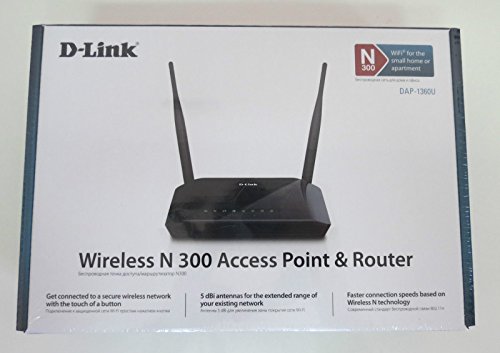
D-Link DIR 632
6.0/10

Overall score

Score
6.0/ 10
✕
What it is
An overall evaluation of the router's quality, based on technical analyses and user reviews.
When it matters
When you need a quick reference to identify the best routers on the market.
Score distribution
â–¼
<55-66-77-88-99-10
Score components

90%

6.0

Technical score

10%

?

User score

â–¼Worse than 90% of routers
7.2

Value for money

Value for money
7.2/ 10
✕
What it is
An indicator that combines the router's overall rating with its cost.
When it matters
When you are looking for a router with a good balance between network performance, features, and price.
Score distribution
â–¼
<55-66-77-88-99-10
Score components

70%

6.0

Overall score

30%

10

Price

â–¼Worse than 92%
6.0

Technical score

Technical score
6.0/ 10
✕
What it is
An assessment of the router's technical performance, covering key areas such as Wi-Fi performance, wired connectivity, security, software features, coverage, and design.
When it matters
When you want to compare routers based on technical performance and available features.
Score distribution
â–¼
<55-66-77-88-99-10
Score components

26%

4.6

Wireless

20%

5.5

Ports

18%

8.5

Networking

14%

7.8

Security

12%

4.6

Hardware

10%

5.4

Management

â–¼Worse than 87%
?

User score

User score
8.0/ 10
✕
What it is
A rating that combines user reviews and the total number of reviews received by the router.
When it matters
When you want to know how a router performs in daily use and how reliable it is for speed, coverage, and stability according to user feedback.
Score distribution
â–¼
<55-66-77-88-99-10
Score components

70%

?

User ratings

30%

?

Number of reviews

  • d-link-dir-632
  • d-link-dir-632
  • d-link-dir-632
  • d-link-dir-632
d-link-dir-632
d-link-dir-632
d-link-dir-632
d-link-dir-632
Best prices
    N/A~ £60
Best rankings
Available: ranking among products currently available (including other versions of this product).All: ranking among all products in the database.
Loading...
Loading category ranking...

Technical Specifications of router D-Link DIR 632

Technical score
Technical score
6.0/ 10
✕
What it is
An assessment of the router's technical performance, covering key areas such as Wi-Fi performance, wired connectivity, security, software features, coverage, and design.
When it matters
When you want to compare routers based on technical performance and available features.
Score distribution
â–¼
<55-66-77-88-99-10
Score components:

26%

4.6

Wireless

20%

5.5

Ports

18%

8.5

Networking

14%

7.8

Security

12%

4.6

Hardware

10%

5.4

Management

6.0
User score
User score
8.0/ 10
✕
What it is
A rating that combines user reviews and the total number of reviews received by the router.
When it matters
When you want to know how a router performs in daily use and how reliable it is for speed, coverage, and stability according to user feedback.
Score distribution
â–¼
<55-66-77-88-99-10
Score components

70%

?

User ratings

30%

?

Number of reviews

?
Popularity
Popularity
1.0/ 10
✕
What it is
An indicator based on the number of reviews received by the router.
When it matters
When you prefer to choose a router reviewed and selected by many other buyers.
Score distribution
â–¼
<55-66-77-88-99-10
Popularity:
D-Link DIR 632 has a popularity score of 1 point, which is lower than that of 72.1% of products in this category.
1.0
Value for money
Value for money
7.2/ 10
✕
What it is
An indicator that combines the router's overall rating with its cost.
When it matters
When you are looking for a router with a good balance between network performance, features, and price.
Score distribution
â–¼
<55-66-77-88-99-10
Score components:

70%

6.0

Overall score

30%

10

Price

7.2
Brand name
D-Link
Wi-Fi version
Wi-Fi 4 (802.11n)
This router uses Wi-Fi Wi-Fi 4 (802.11n), which is less advanced than 60.8% of routers and equal to 37.3% of routers.
Wi-Fi bands
2.4 GHz
This router supports 2.4 GHz Wi-Fi bands, which are less versatile than 75.4% of routers and equal to 22.4% of routers.
Wi-Fi speed
300 Mbps
This router delivers 300 Mbps Wi-Fi speed, which is lower than 73.7% of routers and equal to 16.8% of routers.
Channel widths supported
20 MHz + 40 MHz
This router supports 20 MHz + 40 MHz channel width options, which is fewer than 59.3% of routers and the same as 35.1% of routers.
Show more
Wi-Fi security protocols
WPA2, WPA, WEP
This router supports WPA2, WPA, WEP Wi-Fi security protocols, which are more advanced than 40.9% of routers and equal to 17.7% of routers.
DoS protection
no
This router does not include DoS protection. 87.5% of routers include DoS protection.
SPI intrusion protection
yes
This router includes SPI-based intrusion protection. 6.1% of routers include SPI-based intrusion protection.
MAC address filtering
yes
This router supports MAC address filtering. 2.2% of routers include MAC address filtering.
URL filter
yes
This router supports URL filtering. 3.4% of routers include URL filtering.
Show more
IPv6 support
yes
This router supports IPv6. 11.5% of routers are IPv6-ready.
Dynamic routing
no
This router does not support dynamic routing. 52.5% of routers support dynamic routing.
Inter-VLAN routing
no
This router does not support inter-VLAN routing. 23.5% of routers support inter-VLAN routing.
VLAN tagging
yes
This router supports VLAN tagging. 38.2% of routers include VLAN tagging.
QoS
yes
This router includes QoS controls. 3.2% of routers include QoS controls.
Show more
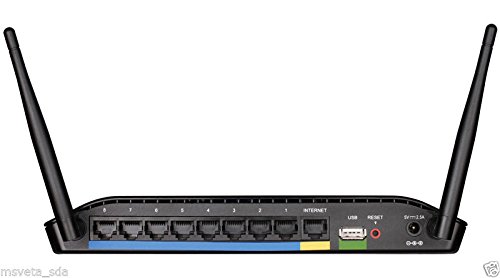
N. of LAN ports
8
This router has 8 LAN ports, which is more than 97.5% of routers and the same as 2.5% of routers.
LAN port speeds
100 Mbps
This router offers 100 Mbps on its LAN ports, which is slower than 73.2% of routers and on par with 26.4% of routers.
N. of WAN ports
1
This router has 1 WAN ports, which is more than 1% of routers and the same as 90.1% of routers.
N. of USB ports
1
This router has 1 USB ports, which is more than 39.5% of routers and the same as 39.5% of routers.
Power over Ethernet (PoE)
no
This router does not support Power over Ethernet (PoE). 0.5% of routers can be powered over Ethernet.
Show more
Management interface
Web UI
This router uses Web UI for management, which is less advanced than 72.2% of routers and equal to 27.3% of routers.
Firmware upgrade method
Web UI
This router supports Web UI firmware update methods, which are less convenient than 69.5% of routers and equal to 29.7% of routers.
Traffic monitoring
no
This router does not include traffic monitoring. 82.1% of routers include traffic monitoring.
Guest Wi-Fi network
yes
This router offers a guest Wi‑Fi network. 8.6% of routers offer a guest Wi‑Fi network.
Captive portal
no
This router does not offer captive portal features. 23.5% of routers offer captive portal features.
Show more
CPU clock speed
0.4 GHz
This router runs at 0.4 GHz, which is slower than 84.7% of routers and on par with 3.5% of routers.
RAM capacity
32 MB
This router has 32 MB of RAM, which is less than 83.5% of routers and the same as 12% of routers.
Internal storage
0.007812 GB
This router has 0.007812 GB of internal storage, which is less than 72.7% of routers and the same as 20.6% of routers.
Hardware acceleration
no
This router does not offer hardware acceleration. 68.9% of routers offer hardware acceleration.
N. of external antennas
2
This router has 2 external antennas, which is more than 45.1% of routers and the same as 13.1% of routers.
Show more

D-Link DIR 632 vs the average router

246810TotalWirelessSecurityNetworkingPortsManagementHardware
  • 4 more LAN ports
    This router has more LAN ports than the average router (8 vs 4). The average router has 4 LAN ports.
    8 vs 4
  • Suitable for gaming
    This router is designed for gaming, while the average router is not. 36.9% of routers are designed for gaming.
  • Stronger Wi-Fi security
    This router supports the Wi-Fi security protocols WPA2, WPA, WEP, while the average router supports WPA2, WPA, WEP, WPS.
    WPA2, WPA, WEP vs WPA2, WPA, WEP, WPS
  • Removable antennas
    This router has removable antennas, while the average router does not. 27.4% of routers have removable antennas.
  • Stronger Wi-Fi security
    This router supports the Wi-Fi security protocols WPA2, WPA, WEP, while the average router supports WPA2, WPA, WEP, WPS.
    WPA2, WPA, WEP vs WPA2, WPA, WEP, WPS
  • 4 more LAN ports
    This router has more LAN ports than the average router (8 vs 4). The average router has 4 LAN ports.
    8 vs 4
  • Suitable for gaming
    This router is designed for gaming, while the average router is not. 36.9% of routers are designed for gaming.
  • Removable antennas
    This router has removable antennas, while the average router does not. 27.4% of routers have removable antennas.
  • Limited firmware updates
    This router supports the firmware update methods Web UI, while the average router supports Web UI, App, Automatic.
    Web UI vs Web UI, App, Automatic
  • Slower LAN ports
    This router has a lower LAN port speed than the average router (100 Mbps vs 1 Gbps). The average router has a LAN port speed of 1 Gbps.
    100 Mbps vs 1 Gbps
  • Older Wi-Fi version
    This router uses an older Wi-Fi version than the average router (Wi-Fi 4 (802.11n) vs Wi-Fi 5 (802.11ac)). The average router uses Wi-Fi Wi-Fi 5 (802.11ac).
    Wi-Fi 4 (802.11n) vs Wi-Fi 5 (802.11ac)
  • No hardware acceleration
    This router does not offer hardware acceleration, while the average router does. 68.7% of routers offer hardware acceleration.
  • Fewer Wi-Fi bands
    This router supports fewer Wi-Fi bands than the average router (2.4 GHz vs 2.4 GHz + 5 GHz). The average router supports 2.4 GHz + 5 GHz Wi-Fi bands.
    2.4 GHz vs 2.4 GHz + 5 GHz
  • No VPN server support
    This router cannot act as a VPN server, while the average router can. 66.3% of routers can act as a VPN server.
  • No dynamic routing
    This router does not support dynamic routing, while the average router does. 52.3% of routers support dynamic routing.
  • 79.7% slower Wi-Fi speed
    This router has a lower Wi-Fi speed than the average router (300 Mbps vs 1475 Mbps). The average router reaches Wi-Fi speed of 1475 Mbps.
    300 Mbps vs 1,475 Mbps
  • 6.54x less popular
    D-Link DIR 632 is less popular than the average router (1 vs 6.5).
    1 vs 6.54
  • 8.2% worse value for money
    D-Link DIR 632 has worse value for money than the average router (7.23 vs 7.8).
    7.23 vs 7.82
  • Older Wi-Fi version
    This router uses an older Wi-Fi version than the average router (Wi-Fi 4 (802.11n) vs Wi-Fi 5 (802.11ac)). The average router uses Wi-Fi Wi-Fi 5 (802.11ac).
    Wi-Fi 4 (802.11n) vs Wi-Fi 5 (802.11ac)
  • Fewer Wi-Fi bands
    This router supports fewer Wi-Fi bands than the average router (2.4 GHz vs 2.4 GHz + 5 GHz). The average router supports 2.4 GHz + 5 GHz Wi-Fi bands.
    2.4 GHz vs 2.4 GHz + 5 GHz
  • 79.7% slower Wi-Fi speed
    This router has a lower Wi-Fi speed than the average router (300 Mbps vs 1475 Mbps). The average router reaches Wi-Fi speed of 1475 Mbps.
    300 Mbps vs 1,475 Mbps
  • Narrower channel widths
    This router has a lower supported channel width than the average router (20 MHz + 40 MHz vs 20 MHz + 40 MHz + 80 MHz). The average router supports channel width of 20 MHz + 40 MHz + 80 MHz.
    20 MHz + 40 MHz vs 20 MHz + 40 MHz + 80 MHz
  • 1 fewer spatial streams
    This router has fewer spatial streams than the average router (2 vs 3). The average router has 3 spatial streams.
    2 vs 3
  • No band steering
    This router does not support band steering, while the average router does. 51.8% of routers support band steering.
  • No beamforming
    This router does not support beamforming, while the average router does. 56.7% of routers support beamforming.
  • 49 fewer connected devices
    This router supports fewer connected devices than the average router (15 vs 64). The average router supports 64 connected devices.
    15 vs 64
  • No VPN server support
    This router cannot act as a VPN server, while the average router can. 66.3% of routers can act as a VPN server.
  • No DoS protection
    This router does not support DoS protection, while the average router does. 87.3% of routers support DoS protection.
  • No dynamic routing
    This router does not support dynamic routing, while the average router does. 52.3% of routers support dynamic routing.
  • Slower LAN ports
    This router has a lower LAN port speed than the average router (100 Mbps vs 1 Gbps). The average router has a LAN port speed of 1 Gbps.
    100 Mbps vs 1 Gbps
  • Limited firmware updates
    This router supports the firmware update methods Web UI, while the average router supports Web UI, App, Automatic.
    Web UI vs Web UI, App, Automatic
  • Weaker management tools
    This router uses the management interface Web UI, while the average router uses Web UI, App.
    Web UI vs Web UI, App
  • Less capable NAS services
    This router includes file sharing NAS services, while the average router includes SMB, FTP, time machine, NFS, web access.
    file sharing vs SMB, FTP, time machine, NFS, web access
  • No traffic monitoring
    This router does not offer traffic monitoring, while the average router does. 81.9% of routers offer traffic monitoring.
  • No hardware acceleration
    This router does not offer hardware acceleration, while the average router does. 68.7% of routers offer hardware acceleration.
  • 87.5% less RAM
    This router has less RAM than the average router (32 MB vs 256 MB). The average router has 256 MB of RAM.
    32 MB vs 256 MB
  • Lower CPU clock speed
    This router has a lower CPU clock speed than the average router (0.4 GHz vs 2x0.5 GHz). The average router has a CPU clock speed of 2x0.5 GHz.
    0.4 GHz vs 2x0.5 GHz
  • 93.8% less internal storage
    This router has less internal storage than the average router (0 GB vs 0.1 GB). The average router offers 0.125 GB of internal storage.
    0.007812 GB vs 0.125 GB

Video reviews

Hands-on testing, unboxing, and real-world video evaluations

Hands-on video, no verdict
Not graded

Expert reviews

In-depth analysis and verdict from leading tech publications
F
firstpost.com
18/04/2011
Summary of the review

Third-party reviews

What we like about D-Link DIR 632

  • Equipped with 8 LAN ports, offering more wired connectivity than standard routers
  • Compatible with third-party firmware like DD-WRT, which can improve stability
  • Includes a USB port for basic network storage or printer sharing
  • Features two external antennas that provide decent signal strength for a 2.4GHz device
  • Supports IPv6, making it more future-proof than some contemporary older models

What we don't like about D-Link DIR 632

  • Frequent Wi-Fi drops and system lockups when using the stock firmware
  • Lacks Gigabit Ethernet; all 8 LAN ports are limited to 10/100 Mbps 'Fast Ethernet'
  • Outdated Wi-Fi 4 (802.11n) technology, missing the faster 5GHz band and modern AC/AX standards
  • Convoluted initial setup process for certain advanced functions like FTP
  • Ancient technology with limited recent security updates from the manufacturer

Verdict

The D-Link DIR-632 is a Wireless N300 router featuring a unique integrated 8-port 10/100 Fast Ethernet switch, a 400MHz Atheros processor, 32MB of RAM, and two external antennas for extended 2.4GHz coverage. Its main advantages include the high number of wired LAN ports for connecting multiple devices, SharePort technology via a USB 2.0 port for sharing printers or storage, and compatibility with third-party firmware like DD-WRT. However, it is limited by aging 10/100 Mbps port speeds rather than Gigabit Ethernet, lacks a 5GHz band, and has been noted by some users to experience intermittent connection drops or setup errors.

Compare D-Link DIR 632 with other routers

1Product to compare no. 1
VS
2Product to compare no. 2
VS
3Product to compare no. 3 (optional)

Graphic comparison of D-Link DIR 632 and other routers

No results found