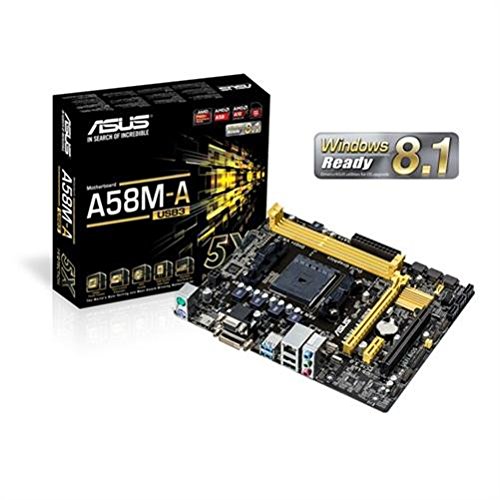
ASUS A55BM A USB3 Review | 107 Data compared

double-arrow
  • Avg. price in UK: ~£55
  • Avg. price in US: ~$30
  • CPU socket: FM2+
  • Chipset: AMD A55
  • Form factor: microATX

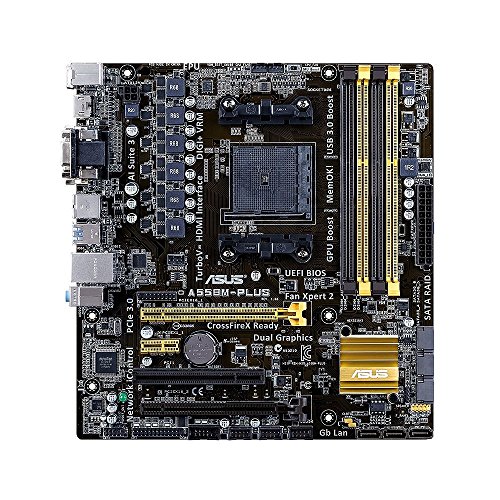
ASUS A55BM A USB3 review. Compare 107 technical specifications and user reviews to see how it ranks among motherboards and if it is worth buying.

3.8

Overall score

What it is: An overall evaluation of the motherboard's quality, based on technical analyses and user reviews.

When it matters: When you need a quick reference to identify the best motherboards on the market.

Score components:

90.0%

3.4

Technical Score

10.0%

7.2

User score

Poor
3.4

Technical Score

What it is: An assessment of the motherboard's technical performance, covering key areas such as power delivery, CPU and memory support, expansion, storage, connectivity, cooling, BIOS features, and design.

When it matters: When you want to compare motherboards based on technical performance and available features.

Score components:

19.0%

2.1

Memory

16.0%

4.6

Platform & Features

16.0%

3.3

Storage

15.0%

5.5

Network

13.0%

1.4

Ports & USB

8.0%

2.3

Expansion

8.0%

3.6

Power & Cooling

5.0%

5.6

Audio

Poor
7.2

User score

What it is: A rating that combines user reviews and the total number of reviews received by the motherboard.

When it matters: When you want to understand how a motherboard performs in real-world builds and how reliable it is in terms of stability, BIOS usability, connectivity, and long-term ownership.

Score components:

70.0%

9.2

User reviews

30.0%

2.5

Popularity

User score:
United Kingdom
amazon
4.8
(10)
amazon
4.4
(8)
United States
Amazon_logo.png
4.8
(10)
Amazon_logo.png
4.4
(8)

(Reviews last updated: May 2026)

Very good
  • 2.7
    Gaming

    Score components:

    28.0%

    4.1

    VRM phases

    22.0%

    1.0

    N. of M.2 sockets

    18.0%

    4.6

    LAN speed

    17.0%

    1.8

    Maximum RAM speed

    15.0%

    1.0

    N. of PCIe 5.0 x16 slots

  • asus-a55bm-a-usb3
  • asus-a55bm-a-usb3
  • asus-a55bm-a-usb3
  • asus-a55bm-a-usb3
  • asus-a55bm-a-usb3
  • asus-a55bm-a-usb3
  • asus-a55bm-a-usb3
  • asus-a55bm-a-usb3
  • asus-a55bm-a-usb3
asus-a55bm-a-usb3
asus-a55bm-a-usb3
asus-a55bm-a-usb3
asus-a55bm-a-usb3
asus-a55bm-a-usb3
asus-a55bm-a-usb3
asus-a55bm-a-usb3
asus-a55bm-a-usb3
asus-a55bm-a-usb3

Best prices in UK

Best rankings

?

Available: ranking among products currently available (including other versions of this product).
All: ranking among all products in the database.

Verdict

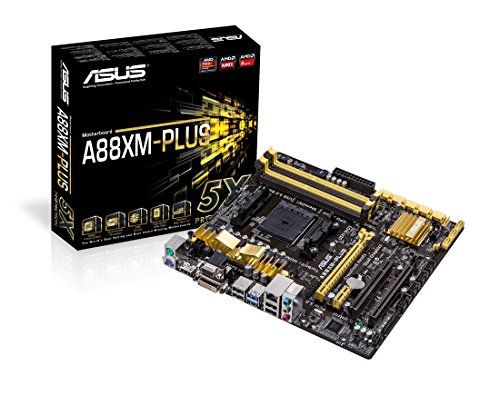
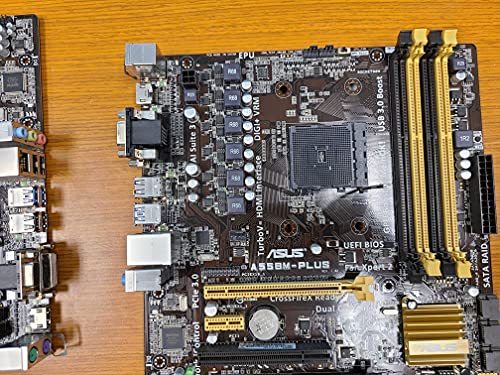
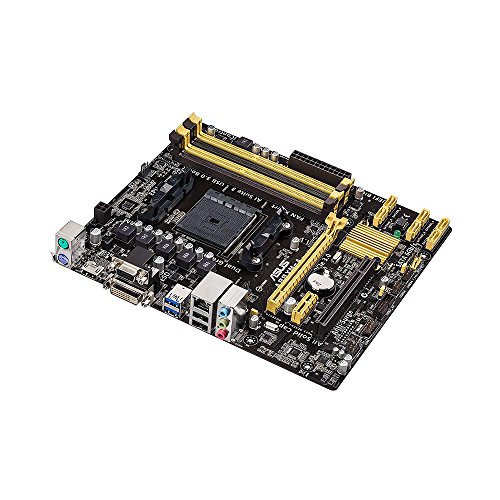
The ASUS A55BM-A/USB3 is a micro-ATX motherboard designed for the AMD FM2+ socket, supporting AMD A-series and Athlon processors with a maximum of four cores. It features the AMD A55 FCH chipset and two DDR3 DIMM slots that support up to 32GB of dual-channel memory with speeds reaching 2133 MHz (and up to 2400 MHz via overclocking). Key specifications include one PCIe 3.0/2.0 x16 slot, six SATA 3Gb/s connectors supporting RAID 0, 1, and 10, and multiple video outputs including HDMI (supporting 4K resolution on FM2+ APUs), DVI, and VGA. Its primary strengths lie in the ASUS 5X Protection suite, which offers enhanced durability through high-quality solid capacitors and digital power regulation, alongside USB 3.0 Boost for faster data transfers. However, notable drawbacks include its reliance on the older SATA 3Gb/s standard rather than the faster 6Gb/s, a limited total of two RAM slots, and the absence of a TPM connector.

Technical Specifications of ASUS A55BM A USB3

Technical Score

What it is: An assessment of the motherboard's technical performance, covering key areas such as power delivery, CPU and memory support, expansion, storage, connectivity, cooling, BIOS features, and design.

When it matters: When you want to compare motherboards based on technical performance and available features.

Score components:

19.0%

2.1

Memory

16.0%

4.6

Platform & Features

16.0%

3.3

Storage

15.0%

5.5

Network

13.0%

1.4

Ports & USB

8.0%

2.3

Expansion

8.0%

3.6

Power & Cooling

5.0%

5.6

Audio

3.4
ASUS A55BM A USB3 has a technical score of 3.41 points, which is lower than that of 99.2% of products in this category.
User score

What it is: A rating that combines user reviews and the total number of reviews received by the motherboard.

When it matters: When you want to understand how a motherboard performs in real-world builds and how reliable it is in terms of stability, BIOS usability, connectivity, and long-term ownership.

Score components:

70.0%

9.2

User reviews

30.0%

2.5

Popularity

User score:
United Kingdom
amazon
4.8
(10)
amazon
4.4
(8)
United States
Amazon_logo.png
4.8
(10)
Amazon_logo.png
4.4
(8)

(Reviews last updated: May 2026)

7.2
ASUS A55BM A USB3 has a user score of 7.23 points, which is lower than that of 71.5% of products in this category.
Popularity
What it is: An indicator based on the number of reviews received by the motherboard.
When it matters: When you prefer a motherboard that has already been bought and reviewed by many other users.
2.5
ASUS A55BM A USB3 has a popularity of 2.5 points, which is lower than 64.5% of products in this category.
Ratio quality/price

What it is: An indicator that combines the motherboard's overall rating with its cost.

When it matters: When you are looking for a motherboard that offers a strong balance of features, performance, and price.

Score components:

60.0%

3.8

Overall score

40.0%

10

Price

5.7
ASUS A55BM A USB3 has a quality-to-price ratio of 5.7 points, which is lower than 97.9% of products in this category.
Brand name
What it is: The brand that makes the motherboard.
When it matters: When you have a brand preference for support, BIOS, or build quality.

Importance: MEDIUM

Asus
CPU socket
What it is: The socket type the motherboard is built to support.
When it matters: When you need the motherboard to match a specific CPU.

Importance: HIGH

FM2+
ASUS A55BM A USB3 uses the FM2+ CPU socket, which is less advanced than that of 97.8% of motherboards and equal to that of 1.4% of motherboards.
CPU platform

Importance: MEDIUM

AMD
Chipset
What it is: The chipset that defines the motherboard platform and many of its features.
When it matters: When you compare platform features, connectivity, and CPU support.

Importance: HIGH

AMD A55
ASUS A55BM A USB3 uses the AMD A55 chipset, which is less advanced than that of 99.7% of motherboards and equal to that of 0.2% of motherboards.
Form factor
What it is: The physical size standard of the motherboard, such as ATX or Micro-ATX.
When it matters: When you need the board to fit a specific case size.

Importance: HIGH

microATX
ASUS A55BM A USB3 has the microATX form factor, which is less versatile than that of 52.2% of motherboards and equal to that of 32.4% of motherboards.
Show more
DDR memory version
What it is: The RAM generation the motherboard supports, such as DDR4 or DDR5.
When it matters: When you need the board to match a certain memory platform.

Importance: HIGH

Good value: DDR5

DDR3
ASUS A55BM A USB3 uses DDR3 memory, which is older than that of 86.6% of motherboards and equal to that of 13.4% of motherboards.
Memory slots
What it is: The number of RAM slots on the motherboard.
When it matters: When you want more room for future memory upgrades.

Importance: HIGH

Good value: >=4

2
ASUS A55BM A USB3 has 2 Memory slots, which is fewer than 78.6% of motherboards and equal to 21.4% of motherboards.
Maximum memory capacity
What it is: The largest total amount of RAM the motherboard supports.
When it matters: When you plan a build with very high memory capacity.

Importance: HIGH

Good value: >=128 GB

32 GB
ASUS A55BM A USB3 supports up to 32 GB of memory, which is less than 87% of motherboards and equal to 11.2% of motherboards.
Memory channels
What it is: The memory channel configuration supported by the motherboard platform.
When it matters: When memory bandwidth matters for your build.

Importance: MEDIUM

2
ASUS A55BM A USB3 supports 2 memory channels, which is more than 0.2% of motherboards and equal to 92.5% of motherboards.
Maximum RAM speed
What it is: The highest officially supported memory speed for the motherboard.
When it matters: When you choose RAM and want to know the supported speed ceiling.

Importance: HIGH

Good value: >=6400 MT/s

2,133 MT/s
ASUS A55BM A USB3 supports memory speeds up to 2133 MT/s, which is lower than that of 86.9% of motherboards and equal to that of 4.5% of motherboards.
Show more
N. of M.2 sockets
What it is: The number of M.2 slots available on the motherboard.
When it matters: When you want room for more NVMe or M.2 drives.

Importance: HIGH

Good value: >=3

0
ASUS A55BM A USB3 has 0 M.2 sockets, which is fewer than 88.4% of motherboards and equal to 11.7% of motherboards.
M.2 slot interface per slot
What it is: The storage or PCIe interface available for each M.2 slot on the motherboard.
When it matters: When you want to check which drives each M.2 slot can use.

Importance: HIGH

N/A
N. of SATA 3 connectors
What it is: The number of SATA 6Gb/s connectors on the motherboard.
When it matters: When you plan to connect multiple SATA drives.

Importance: MEDIUM

Good value: >=6

0
ASUS A55BM A USB3 has 0 SATA 3 connectors, which is fewer than 99.5% of motherboards and equal to 0.5% of motherboards.
Supported RAID levels
What it is: The RAID modes officially supported by the motherboard storage platform.
When it matters: When you plan to use multiple drives in a RAID setup.

Importance: MEDIUM

0/1/10
ASUS A55BM A USB3 supports RAID levels 0/1/10, which is narrower than 68.3% of motherboards and equal to 23.2% of motherboards.
JBOD excluded from RAID-level set
NVMe RAID support
What it is: Shows whether the board supports RAID configurations that use NVMe SSDs.
When it matters: When you plan to use multiple NVMe drives in RAID.

Importance: LOW

no
ASUS A55BM A USB3 does not support NVMe RAID. 59.8% of motherboards support this feature.
Show more
N. of PCIe 5.0 x16 slots
What it is: The number of PCIe 5.0 x16 physical slots on the motherboard.
When it matters: When you want the newest high-bandwidth expansion slots.

Importance: HIGH

Good value: >=1

0
ASUS A55BM A USB3 has 0 PCIe 5.0x16 slots, which is equal to 68.5% of motherboards.
N. of PCIe 4.0 x16 slots
What it is: The number of PCIe 4.0 x16 physical slots on the motherboard.
When it matters: When you want more room for modern expansion cards.

Importance: HIGH

Good value: >=1

0
ASUS A55BM A USB3 has 0 PCIe 4.0x16 slots, which is equal to 55.6% of motherboards.
N. of PCIe 3.0 x16 slots
What it is: The number of PCIe 3.0 x16 physical slots on the motherboard.
When it matters: When you need more full-length expansion slots.

Importance: MEDIUM

1
ASUS A55BM A USB3 has 1 PCIe 3.0x16 slots, which is more than 40.6% of motherboards and equal to 26.7% of motherboards.
PCIe slot electrical configuration
What it is: The actual lane wiring used by the motherboard PCIe slots.
When it matters: When you need to know how much bandwidth each slot really gets.

Importance: HIGH

x16/x1
ASUS A55BM A USB3 uses x16/x1 for PCIe slot electrical configuration, which is less flexible than that of 70.9% of motherboards and equal to that of 7.2% of motherboards.
PCIe bifurcation support
What it is: Shows whether the board can split PCIe lanes across multiple devices from one slot or link.
When it matters: When you plan multi-SSD adapters or more advanced expansion setups.

Importance: MEDIUM

no
ASUS A55BM A USB3 does not support PCIe bifurcation. 61% of motherboards support this feature.
Show more
Total USB ports (rear I/O)
What it is: The total number of rear USB ports available on the motherboard.
When it matters: When you use many USB devices directly from the back of the PC.

Importance: MEDIUM

Good value: >=8

4
ASUS A55BM A USB3 has 4 USB ports (rear I/O), which is fewer than 97.9% of motherboards and equal to 2% of motherboards.
Total USB ports (including headers)
What it is: The total number of USB ports supported when rear ports and internal headers are counted together.
When it matters: When you want to know the board's full USB expansion potential.

Importance: MEDIUM

Good value: >=14

8
ASUS A55BM A USB3 has 8 USB ports (including headers), which is fewer than 97.9% of motherboards and equal to 1.9% of motherboards.
Total USB-C ports (rear I/O)
What it is: The total number of rear USB-C ports on the motherboard.
When it matters: When you want more USB-C devices connected without adapters.

Importance: MEDIUM

Good value: >=1

0
ASUS A55BM A USB3 has 0 USB-C ports (rear I/O), which is fewer than 64.6% of motherboards and equal to 35.4% of motherboards.
Total USB-C ports (including headers)
What it is: The total number of USB-C ports supported when rear ports and internal headers are counted together.
When it matters: When you want more USB-C connectivity across the whole build.

Importance: MEDIUM

Good value: >=2

0
ASUS A55BM A USB3 has 0 USB-C ports (including headers), which is fewer than 69.6% of motherboards and equal to 30.4% of motherboards.
N. of USB 3.2 Gen2x2 ports (USB-C)
What it is: The number of rear USB 3.2 Gen2x2 Type-C ports on the motherboard.
When it matters: When you want very fast USB-C connectivity on the rear I/O.

Importance: HIGH

Good value: >=1

0
ASUS A55BM A USB3 has 0 USB 3.2 Gen2x2 ports (USB-C), which is equal to 81.6% of motherboards.
Show more
LAN speed
What it is: The maximum wired Ethernet speed supported by the motherboard.
When it matters: When you want faster wired networking.

Importance: HIGH

Good value: 2.5GbE

1 Gbps
ASUS A55BM A USB3 supports LAN speeds up to 1 Gbps, which is lower than that of 50.8% of motherboards and equal to that of 49.1% of motherboards.
LAN controller
What it is: The model of onboard Ethernet controller used by the motherboard.
When it matters: When you compare networking hardware quality and features.

Importance: MEDIUM

?
N. of RJ45 ports
What it is: The number of wired Ethernet ports on the motherboard.
When it matters: When you need one or more wired network connections.

Importance: LOW

1
ASUS A55BM A USB3 has 1 RJ45 ports, which is equal to 85.6% of motherboards.
Wi-Fi connectivity
What it is: Shows whether the motherboard includes onboard Wi-Fi hardware instead of requiring a separate adapter.
When it matters: When you want wireless networking without adding an extra card.

Importance: MEDIUM

no
ASUS A55BM A USB3 does not support Wi-Fi connectivity. 49.1% of motherboards support this feature.
Wi-Fi version
What it is: The supported Wi-Fi generation, such as Wi-Fi 6 or Wi-Fi 7.
When it matters: When you care about wireless speed and router compatibility.

Importance: MEDIUM

Good value: Wi-Fi 6E (802.11ax)

N/A
Show more
Audio codec
What it is: The onboard audio codec used by the motherboard.
When it matters: When sound quality from the built-in audio matters to you.

Importance: MEDIUM

Realtek ALC887-VD
ASUS A55BM A USB3 uses the Realtek ALC887-VD audio codec, which is less advanced than that of 96.9% of motherboards and equal to that of 0.4% of motherboards.
Audio channels
What it is: The audio channel configuration supported by the onboard sound solution.
When it matters: When you want surround sound from the motherboard audio outputs.

Importance: LOW

Good value: 7.1

7.1
ASUS A55BM A USB3 offers 7.1 audio channels, which is more than 4.9% of motherboards and equal to 95.1% of motherboards.
full 7.1 needs front panel audio.
Audio SNR
What it is: The signal-to-noise ratio of the onboard audio solution.
When it matters: When you care about cleaner onboard audio output.

Importance: MEDIUM

Good value: >=120 dB

97 dB
ASUS A55BM A USB3 has an audio SNR of 97 dB, which is lower than that of 67.3% of motherboards and equal to that of 16.8% of motherboards.
Headphone amp support
What it is: Shows whether the onboard audio path includes dedicated headphone amplification for harder-to-drive headsets.
When it matters: When you use harder-to-drive headphones from the onboard audio.

Importance: LOW

no
ASUS A55BM A USB3 does not support a headphone amp. 63% of motherboards support this feature.
N. of 3.5mm audio jacks
What it is: The number of rear 3.5mm audio jacks on the motherboard.
When it matters: When you want more analog audio connection options.

Importance: LOW

Good value: >=5

3
ASUS A55BM A USB3 has 3 3.5mm audio jacks, which is fewer than 50.3% of motherboards and equal to 38.2% of motherboards.
Show more
VRM phases
What it is: The number of power-delivery phases used by the motherboard VRM.
When it matters: When you care about CPU power delivery and overclocking headroom.

Importance: HIGH

Good value: >=12

3+1
ASUS A55BM A USB3 has 3+1 VRM phases, which is fewer than 98.9% of motherboards and equal to 0.5% of motherboards.
N. of CPU power connectors
What it is: The number of CPU power connectors on the motherboard.
When it matters: When you care about power delivery for higher-end CPUs.

Importance: HIGH

Good value: >=2

1
ASUS A55BM A USB3 has 1 CPU power connectors, which is equal to 54.5% of motherboards.
N. of fan headers
What it is: The number of headers available for case or CPU fans.
When it matters: When your build uses several fans.

Importance: MEDIUM

Good value: >=6

2
ASUS A55BM A USB3 has 2 fan headers, which is fewer than 91.7% of motherboards and equal to 8.3% of motherboards.
Pump header
What it is: Shows whether the motherboard includes a dedicated header designed for a liquid-cooling pump.
When it matters: When you build with an AIO or custom liquid cooling loop.

Importance: MEDIUM

no
ASUS A55BM A USB3 does not have a pump header. 77% of motherboards include this feature.
Pump header max current
What it is: The maximum current the dedicated pump header can supply.
When it matters: When you want to make sure the pump header can power your cooling setup.

Importance: LOW

Good value: >=2 A

0 A
ASUS A55BM A USB3 supports up to 0 A on the pump header, which is lower than that of 74.3% of motherboards and equal to that of 25.7% of motherboards.
Show more

ASUS A55BM A USB3 vs the average motherboard

  • 1 more PCI slots
    ASUS A55BM A USB3 has more PCI slots than the average motherboard (1 vs 0). The average motherboard has 0 PCI slot/s.
    What it is: The number of legacy PCI slots on the motherboard.
    When it matters: When you need compatibility with older expansion cards.

    Importance: LOW

    ASUS A55BM A USB3 has more PCI slots than the average motherboard (1 vs 0). The average motherboard has 0 PCI slot/s.1 vs 0
  • 6 more SATA 2 connectors
    ASUS A55BM A USB3 has more SATA 2 connectors than the average motherboard (6 vs 0). The average motherboard has 0 SATA 2 connectors.
    What it is: The number of SATA 3Gb/s connectors on the motherboard.
    When it matters: When you still use older SATA devices.

    Importance: LOW

    ASUS A55BM A USB3 has more SATA 2 connectors than the average motherboard (6 vs 0). The average motherboard has 0 SATA 2 connectors.6 vs 0
  • 122 mm shorter
    ASUS A55BM A USB3 is shorter than the average motherboard (183 mm vs 305 mm). The average motherboard height is 305 mm.
    What it is: The physical height of the motherboard.
    When it matters: When you check case fit or compare board size.

    Importance: LOW

    ASUS A55BM A USB3 is shorter than the average motherboard (183 mm vs 305 mm). The average motherboard height is 305 mm.183 mm vs 305 mm
  • 2.91x cheaper
    ASUS A55BM A USB3 is cheaper than the average motherboard (£55 vs £160).
    ASUS A55BM A USB3 is cheaper than the average motherboard (£55 vs £160).£55 vs £160
  • 1 more DVI outputs
    ASUS A55BM A USB3 has more DVI outputs than the average motherboard (1 vs 0). The average motherboard has 0 DVI outputs.
    What it is: The number of DVI video outputs on the motherboard.
    When it matters: When you plan to use older compatible monitors.

    Importance: LOW

    ASUS A55BM A USB3 has more DVI outputs than the average motherboard (1 vs 0). The average motherboard has 0 DVI outputs.1 vs 0
  • Includes VGA connector
    ASUS A55BM A USB3 has a VGA connector, while the average motherboard does not. 22% of motherboards include a VGA connector.
    What it is: Shows whether the rear I/O includes an analog VGA display output.
    When it matters: When you need compatibility with older displays or projectors.

    Importance: LOW

    ASUS A55BM A USB3 has a VGA connector, while the average motherboard does not. 22% of motherboards include a VGA connector.
  • 18 mm narrower
    ASUS A55BM A USB3 is narrower than the average motherboard (226 mm vs 244 mm). The average motherboard width is 244 mm.
    What it is: The physical width of the motherboard.
    When it matters: When you check case fit or compare board size.

    Importance: LOW

    ASUS A55BM A USB3 is narrower than the average motherboard (226 mm vs 244 mm). The average motherboard width is 244 mm.226 mm vs 244 mm
  • 6 more SATA 2 connectors
    ASUS A55BM A USB3 has more SATA 2 connectors than the average motherboard (6 vs 0). The average motherboard has 0 SATA 2 connectors.
  • 1 more PCI slots
    ASUS A55BM A USB3 has more PCI slots than the average motherboard (1 vs 0). The average motherboard has 0 PCI slot/s.
  • 1 more DVI outputs
    ASUS A55BM A USB3 has more DVI outputs than the average motherboard (1 vs 0). The average motherboard has 0 DVI outputs.
  • Includes VGA connector
    ASUS A55BM A USB3 has a VGA connector, while the average motherboard does not. 22% of motherboards include a VGA connector.
  • 122 mm shorter
    ASUS A55BM A USB3 is shorter than the average motherboard (183 mm vs 305 mm). The average motherboard height is 305 mm.
  • 18 mm narrower
    ASUS A55BM A USB3 is narrower than the average motherboard (226 mm vs 244 mm). The average motherboard width is 244 mm.
  • More basic motherboard chipset
    ASUS A55BM A USB3 has more basic motherboard chipset than the average motherboard (AMD A55 vs Intel B860). The average motherboard uses Intel B860 chipset.
  • No BIOS flashback support
    ASUS A55BM A USB3 does not support BIOS flashback, while the average motherboard does. 50.8% of motherboards support BIOS flashback.
  • Older CPU socket
    ASUS A55BM A USB3 has older CPU socket than the average motherboard (FM2+ vs LGA 1,151). The average motherboard uses LGA 1,151 CPU socket.
  • Not ready for Windows 11
    ASUS A55BM A USB3 is not ready for Windows 11, while the average motherboard is. 77.1% of motherboards are ready for Windows 11.
  • No debug LED indicators
    ASUS A55BM A USB3 does not have debug LED indicators, while the average motherboard does. 78.8% of motherboards include debug LED indicators.
  • No automatic overclocking
    ASUS A55BM A USB3 does not support automatic overclocking, while the average motherboard does. 74% of motherboards support automatic overclocking.
  • Narrower Windows support
    ASUS A55BM A USB3 has narrower Windows support than the average motherboard (Windows 10, Windows 8.1, Windows 7 vs Windows 11, Windows 10). The average motherboard supports Windows 11, Windows 10.
  • 8 years older release date
    ASUS A55BM A USB3 is older than the average motherboard (2,013 vs 2,021). The average motherboard was released in 2,021.
    July 2013
  • Less versatile form factor
    ASUS A55BM A USB3 has less versatile form factor than the average motherboard (microATX vs ATX). The average motherboard comes in ATX form factor.
  • 75% less maximum memory capacity
    ASUS A55BM A USB3 has fewer maximum memory capacity than the average motherboard (32 GB vs 128 GB). The average motherboard supports 128 GB of memory.
  • 2 fewer memory slots
    ASUS A55BM A USB3 has fewer memory slots than the average motherboard (2 vs 4). The average motherboard has 4 memory slot/s.
  • Older DDR memory generation
    ASUS A55BM A USB3 has older DDR memory generation than the average motherboard (DDR3 vs DDR4). The average motherboard supports DDR4 memory.
  • 53.6% lower maximum RAM speed
    ASUS A55BM A USB3 has a lower maximum RAM speed than the average motherboard (2,133 MT/s vs 4,600 MT/s). The average motherboard supports RAM speed of 4,600 MT/s.
  • 51.3% lower overclocked RAM speed
    ASUS A55BM A USB3 has a lower overclocked RAM speed than the average motherboard (2,400 MT/s vs 4,933 MT/s). The average motherboard supports overclocked RAM speed of 4,933 MT/s.
  • 2 fewer M.2 sockets
    ASUS A55BM A USB3 has fewer M.2 sockets than the average motherboard (0 vs 2). The average motherboard has 2 M.2 socket/s.
  • No NVMe RAID support
    ASUS A55BM A USB3 does not support NVMe RAID, while the average motherboard does. 59.8% of motherboards support NVMe RAID.
  • Fewer RAID options
    ASUS A55BM A USB3 has fewer RAID options than the average motherboard (0/1/10 vs 0/1/5/10). The average motherboard has 0/1/5/10 RAID level/s.
    JBOD excluded from RAID-level set
  • No PCIe bifurcation support
    ASUS A55BM A USB3 does not support PCIe bifurcation, while the average motherboard does. 61% of motherboards support PCIe bifurcation.
  • No multi-GPU support
    ASUS A55BM A USB3 does not support multi-GPU, while the average motherboard does. 54.6% of motherboards support multi-GPU.
    Single PCIe x16 slot only.
  • 4 fewer rear USB ports
    ASUS A55BM A USB3 has fewer rear USB ports than the average motherboard (4 vs 8). The average motherboard has 8 rear USB port/s.
  • 7 fewer total USB connections
    ASUS A55BM A USB3 has fewer total USB connections than the average motherboard (8 vs 15). The average motherboard has 15 total USB connections.
  • 1 fewer rear USB-C ports
    ASUS A55BM A USB3 has fewer rear USB-C ports than the average motherboard (0 vs 1). The average motherboard has 1 rear USB-C port/s.
  • 1 fewer USB 3.2 Gen2 ports
    ASUS A55BM A USB3 has fewer USB 3.2 Gen2 ports than the average motherboard (0 vs 1). The average motherboard has 1 USB 3.2 Gen2 port/s.
  • 2 fewer USB 3.2 Gen1 ports
    ASUS A55BM A USB3 has fewer USB 3.2 Gen1 ports than the average motherboard (2 vs 4). The average motherboard has 4 USB 3.2 Gen1 port/s.
  • 1 fewer DisplayPort outputs
    ASUS A55BM A USB3 has fewer DisplayPort outputs than the average motherboard (0 vs 1). The average motherboard has 1 DisplayPort outputs.
  • Older HDMI version
    ASUS A55BM A USB3 has older HDMI version than the average motherboard (1.4 vs 2.1). The average motherboard supports HDMI 2.1.
  • 1 fewer total USB-C connections
    ASUS A55BM A USB3 has fewer total USB-C connections than the average motherboard (0 vs 1). The average motherboard has 1 total USB-C connections.
  • 60% lower LAN speed
    ASUS A55BM A USB3 has a lower LAN speed than the average motherboard (1 Gbps vs 2.5 Gbps). The average motherboard offers LAN speed of 2.5 Gbps.
  • No Wi-Fi antenna included
    ASUS A55BM A USB3 does not include a Wi-Fi antenna, while the average motherboard does. 51.1% of motherboards include a Wi-Fi antenna.
  • 18 dB lower audio SNR
    ASUS A55BM A USB3 has a lower audio SNR than the average motherboard (97 dB vs 115 dB). The average motherboard has audio SNR of 115 dB.
  • No headphone amp support
    ASUS A55BM A USB3 does not support a headphone amp, while the average motherboard does. 63% of motherboards support a headphone amp.
  • 2 fewer 3.5mm audio jacks
    ASUS A55BM A USB3 has fewer 3.5mm audio jacks than the average motherboard (3 vs 5). The average motherboard has 5 3.5mm audio jacks.
  • No optical S/PDIF out
    ASUS A55BM A USB3 does not have optical S/PDIF out, while the average motherboard does. 55.7% of motherboards include optical S/PDIF out.
  • Fewer VRM phases
    ASUS A55BM A USB3 has fewer VRM phases than the average motherboard (3+1 vs 10). The average motherboard has 10 VRM phase/s.
  • 2 fewer ARGB headers
    ASUS A55BM A USB3 has fewer ARGB headers than the average motherboard (0 vs 2). The average motherboard has 2 ARGB header/s.
  • No pump header
    ASUS A55BM A USB3 does not have a pump header, while the average motherboard does. 77% of motherboards include a pump header.
  • 3 fewer fan headers
    ASUS A55BM A USB3 has fewer fan headers than the average motherboard (2 vs 5). The average motherboard has 5 fan header/s.
  • No onboard RGB lighting
    ASUS A55BM A USB3 does not have onboard RGB lighting, while the average motherboard does. 50.3% of motherboards include onboard RGB lighting.
  • 1 fewer RGB headers
    ASUS A55BM A USB3 has fewer RGB headers than the average motherboard (0 vs 1). The average motherboard has 1 RGB header/s.
  • 2 A lower pump header current limit
    ASUS A55BM A USB3 has a lower pump header current than the average motherboard (0 A vs 2 A). The average motherboard provides pump header current of 2 A.
  • More basic motherboard chipset
    ASUS A55BM A USB3 has more basic motherboard chipset than the average motherboard (AMD A55 vs Intel B860). The average motherboard uses Intel B860 chipset.
    What it is: The chipset that defines the motherboard platform and many of its features.
    When it matters: When you compare platform features, connectivity, and CPU support.

    Importance: HIGH

    ASUS A55BM A USB3 has more basic motherboard chipset than the average motherboard (AMD A55 vs Intel B860). The average motherboard uses Intel B860 chipset.AMD A55 vs Intel B860
  • 60% lower LAN speed
    ASUS A55BM A USB3 has a lower LAN speed than the average motherboard (1 Gbps vs 2.5 Gbps). The average motherboard offers LAN speed of 2.5 Gbps.
    What it is: The maximum wired Ethernet speed supported by the motherboard.
    When it matters: When you want faster wired networking.

    Importance: HIGH

    Good value: 2.5GbE

    ASUS A55BM A USB3 has a lower LAN speed than the average motherboard (1 Gbps vs 2.5 Gbps). The average motherboard offers LAN speed of 2.5 Gbps.1 Gbps vs 2.5 Gbps
  • 75% less maximum memory capacity
    ASUS A55BM A USB3 has fewer maximum memory capacity than the average motherboard (32 GB vs 128 GB). The average motherboard supports 128 GB of memory.
    What it is: The largest total amount of RAM the motherboard supports.
    When it matters: When you plan a build with very high memory capacity.

    Importance: HIGH

    Good value: >=128 GB

    ASUS A55BM A USB3 has fewer maximum memory capacity than the average motherboard (32 GB vs 128 GB). The average motherboard supports 128 GB of memory.32 GB vs 128 GB
  • 2 fewer M.2 sockets
    ASUS A55BM A USB3 has fewer M.2 sockets than the average motherboard (0 vs 2). The average motherboard has 2 M.2 socket/s.
    What it is: The number of M.2 slots available on the motherboard.
    When it matters: When you want room for more NVMe or M.2 drives.

    Importance: HIGH

    Good value: >=3

    ASUS A55BM A USB3 has fewer M.2 sockets than the average motherboard (0 vs 2). The average motherboard has 2 M.2 socket/s.0 vs 2
  • 2 fewer memory slots
    ASUS A55BM A USB3 has fewer memory slots than the average motherboard (2 vs 4). The average motherboard has 4 memory slot/s.
    What it is: The number of RAM slots on the motherboard.
    When it matters: When you want more room for future memory upgrades.

    Importance: HIGH

    Good value: >=4

    ASUS A55BM A USB3 has fewer memory slots than the average motherboard (2 vs 4). The average motherboard has 4 memory slot/s.2 vs 4
  • 4 fewer rear USB ports
    ASUS A55BM A USB3 has fewer rear USB ports than the average motherboard (4 vs 8). The average motherboard has 8 rear USB port/s.
    What it is: The total number of rear USB ports available on the motherboard.
    When it matters: When you use many USB devices directly from the back of the PC.

    Importance: MEDIUM

    Good value: >=8

    ASUS A55BM A USB3 has fewer rear USB ports than the average motherboard (4 vs 8). The average motherboard has 8 rear USB port/s.4 vs 8
  • No NVMe RAID support
    ASUS A55BM A USB3 does not support NVMe RAID, while the average motherboard does. 59.8% of motherboards support NVMe RAID.
    What it is: Shows whether the board supports RAID configurations that use NVMe SSDs.
    When it matters: When you plan to use multiple NVMe drives in RAID.

    Importance: LOW

    ASUS A55BM A USB3 does not support NVMe RAID, while the average motherboard does. 59.8% of motherboards support NVMe RAID.
  • 7 fewer total USB connections
    ASUS A55BM A USB3 has fewer total USB connections than the average motherboard (8 vs 15). The average motherboard has 15 total USB connections.
    What it is: The total number of USB ports supported when rear ports and internal headers are counted together.
    When it matters: When you want to know the board's full USB expansion potential.

    Importance: MEDIUM

    Good value: >=14

    ASUS A55BM A USB3 has fewer total USB connections than the average motherboard (8 vs 15). The average motherboard has 15 total USB connections.8 vs 15

Graphic comparison of ASUS A55BM A USB3 and

Attribute category
Attribute
No results found

Third-party reviews

(Reviews last updated: May 2026)

What customers like about ASUS A55BM A USB3?

  • Affordable entry-level or budget build option
  • Easy to set up and features a user-friendly UEFI BIOS
  • Stable performance and reliable build quality with Japanese capacitors
  • Compact Micro ATX form factor fits easily in smaller cases
  • Includes essential modern features for its era, such as HDMI and USB 3.0
  • Supports overclocking and provides simple BIOS-based tuning

What customers dislike about ASUS A55BM A USB3?

  • Requires a BIOS update to support newer Kaveri-based processors
  • Lacks internal USB 3.0 headers for case front-panel ports
  • Does not support SATA III (6 Gb/s) speeds, limited to SATA II
  • Scrambled graphical BIOS interface reported when using HDMI output
  • Only one case fan header, which may require splitters for extra cooling
  • Potential audio jack sensitivity issues and driver conflicts

Video reviews

Compare ASUS A55BM A USB3 with

VS
VS

Compare