Scored using Mice Methodology v1.0
Mice Methodology v1.0
Mathematical & Unbiased Scoring
Products in this category are scored under Frontum Mice Methodology v1.0: technical specifications plus authentic consumer ratings, with 0% commercial bias.
Explore Mice Methodology v1.0

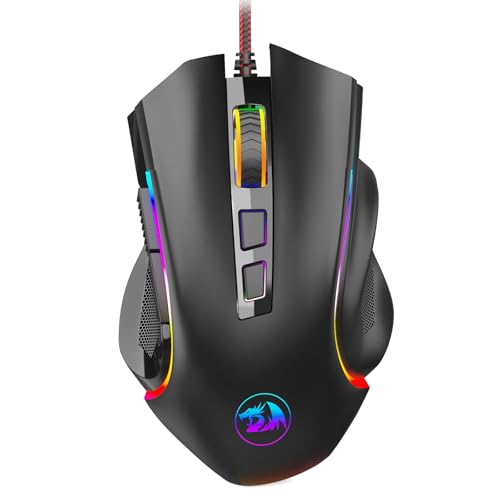
Oversteel Invar RGB Review | 78 Data compared

Avg. price:~£20Connectivity:wiredMaximum polling rate:1000 HzMaximum DPI:12400 DPIWeight:97 g

Oversteel Invar RGB Review: Compare 78 technical specifications and user reviews to see how this product ranks in the Mice category and whether it is worth buying.

Oversteel Invar RGB
5.7/10

Overall score

Score
5.7/ 10
✕
What it is
An overall evaluation of the mouse's quality, based on technical analyses and user reviews.
When it matters
When you need a quick reference to identify the best mice on the market.
Score distribution
â–¼
<55-66-77-88-99-10
Score components

80%

5.0

Technical score

20%

8.6

User score

â–¼Worse than 61% of mice
7.0

Value for money

Value for money
7.0/ 10
✕
What it is
An indicator that combines the mouse's overall rating with its cost.
When it matters
When you are looking for a mouse that offers a strong balance of performance, features, and price.
Score distribution
â–¼
<55-66-77-88-99-10
Score components

70%

5.7

Overall score

30%

10

Price

â–¼Worse than 64%
5.0

Technical score

Technical score
5.0/ 10
✕
What it is
An assessment of technical performance for products in the Mice category across these key areas: Performance & Sensor, Connectivity, Battery & Charging, Controls, Design, Features.
When it matters
When you want to compare mice based on technical performance and available features.
Score distribution
â–¼
<55-66-77-88-99-10
Score components

36%

5.3

Performance & Sensor

22%

5.8

Controls

16%

6.5

Design

14%

4.7

Features

7%

1.1

Connectivity

5%

1.0

Battery & Charging

â–¼Worse than 67%
8.6

User score

User score
8.6/ 10
✕
What it is
A rating that combines user reviews and the total number of reviews received by the mouse.
When it matters
When you want to understand how a mouse performs in daily use or gaming and how reliable it is in terms of comfort, button feel, tracking accuracy, and long-term durability.
Score distribution
â–¼
<55-66-77-88-99-10
Score components

70%

9.2

User ratings

30%

7.4

Number of reviews

Based on ratings from across the web.
â–²Better than 75%
  • oversteel-invar-rgb
  • oversteel-invar-rgb
  • oversteel-invar-rgb
  • oversteel-invar-rgb
oversteel-invar-rgb
oversteel-invar-rgb
oversteel-invar-rgb
oversteel-invar-rgb
Where to buy
*As an Amazon Associate, we earn from qualifying purchases.
Best rankings
Available: ranking among products currently available (including other versions of this product).All: ranking among all products in the database.
Loading...
Loading category ranking...

Technical Specifications of mouse Oversteel Invar RGB

Technical score
Technical score
5.0/ 10
✕
What it is
An assessment of technical performance for products in the Mice category across these key areas: Performance & Sensor, Connectivity, Battery & Charging, Controls, Design, Features.
When it matters
When you want to compare mice based on technical performance and available features.
Score distribution
â–¼
<55-66-77-88-99-10
Score components:

36%

5.3

Performance & Sensor

22%

5.8

Controls

16%

6.5

Design

14%

4.7

Features

7%

1.1

Connectivity

5%

1.0

Battery & Charging

5.0
User score
User score
8.6/ 10
✕
What it is
A rating that combines user reviews and the total number of reviews received by the mouse.
When it matters
When you want to understand how a mouse performs in daily use or gaming and how reliable it is in terms of comfort, button feel, tracking accuracy, and long-term durability.
Score distribution
â–¼
<55-66-77-88-99-10
Score components

70%

9.2

User ratings

30%

7.4

Number of reviews

Based on ratings from across the web.
8.6
Popularity
Popularity
7.4/ 10
✕
What it is
An indicator based on the number of reviews received by the mouse.
When it matters
When you prefer a mouse that has already been chosen and reviewed by many other users.
Score distribution
â–¼
<55-66-77-88-99-10
Popularity:
Oversteel Invar RGB has a popularity score of 7.4 points, which is higher than that of 64% of products in this category.
7.4
Value for money
Value for money
7.0/ 10
✕
What it is
An indicator that combines the mouse's overall rating with its cost.
When it matters
When you are looking for a mouse that offers a strong balance of performance, features, and price.
Score distribution
â–¼
<55-66-77-88-99-10
Score components:

70%

5.7

Overall score

30%

10

Price

7.0
Brand name
Oversteel
Maximum polling rate
1,000 Hz
This mouse has a maximum polling rate of 1,000 Hz, which is higher than 27.8% of mice and equal to 55% of mice.
Wired polling rate
1,000 Hz
This mouse has a wired polling rate of 1,000 Hz, which is higher than 13.2% of mice and equal to 77.4% of mice.
2.4 GHz polling rate
N/A
Bluetooth polling rate
0 Hz
This mouse has a Bluetooth polling rate of 0 Hz, which is lower than 36% of mice and equal to 64% of mice.
wired only.
Show more
Connectivity
wired
This mouse supports wired connectivity, which is less versatile than 65.1% of mice and equal to 34.9% of mice.
connection modes: wired.
Bluetooth support
no
This mouse does not support Bluetooth. 35.6% of mice support Bluetooth.
Bluetooth version
N/A
Proprietary 2.4 GHz support
no
This mouse does not support proprietary 2.4 GHz wireless. 61.3% of mice support proprietary 2.4 GHz wireless.
Receiver included
no
This mouse does not include a receiver. 62.3% of mice include a receiver.
Show more
Battery life
N/A
Battery capacity
N/A
Battery form factor
N/A
Rechargeable battery
no
This mouse does not use a rechargeable battery. 46% of mice use a rechargeable battery.
Removable battery
no
This mouse does not use a removable battery. 22.3% of mice use a removable battery.
Show more
N. of buttons
9
This mouse has 9 buttons, which is more than 88.3% of mice and equal to 3.5% of mice.
N. of side buttons
3
This mouse has 3 side buttons, which is more than 83.8% of mice and equal to 8.6% of mice.
N. of programmable buttons
9
This mouse has 9 programmable buttons, which is more than 88.6% of mice and equal to 3.2% of mice.
DPI switching button
yes
This mouse includes a DPI switching button. 14.7% of mice include a DPI switching button.
Profile switching button
no
This mouse does not include a profile switching button. 16% of mice include a profile switching button.
Show more
Orientation
ambidextrous
Weight
97 g
This mouse weighs 97 g, which is heavier than 66.6% of mice and equal to 0.8% of mice.
Extra weights
0 g
This mouse comes with 0 g extra weights, which is less than 4.6% of mice and equal to 95.4% of mice.
Cable length
1.8 m
This mouse comes with a 1.8 m cable, which is longer than 18.4% of mice and equal to 65.2% of mice.
Cable type
braided
Show more
Onboard memory profiles
0
This mouse supports 0 onboard memory profiles, which is less than 52.2% of mice and equal to 47.8% of mice.
Onboard memory size
?
Software name
?
Firmware upgradable
?
Suitable for gaming
yes
This mouse is suitable for gaming. 23.9% of mice are suitable for gaming.

Oversteel Invar RGB vs the average mouse

246810TotalPerformance & SensorConnectivityBattery & ChargingControlsDesignFeatures
  • 3 more programmable buttons
    This mouse has 9 programmable buttons, while the average mouse has 6 programmable buttons.
    9 vs 6
  • 1 more side buttons
    This mouse has 3 side buttons, while the average mouse has 2 side buttons.
    3 vs 2
  • 3 more buttons
    This mouse has 9 buttons, while the average mouse has 6 buttons.
    9 vs 6
  • 24% higher maximum DPI
    This mouse has a maximum DPI of 12,400 DPI, while the average mouse has a maximum DPI of 10,000 DPI.
    12,400 DPI vs 10,000 DPI
  • 75% cheaper
    Oversteel Invar RGB is cheaper than the average mouse (£20 vs £35).
    £20 vs £35
  • 8.1% higher user score
    User score
    8.6/ 10
    ✕
    What it is
    A rating that combines user reviews and the total number of reviews received by the mouse.
    When it matters
    When you want to understand how a mouse performs in daily use or gaming and how reliable it is in terms of comfort, button feel, tracking accuracy, and long-term durability.
    Score distribution
    â–¼
    â–¼
    <55-66-77-88-99-10
    Oversteel Invar RGB
    the average mouse
    Oversteel Invar RGB has a higher user score than the average mouse (8.65 vs 8).
    8.65 vs 8
  • 75% cheaper
    Oversteel Invar RGB is cheaper than the average mouse (£20 vs £35).
    £20 vs £35
  • 8.1% higher user score
    User score
    8.6/ 10
    ✕
    What it is
    A rating that combines user reviews and the total number of reviews received by the mouse.
    When it matters
    When you want to understand how a mouse performs in daily use or gaming and how reliable it is in terms of comfort, button feel, tracking accuracy, and long-term durability.
    Score distribution
    â–¼
    â–¼
    <55-66-77-88-99-10
    Oversteel Invar RGB
    the average mouse
    Oversteel Invar RGB has a higher user score than the average mouse (8.65 vs 8).
    8.65 vs 8
  • 24% higher maximum DPI
    This mouse has a maximum DPI of 12,400 DPI, while the average mouse has a maximum DPI of 10,000 DPI.
    12,400 DPI vs 10,000 DPI
  • 3 more programmable buttons
    This mouse has 9 programmable buttons, while the average mouse has 6 programmable buttons.
    9 vs 6
  • 1 more side buttons
    This mouse has 3 side buttons, while the average mouse has 2 side buttons.
    3 vs 2
  • 3 more buttons
    This mouse has 9 buttons, while the average mouse has 6 buttons.
    9 vs 6
  • No proprietary 2.4 GHz support
    This mouse does not support proprietary 2.4 GHz wireless, while the average mouse does. 61.3% of mice support proprietary 2.4 GHz wireless.
  • 1 fewer onboard profiles
    This mouse supports 0 onboard memory profiles, while the average mouse supports 1 onboard memory profiles.
    0 vs 1
  • 18.3% higher mouse weight
    This mouse weighs 97 g, while the average mouse weighs 82 g.
    97 g vs 82 g
  • No automatic sleep mode
    This mouse does not support auto-sleep, while the average mouse does. 60.5% of mice support auto-sleep.
  • No receiver included
    This mouse does not include a receiver, while the average mouse does. 62.3% of mice include a receiver.
  • 45% lower tracking speed
    This mouse has a maximum tracking speed of 220 IPS, while the average mouse has a maximum tracking speed of 400 IPS.
    220 IPS vs 400 IPS
  • 10 million clicks shorter switch lifespan
    This mouse has a switch durability of 20 million clicks, while the average mouse has a switch durability of 30 million clicks.
    20 million clicks vs 30 million clicks
  • No battery level indicator
    This mouse does not include a battery level indicator, while the average mouse does. 59.4% of mice include a battery level indicator.
  • 45% lower tracking speed
    This mouse has a maximum tracking speed of 220 IPS, while the average mouse has a maximum tracking speed of 400 IPS.
    220 IPS vs 400 IPS
  • 25% lower maximum acceleration
    This mouse has a maximum acceleration of 30 G, while the average mouse has a maximum acceleration of 40 G.
    30 G vs 40 G
  • Poor default DPI tuning
    This mouse uses a default DPI of 800 DPI, while the average mouse uses a default DPI of 1,000 DPI.
    800 DPI vs 1,000 DPI
  • No proprietary 2.4 GHz support
    This mouse does not support proprietary 2.4 GHz wireless, while the average mouse does. 61.3% of mice support proprietary 2.4 GHz wireless.
  • No receiver included
    This mouse does not include a receiver, while the average mouse does. 62.3% of mice include a receiver.
  • Limited connectivity
    This mouse supports wired connectivity, while the average mouse supports wireless connectivity.
    connection modes: wired.
    wired vs wireless
  • No automatic sleep mode
    This mouse does not support auto-sleep, while the average mouse does. 60.5% of mice support auto-sleep.
  • No battery level indicator
    This mouse does not include a battery level indicator, while the average mouse does. 59.4% of mice include a battery level indicator.
  • 10 million clicks shorter switch lifespan
    This mouse has a switch durability of 20 million clicks, while the average mouse has a switch durability of 30 million clicks.
    20 million clicks vs 30 million clicks
  • 18.3% higher mouse weight
    This mouse weighs 97 g, while the average mouse weighs 82 g.
    97 g vs 82 g
  • 1 fewer onboard profiles
    This mouse supports 0 onboard memory profiles, while the average mouse supports 1 onboard memory profiles.
    0 vs 1

Third-party reviews

Based on ratings from across the web.
Reviews last updated: November 2026 · How we calculate this

What customers like about Oversteel Invar RGB

  • Excellent value for money and affordable pricing
  • Ergonomic, lightweight design comfortable for long sessions
  • Good build quality with a sleek aesthetic and nice feel
  • Accurate and responsive Pixart sensor (3327 for wired / 3325 for wireless)
  • Multiple programmable buttons, including a useful 'fire button' for FPS games
  • Fast charging and decent battery life (up to 45 hours) for the wireless model
  • Customisable RGB lighting with 10 different modes

What customers don't like about Oversteel Invar RGB

  • Proprietary software is often described as 'wonky' or unreliable
  • Difficulty finding or downloading official drivers/software from the manufacturer's site
  • Software may occasionally forget saved settings or fail to show current DPI
  • Left and right click buttons can feel somewhat 'flimsy' to some users
  • Side buttons may occasionally trigger incorrectly or require resetting the configuration

Verdict

The Oversteel Invar RGB is a gaming-focused mouse available in both wired and wireless versions, primarily featuring high-precision Pixart optical sensors—the PMW 3327 for the wired model (12,400 DPI, 30G acceleration, 220 IPS) and the PMW 3325 for the wireless variant (10,000 DPI, 20G acceleration, 100 IPS). Built with durable Huano switches rated for 20 million clicks, it offers 10 configurable RGB lighting modes and an ergonomic design suited for claw grips. Main pros include its highly adjustable sensitivity, programmable buttons (up to 9 on the wired version), and lightweight build (approx. 97g–104g). Reported cons include proprietary software that some users find unintuitive or 'wonky' and the wireless version's relatively modest 45-hour battery life compared to high-end competitors.

Compare Oversteel Invar RGB with other products in the Mice category

1Product to compare no. 1
VS
2Product to compare no. 2
VS
3Product to compare no. 3 (optional)

Graphic comparison of Oversteel Invar RGB and other products in the Mice category

No results found