Scored using Mice Methodology v1.0
Mice Methodology v1.0
Mathematical & Unbiased Scoring
Products in this category are scored under Frontum Mice Methodology v1.0: technical specifications plus authentic consumer ratings, with 0% commercial bias.
Explore Mice Methodology v1.0

Huawei Wireless Mouse Review | 78 Data compared

Avg. price:~£20Connectivity:wirelessMaximum polling rate:125 HzMaximum DPI:3000 DPIWeight:92 g

Huawei Wireless Mouse Review: Compare 78 technical specifications and user reviews to see how this product ranks in the Mice category and whether it is worth buying.
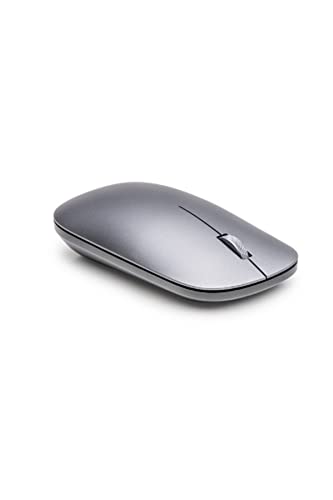
Huawei Wireless Mouse
6.0/10

Overall score

Score
6.0/ 10
✕
What it is
An overall evaluation of the mouse's quality, based on technical analyses and user reviews.
When it matters
When you need a quick reference to identify the best mice on the market.
Score distribution
â–¼
<55-66-77-88-99-10
Score components

80%

5.4

Technical score

20%

8.6

User score

â–¼Worse than 54% of mice
7.2

Value for money

Value for money
7.2/ 10
✕
What it is
An indicator that combines the mouse's overall rating with its cost.
When it matters
When you are looking for a mouse that offers a strong balance of performance, features, and price.
Score distribution
â–¼
<55-66-77-88-99-10
Score components

70%

6.0

Overall score

30%

10

Price

â–¼Worse than 56%
5.4

Technical score

Technical score
5.4/ 10
✕
What it is
An assessment of technical performance for products in the Mice category across these key areas: Performance & Sensor, Connectivity, Battery & Charging, Controls, Design, Features.
When it matters
When you want to compare mice based on technical performance and available features.
Score distribution
â–¼
<55-66-77-88-99-10
Score components

36%

2.7

Performance & Sensor

22%

8.0

Controls

16%

6.8

Design

14%

3.3

Features

7%

9.9

Connectivity

5%

8.9

Battery & Charging

â–¼Worse than 58%
8.6

User score

User score
8.6/ 10
✕
What it is
A rating that combines user reviews and the total number of reviews received by the mouse.
When it matters
When you want to understand how a mouse performs in daily use or gaming and how reliable it is in terms of comfort, button feel, tracking accuracy, and long-term durability.
Score distribution
â–¼
<55-66-77-88-99-10
Score components

70%

9.2

User ratings

30%

7.1

Number of reviews

Based on ratings from across the web.
â–²Better than 73%
  • huawei-wireless-mouse
  • huawei-wireless-mouse
  • huawei-wireless-mouse
  • huawei-wireless-mouse
huawei-wireless-mouse
Where to buy
*As an Amazon Associate, we earn from qualifying purchases.
Best rankings
Available: ranking among products currently available (including other versions of this product).All: ranking among all products in the database.

What owners say about the Huawei Wireless Mouse

Based on 71 owners sharing their experience in online comments

59%positive2%mixed39%negative

Owners appreciate quick fixes and simple setup, but connection failures and unpredictable dropouts cause the most frustration.

What owners dislike

  • The mouse did not connect to laptops or phones, even with fresh batteries and after restarting, and some owners could not find a working pairing method.18
  • The mouse sometimes freezes or disconnects during use, and at startup it may fail to respond until the power switch is flipped off and on.4
  • The mouse stopped working suddenly for some owners, even with new batteries, and resolving it was not clear.4
  • The USB receiver does not fit the available ports on some computers, so the mouse cannot be connected.3
  • The mouse stops responding after 20–40 seconds of inactivity, and it needs the connect button or an on/off switch to respond again.3
  • Batteries drain quickly or fail early, and owners report needing frequent battery changes.3

Points mentioned by at least 3 owners, most mentioned first.

Loading...
Loading category ranking...

Technical Specifications of mouse Huawei Wireless Mouse

Technical score
Technical score
5.4/ 10
✕
What it is
An assessment of technical performance for products in the Mice category across these key areas: Performance & Sensor, Connectivity, Battery & Charging, Controls, Design, Features.
When it matters
When you want to compare mice based on technical performance and available features.
Score distribution
â–¼
<55-66-77-88-99-10
Score components:

36%

2.7

Performance & Sensor

22%

8.0

Controls

16%

6.8

Design

14%

3.3

Features

7%

9.9

Connectivity

5%

8.9

Battery & Charging

5.4
User score
User score
8.6/ 10
✕
What it is
A rating that combines user reviews and the total number of reviews received by the mouse.
When it matters
When you want to understand how a mouse performs in daily use or gaming and how reliable it is in terms of comfort, button feel, tracking accuracy, and long-term durability.
Score distribution
â–¼
<55-66-77-88-99-10
Score components

70%

9.2

User ratings

30%

7.1

Number of reviews

Based on ratings from across the web.
8.6
Popularity
Popularity
7.1/ 10
✕
What it is
An indicator based on the number of reviews received by the mouse.
When it matters
When you prefer a mouse that has already been chosen and reviewed by many other users.
Score distribution
â–¼
<55-66-77-88-99-10
Popularity:
Huawei Wireless Mouse has a popularity score of 7.1 points, which is higher than that of 60% of products in this category.
7.1
Value for money
Value for money
7.2/ 10
✕
What it is
An indicator that combines the mouse's overall rating with its cost.
When it matters
When you are looking for a mouse that offers a strong balance of performance, features, and price.
Score distribution
â–¼
<55-66-77-88-99-10
Score components:

70%

6.0

Overall score

30%

10

Price

7.2
Brand name
Huawei
Maximum polling rate
125 Hz
This mouse has a maximum polling rate of 125 Hz, which is lower than 75.8% of mice and equal to 23.9% of mice.
Wired polling rate
N/A
2.4 GHz polling rate
125 Hz
This mouse has a 2.4 GHz polling rate of 125 Hz, which is lower than 71.1% of mice and equal to 28.8% of mice.
Bluetooth polling rate
125 Hz
This mouse has a Bluetooth polling rate of 125 Hz, which is higher than 67.8% of mice and equal to 30.7% of mice.
Show more
Connectivity
wireless
This mouse supports wireless connectivity, which is more versatile than 35% of mice and equal to 21.7% of mice.
connection modes: Bluetooth / 2.4 GHz.
Bluetooth support
yes
This mouse supports Bluetooth. 64.5% of mice support Bluetooth.
Bluetooth version
5.1
This mouse uses Bluetooth 5.1, which is newer than 86.3% of mice and equal to 6.1% of mice.
Proprietary 2.4 GHz support
yes
This mouse supports proprietary 2.4 GHz wireless. 38.8% of mice support proprietary 2.4 GHz wireless.
Receiver included
yes
This mouse includes a receiver. 37.8% of mice include a receiver.
Show more
Battery life
N/A
Battery capacity
N/A
Battery form factor
AA
Rechargeable battery
no
This mouse does not use a rechargeable battery. 46% of mice use a rechargeable battery.
Removable battery
yes
This mouse uses a removable battery. 77.8% of mice use a removable battery.
Show more
N. of buttons
7
This mouse has 7 buttons, which is more than 63.3% of mice and equal to 15.1% of mice.
N. of side buttons
0
This mouse has 0 side buttons, which is less than 85.3% of mice and equal to 14.7% of mice.
N. of programmable buttons
6
This mouse has 6 programmable buttons, which is more than 35.6% of mice and equal to 31.2% of mice.
DPI switching button
yes
This mouse includes a DPI switching button. 14.7% of mice include a DPI switching button.
Profile switching button
no
This mouse does not include a profile switching button. 16% of mice include a profile switching button.
Show more
Orientation
ambidextrous
Weight
92 g
This mouse weighs 92 g, which is heavier than 60.8% of mice and equal to 1.3% of mice.
Extra weights
0 g
This mouse comes with 0 g extra weights, which is less than 4.6% of mice and equal to 95.4% of mice.
Cable length
N/A
Cable type
N/A
Show more
Onboard memory profiles
0
This mouse supports 0 onboard memory profiles, which is less than 52.2% of mice and equal to 47.8% of mice.
Onboard memory size
0 KB
This mouse has an onboard memory size of 0 KB, which is smaller than 12.6% of mice and equal to 87.4% of mice.
no onboard memory.
Software name
?
Firmware upgradable
yes
This mouse supports firmware updates. 22.5% of mice support firmware updates.
Suitable for gaming
no
This mouse is not suitable for gaming. 76.2% of mice are suitable for gaming.

Huawei Wireless Mouse vs the average mouse

246810TotalPerformance & SensorConnectivityBattery & ChargingControlsDesignFeatures
  • Silent primary switches
    This mouse uses silent primary switches, while the average mouse does not. 14.1% of mice use silent primary switches.
  • Usable while charging
    This mouse can be used while charging, while the average mouse cannot. 47.5% of mice can be used while charging.
  • 2 more paired devices
    This mouse pairs with 3 devices, while the average mouse pairs with 1 devices.
    3 vs 1
  • Removable battery
    This mouse uses a removable battery, while the average mouse does not. 22.3% of mice use a removable battery.
  • Multi-device pairing
    This mouse supports multi-device pairing, while the average mouse does not. 20.3% of mice support multi-device pairing.
  • Bluetooth support
    This mouse supports Bluetooth, while the average mouse does not. 35.5% of mice support Bluetooth.
  • Wireless charging
    This mouse supports wireless charging, while the average mouse does not. 10.6% of mice support wireless charging.
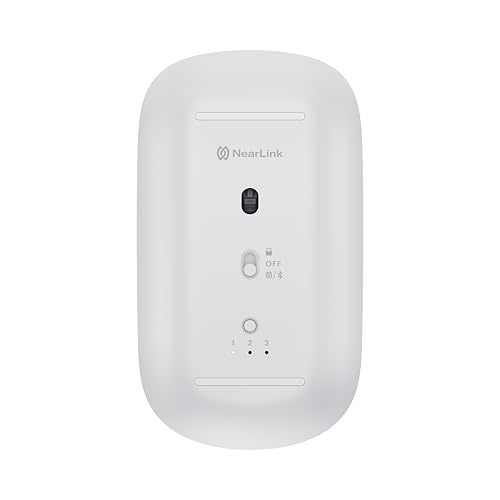
  • Receiver storage inside mouse
    This mouse has receiver storage inside the mouse, while the average mouse does not. 45.9% of mice have receiver storage inside the mouse.
  • 75% cheaper
    Huawei Wireless Mouse is cheaper than the average mouse (£20 vs £35).
    £20 vs £35
  • 2 more paired devices
    This mouse pairs with 3 devices, while the average mouse pairs with 1 devices.
    3 vs 1
  • Multi-device pairing
    This mouse supports multi-device pairing, while the average mouse does not. 20.3% of mice support multi-device pairing.
  • Bluetooth support
    This mouse supports Bluetooth, while the average mouse does not. 35.5% of mice support Bluetooth.
  • Receiver storage inside mouse
    This mouse has receiver storage inside the mouse, while the average mouse does not. 45.9% of mice have receiver storage inside the mouse.
  • Usable while charging
    This mouse can be used while charging, while the average mouse cannot. 47.5% of mice can be used while charging.
  • Removable battery
    This mouse uses a removable battery, while the average mouse does not. 22.3% of mice use a removable battery.
  • Wireless charging
    This mouse supports wireless charging, while the average mouse does not. 10.6% of mice support wireless charging.
  • Silent primary switches
    This mouse uses silent primary switches, while the average mouse does not. 14.1% of mice use silent primary switches.
  • 6 mm narrower mouse width
    This mouse is 60 mm wide, while the average mouse is 66 mm wide.
    60 mm vs 66 mm
  • 87.5% lower maximum polling rate
    This mouse has a maximum polling rate of 125 Hz, while the average mouse has a maximum polling rate of 1,000 Hz.
    125 Hz vs 1,000 Hz
  • 1 fewer onboard profiles
    This mouse supports 0 onboard memory profiles, while the average mouse supports 1 onboard memory profiles.
    0 vs 1
  • 70% lower maximum DPI
    This mouse has a maximum DPI of 3,000 DPI, while the average mouse has a maximum DPI of 10,000 DPI.
    3,000 DPI vs 10,000 DPI
  • 87.5% lower 2.4 GHz polling rate
    This mouse has a 2.4 GHz polling rate of 125 Hz, while the average mouse has a 2.4 GHz polling rate of 1,000 Hz.
    125 Hz vs 1,000 Hz
  • Not suitable for gaming
    This mouse is not suitable for gaming, while the average mouse is. 76.1% of mice are suitable for gaming.
  • 12.2% higher mouse weight
    This mouse weighs 92 g, while the average mouse weighs 82 g.
    92 g vs 82 g
  • 600 DPI higher minimum setting
    This mouse has a minimum DPI of 800 DPI, while the average mouse has a minimum DPI of 200 DPI.
    800 DPI vs 200 DPI
  • 2 fewer side buttons
    This mouse has 0 side buttons, while the average mouse has 2 side buttons.
    0 vs 2
  • 87.5% lower maximum polling rate
    This mouse has a maximum polling rate of 125 Hz, while the average mouse has a maximum polling rate of 1,000 Hz.
    125 Hz vs 1,000 Hz
  • 70% lower maximum DPI
    This mouse has a maximum DPI of 3,000 DPI, while the average mouse has a maximum DPI of 10,000 DPI.
    3,000 DPI vs 10,000 DPI
  • 87.5% lower 2.4 GHz polling rate
    This mouse has a 2.4 GHz polling rate of 125 Hz, while the average mouse has a 2.4 GHz polling rate of 1,000 Hz.
    125 Hz vs 1,000 Hz
  • 600 DPI higher minimum setting
    This mouse has a minimum DPI of 800 DPI, while the average mouse has a minimum DPI of 200 DPI.
    800 DPI vs 200 DPI
  • 1 fewer stored DPI steps
    This mouse stores 4 DPI steps, while the average mouse stores 5 DPI steps.
    4 vs 5
  • 2 fewer side buttons
    This mouse has 0 side buttons, while the average mouse has 2 side buttons.
    0 vs 2
  • 12.2% higher mouse weight
    This mouse weighs 92 g, while the average mouse weighs 82 g.
    92 g vs 82 g
  • No RGB lighting
    This mouse does not have RGB lighting, while the average mouse does. 56.3% of mice have RGB lighting.
  • 1 fewer onboard profiles
    This mouse supports 0 onboard memory profiles, while the average mouse supports 1 onboard memory profiles.
    0 vs 1
  • Not suitable for gaming
    This mouse is not suitable for gaming, while the average mouse is. 76.1% of mice are suitable for gaming.

Video reviews

Hands-on testing, unboxing, and real-world video evaluations

Not graded

Third-party reviews

Based on ratings from across the web.
Reviews last updated: November 2026 · How we calculate this

What customers like about Huawei Wireless Mouse

  • Compact and lightweight design, making it highly portable for travel
  • Seamless multi-device connectivity with a dedicated 'Flash-Switch' button to toggle between up to three devices
  • Exceptional battery life, with some models lasting up to 12 months on a single AA battery
  • Versatile tracking that works effectively even on glass surfaces
  • Stable wireless performance with low latency, particularly the 2.4GHz connection

What customers don't like about Huawei Wireless Mouse

  • Low-profile or 'flat' ergonomic design can lead to hand fatigue during prolonged use
  • Lack of advanced features like programmable side buttons or adjustable DPI on base models
  • Build materials may feel less 'premium' or plasticky compared to higher-end competitors
  • Occasional reports of cursor jumping or inconsistent responsiveness in specific environments
  • Initial battery provided in the box may have a short lifespan

Verdict

The Huawei Wireless Mouse is a lightweight, ergonomic accessory (approx. 92g) featuring dual-mode connectivity via Bluetooth 5.1 Low Energy and a 2.4 GHz wireless dongle, ensuring a stable connection up to 10 metres. It is equipped with a high-performance TOG (Track-On-Glass) sensor that allows for precise movement even on challenging surfaces like glass (minimum 4mm thickness), and it offers self-adaptive DPI settings adjustable across four levels: 800, 1200, 2000, and 3000. Key pros include the innovative ScreenHop feature for seamless multi-device cursor transitions, a skin-soothing micron-grade silicone resin matte surface for a slip-free grip, and impressive battery efficiency utilizing a single AA alkaline battery. On the downside, some users may find the lack of dedicated side or programmable buttons limiting for complex tasks, and the ScreenHop functionality is restricted to specific Huawei systems or those running updated PC Manager software.

Compare Huawei Wireless Mouse with other products in the Mice category

1Product to compare no. 1
VS
2Product to compare no. 2
VS
3Product to compare no. 3 (optional)

Graphic comparison of Huawei Wireless Mouse and other products in the Mice category

No results found