


What makes a VR headset suitable for movies?
A VR headset is suitable for movies when it gets the following basics right:
- Sharp resolution: Higher resolution helps subtitles, faces, and fine scene detail look cleaner instead of soft or pixelated.
- Strong contrast: Good contrast improves dark scenes, black bars, and shadow detail, which matters in a lot of film content.
- Cinematic display type: OLED and Micro-OLED panels usually look more cinematic than basic LCD panels because blacks appear deeper in low-light scenes.
- Comfort for long sessions: Lower weight and balanced fit make it easier to watch a full movie without pressure or fatigue.
- A convincing screen feel: A solid field of view and clear optics help the virtual screen feel large while staying sharp across more of the image.
For this guide, the most useful specs to compare are resolution, display type, horizontal field of view, and weight.
Do VR headsets for movies need high resolution and good contrast?
Yes, high resolution and good contrast are core requirements for movie watching in VR.
Higher resolution reduces visible pixels and makes faces, film grain, menus, and subtitles look cleaner instead of soft or shimmering. In the stronger part of this category, that usually means moving beyond the blurrier feel of older low-resolution headsets and into displays that hold up better on a large virtual screen.
Good contrast matters because dark scenes collapse quickly on weaker panels. Better contrast helps black levels, shadow separation, and overall cinematic depth, which becomes especially important once you start watching films with lots of night scenes, dim interiors, or space-heavy visuals.
In practice, resolution and contrast work together. A sharp panel still feels limited if dark scenes wash out, and a contrast-rich panel still feels compromised if text, detail, and subtitles never look clean enough to begin with.
What apps and platforms do VR headsets for movies support?
VR headsets for movies support apps and platforms in the following main ways:
- Standalone ecosystems: Headsets running systems such as Meta Horizon OS or PICO OS usually offer the easiest access to streaming apps, local video players, and wireless viewing.
- PC VR software: PC-tethered headsets rely more on Windows software and external playback tools, which can be flexible for local files and virtual cinema setups but less convenient for quick couch use.
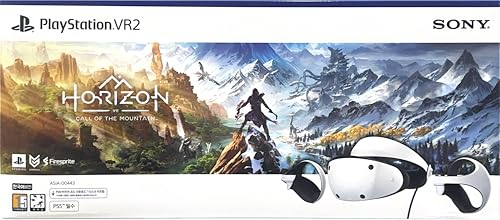
- Console-linked platforms: Console-based headsets can deliver a strong viewing experience, but media support depends on the apps and services available in that console ecosystem.
- Local playback options: Some headsets are better suited to playing stored video files, 3D movies, or personal media libraries through dedicated VR players.
- Casting and setup compatibility: Movie convenience also depends on whether the headset works smoothly with your phone, PC, or preferred casting and account setup method.
Before buying, check that the headset supports the streaming services and playback apps you actually plan to use, because software access can matter as much as display hardware.