AVM FRITZ!Box 6591 Cable Review | 77 Data compared

Avg. price:~£430Wi-Fi version:Wi-Fi 5 (802.11ac)Wi-Fi speed:2533 MbpsLAN port speeds:1 GbpsMesh Wi-Fi:yes

AVM FRITZ!Box 6591 Cable Review: Compare 77 technical specifications and user reviews to see how this product ranks in the Routers category and whether it is worth buying.

7.7

Overall score

Score
7.7/ 10
✕
What it is
An overall evaluation of the router's quality, based on technical analyses and user reviews.
When it matters
When you need a quick reference to identify the best routers on the market.
Score distribution
â–¼
<55-66-77-88-99-10
Score components

90%

7.7

Technical Score

10%

?

User score

â–²Better than 75% of routers
7.7

Technical Score

Technical score
7.7/ 10
✕
What it is
An assessment of the router's technical performance, covering key areas such as Wi-Fi performance, wired connectivity, security, software features, coverage, and design.
When it matters
When you want to compare routers based on technical performance and available features.
Score distribution
â–¼
<55-66-77-88-99-10
Score components

26%

6.9

Wireless

20%

6.6

Ports

18%

9.6

Networking

14%

8.3

Security

12%

7.7

Hardware

10%

8.1

Management

â–²Better than 76% of routers
?

User score

User score
8.0/ 10
✕
What it is
A rating that combines user reviews and the total number of reviews received by the router.
When it matters
When you want to know how a router performs in daily use and how reliable it is for speed, coverage, and stability according to user feedback.
Score distribution
â–¼
<55-66-77-88-99-10
Score components

70%

?

User reviews

30%

?

Popularity

  • avm-fritz-box-6591-cable
  • avm-fritz-box-6591-cable
  • avm-fritz-box-6591-cable
  • avm-fritz-box-6591-cable
  • avm-fritz-box-6591-cable
avm-fritz-box-6591-cable

Best prices in UK

    N/A~ £430

Best rankings

Available: ranking among products currently available (including other versions of this product).All: ranking among all products in the database.
Loading...
Loading category ranking...

Verdict

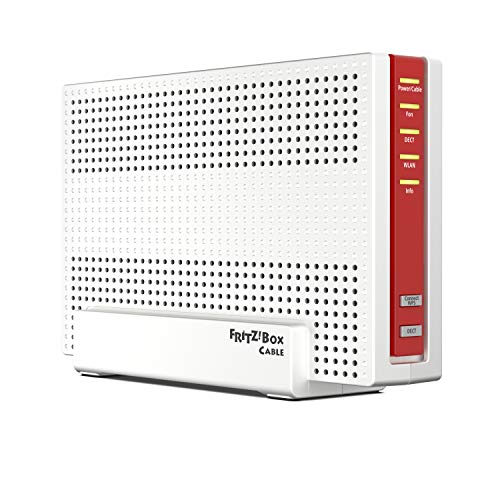
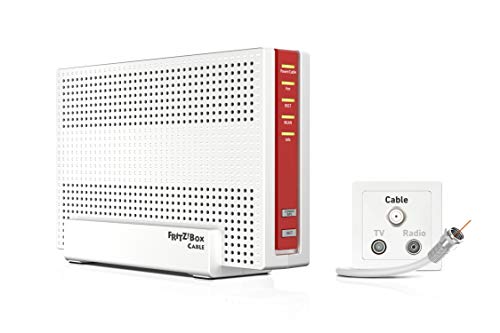
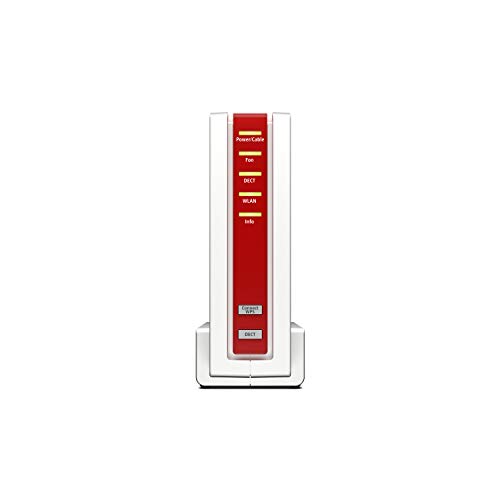
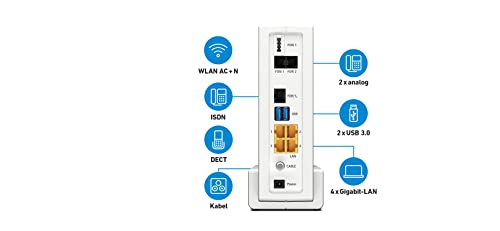
The AVM FRITZ!Box 6591 Cable is a high-performance DOCSIS 3.1 cable router featuring Dual-Band Wi-Fi 5 (802.11ac) with 4x4 MU-MIMO, delivering speeds up to 1,733 Mbps on the 5 GHz band and 800 Mbps on 2.4 GHz. Its extensive connectivity includes four Gigabit LAN ports, two USB 3.0 ports for NAS or printer sharing, and an integrated VoIP telephone system with a DECT base for up to six cordless phones, plus analog and ISDN ports. Key pros include its future-proof cable modem capable of up to 6 Gbit/s downstream and robust FRITZ!OS features like Mesh Wi-Fi and VPN support. Notable cons include its lack of a dedicated WAN port, making it unusable with external modems, and the absence of the newer Wi-Fi 6 standard.

Technical Specifications of router AVM FRITZ!Box 6591 Cable

Technical Score
Technical score
7.7/ 10
✕
What it is
An assessment of the router's technical performance, covering key areas such as Wi-Fi performance, wired connectivity, security, software features, coverage, and design.
When it matters
When you want to compare routers based on technical performance and available features.
Score distribution
â–¼
<55-66-77-88-99-10
Score components:

26%

6.9

Wireless

20%

6.6

Ports

18%

9.6

Networking

14%

8.3

Security

12%

7.7

Hardware

10%

8.1

Management

7.7
AVM FRITZ!Box 6591 Cable has a technical score of 7.7 points, which is higher than that of 76.2% of products in this category.
User score
User score
8.0/ 10
✕
What it is
A rating that combines user reviews and the total number of reviews received by the router.
When it matters
When you want to know how a router performs in daily use and how reliable it is for speed, coverage, and stability according to user feedback.
Score distribution
â–¼
<55-66-77-88-99-10
Score components

70%

?

User reviews

30%

?

Popularity

?
Popularity
Popularity
1.0/ 10
✕
What it is
An indicator based on the number of reviews received by the router.
When it matters
When you prefer to choose a router reviewed and selected by many other buyers.
Score distribution
â–¼
<55-66-77-88-99-10
Popularity:
AVM FRITZ!Box 6591 Cable has a popularity score of 1 point, which is lower than that of 72.1% of products in this category.
1.0
AVM FRITZ!Box 6591 Cable has a popularity score of 1 point, which is lower than that of 72.1% of products in this category.
Ratio quality/price
Value for money
7.9/ 10
✕
What it is
An indicator that combines the router's overall rating with its cost.
When it matters
When you are looking for a router with a good balance between network performance, features, and price.
Score distribution
â–¼
<55-66-77-88-99-10
Score components:

60%

7.7

Overall score

40%

8.3

Price

7.9
AVM FRITZ!Box 6591 Cable has a value-for-money score of 7.9 points, which is higher than that of 53.7% of products in this category.
Brand name
AVM
Wi-Fi version
Wi-Fi 5 (802.11ac)
Wi-Fi version
Wi-Fi 5 (802.11ac)
This router uses Wi-Fi Wi-Fi 5 (802.11ac), which is more advanced than 39.5% of routers and equal to 25.3% of routers.
Wi-Fi bands
2.4 GHz + 5 GHz
Wi-Fi bands
2.4 GHz + 5 GHz
This router supports 2.4 GHz + 5 GHz Wi-Fi bands, which are more versatile than 24.8% of routers and equal to 68.1% of routers.
Wi-Fi speed
2,533 Mbps
Wi-Fi speed
2,533 Mbps
This router delivers 2,533 Mbps Wi-Fi speed, which is higher than 67.9% of routers and equal to 1% of routers.
Channel widths supported
20 MHz + 40 MHz + 80 MHz + 160 MHz
Channel widths supported
20 MHz + 40 MHz + 80 MHz + 160 MHz
This router supports 20 MHz + 40 MHz + 80 MHz + 160 MHz channel width options, which is more than 72.8% of routers and the same as 24.8% of routers.
Show more
Wi-Fi security protocols
WPA3, WPA2, WPA, WPS, 802.1X
Wi-Fi security protocols
WPA3, WPA2, WPA, WPS, 802.1X
This router supports WPA3, WPA2, WPA, WPS, 802.1X Wi-Fi security protocols, which are more advanced than 71.4% of routers.
DoS protection
no
DoS protection
no
This router does not include DoS protection. 87.5% of routers include DoS protection.
SPI intrusion protection
no
SPI intrusion protection
no
This router does not include SPI-based intrusion protection. 94.1% of routers include SPI-based intrusion protection.
MAC address filtering
yes
MAC address filtering
yes
This router supports MAC address filtering. 2.2% of routers include MAC address filtering.
URL filter
yes
URL filter
yes
This router supports URL filtering. 3.4% of routers include URL filtering.
Show more
IPv6 support
yes
IPv6 support
yes
This router supports IPv6. 11.5% of routers are IPv6-ready.
Dynamic routing
yes
Dynamic routing
yes
This router supports dynamic routing. 47.8% of routers support dynamic routing.
Inter-VLAN routing
no
Inter-VLAN routing
no
This router does not support inter-VLAN routing. 23.5% of routers support inter-VLAN routing.
VLAN tagging
yes
VLAN tagging
yes
This router supports VLAN tagging. 38.2% of routers include VLAN tagging.
QoS
yes
QoS
yes
This router includes QoS controls. 3.2% of routers include QoS controls.
Show more
N. of LAN ports
4
N. of LAN ports
4
This router has 4 LAN ports, which is more than 23.7% of routers and the same as 69.2% of routers.
LAN port speeds
1 Gbps
LAN port speeds
1 Gbps
This router offers 1 Gbps on its LAN ports, which is faster than 27.1% of routers and on par with 59.9% of routers.
N. of WAN ports
0
N. of WAN ports
0
This router has 0 WAN ports, which is fewer than 99.3% of routers and the same as 0.7% of routers.
N. of USB ports
2
N. of USB ports
2
This router has 2 USB ports, which is more than 79.2% of routers and the same as 20.6% of routers.
Power over Ethernet (PoE)
no
Power over Ethernet (PoE)
no
This router does not support Power over Ethernet (PoE). 0.5% of routers can be powered over Ethernet.
Show more
Management interface
Web UI, App
Management interface
Web UI, App
This router uses Web UI, App for management, which is more advanced than 33.4% of routers and equal to 57% of routers.
Firmware upgrade method
Web UI, Automatic
Firmware upgrade method
Web UI, Automatic
This router supports Web UI, Automatic firmware update methods, which are more convenient than 35.4% of routers and equal to 37.8% of routers.
Traffic monitoring
yes
Traffic monitoring
yes
This router includes traffic monitoring. 18.1% of routers include traffic monitoring.
Guest Wi-Fi network
yes
Guest Wi-Fi network
yes
This router offers a guest Wi‑Fi network. 8.6% of routers offer a guest Wi‑Fi network.
Captive portal
yes
Captive portal
yes
This router offers captive portal features. 76.7% of routers offer captive portal features.
Show more
CPU clock speed
4x 1.2 GHz
CPU clock speed
4x 1.2 GHz
This router runs at 4x1.2 GHz, which is faster than 76.4% of routers and on par with 0.6% of routers.
RAM capacity
?
Internal storage
?
Hardware acceleration
yes
Hardware acceleration
yes
This router offers hardware acceleration. 31.4% of routers offer hardware acceleration.
N. of external antennas
0
N. of external antennas
0
This router has 0 external antennas, which is fewer than 59.6% of routers and the same as 40.4% of routers.
Show more

AVM FRITZ!Box 6591 Cable vs the average router

246810TotalWirelessSecurityNetworkingPortsManagementHardware
  • Supports mesh Wi-Fi
    Mesh Wi-Fi
    yes
    This router supports mesh Wi-Fi, while the average router does not. 36.4% of routers support mesh Wi-Fi.
  • Supports automatic failover
    Automatic failover
    yes
    This router offers automatic failover, while the average router does not. 24.9% of routers offer automatic failover.
  • Stronger Wi-Fi security
    Wi-Fi security protocols
    WPA3, WPA2, WPA, WPS, 802.1X
    This router supports the Wi-Fi security protocols WPA3, WPA2, WPA, WPS, 802.1X, while the average router supports WPA2, WPA, WEP, WPS.
    WPA3, WPA2, WPA, WPS, 802.1X vs WPA2, WPA, WEP, WPS
  • More advanced integrated modem
    Integrated modem type
    DOCSIS 3.1
    This router uses a DOCSIS 3.1 integrated modem, while the average router uses none (external modem required).
    DOCSIS 3.1 vs none (external modem required)
  • 1 more USB ports
    N. of USB ports
    2
    This router has more USB ports than the average router (2 vs 1). The average router has 1 USB ports.
    2 vs 1
  • Supports captive portal
    Captive portal
    yes
    This router supports captive portal, while the average router does not. 23.5% of routers support captive portal.
  • Supports MU-MIMO
    MU-MIMO
    yes
    This router supports MU-MIMO, while the average router does not. 47.7% of routers support MU-MIMO.
  • Higher CPU clock speed
    CPU clock speed
    4 x 1.2 GHz
    This router has a higher CPU clock speed than the average router (4x1.2 GHz vs 2x0.5 GHz). The average router has a CPU clock speed of 2x0.5 GHz.
    4x1.2 GHz vs 2x0.5 GHz
  • Supports mesh Wi-Fi
    Mesh Wi-Fi
    yes
    This router supports mesh Wi-Fi, while the average router does not. 36.4% of routers support mesh Wi-Fi.
  • Supports MU-MIMO
    MU-MIMO
    yes
    This router supports MU-MIMO, while the average router does not. 47.7% of routers support MU-MIMO.
  • 71.7% faster Wi-Fi speed
    Wi-Fi speed
    2,533 Mbps
    This router has a higher Wi-Fi speed than the average router (2533 Mbps vs 1475 Mbps). The average router reaches Wi-Fi speed of 1475 Mbps.
    2,533 Mbps vs 1,475 Mbps
  • Wider channel widths
    Channel widths supported
    20 MHz + 40 MHz + 80 MHz + 160 MHz
    This router has a higher supported channel width than the average router (20 MHz + 40 MHz + 80 MHz + 160 MHz vs 20 MHz + 40 MHz + 80 MHz). The average router supports channel width of 20 MHz + 40 MHz + 80 MHz.
    20 MHz + 40 MHz + 80 MHz + 160 MHz vs 20 MHz + 40 MHz + 80 MHz
  • 1 more spatial streams
    N. of spatial streams
    4
    This router has more spatial streams than the average router (4 vs 3). The average router has 3 spatial streams.
    4 vs 3
  • Stronger Wi-Fi security
    Wi-Fi security protocols
    WPA3, WPA2, WPA, WPS, 802.1X
    This router supports the Wi-Fi security protocols WPA3, WPA2, WPA, WPS, 802.1X, while the average router supports WPA2, WPA, WEP, WPS.
    WPA3, WPA2, WPA, WPS, 802.1X vs WPA2, WPA, WEP, WPS
  • Supports automatic failover
    Automatic failover
    yes
    This router offers automatic failover, while the average router does not. 24.9% of routers offer automatic failover.
  • More advanced integrated modem
    Integrated modem type
    DOCSIS 3.1
    This router uses a DOCSIS 3.1 integrated modem, while the average router uses none (external modem required).
    DOCSIS 3.1 vs none (external modem required)
  • 1 more USB ports
    N. of USB ports
    2
    This router has more USB ports than the average router (2 vs 1). The average router has 1 USB ports.
    2 vs 1
  • Includes memory card slot
    Memory card slot
    yes
    This router has a memory card slot, while the average router does not. 9.8% of routers have a memory card slot.
  • Supports captive portal
    Captive portal
    yes
    This router supports captive portal, while the average router does not. 23.5% of routers support captive portal.
  • 8 more internal antennas
    N. of internal antennas
    8
    This router has more internal antennas than the average router (8 vs 0). The average router has 0 internal antennas.
    8 vs 0
  • Higher CPU clock speed
    CPU clock speed
    4 x 1.2 GHz
    This router has a higher CPU clock speed than the average router (4x1.2 GHz vs 2x0.5 GHz). The average router has a CPU clock speed of 2x0.5 GHz.
    4x1.2 GHz vs 2x0.5 GHz
  • 117 mm narrower width
    Width
    85 mm
    This router is narrower than the average router (85 mm vs 202 mm). The average router is 202 mm wide.
    85 mm vs 202 mm
  • Limited firmware updates
    Firmware upgrade method
    Web UI, Automatic
    This router supports the firmware update methods Web UI, Automatic, while the average router supports Web UI, App, Automatic.
    Web UI, Automatic vs Web UI, App, Automatic
  • No DoS protection
    DoS protection
    no
    This router does not support DoS protection, while the average router does. 87.3% of routers support DoS protection.
  • No SPI intrusion protection
    SPI intrusion protection
    no
    This router does not support SPI intrusion protection, while the average router does. 93.9% of routers support SPI intrusion protection.
  • Less capable NAS services
    Built-in NAS services
    SMB, FTP, media server
    This router includes SMB, FTP, media server NAS services, while the average router includes SMB, FTP, time machine, NFS, web access.
    SMB, FTP, media server vs SMB, FTP, time machine, NFS, web access
  • No beamforming
    Beamforming
    no
    This router does not support beamforming, while the average router does. 56.7% of routers support beamforming.
  • 2.9 W higher power consumption
    Power consumption
    11 W
    This router uses more power than the average router (11 W vs 8.1 W). The average router uses 8.1 W power.
    11 W vs 8.1 W
  • 4.78x more expensive
    AVM FRITZ!Box 6591 Cable is more expensive than the average router (£430 vs £90).
    £430 vs £90
  • 2 fewer external antennas
    N. of external antennas
    0
    This router has fewer external antennas than the average router (0 vs 2). The average router has 2 external antennas.
    0 vs 2
  • 4.78x more expensive
    AVM FRITZ!Box 6591 Cable is more expensive than the average router (£430 vs £90).
    £430 vs £90
  • 6.54x less popular
    AVM FRITZ!Box 6591 Cable is less popular than the average router (1 vs 6.5).
    1 vs 6.54
  • No beamforming
    Beamforming
    no
    This router does not support beamforming, while the average router does. 56.7% of routers support beamforming.
  • No DoS protection
    DoS protection
    no
    This router does not support DoS protection, while the average router does. 87.3% of routers support DoS protection.
  • No SPI intrusion protection
    SPI intrusion protection
    no
    This router does not support SPI intrusion protection, while the average router does. 93.9% of routers support SPI intrusion protection.
  • No PPTP server
    PPTP server
    no
    This router cannot act as a PPTP server, while the average router can. 62.4% of routers can act as a PPTP server.
  • No DNS relay
    DNS relay
    no
    This router does not support DNS relay, while the average router does. 92.2% of routers support DNS relay.
  • 1 fewer WAN ports
    N. of WAN ports
    0
    This router has fewer WAN ports than the average router (0 vs 1). The average router has 1 WAN ports.
    0 vs 1
  • Limited firmware updates
    Firmware upgrade method
    Web UI, Automatic
    This router supports the firmware update methods Web UI, Automatic, while the average router supports Web UI, App, Automatic.
    Web UI, Automatic vs Web UI, App, Automatic
  • Less capable NAS services
    Built-in NAS services
    SMB, FTP, media server
    This router includes SMB, FTP, media server NAS services, while the average router includes SMB, FTP, time machine, NFS, web access.
    SMB, FTP, media server vs SMB, FTP, time machine, NFS, web access
  • 2.9 W higher power consumption
    Power consumption
    11 W
    This router uses more power than the average router (11 W vs 8.1 W). The average router uses 8.1 W power.
    11 W vs 8.1 W
  • 2 fewer external antennas
    N. of external antennas
    0
    This router has fewer external antennas than the average router (0 vs 2). The average router has 2 external antennas.
    0 vs 2
  • 161.5 mm higher height
    Height
    209 mm
    This router is taller than the average router (209 mm vs 47.5 mm). The average router is 47.5 mm tall.
    209 mm vs 47.5 mm
  • 40 mm thicker design
    Thickness
    85 mm
    This router is thicker than the average router (85 mm vs 45 mm). The average router is 45 mm thick.
    85 mm vs 45 mm
  • 2.49x heavier weight
    Weight
    1,096 g
    This router is heavier than the average router (1096 g vs 440 g). The average router weighs 440 g.
    1,096 g vs 440 g

Graphic comparison of AVM FRITZ!Box 6591 Cable and other routers

No results found

Third-party reviews

What customers like about AVM FRITZ!Box 6591 Cable?

  • User-friendly web interface that is easy for beginners but has depth for advanced users
  • Excellent long-term software support with frequent security and feature updates for many years
  • Highly stable and reliable performance even with many connected devices in a household or small office
  • Comprehensive all-in-one feature set including a modem, telephone system, and smart home hub
  • Simple and fast installation process, often described as 'plug and play'

What customers dislike about AVM FRITZ!Box 6591 Cable?

  • Relatively high purchase price compared to standard ISP-provided or budget routers
  • Physical design is often considered bulky, heavy, and less aesthetically pleasing than competitors
  • Lacks advanced networking features like VLAN tagging or extensive QoS customization for professionals
  • Hardware limitations include the lack of USB 3.0 ports and absence of external antenna connectors
  • Occasional reports of LAN port speed negotiation issues and random connection drops in specific network environments

Video reviews

Hands-on testing, unboxing, and real-world video evaluations
Compare AVM FRITZ!Box 6591 Cable with other routers

1Product to compare no. 1
VS
2Product to compare no. 2
VS
3Product to compare no. 3 (optional)