Scored using Motherboards Methodology v3.0
Motherboards Methodology v3.0
Mathematical & Unbiased Scoring
Products in this category are scored under Frontum Motherboards Methodology v3.0: the technical score from the specifications is the base, and independent expert and video reviews (up to ±0.5 points), owner opinions (up to ±0.3) and best-of lists (up to +0.3) move it up or down.
Explore Motherboards Methodology v3.0

ASRock H510 Pro BTC+ review: 109 specs compared

Avg. price:~£?CPU socket:?Chipset:Intel H510Form factor:?

ASRock H510 Pro BTC+ Review: Compare 109 technical specifications and 1 expert and video reviews to see how this product ranks in the Motherboards category and whether it is worth buying.
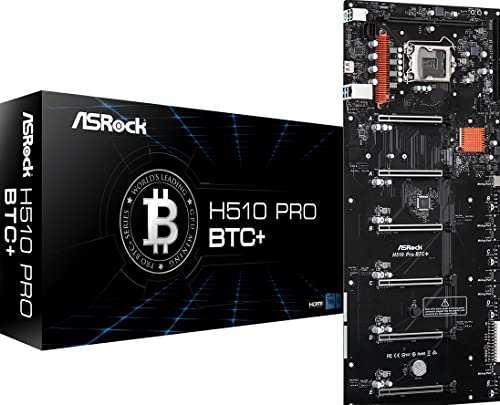
ASRock H510 Pro BTC+
5.4/10

Overall score

Score
5.4/ 10
✕
What it is
Our main score for this model, 1–10. It combines specs, expert reviews, best-of lists, owners and ratings from across the web.
How we count it
Parts: Technical score 40%, Reviews score 20%, List score 20%, Sentiment score 10%, User score 10%
Marks: Each part gets a mark out of 10. For reviews, lists and owners, a typical model in this category gets about 8 and the best one gets 10.
No data yet: A part with no data shows "?". It counts as the mark of a weaker model in this category (4 in 5 models with data score higher). This way, models with reviews, lists and owners usually come out ahead.
Score distribution
â–¼
<55-66-77-88-99-10
Score components

40%

4.8

Technical score

20%

4.8

Reviews score

20%

?

List scoreNot enough data yet, so we use 7.5, the mark of a weaker model in this category

10%

4.8

Sentiment score

10%

4.8

User score

â–¼Worse than 97% of motherboards
?

Value for money

Value for money
✕
What it is
An indicator that combines the motherboard's overall rating with its cost.
When it matters
When you are looking for a motherboard that offers a strong balance of features, performance, and price.
Score distribution
â–¼
<55-66-77-88-99-10
Score components

70%

5.4

Overall score

30%

?

Price

Price not known yet
4.8

Technical score

Technical score
4.8/ 10
✕
What it is
How good the specs are compared with the other models in this category, 1–10.
How we count it
Areas: We rate the specs in each area against the other models in this category.
Weighting: The areas that matter most to buyers count more. The shares are shown under Score components.
Share: The technical score is 40% of the overall score.
Score distribution
â–¼
<55-66-77-88-99-10
Score components

19%

6.2

Memory

16%

6.2

Platform

16%

4.3

Storage

15%

3.4

Network

13%

1.8

Ports

8%

3.8

Expansion

8%

6.7

Power & Cooling

5%

7.7

Audio

â–¼Worse than 78%
4.8

Reviews score

Reviews score
4.8/ 10
✕
What it is
Average grade from independent test sites, magazines and video reviewers, 1–10.
How we count it
Grades: Each review's own score is converted to 1–10; without one, we grade the review ourselves. Big test sites count more, short reviews half as much as full tests. A video review counts half.
Score: The average grade is 80% of the review mark; the number of reviews is the other 20% (1 review = 5, the typical number in this category = 8, the most-reviewed model = 10).
Enough data: With few reviews, the average grade is pulled toward the typical grade of this category. No reviews yet: 7.8 for now.
Share: Reviews count 20% of the overall score.
Score distribution
â–¼
<55-66-77-88-99-10

4.8

Mark 7.8 is below the typical mark 8.3 of this category, so it cannot lift the score above the technical score

80%

8.5

Average grade

20%

5.0

Popularity

Grades by review (1)
1 video review, counting half as much as a written test. Reviews count 20% of the overall score.
Ratings from across the web count in the User score, not in this score.
â–¼Worse than 89%
4.8

User score

User score
4.8/ 10
✕
What it is
How happy buyers are with this model, based on ratings from across the web.
How we count it
Enough data: A model needs at least 1 rating from across the web. Without one, it counts as 7.9, the mark of a weaker rated model in this category.
Share: User score counts 10% of the overall score.
Score distribution
â–¼
<55-66-77-88-99-10

4.8

Mark 7.2 is below the typical mark 8.4 of this category, so it cannot lift the score above the technical score

70%

6.7

Rating

30%

8.3

Popularity

â–¼Worse than 86%
?

List score

List score
7.5/ 10
✕
What it is
How often independent test sites, magazines and video reviewers put this model in their best-of lists for this category.
How we count it
Points: The model in the most lists of this category gets 10; the others get 8 to 10 in proportion. In no list yet: 7.5. Lists count 20% of the overall score.
Enough data: Every list counts, even a single one. With fewer than 5 best-of lists in the category, this part is left out.
Lists with this model (0)
Not in any best-of list yet, so this part counts as 7.5. Models in a list get 8 to 10.
Not in any best-of list yet
  • asrock-h510-pro-btc
asrock-h510-pro-btc
Where to buy
*As an Amazon Associate, we earn from qualifying purchases.
Best rankings
Available: ranking among products currently available (including other versions of this product).All: ranking among all products in the database.

What owners say about the ASRock H510 Pro BTC+

Based on 75 owners sharing their experience in online comments

16%positive7%mixed77%negative

Owners value stable mining with many graphics cards, but boot failures, GPU detection failures, and finicky setup dominate complaints.

What owners dislike

  • Only the first slots are detected at boot, so the other slots stay dark and cards show as undetected until BIOS settings or power changes are tried.22
  • The board gives no video output or BIOS screen without a monitor on the motherboard HDMI or an iGPU CPU, so some builds show a blank screen.13
  • Owners hear 5 or 9 beeps at startup when they add a second or later card, and the board won't boot until the card or power setup is changed.11
  • Large cards like RTX 3080/3090 sit too close together, so heat builds up and some owners find the cards tilt and sag without support.6
  • Molex power connectors are hard to plug in, and adding a second PSU or an extra PCIe power cable can stop the PSU or the board from starting.5
  • The board fails to boot from a USB installer, and some owners see Windows crash or hang on the various storage options they tried.5
  • Without an iGPU the board needs a discrete card for display, and some Intel CPUs and RAM kits don't fit or fail to boot on it.4
  • Extra cards show a yellow warning or resource conflict in Windows, and some see GA104 errors in HiveOS, with only the first card working.4
  • The board doesn't recognise some M.2 SSDs, so the system can't see the drive and Windows can't be installed from it.3
  • Owners say the first setup takes days of troubleshooting, and beginners find the booting and configuration steps hard to follow.3

Points mentioned by at least 3 owners, most mentioned first.

Loading...
Loading category ranking...

Technical Specifications of motherboard ASRock H510 Pro BTC+

Technical score
Technical score
4.8/ 10
✕
What it is
How good the specs are compared with the other models in this category, 1–10.
How we count it
Areas: We rate the specs in each area against the other models in this category.
Weighting: The areas that matter most to buyers count more. The shares are shown under Score components.
Share: The technical score is 40% of the overall score.
Score distribution
â–¼
<55-66-77-88-99-10
Score components:

19%

6.2

Memory

16%

6.2

Platform

16%

4.3

Storage

15%

3.4

Network

13%

1.8

Ports

8%

3.8

Expansion

8%

6.7

Power & Cooling

5%

7.7

Audio

4.8
Reviews score
4.8
User score
4.8
List score
?
Value for money
Value for money
6.8/ 10
✕
What it is
An indicator that combines the motherboard's overall rating with its cost.
When it matters
When you are looking for a motherboard that offers a strong balance of features, performance, and price.
Score distribution
â–¼
<55-66-77-88-99-10
Score components:

70%

5.4

Overall score

30%

?

Price

6.8
CPU socket
?
CPU platform
Intel
Chipset
Intel H510
This motherboard uses Intel H510, which is less capable than 93.9% of Motherboards and as capable as 0.2% of Motherboards.
Form factor
?
Integrated graphics support
yes
This motherboard supports integrated graphics. 10.2% of motherboards support this feature.
Show more
DDR memory version
DDR4
This motherboard uses DDR4, which is more modern than 13.4% of Motherboards and the same as 50.4% of Motherboards.
Memory slots
1
This motherboard has 1 Memory slots, which is fewer than 100% of motherboards and equal to 0.1% of motherboards.
Maximum memory capacity
?
Memory channels
?
Maximum RAM speed
3,200 MT/s
This motherboard supports memory speeds up to 3,200 MT/s, which is lower than that of 63.1% of motherboards and equal to that of 11.2% of motherboards.
Show more
N. of M.2 sockets
1
This motherboard has 1 M.2 sockets, which is fewer than 69.5% of motherboards and equal to 18.9% of motherboards.
M.2 slot interface per slot
?
N. of SATA 3 connectors
1
This motherboard has 1 SATA 3 connectors, which is fewer than 99% of motherboards and equal to 0.4% of motherboards.
Supported RAID levels
?
NVMe RAID support
no
This motherboard does not support NVMe RAID. 59.9% of motherboards support this feature.
Show more
N. of PCIe 5.0 x16 slots
0
This motherboard has 0 PCIe 5.0x16 slots, which is fewer than 31.6% of motherboards and equal to 68.4% of motherboards.
N. of PCIe 4.0 x16 slots
0
This motherboard has 0 PCIe 4.0x16 slots, which is fewer than 44.8% of motherboards and equal to 55.2% of motherboards.
N. of PCIe 3.0 x16 slots
?
PCIe slot electrical configuration
?
PCIe bifurcation support
?
Show more
Total USB ports (rear I/O)
4
This motherboard has 4 USB ports (rear I/O), which is fewer than 97.7% of motherboards and equal to 2.3% of motherboards.
Total USB ports (including headers)
6
This motherboard has 6 USB ports (including headers), which is fewer than 99.7% of motherboards and equal to 0.2% of motherboards.
Total USB-C ports (rear I/O)
0
This motherboard has 0 USB-C ports (rear I/O), which is fewer than 64.2% of motherboards and equal to 35.8% of motherboards.
Total USB-C ports (including headers)
?
N. of USB 3.2 Gen2x2 ports (USB-C)
0
This motherboard has 0 USB 3.2 Gen2x2 ports (USB-C), which is fewer than 18% of motherboards and equal to 82% of motherboards.
Show more
LAN speed
1 Gbps
This motherboard supports LAN speeds up to 1 Gbps, which is lower than that of 51.1% of motherboards and equal to that of 48.9% of motherboards.
LAN controller
?
N. of RJ45 ports
1
This motherboard has 1 RJ45 ports, which is fewer than 14.4% of motherboards and equal to 85.6% of motherboards.
Wi-Fi connectivity
no
This motherboard does not support Wi-Fi connectivity. 50.1% of motherboards support this feature.
Wi-Fi version
N/A
Show more
Audio codec
?
Audio channels
?
Audio SNR
?
Headphone amp support
no
This motherboard does not support a headphone amp. 58.8% of motherboards support this feature.
N. of 3.5mm audio jacks
3
This motherboard has 3 3.5mm audio jacks, which is more than 11.3% of motherboards and equal to 39.3% of motherboards.
Show more
VRM phases
?
N. of CPU power connectors
1
This motherboard has 1 CPU power connectors, which is fewer than 45.2% of motherboards and equal to 54.9% of motherboards.
N. of fan headers
?
Pump header
no
This motherboard does not have a pump header. 77.9% of motherboards include this feature.
Pump header max current
?
Show more

ASRock H510 Pro BTC+ vs the average motherboard

246810TotalPlatformMemoryStorageExpansionPortsNetworkAudioPower & Cooling
  • More basic chipset
    This motherboard uses a more basic chipset than the average motherboard (Intel H510 vs Intel B860).
    Intel H510 vs Intel B860
  • 60% lower LAN speed
    This motherboard has a lower LAN speed than the average motherboard (1 Gbps vs 2.5 Gbps). The average motherboard offers LAN speed of 2.5 Gbps.
    1 Gbps vs 2.5 Gbps
  • 3 fewer memory slots
    This motherboard has fewer memory slots than the average motherboard (1 vs 4). The average motherboard has 4 memory slot/s.
    1 vs 4
  • 4 fewer rear USB ports
    This motherboard has fewer rear USB ports than the average motherboard (4 vs 8). The average motherboard has 8 rear USB port/s.
    4 vs 8
  • No NVMe RAID support
    This motherboard does not support NVMe RAID, while the average motherboard does. 59.9% of motherboards support NVMe RAID.
  • 34.2% lower review score
    Reviews score
    4.8/ 10
    ✕
    What it is
    Average grade from independent test sites, magazines and video reviewers, 1–10.
    How we count it
    Grades: Each review's own score is converted to 1–10; without one, we grade the review ourselves. Big test sites count more, short reviews half as much as full tests. A video review counts half.
    Score: The average grade is 80% of the review mark; the number of reviews is the other 20% (1 review = 5, the typical number in this category = 8, the most-reviewed model = 10).
    Enough data: With few reviews, the average grade is pulled toward the typical grade of this category. No reviews yet: 7.8 for now.
    Share: Reviews count 20% of the overall score.
    Score distribution
    â–¼
    <55-66-77-88-99-10

    4.8

    Mark 7.8 is below the typical mark 8.3 of this category, so it cannot lift the score above the technical score

    80%

    8.5

    Average grade

    20%

    5.0

    Popularity

    Grades by review (1)
    1 video review, counting half as much as a written test. Reviews count 20% of the overall score.
    Ratings from across the web count in the User score, not in this score.
    4.8 vs 7.3
  • 9 fewer total USB connections
    This motherboard has fewer total USB connections than the average motherboard (6 vs 15). The average motherboard has 15 total USB connections.
    6 vs 15
  • No Wi-Fi connectivity
    This motherboard does not support Wi-Fi connectivity, while the average motherboard does. 50.1% of motherboards support Wi-Fi connectivity.
  • 34.2% lower review score
    Reviews score
    4.8/ 10
    ✕
    What it is
    Average grade from independent test sites, magazines and video reviewers, 1–10.
    How we count it
    Grades: Each review's own score is converted to 1–10; without one, we grade the review ourselves. Big test sites count more, short reviews half as much as full tests. A video review counts half.
    Score: The average grade is 80% of the review mark; the number of reviews is the other 20% (1 review = 5, the typical number in this category = 8, the most-reviewed model = 10).
    Enough data: With few reviews, the average grade is pulled toward the typical grade of this category. No reviews yet: 7.8 for now.
    Share: Reviews count 20% of the overall score.
    Score distribution
    â–¼
    <55-66-77-88-99-10

    4.8

    Mark 7.8 is below the typical mark 8.3 of this category, so it cannot lift the score above the technical score

    80%

    8.5

    Average grade

    20%

    5.0

    Popularity

    Grades by review (1)
    1 video review, counting half as much as a written test. Reviews count 20% of the overall score.
    Ratings from across the web count in the User score, not in this score.
    4.8 vs 7.3
  • 36.0% lower sentiment score
    4.8 vs 7.5
  • 35.1% lower user score
    User score
    4.8/ 10
    ✕
    What it is
    How happy buyers are with this model, based on ratings from across the web.
    How we count it
    Enough data: A model needs at least 1 rating from across the web. Without one, it counts as 7.9, the mark of a weaker rated model in this category.
    Share: User score counts 10% of the overall score.
    Score distribution
    â–¼
    <55-66-77-88-99-10

    4.8

    Mark 7.2 is below the typical mark 8.4 of this category, so it cannot lift the score above the technical score

    70%

    6.7

    Rating

    30%

    8.3

    Popularity

    4.8 vs 7.4
  • 14% worse value for money
    ASRock H510 Pro BTC+ has worse value for money than the average motherboard (6.75 vs 7.7).
    6.75 vs 7.7
  • More basic chipset
    This motherboard uses a more basic chipset than the average motherboard (Intel H510 vs Intel B860).
    Intel H510 vs Intel B860
  • No BIOS flashback support
    This motherboard does not support BIOS flashback, while the average motherboard does. 51.3% of motherboards support BIOS flashback.
  • Not ready for Windows 11
    This motherboard is not ready for Windows 11, while the average motherboard is. 77.4% of motherboards are ready for Windows 11.
  • No debug LED indicators
    This motherboard does not have debug LED indicators, while the average motherboard does. 78.7% of motherboards include debug LED indicators.
  • No automatic overclocking
    This motherboard does not support automatic overclocking, while the average motherboard does. 74.1% of motherboards support automatic overclocking.
  • 3 fewer memory slots
    This motherboard has fewer memory slots than the average motherboard (1 vs 4). The average motherboard has 4 memory slot/s.
    1 vs 4
  • 31.9% lower maximum RAM speed
    This motherboard has a lower maximum RAM speed than the average motherboard (3,200 MT/s vs 4,699.5 MT/s). The average motherboard supports RAM speed of 4,699.5 MT/s.
    3,200 MT/s vs 4,699.5 MT/s
  • No NVMe RAID support
    This motherboard does not support NVMe RAID, while the average motherboard does. 59.9% of motherboards support NVMe RAID.
  • 1 fewer M.2 sockets
    This motherboard has fewer M.2 sockets than the average motherboard (1 vs 2). The average motherboard has 2 M.2 socket/s.
    1 vs 2
  • 3 fewer SATA 3 connectors
    This motherboard has fewer SATA 3 connectors than the average motherboard (1 vs 4). The average motherboard has 4 SATA 3 connectors.
    1 vs 4
  • 4 fewer rear USB ports
    This motherboard has fewer rear USB ports than the average motherboard (4 vs 8). The average motherboard has 8 rear USB port/s.
    4 vs 8
  • 9 fewer total USB connections
    This motherboard has fewer total USB connections than the average motherboard (6 vs 15). The average motherboard has 15 total USB connections.
    6 vs 15
  • 1 fewer rear USB-C ports
    This motherboard has fewer rear USB-C ports than the average motherboard (0 vs 1). The average motherboard has 1 rear USB-C port/s.
    0 vs 1
  • 1 fewer USB 3.2 Gen2 ports
    This motherboard has fewer USB 3.2 Gen2 ports than the average motherboard (0 vs 1). The average motherboard has 1 USB 3.2 Gen2 port/s.
    0 vs 1
  • 2 fewer USB 3.2 Gen1 ports
    This motherboard has fewer USB 3.2 Gen1 ports than the average motherboard (2 vs 4). The average motherboard has 4 USB 3.2 Gen1 port/s.
    2 vs 4
  • 1 fewer DisplayPort outputs
    This motherboard has fewer DisplayPort outputs than the average motherboard (0 vs 1). The average motherboard has 1 DisplayPort outputs.
    0 vs 1
  • 60% lower LAN speed
    This motherboard has a lower LAN speed than the average motherboard (1 Gbps vs 2.5 Gbps). The average motherboard offers LAN speed of 2.5 Gbps.
    1 Gbps vs 2.5 Gbps
  • No Wi-Fi connectivity
    This motherboard does not support Wi-Fi connectivity, while the average motherboard does. 50.1% of motherboards support Wi-Fi connectivity.
  • No Wi-Fi antenna included
    This motherboard does not include a Wi-Fi antenna, while the average motherboard does. 51.1% of motherboards include a Wi-Fi antenna.
  • No headphone amp support
    This motherboard does not support a headphone amp, while the average motherboard does. 58.8% of motherboards support a headphone amp.
  • No optical S/PDIF out
    This motherboard does not have optical S/PDIF out, while the average motherboard does. 55.4% of motherboards include optical S/PDIF out.
  • No pump header
    This motherboard does not have a pump header, while the average motherboard does. 77.9% of motherboards include a pump header.
  • 1 fewer RGB headers
    This motherboard has fewer RGB headers than the average motherboard (0 vs 1). The average motherboard has 1 RGB header/s.
    0 vs 1

Video reviews

Hands-on testing, unboxing, and real-world video evaluations

9.0
Red Fox Crypto
≈ estimated
13/10/2021
Hands-on review · GPU spacing, mining and temperature tests
Verdict
ASRock H510 Pro BTC+ is highly recommended for mining builds, but its wide layout is the main airflow drawback.
Overview video
Not graded
Hands-on video, no verdict
Overview video
Not graded
Not graded
Shop video

Third-party reviews

What customers like about ASRock H510 Pro BTC+

  • Onboard power and reset buttons make bench testing easy.
  • One M.2 socket fits an SSD for the system drive.
  • Integrated graphics support means you can run the PC without a graphics card.
  • Passive chipset cooling means no fan noise from the chipset.
  • A 1 Gbps LAN port handles everyday wired internet.
  • Six USB ports in total, including headers, leave some room for extra devices.

What customers don't like about ASRock H510 Pro BTC+

  • The rear panel has only four USB ports, which limits direct connections.
  • One memory slot means any upgrade means replacing the stick.
  • One SATA connector limits how many hard drives you can add.
  • There is no Wi-Fi, so wireless needs a separate adapter.
  • At 510 mm in height, it needs a large case.

Verdict

Simple is the point of the ASRock H510 Pro BTC+, a plain Intel H510 board for builders who want a few basic parts and nothing more. It has one DDR4 memory slot, running up to 3200 MT/s, and a single M.2 socket for an SSD. Two buttons sit right on the board: a power button and a reset button. Both help when you test a build outside a case. The rear panel has only four USB ports, and there is one SATA connector, so you cannot add many drives or devices. The board has no Wi-Fi, no pump header, no debug LEDs and no automatic overclocking. It suits someone who wants a simple machine for office work or a small rig with a single drive, and who is happy without extras.

Compare ASRock H510 Pro BTC+ with other products in the Motherboards category

1Product to compare no. 1
VS
2Product to compare no. 2
VS
3Product to compare no. 3 (optional)

Graphic comparison of ASRock H510 Pro BTC+ and other products in the Motherboards category

No results found