Scored using Mice Methodology v1.0
Mice Methodology v1.0
Mathematical & Unbiased Scoring
Products in this category are scored under Frontum Mice Methodology v1.0: technical specifications plus authentic consumer ratings, with 0% commercial bias.
Explore Mice Methodology v1.0

Qpad DX 120 Review | 78 Data compared

Avg. price:~£55Connectivity:wiredMaximum polling rate:1000 HzMaximum DPI:12000 DPIWeight:152 g

Qpad DX 120 Review: Compare 78 technical specifications and user reviews to see how this product ranks in the Mice category and whether it is worth buying.
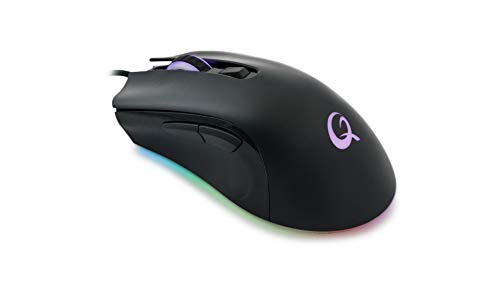
Qpad DX 120
5.0/10

Overall score

Score
5.0/ 10
✕
What it is
An overall evaluation of the mouse's quality, based on technical analyses and user reviews.
When it matters
When you need a quick reference to identify the best mice on the market.
Score distribution
â–¼
<55-66-77-88-99-10
Score components

80%

4.4

Technical score

20%

7.3

User score

â–¼Worse than 84% of mice
6.5

Value for money

Value for money
6.5/ 10
✕
What it is
An indicator that combines the mouse's overall rating with its cost.
When it matters
When you are looking for a mouse that offers a strong balance of performance, features, and price.
Score distribution
â–¼
<55-66-77-88-99-10
Score components

70%

5.0

Overall score

30%

10

Price

â–¼Worse than 85%
4.4

Technical score

Technical score
4.4/ 10
✕
What it is
An assessment of technical performance for products in the Mice category across these key areas: Performance & Sensor, Connectivity, Battery & Charging, Controls, Design, Features.
When it matters
When you want to compare mice based on technical performance and available features.
Score distribution
â–¼
<55-66-77-88-99-10
Score components

36%

5.9

Performance & Sensor

22%

2.6

Controls

16%

2.3

Design

14%

8.5

Features

7%

1.1

Connectivity

5%

1.0

Battery & Charging

â–¼Worse than 85%
7.3

User score

User score
7.3/ 10
✕
What it is
A rating that combines user reviews and the total number of reviews received by the mouse.
When it matters
When you want to understand how a mouse performs in daily use or gaming and how reliable it is in terms of comfort, button feel, tracking accuracy, and long-term durability.
Score distribution
â–¼
<55-66-77-88-99-10
Score components

70%

9.4

User ratings

30%

2.5

Number of reviews

Based on ratings from across the web.
â–¼Worse than 84%
  • qpad-dx-120
  • qpad-dx-120
  • qpad-dx-120
  • qpad-dx-120
  • qpad-dx-120
qpad-dx-120
qpad-dx-120
qpad-dx-120
qpad-dx-120
qpad-dx-120
Where to buy
*As an Amazon Associate, we earn from qualifying purchases.
Best rankings
Available: ranking among products currently available (including other versions of this product).All: ranking among all products in the database.
Loading...
Loading category ranking...

Technical Specifications of mouse Qpad DX 120

Technical score
Technical score
4.4/ 10
✕
What it is
An assessment of technical performance for products in the Mice category across these key areas: Performance & Sensor, Connectivity, Battery & Charging, Controls, Design, Features.
When it matters
When you want to compare mice based on technical performance and available features.
Score distribution
â–¼
<55-66-77-88-99-10
Score components:

36%

5.9

Performance & Sensor

22%

2.6

Controls

16%

2.3

Design

14%

8.5

Features

7%

1.1

Connectivity

5%

1.0

Battery & Charging

4.4
User score
User score
7.3/ 10
✕
What it is
A rating that combines user reviews and the total number of reviews received by the mouse.
When it matters
When you want to understand how a mouse performs in daily use or gaming and how reliable it is in terms of comfort, button feel, tracking accuracy, and long-term durability.
Score distribution
â–¼
<55-66-77-88-99-10
Score components

70%

9.4

User ratings

30%

2.5

Number of reviews

Based on ratings from across the web.
7.3
Popularity
Popularity
2.5/ 10
✕
What it is
An indicator based on the number of reviews received by the mouse.
When it matters
When you prefer a mouse that has already been chosen and reviewed by many other users.
Score distribution
â–¼
<55-66-77-88-99-10
Popularity:
Qpad DX 120 has a popularity score of 2.5 points, which is lower than that of 80% of products in this category.
2.5
Value for money
Value for money
6.5/ 10
✕
What it is
An indicator that combines the mouse's overall rating with its cost.
When it matters
When you are looking for a mouse that offers a strong balance of performance, features, and price.
Score distribution
â–¼
<55-66-77-88-99-10
Score components:

70%

5.0

Overall score

30%

10

Price

6.5
Brand name
Qpad
Maximum polling rate
1,000 Hz
This mouse has a maximum polling rate of 1,000 Hz, which is higher than 27.8% of mice and equal to 55% of mice.
Wired polling rate
1,000 Hz
This mouse has a wired polling rate of 1,000 Hz, which is higher than 13.2% of mice and equal to 77.4% of mice.
2.4 GHz polling rate
N/A
Bluetooth polling rate
0 Hz
This mouse has a Bluetooth polling rate of 0 Hz, which is lower than 36% of mice and equal to 64% of mice.
wired only.
Show more
Connectivity
wired
This mouse supports wired connectivity, which is less versatile than 65.1% of mice and equal to 34.9% of mice.
connection modes: wired.
Bluetooth support
no
This mouse does not support Bluetooth. 35.6% of mice support Bluetooth.
Bluetooth version
N/A
Proprietary 2.4 GHz support
no
This mouse does not support proprietary 2.4 GHz wireless. 61.3% of mice support proprietary 2.4 GHz wireless.
Receiver included
no
This mouse does not include a receiver. 62.3% of mice include a receiver.
Show more
Battery life
N/A
Battery capacity
N/A
Battery form factor
N/A
Rechargeable battery
no
This mouse does not use a rechargeable battery. 46% of mice use a rechargeable battery.
Removable battery
no
This mouse does not use a removable battery. 22.3% of mice use a removable battery.
Show more
N. of buttons
6
This mouse has 6 buttons, which is more than 23.2% of mice and equal to 40% of mice.
N. of side buttons
2
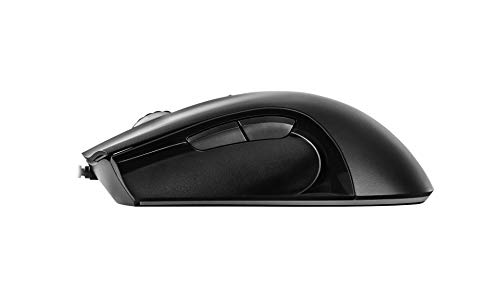
This mouse has 2 side buttons, which is more than 15% of mice and equal to 68.6% of mice.
N. of programmable buttons
0
This mouse has 0 programmable buttons, which is less than 83.4% of mice and equal to 16.7% of mice.
DPI switching button
yes
This mouse includes a DPI switching button. 14.7% of mice include a DPI switching button.
Profile switching button
no
This mouse does not include a profile switching button. 16% of mice include a profile switching button.
Show more
Orientation
right-handed
Weight
152 g
This mouse weighs 152 g, which is heavier than 97.8% of mice.
Extra weights
0 g
This mouse comes with 0 g extra weights, which is less than 4.6% of mice and equal to 95.4% of mice.
Cable length
1.8 m
This mouse comes with a 1.8 m cable, which is longer than 18.4% of mice and equal to 65.2% of mice.
Cable type
fabric
Show more
Onboard memory profiles
?
Onboard memory size
512 KB
This mouse has 512 KB of onboard memory, which is larger than 93.7% of mice and equal to 5.8% of mice.
Software name
N/A
Firmware upgradable
?
Suitable for gaming
yes
This mouse is suitable for gaming. 23.9% of mice are suitable for gaming.

Qpad DX 120 vs the average mouse

246810TotalPerformance & SensorConnectivityBattery & ChargingControlsDesignFeatures
  • Adjustable lift-off distance
    This mouse supports adjustable lift-off distance, while the average mouse does not. 46.5% of mice support adjustable lift-off distance.
  • 25% higher maximum acceleration
    This mouse has a maximum acceleration of 50 G, while the average mouse has a maximum acceleration of 40 G.
    50 G vs 40 G
  • 2 more stored DPI steps
    This mouse stores 7 DPI steps, while the average mouse stores 5 DPI steps.
    7 vs 5
  • 85.4% higher mouse weight
    This mouse weighs 152 g, while the average mouse weighs 82 g.
    152 g vs 82 g
  • No proprietary 2.4 GHz support
    This mouse does not support proprietary 2.4 GHz wireless, while the average mouse does. 61.3% of mice support proprietary 2.4 GHz wireless.
  • 6 fewer programmable buttons
    This mouse has 0 programmable buttons, while the average mouse has 6 programmable buttons.
    0 vs 6
  • No automatic sleep mode
    This mouse does not support auto-sleep, while the average mouse does. 60.5% of mice support auto-sleep.
  • No receiver included
    This mouse does not include a receiver, while the average mouse does. 62.3% of mice include a receiver.
  • 10 million clicks shorter switch lifespan
    This mouse has a switch durability of 20 million clicks, while the average mouse has a switch durability of 30 million clicks.
    20 million clicks vs 30 million clicks
  • 37.5% lower tracking speed
    This mouse has a maximum tracking speed of 250 IPS, while the average mouse has a maximum tracking speed of 400 IPS.
    250 IPS vs 400 IPS
  • No angle snapping support
    This mouse does not support angle snapping, while the average mouse does. 54.4% of mice support angle snapping.
  • 12.9% worse value for money
    Qpad DX 120 has worse value for money than the average mouse (6.48 vs 7.3).
    6.48 vs 7.31
  • 2.57x less popular
    Qpad DX 120 is less popular than the average mouse (2.49 vs 6.4).
    2.49 vs 6.38
  • 9.2% lower user score
    User score
    7.3/ 10
    ✕
    What it is
    A rating that combines user reviews and the total number of reviews received by the mouse.
    When it matters
    When you want to understand how a mouse performs in daily use or gaming and how reliable it is in terms of comfort, button feel, tracking accuracy, and long-term durability.
    Score distribution
    ▼▼
    <55-66-77-88-99-10
    Qpad DX 120
    the average mouse
    Qpad DX 120 has a lower user score than the average mouse (7.33 vs 8).
    7.33 vs 8
  • 57.1% more expensive
    Qpad DX 120 is more expensive than the average mouse (£55 vs £35).
    £55 vs £35
  • 37.5% lower tracking speed
    This mouse has a maximum tracking speed of 250 IPS, while the average mouse has a maximum tracking speed of 400 IPS.
    250 IPS vs 400 IPS
  • No angle snapping support
    This mouse does not support angle snapping, while the average mouse does. 54.4% of mice support angle snapping.
  • 200 DPI higher minimum setting
    This mouse has a minimum DPI of 400 DPI, while the average mouse has a minimum DPI of 200 DPI.
    400 DPI vs 200 DPI
  • No proprietary 2.4 GHz support
    This mouse does not support proprietary 2.4 GHz wireless, while the average mouse does. 61.3% of mice support proprietary 2.4 GHz wireless.
  • No receiver included
    This mouse does not include a receiver, while the average mouse does. 62.3% of mice include a receiver.
  • Limited connectivity
    This mouse supports wired connectivity, while the average mouse supports wireless connectivity.
    connection modes: wired.
    wired vs wireless
  • No automatic sleep mode
    This mouse does not support auto-sleep, while the average mouse does. 60.5% of mice support auto-sleep.
  • No battery level indicator
    This mouse does not include a battery level indicator, while the average mouse does. 59.4% of mice include a battery level indicator.
  • 6 fewer programmable buttons
    This mouse has 0 programmable buttons, while the average mouse has 6 programmable buttons.
    0 vs 6
  • 10 million clicks shorter switch lifespan
    This mouse has a switch durability of 20 million clicks, while the average mouse has a switch durability of 30 million clicks.
    20 million clicks vs 30 million clicks
  • 85.4% higher mouse weight
    This mouse weighs 152 g, while the average mouse weighs 82 g.
    152 g vs 82 g
  • 2.8 mm taller mouse height
    This mouse has a height of 42.5 mm, while the average mouse has a height of 39.7 mm.
    42.5 mm vs 39.7 mm
  • 6.5 mm wider mouse width
    This mouse has a width of 72.5 mm, while the average mouse has a width of 66 mm.
    72.5 mm vs 66 mm

Video reviews

Hands-on testing, unboxing, and real-world video evaluations

Third-party reviews

Based on ratings from across the web.
Reviews last updated: May 2026 · How we calculate this

What customers like about Qpad DX 120

  • High-quality build and solid construction feel
  • Comfortable ergonomic design, particularly for palm grip and users who prefer larger mice
  • Pleasant soft-touch grip coating that prevents slipping
  • Responsive Omron switches and a high-performance PWM 3360 sensor
  • Simple plug-and-play functionality with on-the-fly hardware DPI switching
  • Aesthetic RGB lighting and a durable braided cable

What customers don't like about Qpad DX 120

  • Complete lack of dedicated software for button remapping or custom profiles
  • RGB lighting effects cannot be customized or turned off
  • Limited features compared to competitors at the same price point, such as no adjustable weights or extra macro buttons
  • Cycling through DPI steps can be cumbersome without a dedicated management tool
  • Relatively high price given the lack of modern software features

Verdict

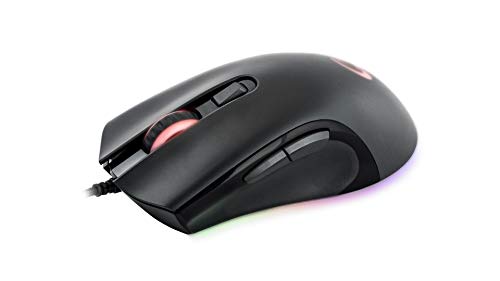
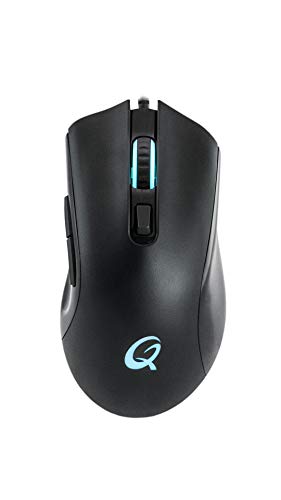
The QPAD DX-120 is a right-handed ergonomic gaming mouse designed specifically for FPS enthusiasts, featuring the high-precision Pixart PWM 3360 optical sensor with a maximum resolution of 12,000 DPI. It is built with a slim, lightweight 150g form factor and 6 programmable buttons equipped with durable Omron switches rated for 20 million clicks. Key advantages include a comfortable soft-touch surface, a flexible 1.8m braided cable with a gold-plated USB connector, and high-performance specs like 50G maximum acceleration and a 1ms response time. However, notable drawbacks include the lack of dedicated software for button remapping or custom RGB profiles, and a lack of adjustable weights compared to other mice in its price category.

Compare Qpad DX 120 with other products in the Mice category

1Product to compare no. 1
VS
2Product to compare no. 2
VS
3Product to compare no. 3 (optional)

Graphic comparison of Qpad DX 120 and other products in the Mice category

No results found