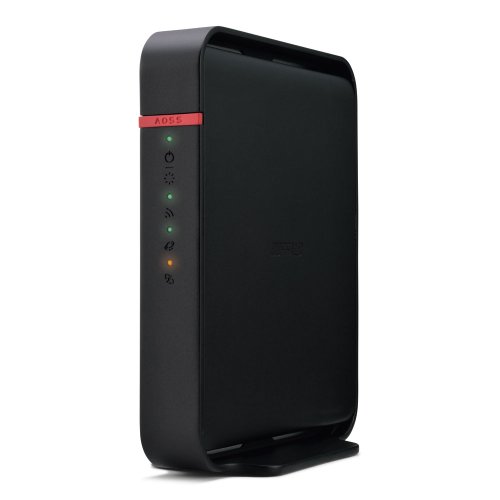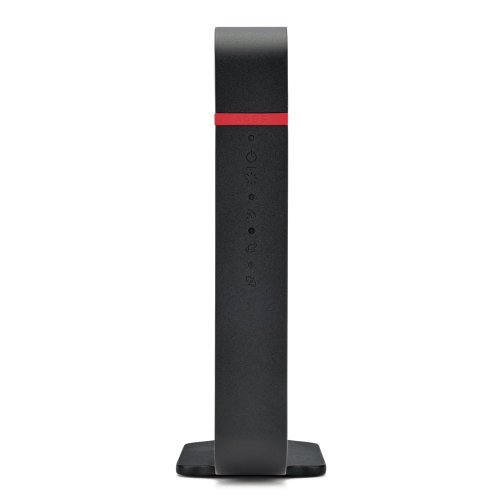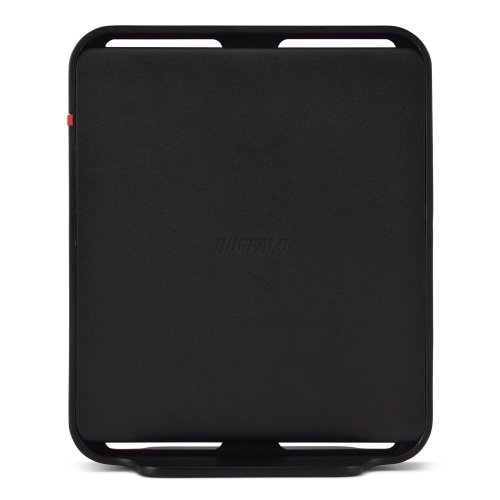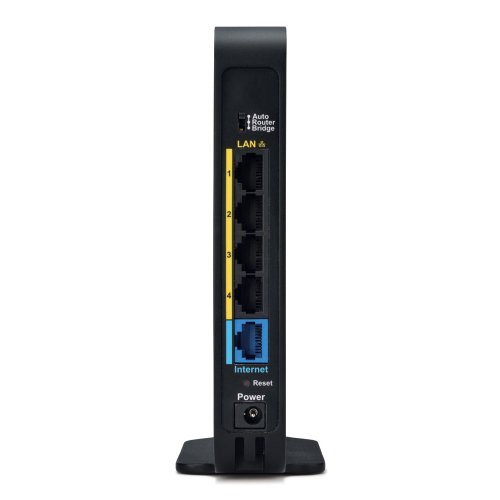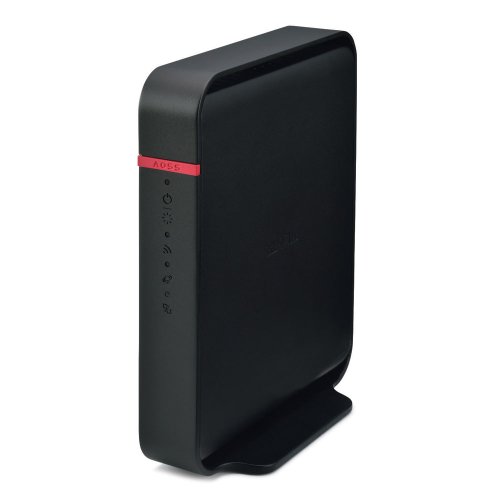
Buffalo AirStation N300 Review | 77 Data compared

double-arrow
  • Avg. price in UK: ~£110
  • Avg. price in US: ~$100
  • Wi-Fi version: Wi-Fi 4 (802.11n)
  • Wi-Fi speed: 300 Mbps
  • LAN port speeds: 100 Mbps
  • Wireless coverage: 56

Buffalo AirStation N300 review. Compare 77 technical specifications and user reviews to see how it ranks among routers and if it is worth buying.

5.5

Overall score

What it is: An overall evaluation of the router's quality, based on technical analyses and user reviews.

When it matters: When you need a quick reference to identify the best routers on the market.

Score components:

90.0%

5.4

Technical Score

10.0%

7.0

User score

Good
5.4

Technical Score

What it is: An assessment of the router's technical performance, covering key areas such as Wi-Fi performance, wired connectivity, security, software features, coverage, and design.

When it matters: When you want to compare routers based on technical performance and available features.

Score components:

26.0%

3.3

Wireless

20.0%

5.2

Ports

18.0%

7.6

Networking

14.0%

9.2

Security

12.0%

3.8

Hardware

10.0%

3.6

Management

Good
7.0

User score

What it is: A rating that combines user reviews and the total number of reviews received by the router.

When it matters: When you want to know how a router performs in daily use and how reliable it is for speed, coverage, and stability according to user feedback.

Score components:

70.0%

7.6

User reviews

30.0%

5.8

Popularity

User score:
United Kingdom
amazon
3.8
(156)
amazon
4.3
(63)
amazon
3.5
(38)
United States
Amazon_logo.png
3.6
(160)
Amazon_logo.png
4.2
(67)
Amazon_logo.png
3.8
(48)

(Reviews last updated: May 2026)

Very good
  • 3.7
    Gaming

    Score components:

    33.0%

    1.3

    Wi-Fi speed

    28.0%

    5.0

    CPU clock speed

    22.0%

    1.9

    RAM capacity

    17.0%

    9.0

    Maximum connected devices

  • 5.3
    Travel

    Score components:

    40.0%

    10

    Weight

    30.0%

    1.3

    Wi-Fi speed

    20.0%

    4.0

    Cellular modem type

    10.0%

    1.0

    SIM slot

  • buffalo-airstation-n300
  • buffalo-airstation-n300
  • buffalo-airstation-n300
  • buffalo-airstation-n300
  • buffalo-airstation-n300
buffalo-airstation-n300

Best prices in UK

Best rankings

?

Available: ranking among products currently available (including other versions of this product).
All: ranking among all products in the database.

Verdict

The Buffalo AirStation HighPower N300 is a 2.4 GHz single-band wireless router supporting 802.11n standards with data transfer speeds up to 300 Mbps. It features HighPower technology to extend range, MIMO technology for improved performance, and a built-in 4-port Fast Ethernet switch (10/100 Mbps). Key pros include its versatile open-source DD-WRT firmware options, integrated SPI firewall, and easy one-touch AOSS/WPS security setup. However, notable cons include the lack of Gigabit Ethernet support on standard models and the absence of a 5 GHz band, which can lead to interference in crowded wireless environments.

Technical Specifications of router Buffalo AirStation N300

Technical Score

What it is: An assessment of the router's technical performance, covering key areas such as Wi-Fi performance, wired connectivity, security, software features, coverage, and design.

When it matters: When you want to compare routers based on technical performance and available features.

Score components:

26.0%

3.3

Wireless

20.0%

5.2

Ports

18.0%

7.6

Networking

14.0%

9.2

Security

12.0%

3.8

Hardware

10.0%

3.6

Management

5.4
Buffalo AirStation N300 has a technical score of 5.37 points, which is lower than that of 90% of products in this category.
User score

What it is: A rating that combines user reviews and the total number of reviews received by the router.

When it matters: When you want to know how a router performs in daily use and how reliable it is for speed, coverage, and stability according to user feedback.

Score components:

70.0%

7.6

User reviews

30.0%

5.8

Popularity

User score:
United Kingdom
amazon
3.8
(156)
amazon
4.3
(63)
amazon
3.5
(38)
United States
Amazon_logo.png
3.6
(160)
Amazon_logo.png
4.2
(67)
Amazon_logo.png
3.8
(48)

(Reviews last updated: May 2026)

7.0
Buffalo AirStation N300 has a user score of 7.04 points, which is lower than that of 84.6% of products in this category.
Popularity
What it is: An indicator based on the number of reviews received by the router.
When it matters: When you prefer to choose a router reviewed and selected by many other buyers.
5.8
Buffalo AirStation N300 has a popularity of 5.8 points, which is higher than 49.8% of products in this category.
Ratio quality/price

What it is: An indicator that combines the router's overall rating with its cost.

When it matters: When you are looking for a router with a good balance between network performance, features, and price.

Score components:

60.0%

5.5

Overall score

40.0%

9.9

Price

6.9
Buffalo AirStation N300 has a quality-to-price ratio of 6.9 points, which is lower than 85.1% of products in this category.
Brand name
What it is: The manufacturer or brand of the product.
When it matters: When you prefer a specific ecosystem, support network, or design philosophy.

Importance: MEDIUM

Buffalo
Wi-Fi version
What it is: Identifies the Wi-Fi generation the router supports, such as Wi-Fi 5, 6, 6E, or 7.
When it matters: When newer phones, laptops, and consoles need the latest Wi-Fi efficiency and speed features.

Importance: HIGH

Good value: Wi-Fi 6 (802.11ax)

Wi-Fi 4 (802.11n)
Buffalo AirStation N300 uses Wi-Fi Wi-Fi 4 (802.11n), which is less advanced than 60.8% of routers and equal to 37.2% of routers.
Wi-Fi bands
What it is: Lists which wireless frequency bands the router can use, such as 2.4 GHz, 5 GHz, or 6 GHz.
When it matters: When you need to balance range, speed, and congestion across different types of client devices.

Importance: HIGH

Good value: 2.4 GHz + 5 GHz

2.4 GHz
Buffalo AirStation N300 supports 2.4 GHz Wi-Fi bands, which are less versatile than 75.3% of routers and equal to 22.3% of routers.
Wi-Fi speed
What it is: The advertised maximum wireless throughput rating of the router under supported conditions.
When it matters: When several users stream, download, and game at once and you want more wireless headroom.

Importance: HIGH

Good value: >2700 Mbps

300 Mbps
Buffalo AirStation N300 delivers 300 Mbps Wi-Fi speed, which is lower than 73.5% of routers and equal to 17% of routers.
Channel widths supported
What it is: Lists the Wi-Fi channel widths the router can use, such as 20, 40, 80, or 160 MHz.
When it matters: When you want the option to trade peak speed against stability in crowded wireless environments.

Importance: MEDIUM

Good value: 20 MHz + 40 MHz + 80 MHz

20 MHz + 40 MHz
Buffalo AirStation N300 supports 20 MHz + 40 MHz channel width options, which is fewer than 59.9% of routers and the same as 34.8% of routers.
Show more
Wi-Fi security protocols
What it is: Lists the wireless security standards the router supports, such as WPA2 or WPA3.
When it matters: When you want stronger wireless protection without locking out older devices that still need compatibility.

Importance: HIGH

WPA2, WPA, WEP
Buffalo AirStation N300 supports WPA2, WPA, WEP Wi-Fi security protocols, which are more advanced than 41% of routers and equal to 17.7% of routers.
DoS protection
What it is: Provides defenses intended to reduce the impact of denial-of-service traffic against the router or network.
When it matters: When exposed services or remote access make resilience against traffic floods more important.

Importance: HIGH

?
SPI intrusion protection
What it is: Uses stateful packet inspection to track sessions and block suspicious unsolicited traffic more accurately.
When it matters: When the router needs a stronger first line of filtering on an internet-facing connection.

Importance: HIGH

yes
Buffalo AirStation N300 includes SPI-based intrusion protection. 3.6% of routers include SPI-based intrusion protection.
MAC address filtering
What it is: Lets the router allow or block devices based on their MAC addresses.
When it matters: When you want an extra device-level access rule beyond passwords and network names.

Importance: MEDIUM

yes
Buffalo AirStation N300 supports MAC address filtering. 1% of routers include MAC address filtering.
URL filter
What it is: Allows the router to block or allow access based on website addresses or domain rules.
When it matters: When you need to restrict specific sites for children, guests, or work-policy reasons.

Importance: MEDIUM

yes
Buffalo AirStation N300 supports URL filtering. 1.8% of routers include URL filtering.
Show more
IPv6 support
What it is: Support for the newer IPv6 internet addressing standard alongside the older IPv4 system.
When it matters: When your internet provider or network already uses IPv6, or you want the router to stay compatible as IPv6 use becomes more common.

Importance: HIGH

yes
Buffalo AirStation N300 supports IPv6. 10.9% of routers are IPv6-ready.
Dynamic routing
What it is: Supports routing protocols or dynamic route updates instead of relying only on static route entries.
When it matters: When the router sits in a more complex network with changing paths between multiple subnets.

Importance: MEDIUM

no
Buffalo AirStation N300 does not support dynamic routing. 53.4% of routers support dynamic routing.
Inter-VLAN routing
What it is: Allows the router to pass traffic between separate VLANs under controlled rules.
When it matters: When you need segmented networks to communicate selectively instead of staying fully isolated.

Importance: MEDIUM

no
Buffalo AirStation N300 does not support inter-VLAN routing. 22.2% of routers support inter-VLAN routing.
VLAN tagging
What it is: Lets the router mark traffic with VLAN tags for segmented or ISP-specific network setups.
When it matters: When you separate guest, office, IoT, or ISP-required traffic into different network segments.

Importance: MEDIUM

yes
Buffalo AirStation N300 supports VLAN tagging. 37.2% of routers include VLAN tagging.
QoS
What it is: Provides quality-of-service controls that prioritize some traffic over less important traffic.
When it matters: When calls, gaming, and downloads compete and you want latency-sensitive traffic protected.

Importance: HIGH

yes
Buffalo AirStation N300 includes QoS controls. 2.7% of routers include QoS controls.
Show more
N. of LAN ports
What it is: Measures how many LAN ports the router includes. A higher count expands direct connectivity for matching devices.
When it matters: When you run a home office with NAS, TV boxes, and desktops, having more LAN ports avoids extra switches and keeps latency lower on wired links.

Importance: HIGH

Good value: 4 ports

4
Buffalo AirStation N300 has 4 LAN ports, which is more than 23.4% of routers and the same as 69.5% of routers.
LAN port speeds
What it is: Lists the Ethernet speeds available on the router’s LAN ports, such as Gigabit or multi-gig.
When it matters: When wired transfers to NAS, desktops, or access points need more than basic Ethernet speeds.

Importance: HIGH

Good value: 1 Gbps

100 Mbps
Buffalo AirStation N300 offers 100 Mbps on its LAN ports, which is slower than 73.1% of routers and on par with 26.4% of routers.
N. of WAN ports
What it is: Shows how many separate WAN uplink ports the router provides for internet connections.
When it matters: When you use dual internet lines, backup WAN, or load balancing between multiple external links.

Importance: HIGH

Good value: 1 WAN port

1
Buffalo AirStation N300 has 1 WAN ports, which is more than 1% of routers and the same as 90.1% of routers.
N. of USB ports
What it is: Shows how many USB ports the router includes for storage, printers, or modem accessories.
When it matters: When you plan to share storage, attach a printer, or use USB-based network extras.

Importance: MEDIUM

Good value: 1 USB port

0
Buffalo AirStation N300 has 0 USB ports, which is fewer than 61.1% of routers and the same as 38.9% of routers.
Power over Ethernet (PoE)
What it is: Power over Ethernet support, meaning the router can receive power, deliver it, or be part of a PoE-based installation.
When it matters: When you want cleaner installation with fewer separate power cables, especially in ceilings, walls, racks, or remote locations.

Importance: MEDIUM

no
Buffalo AirStation N300 does not support Power over Ethernet (PoE). 0.5% of routers can be powered over Ethernet.
Show more
Management interface
What it is: Shows how the router is configured and monitored, such as web UI, app, or command-line tools.
When it matters: When setup depth and day-to-day admin convenience are part of the buying decision.

Importance: HIGH

Web UI
Buffalo AirStation N300 uses Web UI for management, which is less advanced than 72.2% of routers and equal to 27.3% of routers.
Firmware upgrade method
What it is: Describes how router firmware updates are installed, such as automatic OTA, web UI, or manual upload.
When it matters: When you want security fixes and new features applied with less maintenance friction.

Importance: HIGH

Web UI
Buffalo AirStation N300 supports Web UI firmware update methods, which are less convenient than 69.5% of routers and equal to 29.7% of routers.
Traffic monitoring
What it is: Lets the router track bandwidth usage by device, app category, or time period.
When it matters: When you need to find which devices or activities are causing slowdowns or high data use.

Importance: MEDIUM

no
Buffalo AirStation N300 does not include traffic monitoring. 82.8% of routers include traffic monitoring.
Guest Wi-Fi network
What it is: Lets the router create a separate wireless network for visitors or less-trusted devices.
When it matters: When guests need internet access without reaching private devices on the main network.

Importance: HIGH

no
Buffalo AirStation N300 does not offer a guest Wi‑Fi network. 91.6% of routers offer a guest Wi‑Fi network.
Captive portal
What it is: Supports a login or acceptance page that users must pass before getting internet access.
When it matters: When guest networks, rentals, cafes, or managed access points need a sign-in page.

Importance: MEDIUM

?
Show more
CPU clock speed
What it is: Shows the operating frequency of the router processor, often listed per core.
When it matters: When routing, encryption, QoS, and many active clients can put heavier load on the CPU.

Importance: HIGH

0.4 GHz
Buffalo AirStation N300 runs at 0.4 GHz, which is slower than 84.7% of routers and on par with 3.5% of routers.
RAM capacity
What it is: The amount of working memory available for sessions, routing tables, and running router services.
When it matters: When many devices, VPN tunnels, or advanced features need the router to stay responsive under load.

Importance: HIGH

Good value: >=512 MB

64 MB
Buffalo AirStation N300 has 64 MB of RAM, which is less than 66.9% of routers and the same as 15.2% of routers.
Internal storage
What it is: The built-in storage available for logs, apps, shared files, or other local router functions.
When it matters: When the router runs extra services and needs space for logs, packages, or shared content.

Importance: MEDIUM

Good value: >=8 GB

0.03125 GB
Buffalo AirStation N300 has 0.03125 GB of internal storage, which is less than 56.4% of routers and the same as 2.5% of routers.
Hardware acceleration
What it is: Uses dedicated hardware paths to offload routing, NAT, encryption, or switching tasks from the main CPU.
When it matters: When heavy routing or security features would otherwise reduce throughput on the processor alone.

Importance: HIGH

no
Buffalo AirStation N300 does not offer hardware acceleration. 81% of routers offer hardware acceleration.
N. of external antennas
What it is: Shows how many antennas are mounted externally on the router.
When it matters: When you want stronger adjustable coverage or plan to aim antennas for difficult room layouts.

Importance: MEDIUM

Good value: 3 antennas

2
Buffalo AirStation N300 has 2 external antennas, which is more than 45% of routers and the same as 13.3% of routers.
Show more

Buffalo AirStation N300 vs the average router

  • Stronger Wi-Fi security
    Buffalo AirStation N300 supports the Wi-Fi security protocols WPA2, WPA, WEP, while the average router supports WPA2, WPA, WEP, WPS.
    What it is: Lists the wireless security standards the router supports, such as WPA2 or WPA3.
    When it matters: When you want stronger wireless protection without locking out older devices that still need compatibility.

    Importance: HIGH

    Buffalo AirStation N300 supports the Wi-Fi security protocols WPA2, WPA, WEP, while the average router supports WPA2, WPA, WEP, WPS.WPA2, WPA, WEP vs WPA2, WPA, WEP, WPS
  • 28110 more NAT sessions
    Buffalo AirStation N300 has more concurrent NAT sessions than the average router (32206 vs 4096). The average router supports 4096 concurrent NAT sessions.
    What it is: The number of simultaneous NAT-tracked connections the router can handle before tables become a bottleneck.
    When it matters: When many apps and devices open lots of parallel internet sessions at the same time.

    Importance: MEDIUM

    Good value: >=16000 sessions

    Buffalo AirStation N300 has more concurrent NAT sessions than the average router (32206 vs 4096). The average router supports 4096 concurrent NAT sessions.32,206 vs 4,096
  • 3.15 W lower power consumption
    Buffalo AirStation N300 uses less power than the average router (5 W vs 8.1 W). The average router uses 8.1 W power.
    What it is: The amount of electrical power the router draws during normal operation, usually measured in watts.
    When it matters: When the router stays on all day and you care about heat output and long-term electricity cost.

    Importance: MEDIUM

    Good value: <6 W

    Buffalo AirStation N300 uses less power than the average router (5 W vs 8.1 W). The average router uses 8.1 W power.4.95 W vs 8.1 W
  • Stronger Wi-Fi security
    Buffalo AirStation N300 supports the Wi-Fi security protocols WPA2, WPA, WEP, while the average router supports WPA2, WPA, WEP, WPS.
  • 28110 more NAT sessions
    Buffalo AirStation N300 has more concurrent NAT sessions than the average router (32206 vs 4096). The average router supports 4096 concurrent NAT sessions.
  • 3.15 W lower power consumption
    Buffalo AirStation N300 uses less power than the average router (5 W vs 8.1 W). The average router uses 8.1 W power.
  • Older Wi-Fi version
    Buffalo AirStation N300 uses an older Wi-Fi version than the average router (Wi-Fi 4 (802.11n) vs Wi-Fi 5 (802.11ac)). The average router uses Wi-Fi Wi-Fi 5 (802.11ac).
  • Fewer Wi-Fi bands
    Buffalo AirStation N300 supports fewer Wi-Fi bands than the average router (2.4 GHz vs 2.4 GHz + 5 GHz). The average router supports 2.4 GHz + 5 GHz Wi-Fi bands.
  • 79.3% slower Wi-Fi speed
    Buffalo AirStation N300 has a lower Wi-Fi speed than the average router (300 Mbps vs 1450 Mbps). The average router reaches Wi-Fi speed of 1450 Mbps.
  • 69.9% narrower wireless coverage
    Buffalo AirStation N300 has narrower wireless coverage than the average router (56 m² vs 186 m²). The average router offers wireless coverage of 186 m².
  • Narrower channel widths
    Buffalo AirStation N300 has a lower supported channel width than the average router (20 MHz + 40 MHz vs 20 MHz + 40 MHz + 80 MHz). The average router supports channel width of 20 MHz + 40 MHz + 80 MHz.
  • No band steering
    Buffalo AirStation N300 does not support band steering, while the average router does. 52.6% of routers support band steering.
  • No dynamic routing
    Buffalo AirStation N300 does not support dynamic routing, while the average router does. 53.3% of routers support dynamic routing.
  • Slower LAN ports
    Buffalo AirStation N300 has a lower LAN port speed than the average router (100 Mbps vs 1 Gbps). The average router has a LAN port speed of 1 Gbps.
  • 1 fewer USB ports
    Buffalo AirStation N300 has fewer USB ports than the average router (0 vs 1). The average router has 1 USB ports.
  • Limited firmware updates
    Buffalo AirStation N300 supports the firmware update methods Web UI, while the average router supports Web UI, App, Automatic.
  • Less capable NAS services
    Buffalo AirStation N300 includes none NAS services, while the average router includes SMB, FTP, time machine, NFS, web access.
  • No traffic monitoring
    Buffalo AirStation N300 does not offer traffic monitoring, while the average router does. 82.6% of routers offer traffic monitoring.
  • Weaker management tools
    Buffalo AirStation N300 uses the management interface Web UI, while the average router uses Web UI, App.
  • No guest Wi-Fi network
    Buffalo AirStation N300 does not offer a guest Wi-Fi network, while the average router does. 91.4% of routers offer a guest Wi-Fi network.
  • No DLNA support
    Buffalo AirStation N300 does not support DLNA, while the average router does. 54.5% of routers support DLNA.
  • No hardware acceleration
    Buffalo AirStation N300 does not offer hardware acceleration, while the average router does. 80.7% of routers offer hardware acceleration.
  • Lower CPU clock speed
    Buffalo AirStation N300 has a lower CPU clock speed than the average router (0.4 GHz vs 2x0.5 GHz). The average router has a CPU clock speed of 2x0.5 GHz.
  • 50% GB less RAM
    Buffalo AirStation N300 has less RAM than the average router (64 MB vs 128 MB). The average router has 128 MB of RAM.
  • Limited firmware updates
    Buffalo AirStation N300 supports the firmware update methods Web UI, while the average router supports Web UI, App, Automatic.
    What it is: Describes how router firmware updates are installed, such as automatic OTA, web UI, or manual upload.
    When it matters: When you want security fixes and new features applied with less maintenance friction.

    Importance: HIGH

    Buffalo AirStation N300 supports the firmware update methods Web UI, while the average router supports Web UI, App, Automatic.Web UI vs Web UI, App, Automatic
  • Older Wi-Fi version
    Buffalo AirStation N300 uses an older Wi-Fi version than the average router (Wi-Fi 4 (802.11n) vs Wi-Fi 5 (802.11ac)). The average router uses Wi-Fi Wi-Fi 5 (802.11ac).
    What it is: Identifies the Wi-Fi generation the router supports, such as Wi-Fi 5, 6, 6E, or 7.
    When it matters: When newer phones, laptops, and consoles need the latest Wi-Fi efficiency and speed features.

    Importance: HIGH

    Good value: Wi-Fi 6 (802.11ax)

    Buffalo AirStation N300 uses an older Wi-Fi version than the average router (Wi-Fi 4 (802.11n) vs Wi-Fi 5 (802.11ac)). The average router uses Wi-Fi Wi-Fi 5 (802.11ac).Wi-Fi 4 (802.11n) vs Wi-Fi 5 (802.11ac)
  • Fewer Wi-Fi bands
    Buffalo AirStation N300 supports fewer Wi-Fi bands than the average router (2.4 GHz vs 2.4 GHz + 5 GHz). The average router supports 2.4 GHz + 5 GHz Wi-Fi bands.
    What it is: Lists which wireless frequency bands the router can use, such as 2.4 GHz, 5 GHz, or 6 GHz.
    When it matters: When you need to balance range, speed, and congestion across different types of client devices.

    Importance: HIGH

    Good value: 2.4 GHz + 5 GHz

    Buffalo AirStation N300 supports fewer Wi-Fi bands than the average router (2.4 GHz vs 2.4 GHz + 5 GHz). The average router supports 2.4 GHz + 5 GHz Wi-Fi bands.2.4 GHz vs 2.4 GHz + 5 GHz
  • Slower LAN ports
    Buffalo AirStation N300 has a lower LAN port speed than the average router (100 Mbps vs 1 Gbps). The average router has a LAN port speed of 1 Gbps.
    What it is: Lists the Ethernet speeds available on the router’s LAN ports, such as Gigabit or multi-gig.
    When it matters: When wired transfers to NAS, desktops, or access points need more than basic Ethernet speeds.

    Importance: HIGH

    Good value: 1 Gbps

    Buffalo AirStation N300 has a lower LAN port speed than the average router (100 Mbps vs 1 Gbps). The average router has a LAN port speed of 1 Gbps.100 Mbps vs 1 Gbps
  • 79.3% slower Wi-Fi speed
    Buffalo AirStation N300 has a lower Wi-Fi speed than the average router (300 Mbps vs 1450 Mbps). The average router reaches Wi-Fi speed of 1450 Mbps.
    What it is: The advertised maximum wireless throughput rating of the router under supported conditions.
    When it matters: When several users stream, download, and game at once and you want more wireless headroom.

    Importance: HIGH

    Good value: >2700 Mbps

    Buffalo AirStation N300 has a lower Wi-Fi speed than the average router (300 Mbps vs 1450 Mbps). The average router reaches Wi-Fi speed of 1450 Mbps.300 Mbps vs 1450 Mbps
  • 69.9% narrower wireless coverage
    Buffalo AirStation N300 has narrower wireless coverage than the average router (56 m² vs 186 m²). The average router offers wireless coverage of 186 m².
    What it is: The estimated area the router is intended to cover with usable Wi-Fi signal.
    When it matters: When one router needs to serve a large apartment, multi-room house, or open office area.

    Importance: HIGH

    Good value: >230 m²

    Buffalo AirStation N300 has narrower wireless coverage than the average router (56 m² vs 186 m²). The average router offers wireless coverage of 186 m².56 m² vs 186 m²
  • No dynamic routing
    Buffalo AirStation N300 does not support dynamic routing, while the average router does. 53.3% of routers support dynamic routing.
    What it is: Supports routing protocols or dynamic route updates instead of relying only on static route entries.
    When it matters: When the router sits in a more complex network with changing paths between multiple subnets.

    Importance: MEDIUM

    Buffalo AirStation N300 does not support dynamic routing, while the average router does. 53.3% of routers support dynamic routing.
  • No hardware acceleration
    Buffalo AirStation N300 does not offer hardware acceleration, while the average router does. 80.7% of routers offer hardware acceleration.
    What it is: Uses dedicated hardware paths to offload routing, NAT, encryption, or switching tasks from the main CPU.
    When it matters: When heavy routing or security features would otherwise reduce throughput on the processor alone.

    Importance: HIGH

    Buffalo AirStation N300 does not offer hardware acceleration, while the average router does. 80.7% of routers offer hardware acceleration.

Graphic comparison of Buffalo AirStation N300 and other routers

Attribute category
Attribute
No results found

Third-party reviews

(Reviews last updated: May 2026)

What customers like about Buffalo AirStation N300?

  • Pre-installed or easy-to-flash open-source DD-WRT firmware for advanced configuration
  • Excellent wireless range and signal penetration, particularly for the 'HighPower' models
  • Compact and slim hardware design that fits easily in small spaces
  • Versatile operation modes, including router, access point, bridge, and repeater
  • Simple initial setup for basic users, often including a handy setup card with default credentials
  • Competitive pricing offering high-end software features at an entry-level cost

What customers dislike about Buffalo AirStation N300?

  • Lack of Gigabit Ethernet on some N300 models, limiting wired transfer speeds to 100 Mbps
  • User interface (UI) can be intimidating or overly complex for novice users
  • Single-band 2.4 GHz only, making it susceptible to interference in crowded areas
  • Occasional stability issues reported, such as wireless dropouts requiring periodic reboots
  • Firmware 'bugs' in some versions, particularly with AOSS or certain DD-WRT builds
  • Inconsistent throughput; users rarely see the advertised 300 Mbps speeds in real-world scenarios

Expert reviews

S
smallnetbuilder.com
13/12/2012
Summary of the review
E
expertreviews.co.uk
10/01/2011
Summary of the review
U
uk.pcmag.com
05/01/2009
Summary of the review
G
geekanoids.co.uk
01/06/2009
Summary of the review
K
kitguru.net
17/08/2011
Summary of the review
E
expertreviews.co.uk
09/07/2009
Summary of the review
U
uk.pcmag.com
05/01/2009
Summary of the review

Video reviews

Compare Buffalo AirStation N300 with other routers

VS
VS

Compare