Scored using Routers Methodology v3.0
Routers Methodology v3.0
Mathematical & Unbiased Scoring
Products in this category are scored under Frontum Routers Methodology v3.0: the technical score from the specifications is the base, and independent expert and video reviews (up to ±0.5 points), owner opinions (up to ±0.3) and best-of lists (up to +0.3) move it up or down.
Explore Routers Methodology v3.0

Apple AirPort Time Capsule review: 77 specs compared

Avg. price:~£90Wi-Fi version:Wi-Fi 5 (802.11ac)Wi-Fi speed:1300 MbpsLAN port speeds:1 GbpsMesh Wi-Fi:no

Apple AirPort Time Capsule Review: Compare 77 technical specifications and 19 expert and video reviews to see how this product ranks in the Routers category and whether it is worth buying.
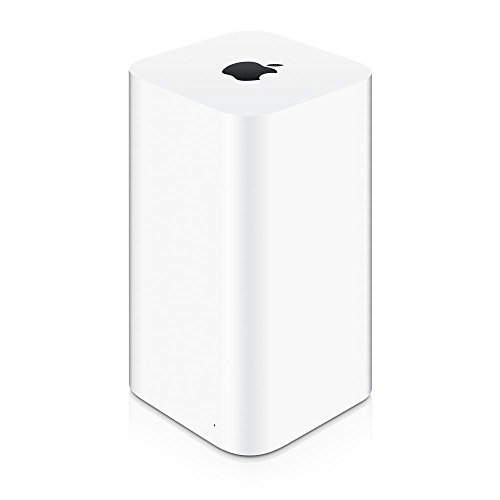
Apple AirPort Time Capsule
7.2/10

Overall score

Score
7.2/ 10
✕
What it is
Our main score for this model, 1–10. It combines specs, expert reviews, best-of lists and owners.
How we count it
Parts: Technical score 40%, Reviews score 25%, List score 25%, Sentiment score 10%
Marks: Each part gets a mark out of 10. For reviews, lists and owners, a typical model in this category gets about 8 and the best one gets 10.
No data yet: A part with no data shows "?". It counts as the mark of a weaker model in this category (4 in 5 models with data score higher). This way, models with reviews, lists and owners usually come out ahead.
Score distribution
â–¼
<55-66-77-88-99-10
Score components

40%

6.0

Technical score

25%

8.1

Reviews score

25%

?

List scoreNot enough data yet, so we use 7.5, the mark of a weaker model in this category

10%

9.1

Sentiment score

â–¼Worse than 60% of routers
8.0

Value for money

Value for money
8.0/ 10
✕
What it is
An indicator that combines the router's overall rating with its cost.
When it matters
When you are looking for a router with a good balance between network performance, features, and price.
Score distribution
â–¼
<55-66-77-88-99-10
Score components

70%

7.2

Overall score

30%

10

Price

â–¼Worse than 62%
6.0

Technical score

Technical score
6.0/ 10
✕
What it is
How good the specs are compared with the other models in this category, 1–10.
How we count it
Areas: We rate the specs in each area against the other models in this category.
Weighting: The areas that matter most to buyers count more. The shares are shown under Score components.
Share: The technical score is 40% of the overall score.
Score distribution
â–¼
<55-66-77-88-99-10
Score components

26%

5.7

Wireless

20%

5.3

Ports

18%

6.1

Networking

14%

7.4

Security

12%

5.9

Hardware

10%

5.8

Management

â–¼Worse than 91%
8.1

Reviews score

Reviews score
8.1/ 10
✕
What it is
Average grade from independent test sites, magazines and video reviewers, 1–10.
How we count it
Grades: Each review's own score is converted to 1–10; without one, we grade the review ourselves. Big test sites count more, short reviews half as much as full tests. A video review counts half.
Score: The average grade is 80% of the review mark; the number of reviews is the other 20% (1 review = 5, the typical number in this category = 8, the most-reviewed model = 10).
Enough data: With few reviews, the average grade is pulled toward the typical grade of this category. No reviews yet: 7.7 for now.
Share: Reviews count 25% of the overall score.
Score distribution
â–¼
<55-66-77-88-99-10

80%

7.9

Average grade

20%

9.2

Popularity

Grades by review (19)
11 reviews: 7 with a printed score, 4 estimated from the review. 8 video reviews, each counting half as much as a written test. Reviews count 25% of the overall score.
User ratings collected online are not part of this score.
â–¼Worse than 53%
?

List score

List score
7.5/ 10
✕
What it is
How often independent test sites, magazines and video reviewers put this model in their best-of lists for this category.
How we count it
Points: The model in the most lists of this category gets 10; the others get 8 to 10 in proportion. In no list yet: 7.5. Lists count 25% of the overall score.
Enough data: Every list counts, even a single one. With fewer than 5 best-of lists in the category, this part is left out.
Lists with this model (0)
Not in any best-of list yet, so this part counts as 7.5. Models in a list get 8 to 10.
Not in any best-of list yet
  • apple-airport-time-capsule
apple-airport-time-capsule
Where to buy
    N/A~ £90
Best rankings
Available: ranking among products currently available (including other versions of this product).All: ranking among all products in the database.

What reviewers say about the Apple AirPort Time Capsule

Based on 9 · 9

Reviewers value the built-in backups and sleek design, but find features lacking and are split on speed and storage.
Praised
Mixed views
Criticised
Pick a topic to see who said what

What owners say about the Apple AirPort Time Capsule

Based on 43 owners sharing their experience in online comments

42%positive18%mixed40%negative

Owners value dependable backups and easy setup, but slow speeds and recurring failures temper the appeal.

What owners dislike

  • Owners report throughput capped far below gigabit, about 200 Mbit/s on a gigabit line, and still slow after swapping in an SSD.6
  • Owners find the cabling and LAN-to-WAN setup confusing, sometimes needing a factory reset, and struggle to find a printer on a USB hub.5
  • Owners report that internal drives stop working and that some units will not power up at all.4
  • Owners report the unit dropping internet after a while, one needing daily power cycles, and an SSD swap that shuts off after 10–15 minutes.3
  • Owners say it lacks WPA3 security, may lose support in newer Mac software, and cannot keep up with gigabit or faster internet.3

Points mentioned by at least 3 owners, most mentioned first.

Loading...
Loading category ranking...

Technical Specifications of router Apple AirPort Time Capsule

Technical score
Technical score
6.0/ 10
✕
What it is
How good the specs are compared with the other models in this category, 1–10.
How we count it
Areas: We rate the specs in each area against the other models in this category.
Weighting: The areas that matter most to buyers count more. The shares are shown under Score components.
Share: The technical score is 40% of the overall score.
Score distribution
â–¼
<55-66-77-88-99-10
Score components:

26%

5.7

Wireless

20%

5.3

Ports

18%

6.1

Networking

14%

7.4

Security

12%

5.9

Hardware

10%

5.8

Management

6.0
Reviews score
8.1
List score
?
Value for money
Value for money
8.0/ 10
✕
What it is
An indicator that combines the router's overall rating with its cost.
When it matters
When you are looking for a router with a good balance between network performance, features, and price.
Score distribution
â–¼
<55-66-77-88-99-10
Score components:

70%

7.2

Overall score

30%

10

Price

8.0
Brand name
Apple
Wi-Fi version
Wi-Fi 5 (802.11ac)
This router uses Wi-Fi 5 (802.11ac), which is more advanced than 35.2% of routers and equal to 23.1% of routers.
Wi-Fi bands
2.4 GHz + 5 GHz
This router supports 2.4 GHz + 5 GHz Wi-Fi bands, which are more versatile than 24.2% of routers and equal to 65.6% of routers.
Wi-Fi speed
1,300 Mbps
This router delivers 1,300 Mbps Wi-Fi speed, which is lower than 53.9% of routers and equal to 1% of routers.
Channel widths supported
20 MHz + 40 MHz + 80 MHz
This router supports 20 MHz + 40 MHz + 80 MHz channel width options, which is more than 36.5% of routers and the same as 29.9% of routers.
Show more
What reviewers say
Wi-Fi security protocols
WPA2, WPA/WPA2, WEP, 802.1X
This router supports WPA2, WPA/WPA2, WEP, 802.1X Wi-Fi security protocols, which are more advanced than 52.9% of routers and equal to 0.2% of routers.
DoS protection
yes
This router includes DoS protection. 9.8% of routers include DoS protection.
SPI intrusion protection
no
This router does not include SPI-based intrusion protection. 95.5% of routers include SPI-based intrusion protection.
MAC address filtering
yes
This router supports MAC address filtering. 1.7% of routers include MAC address filtering.
URL filter
no
This router does not support URL filtering. 97.6% of routers include URL filtering.
Show more
IPv6 support
yes
This router supports IPv6. 8.8% of routers are IPv6-ready.
Dynamic routing
no
This router does not support dynamic routing. 46.2% of routers support dynamic routing.
Inter-VLAN routing
no
This router does not support inter-VLAN routing. 24.5% of routers support inter-VLAN routing.
VLAN tagging
no
This router does not support VLAN tagging. 66.6% of routers include VLAN tagging.
QoS
no
This router does not include QoS controls. 97.7% of routers include QoS controls.
Show more
N. of LAN ports
3
This router has 3 LAN ports, which is fewer than 66% of routers and the same as 18.2% of routers.
LAN port speeds
1 Gbps
This router offers 1 Gbps on its LAN ports, which is faster than 25.7% of routers and on par with 56.1% of routers.
N. of WAN ports
1
This router has 1 WAN ports, which is more than 0.8% of routers and the same as 89.4% of routers.
N. of USB ports
1
This router has 1 USB ports, which is more than 40.1% of routers and the same as 41.5% of routers.
Power over Ethernet (PoE)
no
This router does not support Power over Ethernet (PoE). 1.7% of routers can be powered over Ethernet.
Show more
What reviewers say
Management interface
App, Utility
This router uses App, Utility for management, which is less advanced than 72.4% of routers and equal to 0.4% of routers.
AirPort Utility
Firmware upgrade method
Automatic, Utility
This router supports Automatic, Utility firmware update methods, which are less convenient than 71.7% of routers.
AirPort Utility
Traffic monitoring
no
This router does not include traffic monitoring. 86.3% of routers include traffic monitoring.
Guest Wi-Fi network
yes
This router offers a guest Wi‑Fi network. 7.3% of routers offer a guest Wi‑Fi network.
Captive portal
no
This router does not offer captive portal features. 22.4% of routers offer captive portal features.
Show more
What reviewers say
CPU clock speed
2x 1 GHz
This router runs at 2x1 GHz, which is faster than 49.1% of routers and on par with 7.3% of routers.
RAM capacity
512 MB
This router has 512 MB of RAM, which is more than 61.4% of routers and the same as 21.4% of routers.
Internal storage
2000 GB
This router has 2000 GB of internal storage, which is more than 100% of routers.
500 GB to 3 TB varies by generation.
Hardware acceleration
no
This router does not offer hardware acceleration. 75.3% of routers offer hardware acceleration.
N. of external antennas
0
This router has 0 external antennas, which is fewer than 62.7% of routers and the same as 37.3% of routers.
Show more
What reviewers say

Apple AirPort Time Capsule vs the average router

246810TotalWirelessSecurityNetworkingPortsManagementHardware
  • 2.5x wider wireless coverage
    This router has wider wireless coverage than the average router (465 m² vs 186 m²). The average router offers wireless coverage of 186 m².
    465 m² vs 186 m²
  • 16,000x more internal storage
    This router has more internal storage than the average router (2000 GB vs 0.1 GB). The average router offers 0.125 GB of internal storage.
    500 GB to 3 TB varies by generation.
    2,000 GB vs 0.125 GB
  • Stronger Wi-Fi security
    This router supports the Wi-Fi security protocols WPA2, WPA/WPA2, WEP, 802.1X, while the average router supports WPA2, WPA/WPA2, WEP.
    WPA2, WPA/WPA2, WEP, 802.1X vs WPA2, WPA/WPA2, WEP
  • 6 more internal antennas
    This router has more internal antennas than the average router (6 vs 0). The average router has 0 internal antennas.
    6 vs 0
  • 2x more RAM
    This router has more RAM than the average router (512 MB vs 256 MB). The average router has 256 MB of RAM.
    512 MB vs 256 MB
  • 16.7% higher sentiment score
    9.1 vs 7.8
  • 95 mm narrower width
    This router is narrower than the average router (98 mm vs 193 mm). The average router is 193 mm wide.
    98 mm vs 193 mm
  • 5.2% higher review score
    Reviews score
    8.1/ 10
    ✕
    What it is
    Average grade from independent test sites, magazines and video reviewers, 1–10.
    How we count it
    Grades: Each review's own score is converted to 1–10; without one, we grade the review ourselves. Big test sites count more, short reviews half as much as full tests. A video review counts half.
    Score: The average grade is 80% of the review mark; the number of reviews is the other 20% (1 review = 5, the typical number in this category = 8, the most-reviewed model = 10).
    Enough data: With few reviews, the average grade is pulled toward the typical grade of this category. No reviews yet: 7.7 for now.
    Share: Reviews count 25% of the overall score.
    Score distribution
    â–¼
    <55-66-77-88-99-10

    80%

    7.9

    Average grade

    20%

    9.2

    Popularity

    Grades by review (19)
    11 reviews: 7 with a printed score, 4 estimated from the review. 8 video reviews, each counting half as much as a written test. Reviews count 25% of the overall score.
    User ratings collected online are not part of this score.
    8.1 vs 7.7
  • 16.7% higher sentiment score
    9.1 vs 7.8
  • 5.2% higher review score
    Reviews score
    8.1/ 10
    ✕
    What it is
    Average grade from independent test sites, magazines and video reviewers, 1–10.
    How we count it
    Grades: Each review's own score is converted to 1–10; without one, we grade the review ourselves. Big test sites count more, short reviews half as much as full tests. A video review counts half.
    Score: The average grade is 80% of the review mark; the number of reviews is the other 20% (1 review = 5, the typical number in this category = 8, the most-reviewed model = 10).
    Enough data: With few reviews, the average grade is pulled toward the typical grade of this category. No reviews yet: 7.7 for now.
    Share: Reviews count 25% of the overall score.
    Score distribution
    â–¼
    <55-66-77-88-99-10

    80%

    7.9

    Average grade

    20%

    9.2

    Popularity

    Grades by review (19)
    11 reviews: 7 with a printed score, 4 estimated from the review. 8 video reviews, each counting half as much as a written test. Reviews count 25% of the overall score.
    User ratings collected online are not part of this score.
    8.1 vs 7.7
  • 2.5x wider wireless coverage
    This router has wider wireless coverage than the average router (465 m² vs 186 m²). The average router offers wireless coverage of 186 m².
    465 m² vs 186 m²
  • Stronger Wi-Fi security
    This router supports the Wi-Fi security protocols WPA2, WPA/WPA2, WEP, 802.1X, while the average router supports WPA2, WPA/WPA2, WEP.
    WPA2, WPA/WPA2, WEP, 802.1X vs WPA2, WPA/WPA2, WEP
  • 16,000x more internal storage
    This router has more internal storage than the average router (2000 GB vs 0.1 GB). The average router offers 0.125 GB of internal storage.
    500 GB to 3 TB varies by generation.
    2,000 GB vs 0.125 GB
  • 6 more internal antennas
    This router has more internal antennas than the average router (6 vs 0). The average router has 0 internal antennas.
    6 vs 0
  • 2x more RAM
    This router has more RAM than the average router (512 MB vs 256 MB). The average router has 256 MB of RAM.
    512 MB vs 256 MB
  • 95 mm narrower width
    This router is narrower than the average router (98 mm vs 193 mm). The average router is 193 mm wide.
    98 mm vs 193 mm
  • Limited firmware updates
    This router supports the firmware update methods Automatic, Utility, while the average router supports Web UI, App, Automatic.
    AirPort Utility
    Automatic, Utility vs Web UI, App, Automatic
  • No VLAN tagging
    This router does not support VLAN tagging, while the average router does. 66.5% of routers support VLAN tagging.
  • 1 fewer LAN ports
    This router has fewer LAN ports than the average router (3 vs 4). The average router has 4 LAN ports.
    3 vs 4
  • No hardware acceleration
    This router does not offer hardware acceleration, while the average router does. 75.2% of routers offer hardware acceleration.
  • No VPN server support
    This router cannot act as a VPN server, while the average router can. 68.8% of routers can act as a VPN server.
  • No QoS
    This router does not support QoS, while the average router does. 97.6% of routers support QoS.
  • No MU-MIMO
    This router does not support MU-MIMO, while the average router does. 54% of routers support MU-MIMO.
  • No traffic monitoring
    This router does not offer traffic monitoring, while the average router does. 86.1% of routers offer traffic monitoring.
  • No MU-MIMO
    This router does not support MU-MIMO, while the average router does. 54% of routers support MU-MIMO.
  • No band steering
    This router does not support band steering, while the average router does. 57.6% of routers support band steering.
  • 25.7% slower Wi-Fi speed
    This router has a lower Wi-Fi speed than the average router (1,300 Mbps vs 1,750 Mbps). The average router reaches Wi-Fi speed of 1,750 Mbps.
    1,300 Mbps vs 1,750 Mbps
  • Narrower DFS range
    This router has fewer supported DFS channels than the average router (52-64 + 100-140 vs 52-64 + 100-144). The average router supports 52-64 + 100-144 DFS channels.
    52-64 + 100-140 vs 52-64 + 100-144
  • No VPN server support
    This router cannot act as a VPN server, while the average router can. 68.8% of routers can act as a VPN server.
  • No SPI intrusion protection
    This router does not support SPI intrusion protection, while the average router does. 95.3% of routers support SPI intrusion protection.
  • No URL filtering
    This router does not support URL filtering, while the average router does. 97.4% of routers support URL filtering.
  • No PPTP server
    This router cannot act as a PPTP server, while the average router can. 66.2% of routers can act as a PPTP server.
  • No VLAN tagging
    This router does not support VLAN tagging, while the average router does. 66.5% of routers support VLAN tagging.
  • No QoS
    This router does not support QoS, while the average router does. 97.6% of routers support QoS.
  • No UPnP
    This router does not support UPnP, while the average router does. 98.5% of routers support UPnP.
  • 1 fewer LAN ports
    This router has fewer LAN ports than the average router (3 vs 4). The average router has 4 LAN ports.
    3 vs 4
  • Limited firmware updates
    This router supports the firmware update methods Automatic, Utility, while the average router supports Web UI, App, Automatic.
    AirPort Utility
    Automatic, Utility vs Web UI, App, Automatic
  • No traffic monitoring
    This router does not offer traffic monitoring, while the average router does. 86.1% of routers offer traffic monitoring.
  • Weaker management tools
    This router uses the management interface App, Utility, while the average router uses Web UI, App.
    AirPort Utility
    App, Utility vs Web UI, App
  • No DLNA support
    This router does not support DLNA, while the average router does. 50.4% of routers support DLNA.
  • No hardware acceleration
    This router does not offer hardware acceleration, while the average router does. 75.2% of routers offer hardware acceleration.
  • Narrower temperature range
    This router is rated for 0 to 35 C, while the average router is rated for 0 to 40 C.
    0 to 35 C vs 0 to 40 C
  • 11 years older release date
    This router is an older model than the average router (2008 vs 2019). The average router release year is 2019.
    February 2008
    2008 vs 2019
  • 2.9 W higher power consumption
    This router uses more power than the average router (11 W vs 8.1 W). The average router uses 8.1 W power.
    11 W vs 8.1 W
  • 2 fewer external antennas
    This router has fewer external antennas than the average router (0 vs 2). The average router has 2 external antennas.
    0 vs 2
  • Fewer power options
    This router uses AC power input, while the average router uses DC barrel.
    AC vs DC barrel
  • 3.29x heavier weight
    This router is heavier than the average router (1,480 g vs 450 g). The average router weighs 450 g.
    1,480 g vs 450 g
  • 116.6 mm higher height
    This router is taller than the average router (168 mm vs 51.4 mm). The average router is 51.4 mm tall.
    168 mm vs 51.4 mm
  • 44 mm thicker design
    This router is thicker than the average router (98 mm vs 54 mm). The average router is 54 mm thick.
    98 mm vs 54 mm

Video reviews

Hands-on testing, unboxing, and real-world video evaluations

9.0
Benjamin Butcher
≈ estimated
27/08/2022
Hands-on review · long-term use and backup tests
Verdict
The Apple AirPort Time Capsule is still a dependable backup device despite its age, with only small gaps such as iPhone backup.
8.0
Ifti's Tech Corner!
≈ estimated
23/08/2013
Unboxing and review · storage, backup and speed tests
Verdict
Apple AirPort Time Capsule is best for Mac users who want fast 802.11ac backups, but is not suited to Windows users or advanced features.
9.0
techgooch
≈ estimated
16/07/2013
Setup walkthrough · two weeks of use
Verdict
The Apple AirPort Time Capsule is quick to set up, with built-in storage, and it is well worth buying.
6.0
DetroitBORG
≈ estimated
13/06/2013
Unboxing and setup demo · Time Machine backup test
Verdict
Apple AirPort Time Capsule offers useful backups and faster Wi-Fi, but its slippery base and missing Kensington lock are drawbacks.
9.0
TechOut
≈ estimated
24/05/2014
Speed test · comparison with an older router
Verdict
The Apple AirPort Time Capsule delivers roughly twice the speed of the old router, so it is a recommended upgrade.
9.0
TechOut
≈ estimated
23/05/2014
Replacement review · setup and backup use
Verdict
The Apple AirPort Time Capsule is a good buy and a recommended replacement for an older router.
Hands-on video, no verdict
Overview video
Hands-on video, no verdict

Expert reviews

In-depth analysis and verdict from leading tech publications
7.8
cnet.com
✓ explicit
10/06/2013
Hands-on test · Time Machine backup
Verdict
The Time Capsule is a fast, good-looking backup box with network storage for Mac fans, but its router settings are too rigid for power users.
8.0
techradar.com
✓ explicit
26/07/2013
Real-world test · Backup router
Verdict
The Time Capsule is a well-built backup router, but its 802.11ac speed gains are small in real use.
8.0
macworld.com
✓ explicit
14/07/2013
Lab test · 802.11ac router
Verdict
The Time Capsule is a fast 802.11ac router with a built-in drive, but an apparent OS X problem cuts real copying speeds far below its benchmark.
8.0
alphr.com
≈ estimated
08/07/2013
Hands-on test · Mac backup router
Verdict
The Time Capsule is quick and simple for Mac owners, but PC users are better off buying a separate router and drive.
8.0
appleinsider.com
✓ explicit
04/04/2008
In-depth review · Wireless backup router
Verdict
The Time Capsule is a simple, reasonably priced router and backup drive for home users, but its Gigabit file sharing is slow and it cannot send audio to a stereo.
9.0
randomnerds.com
≈ estimated
24/06/2015
Long-term use · Wi-Fi router
Verdict
The Apple AirPort Time Capsule is a fast, reliable wireless router with built-in Time Machine backups, but its single USB 2.0 port is slow.
8.0
areadvd.de
≈ estimated
30/03/2011
Hands-on test · Backup and Wi-Fi
Verdict
The Time Capsule is a sturdy, simple backup station for Mac users, but its features are basic and it has a sealed case.
7.6
maclife.de
✓ explicit
2008
Hands-on test · Router with backup drive
Verdict
The Time Capsule is a Wi-Fi router with a built-in hard drive for Time Machine backups, but it is bigger than the AirPort base station and runs warm.
8.0
mac4ever.com
✓ explicit
28/06/2013
Hands-on test · Wi-Fi router
Verdict
The Apple AirPort Time Capsule is an easy-to-set-up router whose wireless backups suit Mac owners, but its 802.11ac speeds fell well short of Apple's claims at review time.
6.0
hardware.info
≈ estimated
28/07/2013
Lab test · Backup router
Verdict
The Time Capsule suits Mac owners who want easy Time Machine backups, but its settings are limited and its speed gains are modest.
8.0
id.nl
✓ explicit
18/07/2013
Hands-on test · Mac backup router
Verdict
The Time Capsule is easy to set up and handles Mac backups simply, but it is hard to tuck away and cannot be reached from outside the home.

Third-party reviews

What customers like about Apple AirPort Time Capsule

  • Seamless 'set-it-and-forget-it' automated wireless backups via Time Machine.
  • Extremely simple setup and maintenance through the AirPort Utility app.
  • Elegant, compact aesthetic that fits well in home environments.
  • Reliable dual-band Wi-Fi performance (802.11ac in later models) with strong signal strength.
  • Functions as a convenient all-in-one router and Network Attached Storage (NAS) device.
  • Includes a USB port for easily adding extra storage or a network printer.

What customers don't like about Apple AirPort Time Capsule

  • Internal mechanical hard drives are prone to failure and difficult for users to service.
  • The device lacks modern security patches and support for the latest Wi-Fi standards (Wi-Fi 6/6E/7).
  • Known to run hot due to a compact design with limited internal airflow and ventilation.
  • Limited advanced networking features compared to dedicated NAS or modern mesh systems.
  • Backing up non-Mac devices (like Windows PCs) is difficult or lacks native support.
  • Slow data transfer speeds compared to modern SSD-based or wired storage solutions.

Verdict

The Apple AirPort Time Capsule (5th Generation) is a high-performance 802.11ac Wi-Fi router featuring an integrated 2TB or 3TB server-grade hard drive designed for seamless, automatic wireless backups via macOS Time Machine. It utilizes a simultaneous dual-band 2.4GHz and 5GHz frequency system with a six-element beamforming antenna array, delivering data rates up to 1.3Gbps. Connectivity includes one Gigabit Ethernet WAN port, three Gigabit Ethernet LAN ports, and a USB 2.0 port for printer or additional hard drive sharing. Its main advantages are its effortless setup through AirPort Utility, vertical space-saving design, and reliable 'zero-intervention' backup functionality for Mac users. However, notable drawbacks include its lack of support for modern security protocols like WPA3, the use of legacy SMB1 communication which may pose security risks on newer Windows systems, and its discontinued status, with Apple ending official macOS backup support for the device in 2026.

Compare Apple AirPort Time Capsule with other routers

1Product to compare no. 1
VS
2Product to compare no. 2
VS
3Product to compare no. 3 (optional)

Graphic comparison of Apple AirPort Time Capsule and other routers

No results found