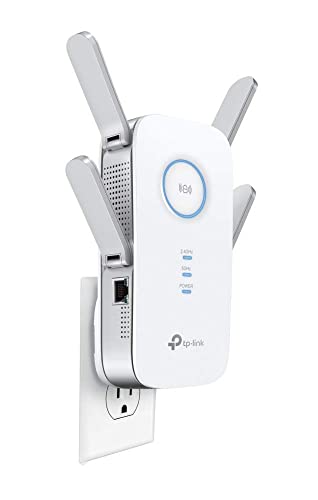
TP-Link RE235BE Review | 63 Data compared

double-arrow
  • Avg. price in UK: ~£80
  • Avg. price in US: ~$90
  • Wi-Fi version: Wi-Fi 7 (802.11be)
  • Wi-Fi speed: 3,570 Mbps
  • Coverage area: 251

TP-Link RE235BE review. Compare 63 technical specifications and user reviews to see how it ranks among wi-fi extenders and if it is worth buying.

9.0

Overall score

What it is: An overall evaluation of the Wi-Fi extender's quality, based on technical analyses and user reviews.

When it matters: When you need a quick reference to spot the best Wi‑Fi extenders overall.

Score components:

80.0%

9.0

Technical Score

20.0%

?

User score

Exceptional
9.0

Technical Score

What it is: An assessment of the Wi-Fi extender's technical performance, covering eight key areas: speed, coverage, signal stability, connectivity, Ethernet features, mesh support, ease of setup, and design.

When it matters: When you want to compare Wi‑Fi extenders based on speed, coverage, ports, and wireless features.

Score components:

40.0%

9.1

Wi-Fi Performance

30.0%

9.0

Network & Security

12.0%

10

Setup & Management

10.0%

6.1

Hardware & Deployment

8.0%

10

Ports

Exceptional
?

User score

What it is: A rating that combines user reviews and the total number of reviews received by the Wi-Fi extender.

When it matters: When you want to know how a Wi‑Fi extender performs in daily use and how reliably it maintains a stable connection over time according to user feedback.

Score components:

70.0%

?

User reviews

30.0%

?

Popularity

  • 7.3
    Gaming

    Score components:

    35.0%

    10

    Wi-Fi speed

    30.0%

    1.0

    QoS support

    20.0%

    10

    Ethernet backhaul

    15.0%

    10

    N. of LAN ports

  • 8.8
    Travel

    Score components:

    45.0%

    7.4

    Weight

    30.0%

    10

    Portable design

    15.0%

    10

    Wi-Fi speed

    10.0%

    10

    Access Point mode

  • No image
No image

Best prices in UK

    N/A~ £80

Best rankings

?

Available: ranking among products currently available (including other versions of this product).
All: ranking among all products in the database.

Verdict

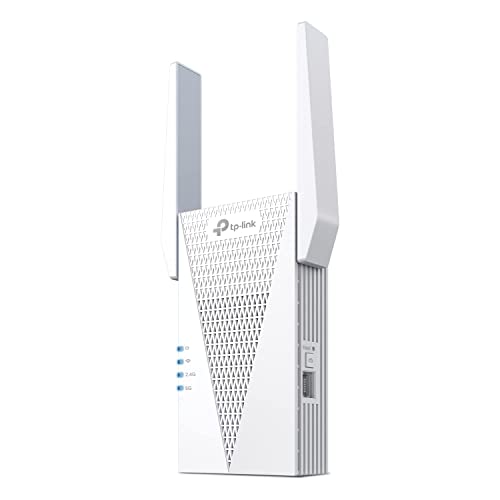
The TP-Link RE235BE is a high-performance BE3600 dual-band Wi-Fi 7 range extender that delivers combined wireless speeds of up to 3.6 Gbps, featuring 2882 Mbps on the 5 GHz band and 688 Mbps on the 2.4 GHz band. It utilizes advanced Wi-Fi 7 technologies like Multi-Link Operation (MLO) for reduced latency and 4K-QAM for increased data efficiency, alongside a 2.5 Gbps multi-gigabit Ethernet port for ultra-fast wired connections. Key pros include its seamless EasyMesh compatibility, easy setup via the Tether app, and coverage of up to 2,700 square feet supported by two high-gain external antennas. However, potential cons include its bulky wall-plug design that may obstruct adjacent power outlets and the lack of a 6 GHz band, which limits its ability to fully capitalize on the complete Wi-Fi 7 spectrum.

Technical Specifications of TP-Link RE235BE

Technical Score

What it is: An assessment of the Wi-Fi extender's technical performance, covering eight key areas: speed, coverage, signal stability, connectivity, Ethernet features, mesh support, ease of setup, and design.

When it matters: When you want to compare Wi‑Fi extenders based on speed, coverage, ports, and wireless features.

Score components:

40.0%

?

Wi-Fi Performance

30.0%

?

Network & Security

12.0%

?

Setup & Management

10.0%

?

Hardware & Deployment

8.0%

?

Ports

9.0
TP-Link RE235BE has a technical score of 8.95 points, which is higher than 87.3% of Wi-Fi extenders.
User score

What it is: A rating that combines user reviews and the total number of reviews received by the Wi-Fi extender.

When it matters: When you want to know how a Wi‑Fi extender performs in daily use and how reliably it maintains a stable connection over time according to user feedback.

Score components:

70.0%

0.0

User reviews

30.0%

1.0

Popularity

?
Popularity
What it is: An indicator based on the number of reviews received by the Wi-Fi extender.
When it matters: When you prefer to buy a Wi‑Fi extender that has already been chosen and reviewed by many other users.
1.0
TP-Link RE235BE has a popularity of 1 points, which is lower than 70.6% of products in this category.
Ratio quality/price

What it is: An indicator that combines the Wi-Fi extender's overall rating with its cost.

When it matters: When you are looking for a Wi‑Fi extender with a good balance between performance and price.

Score components:

60.0%

9.0

Overall score

40.0%

10

Price

9.3
TP-Link RE235BE has a quality-to-price ratio of 9.3 points, which is higher than 91.2% of products in this category.
Wi-Fi version
What it is: The Wi‑Fi generation the extender supports, such as Wi‑Fi 5, Wi‑Fi 6, or Wi‑Fi 6E.
When it matters: When you want the extender to work well with newer routers and support modern wireless features.

Importance: HIGH

Wi-Fi 7 (802.11be)
TP-Link RE235BE supports Wi-Fi 7 (802.11be), more advanced than 93.1% of Wi-Fi extenders and equal to 6.9% of Wi-Fi extenders.
Wi-Fi bands
What it is: The wireless frequency bands the extender can use.
When it matters: When your router and devices depend on support for the right Wi‑Fi bands.

Importance: HIGH

Dual-band
TP-Link RE235BE supports Dual-band, more versatile than 10.8% of Wi-Fi extenders and equal to 74.5% of Wi-Fi extenders.
6 GHz band support
What it is: Whether the extender can operate on the 6 GHz band.
When it matters: When you want the extender to work well with newer routers and support modern wireless features.

Importance: LOW

no
TP-Link RE235BE does not support the 6 GHz band. 5.9% of Wi-Fi extenders support the 6 GHz band.
Wi-Fi speed
What it is: The combined theoretical maximum wireless speed across the supported bands.
When it matters: When you need better speed and signal strength in rooms that are harder to reach.

Importance: HIGH

3,570 Mbps
TP-Link RE235BE reaches 3570 Mbps Wi-Fi speed, faster than 86.3% of Wi-Fi extenders.
Max speed 2.4 GHz
What it is: The maximum supported wireless speed on the 2.4 GHz band.
When it matters: When you need better speed and signal strength in rooms that are harder to reach.

Importance: MEDIUM

688 Mbps
TP-Link RE235BE reaches 688 Mbps on 2.4 GHz, faster than 91.2% of Wi-Fi extenders and equal to 4.9% of Wi-Fi extenders.
Show more
Ethernet backhaul
What it is: Whether the extender supports Ethernet backhaul through a wired network connection.
When it matters: When you want a more stable link over Ethernet instead of relying only on wireless repeating.

Importance: MEDIUM

yes
TP-Link RE235BE supports Ethernet backhaul. 48.9% of Wi-Fi extenders support Ethernet backhaul.
Requires EasyMesh router.
Mesh compatibility
What it is: The mesh systems or ecosystems the extender can work with.
When it matters: When you want smoother roaming and more consistent coverage across your home.

Importance: LOW

EasyMesh
Mesh standard
What it is: The mesh standard or ecosystem the extender uses.
When it matters: When you want smoother roaming and more consistent coverage across your home.

Importance: LOW

EasyMesh
Roaming feature
What it is: Whether the extender supports seamless roaming between network nodes.
When it matters: When you want smoother roaming and more consistent coverage across your home.

Importance: MEDIUM

yes
TP-Link RE235BE supports roaming. 17.7% of Wi-Fi extenders support roaming.
802.11k support
What it is: Whether the extender supports 802.11k for better roaming information between access points.
When it matters: When you want smoother roaming and more consistent coverage across your home.

Importance: LOW

yes
TP-Link RE235BE supports 802.11k. 27.1% of Wi-Fi extenders support 802.11k.
Requires OneMesh/EasyMesh.
Show more
N. of LAN ports
What it is: The number of wired LAN ports on the extender.
When it matters: When you need to connect wired devices such as TVs, consoles, PCs, or switches.

Importance: MEDIUM

1
TP-Link RE235BE has 1 LAN port/s, more than 8.1% of Wi-Fi extenders and equal to 76.8% of Wi-Fi extenders.
Ethernet port speed
What it is: The maximum Ethernet speed supported by the wired ports.
When it matters: When you connect wired devices and want them to run at full local network speed.

Importance: MEDIUM

2.5 Gbps
TP-Link RE235BE offers 2.5 Gbps Ethernet speed, faster than 91.1% of Wi-Fi extenders and equal to 7.9% of Wi-Fi extenders.
N. of USB ports
What it is: The number of USB ports on the extender.
When it matters: When you need to connect wired devices such as TVs, consoles, PCs, or switches.

Importance: LOW

0
TP-Link RE235BE has 0 USB port/s, fewer than 2.9% of Wi-Fi extenders and equal to 97.1% of Wi-Fi extenders.
PoE standard
What it is: The Power over Ethernet standard the extender supports, if any.
When it matters: When you want to power the extender over Ethernet instead of using a separate power adapter.

Importance: LOW

N/A
Dedicated smartphone app
What it is: Whether the extender can be managed through a dedicated smartphone app.
When it matters: When you want easier setup, monitoring, and control from your phone.

Importance: MEDIUM

yes
TP-Link RE235BE comes with a dedicated smartphone app. 15.2% of Wi-Fi extenders come with a dedicated smartphone app.
TP-Link Tether app.
Web UI management
What it is: Whether the extender offers a web-based interface for setup and management.
When it matters: When you prefer advanced setup and control from a web browser.

Importance: MEDIUM

yes
TP-Link RE235BE has a web management interface. 2% of Wi-Fi extenders have a web management interface.
Automatic firmware updates
What it is: Whether the extender can install firmware updates automatically.
When it matters: When you want security and stability updates without having to manage them manually.

Importance: LOW

yes
TP-Link RE235BE has automatic firmware updates. 53.1% of Wi-Fi extenders have automatic firmware updates.
LED control
What it is: Whether the extender’s LED indicators can be adjusted or turned off.
When it matters: When the extender sits in a bedroom or another space where bright status lights can be annoying.

Importance: LOW

yes
TP-Link RE235BE has LED control. 12.1% of Wi-Fi extenders have LED control.
Buttons present
What it is: The physical buttons available on the extender, such as reset, power, or WPS.
When it matters: When you prefer direct physical controls instead of relying only on software menus.

Importance: LOW

wps, reset
Show more
Mounting type
What it is: The mounting style the extender uses, such as wall-plug or desktop placement.
When it matters: When the extender needs to fit neatly into a tight space, behind furniture, or near an outlet.

Importance: LOW

wall-plug
Portable design
What it is: Whether the extender has a travel-friendly portable design, usually a compact plug-in form factor rather than a larger desktop or fixed-installation unit.
When it matters: When you want an extender that is easy to pack, move between locations, or use temporarily while travelling.

Importance: LOW

yes
TP-Link RE235BE has a portable design. 34.3% of Wi-Fi extenders have a portable design.
Derived from compact plug-in form factor.
Height
What it is: The height of the extender body.
When it matters: When the extender needs to fit neatly into a tight space, behind furniture, or near an outlet.

Importance: LOW

158 mm
TP-Link RE235BE is 158 mm tall, taller than 72.6% of Wi-Fi extenders and equal to 1% of Wi-Fi extenders.
Width
What it is: The width of the extender body.
When it matters: When the extender needs to fit neatly into a tight space, behind furniture, or near an outlet.

Importance: LOW

97 mm
TP-Link RE235BE is 97 mm wide, wider than 64.7% of Wi-Fi extenders and equal to 1% of Wi-Fi extenders.
Thickness
What it is: The depth or thickness of the extender body.
When it matters: When the extender needs to fit neatly into a tight space, behind furniture, or near an outlet.

Importance: LOW

46 mm
TP-Link RE235BE is 46 mm thick, thinner than 47.1% of Wi-Fi extenders and equal to 7.8% of Wi-Fi extenders.
Show more

TP-Link RE235BE vs the average wi-fi extender

  • Modern Wi-Fi standard
    TP-Link RE235BE supports a more advanced Wi-Fi version than the average wi-fi extender (Wi-Fi 7 (802.11be) vs Wi-Fi 5 (802.11ac)). The average Wi-Fi extender supports Wi-Fi Wi-Fi 5 (802.11ac).
    What it is: The Wi‑Fi generation the extender supports, such as Wi‑Fi 5, Wi‑Fi 6, or Wi‑Fi 6E.
    When it matters: When you want the extender to work well with newer routers and support modern wireless features.

    Importance: HIGH

    TP-Link RE235BE supports a more advanced Wi-Fi version than the average wi-fi extender (Wi-Fi 7 (802.11be) vs Wi-Fi 5 (802.11ac)). The average Wi-Fi extender supports Wi-Fi Wi-Fi 5 (802.11ac).Wi-Fi 7 (802.11be) vs Wi-Fi 5 (802.11ac)
  • 2.01x faster Wi-Fi speed
    TP-Link RE235BE reaches faster Wi-Fi speed than the average wi-fi extender (3570 Mbps vs 1775 Mbps). The average Wi-Fi extender reaches 1775 Mbps Wi-Fi speed.
    What it is: The combined theoretical maximum wireless speed across the supported bands.
    When it matters: When you need better speed and signal strength in rooms that are harder to reach.

    Importance: HIGH

    TP-Link RE235BE reaches faster Wi-Fi speed than the average wi-fi extender (3570 Mbps vs 1775 Mbps). The average Wi-Fi extender reaches 1775 Mbps Wi-Fi speed.3570 Mbps vs 1775 Mbps
  • 73.1% larger coverage area
    TP-Link RE235BE covers a larger area than the average wi-fi extender (251 m² vs 145 m²). The average Wi-Fi extender covers 145 m².
    What it is: The estimated area the extender is designed to cover.
    When it matters: When you need better speed and signal strength in rooms that are harder to reach.

    Importance: HIGH

    TP-Link RE235BE covers a larger area than the average wi-fi extender (251 m² vs 145 m²). The average Wi-Fi extender covers 145 m².251 m² vs 145 m²
  • 7 dBm stronger transmit power
    TP-Link RE235BE has higher transmit power than the average wi-fi extender (30 dBm vs 23 dBm). The average Wi-Fi extender has 23 dBm of transmit power.
    FCC maximum; CE lower.
    What it is: The maximum wireless transmit power of the extender.
    When it matters: When you need better speed and signal strength in rooms that are harder to reach.

    Importance: MEDIUM

    TP-Link RE235BE has higher transmit power than the average wi-fi extender (30 dBm vs 23 dBm). The average Wi-Fi extender has 23 dBm of transmit power.30 dBm vs 23 dBm
  • Supports OFDMA
    TP-Link RE235BE supports OFDMA, while the average wi-fi extender does not. 45.6% of Wi-Fi extenders support OFDMA.
    Requires compatible AX clients.
    What it is: Whether the extender supports OFDMA to improve efficiency when many devices are connected.
    When it matters: When many phones, laptops, TVs, and smart-home devices are online at the same time.

    Importance: MEDIUM

    TP-Link RE235BE supports OFDMA, while the average wi-fi extender does not. 45.6% of Wi-Fi extenders support OFDMA.
  • 238 Mbps faster 2.4 GHz speed
    TP-Link RE235BE reaches a faster 2.4 GHz speed than the average wi-fi extender (688 Mbps vs 450 Mbps). The average Wi-Fi extender reaches 450 Mbps on 2.4 GHz.
    What it is: The maximum supported wireless speed on the 2.4 GHz band.
    When it matters: When you need better speed and signal strength in rooms that are harder to reach.

    Importance: MEDIUM

    TP-Link RE235BE reaches a faster 2.4 GHz speed than the average wi-fi extender (688 Mbps vs 450 Mbps). The average Wi-Fi extender reaches 450 Mbps on 2.4 GHz.688 Mbps vs 450 Mbps
  • Guest network
    TP-Link RE235BE has a guest network, while the average wi-fi extender does not. 37% of Wi-Fi extenders have a guest network.
    Only in mesh mode.
    What it is: Whether the extender can create a separate guest network.
    When it matters: When you want to give visitors internet access without exposing your main network.

    Importance: LOW

    TP-Link RE235BE has a guest network, while the average wi-fi extender does not. 37% of Wi-Fi extenders have a guest network.
  • Wide channel support
    TP-Link RE235BE supports broader channel widths than the average wi-fi extender (160 + 80 + 40 + 20 vs 80 + 40 + 20). The average Wi-Fi extender supports 80 + 40 + 20 channel widths.
    What it is: The wireless channel widths the extender supports, such as 20, 40, 80, or 160 MHz.
    When it matters: When you need better speed and signal strength in rooms that are harder to reach.

    Importance: MEDIUM

    TP-Link RE235BE supports broader channel widths than the average wi-fi extender (160 + 80 + 40 + 20 vs 80 + 40 + 20). The average Wi-Fi extender supports 80 + 40 + 20 channel widths.160 + 80 + 40 + 20 vs 80 + 40 + 20
  • Modern Wi-Fi standard
    TP-Link RE235BE supports a more advanced Wi-Fi version than the average wi-fi extender (Wi-Fi 7 (802.11be) vs Wi-Fi 5 (802.11ac)). The average Wi-Fi extender supports Wi-Fi Wi-Fi 5 (802.11ac).
  • 2.01x faster Wi-Fi speed
    TP-Link RE235BE reaches faster Wi-Fi speed than the average wi-fi extender (3570 Mbps vs 1775 Mbps). The average Wi-Fi extender reaches 1775 Mbps Wi-Fi speed.
  • 73.1% larger coverage area
    TP-Link RE235BE covers a larger area than the average wi-fi extender (251 m² vs 145 m²). The average Wi-Fi extender covers 145 m².
  • 7 dBm stronger transmit power
    TP-Link RE235BE has higher transmit power than the average wi-fi extender (30 dBm vs 23 dBm). The average Wi-Fi extender has 23 dBm of transmit power.
  • Supports OFDMA
    TP-Link RE235BE supports OFDMA, while the average wi-fi extender does not. 45.6% of Wi-Fi extenders support OFDMA.
  • 238 Mbps faster 2.4 GHz speed
    TP-Link RE235BE reaches a faster 2.4 GHz speed than the average wi-fi extender (688 Mbps vs 450 Mbps). The average Wi-Fi extender reaches 450 Mbps on 2.4 GHz.
  • Wide channel support
    TP-Link RE235BE supports broader channel widths than the average wi-fi extender (160 + 80 + 40 + 20 vs 80 + 40 + 20). The average Wi-Fi extender supports 80 + 40 + 20 channel widths.
  • Advanced QAM level
    TP-Link RE235BE uses a more advanced QAM level than the average wi-fi extender (4096-QAM vs 256-QAM). The average Wi-Fi extender uses 256-QAM QAM.
  • Supports BSS coloring
    TP-Link RE235BE supports BSS coloring, while the average wi-fi extender does not. 45.6% of Wi-Fi extenders support BSS coloring.
  • Supports DFS
    TP-Link RE235BE supports DFS, while the average wi-fi extender does not. 44.7% of Wi-Fi extenders support DFS.
  • Supports Target Wake Time
    TP-Link RE235BE supports Target Wake Time, while the average wi-fi extender does not. 44.1% of Wi-Fi extenders support Target Wake Time.
  • Guest network
    TP-Link RE235BE has a guest network, while the average wi-fi extender does not. 37% of Wi-Fi extenders have a guest network.
  • 2.5x faster Ethernet speed
    TP-Link RE235BE offers faster Ethernet speed than the average wi-fi extender (2.5 Gbps vs 1 Gbps). The average Wi-Fi extender offers 1 Gbps Ethernet speed.
  • Automatic firmware updates
    TP-Link RE235BE has automatic firmware updates, while the average wi-fi extender does not. 47.5% of Wi-Fi extenders have automatic firmware updates.
  • 4 newer release date
    TP-Link RE235BE was released more recently than the average wi-fi extender (2024 vs 2020). The average Wi-Fi extender was released in 2020.
  • No QoS support
    TP-Link RE235BE does not support QoS, while the average wi-fi extender does. 57.4% of Wi-Fi extenders support QoS.
  • 5.5 W higher power consumption
    TP-Link RE235BE uses more power than the average wi-fi extender (15 W vs 9.5 W). The average Wi-Fi extender uses 9.5 W of power.
  • 21.4% heavier
    TP-Link RE235BE is heavier than the average wi-fi extender (340 g vs 280 g). The average Wi-Fi extender weighs 280 g.
  • 36 mm taller
    TP-Link RE235BE is taller than the average wi-fi extender (158 mm vs 122 mm). The average Wi-Fi extender has a height of 122 mm.
  • 15.6 mm wider
    TP-Link RE235BE is wider than the average wi-fi extender (97 mm vs 81.4 mm). The average Wi-Fi extender has a width of 81.4 mm.
  • No QoS support
    TP-Link RE235BE does not support QoS, while the average wi-fi extender does. 57.4% of Wi-Fi extenders support QoS.
    What it is: Whether the extender supports Quality of Service to prioritize certain traffic.
    When it matters: When the extender needs to fit cleanly into a more advanced network setup.

    Importance: MEDIUM

    TP-Link RE235BE does not support QoS, while the average wi-fi extender does. 57.4% of Wi-Fi extenders support QoS.
  • 5.5 W higher power consumption
    TP-Link RE235BE uses more power than the average wi-fi extender (15 W vs 9.5 W). The average Wi-Fi extender uses 9.5 W of power.
    What it is: The power the extender typically uses during normal operation.
    When it matters: When you care about energy use, heat output, or running costs.

    Importance: LOW

    TP-Link RE235BE uses more power than the average wi-fi extender (15 W vs 9.5 W). The average Wi-Fi extender uses 9.5 W of power.15 W vs 9.5 W
  • 10x less popular
    TP-Link RE235BE has a lower popularity than the average wi-fi extender (1 vs 10).
    What it is: An indicator based on the number of reviews received by the Wi-Fi extender.
    When it matters: When you prefer to buy a Wi‑Fi extender that has already been chosen and reviewed by many other users.
    TP-Link RE235BE has a lower popularity than the average wi-fi extender (1 vs 10).1 vs 10
  • 21.4% heavier
    TP-Link RE235BE is heavier than the average wi-fi extender (340 g vs 280 g). The average Wi-Fi extender weighs 280 g.
    What it is: The total weight of the extender.
    When it matters: When you want an extender that is easier to move, mount, or place without adding bulk.

    Importance: LOW

    TP-Link RE235BE is heavier than the average wi-fi extender (340 g vs 280 g). The average Wi-Fi extender weighs 280 g.340 g vs 280 g
  • 36 mm taller
    TP-Link RE235BE is taller than the average wi-fi extender (158 mm vs 122 mm). The average Wi-Fi extender has a height of 122 mm.
    What it is: The height of the extender body.
    When it matters: When the extender needs to fit neatly into a tight space, behind furniture, or near an outlet.

    Importance: LOW

    TP-Link RE235BE is taller than the average wi-fi extender (158 mm vs 122 mm). The average Wi-Fi extender has a height of 122 mm.158 mm vs 122 mm
  • 2.3% lower user score
    TP-Link RE235BE has a lower user score than the average wi-fi extender (8 vs 8.18).
    What it is: A rating that combines user reviews and the total number of reviews received by the Wi-Fi extender.
    When it matters: When you want to know how a Wi‑Fi extender performs in daily use and how reliably it maintains a stable connection over time according to user feedback.
    TP-Link RE235BE has a lower user score than the average wi-fi extender (8 vs 8.18).8 vs 8.18
  • 15.6 mm wider
    TP-Link RE235BE is wider than the average wi-fi extender (97 mm vs 81.4 mm). The average Wi-Fi extender has a width of 81.4 mm.
    What it is: The width of the extender body.
    When it matters: When the extender needs to fit neatly into a tight space, behind furniture, or near an outlet.

    Importance: LOW

    TP-Link RE235BE is wider than the average wi-fi extender (97 mm vs 81.4 mm). The average Wi-Fi extender has a width of 81.4 mm.97 mm vs 81.4 mm

Graphic comparison of TP-Link RE235BE and

Attribute category
Attribute
No results found

Third-party reviews

What customers like about TP-Link RE235BE?

  • Quick and user-friendly setup using the [TP-Link Tether App](https://www.bestbuy.com/site/reviews/tp-link-be3600-wi-fi-7-range-extender-white/6623642) or WPS button.
  • Significant improvement in Wi-Fi signal strength and coverage for dead zones like garages or distant rooms.
  • Equipped with a high-speed 2.5 Gbps Ethernet port for stable wired connections to consoles or PCs.
  • Supports Wi-Fi 7 features like Multi-Link Operation (MLO) for lower latency and better reliability.
  • Good value for a Wi-Fi 7 device, often priced lower than entry-level models according to [Expert Reviews](https://www.expertreviews.co.uk/technology/wifi-home-networking/tp-link-re235be-review).
  • Effective at maintaining stable video streaming and conferencing connections where routers alone failed.

What customers dislike about TP-Link RE235BE?

  • Bulky physical design can obstruct adjacent wall outlets.
  • Does not support the 6 GHz band, which is a key component of the Wi-Fi 7 standard.
  • Can run hot during continuous 24/7 operation and requires open space for cooling.
  • If not used with an EasyMesh router, users may have to manually switch between different network names (SSID_EXT).
  • Limited speed gains over Wi-Fi 6 models if your primary router does not also support Wi-Fi 7.
  • Missing a dedicated wireless backhaul, which can lead to connectivity drops if the main router's signal fluctuates.

Expert reviews

C
consumerreports.org
11/02/2025
Summary of the review
E
expertreviews.co.uk
23/12/2025
Summary of the review
C
chip.de
30/01/2026
Summary of the review
C
computerbild.de
22/02/2026
Summary of the review
F
faz.net
09/02/2026
Summary of the review
T
tp-link.com
19/03/2026
Summary of the review
Q
quechoisir.org
02/03/2026
Summary of the review

Video reviews

Compare TP-Link RE235BE with

VS
VS

Compare