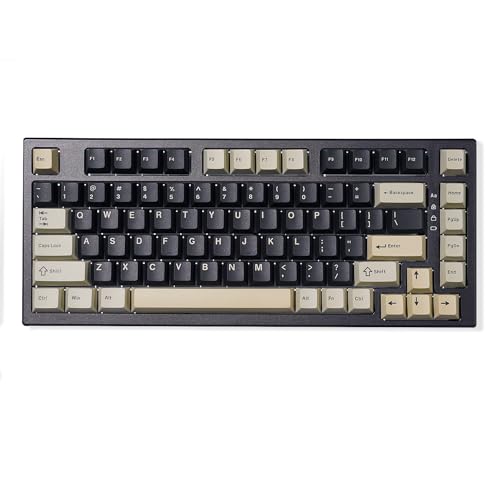
Ducky ProjectD Tinker 75 Review | 64 Data compared

double-arrow
  • Avg. price in UK: ~£90
  • Avg. price in US: ~$90
  • Layout size: 75%
  • Connection type: USB
  • Switch type: mechanical
  • Polling rate: 1000 Hz

Ducky ProjectD Tinker 75 review. Compare 64 technical specifications and user reviews to see how it ranks among keyboards and if it is worth buying.

6.5

Overall score

What it is: An overall evaluation of the keyboard's quality, based on technical analyses and user reviews.

When it matters: When you need a quick reference to identify the best keyboards on the market.

Score components:

80.0%

6.6

Technical Score

20.0%

6.1

User score

Good
6.6

Technical Score

What it is: An assessment of the keyboard's technical performance, covering key areas such as switch feel, typing and gaming performance, layout and features, connectivity, build quality, backlighting, software, and comfort.

When it matters: When you want to compare keyboards based on technical performance and available features.

Score components:

34.0%

6.5

Connectivity & Power

28.0%

3.9

Switches

20.0%

10

Materials

12.0%

7.2

Features

6.0%

6.7

Design

Good
6.1

User score

What it is: A rating that combines user reviews and the total number of reviews received by the keyboard.

When it matters: When you want to understand how a keyboard performs in daily use or gaming and how reliable it is in terms of typing feel, noise level, comfort, and long-term durability.

Score components:

70.0%

8.0

User reviews

30.0%

1.6

Popularity

User score:
United Kingdom
amazon
5.0
(3)
amazon
1.0
(1)
United States
Amazon_logo.png
1.0
(1)

(Reviews last updated: Jun 2026)

Good
  • 3.5
    Gaming

    Score components:

    28.0%

    1.0

    Polling rate

    24.0%

    1.0

    Rapid trigger

    20.0%

    1.0

    Adjustable actuation

    16.0%

    10

    Hot-swappable switches

    12.0%

    10

    Onboard memory

  • 8.2
    Typing

    Score components:

    28.0%

    4.0

    Wrist rest included

    24.0%

    10

    Legend method

    20.0%

    10

    Adjustable feet

    15.0%

    9.0

    Typing angle

    13.0%

    10

    Pre-lubed stabilizers

  • 7.9
    Programming

    Score components:

    30.0%

    10

    QMK support

    26.0%

    10

    VIA support

    18.0%

    10

    Mac compatibility

    14.0%

    0.0

    Multi-device pairing

    12.0%

    4.0

    Connection type

  • ducky-projectd-tinker-75
  • ducky-projectd-tinker-75
  • ducky-projectd-tinker-75
  • ducky-projectd-tinker-75
  • ducky-projectd-tinker-75
ducky-projectd-tinker-75

Best prices in UK

Best rankings

?

Available: ranking among products currently available (including other versions of this product).
All: ranking among all products in the database.

Verdict

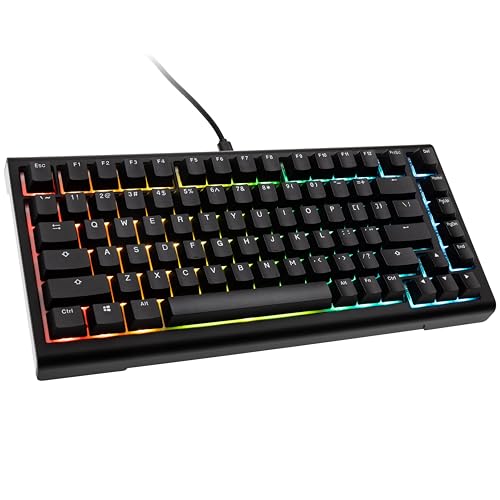
The Ducky ProjectD Tinker 75 is a 75% layout, 83-key gasket-mounted mechanical keyboard featuring a durable plastic chassis, FR4 plate, and 5-pin hot-swappable PCB with south-facing RGB LEDs, powered by QMK/VIA firmware for full customization. Pre-built models utilize Cherry MX2A switches and double-shot PBT keycaps with three-stage adjustable feet. Pros include excellent pre-lubed stabilizers, a comfortable typing experience, robust open-source software support, and a competitive price point for a beginner custom board. Cons include a plastic case that can creak, wired-only connectivity, and lack of a tactile switch option on some pre-built configurations.

Technical Specifications of Ducky ProjectD Tinker 75

Technical Score

What it is: An assessment of the keyboard's technical performance, covering key areas such as switch feel, typing and gaming performance, layout and features, connectivity, build quality, backlighting, software, and comfort.

When it matters: When you want to compare keyboards based on technical performance and available features.

Score components:

34.0%

6.5

Connectivity & Power

28.0%

3.9

Switches

20.0%

10

Materials

12.0%

7.2

Features

6.0%

6.7

Design

6.6
Ducky ProjectD Tinker 75 has a technical score of 6.57 points, which is lower than that of 56.6% of products in this category.
User score

What it is: A rating that combines user reviews and the total number of reviews received by the keyboard.

When it matters: When you want to understand how a keyboard performs in daily use or gaming and how reliable it is in terms of typing feel, noise level, comfort, and long-term durability.

Score components:

70.0%

8.0

User reviews

30.0%

1.6

Popularity

User score:
United Kingdom
amazon
5.0
(3)
amazon
1.0
(1)
United States
Amazon_logo.png
1.0
(1)

(Reviews last updated: Jun 2026)

6.1
Ducky ProjectD Tinker 75 has a user score of 6.09 points, which is lower than that of 95.5% of products in this category.
Popularity
What it is: An indicator based on the number of reviews received by the keyboard.
When it matters: When you prefer a keyboard that has already been chosen and reviewed by many other users.
1.6
Ducky ProjectD Tinker 75 has a popularity of 1.6 points, which is lower than 75.9% of products in this category.
Ratio quality/price

What it is: An indicator that combines the keyboard's overall rating with its cost.

When it matters: When you are looking for a keyboard that offers a strong balance of performance, features, and price.

Score components:

60.0%

6.5

Overall score

40.0%

10

Price

7.5
Ducky ProjectD Tinker 75 has a quality-to-price ratio of 7.5 points, which is lower than 64.4% of products in this category.
Switch type
What it is: Identifies the switch technology used by the keyboard, such as mechanical, optical, or Hall effect.
When it matters: When you are choosing between different response technologies and their long-term behavior.

Importance: HIGH

mechanical
Switch feel
What it is: Describes the keypress character, such as linear, tactile, or clicky.
When it matters: When the sensation of each keypress changes comfort, control, and noise level for your use.

Importance: HIGH

linear / tactile / clicky
Switch name
What it is: States the specific switch model used by the keyboard.
When it matters: When the exact switch model matters because small tuning differences affect your preference.

Importance: MEDIUM

?
Actuation force
What it is: Measures how much force is needed to actuate a key.
When it matters: When finger fatigue, accidental presses, or key resistance matters to your typing style.

Importance: HIGH

45 g
Min actuation distance
What it is: Measures the shortest key travel needed to register an input.
When it matters: When faster key response matters and you want the shortest possible trigger point under your fingers.

Importance: MEDIUM

1.2 mm
Ducky ProjectD Tinker 75 has a minimum actuation distance of 1.2 mm, which is shorter than 59.9% of keyboards and equal to 15.6% of keyboards.
Show more
Keyboard type
What it is: Identifies the keyboard technology, such as mechanical, membrane, optical, or Hall effect.
When it matters: When you need a keyboard built around a specific switch technology or feel profile.

Importance: HIGH

mechanical
Layout size
What it is: States the keyboard form factor and how much of the standard keyset it includes.
When it matters: When desk space, portability, or access to a full key set affects how you work or play.

Importance: HIGH

75%
Layout standard
What it is: Specifies the regional layout standard, such as ANSI, ISO, or JIS.
When it matters: When you need a regional key layout that matches your language habits or keycap set.

Importance: MEDIUM

ANSI
N. of keys
What it is: States how many keys are present on the keyboard.
When it matters: When you need a certain number of keys for shortcuts, navigation, or a numpad.

Importance: MEDIUM

83
Ducky ProjectD Tinker 75 has 83 keys, which is fewer than 62.3% of keyboards and equal to 2.3% of keyboards.
Profile
What it is: Describes whether the keyboard uses a low-profile or standard-height design.
When it matters: When key height changes your typing comfort, travel distance, or the overall desk setup.

Importance: MEDIUM

standard
Show more
Connection type
What it is: Specifies how the keyboard connects, such as USB, 2.4 GHz wireless, or Bluetooth.
When it matters: When latency, cable management, or wireless flexibility is part of your buying decision.

Importance: HIGH

USB
Ducky ProjectD Tinker 75 offers USB connectivity, which is less versatile than 56.7% of keyboards and equal to 43.3% of keyboards.
Multi-device pairing
What it is: Shows whether the keyboard can stay paired with multiple devices for quicker switching.
When it matters: When you switch regularly between a laptop, tablet, and other devices on one desk.

Importance: HIGH

N/A
Bluetooth version
What it is: States the Bluetooth generation supported for wireless pairing.
When it matters: When wireless stability, compatibility, and energy efficiency are part of what you compare.

Importance: MEDIUM

N/A
Mac compatibility
What it is: Shows whether the keyboard is intended to work properly with macOS layouts, shortcuts, or legends.
When it matters: When you need the keyboard to work properly with macOS shortcuts and key mapping.

Importance: HIGH

yes
Ducky ProjectD Tinker 75 is Mac compatible. 44.4% of keyboards are Mac compatible.
Battery life
What it is: Estimates how long the keyboard can run on a full charge.
When it matters: When the keyboard needs to last through workweeks, travel, or long gaming stretches without constant charging.

Importance: HIGH

N/A
Show more
RGB lighting
What it is: Shows whether the keyboard includes customizable RGB lighting effects.
When it matters: When visual customization and desk aesthetics matter to your setup.

Importance: HIGH

yes
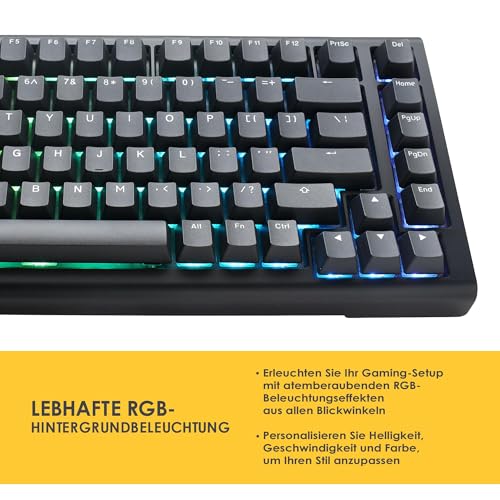
Ducky ProjectD Tinker 75 has RGB lighting. 12.3% of keyboards have RGB lighting.
Per-key RGB
What it is: Shows whether each key can be lit and controlled independently instead of sharing one uniform lighting zone.
When it matters: When customizing each key individually matters for visuals, games, or shortcut visibility.

Importance: HIGH

yes
Ducky ProjectD Tinker 75 has per-key RGB lighting. 23% of keyboards have per-key RGB lighting.
RGB zones
What it is: States how many RGB lighting zones can be controlled separately.
When it matters: When you want more lighting control than a simple all-at-once backlight can provide.

Importance: LOW

83
Ducky ProjectD Tinker 75 has 83 RGB zones, which is more than 50% of keyboards and equal to 1.7% of keyboards.
Underglow / side lighting
What it is: Shows whether the case includes lighting around the underside or outer edges in addition to the keys themselves.
When it matters: When edge lighting is part of the visual style you want from the keyboard.

Importance: MEDIUM

no
Ducky ProjectD Tinker 75 does not include underglow lighting. 31.7% of keyboards include underglow lighting.
Backlight direction
What it is: Specifies whether the switches use north-facing or south-facing backlighting.
When it matters: When you care about switch compatibility, keycap interference, or lighting placement.

Importance: LOW

south-facing
Show more
Case material
What it is: Describes the main material used for the keyboard case.
When it matters: When build feel, rigidity, and overall finish influence your sense of quality.

Importance: HIGH

plastic
Plate material
What it is: Describes the material used for the mounting plate beneath the switches.
When it matters: When keyboard stiffness, sound profile, and bottom-out feel matter more than the switch spec sheet alone.

Importance: HIGH

FR4
Keycap material
What it is: Describes the material used to make the keycaps.
When it matters: When surface texture, wear resistance, and sound of the keycaps affect your choice.

Importance: HIGH

PBT
Keycap profile
What it is: Describes the shape and height profile of the keycaps.
When it matters: When key shape and sculpting affect comfort, wrist angle, and the sound of each press.

Importance: MEDIUM

OEM
Legend method
What it is: Describes how the legends are applied to the keycaps, which affects durability and visibility.
When it matters: When you care about how long key legends stay readable after heavy use.

Importance: MEDIUM

double-shot
Ducky ProjectD Tinker 75 uses double-shot legends, which are more durable than 25.8% of keyboards and equal to 74.2% of keyboards.
Show more

Ducky ProjectD Tinker 75 vs the average keyboard

  • Supports QMK
    Ducky ProjectD Tinker 75 supports QMK, the average keyboard does not. 28.8% of keyboards support QMK.
    What it is: Shows whether the keyboard supports QMK firmware for deeper remapping and behavior customization.
    When it matters: When deep remapping, macros, and firmware-level customization matter to your workflow.

    Importance: HIGH

    Ducky ProjectD Tinker 75 supports QMK, the average keyboard does not. 28.8% of keyboards support QMK.
  • 0.5 mm shorter actuation distance
    Ducky ProjectD Tinker 75 has a shorter minimum actuation distance than the average keyboard (1.2 mm vs 1.7 mm). The average keyboard has a minimum actuation distance of 1.7 mm.
    What it is: Measures the shortest key travel needed to register an input.
    When it matters: When faster key response matters and you want the shortest possible trigger point under your fingers.

    Importance: MEDIUM

    Ducky ProjectD Tinker 75 has a shorter minimum actuation distance than the average keyboard (1.2 mm vs 1.7 mm). The average keyboard has a minimum actuation distance of 1.7 mm.1.2 mm vs 1.7 mm
  • Supports VIA
    Ducky ProjectD Tinker 75 supports VIA, the average keyboard does not. 27.1% of keyboards support VIA.
    What it is: Shows whether the keyboard supports VIA for live remapping and configuration without rebuilding firmware manually.
    When it matters: When quick live remapping without rebuilding firmware is important to you.

    Importance: HIGH

    Ducky ProjectD Tinker 75 supports VIA, the average keyboard does not. 27.1% of keyboards support VIA.
  • 17.8% lower weight
    Ducky ProjectD Tinker 75 weighs less than the average keyboard (802 g vs 976 g). The average keyboard weighs 976 g.
    What it is: Measures the total mass of the keyboard.
    When it matters: When you care whether the keyboard feels easy to carry or heavy enough to stay planted on the desk.

    Importance: HIGH

    Ducky ProjectD Tinker 75 weighs less than the average keyboard (802 g vs 976 g). The average keyboard weighs 976 g.802 g vs 976 g
  • 44.4% cheaper
    Ducky ProjectD Tinker 75 is cheaper than the average keyboard (£90 vs £130).
    Ducky ProjectD Tinker 75 is cheaper than the average keyboard (£90 vs £130).£90 vs £130
  • 17.8% lower weight
    Ducky ProjectD Tinker 75 weighs less than the average keyboard (802 g vs 976 g). The average keyboard weighs 976 g.
  • 0.5 mm shorter actuation distance
    Ducky ProjectD Tinker 75 has a shorter minimum actuation distance than the average keyboard (1.2 mm vs 1.7 mm). The average keyboard has a minimum actuation distance of 1.7 mm.
  • Supports QMK
    Ducky ProjectD Tinker 75 supports QMK, the average keyboard does not. 28.8% of keyboards support QMK.
  • Supports VIA
    Ducky ProjectD Tinker 75 supports VIA, the average keyboard does not. 27.1% of keyboards support VIA.
  • 4 fewer keys
    Ducky ProjectD Tinker 75 has fewer keys than the average keyboard (83 vs 87). The average keyboard has 87 keys.
  • 6.5 mm higher keyboard height
    Ducky ProjectD Tinker 75 is taller than the average keyboard (45 mm vs 38.5 mm). The average keyboard height is 38.5 mm.
  • 7 mm thicker design
    Ducky ProjectD Tinker 75 is thicker than the average keyboard (45 mm vs 38 mm). The average keyboard thickness is 38 mm.
  • Less versatile connectivity
    Ducky ProjectD Tinker 75 offers less versatile connectivity than the average keyboard (USB vs USB / 2.4GHz / Bluetooth). The average keyboard offers USB / 2.4GHz / Bluetooth connectivity.
  • Less versatile connectivity
    Ducky ProjectD Tinker 75 offers less versatile connectivity than the average keyboard (USB vs USB / 2.4GHz / Bluetooth). The average keyboard offers USB / 2.4GHz / Bluetooth connectivity.
    What it is: Specifies how the keyboard connects, such as USB, 2.4 GHz wireless, or Bluetooth.
    When it matters: When latency, cable management, or wireless flexibility is part of your buying decision.

    Importance: HIGH

    Ducky ProjectD Tinker 75 offers less versatile connectivity than the average keyboard (USB vs USB / 2.4GHz / Bluetooth). The average keyboard offers USB / 2.4GHz / Bluetooth connectivity.USB vs USB / 2.4GHz / Bluetooth
  • 4 fewer keys
    Ducky ProjectD Tinker 75 has fewer keys than the average keyboard (83 vs 87). The average keyboard has 87 keys.
    What it is: States how many keys are present on the keyboard.
    When it matters: When you need a certain number of keys for shortcuts, navigation, or a numpad.

    Importance: MEDIUM

    Ducky ProjectD Tinker 75 has fewer keys than the average keyboard (83 vs 87). The average keyboard has 87 keys.83 vs 87
  • 31.3% lower user score
    Ducky ProjectD Tinker 75 has a lower user score than the average keyboard (6.09 vs 8.000).
    What it is: A rating that combines user reviews and the total number of reviews received by the keyboard.
    When it matters: When you want to understand how a keyboard performs in daily use or gaming and how reliable it is in terms of typing feel, noise level, comfort, and long-term durability.
    Ducky ProjectD Tinker 75 has a lower user score than the average keyboard (6.09 vs 8.000).6.09 vs 8
  • 6.5 mm higher keyboard height
    Ducky ProjectD Tinker 75 is taller than the average keyboard (45 mm vs 38.5 mm). The average keyboard height is 38.5 mm.
    What it is: Measures the keyboard's vertical dimension from its base to its highest point.
    When it matters: When the keyboard has to fit under shelves, trays, or other tight desk constraints.

    Importance: MEDIUM

    Ducky ProjectD Tinker 75 is taller than the average keyboard (45 mm vs 38.5 mm). The average keyboard height is 38.5 mm.45 mm vs 38.5 mm
  • 3.51x less popular
    Ducky ProjectD Tinker 75 is less popular than the average keyboard (1.64 vs 5.772).
    What it is: An indicator based on the number of reviews received by the keyboard.
    When it matters: When you prefer a keyboard that has already been chosen and reviewed by many other users.
    Ducky ProjectD Tinker 75 is less popular than the average keyboard (1.64 vs 5.772).1.64 vs 5.77
  • 7 mm thicker design
    Ducky ProjectD Tinker 75 is thicker than the average keyboard (45 mm vs 38 mm). The average keyboard thickness is 38 mm.
    What it is: Measures the keyboard's front-to-back depth or body thickness.
    When it matters: When front height and overall keyboard bulk affect comfort or portability.

    Importance: MEDIUM

    Ducky ProjectD Tinker 75 is thicker than the average keyboard (45 mm vs 38 mm). The average keyboard thickness is 38 mm.45 mm vs 38 mm
  • 3.6% worse value for money
    Ducky ProjectD Tinker 75 has worse value for money than the average keyboard (7.53 vs 7.802).
    What it is: An indicator that combines the keyboard's overall rating with its cost.
    When it matters: When you are looking for a keyboard that offers a strong balance of performance, features, and price.
    Ducky ProjectD Tinker 75 has worse value for money than the average keyboard (7.53 vs 7.802).7.53 vs 7.8

Graphic comparison of Ducky ProjectD Tinker 75 and

Attribute category
Attribute
No results found

Third-party reviews

United States

(Reviews last updated: Jun 2026)

What customers like about Ducky ProjectD Tinker 75?

  • High-quality PBT double-shot keycaps that resist wear and shine
  • Gasket mount design with dampening foam for improved typing feel and acoustics
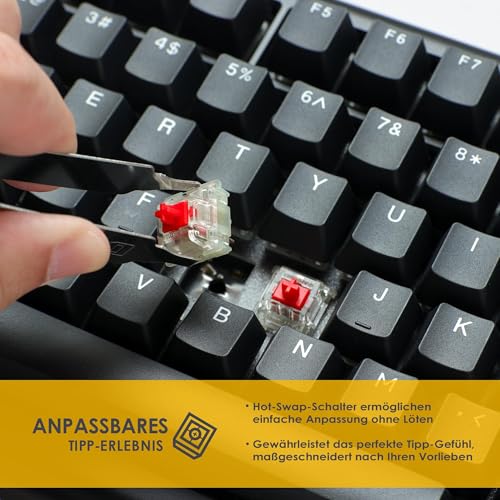
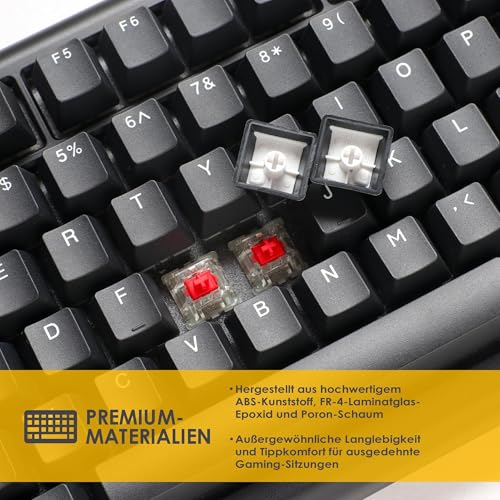
  • Hot-swappable PCB allows for easy switch customization without soldering
  • Open-source QMK/VIA support for extensive key remapping and macros
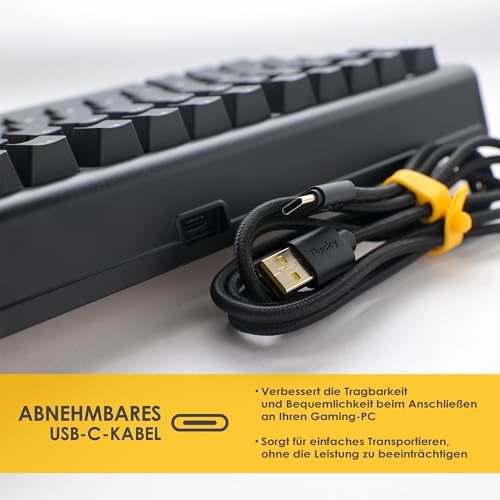
  • Includes features like a three-stage adjustable stand and detachable USB-C cable

What customers dislike about Ducky ProjectD Tinker 75?

  • Plastic (ABS) case construction may feel less premium than aluminum alternatives
  • Some users reported quality control issues, such as non-functional keys or sticky spacebars
  • South-facing LEDs can make it difficult to see legends on shine-through keycaps
  • Case may exhibit slight creaking when handled or picked up from the sides
  • The high-pitched acoustic profile may not appeal to those seeking a deeper 'thock' sound

Expert reviews

T
techpowerup.com
11/01/2024

The TechPowerUp review of the Ducky ProjectD Tinker 75 highlights its excellent gasket-mounted design with internal damping, premium pre-lubed Cherry MX2A switches, and high-quality PBT keycaps. This $119–$124 keyboard offers robust customization through full QMK/VIA support and hot-swappable sockets, with a $99 barebones option available. Conversely, the keyboard lacks modern...Read more

T
techpowerup.com
11/01/2024

The TechPowerUp review of the Ducky ProjectD Tinker 75 highlights the integration of Cherry MX2A Speed Silver switches for smooth, fast linear actuation, coupled with comprehensive VIA software support for extensive RGB and key mapping control. Additionally, the gasket-mounted design, aided by multiple foam layers, successfully reduces unwanted case acoustics. Conversely, the review...Read more

T
techpowerup.com
11/01/2024

The Ducky ProjectD Tinker 75 is a 75% gasket-mounted mechanical keyboard featuring full QMK/VIA support, pre-lubed stabilizers, and premium Cherry MX2A switches. Its, thick PBT keycaps, hotswappable PCB, and internal dampening ensure a high-quality, quiet typing experience. However, at $119–$124, the keyboard lacks wireless, a volume knob, or a screen, making it relatively expensive...Read more

T
techpowerup.com
11/01/2024

The Ducky ProjectD Tinker 75 features a highly structured internal design with high-quality brass inserts, a daughter PCB for the USB-C port, and a thick foam sheet for dampening, alongside genuine gasket-mounting for improved typing feel. The keyboard also boasts Kailh hot-swap sockets and a Westberry 32-bit microcontroller compatible with QMK/VIA firmware. TechPowerUp However,...Read more

T
techpowerup.com
11/01/2024

The Ducky ProjectD Tinker 75 is a 75% hot-swappable mechanical keyboard featuring open-source QMK/VIA support, a gasket mount design, and pre-lubed stabilizers. It aims to provide a premium, customizable typing experience with Cherry MX2A switches, minimizing vibration and metallic pinging. However, the review notes cons including a plastic chassis that tends to creak, thick bezels,...Read more

T
techpowerup.com
11/01/2024

The TechPowerUp review describes the Ducky ProjectD Tinker 75 as a beginner-friendly 75% mechanical keyboard offering premium gasket-mounted, hot-swappable performance with extensive QMK/VIA customization for its price. It features excellent internal dampening, pre-lubed stabilizers, and functional accessories like a dust cover and specialized puller tools. Conversely, the board...Read more

T
techpowerup.com
11/01/2024

The TechPowerUp review of the Ducky ProjectD Tinker 75 highlights it as a solid, 83-key mechanical keyboard that transitions Ducky's premium, customizable internal design into a pre-built, budget-friendly plastic chassis. It offers exceptional typing acoustics through a gasket mount system, hot-swappable PCB, QMK/VIA support, and pre-lubed Cherry MX2A switches. Drawbacks noted in...Read more

Video reviews

Compare Ducky ProjectD Tinker 75 with

VS
VS

Compare