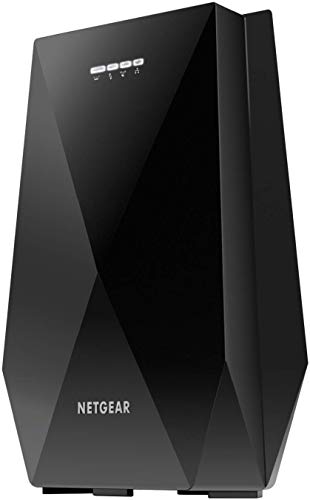
Netgear EX8000 Review | 63 Data compared

double-arrow
  • Avg. price: ~£150
  • Wi-Fi version: Wi-Fi 5 (802.11ac)
  • Wi-Fi speed: 3000 Mbps
  • Coverage area: 232

Netgear EX8000 review. Compare 63 technical specifications and user reviews to see how it ranks among wi-fi extenders and if it is worth buying.

7.8

Overall score

What it is: An overall evaluation of the Wi-Fi extender's quality, based on technical analyses and user reviews.

When it matters: When you need a quick reference to spot the best Wi‑Fi extenders overall.

Score components:

80.0%

7.6

Technical Score

20.0%

8.6

User score

Very good
7.6

Technical Score

What it is: An assessment of the Wi-Fi extender's technical performance, covering eight key areas: speed, coverage, signal stability, connectivity, Ethernet features, mesh support, ease of setup, and design.

When it matters: When you want to compare Wi‑Fi extenders based on speed, coverage, ports, and wireless features.

Score components:

40.0%

7.7

Wi-Fi Performance

30.0%

7.0

Network & Security

12.0%

10

Setup & Management

10.0%

4.8

Hardware & Deployment

8.0%

10

Ports

Very good
8.6

User score

What it is: A rating that combines user reviews and the total number of reviews received by the Wi-Fi extender.

When it matters: When you want to know how a Wi‑Fi extender performs in daily use and how reliably it maintains a stable connection over time according to user feedback.

Score components:

70.0%

8.0

User reviews

30.0%

10

Popularity

User score:
United States
Amazon_logo.png
4.0
(5443)

(Reviews last updated: June 2026)

Excellent
  • 8.2
    Gaming

    Score components:

    35.0%

    10

    Wi-Fi speed

    30.0%

    10

    QoS support

    20.0%

    1.0

    Ethernet backhaul

    15.0%

    10

    N. of LAN ports

  • 3.3
    Travel

    Score components:

    45.0%

    1.0

    Weight

    30.0%

    1.0

    Portable design

    15.0%

    10

    Wi-Fi speed

    10.0%

    10

    Access Point mode

  • No image
No image

Best prices in UK

    N/A~ £150

Best rankings

?

Available: ranking among products currently available (including other versions of this product).
All: ranking among all products in the database.

Verdict

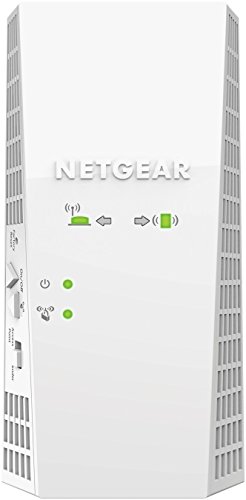
The Netgear Nighthawk X6S EX8000 is an AC3000 tri-band mesh Wi-Fi extender that delivers total speeds up to 3Gbps (400Mbps on 2.4GHz, 866Mbps on one 5GHz band, and a dedicated 1733Mbps 5GHz backhaul). It features FastLane3 technology to prevent bandwidth loss, Smart Roaming for a single SSID experience, and covers up to 2,500 square feet for 50+ devices using a quad-core processor and MU-MIMO support. Main pros include its four Gigabit Ethernet ports for wired connectivity, excellent long-range performance, and universal compatibility with any router; however, cons include its high price point, large physical footprint that requires desk space, and the lack of Wi-Fi 6 support.

Technical Specifications of Netgear EX8000

Technical Score

What it is: An assessment of the Wi-Fi extender's technical performance, covering eight key areas: speed, coverage, signal stability, connectivity, Ethernet features, mesh support, ease of setup, and design.

When it matters: When you want to compare Wi‑Fi extenders based on speed, coverage, ports, and wireless features.

Score components:

40.0%

7.7

Wi-Fi Performance

30.0%

7.0

Network & Security

12.0%

10

Setup & Management

10.0%

4.8

Hardware & Deployment

8.0%

10

Ports

7.6
Netgear EX8000 has a technical score of 7.65 points, which is higher than 56.9% of Wi-Fi extenders.
User score

What it is: A rating that combines user reviews and the total number of reviews received by the Wi-Fi extender.

When it matters: When you want to know how a Wi‑Fi extender performs in daily use and how reliably it maintains a stable connection over time according to user feedback.

Score components:

70.0%

8.0

User reviews

30.0%

10

Popularity

User score:
United States
Amazon_logo.png
4.0
(5443)

(Reviews last updated: June 2026)

8.6
Netgear EX8000 has a user score of 8.6 points, which is higher than 61.8% of Wi-Fi extenders.
Popularity
What it is: An indicator based on the number of reviews received by the Wi-Fi extender.
When it matters: When you prefer to buy a Wi‑Fi extender that has already been chosen and reviewed by many other users.
10
Netgear EX8000 has a popularity of 10 points, which is higher than 49% of products in this category.
Ratio quality/price

What it is: An indicator that combines the Wi-Fi extender's overall rating with its cost.

When it matters: When you are looking for a Wi‑Fi extender with a good balance between performance and price.

Score components:

60.0%

7.8

Overall score

40.0%

9.7

Price

8.4
Netgear EX8000 has a quality-to-price ratio of 8.4 points, which is higher than 55.9% of products in this category.
Wi-Fi version
What it is: The Wi‑Fi generation the extender supports, such as Wi‑Fi 5, Wi‑Fi 6, or Wi‑Fi 6E.
When it matters: When you want the extender to work well with newer routers and support modern wireless features.

Importance: HIGH

Wi-Fi 5 (802.11ac)
Netgear EX8000 supports Wi-Fi 5 (802.11ac), more advanced than 9.8% of Wi-Fi extenders and equal to 44.1% of Wi-Fi extenders.
Wi-Fi bands
What it is: The wireless frequency bands the extender can use.
When it matters: When your router and devices depend on support for the right Wi‑Fi bands.

Importance: HIGH

Tri-band
Netgear EX8000 supports Tri-band, more versatile than 86.3% of Wi-Fi extenders and equal to 13.7% of Wi-Fi extenders.
Bands: 2.4 GHz + 5 GHz + 5 GHz.
6 GHz band support
What it is: Whether the extender can operate on the 6 GHz band.
When it matters: When you want the extender to work well with newer routers and support modern wireless features.

Importance: LOW

no
Netgear EX8000 does not support the 6 GHz band. 5.9% of Wi-Fi extenders support the 6 GHz band.
Wi-Fi speed
What it is: The combined theoretical maximum wireless speed across the supported bands.
When it matters: When you need better speed and signal strength in rooms that are harder to reach.

Importance: HIGH

3,000 Mbps
Netgear EX8000 reaches 3,000 Mbps Wi-Fi speed, faster than 80.4% of Wi-Fi extenders and equal to 4.9% of Wi-Fi extenders.
Max speed 2.4 GHz
What it is: The maximum supported wireless speed on the 2.4 GHz band.
When it matters: When you need better speed and signal strength in rooms that are harder to reach.

Importance: MEDIUM

400 Mbps
Netgear EX8000 reaches 400 Mbps on 2.4 GHz, slower than 52% of Wi-Fi extenders and equal to 8.8% of Wi-Fi extenders.
Show more
Ethernet backhaul
What it is: Whether the extender supports Ethernet backhaul through a wired network connection.
When it matters: When you want a more stable link over Ethernet instead of relying only on wireless repeating.

Importance: MEDIUM

no
Netgear EX8000 does not support Ethernet backhaul. 52.2% of Wi-Fi extenders support Ethernet backhaul.
Mesh compatibility
What it is: The mesh systems or ecosystems the extender can work with.
When it matters: When you want smoother roaming and more consistent coverage across your home.

Importance: LOW

N/A
Mesh standard
What it is: The mesh standard or ecosystem the extender uses.
When it matters: When you want smoother roaming and more consistent coverage across your home.

Importance: LOW

proprietary mesh
Roaming feature
What it is: Whether the extender supports seamless roaming between network nodes.
When it matters: When you want smoother roaming and more consistent coverage across your home.

Importance: MEDIUM

yes
Netgear EX8000 supports roaming. 17.7% of Wi-Fi extenders support roaming.
Via Smart Roaming.
802.11k support
What it is: Whether the extender supports 802.11k for better roaming information between access points.
When it matters: When you want smoother roaming and more consistent coverage across your home.

Importance: LOW

?
Show more
N. of LAN ports
What it is: The number of wired LAN ports on the extender.
When it matters: When you need to connect wired devices such as TVs, consoles, PCs, or switches.

Importance: MEDIUM

4
Netgear EX8000 has 4 LAN port/s, more than 97% of Wi-Fi extenders and equal to 2% of Wi-Fi extenders.
Ethernet port speed
What it is: The maximum Ethernet speed supported by the wired ports.
When it matters: When you connect wired devices and want them to run at full local network speed.

Importance: MEDIUM

1 Gbps
Netgear EX8000 offers 1 Gbps Ethernet speed, faster than 25.7% of Wi-Fi extenders and equal to 64.4% of Wi-Fi extenders.
N. of USB ports
What it is: The number of USB ports on the extender.
When it matters: When you need to connect wired devices such as TVs, consoles, PCs, or switches.

Importance: LOW

1
Netgear EX8000 has 1 USB port/s, more than 98% of Wi-Fi extenders and equal to 2% of Wi-Fi extenders.
USB 2.0 port.
PoE standard
What it is: The Power over Ethernet standard the extender supports, if any.
When it matters: When you want to power the extender over Ethernet instead of using a separate power adapter.

Importance: LOW

N/A
Dedicated smartphone app
What it is: Whether the extender can be managed through a dedicated smartphone app.
When it matters: When you want easier setup, monitoring, and control from your phone.

Importance: MEDIUM

yes
Netgear EX8000 comes with a dedicated smartphone app. 15.2% of Wi-Fi extenders come with a dedicated smartphone app.
Nighthawk app.
Web UI management
What it is: Whether the extender offers a web-based interface for setup and management.
When it matters: When you prefer advanced setup and control from a web browser.

Importance: MEDIUM

yes
Netgear EX8000 has a web management interface. 2% of Wi-Fi extenders have a web management interface.
Automatic firmware updates
What it is: Whether the extender can install firmware updates automatically.
When it matters: When you want security and stability updates without having to manage them manually.

Importance: LOW

yes
Netgear EX8000 has automatic firmware updates. 53.1% of Wi-Fi extenders have automatic firmware updates.
LED control
What it is: Whether the extender’s LED indicators can be adjusted or turned off.
When it matters: When the extender sits in a bedroom or another space where bright status lights can be annoying.

Importance: LOW

yes
Netgear EX8000 has LED control. 12.1% of Wi-Fi extenders have LED control.
LED control setting available.
Buttons present
What it is: The physical buttons available on the extender, such as reset, power, or WPS.
When it matters: When you prefer direct physical controls instead of relying only on software menus.

Importance: LOW

wps, reset, power
Show more
Mounting type
What it is: The mounting style the extender uses, such as wall-plug or desktop placement.
When it matters: When the extender needs to fit neatly into a tight space, behind furniture, or near an outlet.

Importance: LOW

desktop
Portable design
What it is: Whether the extender has a travel-friendly portable design, usually a compact plug-in form factor rather than a larger desktop or fixed-installation unit.
When it matters: When you want an extender that is easy to pack, move between locations, or use temporarily while travelling.

Importance: LOW

no
Netgear EX8000 does not have a portable design. 66.7% of Wi-Fi extenders have a portable design.
Desktop / fixed-installation form factor.
Height
What it is: The height of the extender body.
When it matters: When the extender needs to fit neatly into a tight space, behind furniture, or near an outlet.

Importance: LOW

227 mm
Netgear EX8000 is 227 mm tall, taller than 95.1% of Wi-Fi extenders.
Width
What it is: The width of the extender body.
When it matters: When the extender needs to fit neatly into a tight space, behind furniture, or near an outlet.

Importance: LOW

170 mm
Netgear EX8000 is 170 mm wide, wider than 90.2% of Wi-Fi extenders.
Thickness
What it is: The depth or thickness of the extender body.
When it matters: When the extender needs to fit neatly into a tight space, behind furniture, or near an outlet.

Importance: LOW

93 mm
Netgear EX8000 is 93 mm thick, thicker than 94.1% of Wi-Fi extenders.
Show more

Netgear EX8000 vs the average wi-fi extender

  • Multi-band support
    Netgear EX8000 supports more versatile Wi-Fi bands than the average wi-fi extender (Tri-band vs Dual-band). The average Wi-Fi extender supports Dual-band Wi-Fi bands.
    Bands: 2.4 GHz + 5 GHz + 5 GHz.
    What it is: The wireless frequency bands the extender can use.
    When it matters: When your router and devices depend on support for the right Wi‑Fi bands.

    Importance: HIGH

    Netgear EX8000 supports more versatile Wi-Fi bands than the average wi-fi extender (Tri-band vs Dual-band). The average Wi-Fi extender supports Dual-band Wi-Fi bands.Tri-band vs Dual-band
  • 69% faster Wi-Fi speed
    Netgear EX8000 reaches faster Wi-Fi speed than the average wi-fi extender (3,000 Mbps vs 1,775 Mbps). The average Wi-Fi extender reaches 1,775 Mbps Wi-Fi speed.
    What it is: The combined theoretical maximum wireless speed across the supported bands.
    When it matters: When you need better speed and signal strength in rooms that are harder to reach.

    Importance: HIGH

    Netgear EX8000 reaches faster Wi-Fi speed than the average wi-fi extender (3,000 Mbps vs 1,775 Mbps). The average Wi-Fi extender reaches 1,775 Mbps Wi-Fi speed.3000 Mbps vs 1775 Mbps
  • 4 more antennas
    Netgear EX8000 has more antennas than the average wi-fi extender (6 vs 2). The average Wi-Fi extender has 2 antennas.
    What it is: The number of antennas built into or attached to the extender.
    When it matters: When you need better speed and signal strength in rooms that are harder to reach.

    Importance: LOW

    Netgear EX8000 has more antennas than the average wi-fi extender (6 vs 2). The average Wi-Fi extender has 2 antennas.6 vs 2
  • 60% larger coverage area
    Netgear EX8000 covers a larger area than the average wi-fi extender (232 m² vs 145 m²). The average Wi-Fi extender covers 145 m².
    What it is: The estimated area the extender is designed to cover.
    When it matters: When you need better speed and signal strength in rooms that are harder to reach.

    Importance: HIGH

    Netgear EX8000 covers a larger area than the average wi-fi extender (232 m² vs 145 m²). The average Wi-Fi extender covers 145 m².232 m² vs 145 m²
  • 3 more LAN ports
    Netgear EX8000 has more LAN ports than the average wi-fi extender (4 vs 1). The average Wi-Fi extender has 1 LAN port/s.
    What it is: The number of wired LAN ports on the extender.
    When it matters: When you need to connect wired devices such as TVs, consoles, PCs, or switches.

    Importance: MEDIUM

    Netgear EX8000 has more LAN ports than the average wi-fi extender (4 vs 1). The average Wi-Fi extender has 1 LAN port/s.4 vs 1
  • Guest network
    Netgear EX8000 has a guest network, while the average wi-fi extender does not. 37% of Wi-Fi extenders have a guest network.
    Only in AP mode.
    What it is: Whether the extender can create a separate guest network.
    When it matters: When you want to give visitors internet access without exposing your main network.

    Importance: LOW

    Netgear EX8000 has a guest network, while the average wi-fi extender does not. 37% of Wi-Fi extenders have a guest network.
  • 2x more RAM
    Netgear EX8000 has more RAM than the average wi-fi extender (512 MB vs 256 MB). The average Wi-Fi extender has 256 MB of RAM.
    What it is: The amount of RAM available for system operation and multitasking.
    When it matters: When you want the extender to stay responsive and capable over the long term.

    Importance: MEDIUM

    Netgear EX8000 has more RAM than the average wi-fi extender (512 MB vs 256 MB). The average Wi-Fi extender has 256 MB of RAM.512 MB vs 256 MB
  • 5.45 dBm stronger transmit power
    Netgear EX8000 has higher transmit power than the average wi-fi extender (28.5 dBm vs 23 dBm). The average Wi-Fi extender has 23 dBm of transmit power.
    Converted from mW output figures.
    What it is: The maximum wireless transmit power of the extender.
    When it matters: When you need better speed and signal strength in rooms that are harder to reach.

    Importance: MEDIUM

    Netgear EX8000 has higher transmit power than the average wi-fi extender (28.5 dBm vs 23 dBm). The average Wi-Fi extender has 23 dBm of transmit power.28.45 dBm vs 23 dBm
  • Multi-band support
    Netgear EX8000 supports more versatile Wi-Fi bands than the average wi-fi extender (Tri-band vs Dual-band). The average Wi-Fi extender supports Dual-band Wi-Fi bands.
  • 69% faster Wi-Fi speed
    Netgear EX8000 reaches faster Wi-Fi speed than the average wi-fi extender (3,000 Mbps vs 1,775 Mbps). The average Wi-Fi extender reaches 1,775 Mbps Wi-Fi speed.
  • 4 more antennas
    Netgear EX8000 has more antennas than the average wi-fi extender (6 vs 2). The average Wi-Fi extender has 2 antennas.
  • 60% larger coverage area
    Netgear EX8000 covers a larger area than the average wi-fi extender (232 m² vs 145 m²). The average Wi-Fi extender covers 145 m².
  • 5.45 dBm stronger transmit power
    Netgear EX8000 has higher transmit power than the average wi-fi extender (28.5 dBm vs 23 dBm). The average Wi-Fi extender has 23 dBm of transmit power.
  • 19 more connected devices
    Netgear EX8000 supports more connected devices than the average wi-fi extender (50 vs 31). The average Wi-Fi extender supports up to 31 connected devices.
  • Guest network
    Netgear EX8000 has a guest network, while the average wi-fi extender does not. 37% of Wi-Fi extenders have a guest network.
  • 3 more LAN ports
    Netgear EX8000 has more LAN ports than the average wi-fi extender (4 vs 1). The average Wi-Fi extender has 1 LAN port/s.
  • Automatic firmware updates
    Netgear EX8000 has automatic firmware updates, while the average wi-fi extender does not. 47.5% of Wi-Fi extenders have automatic firmware updates.
  • 2x more RAM
    Netgear EX8000 has more RAM than the average wi-fi extender (512 MB vs 256 MB). The average Wi-Fi extender has 256 MB of RAM.
  • 3.3 W lower power consumption
    Netgear EX8000 uses less power than the average wi-fi extender (6.2 W vs 9.5 W). The average Wi-Fi extender uses 9.5 W of power.
  • 2x more flash storage
    Netgear EX8000 has more flash storage than the average wi-fi extender (32 MB vs 16 MB). The average Wi-Fi extender has 16 MB of flash storage.
  • 50 Mbps slower 2.4 GHz speed
    Netgear EX8000 reaches a slower 2.4 GHz speed than the average wi-fi extender (400 Mbps vs 450 Mbps). The average Wi-Fi extender reaches 450 Mbps on 2.4 GHz.
  • No Ethernet backhaul
    Netgear EX8000 does not support Ethernet backhaul, while the average wi-fi extender does. 51.6% of Wi-Fi extenders support Ethernet backhaul.
  • No WPA3 support
    Netgear EX8000 does not support WPA3, while the average wi-fi extender does. 56.7% of Wi-Fi extenders support WPA3.
  • Not portable
    Netgear EX8000 does not have a portable design, while the average wi-fi extender does. 66% of Wi-Fi extenders have a portable design.
    Desktop / fixed-installation form factor.
  • 3.08x heavier
    Netgear EX8000 is heavier than the average wi-fi extender (862 g vs 280 g). The average Wi-Fi extender weighs 280 g.
  • 47 mm thicker
    Netgear EX8000 is thicker than the average wi-fi extender (93 mm vs 46 mm). The average Wi-Fi extender has a thickness of 46 mm.
  • 105 mm taller
    Netgear EX8000 is taller than the average wi-fi extender (227 mm vs 122 mm). The average Wi-Fi extender has a height of 122 mm.
  • 88.6 mm wider
    Netgear EX8000 is wider than the average wi-fi extender (170 mm vs 81.4 mm). The average Wi-Fi extender has a width of 81.4 mm.
  • 3 older release date
    Netgear EX8000 was released earlier than the average wi-fi extender (2017 vs 2020). The average Wi-Fi extender was released in 2020.
    August 2017
  • No Ethernet backhaul
    Netgear EX8000 does not support Ethernet backhaul, while the average wi-fi extender does. 51.6% of Wi-Fi extenders support Ethernet backhaul.
    What it is: Whether the extender supports Ethernet backhaul through a wired network connection.
    When it matters: When you want a more stable link over Ethernet instead of relying only on wireless repeating.

    Importance: MEDIUM

    Netgear EX8000 does not support Ethernet backhaul, while the average wi-fi extender does. 51.6% of Wi-Fi extenders support Ethernet backhaul.
  • No WPA3 support
    Netgear EX8000 does not support WPA3, while the average wi-fi extender does. 56.7% of Wi-Fi extenders support WPA3.
    What it is: Whether the extender supports WPA3 wireless security.
    When it matters: When you want stronger protection for your network and connected devices.

    Importance: MEDIUM

    Netgear EX8000 does not support WPA3, while the average wi-fi extender does. 56.7% of Wi-Fi extenders support WPA3.
  • Not portable
    Netgear EX8000 does not have a portable design, while the average wi-fi extender does. 66% of Wi-Fi extenders have a portable design.
    Desktop / fixed-installation form factor.
    What it is: Whether the extender has a travel-friendly portable design, usually a compact plug-in form factor rather than a larger desktop or fixed-installation unit.
    When it matters: When you want an extender that is easy to pack, move between locations, or use temporarily while travelling.

    Importance: LOW

    Netgear EX8000 does not have a portable design, while the average wi-fi extender does. 66% of Wi-Fi extenders have a portable design.
  • 3.08x heavier
    Netgear EX8000 is heavier than the average wi-fi extender (862 g vs 280 g). The average Wi-Fi extender weighs 280 g.
    What it is: The total weight of the extender.
    When it matters: When you want an extender that is easier to move, mount, or place without adding bulk.

    Importance: LOW

    Netgear EX8000 is heavier than the average wi-fi extender (862 g vs 280 g). The average Wi-Fi extender weighs 280 g.862 g vs 280 g
  • 47 mm thicker
    Netgear EX8000 is thicker than the average wi-fi extender (93 mm vs 46 mm). The average Wi-Fi extender has a thickness of 46 mm.
    What it is: The depth or thickness of the extender body.
    When it matters: When the extender needs to fit neatly into a tight space, behind furniture, or near an outlet.

    Importance: LOW

    Netgear EX8000 is thicker than the average wi-fi extender (93 mm vs 46 mm). The average Wi-Fi extender has a thickness of 46 mm.93 mm vs 46 mm
  • 105 mm taller
    Netgear EX8000 is taller than the average wi-fi extender (227 mm vs 122 mm). The average Wi-Fi extender has a height of 122 mm.
    What it is: The height of the extender body.
    When it matters: When the extender needs to fit neatly into a tight space, behind furniture, or near an outlet.

    Importance: LOW

    Netgear EX8000 is taller than the average wi-fi extender (227 mm vs 122 mm). The average Wi-Fi extender has a height of 122 mm.227 mm vs 122 mm
  • 88.6 mm wider
    Netgear EX8000 is wider than the average wi-fi extender (170 mm vs 81.4 mm). The average Wi-Fi extender has a width of 81.4 mm.
    What it is: The width of the extender body.
    When it matters: When the extender needs to fit neatly into a tight space, behind furniture, or near an outlet.

    Importance: LOW

    Netgear EX8000 is wider than the average wi-fi extender (170 mm vs 81.4 mm). The average Wi-Fi extender has a width of 81.4 mm.170 mm vs 81.4 mm
  • 2.14x more expensive
    Netgear EX8000 is more expensive than the average wi-fi extender (£150 vs £70).
    Netgear EX8000 is more expensive than the average wi-fi extender (£150 vs £70).£150 vs £70

Graphic comparison of Netgear EX8000 and

Attribute category
Attribute
No results found

Third-party reviews

United States

(Reviews last updated: June 2026)

What customers like about Netgear EX8000?

  • Tri-band technology with a dedicated 5GHz backhaul ensures minimal speed loss
  • Supports 'One WiFi Name' (SSID) for seamless roaming without disconnecting
  • Excellent throughput performance, often beating other mesh-like extenders at close range
  • Equipped with four Gigabit Ethernet ports for multiple wired device connections
  • Easy setup process via WPS or the dedicated mobile app
  • Works universally with any standard Wi-Fi router

What customers dislike about Netgear EX8000?

  • High price point compared to standard dual-band extenders
  • Bulky, upright desktop design takes up significant space and cannot be plugged directly into a wall outlet
  • USB port is limited to 2.0 speeds, which may be slow for large file transfers
  • Occasional software or stability quirks reported during initial firmware versions
  • Performance can drop noticeably at very long ranges compared to high-end dedicated mesh systems

Expert reviews

E
expertreviews.co.uk
10/12/2021
Summary of the review
T
trustedreviews.com
29/12/2020
Summary of the review
D
dongknows.com
08/05/2018
Summary of the review
T
tomsguide.com
07/06/2018
Summary of the review
P
pcmag.com
15/02/2018
Summary of the review
S
smallnetbuilder.com
01/11/2017
Summary of the review
S
senses.se
14/08/2018
Summary of the review
K
kitguru.net
02/05/2018
Summary of the review
H
hothardware.com
23/02/2018
Summary of the review
G
galaxus.de
05/04/2018
Summary of the review
G
galaxus.de
06/04/2018
Summary of the review
H
hardware-journal.de
19/12/2017
Summary of the review
H
hardwareluxx.de
20/02/2018
Summary of the review
C
computerbild.de
22/02/2026
Summary of the review
F
faz.net
09/02/2026
Summary of the review
L
lesnumeriques.com
11/04/2026
Summary of the review
0
01net.com
23/04/2018
Summary of the review
Q
quechoisir.org
N/A
Summary of the review
D
digitec.ch
06/04/2018
Summary of the review
L
lecafedugeek.fr
17/08/2019
Summary of the review
S
sitegeek.fr
21/04/2020
Summary of the review
H
hardwarecooking.fr
04/07/2019
Summary of the review
R
redeszone.net
17/04/2018
Summary of the review
P
profesionalreview.com
15/09/2018
Summary of the review
R
redeszone.net
17/04/2018
Summary of the review
R
robadainformatici.it
22/03/2018
Summary of the review
C
console-tribe.com
15/02/2018
Summary of the review
M
multiplayer.it
20/01/2018
Summary of the review
B
bestewifirepeater.nl
25/07/2026
Summary of the review
G
gadgetgear.nl
14/04/2018
Summary of the review

Video reviews

Compare Netgear EX8000 with

VS
VS

Compare