ASUS RP-AC53 Review | 63 Data compared

double-arrow
  • Avg. price: ~£25
  • Wi-Fi version: Wi-Fi 5 (802.11ac)
  • Wi-Fi speed: 733 Mbps
  • Coverage area: 80

ASUS RP-AC53 review. Compare 63 technical specifications and user reviews to see how it ranks among wi-fi extenders and if it is worth buying.

5.4

Overall score

What it is: An overall evaluation of the Wi-Fi extender's quality, based on technical analyses and user reviews.

When it matters: When you need a quick reference to spot the best Wi‑Fi extenders overall.

Score components:

80.0%

5.2

Technical Score

20.0%

6.3

User score

Good
5.2

Technical Score

What it is: An assessment of the Wi-Fi extender's technical performance, covering eight key areas: speed, coverage, signal stability, connectivity, Ethernet features, mesh support, ease of setup, and design.

When it matters: When you want to compare Wi‑Fi extenders based on speed, coverage, ports, and wireless features.

Score components:

40.0%

3.7

Wi-Fi Performance

30.0%

5.2

Network & Security

12.0%

8.7

Setup & Management

10.0%

6.6

Hardware & Deployment

8.0%

5.5

Ports

Good
6.3

User score

What it is: A rating that combines user reviews and the total number of reviews received by the Wi-Fi extender.

When it matters: When you want to know how a Wi‑Fi extender performs in daily use and how reliably it maintains a stable connection over time according to user feedback.

Score components:

70.0%

6.6

User reviews

30.0%

5.7

Popularity

User score:
United Kingdom
amazon
3.3
(180)
United States
Amazon_logo.png
3.3
(180)

(Reviews last updated: June 2026)

Good
  • 4.7
    Gaming

    Score components:

    35.0%

    2.4

    Wi-Fi speed

    30.0%

    1.0

    QoS support

    20.0%

    10

    Ethernet backhaul

    15.0%

    10

    N. of LAN ports

  • 8.6
    Travel

    Score components:

    45.0%

    9.3

    Weight

    30.0%

    10

    Portable design

    15.0%

    2.4

    Wi-Fi speed

    10.0%

    10

    Access Point mode

  • asus-rp-ac53
  • asus-rp-ac53
  • asus-rp-ac53
  • asus-rp-ac53
asus-rp-ac53
asus-rp-ac53
asus-rp-ac53
asus-rp-ac53

Best prices in UK

Best rankings

?

Available: ranking among products currently available (including other versions of this product).
All: ranking among all products in the database.

Verdict

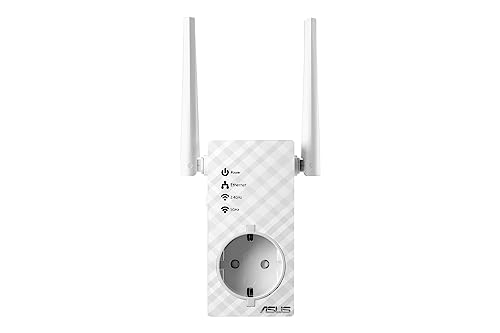
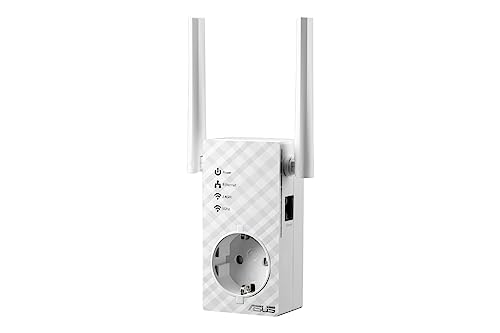
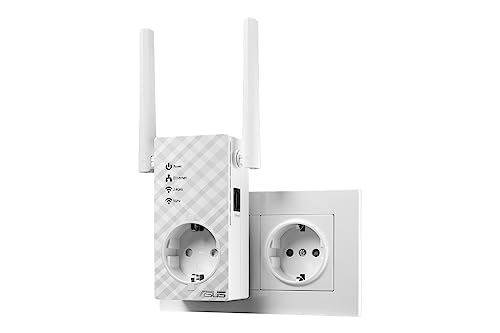
The ASUS RP-AC53 is a compact AC750 dual-band Wi-Fi extender designed to eliminate dead zones with combined speeds of up to 733 Mbps (300 Mbps on 2.4 GHz and 433 Mbps on 5 GHz). This versatile 3-in-1 device functions as a repeater, access point, or media bridge and features a built-in AC pass-through socket to keep wall outlets available for other electronics. Key pros include two external antennas for enhanced signal stability, easy setup via the WPS button or the ASUS Extender app, and a smart LED signal indicator to assist with optimal placement. However, some users have reported periodic connectivity drops that require a restart, and the single LAN port is limited to 10/100 Mbps Fast Ethernet rather than Gigabit speeds.

Technical Specifications of ASUS RP-AC53

Technical Score

What it is: An assessment of the Wi-Fi extender's technical performance, covering eight key areas: speed, coverage, signal stability, connectivity, Ethernet features, mesh support, ease of setup, and design.

When it matters: When you want to compare Wi‑Fi extenders based on speed, coverage, ports, and wireless features.

Score components:

40.0%

3.7

Wi-Fi Performance

30.0%

5.2

Network & Security

12.0%

8.7

Setup & Management

10.0%

6.6

Hardware & Deployment

8.0%

5.5

Ports

5.2
ASUS RP-AC53 has a technical score of 5.19 points, which is lower than 80.4% of Wi-Fi extenders.
User score

What it is: A rating that combines user reviews and the total number of reviews received by the Wi-Fi extender.

When it matters: When you want to know how a Wi‑Fi extender performs in daily use and how reliably it maintains a stable connection over time according to user feedback.

Score components:

70.0%

6.6

User reviews

30.0%

5.7

Popularity

User score:
United Kingdom
amazon
3.3
(180)
United States
Amazon_logo.png
3.3
(180)

(Reviews last updated: June 2026)

6.3
ASUS RP-AC53 has a user score of 6.32 points, which is lower than 98% of Wi-Fi extenders.
Popularity
What it is: An indicator based on the number of reviews received by the Wi-Fi extender.
When it matters: When you prefer to buy a Wi‑Fi extender that has already been chosen and reviewed by many other users.
5.7
ASUS RP-AC53 has a popularity of 5.7 points, which is lower than 58.8% of products in this category.
Ratio quality/price

What it is: An indicator that combines the Wi-Fi extender's overall rating with its cost.

When it matters: When you are looking for a Wi‑Fi extender with a good balance between performance and price.

Score components:

60.0%

5.4

Overall score

40.0%

10

Price

6.8
ASUS RP-AC53 has a quality-to-price ratio of 6.8 points, which is lower than 82.4% of products in this category.
Wi-Fi version
What it is: The Wi‑Fi generation the extender supports, such as Wi‑Fi 5, Wi‑Fi 6, or Wi‑Fi 6E.
When it matters: When you want the extender to work well with newer routers and support modern wireless features.

Importance: HIGH

Wi-Fi 5 (802.11ac)
ASUS RP-AC53 supports Wi-Fi 5 (802.11ac), more advanced than 9.8% of Wi-Fi extenders and equal to 44.1% of Wi-Fi extenders.
Wi-Fi bands
What it is: The wireless frequency bands the extender can use.
When it matters: When your router and devices depend on support for the right Wi‑Fi bands.

Importance: HIGH

Dual-band
ASUS RP-AC53 supports Dual-band, more versatile than 10.8% of Wi-Fi extenders and equal to 74.5% of Wi-Fi extenders.
6 GHz band support
What it is: Whether the extender can operate on the 6 GHz band.
When it matters: When you want the extender to work well with newer routers and support modern wireless features.

Importance: LOW

no
ASUS RP-AC53 does not support the 6 GHz band. 5.9% of Wi-Fi extenders support the 6 GHz band.
Wi-Fi speed
What it is: The combined theoretical maximum wireless speed across the supported bands.
When it matters: When you need better speed and signal strength in rooms that are harder to reach.

Importance: HIGH

733 Mbps
ASUS RP-AC53 reaches 733 Mbps Wi-Fi speed, slower than 88.2% of Wi-Fi extenders and equal to 2% of Wi-Fi extenders.
Max speed 2.4 GHz
What it is: The maximum supported wireless speed on the 2.4 GHz band.
When it matters: When you need better speed and signal strength in rooms that are harder to reach.

Importance: MEDIUM

300 Mbps
ASUS RP-AC53 reaches 300 Mbps on 2.4 GHz, slower than 61.8% of Wi-Fi extenders and equal to 36.3% of Wi-Fi extenders.
Show more
Ethernet backhaul
What it is: Whether the extender supports Ethernet backhaul through a wired network connection.
When it matters: When you want a more stable link over Ethernet instead of relying only on wireless repeating.

Importance: MEDIUM

yes
ASUS RP-AC53 supports Ethernet backhaul. 48.9% of Wi-Fi extenders support Ethernet backhaul.
Mesh compatibility
What it is: The mesh systems or ecosystems the extender can work with.
When it matters: When you want smoother roaming and more consistent coverage across your home.

Importance: LOW

N/A
Mesh standard
What it is: The mesh standard or ecosystem the extender uses.
When it matters: When you want smoother roaming and more consistent coverage across your home.

Importance: LOW

?
Roaming feature
What it is: Whether the extender supports seamless roaming between network nodes.
When it matters: When you want smoother roaming and more consistent coverage across your home.

Importance: MEDIUM

yes
ASUS RP-AC53 supports roaming. 17.7% of Wi-Fi extenders support roaming.
Roaming Assist.
802.11k support
What it is: Whether the extender supports 802.11k for better roaming information between access points.
When it matters: When you want smoother roaming and more consistent coverage across your home.

Importance: LOW

no
ASUS RP-AC53 does not support 802.11k. 74.1% of Wi-Fi extenders support 802.11k.
Show more
N. of LAN ports
What it is: The number of wired LAN ports on the extender.
When it matters: When you need to connect wired devices such as TVs, consoles, PCs, or switches.

Importance: MEDIUM

1
ASUS RP-AC53 has 1 LAN port/s, more than 8.1% of Wi-Fi extenders and equal to 76.8% of Wi-Fi extenders.
Ethernet port speed
What it is: The maximum Ethernet speed supported by the wired ports.
When it matters: When you connect wired devices and want them to run at full local network speed.

Importance: MEDIUM

0.1 Gbps
ASUS RP-AC53 offers 0.1 Gbps Ethernet speed, slower than 75.3% of Wi-Fi extenders and equal to 21.8% of Wi-Fi extenders.
N. of USB ports
What it is: The number of USB ports on the extender.
When it matters: When you need to connect wired devices such as TVs, consoles, PCs, or switches.

Importance: LOW

0
ASUS RP-AC53 has 0 USB port/s, equal to 97.1% of Wi-Fi extenders.
PoE standard
What it is: The Power over Ethernet standard the extender supports, if any.
When it matters: When you want to power the extender over Ethernet instead of using a separate power adapter.

Importance: LOW

N/A
Dedicated smartphone app
What it is: Whether the extender can be managed through a dedicated smartphone app.
When it matters: When you want easier setup, monitoring, and control from your phone.

Importance: MEDIUM

yes
ASUS RP-AC53 comes with a dedicated smartphone app. 15.2% of Wi-Fi extenders come with a dedicated smartphone app.
ASUS Extender app.
Web UI management
What it is: Whether the extender offers a web-based interface for setup and management.
When it matters: When you prefer advanced setup and control from a web browser.

Importance: MEDIUM

yes
ASUS RP-AC53 has a web management interface. 2% of Wi-Fi extenders have a web management interface.
Automatic firmware updates
What it is: Whether the extender can install firmware updates automatically.
When it matters: When you want security and stability updates without having to manage them manually.

Importance: LOW

no
ASUS RP-AC53 does not have automatic firmware updates. 48% of Wi-Fi extenders have automatic firmware updates.
LED control
What it is: Whether the extender’s LED indicators can be adjusted or turned off.
When it matters: When the extender sits in a bedroom or another space where bright status lights can be annoying.

Importance: LOW

yes
ASUS RP-AC53 has LED control. 12.1% of Wi-Fi extenders have LED control.
Buttons present
What it is: The physical buttons available on the extender, such as reset, power, or WPS.
When it matters: When you prefer direct physical controls instead of relying only on software menus.

Importance: LOW

wps, reset, power
Show more
Mounting type
What it is: The mounting style the extender uses, such as wall-plug or desktop placement.
When it matters: When the extender needs to fit neatly into a tight space, behind furniture, or near an outlet.

Importance: LOW

wall-plug
Portable design
What it is: Whether the extender has a travel-friendly portable design, usually a compact plug-in form factor rather than a larger desktop or fixed-installation unit.
When it matters: When you want an extender that is easy to pack, move between locations, or use temporarily while travelling.

Importance: LOW

yes
ASUS RP-AC53 has a portable design. 34.3% of Wi-Fi extenders have a portable design.
Derived from compact plug-in form factor.
Height
What it is: The height of the extender body.
When it matters: When the extender needs to fit neatly into a tight space, behind furniture, or near an outlet.

Importance: LOW

110 mm
ASUS RP-AC53 is 110 mm tall, shorter than 54.9% of Wi-Fi extenders and equal to 1% of Wi-Fi extenders.
Width
What it is: The width of the extender body.
When it matters: When the extender needs to fit neatly into a tight space, behind furniture, or near an outlet.

Importance: LOW

54 mm
ASUS RP-AC53 is 54 mm wide, narrower than 100% of Wi-Fi extenders.
Thickness
What it is: The depth or thickness of the extender body.
When it matters: When the extender needs to fit neatly into a tight space, behind furniture, or near an outlet.

Importance: LOW

38 mm
ASUS RP-AC53 is 38 mm thick, thinner than 71.6% of Wi-Fi extenders and equal to 3.9% of Wi-Fi extenders.
Show more

ASUS RP-AC53 vs the average wi-fi extender

  • 5.6 W lower power consumption
    ASUS RP-AC53 uses less power than the average wi-fi extender (3.9 W vs 9.5 W). The average Wi-Fi extender uses 9.5 W of power.
    What it is: The power the extender typically uses during normal operation.
    When it matters: When you care about energy use, heat output, or running costs.

    Importance: LOW

    ASUS RP-AC53 uses less power than the average wi-fi extender (3.9 W vs 9.5 W). The average Wi-Fi extender uses 9.5 W of power.3.9 W vs 9.5 W
  • 27.4 mm narrower width
    ASUS RP-AC53 is narrower than the average wi-fi extender (54 mm vs 81.4 mm). The average Wi-Fi extender has a width of 81.4 mm.
    What it is: The width of the extender body.
    When it matters: When the extender needs to fit neatly into a tight space, behind furniture, or near an outlet.

    Importance: LOW

    ASUS RP-AC53 is narrower than the average wi-fi extender (54 mm vs 81.4 mm). The average Wi-Fi extender has a width of 81.4 mm.54 mm vs 81.4 mm
  • 28.6% lighter
    ASUS RP-AC53 is lighter than the average wi-fi extender (200 g vs 280 g). The average Wi-Fi extender weighs 280 g.
    What it is: The total weight of the extender.
    When it matters: When you want an extender that is easier to move, mount, or place without adding bulk.

    Importance: LOW

    ASUS RP-AC53 is lighter than the average wi-fi extender (200 g vs 280 g). The average Wi-Fi extender weighs 280 g.200 g vs 280 g
  • 2.8x cheaper
    ASUS RP-AC53 is cheaper than the average wi-fi extender (£25 vs £70).
    ASUS RP-AC53 is cheaper than the average wi-fi extender (£25 vs £70).£25 vs £70
  • 8 mm thinner
    ASUS RP-AC53 is thinner than the average wi-fi extender (38 mm vs 46 mm). The average Wi-Fi extender has a thickness of 46 mm.
    What it is: The depth or thickness of the extender body.
    When it matters: When the extender needs to fit neatly into a tight space, behind furniture, or near an outlet.

    Importance: LOW

    ASUS RP-AC53 is thinner than the average wi-fi extender (38 mm vs 46 mm). The average Wi-Fi extender has a thickness of 46 mm.38 mm vs 46 mm
  • 5.6 W lower power consumption
    ASUS RP-AC53 uses less power than the average wi-fi extender (3.9 W vs 9.5 W). The average Wi-Fi extender uses 9.5 W of power.
  • 27.4 mm narrower width
    ASUS RP-AC53 is narrower than the average wi-fi extender (54 mm vs 81.4 mm). The average Wi-Fi extender has a width of 81.4 mm.
  • 28.6% lighter
    ASUS RP-AC53 is lighter than the average wi-fi extender (200 g vs 280 g). The average Wi-Fi extender weighs 280 g.
  • 8 mm thinner
    ASUS RP-AC53 is thinner than the average wi-fi extender (38 mm vs 46 mm). The average Wi-Fi extender has a thickness of 46 mm.
  • No Mesh Wi-Fi support
    ASUS RP-AC53 does not support mesh Wi-Fi, while the average wi-fi extender does. 66.7% of Wi-Fi extenders support mesh Wi-Fi.
  • 58.7% slower Wi-Fi speed
    ASUS RP-AC53 reaches slower Wi-Fi speed than the average wi-fi extender (733 Mbps vs 1,775 Mbps). The average Wi-Fi extender reaches 1,775 Mbps Wi-Fi speed.
  • 44.8% smaller coverage area
    ASUS RP-AC53 covers a smaller area than the average wi-fi extender (80 m² vs 145 m²). The average Wi-Fi extender covers 145 m².
  • No MU-MIMO support
    ASUS RP-AC53 does not support MU-MIMO, while the average wi-fi extender does. 72.5% of Wi-Fi extenders support MU-MIMO.
  • 150 Mbps slower 2.4 GHz speed
    ASUS RP-AC53 reaches a slower 2.4 GHz speed than the average wi-fi extender (300 Mbps vs 450 Mbps). The average Wi-Fi extender reaches 450 Mbps on 2.4 GHz.
  • No band steering
    ASUS RP-AC53 does not have band steering, while the average wi-fi extender does. 65.3% of Wi-Fi extenders have band steering.
    Smart Connect.
  • 2 dBi lower antenna gain
    ASUS RP-AC53 has lower antenna gain than the average wi-fi extender (2 dBi vs 4 dBi). The average Wi-Fi extender has 4 dBi antenna gain.
  • No WPA3 support
    ASUS RP-AC53 does not support WPA3, while the average wi-fi extender does. 56.7% of Wi-Fi extenders support WPA3.
  • No QoS support
    ASUS RP-AC53 does not support QoS, while the average wi-fi extender does. 57.4% of Wi-Fi extenders support QoS.
  • No 802.11r support
    ASUS RP-AC53 does not support 802.11r, while the average wi-fi extender does. 58.3% of Wi-Fi extenders support 802.11r.
  • No 802.11k support
    ASUS RP-AC53 does not support 802.11k, while the average wi-fi extender does. 73.3% of Wi-Fi extenders support 802.11k.
  • No 802.11v support
    ASUS RP-AC53 does not support 802.11v, while the average wi-fi extender does. 68.4% of Wi-Fi extenders support 802.11v.
  • 90% slower Ethernet speed
    ASUS RP-AC53 offers slower Ethernet speed than the average wi-fi extender (0.1 Gbps vs 1 Gbps). The average Wi-Fi extender offers 1 Gbps Ethernet speed.
  • 5 older release date
    ASUS RP-AC53 was released earlier than the average wi-fi extender (2,015 vs 2,020). The average Wi-Fi extender was released in 2,020.
    May 2015
  • 50% less flash storage
    ASUS RP-AC53 has less flash storage than the average wi-fi extender (8 MB vs 16 MB). The average Wi-Fi extender has 16 MB of flash storage.
  • No Mesh Wi-Fi support
    ASUS RP-AC53 does not support mesh Wi-Fi, while the average wi-fi extender does. 66.7% of Wi-Fi extenders support mesh Wi-Fi.
    What it is: Whether the extender can join a mesh Wi‑Fi setup for smoother whole-home coverage.
    When it matters: When you want smoother roaming and more consistent coverage across your home.

    Importance: HIGH

    ASUS RP-AC53 does not support mesh Wi-Fi, while the average wi-fi extender does. 66.7% of Wi-Fi extenders support mesh Wi-Fi.
  • No WPA3 support
    ASUS RP-AC53 does not support WPA3, while the average wi-fi extender does. 56.7% of Wi-Fi extenders support WPA3.
    What it is: Whether the extender supports WPA3 wireless security.
    When it matters: When you want stronger protection for your network and connected devices.

    Importance: MEDIUM

    ASUS RP-AC53 does not support WPA3, while the average wi-fi extender does. 56.7% of Wi-Fi extenders support WPA3.
  • 58.7% slower Wi-Fi speed
    ASUS RP-AC53 reaches slower Wi-Fi speed than the average wi-fi extender (733 Mbps vs 1,775 Mbps). The average Wi-Fi extender reaches 1,775 Mbps Wi-Fi speed.
    What it is: The combined theoretical maximum wireless speed across the supported bands.
    When it matters: When you need better speed and signal strength in rooms that are harder to reach.

    Importance: HIGH

    ASUS RP-AC53 reaches slower Wi-Fi speed than the average wi-fi extender (733 Mbps vs 1,775 Mbps). The average Wi-Fi extender reaches 1,775 Mbps Wi-Fi speed.733 Mbps vs 1775 Mbps
  • No QoS support
    ASUS RP-AC53 does not support QoS, while the average wi-fi extender does. 57.4% of Wi-Fi extenders support QoS.
    What it is: Whether the extender supports Quality of Service to prioritize certain traffic.
    When it matters: When the extender needs to fit cleanly into a more advanced network setup.

    Importance: MEDIUM

    ASUS RP-AC53 does not support QoS, while the average wi-fi extender does. 57.4% of Wi-Fi extenders support QoS.
  • 44.8% smaller coverage area
    ASUS RP-AC53 covers a smaller area than the average wi-fi extender (80 m² vs 145 m²). The average Wi-Fi extender covers 145 m².
    What it is: The estimated area the extender is designed to cover.
    When it matters: When you need better speed and signal strength in rooms that are harder to reach.

    Importance: HIGH

    ASUS RP-AC53 covers a smaller area than the average wi-fi extender (80 m² vs 145 m²). The average Wi-Fi extender covers 145 m².80 m² vs 145 m²
  • No MU-MIMO support
    ASUS RP-AC53 does not support MU-MIMO, while the average wi-fi extender does. 72.5% of Wi-Fi extenders support MU-MIMO.
    What it is: Whether the extender supports MU-MIMO for more efficient simultaneous connections.
    When it matters: When many phones, laptops, TVs, and smart-home devices are online at the same time.

    Importance: MEDIUM

    ASUS RP-AC53 does not support MU-MIMO, while the average wi-fi extender does. 72.5% of Wi-Fi extenders support MU-MIMO.
  • No 802.11r support
    ASUS RP-AC53 does not support 802.11r, while the average wi-fi extender does. 58.3% of Wi-Fi extenders support 802.11r.
    What it is: Whether the extender supports 802.11r for faster roaming handoffs.
    When it matters: When you want smoother roaming and more consistent coverage across your home.

    Importance: LOW

    ASUS RP-AC53 does not support 802.11r, while the average wi-fi extender does. 58.3% of Wi-Fi extenders support 802.11r.
  • 90% slower Ethernet speed
    ASUS RP-AC53 offers slower Ethernet speed than the average wi-fi extender (0.1 Gbps vs 1 Gbps). The average Wi-Fi extender offers 1 Gbps Ethernet speed.
    What it is: The maximum Ethernet speed supported by the wired ports.
    When it matters: When you connect wired devices and want them to run at full local network speed.

    Importance: MEDIUM

    ASUS RP-AC53 offers slower Ethernet speed than the average wi-fi extender (0.1 Gbps vs 1 Gbps). The average Wi-Fi extender offers 1 Gbps Ethernet speed.0.1 Gbps vs 1 Gbps

Graphic comparison of ASUS RP-AC53 and

Attribute category
Attribute
No results found

Third-party reviews

United Kingdom
United States

(Reviews last updated: June 2026)

What customers like about ASUS RP-AC53?

  • Integrated AC power pass-through keeps the wall outlet free for other devices.
  • Easy setup process via the WPS button or the dedicated ASUS Extender app.
  • Compact and minimal design that fits well in most home environments.
  • Flexible 3-in-1 functionality allows it to work as a repeater, Access Point (AP), or Media Bridge.
  • Visual signal strength LED indicators help users find the optimal placement location.
  • Includes a 3.5mm audio jack for wireless media playback via the AiPlayer app.

What customers dislike about ASUS RP-AC53?

  • Users frequently report stability issues, including random internet drops that require a manual restart.
  • Weak 5GHz performance and range compared to more modern or higher-end models.
  • The Ethernet port is limited to Fast Ethernet (10/100) rather than Gigabit speeds.
  • Inability to change the extended network's SSID name in certain configurations can cause device roaming confusion.
  • Firmware bugs can sometimes make the web administration interface unresponsive or 'messed up' after initial setup.
  • The device tends to get noticeably warm to the touch during operation.

Expert reviews

R
redeszone.net
06/04/2017

The ASUS RP-AC53 AC750 is an entry-level, dual-band Wi-Fi range extender designed to expand home network coverage, supporting speeds up to 300Mbps on the 2.4GHz band and 433Mbps on the 5GHz band. It stands out for its high versatility, offering five distinct operation modes: universal repeater, access point (AP), media bridge, and two specialized ExpressWay modes that split...Read more

R
redeszone.net
06/04/2017

The ASUS RP-AC53 is a dual-band Wi-Fi AC750 repeater capable of reaching speeds up to 300Mbps on the 2.4GHz band and 433Mbps on the 5GHz band. A standout positive feature is its versatility, offering five distinct configuration modes (Universal Repeater, Access Point, Media Bridge, and two Express Way modes) via the advanced ASUSWRT firmware. Additionally, it features a built-in...Read more

T
test-aankoop.be
10/06/2026

According to Testachats/Testaankoop, ASUS laptops consistently demonstrate high reliability across a diverse product lineup, spanning from budget-friendly Vivobooks to high-end Zenbooks. Key strengths include a lightweight, compact design with sturdy, durable chassis construction and vibrant, high-quality display panels, particularly on their OLED models. Conversely, the data...Read more

Video reviews

Compare ASUS RP-AC53 with

VS
VS

Compare