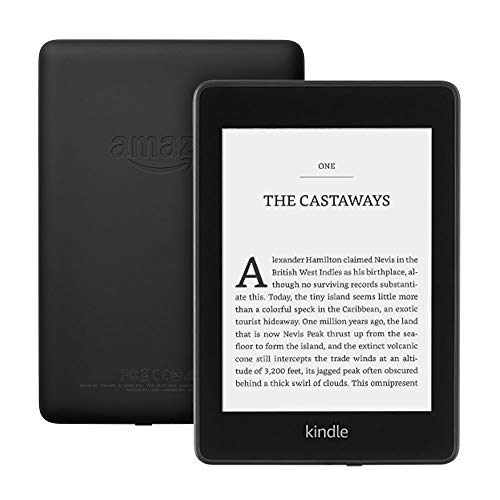
Amazon Kindle Paperwhite 2013 Review | 68 Data compared

double-arrow
  • Avg. price in UK: ~£110
  • Avg. price in US: ~$120
  • Screen size: 6 inches
  • Battery life: 28 hours
  • Supported bookstore ecosystem: Amazon Ecosystem

Amazon Kindle Paperwhite 2013 review. Compare 68 technical specifications and user reviews to see how it ranks among ereaders and if it is worth buying.

5.4

Overall score

What it is: An overall evaluation of the eReader's quality, based on technical analyses and user reviews.

When it matters: When you need a quick reference to identify the best eReaders on the market.

Score components:

90.0%

5.0

Technical Score

10.0%

9.2

User score

Good
5.0

Technical Score

What it is: An assessment of the eReader's technical performance, covering key areas such as display quality, reading features, battery life, format support, ecosystem, and design.

When it matters: When you want to compare eReaders based on technical performance and available features.

Score components:

25.0%

5.9

Display

22.0%

6.1

Reading

18.0%

4.8

Battery

14.0%

2.5

Hardware

12.0%

4.6

Connectivity

9.0%

4.7

Design

Good
9.2

User score

What it is: A rating that combines user reviews and the total number of reviews received by the eReader.

When it matters: When you want to know how an eReader feels in daily reading and how reliable it is for screen comfort, battery life, and library management according to user feedback.

Score components:

70.0%

8.8

User reviews

30.0%

10

Popularity

User score:
United States
Amazon_logo.png
4.4
(3179)

(Reviews last updated: April 2026)

Exceptional
    • No image
    No image

    Best prices in UK

      N/A~ £110

    Best rankings

    ?

    Available: ranking among products currently available (including other versions of this product).
    All: ranking among all products in the database.

    Verdict

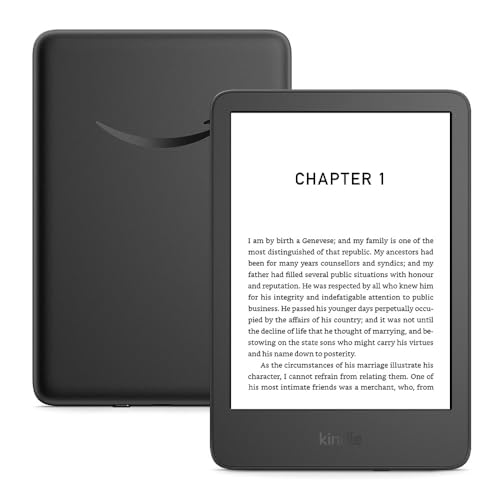
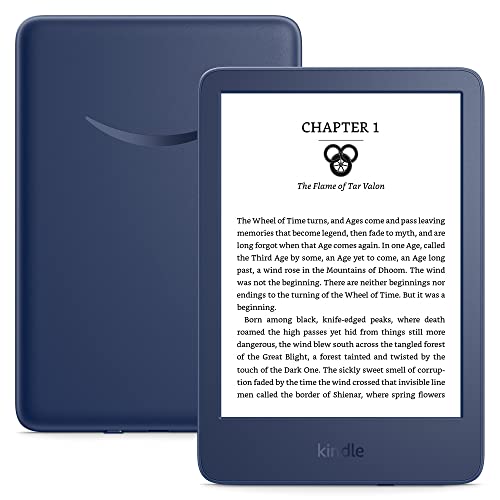
    The 2013 Amazon Kindle Paperwhite (2nd Generation) features a 6-inch E Ink Carta display with a 212 ppi resolution (1024 x 758) and 16 levels of grey scale. It is powered by a 1GHz processor—25% faster than its predecessor—and includes 2GB of internal storage, a more responsive capacitive touchscreen, and a next-generation built-in front light for reading in all lighting conditions. Main pros include its lightweight 206g design, improved screen contrast with 'blacker' blacks, and a battery that lasts up to 8 weeks on a single charge. However, notable cons include the lack of an included AC power adapter, no physical page-turn buttons, and the absence of a microSD slot for expandable storage.

    Technical Specifications of eReader Amazon Kindle Paperwhite 2013

    Technical Score

    What it is: An assessment of the eReader's technical performance, covering key areas such as display quality, reading features, battery life, format support, ecosystem, and design.

    When it matters: When you want to compare eReaders based on technical performance and available features.

    Score components:

    25.0%

    5.9

    Display

    22.0%

    6.1

    Reading

    18.0%

    4.8

    Battery

    14.0%

    2.5

    Hardware

    12.0%

    4.6

    Connectivity

    9.0%

    4.7

    Design

    5.0
    Amazon Kindle Paperwhite 2013 has a technical score of 5.01 points, which is lower than that of 82% of products in this category.
    User score

    What it is: A rating that combines user reviews and the total number of reviews received by the eReader.

    When it matters: When you want to know how an eReader feels in daily reading and how reliable it is for screen comfort, battery life, and library management according to user feedback.

    Score components:

    70.0%

    8.8

    User reviews

    30.0%

    10

    Popularity

    User score:
    United States
    Amazon_logo.png
    4.4
    (3179)

    (Reviews last updated: April 2026)

    9.2
    Amazon Kindle Paperwhite 2013 has a user score of 9.16 points, which is higher than that of 84.4% of products in this category.
    Popularity
    What it is: An indicator based on the number of reviews received by the eReader.
    When it matters: When you prefer to choose an eReader reviewed and selected by many other buyers.
    10
    Amazon Kindle Paperwhite 2013 has a popularity of 10 points, which is higher than 70.5% of products in this category.
    Ratio quality/price

    What it is: An indicator that combines the eReader's overall rating with its cost.

    When it matters: When you are looking for an eReader with a good balance between reading comfort, features, and price.

    Score components:

    60.0%

    5.4

    Overall score

    40.0%

    9.9

    Price

    6.8
    Amazon Kindle Paperwhite 2013 has a quality-to-price ratio of 6.8 points, which is lower than 69.7% of products in this category.
    Brand name
    What it is: Identifies the company or ecosystem behind the device, which often shapes the store, software approach, and accessory support.
    When it matters: When you are choosing between Kindle, Kobo, Boox, PocketBook, or another ecosystem with different store access and software behavior.

    Importance: MEDIUM

    Amazon
    Screen size
    What it is: The diagonal measurement of the reading panel, usually given in inches.
    When it matters: When you are deciding between a small travel reader and a larger page that works better for PDFs, comics, or textbooks.

    Importance: HIGH

    Good value: >=7.8

    6 inches
    Amazon Kindle Paperwhite 2013 has a screen size of 6 inches which is smaller than 57.4% of eReaders on this spec and equal to 40.2% of eReaders.
    Screen resolution
    What it is: The total pixel grid shown on the panel, normally written as width by height.
    When it matters: When small fonts, diagrams, or dense page layouts need to stay readable without constant zooming.

    Importance: HIGH

    758x1024 px
    Amazon Kindle Paperwhite 2013 uses a screen resolution of 758x1024 px, which is less sharp than that of 67.2% of eReaders and the same as that of 14.8% of eReaders.
    Pixel density
    What it is: The number of pixels packed into each inch of the display, expressed in ppi.
    When it matters: When you want text edges to look cleaner and serif fonts to resemble print more closely.

    Importance: HIGH

    Good value: >=300

    212 ppi
    Amazon Kindle Paperwhite 2013 has a pixel density of 212 ppi which is lower than 59.8% of eReaders on this spec and equal to 12.3% of eReaders.
    E-paper display
    What it is: Uses an electrophoretic panel designed to mimic paper rather than a conventional backlit phone or tablet screen.
    When it matters: When you read for long stretches and want lower glare and less screen-like fatigue than on LCD or OLED devices.

    Importance: LOW

    yes
    Amazon Kindle Paperwhite 2013 uses an e-paper display. 97.6% of eReaders have an e-paper display.
    Show more
    Supported file types
    What it is: Lists which ebook, document, image, or audio formats the reader can open without conversion.
    When it matters: When your library comes from mixed sources instead of one locked bookstore.

    Importance: HIGH

    ?
    PDF reflow support
    What it is: Can rearrange PDF text into a more readable, screen-sized layout instead of forcing the original fixed page.
    When it matters: When you read A4 documents, articles, or manuals on a smaller eReader screen.

    Importance: HIGH

    no
    Amazon Kindle Paperwhite 2013 does not offer PDF reflow. 55.4% of eReaders support PDF reflow.
    Annotation support
    What it is: Allows highlighting, handwritten notes, typed comments, or markup directly inside supported files.
    When it matters: When you study, review academic papers, or want your notes to stay attached to the exact passage.

    Importance: HIGH

    yes
    Amazon Kindle Paperwhite 2013 offers annotation support. 100% of eReaders offer annotation support.
    Dictionary
    What it is: Provides built-in word lookup while you read.
    When it matters: When you read in another language or want quick definitions without leaving the page.

    Importance: MEDIUM

    yes
    Amazon Kindle Paperwhite 2013 includes a built-in dictionary. 99.2% of eReaders include a built-in dictionary.
    Text-to-speech
    What it is: Converts on-screen text into spoken audio using a synthetic voice.
    When it matters: When you want to keep following a book while resting your eyes, walking, or multitasking.

    Importance: MEDIUM

    no
    Amazon Kindle Paperwhite 2013 does not offer text-to-speech. 64.2% of eReaders include text-to-speech.
    Show more
    Battery life
    What it is: Estimates how long the device can keep running between charges under normal reading conditions.
    When it matters: When you travel, commute, or want to finish books for days without thinking about charging.

    Importance: HIGH

    Good value: >=30

    28 hours
    Amazon Kindle Paperwhite 2013 offers 28 hours of battery life which is longer than 63.8% of eReaders on this spec and equal to 2.5% of eReaders.
    Battery capacity
    What it is: The amount of energy the battery can store, commonly expressed in mAh.
    When it matters: When you want a rough hardware indicator of how much power reserve the device has.

    Importance: MEDIUM

    Good value: >=2000

    1,350 mAh
    Amazon Kindle Paperwhite 2013 has a battery capacity of 1,350 mAh which is lower than 70.8% of eReaders on this spec of eReaders.
    Charging time
    What it is: The approximate time needed to recharge the battery from low to full.
    When it matters: When you often top up shortly before leaving and need the reader ready again quickly.

    Importance: MEDIUM

    Good value: <=3

    4 hours
    Amazon Kindle Paperwhite 2013 takes 4 hours to charge which is slower than 82.7% of eReaders on this spec and equal to 11.5% of eReaders.
    with 5W power adapter; longer with a computer USB port
    Wireless charging
    What it is: Can recharge on a compatible charging pad without plugging in a cable.
    When it matters: When you prefer drop-and-charge convenience on a desk or bedside stand.

    Importance: LOW

    no
    Amazon Kindle Paperwhite 2013 does not offer wireless charging. 7.3% of eReaders offer wireless charging.
    Internal storage
    What it is: The built-in space available for books, notes, audiobooks, apps, and downloaded documents.
    When it matters: When you keep large libraries offline or store a lot of PDFs and audio locally.

    Importance: HIGH

    Good value: >=32

    2 GB
    Amazon Kindle Paperwhite 2013 offers 2 GB of internal storage which is less than 80.5% of eReaders on this spec and equal to 17.8% of eReaders.
    RAM capacity
    What it is: The amount of working memory used for page rendering, multitasking, and keeping content active in the background.
    When it matters: When you open heavy files, switch between books, or expect the interface to stay snappy.

    Importance: MEDIUM

    Good value: >=2

    0.256 GB
    Amazon Kindle Paperwhite 2013 offers 0.256 GB of RAM which is less than 73.1% of eReaders on this spec and equal to 15.1% of eReaders.
    CPU base clock speed
    What it is: The baseline operating frequency of the main processor under normal load.
    When it matters: When you compare readers for faster menu navigation, indexing, and handling of larger documents.

    Importance: MEDIUM

    1 x 1 GHz
    Amazon Kindle Paperwhite 2013 has a CPU base clock speed of 1x1 GHz, which is slower than that of 50.4% of eReaders and the same as that of 24% of eReaders.
    Operating system
    What it is: The software platform that drives the interface, reading apps, and deeper system capabilities.
    When it matters: When you care about app availability, customization, and how flexible the device can become beyond basic reading.

    Importance: HIGH

    Kindle OS
    Amazon Kindle Paperwhite 2013 runs Kindle OS, which is more advanced than that of 43.4% of eReaders and the same as that of 20.5% of eReaders.
    Memory card slot
    What it is: Accepts removable storage so the library can expand beyond the built-in capacity.
    When it matters: When your collection will outgrow internal storage or you move files between devices manually.

    Importance: MEDIUM

    no
    Amazon Kindle Paperwhite 2013 does not have a memory card slot. 43.1% of eReaders have a memory card slot.
    Show more
    Wi-Fi connectivity
    What it is: Connects the reader to wireless networks for book downloads, syncing, updates, and online services.
    When it matters: When you buy books directly on the device or keep your library synced without using a cable.

    Importance: HIGH

    yes
    Amazon Kindle Paperwhite 2013 connects over Wi-Fi. 93.5% of eReaders have Wi-Fi.
    Wi-Fi version
    What it is: Specifies which wireless networking standard is supported, such as Wi-Fi 4, 5, or 6.
    When it matters: When router compatibility, wireless stability, or faster transfers on newer home networks matter to you.

    Importance: LOW

    Wi-Fi 4 (802.11n)
    Amazon Kindle Paperwhite 2013 supports Wi-Fi Wi-Fi 4 (802.11n), which is newer than that of 10.7% of eReaders and the same as that of 46.7% of eReaders.
    Wi-Fi bands supported
    What it is: Shows whether the reader can use 2.4 GHz, 5 GHz, or both wireless bands.
    When it matters: When crowded apartment Wi-Fi or 5 GHz-only setups make band support matter at home or in the office.

    Importance: LOW

    2.4 GHz
    Amazon Kindle Paperwhite 2013 supports 2.4 GHz Wi-Fi bands, which is broader than that of 6.6% of eReaders and the same as that of 50% of eReaders.
    Bluetooth
    What it is: Provides short-range wireless pairing for headphones, speakers, keyboards, page turners, or other accessories.
    When it matters: When you listen to audiobooks, use a remote page turner, or want cable-free accessories around the house.

    Importance: MEDIUM

    no
    Amazon Kindle Paperwhite 2013 does not connect over Bluetooth. 60.2% of eReaders have Bluetooth.
    Bluetooth version
    What it is: Identifies the supported Bluetooth generation, which affects efficiency, codec support, and compatibility.
    When it matters: When you pair newer headphones and want a more stable, lower-power wireless connection.

    Importance: LOW

    Good value: >=5.0

    N/A
    Show more
    Weight
    What it is: The mass of the device, usually measured in grams.
    When it matters: When one-handed comfort matters and you do not want the reader to feel tiring during long sessions.

    Importance: HIGH

    Good value: <=200

    206 g
    Amazon Kindle Paperwhite 2013 weighs 206 g which is lighter than 54.1% of eReaders on this spec of eReaders.
    Thickness
    What it is: The depth of the body from front to back, usually measured in millimetres.
    When it matters: When grip comfort, sleeve fit, or how slim the reader feels in the hand matters to you.

    Importance: MEDIUM

    Good value: <=8

    9.1 mm
    Amazon Kindle Paperwhite 2013 is 9.1 mm thick which is thicker than 69.2% of eReaders on this spec and equal to 1.7% of eReaders.
    Height
    What it is: The vertical size of the body, usually measured from top to bottom in millimetres.
    When it matters: When you are checking whether the reader will fit a bag, jacket pocket, or small stand.

    Importance: LOW

    Good value: <=160

    169 mm
    Amazon Kindle Paperwhite 2013 is 169 mm tall which is shorter than 54.1% of eReaders on this spec and equal to 2.5% of eReaders.
    Width
    What it is: The side-to-side body measurement, usually given in millimetres.
    When it matters: When one-handed reach and how much space the reader takes in a bag or bedside setup matter.

    Importance: LOW

    Good value: <=130

    117 mm
    Amazon Kindle Paperwhite 2013 is 117 mm wide which is narrower than 69.7% of eReaders on this spec and equal to 3.3% of eReaders.
    Water resistance (splashproof)
    What it is: Can tolerate light splashes, damp hands, or brief accidental contact with water.
    When it matters: When you read by the bath, at the pool, or outdoors where light moisture is realistic.

    Importance: MEDIUM

    no
    Amazon Kindle Paperwhite 2013 does not have water resistance against splashes. 25% of eReaders have water resistance against splashes.
    Show more

    Amazon Kindle Paperwhite 2013 vs the average eReader

    • 7 hours longer battery life
      Amazon Kindle Paperwhite 2013 offers longer battery life than the average eReader (28 hours vs 21 hours). The average eReader offers 21 hours of battery life.
      What it is: Estimates how long the device can keep running between charges under normal reading conditions.
      When it matters: When you travel, commute, or want to finish books for days without thinking about charging.

      Importance: HIGH

      Good value: >=30

      Amazon Kindle Paperwhite 2013 offers longer battery life than the average eReader (28 hours vs 21 hours). The average eReader offers 21 hours of battery life.28 hours vs 21 hours
    • Has auto-brightness sensor
      Amazon Kindle Paperwhite 2013 has an auto-brightness sensor, while the average eReader does not.
      Ambient light sensor enables automatic brightness adjustments.
      What it is: Uses ambient light sensing to adjust the front light automatically as the room gets brighter or darker.
      When it matters: When you move between daylight and dark rooms and do not want to keep adjusting brightness by hand.

      Importance: MEDIUM

      Amazon Kindle Paperwhite 2013 has an auto-brightness sensor, while the average eReader does not.
    • 54.5% cheaper
      Amazon Kindle Paperwhite 2013 is cheaper than the average eReader (£110 vs £170).
      Amazon Kindle Paperwhite 2013 is cheaper than the average eReader (£110 vs £170).£110 vs £170
    • 14.5% higher user score
      Amazon Kindle Paperwhite 2013 has a higher user score than the average eReader (9.16 vs 8.000).
      What it is: A rating that combines user reviews and the total number of reviews received by the eReader.
      When it matters: When you want to know how an eReader feels in daily reading and how reliable it is for screen comfort, battery life, and library management according to user feedback.
      Amazon Kindle Paperwhite 2013 has a higher user score than the average eReader (9.16 vs 8.000).9.16 vs 8
    • 10.6 mm narrower
      Amazon Kindle Paperwhite 2013 is narrower than the average eReader (117 mm vs 127.6 mm). The average eReader width is 127.6 mm.
      What it is: The side-to-side body measurement, usually given in millimetres.
      When it matters: When one-handed reach and how much space the reader takes in a bag or bedside setup matter.

      Importance: LOW

      Good value: <=130

      Amazon Kindle Paperwhite 2013 is narrower than the average eReader (117 mm vs 127.6 mm). The average eReader width is 127.6 mm.117 mm vs 127.6 mm
    • Has auto-brightness sensor
      Amazon Kindle Paperwhite 2013 has an auto-brightness sensor, while the average eReader does not.
    • 7 hours longer battery life
      Amazon Kindle Paperwhite 2013 offers longer battery life than the average eReader (28 hours vs 21 hours). The average eReader offers 21 hours of battery life.
    • 10.6 mm narrower
      Amazon Kindle Paperwhite 2013 is narrower than the average eReader (117 mm vs 127.6 mm). The average eReader width is 127.6 mm.
    • No color temperature adjustment
      Amazon Kindle Paperwhite 2013 does not support color temperature adjustment, while the average eReader does.
    • Lower screen resolution
      Amazon Kindle Paperwhite 2013 supports lower screen resolution than the average eReader (758x1024 px vs 1072x1448 px). The average eReader supports 1072x1448 px screen resolution.
    • 1 inches smaller screen size
      Amazon Kindle Paperwhite 2013 has a smaller screen than the average eReader (6 inches vs 7 inches). The average eReader screen size is 7 inches.
    • Less advanced E-Ink technology
      Amazon Kindle Paperwhite 2013 uses Carta E-Ink technology, while the average eReader uses Carta Plus.
    • 20% lower pixel density
      Amazon Kindle Paperwhite 2013 has a lower pixel density than the average eReader (212 ppi vs 265 ppi). The average eReader has a pixel density of 265 ppi.
    • Limited DRM support
      Amazon Kindle Paperwhite 2013 supports fewer DRM schemes than the average eReader (Amazon's proprietary DRM vs Adobe DRM, Readium LCP).
    • No PDF reflow
      Amazon Kindle Paperwhite 2013 does not support PDF reflow, while the average eReader does.
    • Limited bookstore ecosystem
      Amazon Kindle Paperwhite 2013 uses the Amazon Ecosystem bookstore ecosystem, while the average eReader uses Android Open Ecosystem.
      Amazon Kindle Store ecosystem.
    • No audiobook playback
      Amazon Kindle Paperwhite 2013 does not support audiobook playback, while the average eReader does.
    • No text-to-speech
      Amazon Kindle Paperwhite 2013 does not support text-to-speech, while the average eReader does.
    • No folder support
      Amazon Kindle Paperwhite 2013 does not support folders, while the average eReader does.
      Uses "Collections" for organization, not traditional nested folders for content display on the device
    • 2 hours longer charging time
      Amazon Kindle Paperwhite 2013 charges more slowly than the average eReader (4 hours vs 2 hours). The average eReader charges in 2 hours.
      with 5W power adapter; longer with a computer USB port
    • 11.8% smaller battery capacity
      Amazon Kindle Paperwhite 2013 has a smaller battery than the average eReader (1,350 mAh vs 1,530 mAh). The average eReader battery has a capacity of 1,530 mAh.
    • 87.5% less storage
      Amazon Kindle Paperwhite 2013 offers less internal storage than the average eReader (2 GB vs 16 GB). The average eReader provides 16 GB of internal storage.
    • 0.26 GB less RAM
      Amazon Kindle Paperwhite 2013 has less RAM than the average eReader (0.3 GB vs 0.512 GB). The average eReader has 0.512 GB of RAM.
    • No USB Type-C
      Amazon Kindle Paperwhite 2013 does not have USB Type-C, while the average eReader does.
    • No Bluetooth
      Amazon Kindle Paperwhite 2013 does not have Bluetooth, while the average eReader does.
    • No Bluetooth audio
      Amazon Kindle Paperwhite 2013 does not support Bluetooth audio, while the average eReader does.
    • 8 year/s older release date
      Amazon Kindle Paperwhite 2013 is older than the average eReader (2013 vs 2021). The average eReader was released in 2021.
      September 2013
    • 1 mm thicker
      Amazon Kindle Paperwhite 2013 is thicker than the average eReader (9.1 mm vs 8.1 mm). The average eReader thickness is 8.1 mm.
    • Limited DRM support
      Amazon Kindle Paperwhite 2013 supports fewer DRM schemes than the average eReader (Amazon's proprietary DRM vs Adobe DRM, Readium LCP).
      What it is: Shows which copy-protection systems the device can open, such as Adobe DRM or store-specific protection.
      When it matters: When you buy or borrow books from multiple stores and need them all to open on one reader.

      Importance: HIGH

      Amazon Kindle Paperwhite 2013 supports fewer DRM schemes than the average eReader (Amazon's proprietary DRM vs Adobe DRM, Readium LCP).Amazon's proprietary DRM vs Adobe DRM, Readium LCP
    • No PDF reflow
      Amazon Kindle Paperwhite 2013 does not support PDF reflow, while the average eReader does.
      What it is: Can rearrange PDF text into a more readable, screen-sized layout instead of forcing the original fixed page.
      When it matters: When you read A4 documents, articles, or manuals on a smaller eReader screen.

      Importance: HIGH

      Amazon Kindle Paperwhite 2013 does not support PDF reflow, while the average eReader does.
    • 2 hours longer charging time
      Amazon Kindle Paperwhite 2013 charges more slowly than the average eReader (4 hours vs 2 hours). The average eReader charges in 2 hours.
      with 5W power adapter; longer with a computer USB port
      What it is: The approximate time needed to recharge the battery from low to full.
      When it matters: When you often top up shortly before leaving and need the reader ready again quickly.

      Importance: MEDIUM

      Good value: <=3

      Amazon Kindle Paperwhite 2013 charges more slowly than the average eReader (4 hours vs 2 hours). The average eReader charges in 2 hours.4 hours vs 2 hours
    • No USB Type-C
      Amazon Kindle Paperwhite 2013 does not have USB Type-C, while the average eReader does.
      What it is: Uses the reversible USB-C connector for charging and, on some models, wired data transfer.
      When it matters: When you want one shared cable standard for your reader, phone, and other travel gear.

      Importance: MEDIUM

      Amazon Kindle Paperwhite 2013 does not have USB Type-C, while the average eReader does.
    • No Bluetooth audio
      Amazon Kindle Paperwhite 2013 does not support Bluetooth audio, while the average eReader does.
      What it is: Confirms that Bluetooth can be used specifically for wireless audio output, not just for generic accessories.
      When it matters: When you plan to pair earbuds or a speaker for audiobooks or text-to-speech playback.

      Importance: MEDIUM

      Amazon Kindle Paperwhite 2013 does not support Bluetooth audio, while the average eReader does.
    • Limited bookstore ecosystem
      Amazon Kindle Paperwhite 2013 uses the Amazon Ecosystem bookstore ecosystem, while the average eReader uses Android Open Ecosystem.
      Amazon Kindle Store ecosystem.
      What it is: Shows which built-in store or content platform the device is tied to for buying or downloading books.
      When it matters: When store selection, regional catalog access, or ecosystem lock-in will shape what you can read most easily.

      Importance: HIGH

      Amazon Kindle Paperwhite 2013 uses the Amazon Ecosystem bookstore ecosystem, while the average eReader uses Android Open Ecosystem.Amazon Ecosystem vs Android Open Ecosystem
    • No Bluetooth
      Amazon Kindle Paperwhite 2013 does not have Bluetooth, while the average eReader does.
      What it is: Provides short-range wireless pairing for headphones, speakers, keyboards, page turners, or other accessories.
      When it matters: When you listen to audiobooks, use a remote page turner, or want cable-free accessories around the house.

      Importance: MEDIUM

      Amazon Kindle Paperwhite 2013 does not have Bluetooth, while the average eReader does.
    • No color temperature adjustment
      Amazon Kindle Paperwhite 2013 does not support color temperature adjustment, while the average eReader does.
      What it is: Lets the front light shift between cooler and warmer tones instead of using one fixed white light.
      When it matters: When you read late at night and want a warmer page tone that feels gentler on your eyes.

      Importance: MEDIUM

      Amazon Kindle Paperwhite 2013 does not support color temperature adjustment, while the average eReader does.

    Graphic comparison of Amazon Kindle Paperwhite 2013 and other eReaders

    Attribute category
    Attribute
    No results found

    Third-party reviews

    United States

    (Reviews last updated: April 2026)

    What customers like about Amazon Kindle Paperwhite 2013?

    • Improved edge lighting that is brighter, whiter, and more evenly distributed compared to the original model
    • Faster 1 GHz processor leads to snappier page turns, quicker book loading, and smoother menu navigation
    • Higher contrast E Ink display with 'blacker blacks' and a whiter background for better readability
    • Reduced screen refresh frequency (fewer black flashes) through an improved refresh algorithm
    • Exceptional battery life lasting up to 8 weeks on a single charge with intermittent use
    • Robust content ecosystem with seamless integration into the Amazon Kindle Store and cloud storage
    • Introduction of useful software features like 'Page Flip' for easier scanning and 'Vocabulary Builder'

    Expert reviews

    C
    cnet.com
    27/09/2013
    Summary of the review
    F
    forbes.com
    22/12/2013
    Summary of the review
    L
    laptopmag.com
    05/11/2013
    Summary of the review
    W
    wired.com
    09/10/2013
    Summary of the review
    I
    ibtimes.co.uk
    04/12/2013
    Summary of the review
    E
    engadget.com
    30/09/2013
    Summary of the review
    T
    theverge.com
    07/10/2013
    Summary of the review
    U
    uk.pcmag.com
    25/09/2013
    Summary of the review
    N
    newatlas.com
    09/04/2014
    Summary of the review
    T
    techadvisor.com
    12/03/2014
    Summary of the review
    P
    pocket-lint.com
    17/12/2013
    Summary of the review
    S
    stuff.tv
    17/12/2013
    Summary of the review
    T
    t3.com
    25/10/2013
    Summary of the review
    G
    gizmodo.com
    09/10/2013
    Summary of the review
    W
    wasgehtapp.com
    23/11/2013
    Summary of the review
    A
    allesebook.de
    24/07/2026
    Summary of the review
    L
    literaturcafe.de
    16/10/2013
    Summary of the review
    C
    chip.de
    11/10/2013
    Summary of the review
    0
    01net.com
    15/02/2013
    Summary of the review
    P
    presse-citron.net
    03/11/2013
    Summary of the review
    0
    01net.com
    23/10/2013
    Summary of the review
    L
    lesnumeriques.com
    08/11/2013
    Summary of the review
    M
    mercipourlechocolat.fr
    30/10/2013
    Summary of the review
    G
    generation-nt.com
    15/04/2013
    Summary of the review
    L
    liseuses.net
    04/09/2013
    Summary of the review
    M
    microsiervos.com
    27 de noviembre de 2013
    Summary of the review
    X
    xataka.com
    26/12/2013
    Summary of the review
    C
    cnnespanol.cnn.com
    07/10/2013
    Summary of the review
    B
    boekwijs.nl
    15/08/2025
    Summary of the review
    T
    tweakers.net
    17/02/2013
    Summary of the review
    E
    ereaders.nl
    22/03/2013
    Summary of the review

    Video reviews

    Compare Amazon Kindle Paperwhite 2013 with other eReaders

    VS
    VS

    Compare