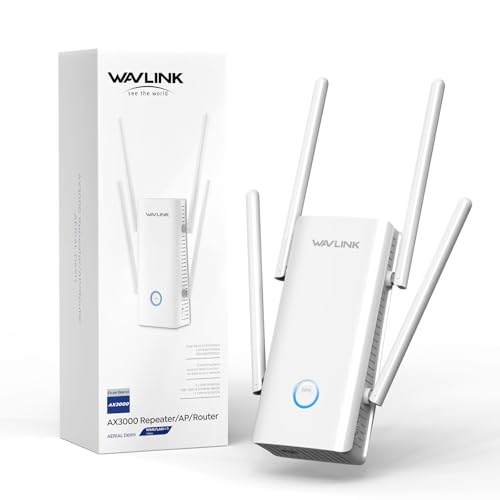

What makes an outdoor Wi-Fi extender suitable for outdoor use?
The features that make an outdoor Wi-Fi extender suitable for outdoor use are as follows:
- Weather-ready housing: Outdoor models need sealed enclosures that can cope with rain, dust, humidity, and sun better than ordinary indoor repeater shells. Ratings such as IP55, IP56, IP67, or IP68 matter because they show how much exposure the unit is built to survive.
- Flexible mounting: Pole-mount and wall-mount support matter because outdoor coverage often depends on getting the unit above fences, garden clutter, or building edges.
- Stable long-distance radio design: Better outdoor units rely on stronger antenna gain, cleaner positioning, and dual-band or higher-class radios rather than only on marketing speed claims.
- Practical wired support: Ethernet and ideally PoE support make outdoor installs much cleaner because power and data can run to the same mounting point.
- Outdoor operating tolerance: Outdoor units need to stay reliable through wider temperature swings than indoor extenders. A model that can handle roughly -20 to 60 °C is in a very different class from one that is only comfortable in mild indoor-style conditions.
How weather-resistant are outdoor Wi-Fi extenders?
Outdoor Wi-Fi extenders are usually weather-resistant rather than fully waterproof, so the exact protection level matters.
Some are built mainly for rain, dust, and normal exterior exposure, while others are sealed more aggressively for harsher open-air conditions. That difference matters because a lightly protected wall-mount unit is not the same thing as a more heavily sealed product built for stronger rain, spray, or dirt ingress.
If the install point is very exposed, the rating matters more than the word outdoor on the box. For a sheltered patio or yard wall, lighter protection may be enough, but for open mounting points the safer choice is a more purpose-built enclosure.
How should you place an outdoor Wi-Fi extender for the best coverage?
The best place for an outdoor Wi-Fi extender is usually a high, open position that still keeps a strong link back to the main network.
In practice, that usually means an exterior wall or pole where the unit is above fences, garden clutter, parked vehicles, and other low obstacles. Avoid hiding it behind thick masonry, metal siding, roof edges, dense foliage, or corners that force the signal through multiple barriers.
Placement also depends on the backhaul method. If the unit can use Ethernet or PoE, it becomes much easier to mount it where coverage is best instead of where indoor power happens to be available.

How much do outdoor Wi-Fi extenders cost?
Outdoor Wi-Fi extenders usually cost between £55 and £180, and many serious models sit around £85 to £170.
They cost more than indoor extenders because you are paying for weather-ready hardware, mounting flexibility, PoE support, and stronger enclosures. At the low end, you may still get outdoor use, but often with slower hardware or fewer setup options. Spend more, and you usually move into better Ethernet, stronger radios, and hardware that is more convincing for a garden office, workshop, yard, or detached building. If the coverage problem can be solved from indoors, that extra cost is often unnecessary.
The following chart shows outdoor Wi-Fi extender prices.
[vertical-chart-18023027912897831767007880904706623676560069808434]
How fast are outdoor Wi-Fi extenders in real use?
Outdoor Wi-Fi extenders usually sit in roughly the 867 to 2976 Mbps class, but in real use they are more often delivering something like 50-300 Mbps unless the backhaul is especially strong. That is usually enough for cameras, garden coverage, detached-workspace internet, and ordinary outdoor device use.
The key difference is not the printed class alone, but whether the outdoor unit keeps a clean link back to the main network. A weather-ready model with good placement or Ethernet backhaul can feel much faster and steadier than a nominally faster unit that is still fighting a weak wireless uplink.
The following chart compares outdoor Wi-Fi extender speed classes.
[vertical-chart-09205294173817892537026275869219243970031981404959]
What compatibility should you check on an outdoor Wi-Fi extender?
The compatibility checks that matter most on an outdoor Wi-Fi extender are as follows:
- Power and PoE method: Check whether the unit uses 802.3at PoE, passive proprietary PoE, or no PoE at all. Outdoor placement gets much easier when power and data can run through one cable.
- Operating mode support: Make sure the unit can work in the mode you actually need, such as repeater, access point, bridge, client bridge, or mesh-style linking.
- Ethernet and backhaul support: Check the Ethernet port count and speed, and whether the unit can use wired backhaul. That matters if the outdoor unit also needs to feed cameras, switches, or another building.
- Wi-Fi band and standard support: Match the unit to the network you already use, especially if you need dual-band coverage, Wi-Fi 6, or better 5 GHz capacity.
- Security and management fit: Confirm that the security protocols and management style match the rest of your network.
- Mounting and climate limits: Check pole-mount or wall-mount support, cable routing, and the operating temperature range before you buy. Outdoor compatibility is also physical and electrical, not only wireless.






