Razer OSVR HDK2 Review | 89 Data compared

double-arrow
  • Avg. price in UK: ~£440
  • Avg. price in US: ~$400
  • Weight: 650 g
  • Resolution: 1080x1200
  • Refresh rate: 90 Hz
  • Display type: OLED
  • Device type: PC VR

Razer OSVR HDK2 review. Compare 89 technical specifications and user reviews to see how it ranks among VR headsets and if it is worth buying.

5.2

Overall score

What it is: An overall evaluation of the VR headset's quality, based on technical analyses and user reviews.

When it matters: When you need a quick reference to identify the best VR headsets on the market.

Score components:

80.0%

5.2

Technical Score

20.0%

5.1

User score

Good
5.2

Technical Score

What it is: An assessment of the VR headset's technical performance, covering eight key areas: display quality, tracking, comfort, controllers, connectivity, audio, battery, and design.

When it matters: When you want to compare VR headsets based on technical performance and available features.

Score components:

58.0%

5.4

Display & Optics

22.0%

5.5

Tracking & Sensors

10.0%

3.7

Controls & Audio

4.0%

4.0

Hardware

3.0%

5.5

Connectivity

3.0%

5.7

Design & Power

Good
5.1

User score

What it is: A rating that combines user reviews and the total number of reviews received by the VR headset.

When it matters: When you want to know how a VR headset performs in real use and how reliable it remains over time according to user feedback.

Score components:

70.0%

6.2

User reviews

30.0%

2.5

Popularity

User score:
United Kingdom
amazon
3.1
(26)

(Reviews last updated: July 2026)

Good
  • 4.8
    Gaming

    Score components:

    40.0%

    5.5

    Refresh rate

    35.0%

    4.0

    Touch controllers

    25.0%

    4.7

    Resolution

  • 5.8
    Movies

    Score components:

    40.0%

    4.7

    Resolution

    35.0%

    8.8

    Display type

    25.0%

    3.3

    Visible FoV (horizontal)

  • razer-osvr-hdk2
razer-osvr-hdk2

Best prices in UK

Best rankings

?

Available: ranking among products currently available (including other versions of this product).
All: ranking among all products in the database.

Verdict

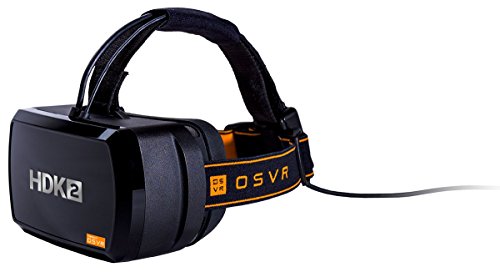
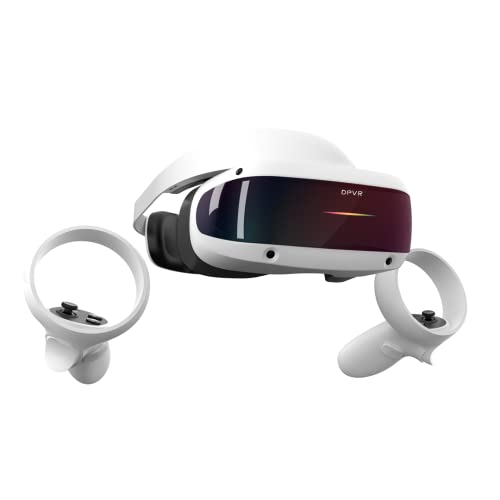
The Razer OSVR HDK2 is a PC-powered Hacker Development Kit featuring a dual-OLED display with a combined resolution of 2160x1200 (1080x1200 per eye), a 90Hz refresh rate, and a 110-degree field of view. Its main characteristics include an open-source modular design, individual diopter adjustments for each eye, and 'Image Quality Enhancer' technology to reduce the screen door effect. The headset's primary pros are its affordable price point compared to contemporary rivals, compatibility with SteamVR, and high pixel density (441 PPI) using a full RGB sub-pixel arrangement. However, common cons include inconsistent IR-based positional tracking that lacks room-scale capability, a heavy and less ergonomic build, and a demanding setup process tailored more for technical enthusiasts than casual consumers.

Technical Specifications of Razer OSVR HDK2

Technical Score

What it is: An assessment of the VR headset's technical performance, covering eight key areas: display quality, tracking, comfort, controllers, connectivity, audio, battery, and design.

When it matters: When you want to compare VR headsets based on technical performance and available features.

Score components:

58.0%

5.4

Display & Optics

22.0%

5.5

Tracking & Sensors

10.0%

3.7

Controls & Audio

4.0%

4.0

Hardware

3.0%

5.5

Connectivity

3.0%

5.7

Design & Power

5.2
Razer OSVR HDK2 has a technical score of 5.2 points, which is lower than 75.5% of VR headsets.
User score

What it is: A rating that combines user reviews and the total number of reviews received by the VR headset.

When it matters: When you want to know how a VR headset performs in real use and how reliable it remains over time according to user feedback.

Score components:

70.0%

6.2

User reviews

30.0%

2.5

Popularity

User score:
United Kingdom
amazon
3.1
(26)

(Reviews last updated: July 2026)

5.1
Razer OSVR HDK2 has a user score of 5.1 points, which is lower than 95.9% of VR headsets.
Popularity
What it is: An indicator based on the number of reviews received by the VR headset.
When it matters: When you prefer to buy a product chosen and reviewed by many other consumers.
2.5
Razer OSVR HDK2 has a popularity of 2.5 points, which is lower than 55.1% of products in this category.
Ratio quality/price

What it is: An indicator that combines the VR headset's overall rating with its cost.

When it matters: When you are looking for a VR headset with a good balance between quality and price.

Score components:

60.0%

5.2

Overall score

40.0%

8.2

Price

6.1
Razer OSVR HDK2 has a quality-to-price ratio of 6.1 points, which is lower than 79.6% of products in this category.
Resolution
What it is: The total number of pixels displayed on the screen, expressed as width x height, determining sharpness.
When it matters: When you want crisp text and sharp details in photos and videos.

Importance: HIGH

1080x1200
Razer OSVR HDK2 has a screen resolution of 1080x1200 which is lower than that of 87.2% of VR headsets and equal to that of 7.7% of VR headsets.
Screen size
What it is: The physical diagonal measurement of the display area, usually expressed in inches.
When it matters: When you want a larger image area that can feel more immersive in games, movies, and VR apps.

Importance: LOW

5.5 inches
Refresh rate
What it is: The number of times per second the display updates the image, measured in Hertz (Hz); higher rates offer smoother motion.
When it matters: When you want scrolling to feel fluid and games to look smoother.

Importance: HIGH

Good value: >100 Hz

90 Hz
Razer OSVR HDK2 supports a refresh rate of 90 Hz which is higher than in 20.5% of VR headsets and equal to that in 51.3% of VR headsets.
Visible FoV (horizontal)
What it is: Measures the visible horizontal field of view of the image, expressed in degrees.
When it matters: When you want a wider left-to-right view for racing, shooters, and room-scale immersion.

Importance: HIGH

Good value: >105 °

92 °
Razer OSVR HDK2 offers a horizontal FoV of 92 ° which is narrower than that of 86.1% of VR headsets.
Visible FoV (vertical)
What it is: Measures the visible vertical field of view of the image, expressed in degrees.
When it matters: When a taller visible image helps scenes feel less cropped above and below your view.

Importance: HIGH

Good value: >97 °

92 °
Razer OSVR HDK2 offers a vertical FoV of 92 ° which is narrower than that of 71.4% of VR headsets and equal to that of 2.9% of VR headsets.
Show more
Tracking type
What it is: Specifies the tracking method used for positional detection, such as inside-out or outside-in.
When it matters: When you want to know whether tracking depends on onboard cameras or external hardware.

Importance: LOW

outside-in
360° head tracking
What it is: Shows whether the headset can track head movement across a full 360-degree space.
When it matters: When you turn around often in room-scale games and do not want tracking blind spots.

Importance: MEDIUM

yes
Razer OSVR HDK2 supports full 360° head tracking. 2% of VR headsets support this tracking mode.
N. of tracking sensors
What it is: Counts the integrated sensors used for positional or motion tracking.
When it matters: When you compare how much built-in hardware the headset uses for motion tracking.

Importance: LOW

?
N. of cameras
What it is: Counts the built-in cameras used for tracking, passthrough, or environmental sensing.
When it matters: When passthrough quality, room mapping, and inside-out tracking matter to your setup.

Importance: MEDIUM

Good value: >4

0
Razer OSVR HDK2 has 0 cameras which is fewer than in 64.6% of VR headsets and equal to that in 35.4% of VR headsets.
Tracking frequency
What it is: Indicates how often the tracking system updates position data, measured in hertz.
When it matters: When you want fast motion tracking to stay stable during quick head or hand movement.

Importance: LOW

Good value: >700 Hz

400 Hz
Razer OSVR HDK2 has a tracking frequency of 400 Hz which is lower than that of 83.3% of VR headsets.
Show more
Operating system
What it is: The primary system software that manages the headset's hardware, apps, and core functions.
When it matters: When you have a preference for the user interface and app ecosystem.

Importance: LOW

Windows/Linux/macOS/Android
OpenXR support
What it is: Indicates whether the headset supports the OpenXR standard for compatible VR software.
When it matters: When you want broader compatibility with VR apps across different software platforms.

Importance: LOW

?
Wireless PC streaming
What it is: Shows whether the headset can receive PC VR content over a wireless connection.
When it matters: When you want PC VR without a cable running from the headset to your computer.

Importance: LOW

no
Razer OSVR HDK2 does not support wireless PC streaming. 38.8% of VR headsets support cable-free PC VR streaming.
Wi-Fi connectivity
What it is: The ability of the headset to connect to a wireless network.
When it matters: When you want wireless downloads, streaming, updates, or online features without relying on a cable.

Importance: LOW

no
Razer OSVR HDK2 does not have Wi-Fi. 38.8% of VR headsets have Wi-Fi connectivity.
Wi-Fi version
What it is: Version of Wi-Fi standard supported.
When it matters: When compatibility with your router and wireless setup affects download speeds, streaming quality, or latency.

Importance: LOW

N/A
Show more
Touch controllers
What it is: Shows whether dedicated motion controllers are included for hand-based input in VR.
When it matters: When your favorite games rely on precise hand input rather than hand tracking alone.

Importance: MEDIUM

no
Razer OSVR HDK2 does not include touch controllers. 73.5% of VR headsets come with dedicated hand controllers.
Game controller included
What it is: Indicates whether game controllers are included in the standard package.
When it matters: When you want a complete VR package and do not want to buy controllers separately.

Importance: LOW

no
Razer OSVR HDK2 does not include a game controller. 65.3% of VR headsets ship with controllers in the box.
Spatial audio
What it is: Supports immersive spatial audio playback.
When it matters: When movies, games, and VR experiences feel better with more immersive positional sound.

Importance: LOW

no
Razer OSVR HDK2 does not support spatial audio. 91.5% of VR headsets support spatial audio.
N. of speakers
What it is: Counts the built-in speakers used for audio playback.
When it matters: When you plan to use the headset without separate headphones or external speakers.

Importance: LOW

0
Razer OSVR HDK2 has 0 speakers which is fewer than in 63% of VR headsets and equal to that in 37% of VR headsets.
N. of microphones
What it is: The number of microphones built into the headset or its integrated hardware.
When it matters: When voice chat, voice commands, or in-headset recording quality matter to your setup.

Importance: LOW

0
Razer OSVR HDK2 includes 0 microphones, which is fewer than 74.4% of VR headsets and equal to 25.6% of VR headsets.
Show more
Device type
What it is: Describes the overall headset class, such as standalone, PC VR, or mixed reality.
When it matters: When you choose between a standalone headset, a PC VR model, or mixed-reality use.

Importance: LOW

PC VR
Chipset
What it is: The central System-on-Chip (SoC) that houses the CPU, GPU, modem, and other core processing components.
When it matters: When you want to know which processor powers the headset’s performance and supported features.

Importance: LOW

N/A
CPU clock speed
What it is: Indicates the base operating frequency of the main processor, measured in gigahertz.
When it matters: When you compare standalone headset speed for games, menus, and mixed-reality apps.

Importance: LOW

Good value: >3 GHz

N/A
GPU model
What it is: The official model name of the graphics processor used in the VR headset.
When it matters: When you compare graphics hardware for gaming, video editing, or benchmarks.

Importance: LOW

N/A
RAM capacity
What it is: States the installed RAM capacity used for system operation and multitasking.
When it matters: When you want smoother multitasking and better headroom for demanding VR apps.

Importance: LOW

Good value: >8 GB

N/A
Show more
Battery capacity
What it is: The amount of electric charge the battery can store, usually measured in mAh.
When it matters: When you want longer untethered play time without recharging the headset too often.

Importance: LOW

Good value: >4900 mAh

N/A
Charging time
What it is: Time required for a full charge.
When it matters: When charging speed, charging method, or battery upkeep convenience matters to your routine.

Importance: LOW

Good value: <2.5 hours

N/A
Weight
What it is: The total weight of the headset, affecting how heavy it feels during use.
When it matters: When you want a headset that feels lighter and more comfortable during longer VR sessions.

Importance: LOW

Good value: <500 g

650 g
Razer OSVR HDK2 weighs 650 g which is heavier than 73.3% of VR headsets.
Headstrap type
What it is: Identifies the design of the headstrap used to secure the headset on the user's head.
When it matters: When comfort, balance, and pressure distribution matter during long VR sessions.

Importance: LOW

elastic strap
Razer OSVR HDK2 uses a elastic strap headstrap, which is less comfortable than the design on 61.2%.
Body material
What it is: The main material used for the headset body or housing.
When it matters: When you care about how sturdy, premium, or lightweight the headset feels over time.

Importance: LOW

plastic
Show more

Razer OSVR HDK2 vs the average VR headset

  • Adjustable diopter
    Razer OSVR HDK2 supports adjustable diopter, the average VR headset does not. 20% of VR headsets offer built-in diopter adjustment.
    What it is: Shows whether the headset allows optical diopter correction without external glasses.
    When it matters: When you want to fine-tune focus without always relying on glasses inserts.

    Importance: LOW

    Razer OSVR HDK2 supports adjustable diopter, the average VR headset does not. 20% of VR headsets offer built-in diopter adjustment.
  • Better lens type
    Razer OSVR HDK2 uses aspheric lenses, while the average VR headset uses fresnel lenses.
    What it is: Identifies the optical lens design used by the headset, such as Fresnel or pancake.
    When it matters: When you compare edge clarity, glare behavior, and headset thickness across optical designs.

    Importance: MEDIUM

    Razer OSVR HDK2 uses aspheric lenses, while the average VR headset uses fresnel lenses.aspheric vs fresnel
  • Includes compass
    Razer OSVR HDK2 features a compass, the average VR headset does not. 35.6% of VR headsets include a compass sensor.
    What it is: A digital magnetometer that helps the headset determine its orientation relative to magnetic north.
    When it matters: When headset orientation contributes to tracking, navigation, or mixed-reality experiences.

    Importance: LOW

    Razer OSVR HDK2 features a compass, the average VR headset does not. 35.6% of VR headsets include a compass sensor.
  • 1 more HDMI ports
    Razer OSVR HDK2 has more HDMI ports than the average VR headset (1 vs 0). The average VR headset has 0 HDMI ports.
    What it is: Counts the HDMI ports available for video input or connection to external hardware.
    When it matters: When you need direct HDMI input for external devices instead of relying only on wireless links.

    Importance: LOW

    Good value: >0

    Razer OSVR HDK2 has more HDMI ports than the average VR headset (1 vs 0). The average VR headset has 0 HDMI ports.1 vs 0
  • Compatible with Android
    Razer OSVR HDK2 is compatible with Android, the average VR headset is not. 50% of VR headsets support Android pairing or companion apps.
    What it is: Shows whether the headset can work with Android phones or tablets for setup, companion apps, or content.
    When it matters: When you want the headset to pair cleanly with Android phones for apps or setup.

    Importance: LOW

    Razer OSVR HDK2 is compatible with Android, the average VR headset is not. 50% of VR headsets support Android pairing or companion apps.
  • 25 mm thinner
    Razer OSVR HDK2 is thinner than the average VR headset (80 mm vs 105 mm). The average VR headset has a thickness of 105 mm.
    What it is: The front-to-back depth of the headset body.
    When it matters: When you want a headset with a slimmer profile that feels less bulky on your face.

    Importance: LOW

    Good value: <100 mm

    Razer OSVR HDK2 is thinner than the average VR headset (80 mm vs 105 mm). The average VR headset has a thickness of 105 mm.80 mm vs 105 mm
  • Adjustable diopter
    Razer OSVR HDK2 supports adjustable diopter, the average VR headset does not. 20% of VR headsets offer built-in diopter adjustment.
  • Better lens type
    Razer OSVR HDK2 uses aspheric lenses, while the average VR headset uses fresnel lenses.
  • Includes compass
    Razer OSVR HDK2 features a compass, the average VR headset does not. 35.6% of VR headsets include a compass sensor.
  • 1 more HDMI ports
    Razer OSVR HDK2 has more HDMI ports than the average VR headset (1 vs 0). The average VR headset has 0 HDMI ports.
  • Compatible with Android
    Razer OSVR HDK2 is compatible with Android, the average VR headset is not. 50% of VR headsets support Android pairing or companion apps.
  • 25 mm thinner
    Razer OSVR HDK2 is thinner than the average VR headset (80 mm vs 105 mm). The average VR headset has a thickness of 105 mm.
  • No adjustable IPD
    Razer OSVR HDK2 does not support adjustable IPD, the average VR headset does. 64% of VR headsets offer adjustable lens spacing.
  • Lower screen resolution
    Razer OSVR HDK2 has a lower screen resolution than the average VR headset (1080x1200 vs 1440x1600). The average VR headset has a screen resolution of 1440x1600.
  • Basic display type
    Razer OSVR HDK2 uses OLED for display type, while the average VR headset uses Micro-OLED.
  • 8 ° narrower horizontal FoV
    Razer OSVR HDK2 has a lower horizontal visible FoV than the average VR headset (92 ° vs 100 °). The average VR headset offers a horizontal visible FoV of 100 °.
  • 28.4% lower pixel density
    Razer OSVR HDK2 has a lower pixel density than the average VR headset (441 ppi vs 616 ppi). The average VR headset has a pixel density of 616 ppi.
  • 3.5 ° narrower vertical FoV
    Razer OSVR HDK2 has a lower vertical visible FoV than the average VR headset (92 ° vs 95.5 °). The average VR headset offers a vertical visible FoV of 95.5 °.
  • 600 Hz lower tracking frequency
    Razer OSVR HDK2 has a lower tracking frequency than the average VR headset (400 Hz vs 1000 Hz). The average VR headset has a tracking frequency of 1000 Hz.
  • 2 fewer cameras
    Razer OSVR HDK2 has fewer cameras than the average VR headset (0 vs 2). The average VR headset has 2 cameras.
  • Lacks USB Type-C
    Razer OSVR HDK2 lacks a USB Type-C port, the average VR headset includes one. 58% of VR headsets use USB-C ports.
  • No touch controllers
    Razer OSVR HDK2 does not include touch controllers, the average VR headset does. 72% of VR headsets come with dedicated hand controllers.
  • No haptic feedback
    Razer OSVR HDK2 does not support haptic feedback, the average VR headset does. 63.3% of VR headsets offer haptics in the headset or controllers.
  • No spatial audio
    Razer OSVR HDK2 does not support spatial audio, the average VR headset does. 89.6% of VR headsets support spatial audio.
  • Fewer microphones
    Razer OSVR HDK2 includes fewer microphones than the average VR headset (0 vs 2). The average VR headset includes 2 microphones.
  • Fewer speakers
    Razer OSVR HDK2 has fewer speakers than the average VR headset (0 vs 2). The average VR headset has 2 speakers.
  • No game controller included
    Razer OSVR HDK2 does not include a game controller, the average VR headset does. 64% of VR headsets ship with controllers in the box.
  • Inferior headstrap type
    Razer OSVR HDK2 uses a elastic strap headstrap, while the average VR headset uses rigid halo.
  • 11.5% heavier
    Razer OSVR HDK2 is heavier than the average VR headset (650 g vs 583 g). The average VR headset weighs 583 g.
  • 2 older release date
    Razer OSVR HDK2 is older than the average VR headset (2016 vs 2018). The average VR headset was released in 2018.
  • No adjustable IPD
    Razer OSVR HDK2 does not support adjustable IPD, the average VR headset does. 64% of VR headsets offer adjustable lens spacing.
    What it is: Shows whether the lens spacing can be adjusted to match the distance between the user's pupils.
    When it matters: When more than one person uses the headset and needs the lenses aligned comfortably.

    Importance: HIGH

    Razer OSVR HDK2 does not support adjustable IPD, the average VR headset does. 64% of VR headsets offer adjustable lens spacing.
  • Lower screen resolution
    Razer OSVR HDK2 has a lower screen resolution than the average VR headset (1080x1200 vs 1440x1600). The average VR headset has a screen resolution of 1440x1600.
    What it is: The total number of pixels displayed on the screen, expressed as width x height, determining sharpness.
    When it matters: When you want crisp text and sharp details in photos and videos.

    Importance: HIGH

    Razer OSVR HDK2 has a lower screen resolution than the average VR headset (1080x1200 vs 1440x1600). The average VR headset has a screen resolution of 1440x1600.1080x1200 vs 1440x1600
  • Basic display type
    Razer OSVR HDK2 uses OLED for display type, while the average VR headset uses Micro-OLED.
    What it is: The type of display panel used in the headset, such as LCD, OLED, or micro-OLED.
    When it matters: When you compare panel technologies that affect contrast, brightness, motion clarity, and black levels.

    Importance: HIGH

    Razer OSVR HDK2 uses OLED for display type, while the average VR headset uses Micro-OLED.OLED vs Micro-OLED
  • 8 ° narrower horizontal FoV
    Razer OSVR HDK2 has a lower horizontal visible FoV than the average VR headset (92 ° vs 100 °). The average VR headset offers a horizontal visible FoV of 100 °.
    What it is: Measures the visible horizontal field of view of the image, expressed in degrees.
    When it matters: When you want a wider left-to-right view for racing, shooters, and room-scale immersion.

    Importance: HIGH

    Good value: >105 °

    Razer OSVR HDK2 has a lower horizontal visible FoV than the average VR headset (92 ° vs 100 °). The average VR headset offers a horizontal visible FoV of 100 °.92 ° vs 100 °
  • 28.4% lower pixel density
    Razer OSVR HDK2 has a lower pixel density than the average VR headset (441 ppi vs 616 ppi). The average VR headset has a pixel density of 616 ppi.
    What it is: The concentration of pixels on the display, measured in pixels per inch (PPI), affecting image clarity.
    When it matters: When you want the image to look perfectly smooth with no visible pixels.

    Importance: HIGH

    Good value: >850 ppi

    Razer OSVR HDK2 has a lower pixel density than the average VR headset (441 ppi vs 616 ppi). The average VR headset has a pixel density of 616 ppi.441 ppi vs 616 ppi
  • No touch controllers
    Razer OSVR HDK2 does not include touch controllers, the average VR headset does. 72% of VR headsets come with dedicated hand controllers.
    What it is: Shows whether dedicated motion controllers are included for hand-based input in VR.
    When it matters: When your favorite games rely on precise hand input rather than hand tracking alone.

    Importance: MEDIUM

    Razer OSVR HDK2 does not include touch controllers, the average VR headset does. 72% of VR headsets come with dedicated hand controllers.
  • No haptic feedback
    Razer OSVR HDK2 does not support haptic feedback, the average VR headset does. 63.3% of VR headsets offer haptics in the headset or controllers.
    What it is: Shows whether vibration-based haptic feedback is available in the controllers or headset.
    When it matters: When you want stronger physical feedback from hits, grabs, or rhythm cues in VR games.

    Importance: LOW

    Razer OSVR HDK2 does not support haptic feedback, the average VR headset does. 63.3% of VR headsets offer haptics in the headset or controllers.
  • 3.5 ° narrower vertical FoV
    Razer OSVR HDK2 has a lower vertical visible FoV than the average VR headset (92 ° vs 95.5 °). The average VR headset offers a vertical visible FoV of 95.5 °.
    What it is: Measures the visible vertical field of view of the image, expressed in degrees.
    When it matters: When a taller visible image helps scenes feel less cropped above and below your view.

    Importance: HIGH

    Good value: >97 °

    Razer OSVR HDK2 has a lower vertical visible FoV than the average VR headset (92 ° vs 95.5 °). The average VR headset offers a vertical visible FoV of 95.5 °.92 ° vs 95.5 °

Graphic comparison of Razer OSVR HDK2 and

Attribute category
Attribute
No results found

Third-party reviews

United Kingdom

(Reviews last updated: July 2026)

What customers like about Razer OSVR HDK2?

  • Significantly lower price point ($399) compared to contemporary competitors like Rift or Vive.
  • High-quality dual OLED displays with 2160x1200 resolution and 90Hz refresh rate.
  • No 'god-rays' (light streaks) due to custom-crafted dual-lens optics instead of Fresnel lenses.
  • Individual eye focal adjustments (diopters) that allow some users to use the device without glasses.
  • Open-source ecosystem (OSVR) that encourages hardware modding and multi-platform compatibility.

What customers dislike about Razer OSVR HDK2?

  • Unreliable IR-based positional tracking that frequently loses sight of the headset or suffers from jitter.
  • Difficult and technical setup process involving multiple drivers and potential software glitches.
  • Lack of standard motion controllers in the box, requiring users to find third-party solutions for a full VR experience.
  • Noticeable 'underwater' distortion effect at the edges of the lenses.
  • Cramped design that is uncomfortable for users who wear glasses despite the focal adjustments.
  • Lack of built-in audio output or input, requiring external headphones.

Expert reviews

T
tomshardware.com
02/07/2017
Summary of the review
C
cravingtech.com
26/06/2017
Summary of the review
V
vrbites.com
10/10/2016
Summary of the review
T
techradar.com
15/06/2016
Summary of the review
W
wareable.com
17/06/2016
Summary of the review
U
uploadvr.com
17/06/2016
Summary of the review
M
mixed.de
16/06/2019
Summary of the review
D
demonixis.net
14/07/2016
Summary of the review
R
realite-virtuelle.com
02/07/2016
Summary of the review
V
virtualreality123.nl
Geen exacte datum vermeld
Summary of the review
V
vrbites.com
10/10/2016
Summary of the review

Video reviews

Compare Razer OSVR HDK2 with

VS
VS

Compare