Wacom Intuos Pro Small Review | 66 Data compared

double-arrow
  • Avg. price in UK: ~£240
  • Avg. price in US: ~$220
  • Type: pen tablet
  • Active drawing area: 16000 mm²
  • Resolution: N/A
  • Pen pressure levels: 8192
  • Report rate: 200 RPS

Wacom Intuos Pro Small review. Compare 66 technical specifications and user reviews to see how it ranks among drawing tablets and if it is worth buying.

6.9

Overall score

What it is: An overall evaluation of the drawing tablet's quality, based on technical analyses and user reviews.

When it matters: When you need a quick reference to identify the best drawing tablets on the market.

Score components:

90.0%

6.6

Technical Score

10.0%

9.4

User score

Good
6.6

Technical Score

What it is: An assessment of the drawing tablet's technical performance, covering eight key areas: drawing accuracy, pen performance, pressure sensitivity, tilt support, display quality, connectivity, software support, and design.

When it matters: When you want to compare drawing tablets based on technical performance and available features.

Score components:

50.0%

8.7

Pen & Input

40.0%

3.9

Display & Color

4.0%

7.4

Form Factor

3.0%

7.1

Connectivity

3.0%

6.4

Controls & Extras

Good
9.4

User score

What it is: A rating that combines user reviews and the total number of reviews received by the drawing tablet.

When it matters: When you want to know how a drawing tablet performs in real use and how reliable it remains over time according to user feedback.

Score components:

70.0%

9.1

User reviews

30.0%

10

Popularity

User score:
United Kingdom
amazon
4.5
(2010)
amazon
4.6
(1086)
amazon
4.2
(197)
amazon
4.4
(113)
amazon
3.7
(43)
United States
Amazon_logo.png
4.6
(4037)
Amazon_logo.png
4.6
(711)
Amazon_logo.png
4.5
(231)
Amazon_logo.png
4.5
(203)
Amazon_logo.png
4.4
(113)
Amazon_logo.png
3.7
(43)

(Reviews last updated: July 2026)

Exceptional
  • 9.3
    Kids

    Score components:

    45.0%

    9.8

    Weight

    45.0%

    9.3

    Price

    10.0%

    6.9

    Counted score

  • wacom-intuos-pro-small
  • wacom-intuos-pro-small
  • wacom-intuos-pro-small
  • wacom-intuos-pro-small
  • wacom-intuos-pro-small
  • wacom-intuos-pro-small
  • wacom-intuos-pro-small
wacom-intuos-pro-small

Best prices in UK

Best rankings

?

Available: ranking among products currently available (including other versions of this product).
All: ranking among all products in the database.

Verdict

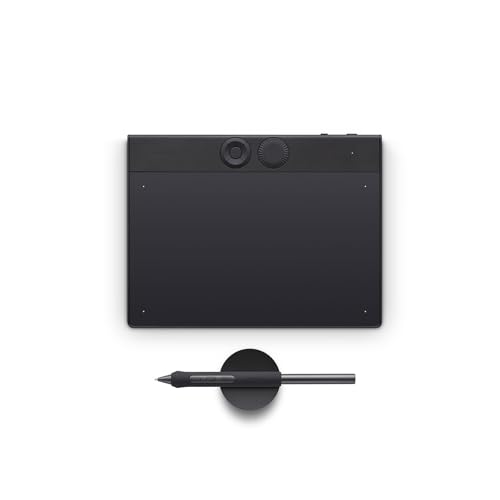
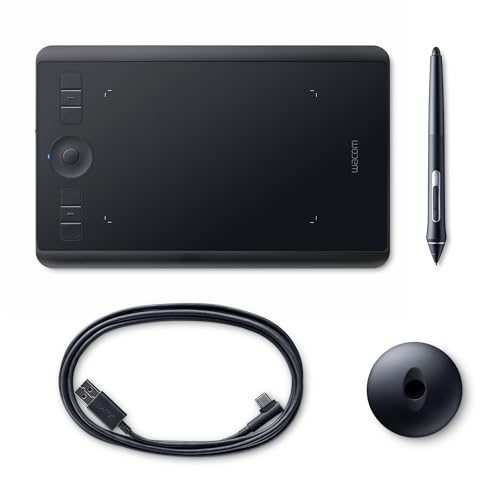
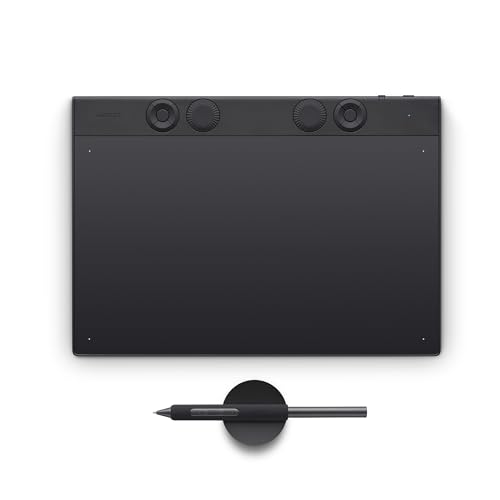
The Wacom Intuos Pro Small (PTH460K0A) is a professional-grade graphic tablet featuring 8,192 levels of pressure sensitivity, tilt recognition, and a compact 269 x 170 mm footprint with a 160 x 100 mm active area. Key advantages include its battery-free Pro Pen 2 for lag-free tracking, built-in Bluetooth connectivity, and customisable productivity tools like six ExpressKeys and a Touch Ring. While it offers superior build quality and portable design, notable drawbacks include its premium price point compared to entry-level models and the relatively high cost of replacement nibs due to the textured surface's abrasive nature.

Technical Specifications of Wacom Intuos Pro Small

Technical Score

What it is: An assessment of the drawing tablet's technical performance, covering eight key areas: drawing accuracy, pen performance, pressure sensitivity, tilt support, display quality, connectivity, software support, and design.

When it matters: When you want to compare drawing tablets based on technical performance and available features.

Score components:

50.0%

8.7

Pen & Input

40.0%

3.9

Display & Color

4.0%

7.4

Form Factor

3.0%

7.1

Connectivity

3.0%

6.4

Controls & Extras

6.6
Wacom Intuos Pro Small has a technical score of 6.61 points, which is lower than 51.6% of drawing tablets.
User score

What it is: A rating that combines user reviews and the total number of reviews received by the drawing tablet.

When it matters: When you want to know how a drawing tablet performs in real use and how reliable it remains over time according to user feedback.

Score components:

70.0%

9.1

User reviews

30.0%

10

Popularity

User score:
United Kingdom
amazon
4.5
(2010)
amazon
4.6
(1086)
amazon
4.2
(197)
amazon
4.4
(113)
amazon
3.7
(43)
United States
Amazon_logo.png
4.6
(4037)
Amazon_logo.png
4.6
(711)
Amazon_logo.png
4.5
(231)
Amazon_logo.png
4.5
(203)
Amazon_logo.png
4.4
(113)
Amazon_logo.png
3.7
(43)

(Reviews last updated: July 2026)

9.4
Wacom Intuos Pro Small has a user score of 9.38 points, which is higher than 95.9% of drawing tablets.
Popularity
What it is: An indicator based on the number of reviews received by the drawing tablet.
When it matters: When you prefer to buy a product chosen and reviewed by many other consumers.
10
Wacom Intuos Pro Small has a popularity of 10 points, which is higher than 66% of products in this category.
Ratio quality/price

What it is: An indicator that combines the drawing tablet's overall rating with its cost.

When it matters: When you are looking for a drawing tablet with a good balance between quality and price.

Score components:

60.0%

6.9

Overall score

40.0%

9.3

Price

7.6
Wacom Intuos Pro Small has a quality-to-price ratio of 7.6 points, which is higher than 53.6% of products in this category.
Type
What it is: Identifies whether the device is a screenless pen tablet or a pen display with its own built-in screen.
When it matters: When you are choosing between a screenless setup and direct on-screen drawing, because the device type changes how you position your hand, eyes, and workspace.

Importance: LOW

pen tablet
Display
What it is: Indicates whether the tablet itself includes an integrated screen instead of relying only on an external monitor.
When it matters: When you are deciding whether you want to draw directly on the tablet instead of looking at a separate monitor.

Importance: LOW

no
Wacom Intuos Pro Small does not have a display. 48.5% of drawing tablets have a display.
Compatibility
What it is: Shows which operating systems or platforms the tablet officially supports for drivers, software, and core input functions.
When it matters: When you need the tablet to work reliably with your current computer, phone, or creative software environment without driver problems.

Importance: LOW

Windows / macOS
Wireless capability
What it is: Indicates whether the tablet can operate without a constant wired connection to the host device.
When it matters: When you want a cleaner desk, easier repositioning, or more flexibility for mobile use without a permanent cable tether.

Importance: LOW

yes
Wacom Intuos Pro Small supports wireless use. This feature is present on 18% of drawing tablets.
Weight
What it is: Measures the total mass of the tablet, which affects portability, desk stability, and carrying comfort.
When it matters: When you move the tablet between rooms, carry it in a bag, or want it to feel stable without being cumbersome on the desk.

Importance: LOW

450 g
Wacom Intuos Pro Small weighs 450 g, lighter than 75.4% of drawing tablets and equal to 1.6% of drawing tablets.
Includes integrated stand.
Show more
Active drawing area
What it is: Represents the usable surface where pen input is detected for drawing, writing, or navigation.
When it matters: When you want enough working space for broad arm movements, long strokes, or detailed retouching without feeling cramped.

Importance: HIGH

16,000 mm²
Wacom Intuos Pro Small offers an active drawing area of 16000 mm², smaller than that of 87.8% of drawing tablets and equal to that of 2.1% of drawing tablets.
160 x 100 mm.
Screen size
What it is: Measures the diagonal size of the built-in display, usually in inches, for pen display models.
When it matters: When you work directly on a pen display and need enough room for menus, canvas space, and hand placement at the same time.

Importance: HIGH

N/A
Resolution
What it is: Shows the total number of display pixels available across the panel and defines image detail.
When it matters: When you want interface elements, brush edges, and artwork details to look clean on a built-in display.

Importance: HIGH

N/A
Pixel density
What it is: Measures how many pixels are packed into each inch of the display, affecting sharpness and fine detail.
When it matters: When you are sensitive to visible pixels while drawing fine lines, reading small text, or checking detailed artwork.

Importance: MEDIUM

N/A
Typical brightness
What it is: Represents the usual screen luminance the display can sustain in normal operation, usually measured in nits.
When it matters: When you work in bright rooms and need the display to remain clearly visible without washing out.

Importance: MEDIUM

N/A
Show more
Stylus included
What it is: Indicates whether a compatible drawing pen is included in the box rather than sold separately.
When it matters: When you want to start drawing immediately and avoid paying extra for a compatible pen after buying the tablet.

Importance: HIGH

yes
Wacom Intuos Pro Small comes with a stylus. This feature is present on 100% of drawing tablets.
Pen technology
What it is: Identifies the stylus input technology used, such as EMR, AES, active, or passive implementations.
When it matters: When you compare drawing feel, charging needs, and compatibility between different pen systems.

Importance: HIGH

EMR (battery-free)
Wacom Intuos Pro Small uses EMR (battery-free) pen technology, more advanced than that of 4.6% of drawing tablets and equal to that of 95.4% of drawing tablets.
Pen pressure levels
What it is: Shows how many distinct pressure steps the stylus can register while drawing or writing.
When it matters: When you vary line weight and brush intensity often, because more pressure steps can give finer control over stroke response.

Importance: HIGH

8,192
Wacom Intuos Pro Small supports 8192 pen pressure levels, more than 9.3% of drawing tablets and equal to 75.7% of drawing tablets.
Pen resolution
What it is: Measures the positional precision of the pen input system, commonly expressed in lines per inch.
When it matters: When you need accurate cursor placement for detailed illustration, masking, or careful selection work.

Importance: HIGH

5,080 LPI
Wacom Intuos Pro Small supports a pen resolution of 5080 LPI, higher than that of 5.7% of drawing tablets and equal to that of 94.3% of drawing tablets.
Report rate
What it is: Shows how often the pen position is reported to the system, which influences cursor responsiveness.
When it matters: When you want pen tracking to feel snappy during fast strokes, handwriting, or quick gesture-based work.

Importance: HIGH

200 RPS
Wacom Intuos Pro Small has a report rate of 200 RPS, lower than that of 77.4% of drawing tablets and equal to that of 16.6% of drawing tablets.
Show more
Bluetooth connectivity
What it is: Indicates whether the tablet supports Bluetooth for wireless connection to compatible devices or accessories.
When it matters: When you want wireless pairing with accessories or a less cable-heavy setup around the tablet.

Importance: LOW

yes
Wacom Intuos Pro Small supports Bluetooth. This feature is present on 12.4% of drawing tablets.
USB 3.2 Gen 2 (USB-C) ports
What it is: Counts the available USB 3.2 Gen 2 Type-C ports for high-speed data, charging, or display-related connections.
When it matters: When you want modern high-bandwidth Type-C connections for data, charging, or display-oriented accessories.

Importance: LOW

?
USB 3.2 Gen 1 (USB-C) ports
What it is: Counts the available USB 3.2 Gen 1 Type-C ports used for general data, charging, or accessory links.
When it matters: When you need flexible Type-C connectivity for everyday data links, charging, or accessory support.

Importance: LOW

?
USB 3.2 Gen 2 (USB-A) ports
What it is: Counts the available USB 3.2 Gen 2 Type-A ports for high-speed data transfer and peripheral connection.
When it matters: When you plan to connect fast external storage or peripherals directly and want enough high-speed Type-A ports.

Importance: LOW

0
Wacom Intuos Pro Small has 0 USB 3.2 Gen 2 (USB-A) ports, equal to 98.7% of drawing tablets.
USB 3.2 Gen 1 (USB-A) ports
What it is: Counts the available USB 3.2 Gen 1 Type-A ports for standard high-speed peripheral and storage connections.
When it matters: When you still use standard USB-A devices and want enough direct ports without carrying a hub.

Importance: LOW

0
Wacom Intuos Pro Small has 0 USB 3.2 Gen 1 (USB-A) ports, equal to 98.1% of drawing tablets.
Show more
N. of express keys
What it is: Counts the programmable shortcut keys built into the tablet for quick access to commands.
When it matters: When you rely on shortcut-heavy workflows and want more actions accessible on the tablet without reaching for the keyboard.

Importance: LOW

6
Wacom Intuos Pro Small has 6 express keys, more than 43.2% of drawing tablets and equal to 12.5% of drawing tablets.
N. of dials
What it is: Counts the physical dials or rotary controls available for shortcuts, zoom, brush size, or similar functions.
When it matters: When you want physical rotary controls for zoom, brush size, timeline scrubbing, or other actions you repeat constantly.

Importance: LOW

1
Wacom Intuos Pro Small has 1 dials, more than 77.8% of drawing tablets and equal to 17.8% of drawing tablets.
Stand included
What it is: Indicates whether a separate stand is included to support the tablet at adjustable working angles.
When it matters: When you want an ergonomic drawing angle right away and do not want to budget for a separate stand after purchase.

Importance: LOW

no
Wacom Intuos Pro Small does not come with a stand. 29.1% of drawing tablets come with a stand.
Fold-out legs
What it is: Indicates whether the tablet has built-in fold-out legs for basic angle adjustment on a desk.
When it matters: When you want a quick built-in way to tilt the tablet without buying a separate stand first.

Importance: LOW

no
Wacom Intuos Pro Small does not have fold-out legs. 7.3% of drawing tablets have fold-out legs.
Pen stand included
What it is: Indicates whether a dedicated holder or stand for the stylus is included in the package.
When it matters: When you want the stylus stored safely on the desk instead of rolling around or getting misplaced between sessions.

Importance: LOW

yes
Wacom Intuos Pro Small comes with a pen stand. This feature is present on 59.1% of drawing tablets.
Pen holder stores spare nibs.
Show more

Wacom Intuos Pro Small vs the average drawing tablet

  • 2 g lower activation force
    Wacom Intuos Pro Small needs less initial activation force than the average drawing tablet (1 g vs 3 g). The average drawing tablet pen needs 3 g of initial activation force.
    Reported as <1g.
    What it is: Measures how much pressure is needed before the stylus begins to register an input stroke.
    When it matters: When you need very light pen contact to register, especially for soft sketching or delicate shading.

    Importance: HIGH

    Wacom Intuos Pro Small needs less initial activation force than the average drawing tablet (1 g vs 3 g). The average drawing tablet pen needs 3 g of initial activation force.1 g vs 3 g
  • Supports touch input
    Wacom Intuos Pro Small supports touch input, while the average drawing tablet does not. 12% of drawing tablets support touch input.
    What it is: Indicates whether the tablet can also register finger touch input in addition to the pen.
    When it matters: When you want to pan, zoom, or rotate the canvas with your fingers instead of relying only on pen and keyboard commands.

    Importance: MEDIUM

    Wacom Intuos Pro Small supports touch input, while the average drawing tablet does not. 12% of drawing tablets support touch input.
  • 1 more pen buttons
    Wacom Intuos Pro Small has more pen buttons than the average drawing tablet (3 vs 2). The average drawing tablet pen has 2 buttons.
    What it is: Counts the programmable buttons available directly on the stylus.
    When it matters: When you like putting undo, modifier keys, or tool switches directly on the pen to reduce keyboard reach.

    Importance: MEDIUM

    Wacom Intuos Pro Small has more pen buttons than the average drawing tablet (3 vs 2). The average drawing tablet pen has 2 buttons.3 vs 2
  • 10 more touch points
    Wacom Intuos Pro Small supports more touch points than the average drawing tablet (10 vs 0). The average drawing tablet supports 0 touch points.
    What it is: Shows how many simultaneous finger contact points the touch layer can detect at once.
    When it matters: When you use multi-touch gestures and want the tablet to recognize more than one or two finger inputs at once.

    Importance: LOW

    Wacom Intuos Pro Small supports more touch points than the average drawing tablet (10 vs 0). The average drawing tablet supports 0 touch points.10 vs 0
  • Has pen eraser
    Wacom Intuos Pro Small includes a pen eraser, while the average drawing tablet does not. 19% of drawing tablets include a pen eraser.
    What it is: Indicates whether the stylus includes an eraser function, often on the back end of the pen.
    When it matters: When you like flipping the pen over to erase naturally instead of switching tools on screen or with shortcuts.

    Importance: LOW

    Wacom Intuos Pro Small includes a pen eraser, while the average drawing tablet does not. 19% of drawing tablets include a pen eraser.
  • Supports Bluetooth
    Wacom Intuos Pro Small supports Bluetooth, while the average drawing tablet does not. 12.9% of drawing tablets support Bluetooth.
    What it is: Indicates whether the tablet supports Bluetooth for wireless connection to compatible devices or accessories.
    When it matters: When you want wireless pairing with accessories or a less cable-heavy setup around the tablet.

    Importance: LOW

    Wacom Intuos Pro Small supports Bluetooth, while the average drawing tablet does not. 12.9% of drawing tablets support Bluetooth.
  • 1 more dials
    Wacom Intuos Pro Small has more dials than the average drawing tablet (1 vs 0). The average drawing tablet has 0 dials.
    What it is: Counts the physical dials or rotary controls available for shortcuts, zoom, brush size, or similar functions.
    When it matters: When you want physical rotary controls for zoom, brush size, timeline scrubbing, or other actions you repeat constantly.

    Importance: LOW

    Wacom Intuos Pro Small has more dials than the average drawing tablet (1 vs 0). The average drawing tablet has 0 dials.1 vs 0
  • Supports wireless use
    Wacom Intuos Pro Small supports wireless use, while the average drawing tablet does not. 18.5% of drawing tablets support wireless use.
    What it is: Indicates whether the tablet can operate without a constant wired connection to the host device.
    When it matters: When you want a cleaner desk, easier repositioning, or more flexibility for mobile use without a permanent cable tether.

    Importance: LOW

    Wacom Intuos Pro Small supports wireless use, while the average drawing tablet does not. 18.5% of drawing tablets support wireless use.
  • Supports wireless use
    Wacom Intuos Pro Small supports wireless use, while the average drawing tablet does not. 18.5% of drawing tablets support wireless use.
  • 40.4% lighter design
    Wacom Intuos Pro Small is lighter than the average drawing tablet (450 g vs 755 g). The average drawing tablet weighs 755 g.
  • 53 mm shorter body
    Wacom Intuos Pro Small is shorter than the average drawing tablet (170 mm vs 223 mm). The average drawing tablet is 223 mm tall.
  • 2.5 mm thinner body
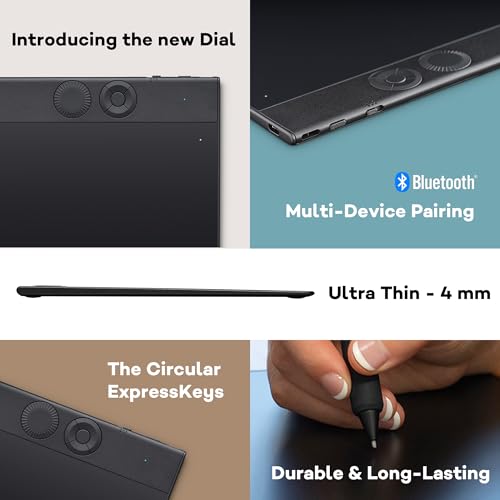
    Wacom Intuos Pro Small is thinner than the average drawing tablet (8 mm vs 10.5 mm). The average drawing tablet is 10.5 mm thick.
  • 2 g lower activation force
    Wacom Intuos Pro Small needs less initial activation force than the average drawing tablet (1 g vs 3 g). The average drawing tablet pen needs 3 g of initial activation force.
  • Supports touch input
    Wacom Intuos Pro Small supports touch input, while the average drawing tablet does not. 12% of drawing tablets support touch input.
  • 1 more pen buttons
    Wacom Intuos Pro Small has more pen buttons than the average drawing tablet (3 vs 2). The average drawing tablet pen has 2 buttons.
  • 10 more touch points
    Wacom Intuos Pro Small supports more touch points than the average drawing tablet (10 vs 0). The average drawing tablet supports 0 touch points.
  • Has pen eraser
    Wacom Intuos Pro Small includes a pen eraser, while the average drawing tablet does not. 19% of drawing tablets include a pen eraser.
  • Supports Bluetooth
    Wacom Intuos Pro Small supports Bluetooth, while the average drawing tablet does not. 12.9% of drawing tablets support Bluetooth.
  • 0.5 m longer cable
    Wacom Intuos Pro Small has a longer cable than the average drawing tablet (2 m vs 1.5 m). The average drawing tablet has a cable length of 1.5 m.
  • 1 more dials
    Wacom Intuos Pro Small has more dials than the average drawing tablet (1 vs 0). The average drawing tablet has 0 dials.
  • Older release
    Wacom Intuos Pro Small was released earlier than the average drawing tablet.
    May 2019.
  • 24,764 mm² smaller work area
    Wacom Intuos Pro Small has a smaller active drawing area than the average drawing tablet (16,000 mm² vs 40,764 mm²). The average drawing tablet offers an active drawing area of 40,764 mm².
    160x100 mm.
  • 14.2% lower report rate
    Wacom Intuos Pro Small has a lower report rate than the average drawing tablet (200 RPS vs 233 RPS). The average drawing tablet has a report rate of 233 RPS.
  • 13.2% heavier pen
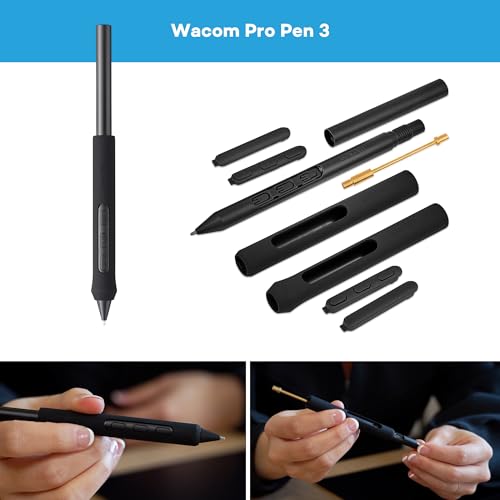
    Wacom Intuos Pro Small includes a heavier pen than the average drawing tablet (15 g vs 13.25 g). The average drawing tablet pen weighs 13.25 g.
  • 14.2% lower report rate
    Wacom Intuos Pro Small has a lower report rate than the average drawing tablet (200 RPS vs 233 RPS). The average drawing tablet has a report rate of 233 RPS.
    What it is: Shows how often the pen position is reported to the system, which influences cursor responsiveness.
    When it matters: When you want pen tracking to feel snappy during fast strokes, handwriting, or quick gesture-based work.

    Importance: HIGH

    Wacom Intuos Pro Small has a lower report rate than the average drawing tablet (200 RPS vs 233 RPS). The average drawing tablet has a report rate of 233 RPS.200 RPS vs 233 RPS
  • 24,764 mm² smaller work area
    Wacom Intuos Pro Small has a smaller active drawing area than the average drawing tablet (16,000 mm² vs 40,764 mm²). The average drawing tablet offers an active drawing area of 40,764 mm².
    160x100 mm.
    What it is: Represents the usable surface where pen input is detected for drawing, writing, or navigation.
    When it matters: When you want enough working space for broad arm movements, long strokes, or detailed retouching without feeling cramped.

    Importance: HIGH

    Wacom Intuos Pro Small has a smaller active drawing area than the average drawing tablet (16,000 mm² vs 40,764 mm²). The average drawing tablet offers an active drawing area of 40,764 mm².16000 mm² vs 40764 mm²
  • 13.2% heavier pen
    Wacom Intuos Pro Small includes a heavier pen than the average drawing tablet (15 g vs 13.25 g). The average drawing tablet pen weighs 13.25 g.
    What it is: Measures the mass of the stylus itself, which affects long-session comfort and handling feel.
    When it matters: When hand comfort matters during long drawing sessions and you are sensitive to how heavy a stylus feels over time.

    Importance: HIGH

    Wacom Intuos Pro Small includes a heavier pen than the average drawing tablet (15 g vs 13.25 g). The average drawing tablet pen weighs 13.25 g.15 g vs 13.25 g
  • Older release
    Wacom Intuos Pro Small was released earlier than the average drawing tablet.
    May 2019.
    What it is: States the month and year when the drawing tablet model was officially launched or became available.
    When it matters: When you care about buying a more recent model with newer hardware, longer software relevance, or a fresher pen generation.

    Importance: LOW

    Wacom Intuos Pro Small was released earlier than the average drawing tablet.2,019 vs 2,021

Graphic comparison of Wacom Intuos Pro Small and

Attribute category
Attribute
No results found

Third-party reviews

What customers like about Wacom Intuos Pro Small?

  • High-grade build quality with a slim, lightweight, and durable design
  • Excellent portability; fits easily in laptop bags and saves desk space
  • Highly responsive Pro Pen performance with 8,192 levels of pressure sensitivity and tilt support
  • Customizable ExpressKeys and a Touch Ring/dial to streamline workflows
  • Smooth, paper-like drawing surface texture
  • Reliable dual connectivity options via Bluetooth or USB
  • Multi-touch support for intuitive gestures like zooming and panning

What customers dislike about Wacom Intuos Pro Small?

  • Small active drawing area can feel restrictive for illustrators used to large strokes
  • Higher price point compared to similar competitors like Huion
  • Fewer ExpressKeys compared to the medium and large models
  • Textured surface can cause faster nib wear for heavy-handed users
  • Does not include free software bundles often found in entry-level Wacom models
  • Lack of replaceable texture sheets, which are available on larger versions

Expert reviews

P
pcmag.com
06/06/2019

The Wacom Intuos Pro (Small) is highly regarded by PCMag for its 0.3-inch, highly portable design, featuring a durable, textured surface and the precise Pro Pen 2 with 8,192 pressure levels. It enhances workflow through customizable ExpressKeys, a Touch Ring, and multi-touch gesture support, making it ideal for mobile creative professionals. However, PCMag notes that Bluetooth...Read more

C
creativebloq.com
27/06/2019

The 2019 Wacom Intuos Pro Small is a highly portable, professional-grade graphics tablet that delivers excellent performance within a compact physical footprint. It features six programmable ExpressKeys, a touch ring, and intuitive multi-touch gestures that can be easily disabled via a physical side switch. The standout feature is the included battery-free Pro Pen 2, which sets the...Read more

P
photoshopcafe.com
09/05/2019

The Wacom Intuos Pro Small is a highly portable, travel-friendly graphics tablet designed for digital creatives who need full functionality on the go. Measuring 269 x 170 x 8 mm, it easily fits onto small podiums or tables during live speaking events. Despite its compact footprint, it boasts features found in its larger siblings, including the latest Wacom Pro Pen 2, an impressive...Read more

T
terrywhite.com
09/10/2019

In his review, Terry White highly praises the redesigned Wacom Intuos Pro Small graphics tablet, declaring it the best portable tablet he has ever travelled with. He highlights several major advantages, starting with its ultra-compact, lightweight design. By removing most of the bezel space, Wacom shrank the physical footprint while keeping the active drawing area the same size as...Read more

C
cnet.com
08/05/2019

The Wacom Intuos Pro Small brings professional-grade, 8,192-level pressure sensitivity and the Pro Pen 2 to a portable 10.6 x 6.7-inch form factor priced at $250. Ideal for small workspaces, this USB-C and Bluetooth-enabled tablet serves as a highly functional, compact input device or customizable touchpad. While offering high-end performance, this smaller model lacks the Paper...Read more

U
uk.pcmag.com
06/06/2019

The Wacom Intuos Pro Small reviewed by Tony Hoffman at PCMag UK is a compact, highly portable graphics tablet designed for digital artists and photo editors working in tight spaces or on the go. Measuring 0.3 by 10.3 by 6.7 inches—similar to a standard 9.7-inch iPad—this thin model easily slips into a laptop bag. Its key pros include an exceptionally responsive Wacom Pro Pen 2 that...Read more

F
forums.appleinsider.com
07/07/2019

The ⁠AppleInsider review praises the Wacom Intuos Pro Small as a highly portable, compact device ideal for artists on the go, highlighting its robust wireless Bluetooth connectivity and customizable ExpressKeys for enhanced efficiency. While designed for mobility, the tablet is versatile enough for both left- and right-handed users, though its small active drawing area may be too...Read more

F
faz.net
03/12/2025

This product review evaluates 36 graphic tablets divided into two separate categories: classic tablets without a screen and pen displays with built-in screens. For standard screenless tablets, the Wacom Intuos Pro M is crowned the overall winner due to its highly robust build, unrivaled driver software, lag-free Bluetooth connection, and exceptional pressure sensitivity...Read more

P
page-online.de
23. Mai 2017

The PAGE online review highlights the Wacom Intuos Pro Paper Edition as a premium, versatile graphics tablet that successfully bridges analog sketching and digital art production. A major pro is its standalone "Paper" mode, which lets artists sketch on standard paper with an included Finetip pen to automatically digitise up to 200 pages into Wacom's Inkspace app before transferring...Read more

P
phototrend.fr
26/01/2016

The Wacom Intuos Pro is a professional-grade graphic tablet designed to offer a significant upgrade in build quality and material selection over its predecessor, the Intuos 5. The Medium version features a total footprint of 380 x 251 x 12 mm with an active retouching area of 224 x 140 mm, weighing 990 grams. It delivers highly accurate performance and control using a stylus...Read more

G
grafigata.com
21/05/2019

summary of the Wacom Intuos Pro Small review: Review Summary The Wacom Intuos Pro Small is a highly versatile, professional-grade Pen & Touch graphics tablet that seamlessly combines multi-touch gestures with an advanced stylus experience. Designed with a compact form factor (269 x 170 x 8 mm) and an active area of 160 x 100 mm, it features a 5080 lpi screen resolution and comes...Read more

Q
qualescegliere.it
15/03/2017

The Wacom Intuos Pro S is a compact graphic tablet designed for both digital art hobbyists and professional designers, achieving an overall score of 8.4 out of 10 for its excellent price-to-quality ratio. Its standout features include a highly precise 5,080 LPI resolution surface tailored for 13-to-15-inch displays, and a battery-free digital pen operating via electromagnetic...Read more

C
coolesuggesties.nl
23/06/2019

The Wacom Intuos Pro Small serves as an excellent, highly ergonomic alternative to the traditional computer mouse, particularly benefiting users active in digital art and photo editing programs like Photoshop and Lightroom. A major pro of this device is its versatile dual-input system, which allows it to operate both via a highly precise pen and as a large, multi-touch trackpad that...Read more

Video reviews

Compare Wacom Intuos Pro Small with

VS
VS

Compare