Razer Naga X Review | 78 Data compared

double-arrow
  • Avg. price in UK: ~£80
  • Avg. price in US: ~$80
  • Connectivity: wired
  • Maximum polling rate: 1000 Hz
  • Maximum DPI: 18000 DPI
  • Weight: 85 g

Razer Naga X review. Compare 78 technical specifications and user reviews to see how it ranks among mice and if it is worth buying.

6.8

Overall score

What it is: An overall evaluation of the mouse's quality, based on technical analyses and user reviews.

When it matters: When you need a quick reference to identify the best mice on the market.

Score components:

80.0%

6.3

Technical Score

20.0%

9.1

User score

Good
6.3

Technical Score

What it is: An assessment of the mouse's technical performance, covering key areas such as sensor performance, buttons and features, connectivity, battery life, ergonomics, software, and build quality.

When it matters: When you want to compare mice based on technical performance and available features.

Score components:

36.0%

6.3

Performance & Sensor

22.0%

8.4

Controls

16.0%

7.1

Design

14.0%

6.3

Features

7.0%

1.1

Connectivity

5.0%

1.0

Battery & Charging

Good
9.1

User score

What it is: A rating that combines user reviews and the total number of reviews received by the mouse.

When it matters: When you want to understand how a mouse performs in daily use or gaming and how reliable it is in terms of comfort, button feel, tracking accuracy, and long-term durability.

Score components:

70.0%

8.7

User reviews

30.0%

10

Popularity

User score:
United Kingdom
amazon
4.3
(2466)
amazon
4.3
(1232)
amazon
4.2
(134)
United States
Amazon_logo.png
4.4
(2549)
Amazon_logo.png
4.2
(139)
Amazon_logo.png
3.0
(1)

(Reviews last updated: May 2026)

Exceptional
  • 6.0
    Gaming

    Score components:

    28.0%

    3.7

    Maximum polling rate

    24.0%

    10

    N. of programmable buttons

    20.0%

    2.8

    Onboard memory profiles

    16.0%

    7.1

    Maximum tracking speed

    12.0%

    6.9

    Weight

  • razer-naga-x
  • razer-naga-x
  • razer-naga-x
  • razer-naga-x
  • razer-naga-x
  • razer-naga-x
  • razer-naga-x
razer-naga-x
razer-naga-x
razer-naga-x
razer-naga-x
razer-naga-x
razer-naga-x
razer-naga-x

Best prices in UK

Best rankings

?

Available: ranking among products currently available (including other versions of this product).
All: ranking among all products in the database.

Verdict

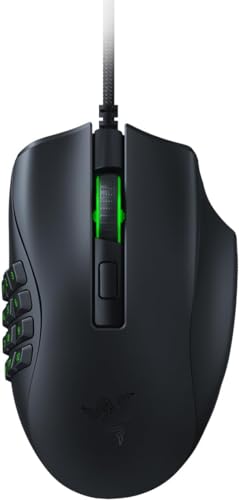
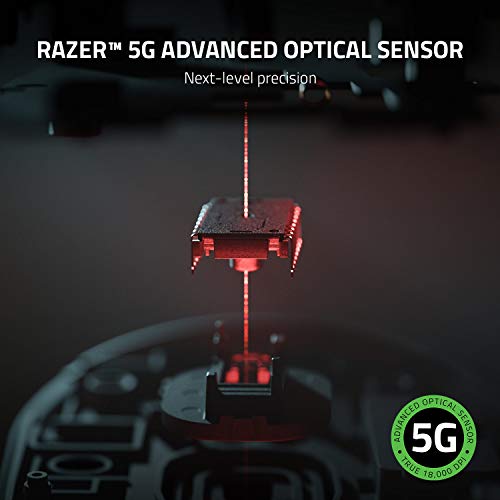
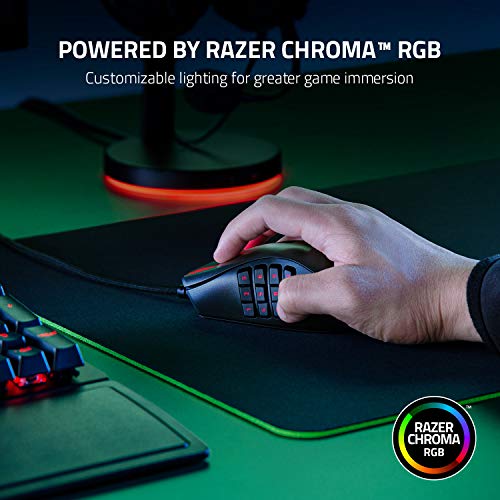
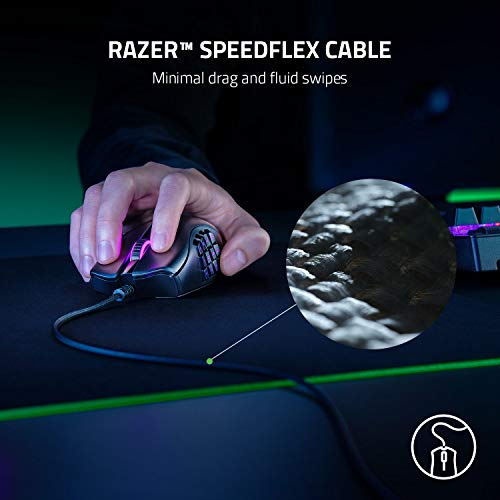
The Razer Naga X is a specialized ergonomic MMO gaming mouse featuring 16 programmable buttons, including a signature 12-button thumb grid for extensive macro mapping. It is equipped with a Razer 5G Advanced Optical Sensor offering a maximum sensitivity of 18,000 DPI and 99.4% tracking accuracy, alongside 2nd-Gen Razer Optical Mouse Switches rated for 70 million clicks. Key advantages include its remarkably lightweight 85g design (approx. 30% lighter than the Naga Trinity), a highly flexible Razer Speedflex cable for minimal drag, and 100% PTFE mouse feet for smooth gliding. Main pros are its comfortable shape for medium-to-large hands and its responsiveness for complex rotations. Notable cons include its wired-only connectivity, the lack of swappable side panels found in other Naga models, and the omission of a tilt-click scroll wheel or a second top-side DPI button.

Technical Specifications of Razer Naga X

Technical Score

What it is: An assessment of the mouse's technical performance, covering key areas such as sensor performance, buttons and features, connectivity, battery life, ergonomics, software, and build quality.

When it matters: When you want to compare mice based on technical performance and available features.

Score components:

36.0%

6.3

Performance & Sensor

22.0%

8.4

Controls

16.0%

7.1

Design

14.0%

6.3

Features

7.0%

1.1

Connectivity

5.0%

1.0

Battery & Charging

6.3
Razer Naga X has a technical score of 6.26 points, which is higher than that of 60.9% of products in this category.
User score

What it is: A rating that combines user reviews and the total number of reviews received by the mouse.

When it matters: When you want to understand how a mouse performs in daily use or gaming and how reliable it is in terms of comfort, button feel, tracking accuracy, and long-term durability.

Score components:

70.0%

8.7

User reviews

30.0%

10

Popularity

User score:
United Kingdom
amazon
4.3
(2466)
amazon
4.3
(1232)
amazon
4.2
(134)
United States
Amazon_logo.png
4.4
(2549)
Amazon_logo.png
4.2
(139)
Amazon_logo.png
3.0
(1)

(Reviews last updated: May 2026)

9.1
Razer Naga X has a user score of 9.11 points, which is higher than that of 72.7% of products in this category.
Popularity
What it is: An indicator based on the number of reviews received by the mouse.
When it matters: When you prefer a mouse that has already been chosen and reviewed by many other users.
10
Razer Naga X has a popularity of 10 points, which is higher than 63.3% of products in this category.
Ratio quality/price

What it is: An indicator that combines the mouse's overall rating with its cost.

When it matters: When you are looking for a mouse that offers a strong balance of performance, features, and price.

Score components:

60.0%

6.8

Overall score

40.0%

10

Price

7.8
Razer Naga X has a quality-to-price ratio of 7.8 points, which is higher than 65.1% of products in this category.
Brand name
What it is: The manufacturer or brand of the product.
When it matters: When you prefer a specific ecosystem, support network, or design philosophy.

Importance: MEDIUM

Razer
Maximum polling rate
What it is: The maximum number of position reports the mouse can send to the computer each second, measured in Hertz (Hz).
When it matters: When you are chasing the lowest possible input delay for competitive play and want the mouse reporting as often as possible.

Importance: HIGH

Good value: >=1000 Hz

1,000 Hz
Razer Naga X has a maximum polling rate of 1000 Hz, which is higher than 27.8% of mice and equal to 55.1% of mice.
Wired polling rate
What it is: The polling rate the mouse reaches when it is connected with a cable.
When it matters: When you mainly use the mouse wired and want maximum responsiveness.

Importance: HIGH

Good value: >=1000 Hz

1,000 Hz
Razer Naga X has a wired polling rate of 1000 Hz, which is higher than 13.3% of mice and equal to 77.3% of mice.
2.4 GHz polling rate
What it is: The polling rate available when the mouse is used over a 2.4 GHz wireless connection.
When it matters: When you use the 2.4 GHz receiver and want near-wired performance.

Importance: HIGH

Good value: >=1000 Hz

N/A
Bluetooth polling rate
What it is: The polling rate available when the mouse is connected through Bluetooth.
When it matters: When you use Bluetooth and want to understand the trade-off in responsiveness.

Importance: LOW

Good value: >=125 Hz

0 Hz
Razer Naga X has a Bluetooth polling rate of 0 Hz, which is equal to 63% of mice.
wired only.
Show more
Connectivity
What it is: The mouse's high-level connectivity class: wired only, wireless only, or both wired and wireless.
When it matters: When you need to know at a glance whether the mouse is wired, wireless, or flexible enough to support both.

Importance: HIGH

wired
Razer Naga X supports wired connectivity, which is less versatile than 65.1% of mice and equal to 34.9% of mice.
connection modes: wired.
Bluetooth support
What it is: Shows whether the mouse can connect over Bluetooth instead of relying only on a wired link or proprietary USB receiver.
When it matters: When you want a dongle-free connection option for laptops, tablets, or devices with limited USB ports.

Importance: MEDIUM

no
Razer Naga X does not support Bluetooth. 35.6% of mice support Bluetooth.
Bluetooth version
What it is: The Bluetooth standard version supported by the mouse for wireless connectivity and compatibility.
When it matters: When you care about Bluetooth compatibility, efficiency, and connection quality.

Importance: LOW

Good value: >=5.1

N/A
Proprietary 2.4 GHz support
What it is: Shows whether the mouse supports the brand's dedicated 2.4 GHz wireless system rather than relying only on Bluetooth.
When it matters: When you want the brand's fast low-latency wireless mode instead of depending only on Bluetooth performance.

Importance: MEDIUM

no
Razer Naga X does not support proprietary 2.4 GHz wireless. 61.6% of mice support proprietary 2.4 GHz wireless.
Receiver included
What it is: Shows whether a compatible wireless receiver is included in the box instead of needing to be bought separately.
When it matters: When you expect full wireless use immediately and do not want to buy extra accessories just to get started.

Importance: MEDIUM

no
Razer Naga X does not include a receiver. 62.5% of mice include a receiver.
Show more
Battery life
What it is: The operating time the mouse can deliver on a full charge or a fresh set of batteries under normal use.
When it matters: When the mouse needs to last through workdays, travel, or repeated gaming sessions without constant charging.

Importance: HIGH

Good value: >400 hours

N/A
Battery capacity
What it is: The amount of energy the built-in battery can store, measured in milliampere-hours (mAh).
When it matters: When you want rough battery context behind the runtime claim instead of judging endurance from marketing hours alone.

Importance: MEDIUM

Good value: >=500 mAh

N/A
Battery form factor
What it is: The battery format used by the mouse, such as AA, AAA, integrated rechargeable cell, or another form.
When it matters: When you care whether the mouse uses easy-to-replace AA or AAA cells or a sealed rechargeable pack.

Importance: LOW

N/A
Rechargeable battery
What it is: Shows whether the mouse uses a rechargeable battery instead of relying only on disposable cells.
When it matters: When you prefer topping the mouse up over USB or a dock instead of buying disposable batteries repeatedly.

Importance: HIGH

no
Razer Naga X does not use a rechargeable battery. 46% of mice use a rechargeable battery.
Removable battery
What it is: Shows whether the battery can be removed and replaced by the user instead of being sealed inside the mouse.
When it matters: When long-term serviceability matters and you would rather replace the battery than replace the whole mouse later.

Importance: LOW

no
Razer Naga X does not use a removable battery. 22.3% of mice use a removable battery.
Show more
N. of buttons
What it is: The total number of physical buttons available on the mouse body.
When it matters: When you need enough physical controls for shortcuts, MMO binds, browser actions, or productivity commands.

Importance: HIGH

Good value: >=7

16
Razer Naga X has 16 buttons, which is more than 98.6% of mice and equal to 0.2% of mice.
N. of side buttons
What it is: The number of buttons placed on the side of the mouse, typically for thumb access.
When it matters: When thumb-access buttons matter for browser navigation, MMOs, or productivity shortcuts.

Importance: MEDIUM

Good value: >=2

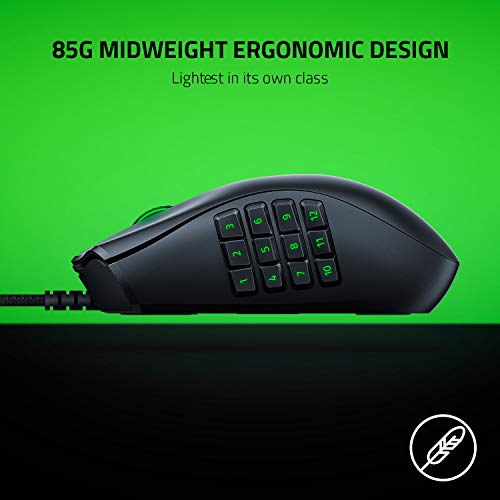
12
Razer Naga X has 12 side buttons, which is more than 98.9% of mice and equal to 1.1% of mice.
12-button thumb grid.
N. of programmable buttons
What it is: The number of mouse buttons that can be customized or reassigned through software or onboard settings.
When it matters: When remapping flexibility matters and you want more actions moved off the keyboard.

Importance: HIGH

Good value: >=7

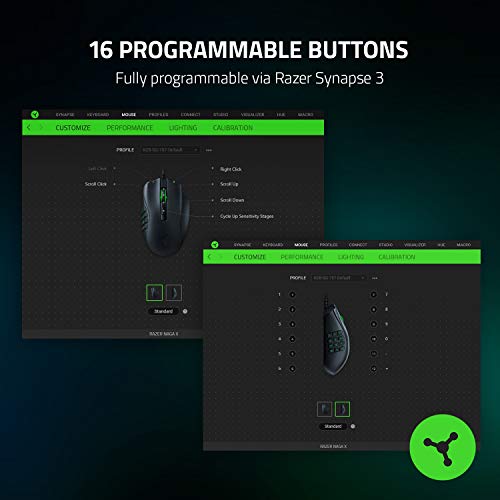
16
Razer Naga X has 16 programmable buttons, which is more than 98.5% of mice and equal to 0.2% of mice.
DPI switching button
What it is: Shows whether the mouse includes a dedicated control for changing DPI levels on the fly.
When it matters: When you want to swap sensitivity instantly for sniping, browsing, editing, or different game genres.

Importance: MEDIUM

yes
Razer Naga X includes a DPI switching button. 14.7% of mice include a DPI switching button.
Profile switching button
What it is: Shows whether the mouse includes a dedicated control for changing onboard or saved profiles during use.
When it matters: When you switch between saved profiles for different games or work routines.

Importance: LOW

no
Razer Naga X does not include a profile switching button. 16.8% of mice include a profile switching button.
Show more
Orientation
What it is: The hand orientation the mouse is designed for, such as right-handed, left-handed, or ambidextrous use.
When it matters: When hand comfort matters and you need a shape that fits your grip and dominant hand.

Importance: HIGH

right-handed
Weight
What it is: The overall weight of the mouse itself, which influences portability, comfort, and movement feel.
When it matters: When you care about how light or substantial the mouse feels during long sessions.

Importance: HIGH

Good value: <100 g

85 g
Razer Naga X weighs 85 g, which is heavier than 52.5% of mice and equal to 2.2% of mice.
Without cable.
Extra weights
What it is: The total weight of removable extra weights included for tuning the balance or feel of the mouse.
When it matters: When you care about tuning balance and overall heft instead of being locked into the stock feel.

Importance: LOW

0 g
Razer Naga X comes with 0 g of extra weights, which is equal to 95.4% of mice.
Cable length
What it is: The length of the supplied cable used for wired operation or charging, usually measured in meters.
When it matters: When you need enough cable reach across your desk or charging setup.

Importance: LOW

Good value: >=1.8 m

1.8 m
Razer Naga X comes with a 1.8 m cable, which is longer than 18.9% of mice and equal to 64.5% of mice.
Cable type
What it is: The construction style of the cable, such as braided, rubber, or paracord, which affects flexibility and durability.
When it matters: When cable drag, flexibility, and durability affect how the mouse feels in use.

Importance: LOW

braided
Show more
Onboard memory profiles
What it is: The number of user profiles that can be stored directly in the mouse memory for use without reconfiguring software each time.
When it matters: When you use different games, apps, or devices and want settings saved directly on the mouse.

Importance: MEDIUM

Good value: >=3

1
Razer Naga X stores 1 onboard profiles, which is more than 47.7% of mice and equal to 20.1% of mice.
Onboard memory size
What it is: The amount of onboard memory available inside the mouse for storing settings, macros, or profiles.
When it matters: When you store complex macros, settings, or several onboard profiles.

Importance: LOW

Good value: >=512 KB

?
Software name
What it is: The name of the official software used to configure the mouse, update firmware, or customize features.
When it matters: When software ecosystem and customization tools influence your buying decision.

Importance: LOW

Razer Synapse
Firmware upgradable
What it is: Shows whether the mouse can receive firmware updates for fixes, compatibility improvements, or feature changes.
When it matters: When you want the option for later fixes, stability improvements, or performance tweaks after purchase.

Importance: LOW

yes
Razer Naga X supports firmware updates. 27.3% of mice support firmware updates.
Suitable for gaming
What it is: Shows whether the mouse is positioned or tuned around gaming-focused speed, latency, and control features.
When it matters: When fast clicks, low latency, and gaming-oriented features are priorities.

Importance: MEDIUM

yes
Razer Naga X is suitable for gaming. 24.3% of mice are suitable for gaming.

Razer Naga X vs the average mouse

  • 10 more programmable buttons
    Razer Naga X has 16 programmable buttons, while the average mouse has 6 programmable buttons.
    What it is: The number of mouse buttons that can be customized or reassigned through software or onboard settings.
    When it matters: When remapping flexibility matters and you want more actions moved off the keyboard.

    Importance: HIGH

    Good value: >=7

    Razer Naga X has 16 programmable buttons, while the average mouse has 6 programmable buttons.16 vs 6
  • 40 million clicks longer switch lifespan
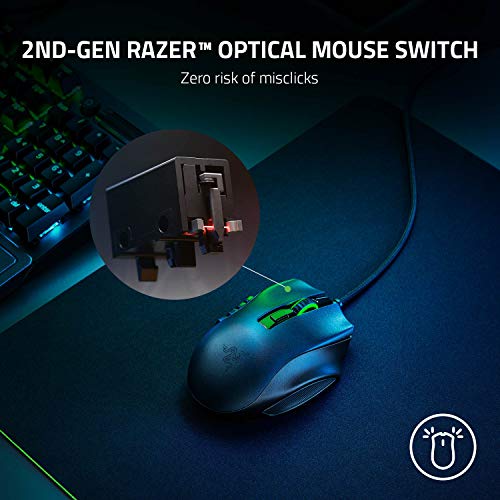
    Razer Naga X offers switch durability of 70 million clicks, while the average mouse offers switch durability of 30 million clicks.
    Optical switches.
    What it is: The rated click lifespan of the primary switches, usually expressed in millions of clicks.
    When it matters: When heavy clicking, long-term reliability, and avoiding early switch failure are part of the buying decision.

    Importance: MEDIUM

    Good value: >=70 million clicks

    Razer Naga X offers switch durability of 70 million clicks, while the average mouse offers switch durability of 30 million clicks.70 million clicks vs 30 million clicks
  • Adjustable lift-off distance
    Razer Naga X supports adjustable lift-off distance, while the average mouse does not. 46.5% of mice support adjustable lift-off distance.
    What it is: Shows whether you can tune how high the mouse can be lifted before the sensor stops tracking movement.
    When it matters: When you lift and reposition the mouse often and want tighter cursor control.

    Importance: MEDIUM

    Razer Naga X supports adjustable lift-off distance, while the average mouse does not. 46.5% of mice support adjustable lift-off distance.
  • 80% higher maximum DPI
    Razer Naga X has a maximum DPI of 18,000 DPI, while the average mouse has a maximum DPI of 10,000 DPI.
    What it is: The highest sensitivity setting supported by the mouse sensor, measured in dots per inch (DPI).
    When it matters: When extremely high sensitivity is part of your setup, even if it matters less than sensor quality for most users.

    Importance: HIGH

    Good value: >=18000 DPI

    Razer Naga X has a maximum DPI of 18,000 DPI, while the average mouse has a maximum DPI of 10,000 DPI.18000 DPI vs 10000 DPI
  • 10 more side buttons
    Razer Naga X has 12 side buttons, while the average mouse has 2 side buttons.
    12-button thumb grid.
    What it is: The number of buttons placed on the side of the mouse, typically for thumb access.
    When it matters: When thumb-access buttons matter for browser navigation, MMOs, or productivity shortcuts.

    Importance: MEDIUM

    Good value: >=2

    Razer Naga X has 12 side buttons, while the average mouse has 2 side buttons.12 vs 2
  • 12.5% higher tracking speed
    Razer Naga X offers a maximum tracking speed of 450 IPS, while the average mouse offers a maximum tracking speed of 400 IPS.
    What it is: The highest movement speed the sensor can track accurately before it starts losing precision, usually expressed in inches per second (IPS).
    When it matters: When you make very fast swipes and do not want the sensor to lose tracking.

    Importance: HIGH

    Good value: >=400 IPS

    Razer Naga X offers a maximum tracking speed of 450 IPS, while the average mouse offers a maximum tracking speed of 400 IPS.450 IPS vs 400 IPS
  • 10 more buttons
    Razer Naga X has 16 buttons, while the average mouse has 6 buttons.
    What it is: The total number of physical buttons available on the mouse body.
    When it matters: When you need enough physical controls for shortcuts, MMO binds, browser actions, or productivity commands.

    Importance: HIGH

    Good value: >=7

    Razer Naga X has 16 buttons, while the average mouse has 6 buttons.16 vs 6
  • Detachable cable
    Razer Naga X comes with a detachable cable, while the average mouse does not. 42.9% of mice come with a detachable cable.
    What it is: Shows whether the cable can be unplugged and replaced instead of staying permanently attached to the mouse.
    When it matters: When you value easier cable replacement, transport, or long-term repairability.

    Importance: LOW

    Razer Naga X comes with a detachable cable, while the average mouse does not. 42.9% of mice come with a detachable cable.
  • Adjustable lift-off distance
    Razer Naga X supports adjustable lift-off distance, while the average mouse does not. 46.5% of mice support adjustable lift-off distance.
  • 80% higher maximum DPI
    Razer Naga X has a maximum DPI of 18,000 DPI, while the average mouse has a maximum DPI of 10,000 DPI.
  • 12.5% higher tracking speed
    Razer Naga X offers a maximum tracking speed of 450 IPS, while the average mouse offers a maximum tracking speed of 400 IPS.
  • 100 DPI lower minimum setting
    Razer Naga X goes as low as 100 DPI DPI, while the average mouse goes as low as 200 DPI DPI.
  • 10 more programmable buttons
    Razer Naga X has 16 programmable buttons, while the average mouse has 6 programmable buttons.
  • 40 million clicks longer switch lifespan
    Razer Naga X offers switch durability of 70 million clicks, while the average mouse offers switch durability of 30 million clicks.
  • 10 more side buttons
    Razer Naga X has 12 side buttons, while the average mouse has 2 side buttons.
  • 10 more buttons
    Razer Naga X has 16 buttons, while the average mouse has 6 buttons.
  • Detachable cable
    Razer Naga X comes with a detachable cable, while the average mouse does not. 42.9% of mice come with a detachable cable.
  • No angle snapping support
    Razer Naga X does not support angle snapping, while the average mouse does. 53.9% of mice support angle snapping.
  • No proprietary 2.4 GHz support
    Razer Naga X does not support proprietary 2.4 GHz wireless, while the average mouse does. 61.5% of mice support proprietary 2.4 GHz wireless.
  • No receiver included
    Razer Naga X does not include a receiver, while the average mouse does. 62.4% of mice include a receiver.
  • Limited connectivity
    Razer Naga X supports wired connectivity, while the average mouse supports wireless connectivity.
    connection modes: wired.
  • No automatic sleep mode
    Razer Naga X does not support auto-sleep, while the average mouse does. 63.2% of mice support auto-sleep.
  • No battery level indicator
    Razer Naga X does not include a battery level indicator, while the average mouse does. 59.2% of mice include a battery level indicator.
  • 3.3 mm taller mouse height
    Razer Naga X has a height of 43 mm, while the average mouse has a height of 39.7 mm.
  • Thin glide feet
    Razer Naga X uses 0.7 mm thick mouse feet, while the average mouse uses 0.8 mm thick mouse feet.
  • 2.7% higher mouse weight
    Razer Naga X weighs 85 g, while the average mouse weighs 82.745 g.
    Without cable.
  • 8 mm wider mouse width
    Razer Naga X has a width of 74 mm, while the average mouse has a width of 66 mm.
  • No proprietary 2.4 GHz support
    Razer Naga X does not support proprietary 2.4 GHz wireless, while the average mouse does. 61.5% of mice support proprietary 2.4 GHz wireless.
    What it is: Shows whether the mouse supports the brand's dedicated 2.4 GHz wireless system rather than relying only on Bluetooth.
    When it matters: When you want the brand's fast low-latency wireless mode instead of depending only on Bluetooth performance.

    Importance: MEDIUM

    Razer Naga X does not support proprietary 2.4 GHz wireless, while the average mouse does. 61.5% of mice support proprietary 2.4 GHz wireless.
  • No automatic sleep mode
    Razer Naga X does not support auto-sleep, while the average mouse does. 63.2% of mice support auto-sleep.
    What it is: Shows whether the mouse automatically enters a low-power state after inactivity to reduce battery drain.
    When it matters: When battery life matters but you do not want to remember to power the mouse down every time you step away.

    Importance: LOW

    Razer Naga X does not support auto-sleep, while the average mouse does. 63.2% of mice support auto-sleep.
  • No receiver included
    Razer Naga X does not include a receiver, while the average mouse does. 62.4% of mice include a receiver.
    What it is: Shows whether a compatible wireless receiver is included in the box instead of needing to be bought separately.
    When it matters: When you expect full wireless use immediately and do not want to buy extra accessories just to get started.

    Importance: MEDIUM

    Razer Naga X does not include a receiver, while the average mouse does. 62.4% of mice include a receiver.
  • No angle snapping support
    Razer Naga X does not support angle snapping, while the average mouse does. 53.9% of mice support angle snapping.
    What it is: Shows whether the sensor smooths cursor movement into straighter lines instead of reporting raw hand motion.
    When it matters: When precision matters and you want to know whether the cursor follows raw hand movement instead of corrected straight lines.

    Importance: LOW

    Razer Naga X does not support angle snapping, while the average mouse does. 53.9% of mice support angle snapping.
  • No battery level indicator
    Razer Naga X does not include a battery level indicator, while the average mouse does. 59.2% of mice include a battery level indicator.
    What it is: Shows whether the mouse gives a visible or app-based battery readout instead of leaving charge level to guesswork.
    When it matters: When you do not want the mouse to die unexpectedly in the middle of work or a match.

    Importance: LOW

    Razer Naga X does not include a battery level indicator, while the average mouse does. 59.2% of mice include a battery level indicator.
  • 2.29x more expensive
    Razer Naga X is more expensive than the average mouse (£80 vs £35).
    Razer Naga X is more expensive than the average mouse (£80 vs £35).£80 vs £35
  • Limited connectivity
    Razer Naga X supports wired connectivity, while the average mouse supports wireless connectivity.
    connection modes: wired.
    What it is: The mouse's high-level connectivity class: wired only, wireless only, or both wired and wireless.
    When it matters: When you need to know at a glance whether the mouse is wired, wireless, or flexible enough to support both.

    Importance: HIGH

    Razer Naga X supports wired connectivity, while the average mouse supports wireless connectivity.wired vs wireless
  • 3.3 mm taller mouse height
    Razer Naga X has a height of 43 mm, while the average mouse has a height of 39.7 mm.
    What it is: The height of the mouse from its base to the highest point of the shell.
    When it matters: When palm support and the hump shape affect your comfort during long use.

    Importance: MEDIUM

    Good value: <39 mm

    Razer Naga X has a height of 43 mm, while the average mouse has a height of 39.7 mm.43 mm vs 39.7 mm

Graphic comparison of Razer Naga X and

Attribute category
Attribute
No results found

Third-party reviews

(Reviews last updated: May 2026)

What customers like about Razer Naga X?

  • Lightweight design (85g) compared to other MMO mice, reducing hand fatigue during long sessions.
  • Comprehensive 12-button side keypad is highly effective for MMOs and productivity macros.
  • Responsive second-generation optical switches and a high-accuracy 18,000 DPI sensor.
  • Ergonomic shape with a dedicated ring finger rest for improved comfort.
  • Speedflex cable provides a nearly wireless feel with minimal drag.
  • Excellent value as a more affordable entry point into the Razer Naga lineup.

What customers dislike about Razer Naga X?

  • Wired-only connection may be a dealbreaker for users seeking wireless freedom.
  • Lacks the modular swappable side panels found on the more expensive Naga Pro or Trinity.
  • The 12-button layout can feel crowded, leading to potential misclicks for some users.
  • Missing some premium features like a tilting scroll wheel and multiple onboard profiles.
  • Some users report a 'mushy' or 'dull' feel on the primary left and right click buttons.
  • Lack of tactile guides/notches on certain side buttons can make navigation difficult by feel alone.

Video reviews

Compare Razer Naga X with

VS
VS

Compare